
How to Make SSO Work: Setup Steps and 2026 Costs

Oct 18, 202616 min read
To make SSO work, you pick one system to hold the login, which is the identity provider.
You then tell each app to trust it, whether it's a built-in setting or a workflow tool like Activepieces wired in alongside, and agree on a protocol for passing proof of sign-in between them.
Everything else is configuration of those three choices. Vendor pages referenced in this article were checked on 18 October 2026.
What SSO is and how logins work
SSO defined in one sentence
Instead of checking a password itself, an app using SSO hands the sign-in step to a separate identity provider. The app then accepts that provider's signed statement that the user has authenticated.
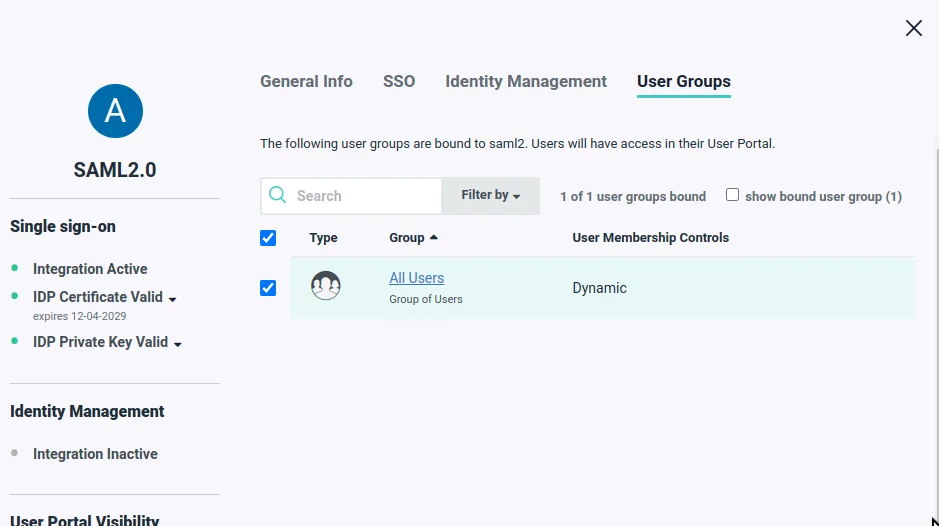
With SSO, a user's credentials live in one place, so disabling the account there is supposed to cut access everywhere. That is the failure it prevents: a password store in every app. "Supposed to" matters, and later sections return to it.
When you debug a broken login, the order of the flow's four steps matters. The illustration below shows the browser, the app (the service provider), the identity provider, and the return to the app.
Numbered arrows mark the request, the redirect, the sign-in, and the signed assertion coming back.
Take from the illustration that the app never sees the password; it sees only the assertion, and it accepts that assertion only if the signature matches the certificate or key you registered in advance.
The connection itself is rarely the problem. Most "SSO is broken" tickets are a mismatch at step four: an expired certificate, a wrong callback address, or a clock that has drifted far enough to invalidate the assertion.

With the flow established, the next question is which protocol carries the assertion.
SAML versus OpenID Connect, on age, typical use and setup effort
| SAML 2.0 | OpenID Connect | |
|---|---|---|
| Age | Older, standardized in the mid-2000s | Newer, built on OAuth 2.0 in the 2010s |
| Typical use | Enterprise and workforce apps, often the one a vendor gates behind a higher plan | Modern web and mobile apps, APIs |
| Setup effort | Exchange of XML metadata and certificates, and attribute mapping by hand | Client ID, secret and a discovery address, usually less to copy |
So SAML is more tedious to configure and more likely to fail on certificates, while OpenID Connect is quicker to set up.
Check which one your app actually supports before you choose an identity provider workflow. Some apps offer only one, and that decides the question for you.
What SSO does not do: authorization and provisioning
All SSO does is prove who someone is. It doesn't decide what they can do inside the app, and it doesn't create or remove their account there.
Inside the app, authorization is a separate setting: roles and permissions. An assertion can carry group attributes, but the app has to be configured to read them.
Creating and deleting accounts, which is provisioning, needs its own mechanism, commonly SCIM. Without it, removing someone from the identity provider blocks new sign-ins but can leave existing sessions, API keys and the account itself alive in the app.
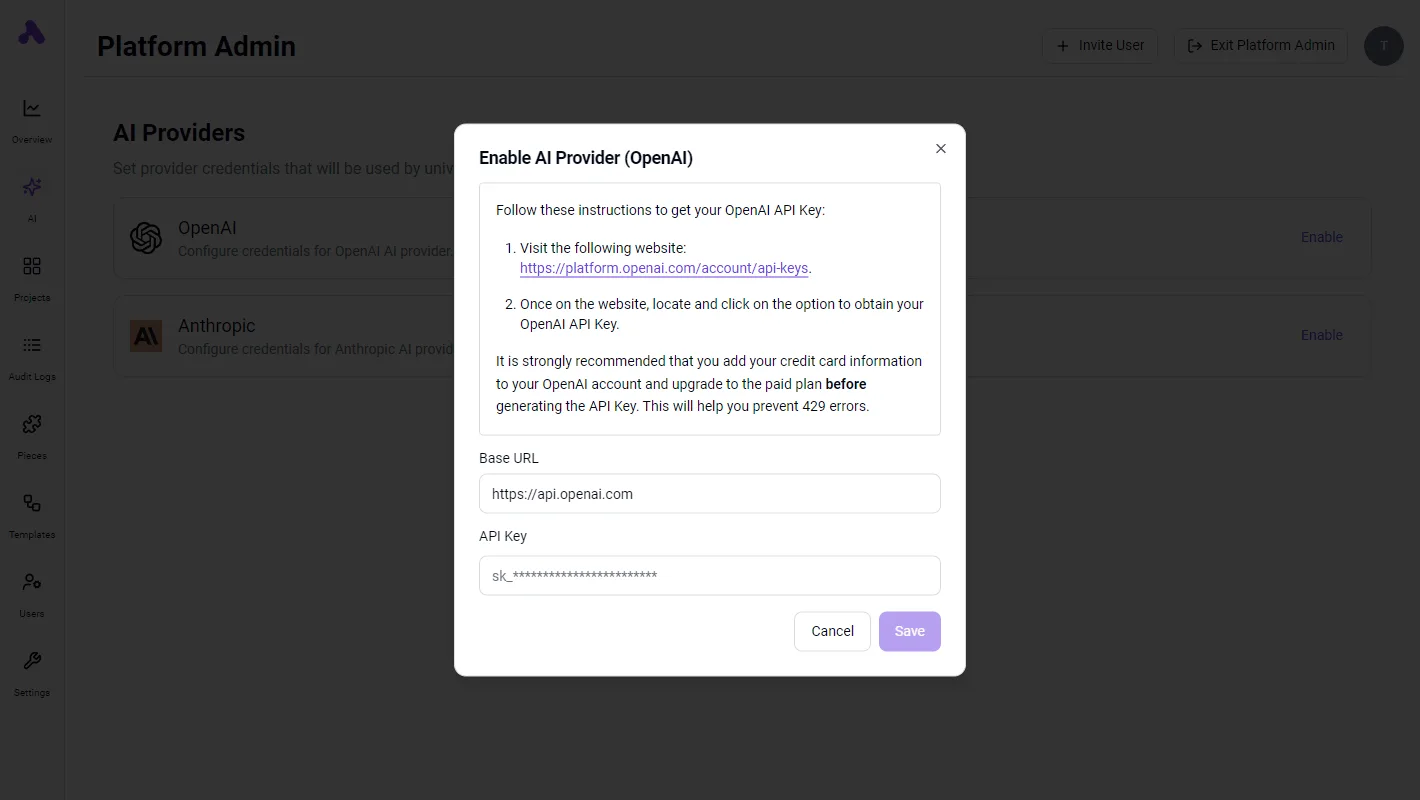
Admin visibility into who signed in isn't the same as control over who still has access, and that gap is where offboarding fails.
This takes minutes, not a project: automate it in Activepieces free.
Set up SSO in six stages
To keep control over who still has access, start at setup: six stages, each ending in a login that still works, keep you from locking yourself out while you build it.

The list shows the order and the checkpoint each stage must pass; take from it that enforcement comes last, never first.
- Choose the identity provider and verify your email domain.
- Create a test app integration in the identity provider.
- Enter the exact connection values on both sides.
- Map the email attribute.
- Pilot with one group and a break-glass admin.
- Enforce SSO and set session length.
Below, the subsections cover what to do at each pair of stages and which failure each one prevents.
Stages 1–2: identity provider and a test app
Verify the domain before anything else. Most identity providers ask you to publish a DNS TXT record, and until it validates, you can't claim that domain's users.
Then create a separate test app integration rather than editing the production one, so a wrong value breaks a sandbox login instead of everyone's.
The integration screen is where you choose SAML or OIDC; pick the one the application supports natively instead of the one you prefer.
Enter SSO configuration values and map email attribute
For SAML, copy the ACS URL, entity ID, issuer and signing certificate between the two systems. For OIDC, copy the client ID, client secret and redirect URI.
Copy them exactly. A trailing slash on the entity ID or a redirect URI that differs by one character produces a rejected login with an unhelpful error, and it's the most common reason a first test fails.

Then map the email attribute, and send it in the same form the application stores it. The application matches people by email, so a mismatch in case or format creates a duplicate account or no match at all.
Sign in with a test user and confirm the session lands on the existing account.
Pilot SSO, add break-glass account, then enforce
On the assignment page, give the integration to one pilot group only. Before enforcing, create a break-glass admin with a local password that bypasses SSO, and store its credentials offline.
Only if the identity provider has an outage or the certificate expires is that account the only way back in.
Enforce only after the pilot group signs in cleanly. Set session length at the same time.
A removed user keeps working until their application session ends, so a long session is a gap in your offboarding that disabling the account in the identity provider doesn't close.
What SSO costs and which plan unlocks it
Closing the session gap costs money on two sides. You pay the identity provider per user, and the application usually puts SSO, and often session controls and SCIM, behind a higher plan tier. I have no verified figures, so I give none.
Identity provider cost: what Okta, Entra ID and Google list
Before you budget, know that Okta, Microsoft Entra ID (Microsoft's identity service) and Google Workspace each publish plan and pricing pages. The table below names the four things to pin down for each.
Every cell reads "check the page" because I haven't confirmed any figure against the vendor's page, so use it as a checklist and fill it from the live page before you budget.
| Identity provider | Plan needed for SSO | Price per user per month | SCIM included | Date checked |
|---|---|---|---|---|
| Okta | Check the page | Check the page | Check the page | Check the page |
| Microsoft Entra ID | Check the page | Check the page | Check the page | Check the page |
| Google Workspace | Check the page | Check the page | Check the page | Check the page |
Price the full headcount, not the pilot group. Per-user pricing means contractors and part-timers who need app access are billed like everyone else.
The SaaS-side tier that gates SSO
Often the larger cost lands on the application's invoice. Many vendors enable the SAML or OIDC setting only on a business or enterprise tier, so turning SSO on can mean moving every seat up a plan.

This is the SSO tax. The identity provider side may cost little, while the application side forces an upgrade you didn't plan for.
Before you start, open the app's admin panel and find the SSO setting. If it's greyed out or sends you to a sales form, you're on the wrong tier.
Ask the vendor in writing which plan includes SSO, which includes SCIM, and whether they are separate line items.
Hidden costs: SCIM, support hours and certificate renewals
Without SCIM, offboarding is a manual deletion in each app, and a removed user's account can survive in an application long after you disabled them in the identity provider.
SCIM is the part that deprovisions users automatically. Treat it as a requirement, not an extra, and confirm it is included at the tier you are buying.
You are likely to miss two further costs. The first is support hours, since each app needs its own attribute mapping and test login, and a mismatch in one field can lock out a whole department.
The second is certificate renewals: SAML signing certificates expire, and an expired one blocks every login through that connection until someone uploads the new one.
Put the certificate expiry dates in a calendar with a named owner. A renewal nobody owns turns into an outage, and your own staff will be the ones locked out.
You can follow the rest of this with the builder open. Start free, no card.
Identify common SSO mistakes with published data
In the Verizon Data Breach Investigations Report 2025, as summarised by Optery, stolen credentials started 22% of breaches, which is why attackers go after them first.
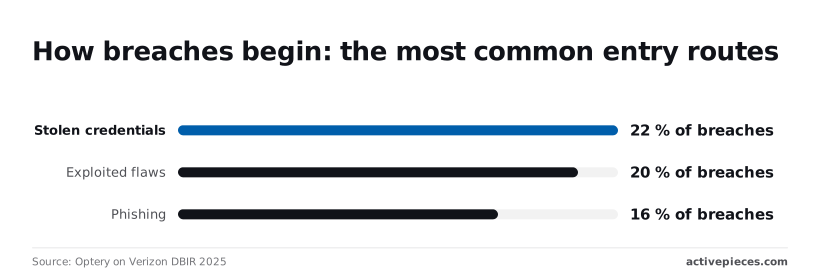
Exploited flaws came next at 20%, and phishing at 16%. The gap between first and second is two points, so SSO fixes one route without closing the others.
Avoid SSO lockout and expired certificates
Create a break-glass admin before you enable "require SSO": one local account, exempt from enforcement, with its password in a vault two people can open. Without it, a misconfigured identity provider locks out the very admins who would fix it.

Next, put the SAML signing certificate's expiry date in a calendar with an owner. When it lapses, every assertion fails validation and every login breaks at once.
Enforce only after a pilot group has signed in successfully, and check email attributes during the pilot. If the provider sends j.smith@ and the app holds john.smith@, the app creates a second, empty account instead of matching the first.
Offboarding without SCIM
Without SCIM, removing a leaver depends on someone remembering every app. SCIM (System for Cross-domain Identity Management) lets the identity provider create and disable app accounts automatically.
Zluri's figures, relayed by NHIMG, show how that goes: 50% of former-employee accounts are still active after more than a day, and 25% after a week or longer, meaning your company likely has active accounts belonging to people who no longer work there.
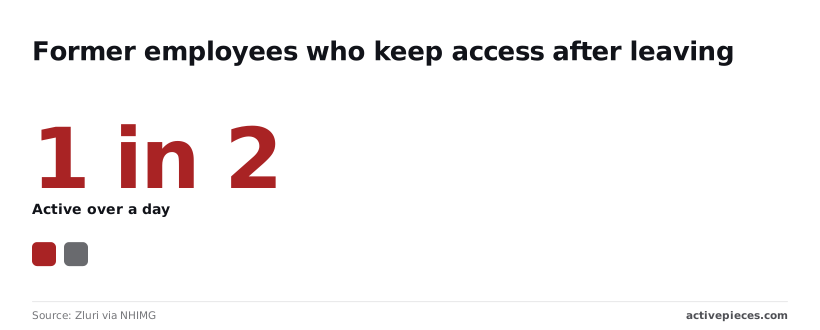
Disabling someone in the identity provider doesn't end their sessions in the apps. A 30-day session lifetime leaves a leaver's open browser logged in for up to a month.
**Disabling someone in the identity provider doesn't end their sessions in the apps.
So set short session limits and require SCIM on the plan tier you buy. That's usually a higher tier than the one that merely offers SSO.
Treating SSO as a replacement for MFA
When one identity-provider login is phished, every connected app opens with it, because SSO changes where the password lives without making it harder to steal.
Phishing alone accounts for 16% of breaches in the DBIR data above, which means it's a vector responsible for a large chunk of industry compromise.
Require multi-factor authentication at the identity provider, preferably phishing-resistant keys or passkeys, and treat that as part of the SSO project.
Admin visibility has limits here. A sign-in log tells you who authenticated and from where, but it won't tell you the person was the employee. A stolen session cookie looks like a normal login.
How Activepieces meets SSO and security review requirements
A codebase you can read closes a security review faster than a vendor's word, because a reviewer who must take maturity on faith sends the SSO and SCIM questions back for another round.
Activepieces ships an MIT-licensed core, so the reviewer can clone it, inspect the code, load-test it, and run it self-hosted or air-gapped before signing anything.
SSO, SCIM, SOC 2 Type II, custom RBAC and audit logs still come through a sales quote, but the evidence is in hand first.
Audit logs and SCIM matter most against a stolen cookie, because they show who did what and cut off who should be gone.
SSO security requirements compared in a table
Before the review, work through the table below: it maps six requirements a security reviewer is likely to raise to what Activepieces offers, each with its plan and cost column to confirm in a quote.
Read the last two columns as a prompt for who to ask, since plan and price are settled in a quote, not on a public rate card.
| Requirement | Activepieces offering | Plan | Cost |
|---|---|---|---|
| SOC 2 Type II | Attestation covering the managed service | Per sales quote | Quoted by sales |
| SSO and SCIM | Single sign-on plus automated user provisioning and deprovisioning | Enterprise Edition | Per sales quote |
| Custom RBAC | Roles you define yourself, not only fixed presets | Enterprise Edition | Per sales quote |
| Audit logs | Record of user and admin actions | Enterprise Edition | Per sales quote |
| EU or US cloud | Managed cloud hosted in either region | Cloud tiers or free self-hosted Community edition; see activepieces.com/pricing | Cloud tiers or free self-hosted Community edition; see activepieces.com/pricing |
| Self-host and air-gap | Run it inside your own network | Cloud tiers or free self-hosted Community edition; see activepieces.com/pricing | Cloud tiers or free self-hosted Community edition; see activepieces.com/pricing |
Read the table as a split of duties. SSO decides who can sign in. SCIM removes the account when HR removes the person, which is the offboarding failure that leaves a departed contractor's access alive.
Once someone is signed in, custom RBAC limits what that session can touch. Audit logs tell you afterward what that session did.
None of these stops a stolen cookie from being replayed. They shrink what it can reach and let you reconstruct what happened, and you should say so in the review.
Self-host SSO to keep data in your network
If your reviewer asks where workflow data lives, managed cloud in an EU or US region answers it with a location.
Self-hosting answers it with a boundary: the MIT-licensed core of Activepieces runs in your environment, and an air-gapped install means no traffic leaves your network. Teams under regulation should start here.
In the material we're working from, Activepieces makes no HIPAA certification, BAA or ISO certificate claim.
For a regulated team the evidence on offer is the MIT-licensed code itself, which it can read in the repository, while its data stays in its own environment and it takes responsibility for the controls around it.
Expect work to move onto you with self-hosting. You patch it, you back it up, and you decide where the logs go. Ask these in the security review:
- Which plan includes SSO, SCIM, custom RBAC and audit logs, and are any sold separately?
- Does the SOC 2 Type II report cover the managed cloud only, or also self-hosted deployments?
- How long are audit logs kept, and can they be exported to our own system?
- Does SCIM deprovisioning also end active sessions and revoke API keys?
Plus is $20 a month and Team is $200 a month on Activepieces Cloud, both listed at activepieces.com/pricing; for the security documents and Ultimate pricing, contact Activepieces sales.
Frequently asked questions
Can I use SSO without an identity provider?
No, because SSO is the app trusting a separate system to vouch for the user, and that system is the identity provider.
If you have no Okta, Microsoft Entra ID or Google Workspace tenant, you have nothing to connect, and the app's SSO settings page will have no one to talk to.
Some small teams already own a provider through their email suite without realizing it. Check the admin console you pay for before buying another.
Is SAML or OpenID Connect better for a new setup?
Use whichever protocol both your identity provider and the app support cleanly, and prefer OpenID Connect if both do. It's newer, easier to debug, and its configuration is a handful of URLs and a client secret rather than certificate exchange.
When the app's enterprise documentation only describes SAML, which is common, SAML is still the safer bet. The failure mode to watch in SAML is an expired signing certificate, which locks everyone out on a date nobody wrote down. Put that date in a calendar.
Does SSO replace multi-factor authentication?
No. SSO moves the login to one place, so the multi-factor policy has to be enforced there as well. If your identity provider accepts a password alone, every connected app now accepts a password alone.
Also check whether the app keeps a local login that bypasses SSO. If it does, an attacker or a departed employee may never touch your provider at all.
What should I ask a vendor in a security review?
Ask for evidence, not assurances, and ask about the plan tier before the feature. Admin visibility only helps if the logs exist and you can export them, so confirm that too. Send these five requests on Monday through the sales page:
- The current SOC 2 report, not a badge on a web page
- Written answers to your security questionnaire
- Enterprise pricing, in writing
- Confirmation of which plan includes SSO and SCIM, since SSO without SCIM leaves offboarding manual
- Whether a self-host option exists, and what it covers
If the answers dodge the plan question, assume SSO sits behind a tier you haven't priced. Then rework the budget before you commit.
Related reading
References
Build it
Set this up in minutes.
No code required. Connect your accounts, and Activepieces runs it from there.
Start free Talk to sales