
Self Hosted Agentic AI: 2026 Guide to Setup and Costs

Oct 14, 202615 min read
Self-hosted agentic AI is software that plans and acts across your tools, with the model, the agent runtime and the data it touches all running on infrastructure you control, whether that means workflow layers such as Activepieces or anything else you deploy yourself.
Vendor facts in this integration were checked on 14 October 2026.
Where a chatbot talks and a workflow follows a fixed path, an agent chooses its next step and calls tools to take it. That's the privacy problem: the agent decides at run time what to read and what to write.
Three things get mistaken for it, and each lacks one integration:
Self-hosted agentic AI defined in plain terms
- A chatbot answers questions but takes no action, so it never touches your systems.
- A plain self-hosted LLM is a model with no tools, so it can't do anything even though it sits on your hardware.
- A hosted-API agent acts, but your prompts, tool results and files leave your network on every call.
Only when it both acts and stays local does it count here, and that's where the leaks hide.
Everyone moves the model first. The runtime is the second layer: the process that holds the agent loop, calls tools and stores run history, and Activepieces sits at this layer.
Then comes the third layer, the data and credentials the agent reaches, including databases, tokens and logs. A local model feeding a runtime that ships traces to an outside service is a hosted agent with extra steps.
Treat these words as different things, because they are. Private means outsiders can't read your data. On-premise means the hardware is yours. Air-gapped means no route to the internet at all, so every dependency must be installed from inside.
**A local model feeding a runtime that ships traces to an outside service is a hosted agent with extra steps.
Sovereign adds a legal claim about jurisdiction and who can compel access. Pick the one your auditor actually means before you design anything.
This takes minutes, not a project: automate it in Activepieces free.
How a self-hosted agent works step by step
Unless every hop stays inside your network boundary, a self-hosted agent isn't private, however it loops through trigger, reasoning, tool calls, retrieval, approval and logging.
Look for the single red arrow: it's a call leaving to an external API, and that's where most "self-hosted" claims quietly fail.
(Illustration: trigger, model, internal app tools, private document store, human approver and log store inside a dashed boundary, with one red arrow leaving to an external API.)
When a webhook, schedule or message fires, the run starts. The model reads the input, picks a tool, and your runtime executes it against an internal app. The result goes back to the model, and the cycle repeats.
The model never touches your apps directly. The runtime does, with whatever permissions you gave it, so that's where the reach lives.
Where the model runs: local weights or private endpoint
Run the weights on your own hardware and prompts stay inside the box.
When the model sits on a private endpoint, such as a dedicated deployment in your cloud account, prompts stay inside a contract rather than a building. Both can be legitimate, but they're different claims.

Check which one your auditor accepted, and check that no fallback route sends traffic to a public API when the primary is down.
Once retrieval queries your document store, the retrieved text lands in the prompt, so the store's access rules must follow the requesting user, not the agent. Memory and run logs often hold copies of that text.
Credentials are the last leak: an agent holding a broad API key can reach everything that key reaches, whatever the prompt says.
Where self-hosted agents are used in practice
Where the data can't leave the network and the agent needs a real tool to act on it, self-hosted agents show up. Each of those tools carries the credential you just worried about.
Read the table below for four common cases; the takeaway is that the sensitive part is rarely the model but the system the agent writes to. Figures on adoption or savings are left out because none could be sourced.
| Use case | Data the agent touches | Why it can't go to a public API | Tool it acts through |
|---|---|---|---|
| Support triage | Internal tickets with customer details and account notes | Customer personal data and internal remarks leave your control | Helpdesk ticketing system |
| Contract review | Draft and signed agreements, negotiation history | Confidential terms, often under non-disclosure clauses | Document store |
| IT/security operations | Alerts, logs, asset inventories | Logs expose hostnames, user names and network layout | Ticketing and monitoring consoles |
| Finance reconciliation | Ledgers, invoices, bank exports | Financial records are regulated and commercially sensitive | Accounting system |
For every row, scope a credential to that one tool; that is the next thing to define.
A chatbot answers a question. A workflow runs fixed steps in a fixed order. An agent decides which tool to call next, so its reach depends on what you let it call, not on the prompt.
Split self-hosting into three integrations:
- The model, running on your own hardware.
- The tools and connectors the agent calls.
- The state it leaves behind: logs, memory and traces.
Usually the first gets finished and the other two stay on a vendor's cloud.
Say private and you mean access is restricted, though it can still sit in a rented cloud. On-premise means your hardware. Air-gapped means no outside network path at all.
Sovereign is about which jurisdiction governs the data and who can compel access to it. Pick the term your auditor will actually test.
What self-hosted agentic AI costs and requires
Whichever term you chose, the bill depends on which of four setups you run, and the model is only one line in it. The table shows how the setups differ on the costs that recur and the effort that never appears in a quote.
| Setup | Hardware | Upfront cost | Running cost | Operator effort | Audit fit |
|---|---|---|---|---|---|
| Hosted API | Vendor's | None | Per-token billing | Low | Weakest: you rely on vendor reports and can't see their logs |
| Self-hosted orchestrator | Your servers or VMs for the workflow engine; model called elsewhere | Low | Hosting plus model calls | Medium | Good for tool and credential logs; model side stays with the vendor |
| Private cloud GPU | Rented dedicated GPUs | Low | Monthly GPU rental | High | Strong, though the provider still owns the machine |
| On-premise / air-gapped | Your own GPU servers | Highest | Power, space, staff | Highest | Strongest: no outbound path to explain |
Start on the cheapest row and you land on the hardest to audit, so you're choosing which cost to pay now.
Read the table top to bottom and upfront cost rises while audit exposure falls. The orchestrator row matters most for this article's argument: it controls what the agent can reach, whatever model sits behind it.
GPU memory needed for self-hosted AI models
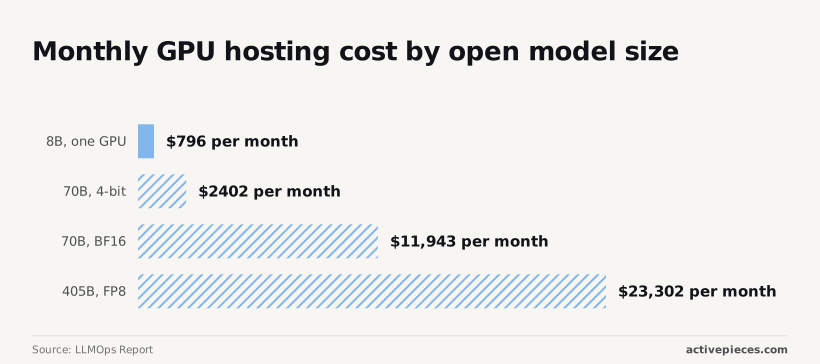
The LLMOps Report prices GPUs against model-card memory needs, using provider rates dated 14 October 2026.
According to Llmops, an 8B model on one GPU costs 796 $ per month, so a small model is a line item rather than a project. Per Llmops, a 70B model at 4-bit costs 2402 $, about three times that.

At BF16 the same 70B costs 11943 $, roughly five times the 4-bit bill, so precision is a bigger cost lever than parameter count. A 405B model at FP8 reaches 23302 $, nearly double the 70B at BF16.
None of those numbers include patching, key rotation, log retention or the person paged when the GPU node dies. Those costs sit in the effort column, and they grow with every tool the agent touches.
You can follow the rest of this with the builder open. Start free, no card.
Six mistakes that break a self-hosted agent deployment
Six mistakes, one outcome: data or authority leaves the boundary you built, and each has a fix that costs less than the incident it prevents.
Private model, public tools
Check the egress log. The classic tell is your "air-gapped" orchestrator posting to a hosted model API. The model runs locally, but one node in the workflow still calls out, so every prompt and retrieved document leaves with it.

Fix it by denying outbound traffic from the orchestrator by default, then allowing only the internal model endpoint and named internal tools. This maps to OWASP's sensitive information disclosure risk for LLM applications.
Secrets in prompts belong here too. An API key pasted into a system prompt gets logged, cached and echoed back by a model that was asked nicely.
Keep credentials in the orchestrator's secret store and inject them at call time, so the model never reads one.
With one service account for every agent, a prompt injection against the support bot can reach the finance database. OWASP calls this excessive agency: too much functionality, too many permissions, too much autonomy.
The fix is one identity per agent, scoped to the tools that agent needs, with read-only as the default and write access granted per tool.
Missing audit logs and approvals in self-hosted agents
Without a tool-call log, "what did the agent do at 2am?" has no answer. Record the agent identity, tool, arguments and result for every call, and ship that log somewhere the agent can't write to.
Then gate destructive actions (deletes, payments, outbound email, permission changes) behind a human approval. This is the other half of OWASP's excessive agency guidance: if an action can't be undone, a person confirms it first.
Under-sized models that fail at tool calls
Ask a small model for a tool call and it will often emit malformed JSON, pick the wrong tool, or invent an argument. Teams then "fix" it by loosening validation, which widens the agent's reach.
Do the opposite: validate every call against a strict schema, and test the model on your real tool set before you trust it.
If it fails, move to a larger open-weight model such as Mistral Large 4 or Z.ai GLM 5.3 instead of relaxing the guardrails.
Self-hosted AI agent platform requirements checklist
Choose the platform that lets you prove, during a trial, where the model runs, what the agent can reach, and what gets recorded, then check the licence and support terms.
The failure you are screening for looks like a 200 OK from a tool the agent shouldn't have touched.
Across each row of the table you get a requirement, the question to put to a vendor and a test you can run yourself. A "yes" on a sales call then becomes something you observed.
| Requirement | What to ask | How to test it in evaluation |
|---|---|---|
| Model location | Can the agent call a model on our own hardware, and does anything else leave the network? | Point it at a local model, block outbound traffic, and watch for failed calls. |
| App access | Can we limit which apps and actions each agent can call? | Give an agent one app, then ask it to use another. It should be refused. |
| SSO and roles | Does login go through our identity provider, and do roles limit what people can edit or run? | Sign in as a low-privilege user and try to change a flow. |
| Audit logs | Does the log record who ran what, with which inputs? | Run a flow, then find that run in the log without asking the vendor. |
| Secrets | Where are credentials stored, and can the agent read them? | Prompt the agent to print its own credentials, then check logs for leaks. |
| Air-gapped install | Can we install and update with no internet access? | Install on an isolated host from files you carried in. |
| Licence and support | What can we do if the vendor changes terms, and who answers at 1am? | Read the licence text, then ask support a hard deployment question. |
Spend more time on the licence row than people usually do. An open-source licence such as MIT lets you read, modify and keep running the code if the vendor changes direction.
If the licence is source-available, you can read the code but its use may be restricted, and that restriction can matter most when you're regulated or offline.
Run the tests in order of your biggest exposure, and stop at the first failure.
Running the agent layer yourself with Activepieces
Controlling what your agent touches
Activepieces lets you decide what your agent can touch, and it does so from an instance you host yourself.
It's an MIT-licensed automation core you run on Docker, Compose or Kubernetes, air-gapped if you need it, with agents that call your own models and apps. It doesn't host models, so that part stays yours.
The licence is a file you can read: the core is MIT, and the packages/ee/ directories sit under a separate commercial licence in the repository's LICENSE file.
That boundary is the point. If the stack is already inside your network, the open question is which flows the agent can trigger, which credentials each step uses, and what gets written down afterward.
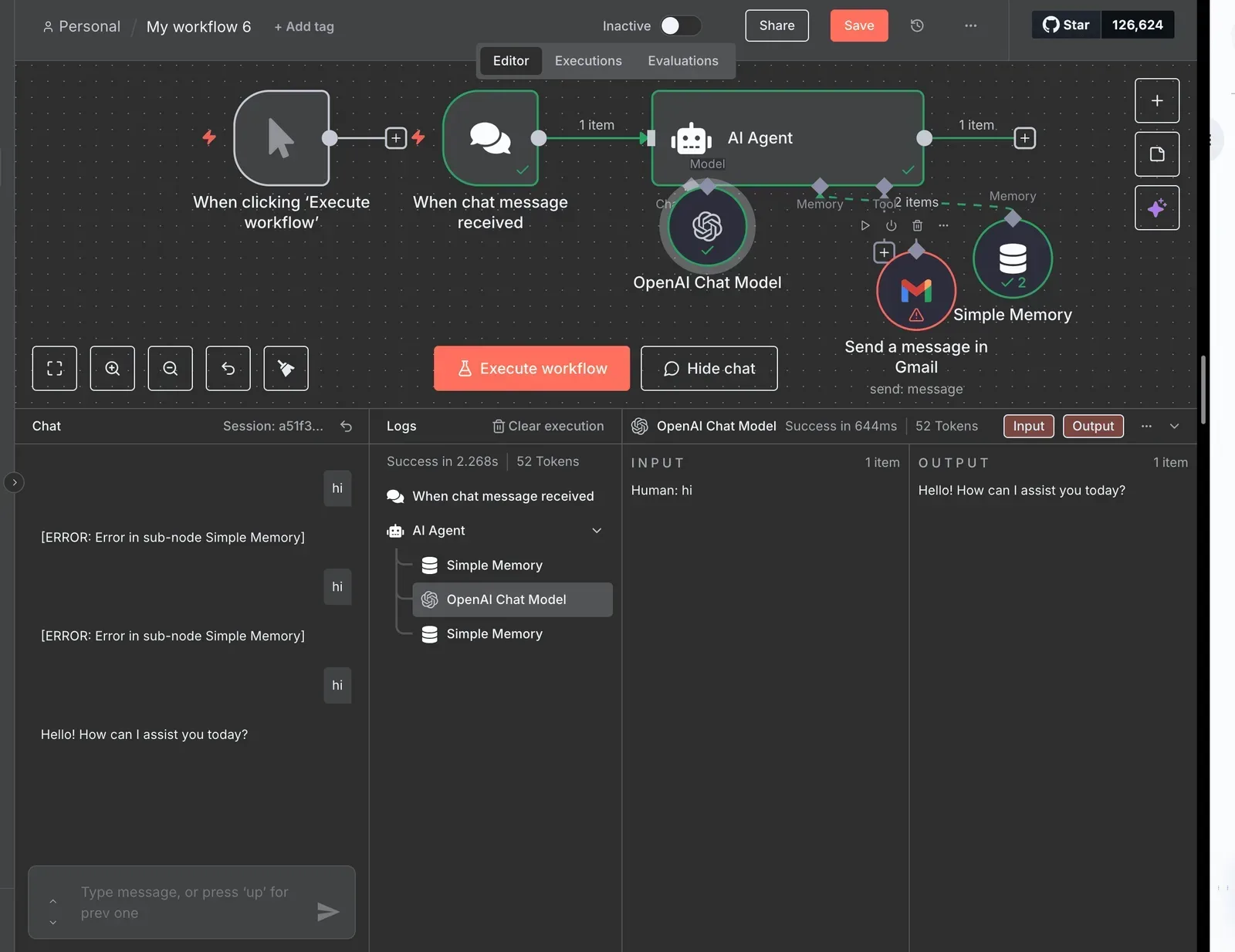
In a flow, every step is an explicit connection to one named app, drawn from the 740 integrations in the open source monorepo's packages/pieces/community directory, so the agent's reach is something you can read, not something you infer from a prompt.
The run detail view for an agent step lists each call to a tool as its own entry, with the input sent and the output returned, and the enterprise RBAC docs list app connections among the things an access policy governs for an agent, alongside SSO, SCIM and audit logs in the same enterprise feature set.
Free trial and governance costs for self-hosted agents
Before anyone signs anything, you can test the whole arrangement on the free Community edition, which self-hosts with unlimited runs.
For enterprise governance (SSO, SCIM, RBAC and audit logs), plus support for regulated or air-gapped deployments, you arrange it with the sales team at https://www.activepieces.com/sales.
Treat that as a real line in your plan: if you need per-team permissions or a formal audit trail, you're not on the free tier.
Reading the run log
When something breaks, the run log is where this pays off. The screenshot below shows a failed step expanded on a self-hosted instance, with the exact input the agent sent and the output the app returned.
Read it as evidence: you can see whether the agent passed something it shouldn't have had, and whether the tool's response carried data that now sits in your logs.
Stored on your instance, those inputs and outputs are good for debugging and a liability for privacy. Whatever the agent handled is now in the log, so the log needs the same access controls as the systems it came from.
What Activepieces gives you is the place to look. It doesn't yet decide for you what should be redacted, and neither does MCP.
Frequently asked questions
Is self-hosted agentic AI the same as running a local LLM? No.
A local model is one component; an agent also has tools, credentials, memory and logs, and any of those can leak data the model never sees.
You can run the model on your own hardware and still ship customer records to a third-party API through a tool call.
Can a self-hosted AI agent run fully offline?
Yes, if every dependency is also inside the boundary: the model weights, the tool servers, the package mirrors, the identity provider and the log store.
Self-hosted isn't the same as air-gapped. The first means you run it, the second means nothing can call out. Most teams that think they're air-gapped find an update check or a telemetry endpoint the first time they watch egress traffic.
Is self-hosted agentic AI cheaper than a hosted API? Sometimes, and mostly at steady, high volume.
Hardware, power, patching and the person on call all count, and they're paid whether or not the agent is busy. For spiky or low usage, a hosted API is usually cheaper. The case for self-hosting is more often control over where data goes than savings.
Do I need a GPU to self-host an AI agent? Only if you host the model yourself.
The orchestration, tool servers and logging run fine on ordinary CPUs. Small open-weight models, such as Ministral 3 8B, can handle narrow tool-calling tasks on modest hardware.
Larger ones, such as Mistral Large 4, want serious GPU capacity. Match the model to the task rather than to the benchmark.
How do I start with one low-risk agent this week? Pick a read-only job and give it the narrowest reach you can.
- Choose a task with no write access, such as summarizing internal tickets.
- Create a dedicated service account with read scope on one data source.
- Turn on logging and check what the logs capture before the agent runs.
- Block outbound traffic except to the model endpoint.
- Review the first batch of runs by hand, then decide whether to widen access.
Related reading
References
Build it
Set this up in minutes.
No code required. Connect your accounts, and Activepieces runs it from there.
Start free Talk to sales