AI Lead Qualification Agent: Best Options (2026 Guide)

Nov 22, 202615 min read
We ranked each option on two questions: how closely it ties to your CRM, and how well it holds up once your qualification rules reach beyond that CRM.
The agent we judge is one that:
- Reads each new inbound lead
- Applies your qualification rules
- Writes the result back to the CRM record
- Sends the call to a person when the rules run out

For a team that lives in one CRM, HubSpot Breeze or Salesforce Agentforce is the natural pick, because each works on the data of the CRM it ships with.
When a team's rules touch several apps but it wants a hosted, no-install setup, Zapier Agents suits it. Activepieces matters when the rules cross tools and hosting is part of the decision: it runs self-hosted or on its cloud, with an MIT-licensed core.
Compare the options on five criteria:
How We Ranked: CRM Fit and Rule Complexity
- CRM fit: whether the agent works natively on one CRM's records or on any CRM you connect.
- Rules spanning tools: whether one qualification rule can read from and write to several systems, such as a CRM, an enrichment source and a billing tool.
- Pricing model: what the unit of billing is, since that decides how cost grows with lead volume.
- Human review: whether a person can approve or take over before the agent acts.
- Hosting: whether the agent runs only in the vendor's cloud or can run on infrastructure you control.
Read the table by row: all four options are judged on those five criteria, and the cost of a native agent is paid in the "rules spanning tools" and "hosting" columns, which are the two columns that matter once your rules leave one CRM.
| CRM fit | Rules spanning tools | Pricing model | Human review | Hosting | |
|---|---|---|---|---|---|
| HubSpot Breeze | HubSpot only | Centred on HubSpot data, with connectors out | Credit-based consumption | Handoff to a human rep | HubSpot cloud |
| Salesforce Agentforce | Salesforce only | Centred on Salesforce data, with integrations out | Consumption-based | Escalation to a human | Salesforce cloud |
| Zapier Agents | Any CRM with a Zapier connection | Across the apps Zapier connects | Activity-based | Configurable approval before actions | Zapier cloud |
| Activepieces | Any CRM with a connector | Across apps in one flow | Cloud plans, or free to self-host | Approval step inside a flow | Self-hosted or cloud |
Prices and plan limits checked against docs.claude.com and claude.com and openai.com and gemini.google on November 22, 2026.
Because cost and hosting are the two places where the native agents and the cross-tool platforms diverge, the next section starts with them.
This takes minutes, not a project: automate it in Activepieces free.
Qualify leads with HubSpot Breeze
Breeze is HubSpot's native agent layer:
- HubSpot bills it through its credit model
- It runs on HubSpot's infrastructure
- It acts on a lead only as far as HubSpot CRM reaches

For a team whose pipeline lives entirely in HubSpot, that boundary may never matter. For a team whose qualification rules touch other tools, it's the first thing to price in.
Inside the CRM, Breeze works on the records HubSpot already holds. Its prospecting and customer agents read:
- A contact's properties
- Company record
- Past activity
They:
- Draft outreach
- Answer questions from the knowledge base you connect
- Log what they did on the contact timeline
When a conversation needs a person, they hand it to a rep through HubSpot's own routing and ownership rules. The commercial upside is plain:
- There's no integration to build
- There's no separate login
- There's no second vendor review
The agent inherits HubSpot's permissions, so it can only see and change what your HubSpot setup lets it.
HubSpot Breeze pricing and usage limits
You pay for usage, not seats. Breeze actions draw down a pool of HubSpot credits, so the bill grows with the number of leads and conversations the agents handle.
That suits a steady, predictable inbound volume. It's harder to forecast if you run campaigns that spike lead flow, because each spike is also a spike in credit draw.
We're not quoting HubSpot's list credit rates here because we couldn't confirm them against HubSpot's own pages. Get the current rate and what each agent action consumes from HubSpot before you model a month of traffic.
Where it stops matters more than what it does. A qualification rule that checks a billing system, a product-usage database or a support tool before it routes a lead is outside Breeze's reach unless HubSpot already syncs that data into a CRM property.

Run it the other way and the same applies: if a qualified lead has to open a ticket, update an enrichment vendor or trigger a contract step elsewhere, Breeze can't take those actions itself.
Hosting is also HubSpot's alone, so the choice of where the model runs, and whose API key it uses, is not yours to make.
That makes the next question one of scope: how many of your qualification rules live entirely inside HubSpot, and how many don't?
Qualify leads with Salesforce Agentforce
If your qualification rules live in Salesforce rather than HubSpot, Agentforce is Salesforce's native answer. It's an agent that qualifies inbound leads and handles SDR-style follow-up using the records already in your org.
Start with the commercial trade-off, before the technical detail. You're buying an agent that sits inside the system your sales team already works in, so there's no sync layer to build and no second login for reps.

In exchange, the agent is only as good as the Salesforce data it reads, and it's only as portable as your commitment to Salesforce.
Salesforce positions it for the jobs a human SDR does at the top of the funnel. It reads lead and contact records, applies the qualification criteria you define, and drafts and sends first-touch outreach, and it answers routine questions from prospects.
It hands the conversation to a rep when a lead meets your threshold. Because Agentforce works on the same objects your reps use, the handoff is a record update rather than an export.
Agentforce setup and pricing for lead qualification
At setup, the scoping conversation matters. Someone who knows how Salesforce objects, fields, permissions and flows fit together configures Agentforce inside Salesforce.
You define the actions the agent may take, ground it in your data, and test it before it touches a live lead.
That means a Salesforce admin, or a partner who's one, needs to own the work. A sales ops team without that skill will be waiting on someone else's calendar.
For pricing, read Salesforce's own Agentforce page instead of trusting a summary, since Salesforce publishes it there. The model and the unit Salesforce meters determine your cost as lead volume grows.
Ask what counts as a billable action, then compare it against your expected volume of conversations and qualifications. This section reflects Salesforce's own positioning as of 22 November 2026, so confirm current terms with them before you budget.
The limit is the one that carries over to the rest of this article. Agentforce assumes your qualification inputs are in Salesforce.
If a scoring signal comes from your product database, a billing tool or a marketing platform that doesn't write back cleanly, you're building integrations first and running the agent second.
For a team that's all-in on Salesforce, that's a fair price. For a team whose rules span several tools, it's the gap to plan for.
You can follow the rest of this with the builder open. Start free, no card.
Route leads across tools with Zapier
For an ops team whose leads sit in several tools, Zapier Agents is the no-code route. It's a general-purpose agent builder, not a sales product, so the qualification logic is yours to write. Its appeal is breadth.
Zapier is already a connector layer across a very large catalogue of business apps. An agent built there can read a form submission, check a spreadsheet, look the contact up in the CRM, send an email and post to chat without anyone writing an integration.
Zapier suits the reader the previous section described, where the rules cross tools and nobody on the team wants to maintain code.
You describe the job in plain English: who counts as a qualified lead, what to check, what to do with each outcome. You then give the agent the apps it may use.
The picture below shows that arrangement. It has the instruction card above one agent, a line out to each app, and a person icon on the one line where a human reviews the result before anything is sent.
Control and review of AI lead qualification rules
The commercial trade-off is control against speed. The plain-English card gets a working agent in front of stakeholders quickly, but your qualification criteria then live in prose, not in a scored rule you can diff or version.
If two reviewers read "good fit" differently, the agent will too.
You tighten this by writing the criteria as explicit conditions, and by testing against real past leads before it touches live ones.
Because a qualification agent that emails prospects unattended is a brand risk, human review matters, and Zapier supports it.
Put the person on the step that sends or writes to the CRM, not on every lookup, or the review queue becomes the bottleneck you were trying to remove.
Three limits are worth planning for:
- Not sales-specific. There's no built-in lead scoring model, territory routing or enrichment. You assemble those from the connected apps.
- Metered usage. Agent work is counted against your plan's allowance, so cost tracks how many leads the agent handles and how many steps each one takes. Price it against your real monthly lead volume, not a demo.
- Hosted by the vendor. Where the model runs and whose key it uses is set by Zapier's plan, so check that against your data policy.
Plan tiers and list prices change, so confirm them on Zapier's pricing page; this section was checked on 2026-11-22 and carries no price figures. The next section looks at a platform that gives you more control over the rules themselves.
Activepieces
When qualification rules span several tools, Activepieces keeps the rule in one place: its flows connect your CRM, your lead forms and your model through 750 integrations, so the rule lives in one workflow instead of being rebuilt inside each vendor's agent.
You give up a packaged product and take on ownership of the logic. That is the trade-off.
It isn't an AI SDR. It has no lead database of its own, no prospecting engine and no chat widget to put on your site. You bring the lead sources, the CRM and the model, and it connects them.
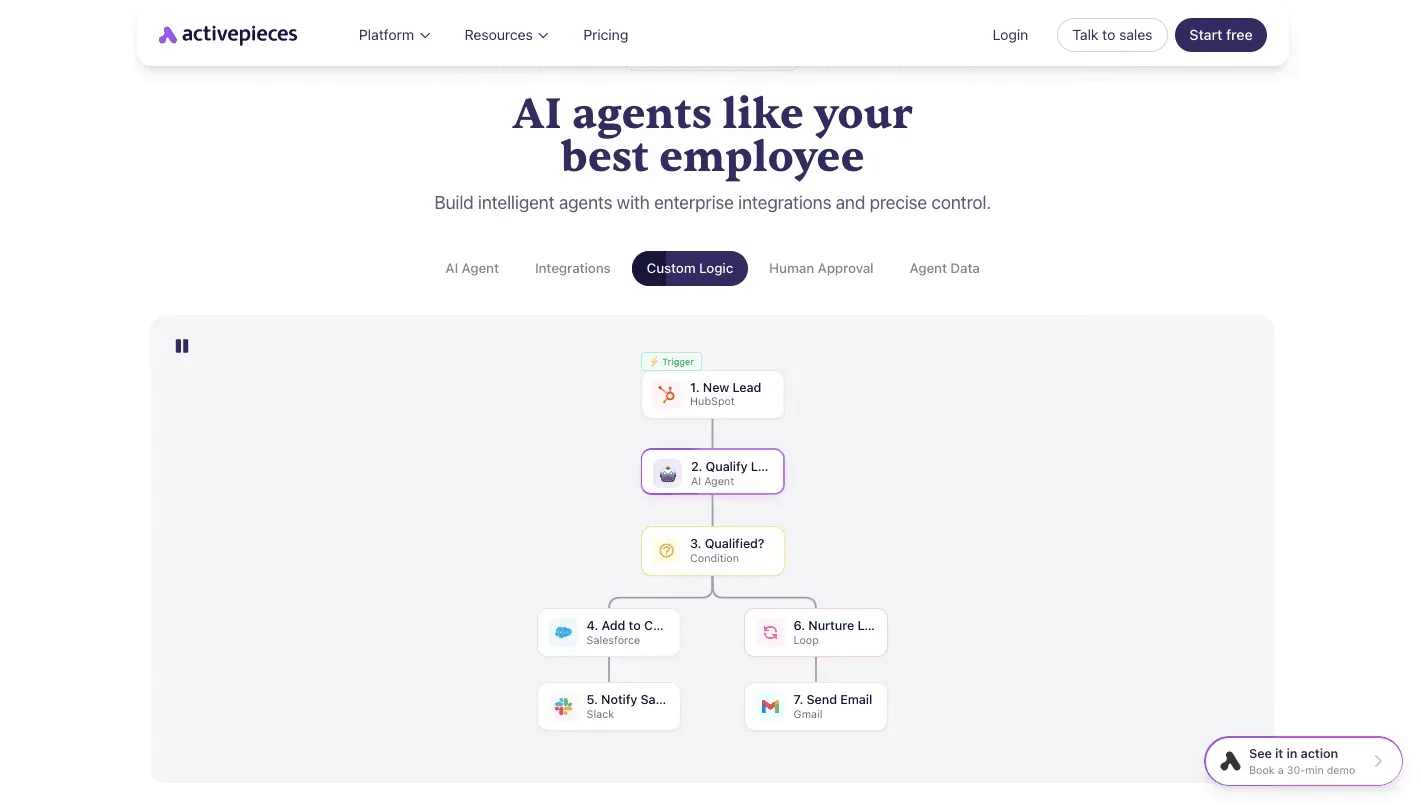
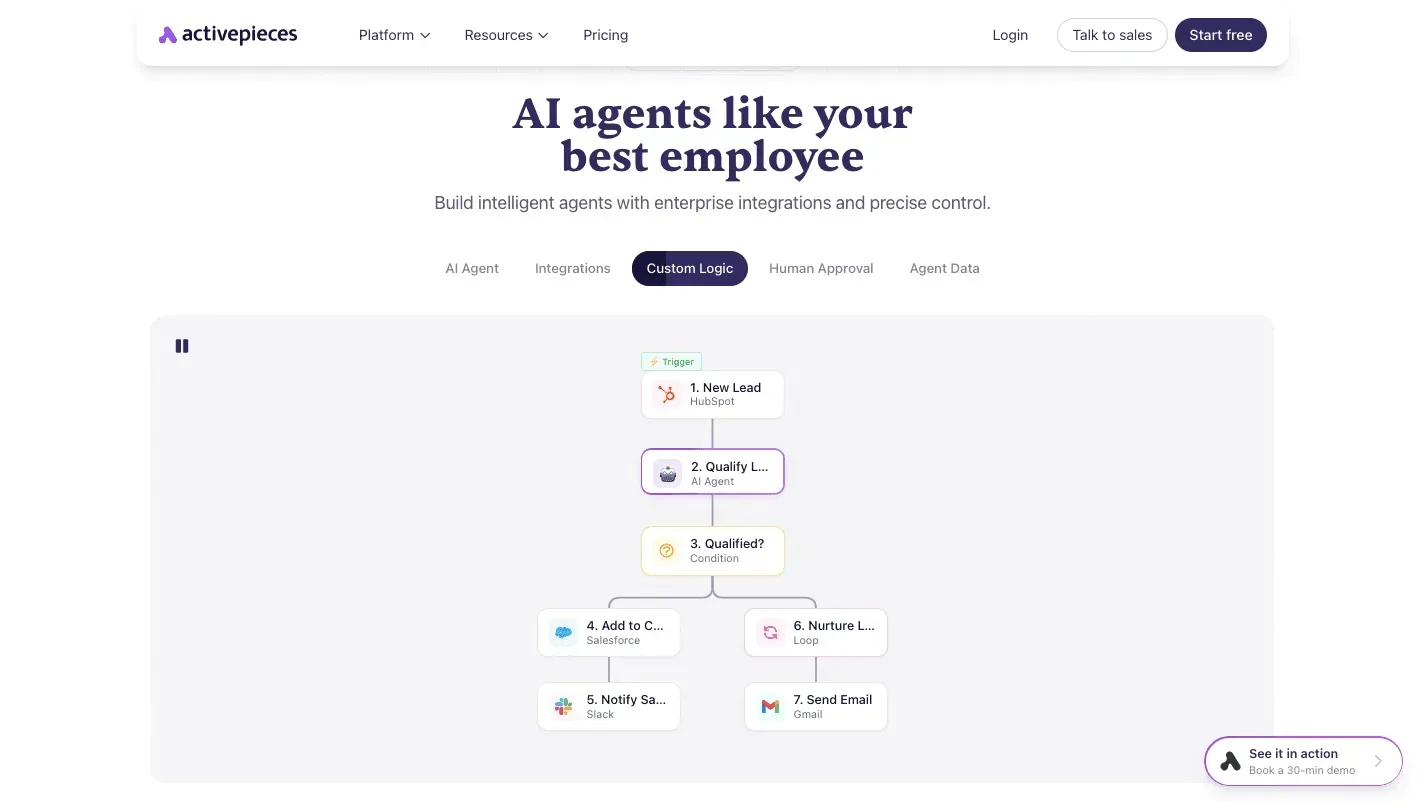
What it does about the problem is narrow and useful. The flow below is the one a business team would build for lead qualification, and each step is a separate, inspectable unit rather than a black box inside one CRM.
Read the flow as the order in which a lead is handled, and note that the human approval step sits before anything is written back.
- A trigger fires, either a new lead-form submission or a new or changed record in the CRM.
- An AI scoring step sends the lead's details to the model you choose and returns a score and a short reason.
- A human approval step pauses the run and asks a named person to confirm or override the score.
- A CRM update writes the approved score and status back to the lead record.
- Routing assigns the lead to its owner and notifies them.
Because the rule is one workflow, changing a threshold or swapping the model is one edit, not one edit per tool. The approval step is also where you decide how much autonomy the agent gets: nothing reaches the CRM until someone has signed off.
Around that flow sit custom RBAC, SSO, SCIM provisioning, audit logs, log and event streaming, and environments with git sync, so a rule change can be tested before it goes live and traced afterwards.
All of it is one product, and it is the same product whether you self-host or use the cloud, with no cut-down version on either side.
The repository's LICENSE file draws the line in public: an MIT-licensed core, with the enterprise code in the packages/ee/ directories under a separate commercial licence. MoneyGram, Moneypenny, Alan and FundingSocieties run Activepieces in production.
Activepieces runs self-hosted or on its cloud, which matters if lead data can't leave your infrastructure. Self-hosting means your team runs and updates it.
On price, I haven't confirmed current plan figures against Activepieces' pricing page as of this check, so check that page before budgeting. Plan limits on features such as the ones above may also differ by tier.
What remains is the decision rule: which of the two routes your team should take.
Activepieces is the better fit for teams that need lead-qualification logic to span their CRM, lead forms and model, and that want governance handled in the same product: RBAC, SSO, SCIM, audit logs, log and event streaming, and environments with git sync, available self-hosted or on cloud with no cut-down version either way.

That choice costs you a packaged product and puts ownership of the logic on your team, so anyone who wants a ready-made AI SDR with its own lead database, prospecting engine or chat widget will be better served elsewhere.
For a business that already has its lead sources, CRM and model and wants each qualification step to be an inspectable unit in one place, rather than a rule rebuilt inside each vendor's agent, that trade is worth making.
Test leads on your rules
Run a one-week test on your own past leads before you pick a route, because the answer depends on your qualification rules, not on a vendor's demo.
You are also testing speed. Leads360, in a study HubSpot republished, found that responding within 1 minute lifted conversion by 391%. Per Leads360 and HubSpot, within 30 minutes the lift was 62%, and within 1 hour it was 36%.

By the end of the first half hour, most of the gain has disappeared, so an agent that scores slightly better but replies late is worth less than one that replies at once.
- Write your criteria in five lines. One rule per line, plain enough that a new hire could apply them. If you can't fit them in five, the rules aren't ready to automate.
- Pull 50 past leads with known outcomes. Mix won and lost deals. Fifty can be labelled by hand in an afternoon, but it's too few to show small differences, so treat only large gaps as real.
- Trial two tools. Run the same 50 leads and the same five lines through the native agent in your CRM and through one platform that spans several tools. Identical inputs are what make the comparison fair.
- Compare with human judgement. Have a sales rep score the same 50 blind. Every disagreement is a lead that would have been misrouted, so count them per tool.
- Check where the model runs and whose API key it uses. If the vendor supplies the key, usage and data handling follow their terms. If the key is yours, the bill and the data agreement are yours too. Know which before any real lead goes through.
- Set human approval before go-live. The agent drafts, a person approves, and you loosen that only once the disagreement rate from step 4 is one you would accept from a junior hire.
The comparison in step 4 gives you the decision. If the native agent matches your rep and your rules live in one CRM, buy it.
If it misses because the rules depend on data in other tools, you have your case for a platform that spans them.
Expect a few questions. How long does this take? One week, mostly spent labelling leads.
What if both tools fail? Tighten the five lines first, since vague criteria fail every tool. Do we need engineers? Not for the trial, but ask who owns the API key before you start.
Related reading
References
Build it
Set this up in minutes.
No code required. Connect your accounts, and Activepieces runs it from there.
Start free Talk to sales