
Artificial Intelligence for CRM: A Complete 2026 Guide

Oct 25, 202616 min read
AI for CRM is two jobs done on three kinds of record: machine-learning models predict outcomes, and generative models draft text, which means you need to plan for both model types, not one, and for the workflow layer, whether that's custom code or an open-source automation tool like Activepieces, that carries their outputs back into the CRM.
Artificial intelligence for CRM is the use of machine-learning models to predict outcomes such as deal closure or churn, and generative models to draft customer-facing text, both working from the contact, account, and activity records stored in a customer relationship management system.
Both read the contact, deal and activity data you already hold. Beyond what those records say, the tool knows nothing about your customers.
60% of a rep's working time goes on non-selling tasks, according to Salesforce, the CRM vendor, with 22% in customer meetings and 18% on prospecting, which means less than 40% of each rep's day is spent on actual selling.
How AI for CRM works
The business case starts with rep time.
So the largest pool to attack is the 60% of logging, researching and writing up, and the 18% is where better targeting pays.
By the end of this guide you'll have picked one use case, estimated its cost and have a lead-summary workflow running, in about 45 minutes, and Activepieces includes unlimited flows on its free plan, which means you can prototype this before lunchtime ends.
Every AI feature in a CRM reduces to one of these pairings. The list below pairs each record type with the job that reads it.
- A contact record (role, company, lead source) is what a model reads to score a new lead on likelihood to convert.
- A deal record (stage, value, age, close date) is what a forecast reads to estimate this quarter's closed revenue.
- An activity record (emails, calls, notes) is what a drafting model reads to condense a lead's history into three lines before a call.
- Prediction returns a number or a ranking, such as a lead score or a forecast.
- Drafting returns text, such as a follow-up email or a call summary.
The next three subsections take each job in turn, then the data that limits both.
Predictive models: scoring and forecasting
If a rep calls the top fifth of scored leads first, the 18% of time on prospecting is spent on better odds. Predictive models learn from past outcomes which records ended in a win, and that is what serves that slice.

That is the trade-off: a small history gives you a confident-looking number with little behind it, because a score needs enough closed deals to learn from.
Generative models write from the records they're handed. They go after the 60%: a call summary or first-draft email takes seconds, and the rep edits instead of composing, which means each rep recovers hours weekly on these two tasks alone.
The cost is review time. A draft that misstates a deal stage still has to be caught by a person before it reaches a customer.
Why the data underneath decides the result
Both jobs read the same fields, so a duplicate contact or a stale deal stage corrupts the score and the draft alike.
The vendor's AI badge on the screen matters less than whether those fields are accurate. That's why a narrow first use case beats a broad rollout: you only have to clean the fields that one workflow reads.
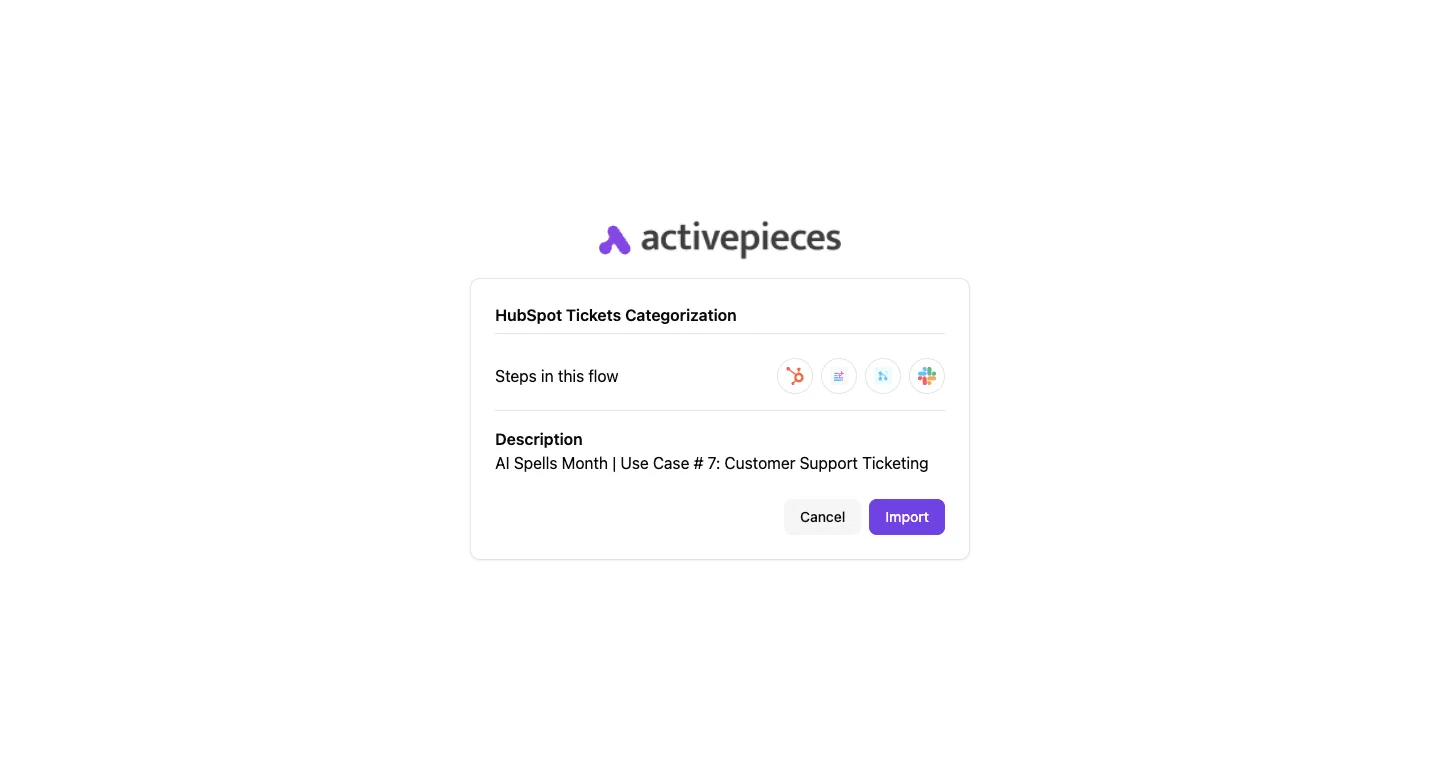
This takes minutes, not a project: automate it in Activepieces free.
Six CRM use cases with published results
The six common CRM use cases differ mainly in which fields they read. The only result we can stand behind is how few organisations get any of them into production.
According to Networked Intelligence citing MIT Media Lab, 80% of organisations explored generative AI, 20% ran a pilot and 5% reached production, which means only 1 in 4 pilot projects actually reach production.
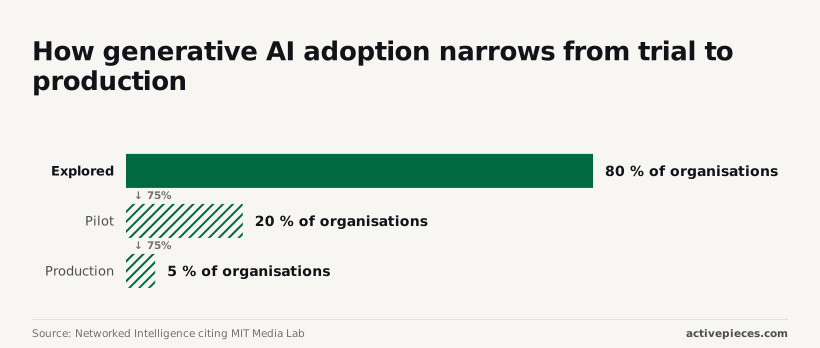
Three in four pilots stall. Most of the work is in what surrounds the model, not in picking a better one.
The table below shows what each use case needs and what it produces, and that we have no per-use-case figure to quote. Take from it the input column, because that's your cleanup bill.
Most of the work is in what surrounds the model, not in picking a better one.
| Use case | Required input | Output | Published figure | Source and date | Claim or independent |
|---|---|---|---|---|---|
| Lead scoring | Won and lost history, consistent stage fields | Ranked leads | None cited here | n/a | No figure to label |
| Email drafting | Contact role, activity history | Draft message | None cited here | n/a | No figure to label |
| Call summaries | Call recordings or transcripts, linked contacts | Notes and next steps | None cited here | n/a | No figure to label |
| Deal forecasting | Reliable close dates and amounts | Forecast by period | None cited here | n/a | No figure to label |
| Support triage | Labelled past tickets | Category and priority | None cited here | n/a | No figure to label |
| Data cleanup | Records with duplicates or gaps | Merge and fill suggestions | None cited here | n/a | No figure to label |
If a vendor shows you a percentage for these, treat it as a claim until someone outside the vendor has measured it. The three groups below share an input problem, which is where to choose.
When reps leave stage and close-date fields stale, scoring and forecasting inherit that noise, because both depend on those fields. Drafting is more forgiving, since a person reads every message before it goes out. If your pipeline data is untrustworthy, start with drafting.

Agents who have tagged the same problem three different ways leave the model learning three categories. Triage needs past tickets that were labelled consistently.
Call summaries sit here too: they need transcripts attached to the right contact, which is a linking problem more than a model problem.
A wrong suggestion costs minutes, and a human approves each merge. That makes cleanup the narrowest first choice commercially, and the same fixes lift every other use case later.
With 5% of organisations reaching production, a scoped, reviewable workflow is the better bet than a broad rollout, which means you have proof of concept before justifying the cost and disruption of organization-wide scaling.
What AI in a CRM costs and requires
Price the scoped workflow before you enable anything. The three vendors charge in different units, gate AI behind different plans, and set data thresholds that decide whether a small pilot can work at all.
Built-in CRM AI pricing by vendor
Compare billing units, not a headline price. The table shows how Salesforce, HubSpot and Microsoft Dynamics 365 (Microsoft's CRM and business-applications suite) describe their built-in AI, so the comparison has to start from your own workflow volume.
| Vendor | Price model | Plan required | Minimum data | Source page |
|---|---|---|---|---|
| Salesforce | Per-user add-on or usage-based, as the pricing page describes (checked 25 October 2026) | Higher editions of its sales and service products (checked 25 October 2026) | Prediction features need a history of won and lost records; drafting doesn't (checked 25 October 2026) | Salesforce pricing page (checked 25 October 2026) |
| HubSpot | Credit-based usage on top of the subscription (checked 25 October 2026) | Paid tiers; the more capable features sit in upper tiers (checked 25 October 2026) | Prediction features need closed-deal history; drafting doesn't (checked 25 October 2026) | HubSpot pricing page (checked 25 October 2026) |
| Microsoft Dynamics 365 | Some assistant features bundled, others metered by capacity (checked 25 October 2026) | Sales or customer service application licence (checked 25 October 2026) | Prediction features need historical opportunity data; drafting doesn't (checked 25 October 2026) | Microsoft Dynamics 365 pricing page (checked 25 October 2026) |
Vendors revise these pages often, so recheck the source page on the day you sign. The pattern is consistent, though: drafting is cheap to start and prediction is gated by history.
Hidden costs of AI in a CRM
In the scoping doc, the licence is the smaller line. Staff time is the larger one, and it falls in three places.
First, someone has to merge duplicates and fill the fields the model reads before the output means anything.
Second, every drafted email or predicted score needs a named person who accepts or rejects it, so the workflow's time saving is net of that checking.
Third, someone has to watch usage-based billing, or a cheap pilot turns into an open-ended meter.
If you can't name those three people, the pilot is not scoped yet.
Minimum data before it is worth enabling
Drafting works on thin records, but it'll confidently write from wrong ones. Wrong contact roles or stale deal notes appear in the draft, and the reviewer then pays for them in time.
Prediction is stricter. A lead score or deal forecast learns from outcomes, so you need enough closed records, with consistent stage definitions and outcomes recorded reliably.
Where the vendor page states a threshold, treat it as the floor, not a target. If your closed history is patchy, start with drafting on one team and fix the records first.
You can follow the rest of this with the builder open. Start free, no card.
Mistakes that make CRM AI fail
Most failed CRM AI projects were lost before launch, in the audit nobody ran, and the survey evidence points at records first and skills second.
In the AI Data Analytics Network's PEX Report 2025/26, 52% of respondents named data quality and availability as a barrier, just ahead of lack of internal expertise at 49%, so neither barrier can be safely ignored by organizations attempting to accelerate adoption.
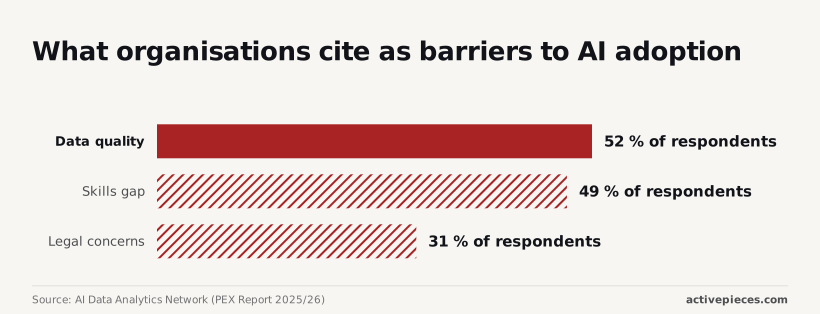
Organizations must resolve data quality issues before implementing AI.
Your team owns the two leading problems; no vendor ships them to you.
(chart)
Legal concerns came in lower, at 31%, but that's still nearly one in three organisations. So audit all four areas below before anyone switches anything on.
Switching on AI before cleaning records
That 52% on data quality is the commercial trade-off in one number. You pay for a prediction or drafting layer, and it can only be as good as the records underneath.
Duplicate accounts, contacts with no role, and deals closed with no loss reason all feed straight into scoring and drafts. The result is confident output built on wrong inputs.
Run a duplicate and completeness check on the fields the first use case reads, and fix those before launch.
Skipping a baseline before CRM AI launch
Without a baseline, you can't say whether the tool helped. Record the current numbers for the one task you're automating: minutes to write a follow-up, reply rate, forecast error. Then you have something to compare against at thirty days.
The 49% who cite a skills gap often mean exactly this: nobody on the team owns the measurement, so a vendor's claimed accuracy goes untested. Ask for a trial on your own closed deals before you accept any accuracy figure.
Sending AI drafts without human review
Drafting is cheap, but a wrong email to a customer isn't. Keep a human approving every draft until reviewers are editing less than they're rewriting, and track that edit rate.
When a draft cites the wrong renewal date, it goes out under your name, which is where bad records do their visible damage. Unreviewed sending is the route. Scope autonomy to one team first, so any error stays contained.
Overlooking privacy and data residency
Nearly a third of respondents, the 31% citing legal concerns, are usually reacting to a real gap. Customer records contain personal data, and AI features may send it to a model provider in another region, which means customer data can end up outside national boundaries.
Before launch, ask where prompts and records are processed, whether they're retained or used for training, and whether you can restrict the tool to specific fields. If the vendor can't answer in writing, that settles the question for now, and the pilot waits.
Add AI lead summaries to any CRM with Activepieces
You can wire an AI summary into your CRM yourself with Activepieces, and the integration you connect for your CRM does two jobs from a single registration.
It runs as a step in this lead-summary flow, and it is also a tool on the project's MCP server, so Claude, ChatGPT, Cursor or an agent you built can read and update those same records without a second integration project.
That holds for all 744 integrations counted in the open-source monorepo, and MoneyGram, Moneypenny, Alan and FundingSocieties run Activepieces in production. Nothing is published or exported to a separate catalog, because re-integrating your CRM for agents would be a second migration.

The mechanism is visible in packages/integrations in the open-source repo, and the Integrations Framework and MCP Server docs describe the same action serving both.
You build and maintain the workflow, but you decide which model reads your leads and where its output lands. That is the trade-off: control against convenience.
It won't fix thin records; a summary of an empty lead is an empty summary. The build runs in this order:
- Set the new-lead trigger.
- Add the AI step with the summary prompt.
- Write the summary and score to a custom CRM field.
- Post a Slack notice.
- Test with one lead.
The three subsections below walk through those steps in sequence, and the last turns them into a Monday checklist.
Stage 4a: trigger on new leads
Start with the trigger for your CRM's "new lead created" event, using its piece (Activepieces calls its integrations pieces, and 744 of them are counted in the open-source monorepo) or a webhook if your CRM lacks one.
Keep the scope narrow: new leads only, not updates, not contacts, not accounts.
If the trigger is broad, it fires on records you haven't cleaned, and you pay for that in noise your reps will learn to ignore.
Add the AI summary step and prompt
Pass the AI step only the fields you trust: company, role, source, and any notes.
Prompt for a short summary and a score on a fixed scale, and tell the model to say "insufficient data" when fields are blank.
That instruction matters most, because it makes weak records visible instead of letting the model invent a story around them. Which model you pick is secondary to what you feed it.
Stage 4c: write back and notify
Never write the summary and score over an existing field; use a custom field you created for this purpose. A separate field means reps can compare the AI's view with their own, and you can switch it off without losing anything.

Then add the Slack step, so the lead's owner gets a notice in the team chat with the summary, the score, and a link to the record. A score nobody sees doesn't change behavior.
On Monday:
- Create the custom summary and score fields in your CRM.
- Build the workflow with the new-lead trigger only.
- Run exactly one real lead through it and read the output against the record.
- If the summary says "insufficient data," fix the record before touching the prompt.
- Turn it on for one team, and review the fields with them after a week.
Frequently asked questions
Is AI in a CRM the same as a chatbot? No. A chatbot is one way to reach the AI.
Most CRM AI works without a conversation: it scores leads, predicts which deals will slip, and drafts emails or call summaries from the records you already hold. The chat box is the interface. The value comes from the records behind it.
Do small businesses need AI in their CRM?
Not as a starting point. A small team with a few hundred accounts gets more from clean records and a consistent habit of logging activity than from a prediction model with little history to learn from.

If follow-up emails or meeting notes eat your week, a narrow drafting feature can pay off early, since it needs no history. That makes drafting the exception.
Can AI replace a salesperson or support agent?
In the scoped uses this article describes, it takes on tasks, not roles. It can draft the reply, summarize the thread, or flag the account at risk.
A person still owns the relationship, the pricing decision, and the judgment call on an upset customer. Plan for fewer repetitive steps per person, and treat headcount cuts as a separate decision that the tool doesn't justify by itself.
Is customer data used to train the vendor's models?
It depends on the vendor, the plan, and the contract, so check the terms rather than assuming. Many business plans state that your data isn't used to train shared models, but that's a commitment you should find in writing.
Ask where prompts and records are processed, how long they're retained, and whether any third-party model provider sits in the chain. Get the answers in the data processing agreement, not in a sales call.
How long before CRM AI shows results?
Within the first weeks of use, drafting features can show a visible time saving, because they need no training history.
Prediction takes longer, since the model needs enough clean, consistent records to find a pattern, and you need time to see whether the scores match what happened.
If a pilot has no baseline measure agreed before launch, you won't be able to say whether it worked. Fix that first, then start.
Related reading
Build it
Set this up in minutes.
No code required. Connect your accounts, and Activepieces runs it from there.
Start free Talk to sales