
Asana API Guide: Get Tasks, Projects, and Users in 2026

Nov 20, 202615 min read
Asana's API is a REST interface that speaks JSON at https://app.asana.com/api/1.0, and you can list tasks with a personal access token and a GET /tasks call, the same kind of call that tools like Activepieces make under the hood when they talk to Asana.
That works in about ten minutes.
What it doesn't give you is a loop that survives real data volumes. The official reference lives at developer.asana.com.
Asana's REST interface for your workspace
Asana API failure modes to plan for
Start with the failure modes, because they decide how you write the first call. A list endpoint returns one page, not your whole workspace, so a loop that ignores the pagination offset silently drops tasks.

Responses are compact by default, so a task comes back with little more than an ID and a name. Request more through opt_fields. Requests can also be throttled, so your code needs a retry path before it needs a clever query.
What the Asana API can do
You can read, create, update and delete most of the objects you see in the app through the API. Webhooks and events are the two ways to learn about changes without polling.
The table shows the six resources you'll touch first, with a representative path for each.
| Resource | What it represents | Example endpoint path | What you can do with it |
|---|---|---|---|
| Tasks | A unit of work | /tasks/{task_gid} |
Read, create, update, complete, delete, and filter by project or assignee |
| Projects | A container for tasks | /projects/{project_gid} |
Read, create and update projects, and list the tasks inside |
| Sections | A grouping within a project | /projects/{project_gid}/sections |
List sections and move tasks between them |
| Users | A person in a workspace | /users/me |
Identify the token's owner and list workspace members |
| Webhooks | A subscription to changes on a resource | /webhooks |
Register a callback URL to be notified of changes |
| Events | A record of changes on a resource | /events |
Poll for changes since a sync token |
If you'd rather not hand-write that plumbing, Activepieces has 750 integrations, Asana among them, and can run the same calls from a described process, which means your Asana workflows don't require custom connector code.

Which Asana plans include API access
You create a personal access token from your own account's developer settings, and Asana's developer documentation describes the API as available to Asana accounts.
Plan details change over time. Confirm them on Asana's pricing page and the developer docs before you build a dependency on a particular tier. To check access, make a single GET /users/me call with your token.

How the Asana API figures were verified
This guide was checked against Asana's developer documentation on 2026-11-20.
Read an exact limit from the Asana developer docs and from the response headers your own calls return. Those reflect your account rather than a general claim.
This takes minutes, not a project: automate it in Activepieces free.
Get a personal access token or OAuth app
Use a personal access token when the script runs as you, and an OAuth app when other people's Asana accounts are involved.
Both go in the same Authorization: Bearer header, so your calling code barely changes between them.
A token that expires or is revoked mid-run fails like a rate limit does: a 401 or 429 in the middle of a pagination loop, with half your tasks already pulled.
Pick by who the request acts as, since that decides what your script can see and what breaks when a person leaves. The table compares the three credential types.
| Personal access token | OAuth app | Service account | |
|---|---|---|---|
| Who it acts as | The user who created it | Each user who authorizes the app | A dedicated non-human user, where your Asana plan offers one |
| Best for | Your own scripts and one-off pulls | Products used by other people | Unattended jobs that should outlive any one employee |
| How it's sent | Authorization: Bearer <token> |
Authorization: Bearer <access_token> |
Authorization: Bearer <token> |
| Scopes behaviour | Carries the full access of its owner | Limited to the scopes the user approves | Limited to what that account can see |
| Setup effort | Minutes, from the developer console | Registration, redirect URI, consent flow, token refresh | Account provisioning, then a token like any other |
Check your plan's documentation for service accounts before you design around one, because availability depends on it.
For your own scripts, create a personal access token in the Asana developer console, copy it once, and send it as a Bearer header.
Because it inherits everything you can see, a leaked token exposes every project you can open. It also stops working if your account is deactivated, so a script that matters to a team shouldn't hang off one person's identity.
OAuth app for products used by other people
Register the app, set a redirect URI, and send users through the consent screen. You get an access token per user and a refresh token to renew it.
Build the refresh path before the happy path: an expired access token should trigger one refresh and one retry, not a loop. If the refresh itself is rejected, the user revoked access, so stop and ask them to reconnect.
Keep either credential in an environment variable or a secrets manager, never in the repository or in a prompt. Log the request ID, not the header.
If a token ever lands in a log or a commit, revoke it in the console and issue a new one, since deleting the line doesn't undo the exposure.
A minimal working request to get tasks
One authenticated GET against the tasks endpoint is the whole request. Keep the token in an environment variable so it stays out of shell history and logs.
curl -s "https://app.asana.com/api/1.0/tasks/$TASK_GID" \
 -H "Authorization: Bearer $ASANA_TOKEN"
If you send a bad gid, or a task your token can't see, you get an error body, not an empty result, so check the status code before parsing.
List tasks in a project
curl -s "https://app.asana.com/api/1.0/tasks?project=$PROJECT_GID" \
 -H "Authorization: Bearer $ASANA_TOKEN"
Swap project for section to list one column of a board. To list by person, send assignee together with workspace. Asana rejects the assignee form without the workspace, so a missing parameter fails the whole call.
If your code reads due_on or completed and never asked for them, it gets nothing back and may treat that as "no due date." The default response is compact, usually just the gid, name and resource type.
curl -s "https://app.asana.com/api/1.0/tasks?project=$PROJECT_GID&opt_fields=name,completed,due_on,assignee.name" \
 -H "Authorization: Bearer $ASANA_TOKEN"
Name every field you use, including nested ones with dot notation. Asking for less also keeps responses small.
Page through Asana API task results
Add limit to set the page size. When more results exist, the response carries a next_page object with an offset value. Pass it back unchanged as offset on the next call, and repeat until next_page is null.

curl -s "https://app.asana.com/api/1.0/tasks?project=$PROJECT_GID&limit=50&offset=$NEXT_OFFSET" \
 -H "Authorization: Bearer $ASANA_TOKEN"
Treat the offset as opaque and never construct it yourself. A loop that reads only the first page will pass every test on a small project and silently drop tasks on a large one.
You can follow the rest of this with the builder open. Start free, no card.
Asana API rate limits and pricing, as documented
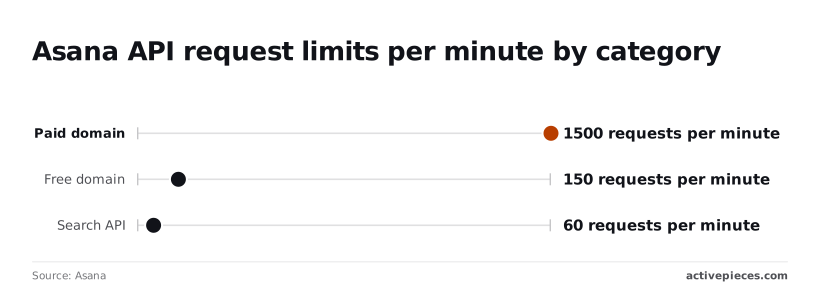
You pay for every page in requests. Asana caps them at 1,500 per minute on a paid domain, 150 on a free domain and 60 for the Search API, according to Asana's rate-limits page.
**A loop that reads only the first page will pass every test on a small project and silently drop tasks on a large one.
What Asana API rate limits mean in practice
At 150 requests per minute on a free domain, a project with 10,000 tasks, paged at 100 per request, uses about 100 calls for one full read.
A second read in the same minute would exceed your quota, so you may need to wait for the Retry-After period before refreshing that data.
Move to a paid domain at 1,500 and you get roughly ten times that room.
Tightest of all is the Search API at 60 per minute. A workflow that searches once per task will stall after one minute's worth of tasks and need backoff on the 429 responses.
These are the only limits I have confirmed figures for. Asana's page also covers concurrent-request and cost-based limits, which this article doesn't quote, so read that page before sizing a bulk job. Figures checked 2026-11-20.
What API access costs
You won't find a per-call price in the documentation. Access appears to come with the plan, so the cost is the seat price. G2's Asana pricing page lists Personal at $0 per user per month, Starter at $10.99 and Advanced at $24.99.
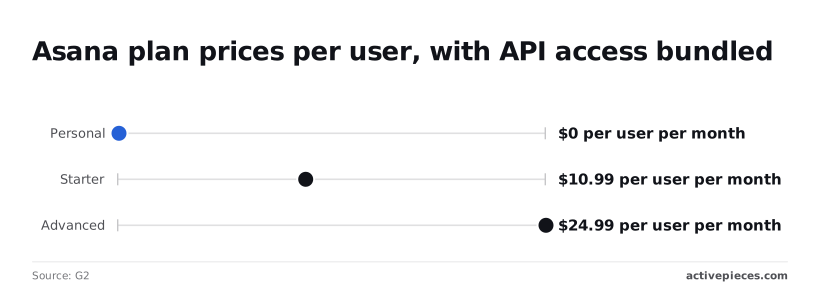
Because Personal is free, you can build and test against the API at no cost, but it sits under the 150-per-minute free ceiling. Starter at $10.99 per user is the cheapest tier listed above that free plan.
Which Asana plan to build on
Since the 1,500 figure applies to paid domains, a production sync is better planned on a paid plan. Asana's rate-limits page doesn't tie the cap to a specific tier, so confirm which plan your workspace is on before you rely on it.
Treat the pricing figures as a snapshot, since they come from a third-party listing rather than Asana's own pricing page.
The case for API polling
Cost is the best argument for polling. A nightly GET /tasks needs one token, one cron job and no public endpoint to host, which is why it's enough for a small workspace.

If the job dies, you rerun it in the morning and nothing is lost, because the next pull rebuilds the full picture.
With webhooks there is no such safety net. If your receiver is down when Asana delivers an event, you can be left with a gap you only notice later, and you end up writing retry and reconciliation logic that the cron job never needed.
Where Asana API polling breaks down
That case holds while the workspace stays small and a one-day delay is acceptable. Past that point, these four problems decide it:
- Polling spends request quota re-reading tasks that haven't changed, so most of what you pay for in calls is a copy of what you already stored.
- A task changed and then reverted between two polls looks untouched, so any audit or automation that depends on the intermediate state never sees it.
- Results come back in pages capped at a fixed size, so every full pull becomes a loop of follow-up calls that you must write, retry and resume correctly when one page fails.
- The search endpoint, the natural way to ask only for what changed, has its own per-minute cap, so a large workspace hits a rate limit exactly when you try to narrow the query.
The alternative is to let Asana tell you what changed. Webhooks push events as they happen, and the events endpoint lets you ask for changes since your last sync token.
Both read only the delta, so quota tracks activity rather than workspace size, and short-lived changes arrive as events instead of vanishing between polls.
You still need pagination and retry handling, but over a far smaller volume of data.
Handle common Asana API errors
Retry a 4xx other than 429 and you only repeat the failure. The table sorts each status into retry or don't, and most Asana errors are either a fault you fix once or a throttle you wait out.
| Status | Typical cause | Fix | Retry? |
|---|---|---|---|
| 400 | Malformed body or invalid opt_fields |
Correct the request | No |
| 401 | Missing, expired or revoked token | Reissue the token | No |
| 403 | Token lacks access to the resource | Grant access or change scope | No |
| 404 | Wrong gid, or no access to it | Verify the gid and membership | No |
| 429 | Rate limit exceeded | Wait for Retry-After |
Yes |
| 5xx | Asana-side fault | Back off and retry | Yes |
| Truncated results | Pagination ignored | Follow next_page.offset |
Not applicable |
| Webhook handshake failure | Handshake not echoed in time | Return X-Hook-Secret in the response |
Re-register |
With a 401, check for a revoked or mistyped token first. With a 403 the credential is valid but the user behind it can't touch that resource, so a retry changes nothing.
A 404 can mean an object you can't see, not only one that doesn't exist. A job that worked for you and fails for a teammate's token usually points to membership, not a bad gid.
Truncated results are quieter: you get a 200 with one page, and the missing rows only show up when you compare counts.
429: honour Retry-After
When Asana returns 429, wait the number of seconds in Retry-After. If a client has no header to read, the python-asana default retry delays double. They run 1 second, then 2, 4, 8 and 16.
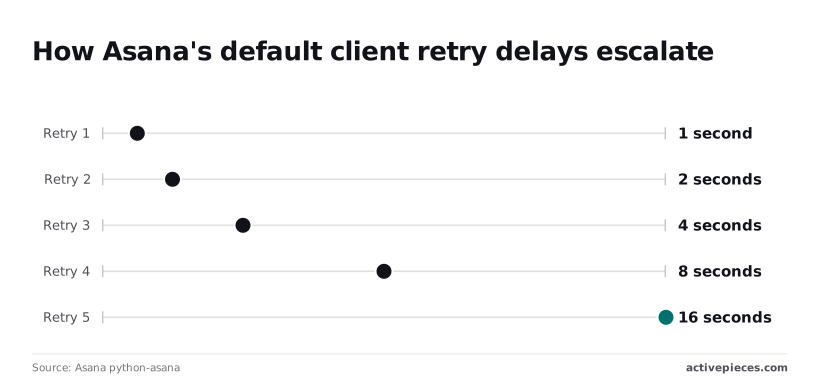
That means five retries burn 31 seconds in total, so a job that exhausts them should fail loudly rather than hang. The header value wins whenever it is present, because it reflects Asana's actual window. Treat 5xx the same way.
Asana webhook handshake and expiry failures
When you register a webhook, Asana sends a handshake request carrying an X-Hook-Secret header. Your endpoint must echo that header back in its response, or the registration fails.
If your endpoint is slow or behind a login wall, it fails here, so test it from outside your network. A webhook that later stops delivering should be re-registered, and a periodic reconciliation pull catches anything missed in between.
Call the same Asana endpoints without code in Activepieces
When a webhook stops delivering, it needs re-registering, and a reconciliation pull needs someone to maintain it.
Activepieces lets you build that in a flow editor instead of in your own scheduler code, and every plan, the free one included, allows unlimited flows, so a reconciliation flow beside the main one doesn't use up an allowance.
What the Asana integration covers
For syncing tasks into other apps, the Activepieces Asana integration, which sits in the open source repository under the MIT-licensed core, gives you triggers and actions for the common cases.
It has a new-task trigger to start a flow, a get-task action to fetch one task by its ID, and a find-task action to search for tasks.
The integration also includes a custom API call action, so an endpoint the piece has no dedicated action for is still reachable with your Asana credentials.
What the integration doesn't do is change Asana's limits. A flow that pulls too fast still gets a 429 from Asana, and a failed step shows up in the trace as a failure.
Treat the trace as your first stop when a sync goes quiet, because it tells you whether the request failed or the flow never started.
When to write code instead
Stay in code when you need control the flow editor doesn't expose. That includes a custom retry schedule tied to Retry-After, tight handling of large paginated pulls, or a field list tuned per request.
The same applies when the sync is a hot path inside your own service rather than a workflow between apps.
In those cases the hand-written calls are the right tool, and the checklist below is what they need.
Do these in order; each step proves the one before it.
- Create a personal access token in your Asana account settings, and store it as a secret rather than in the source.
- Test one request, such as fetching a single task, and confirm you get a 200 and the task you expected.
- Add
opt_fieldsso the response carries only the fields you use, then follow pagination until no next page is returned, so large projects are not silently truncated. - Add 429 backoff that honours the
Retry-Afterheader, falling back to waits of 1s, 2s, 4s, 8s and 16s when it's absent, and give up with a logged error after the last one.
Related reading
References
Build it
Set this up in minutes.
No code required. Connect your accounts, and Activepieces runs it from there.
Start free Talk to sales