
Automate YouTube: Tools and Methods (2026 Guide)

Nov 11, 202615 min read
The fastest route is YouTube Studio's built-in scheduler for one channel, a no-code tool such as Activepieces once a trigger is involved, and a Data API script only when the other two can't do the job.
What YouTube automation is and the fastest route
YouTube automation is the practice of using YouTube Studio's scheduler, no-code workflow tools, or scripts built on the official YouTube Data API to upload, schedule, moderate and report on a channel's videos and comments without doing each step by hand.
By the end you'll have one scheduled upload and one automated report running, checked against YouTube's rules as of 11 November 2026.
What counts as YouTube automation
YouTube automation is any repeated channel task that software performs through an approved route:
- scheduling uploads
- publishing metadata
- pulling analytics
- routing comments to a person
"Approved" is the important word. The route is either:
- Studio itself
- a no-code tool such as Zapier, Make, n8n or Activepieces (25,455 GitHub stars)
- a script calling the official YouTube Data API
18.8% of viewer questions got any reply at all, according to CommentShark's report. Just 15.9% got an answer, and only 11.7% got a full one. That is why comments are worth automating.

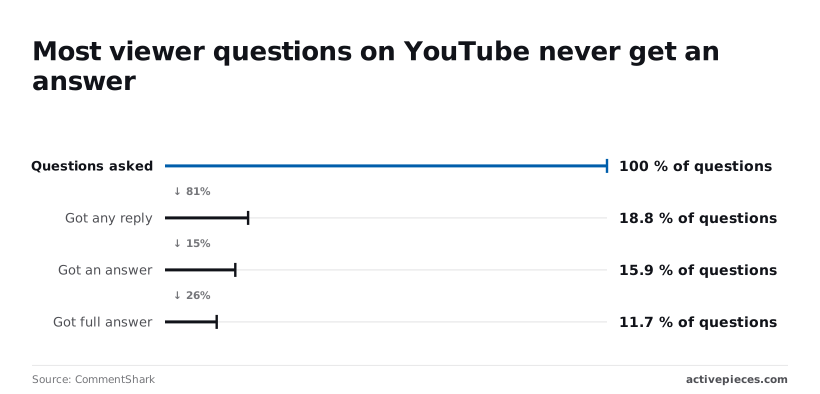
Most questions go unresolved, and a routing rule that flags questions for you fixes a bigger gap than any upload scheduler will.
Three ways to do it compared
Climbing from one route to the next buys capability and also adds a limit you must plan around. The table below ranks the three routes by effort and reach.
| Route | Setup time | What it can do | Main limit |
|---|---|---|---|
| YouTube Studio scheduling | Minutes | Schedule or premiere an upload on one channel | Manual: one video at a time, no triggers |
| No-code tool | An hour or two | Trigger uploads, reports and alerts from a sheet, form or feed | Shares the API quota and needs Google's app verification for some scopes |
| Data API script | A day or more | Anything the API exposes, in bulk |
Uploads have their own bucket of 100 calls a day, each costing 1 quota, before the API starts refusing requests, which is how most batch jobs silently stall, Blotato notes.
Studio costs nothing. Paid schedulers are the price of skipping the setup. According to Schedulala, Buffer charges $6 a month, Later $25 and Hootsuite $99.
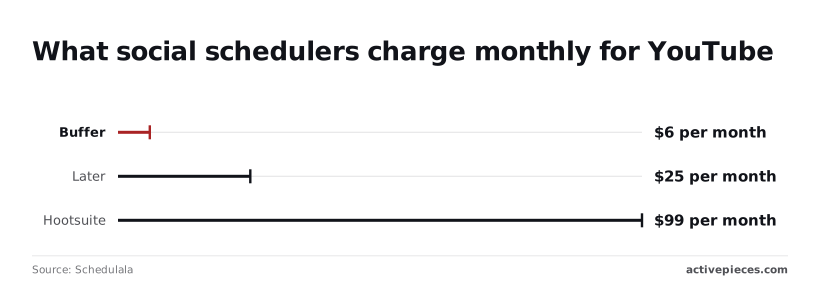
For a single YouTube channel that buys you nothing Studio lacks. The fee only pays off when the same queue also feeds other platforms.
Do not automate views, likes, subscribers or comments. It is banned, and no tool or script changes that.
A scheduler that publishes your video is fine. A bot that inflates its numbers risks strikes or termination of the channel. Everything that follows assumes you automate your own workflow, not your audience.
This takes minutes, not a project: automate it in Activepieces free.
Stage 1: Schedule uploads in YouTube Studio
No code, no API key and no quota to exhaust: YouTube Studio already schedules uploads, applies defaults and bulk edits metadata. That matters because the failures later in this article are quota and verification failures, and nothing here can trigger either.
Set upload defaults once
Open Settings, then Upload defaults. Whatever you put in the title, description, tags, visibility and the advanced options is pre-filled into every new upload.
In practice, the form applies a standing description with your links and credits, rather than your memory. So the video someone uploads at the end of a long day doesn't go out with a blank description box.
Do not expect a changed default to repair old videos. Those already in the channel keep what they have, because defaults apply only to uploads you make after you change them.
Schedule a single video
You will find the control on the last step of the upload flow.
- Upload the file and complete the details and checks steps.
- On the Visibility step, choose Schedule instead of Public or Private.
- Pick the date and time, and read the time zone shown next to it.
- Save. The video appears in Content with a scheduled status.
The time zone is where this goes wrong. The picker uses the zone of your Studio session, so a teammate travelling or a browser set to another region can schedule a video for an hour you didn't intend.
Nothing warns you. Check the stated zone every time.
If you finish uploading a video but leave it on Private, it isn't scheduled. It sits there indefinitely, because YouTube only publishes what you explicitly queued.
Bulk edit YouTube video titles, tags and visibility
In Content, tick the checkbox beside each video you want to change. An Edit menu appears above the list, with fields such as title, description, tags and visibility.
For titles and descriptions you can choose to add text at the start, add it at the end, or replace it. So a series-wide rename is one operation rather than a dozen separate trips into the editor.
Before you run it across the whole channel, select a small batch first and open one result, because Studio doesn't give you a preview of the outcome and the edit applies to every ticked row.

A tag appended to the wrong set of videos has to be removed the same way, one batch at a time.
That's the full no-tools toolkit. Its limit is that every step still needs a person to click, which is exactly the gap the next stage addresses.
Stage 2: Connect a no-code tool to your channel with Activepieces
Once Google is authorised, each new upload becomes a row in a Google Sheet with no one present: Activepieces removes the clicking by watching your channel for you, and a run costs 1 credit however many steps it has, against 1,000 credits a month on the free plan.
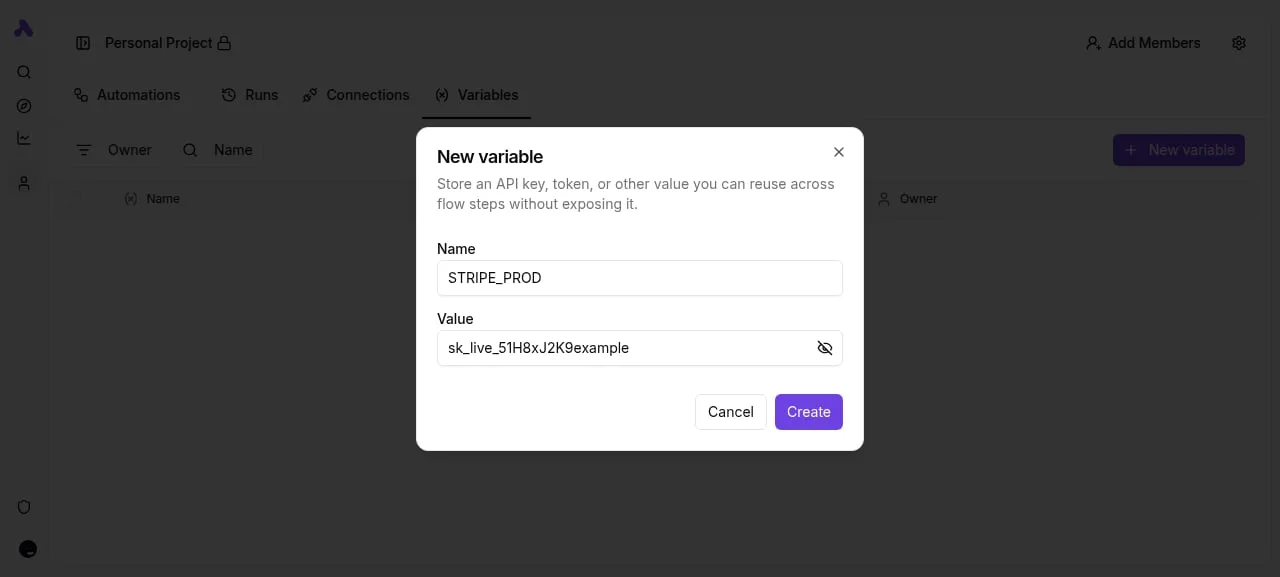
The whole build is six steps:
- Add a YouTube connection and authorise Google.
- Pick the channel.
- Add the New Video trigger.
- Add the Google Sheets Insert Row action.
- Test.
- Publish.
Spend most of your care on the first two steps, because they decide whether the rest works.
Authorise Google and choose your YouTube channel
When you add the connection, Google's consent screen appears. Approve it with the account that owns the channel, not whichever account your browser happens to be signed into.
A flow authorised under the wrong account runs without errors and watches the wrong channel, so the empty sheet is the only symptom.
If a Google account manages several channels, pick the channel explicitly in the trigger settings. Leave it unset and you're trusting a default you never inspected.
Activepieces runs on its managed cloud or self-hosted, and the Google credentials sit centrally as a connection that your flows share. Google's verification rules for OAuth apps and sensitive scopes change, so check Google's current requirements before you rely on a given setup.
Build the trigger and one action
Add New Video as the trigger. It polls the channel and fires once per new upload. Polling means a delay between publishing and the row appearing, so don't build anything that needs the row at the moment of upload.
Then add Google Sheets, choose Insert Row, and map the trigger's fields to columns: title, video ID, publish time and URL are enough. Write the header row in the sheet first. Mapping to columns that don't exist is the quietest way to get blank cells.
Test and turn on the workflow
Run the test against a video that already exists. The trigger will return a sample, and the step will show you the row it would write. Check the sample's video ID against what YouTube Studio shows.
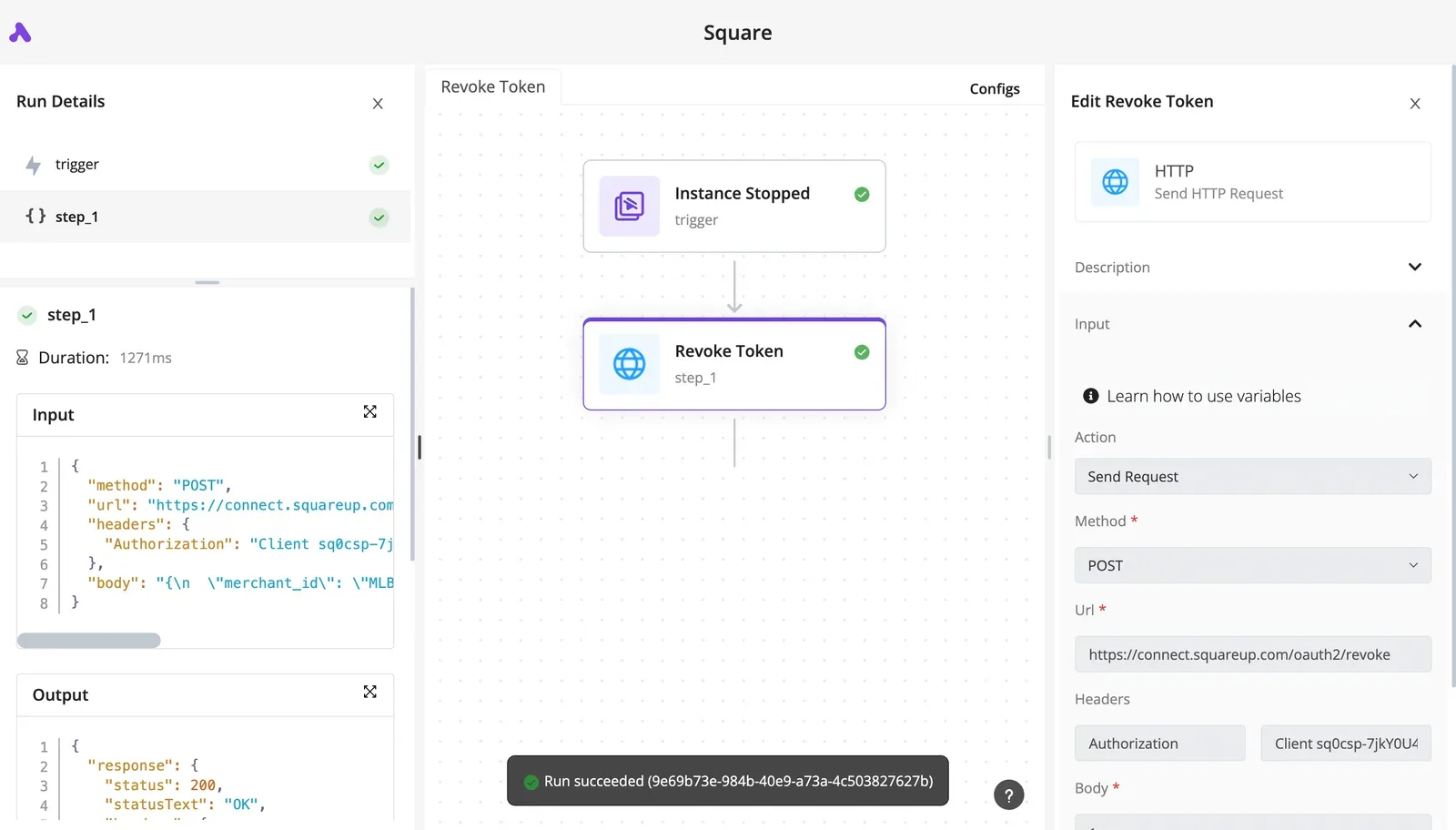
Then publish the flow; until you do, it's a draft that reacts to nothing. Upload something unlisted and confirm the row arrives before you rely on it.
How the main tools differ on YouTube support
Check each tool's YouTube page before committing. Zapier, Make and n8n all have YouTube connectors, and the differences are in which triggers and actions each exposes, which changes as the vendors update their app pages.
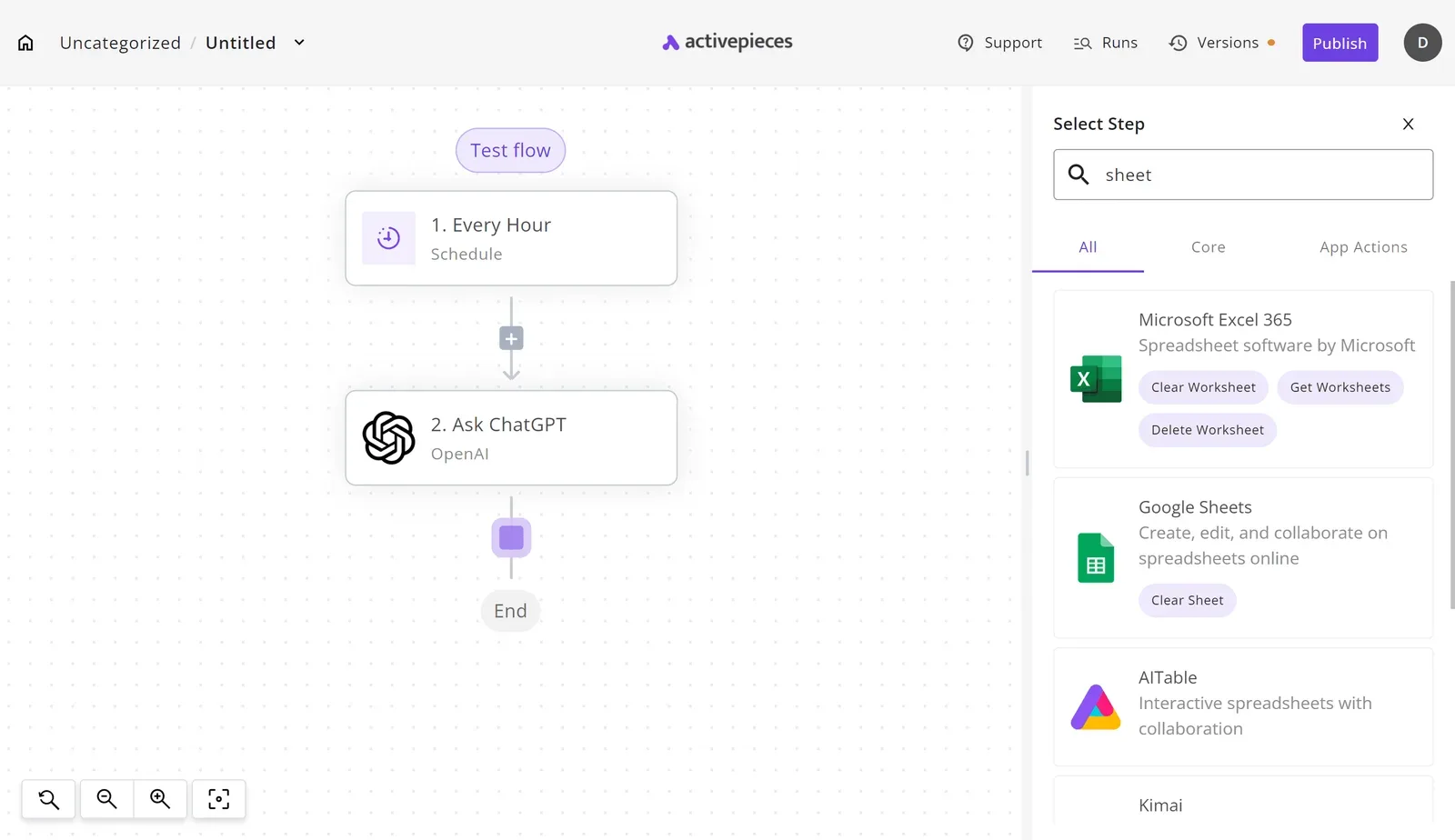
When the trigger you need isn't listed, a closed catalogue leaves you waiting on the vendor's priorities.
Activepieces lets you generate the missing YouTube integration with AI and add it privately to your own instance, and roughly 60% of the 747 integrations in its open-source monorepo were written by community contributors rather than by the company.
If you need to control the Google credentials yourself, the choice matters most: Activepieces, whose core is MIT-licensed, and n8n can both be self-hosted, while Zapier and Make are hosted services.
You can follow the rest of this with the builder open. Start free, no card.
Stage 3: Script it with the YouTube Data API
When you control the Google credentials yourself, scripting means four moves: create a Cloud project, enable YouTube Data API v3, issue OAuth credentials, then call videos.insert and commentThreads. The default quota is 10,000 units a day, and that ceiling is where scripts usually break.
Create the project and enable the API
In the Google Cloud console, create a project, open the API library, and enable YouTube Data API v3. Every project starts with 10,000 quota units a day, shared across every script and teammate using that project's credentials.
One runaway loop therefore locks out everyone else until the quota resets.
Check the date on any tutorial, because the cost of an upload has moved and old ones quote the old numbers. Before December 2025, one upload cost 1,600 units, so the default quota allowed six uploads a day.
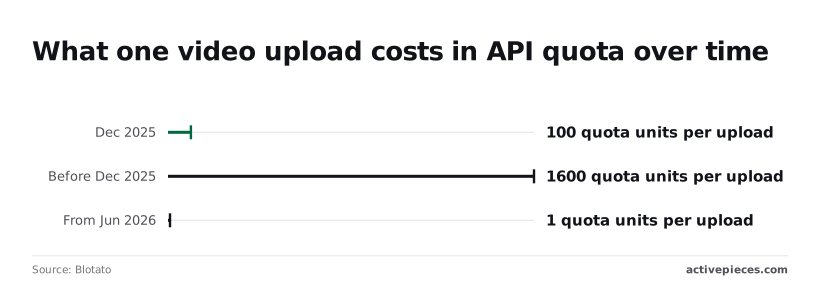
From December 2025 to May 2026 it cost 100 units, which allowed about a hundred.
From June 2026 it costs 1 unit, so quota stops being the upload constraint. If a guide tells you to batch uploads to save quota, it predates the change.
Authorise the YouTube Data API with OAuth scopes
Configure the OAuth consent screen, then create an OAuth client ID. A desktop-app client is enough for a script that runs under your own login. Request only the scopes you need: youtube.upload for publishing, and youtube.force-ssl for reading and moderating comments.
If you ask for the broad youtube scope when you only upload, the consent screen is harder to approve and a leaked token has more power than it should.
Keep the refresh token somewhere safe. If your consent screen is still in "Testing" status, Google expires that token after seven days, and a scheduler that worked on Friday fails the following week with an invalid_grant error.

Upload a video and read comments
Call videos.insert with the video file and a snippet and status body. Set privacyStatus deliberately.
There's also an audit requirement: videos uploaded through an API project that hasn't passed Google's compliance audit are locked to private.
So a script can succeed, return a video ID, and publish nothing anyone can watch. Submit the audit before you promise a client a publishing schedule.
For reading, commentThreads.list takes a videoId and returns top-level comments with their replies attached. A list call costs 1 unit, so even at the default quota you can poll comments thousands of times a day.
Use pageToken to page through results instead of re-fetching, and store the last comment ID you saw so a nightly report counts only what is new.
Once uploads and comment reads work, wrap them in a scheduler and a log. The log matters more than the script, because quota and audit failures show up there first.
YouTube automation limits, errors and fixes
When a YouTube automation fails, it is nearly always one of a handful of errors, and the log names each one in plain text.
The table pairs each error with its cause and the fix that clears it, so you can match a log line to a remedy.
| Error | Cause | Fix |
|---|---|---|
| quotaExceeded | The project spent its daily quota; each API method has its own cost, and writes and searches cost far more than simple lists | Wait for the reset at midnight Pacific time, cut search calls, or file the quota extension form |
| Upload limit reached | The channel hit its own daily upload cap, which is separate from API quota | Wait, and verify the channel by phone to raise the cap |
| Unverified project locked to private | Videos uploaded through an API project that hasn't passed audit are forced to private | Submit the project for the compliance audit; until then, publish by hand in Studio |
| Token expiry in Testing status | An OAuth consent screen left in Testing issues refresh tokens that expire within days | Move the consent screen to production, then re-authorise once |
| 403 on comments | Missing scope, comments disabled on the video, or the quota cost of the call | Request the full-access scope, check the video's comment setting, then check quota |
They look like bugs in your script, but most of these are account and project states, which is why retrying never fixes them.
YouTube Data API quota errors and increases
Reads are cheap. Searches and writes, comment writes especially, burn the budget quickly, because every call your project makes draws on a daily budget and each method draws a different amount.
A scheduler that searches on every run can exhaust the day before it publishes anything.
Replace searches with list calls on known IDs, cache what you fetch, and log the method name beside every failure.
When trimming is not enough, the extension request goes through Google's audit and compliance form, and it asks you to describe the use case and show it follows the API terms.
YouTube API authorisation and token errors
When a job authenticates fine for a week and then fails overnight, it is almost always the Testing status on the consent screen. Tokens issued in that state lapse quickly, so the script stops working without any change to your code.
Publishing the consent screen fixes it.
If you see a 403 on comments, check the scope list before you touch the code, because the call needs a broader scope than a read-only token carries.
Upload restrictions on unverified projects
On an unverified project, an upload can succeed and still produce nothing public. The video appears, locked to private, and the API reports success.
The audit is the fix, and nothing in your code can substitute for it. The separate upload limit reached error belongs to the channel, not the project, so passing the audit won't clear it.
On an unverified project, an upload can succeed and still produce nothing public. The video appears, locked to private, and the API reports success.
Frequently asked questions
Yes, automation through the official API is allowed, provided you follow the API Services Terms of Service and YouTube's policies.
What gets channels penalized is the outcome, not the tooling: inflating views, likes or subscribers, or posting spam. Scheduling, publishing and reporting are all on the permitted side.
You can auto-reply to comments, since the API can post replies, but a reply that reads like a template is the quickest way to look like spam. Each write also draws on your daily quota.
Automate the triage by sorting and flagging comments, and have a person write the replies that matter.
Can I automate YouTube Shorts uploads?
Yes. There's no separate Shorts endpoint, so you upload through the same video-insert call as any other video.
YouTube treats a video as a Short based on its format, meaning a vertical or square frame and a short duration, not on a flag in your request.
If your project hasn't passed verification, uploads may be locked to private, so check that before debugging your video files.
Is the YouTube Data API free?
Yes, there's no charge for using it. The limit is a daily quota allotment per project, and every call spends some of it.
Uploads cost the same 1 unit as a read but have their own 100-a-day bucket, so a script that is cheap to run for reporting can still hit the upload cap fast if it publishes.
If you need more, you apply for an extension, and that review is where many projects stall.
Do I need to code to automate YouTube?
Not for the basics. YouTube Studio schedules videos natively, and no-code workflow tools can connect to the API for publishing and reporting. You do need code, or a developer, once you want custom logic: your own reporting layout, bulk edits to metadata, or conditional publishing.
Pick the lightest tool that covers your task, and move to code only when the lighter one visibly can't.
Related reading
References
Build it
Set this up in minutes.
No code required. Connect your accounts, and Activepieces runs it from there.
Start free Talk to sales