AutoCAD Pricing 2026: LT vs Full Cost Per Year

Nov 5, 202614 min read
According to DraftSight, Autodesk AutoCAD costs $2,095 per seat per year, or $260 if you pay month to month, while AutoCAD LT costs $540 a year, a gap that matters most to teams who, like those wiring up routine hand-offs with Activepieces, count every recurring cost.
Digitalengineering247 reports that monthly billing on full AutoCAD runs $3,120 over twelve months, so paying by the month costs you about $1,025 more.
AutoCAD is Autodesk's drafting software for 2D and 3D technical drawings, saved in the DWG file format.
Every current plan: price, billing term and limits
Read the table and LT is the cheap entry, full AutoCAD costs nearly four times as much per year, and the AEC Collection is a different class of purchase.
| Plan | Monthly price | Yearly price | 3-year price | Caps and exclusions |
|---|---|---|---|---|
| AutoCAD LT | $70 | $540 | Not listed | 2D drafting only; no specialized toolsets |
| AutoCAD | $260 | $2,095 | $6,285 | 2D and 3D; includes the specialized toolsets |
| AEC Collection | Not listed | $3,675 | Not listed | Architecture bundle priced per seat; yearly billing only |
The three-year AutoCAD price works out to $2,095 a year, so it saves nothing against a single year. Commit to three years only if you need the price locked.
Set against other design tools, Autodesk and Rankite put SketchUp Pro at $399 per seat per year, which is under a fifth of AutoCAD. According to Autodesk and Rankite, Fusion is $680, so it costs about a third of AutoCAD.

Per Autodesk, AutoCAD sits at $2,095, and Revit is $3,005, so building-information modeling costs roughly $900 a year more than AutoCAD.
As of 5 November 2026, the prices above are Autodesk's published list prices, in US dollars. Regional prices, taxes and reseller discounts will change what you actually pay.
AutoCAD pricing for solo drafters, teams, and companies
Those local adjustments nudge every bill, but the plan you choose and how long you commit move it much further, as three typical buyers show.
Check Autodesk's pricing page for your region and use the arithmetic below.
Solo creator on AutoCAD LT
If you mostly produce 2D plans, details and permit drawings and you buy full AutoCAD, you are paying for features you never open. AutoCAD LT is the lighter edition, built for 2D drafting.

For one person, the bill is one seat multiplied by the term you pick.
Paying month to month costs the most per year, and the annual plan costs less for the same software. A multi-year term, where Autodesk offers one, locks in today's price for three years.
If your workload is uneven, the flexibility of monthly may be worth the premium. If you draw every week, it isn't.
AutoCAD vs LT for a five-person studio
Rarely does a studio need full AutoCAD on all five desks. Usually one or two people do 3D work, scripting or specialized toolsets, and the rest draft and mark up.
Put full AutoCAD on those one or two desks and LT on the others.
Doing nothing about this, and buying five full seats by default, pays the higher rate three or four times for features nobody touches, so the premium cost becomes part of the baseline budget.

Add up each seat at its own rate, then apply the term discount to the whole.
Twenty-seat company on full AutoCAD
At twenty full seats, small differences compound. A modest gap between monthly and annual billing, multiplied by twenty and then by the years you stay, becomes real money.
Before renewing, count who actually opens the software each week. Seats that sit idle cost the same as seats in daily use, and trimming even a few of them beats most discounts.
If you are running this arithmetic for your own team, see what the same workload costs on Activepieces.
Hidden costs and limits buyers hit after purchase
Beyond idle seats, the most visible leak, four other costs sit outside the price on the page: missing LT features, named-user rules, renewal increases, and add-on and hardware requirements.
Seats that sit idle cost the same as seats in daily use, and trimming even a few of them beats most discounts.
Buy LT and you give up 3D modelling and programming interfaces, but you keep LISP routines (small scripts that automate repeat drawing tasks).
If a colleague's workflow or a plug-in depends on any of those, you find out after buying LT, and the fix is paying again for full AutoCAD.
Passing a login around to cover shifts or part-timers breaks the terms, because a subscription belongs to one named person, not to a desk. The safe fix is another seat. Count people who actually draw, not people who might.

That is per-seat pricing doing what it does: every added person becomes a charge, so licences go to a few and everyone else waits.
Activepieces charges for use instead, in credits, with one credit per run however many steps it has and unlimited flows on every plan including free, and Alan and Funding Societies run it in production.
Unless you cancel, subscriptions renew on their own, and the renewal price can be higher than what you first paid.
Do nothing and you'll pay the new rate for another full term. Put the renewal date in the calendar well ahead of time and re-check the plan then.
AutoCAD add-on, storage and hardware costs
Specialised toolsets and extra cloud storage cost more on top of the base plan, so a plan that looked cheap can grow quickly.
Newer versions also expect reasonably current computers, and files saved in a recent version may not open for a client or subcontractor on an older one. Budget for a machine upgrade or a round of save-as conversions before either surprises you.
AutoCAD against its closest DWG-compatible alternatives
Only two alternatives undercut AutoCAD LT's [$540 a year], which means cost-conscious buyers face a nearly empty market for cheaper CAD. They're DraftSight Pro at $299 and ZWCAD Standard at $405.

The other tiers cost the same or more, so "cheaper" depends on which tier you need.
| Product | Licence model | Entry yearly price | 2D/3D | DWG | LISP/API | Best fit |
|---|---|---|---|---|---|---|
| AutoCAD LT | Subscription | $540 | 2D | Native | LISP | Drafting-only offices |
| AutoCAD | Subscription | $2,095 | 2D and 3D | Native | LISP and API | Teams needing 3D or custom add-ons |
| BricsCAD Pro | Subscription or perpetual | $780 | 2D, some 3D | Yes | LISP and API | Teams wanting 3D without Autodesk |
| DraftSight Pro | Subscription | $299 | 2D | Yes | LISP | Lowest-cost 2D seat |
| ZWCAD Standard | Subscription or perpetual | $405 | 2D | Yes | LISP and API | Budget seats with scripts to keep |
At $780, BricsCAD Pro costs $240 a year more than LT, so you pay for 3D, not for a discount.
If your drawings are flat plans, details and markups, LT's $540 buys the real thing, with no file-translation risk when a client sends DWG. Pick it when most of your outside files come from AutoCAD users and you don't need 3D.
When a cheaper AutoCAD alternative makes sense
If you draw in 2D and your scripts are simple, DraftSight Pro's $299 saves $241 a year per seat against LT. Across five seats that's $1,205 a year.
DraftSight Premium at $599 and ZWCAD Pro at $630 both cost more than LT, so choose them only for the extra features, not to save money.
Test your own LISP routines in a trial before you switch, because that's where compatibility gaps usually show.
Worth checking against a plan that does not meter every step: one credit covers a whole run on Activepieces.
Cutting AutoCAD costs without losing features
Start with the cheapest saving: matching each seat to the work it really does. Your LISP trial already tells you which seats need full AutoCAD and which could drop to LT.
The levers below are ordered roughly by how much they save against what they cost you in flexibility.
- Annual or multi-year billing costs less per month than paying month to month, but you owe the whole term even if work dries up, so commit only for seats you're sure you'll keep.
- LT on some seats suits people who draft and mark up but never run custom routines. It supports LISP but lacks APIs and third-party connections, so anyone who depends on those stays on full AutoCAD.
- A collection, which bundles AutoCAD with other Autodesk tools, pays off only if three or more of those tools get used. Otherwise you're paying for software that sits idle.
- Reassigning named seats means that when someone leaves, you move their seat to the replacement instead of buying another. It takes some admin, and a named seat belongs to one person at a time, so it won't cover people who alternate days.
- Education or startup eligibility can cut the cost sharply or remove it for a while. Those programs usually limit commercial work or run out after a set period, so read the terms before you build a project on them.
- Reseller quotes can include volume or bundle terms you won't see on the public price page. The trade-off is time spent comparing quotes, and you may end up dealing with the reseller instead of Autodesk for support.

Add up only the levers that fit your headcount and work, because stacking a long commitment on seats you may cut is how a saving turns into a bill.
Automate AutoCAD subscription admin with Activepieces
Although Activepieces won't touch your drawings, it can take over the paperwork around your AutoCAD subscription. It's an open-source tool that chains everyday apps into automatic workflows, and it pays off mainly once you have ten or more seats.

Below that, a calendar reminder and one shared spreadsheet do the same job for free, so don't buy tooling you don't need.
Do nothing and you hit the cost the last section warned about. A renewal date slips by, a long commitment rolls over on seats someone already stopped using, and you pay for the year before anyone notices.
Nobody was careless; the date just lived in one person's inbox.
Three jobs are worth handing to a workflow:
- Renewal reminders that email the person who owns the budget well before the term ends, so there's time to cut seats instead of auto-renewing them.
- Seat requests that go to a manager for a yes or no, so a new license isn't handed out because someone asked in a hallway.
- Spend logging that writes each seat and its cost into a sheet, so you can see who holds a license and whether they still use it.
To see how plain this is, look at the workflow below. It's a weekly feedback summary, not an AutoCAD one, but the integrations are the same ones you'd use.
A schedule fires every Monday at 10 am UTC, a Google Sheets step pulls the next row, an AI step reads it, and a Gmail step sends the result, with a loop to repeat it for each row.
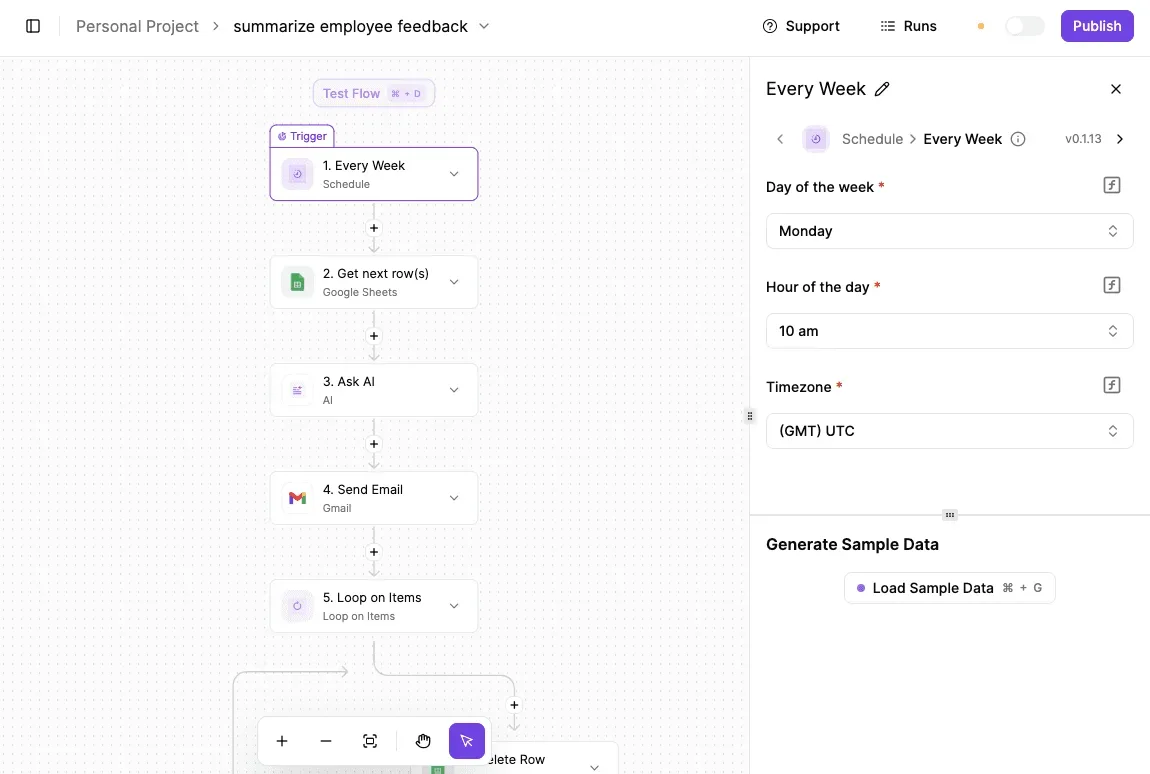
Swap the sheet for your seat list and the email for a renewal notice, and you have the reminder job.
Once the trigger and sample data are set, the work left is deciding who gets the email and who approves a request. That's the part that saves you money, because a rule written down gets followed, while a habit gets forgotten.
The Monday checklist before buying or renewing AutoCAD
Put it on paper as these six steps, done in this order, so you don't have to reconstruct the sequence from memory.
- List who needs 3D modeling or LISP. LISP is the scripting language some offices use to automate repetitive drawing tasks. Write down names, not departments. Anyone not on that list is a candidate for AutoCAD LT, and guessing here means paying full-plan rates for people who draw flat plans.
- Count seats. Count the people who open the software in a normal week, not everyone who ever has. An inflated count gets billed every month and goes unnoticed.
- Re-check Autodesk's pricing page and record the date. Prices and plan terms change, so a figure from an old article or an old invoice is a guess. A dated note lets you tell later whether the price moved or your memory did.
- Get one alternative quote. Ask a DWG-compatible tool's maker, or a reseller, for a written price for the same seats. Even if you stay with Autodesk, you now know what the choice costs.
- Pick the billing term. Compare the monthly and yearly totals for your seat count. A longer term usually costs less per month, but it locks you in if the team shrinks.
- Set a renewal reminder 60 days ahead. That leaves time to repeat steps two through four before the renewal date arrives, instead of renewing by default because nobody had time to check.
Finish all six and you have a short file:
- Who needs what
- The seat count
- A dated price
- A competing quote
- A chosen term
That file is what you take to the purchase, and next year it's what you update instead of starting over.
Frequently asked questions
Once the file is in hand and the purchase is close, these are the questions that come up.
Is there a free version of AutoCAD? No permanent free version exists for commercial work.
Autodesk offers a time-limited trial, so use it to test your real drawings before paying, not to run a job. Anything you produce for a paying client belongs on a paid plan.
Can I still buy a perpetual AutoCAD licence? Not new ones from Autodesk. It sells AutoCAD and AutoCAD LT by subscription only.
If you already own an old perpetual licence, it keeps working on the version you have, but it no longer gets the updates a subscription does. So budget for a recurring bill, not a one-time purchase.
Does AutoCAD LT include the web and mobile apps?
Yes, a current LT subscription includes access to the AutoCAD web and mobile apps, which are handy for checking or marking up a drawing away from your desk.
They're lighter than the desktop program, so treat them as a way to view and make quick edits, not as a replacement. Confirm the details on your plan page before you rely on them in the field.
Can students or educators get AutoCAD for free? Yes, if you qualify. Autodesk gives eligible students and educators free educational access after they verify their status.
It's for learning and teaching only, and files made under it are marked as educational. If a student starts taking paid work, they need a commercial plan.
What happens to my files if I stop paying for AutoCAD?
Your drawings stay yours, and the DWG format doesn't lock you out of them. What you lose is the ability to open and edit them in AutoCAD itself.
Other DWG-compatible programs can open them, so the cost of stopping is a change of tool, not lost work. Keep a copy of every active project outside the software before you cancel.
Related reading
References
Running the numbers
See what the same workload costs here.
Free forever plan, and every paid plan self-hosts at no extra cost.
See pricing Talk to sales