
Automate Exa 3.0 with an AI Agent (2026 Guide)

Nov 12, 202617 min read
Choose the lowest tier that survives a week of your real scheduled traffic, whether that traffic comes from cron-style jobs or from flows built in a tool like Activepieces: an entry tier for one person, a paid self-serve tier for a small team, and a sales conversation once SSO or volume enters the picture.
Before budgeting, check exa.ai/pricing yourself.
Read the last column first. Upgrades are almost always triggered by a cap or a locked feature, not by the setup. The table shows the four situations, the kind of plan each lands on, and the limit that pushes you up.
Which Exa plan fits you
| Situation | Exa plan | Monthly cost (exa.ai/pricing, checked 2026-11-12) | The catch that forces the next tier |
|---|---|---|---|
| Solo | Entry or free tier | Not published here | Request allowance runs out once a schedule fires unattended |
| Team of 5 | Paid self-serve tier | Not published here | One shared key and one shared rate limit across every job |
| Team of 25 needing SSO | Business or enterprise tier | Not published here | SSO and admin controls are a tier feature, so a quote replaces self-serve |
| Heavy API volume | Usage-based or custom agreement | Not published here | Rate limits and per-request cost grow faster than headcount |
Treat the table as a map of where failures show up, then test each row before trusting it.
What fails at each size
Monday looks fine. By Thursday the scheduled job returns nothing, because the allowance ran out silently.
That is the risk for a solo user or a first test, where one key and one working search request is enough.
Run the schedule for several days in a test project and watch the error responses before you rely on the output.
A team of 5 sharing one key
When two jobs fire at the same minute, they can throttle each other.
On a team of 5 running scheduled jobs, you usually have several jobs sharing one key, and the shared rate limit is the failure point.
You don't hire for this, you describe it: tell the built-in chat in Activepieces which jobs share the key and how far apart they should fire, and it publishes live flows in your account, the same ones a builder would have assembled by hand, under the same RBAC and audit logs as everything else on the platform.
Each run leaves a trace with the input and output of every step, so when two jobs collide on the rate limit, anyone on the team can open the run and read what happened, no certification required.
Stagger the schedules, and reproduce the collision in a test environment before it hits production.
A team of 25 needing SSO
For a team of 25 needing SSO or admin controls, key sprawl and offboarding become the problem. If SSO or admin controls sit on a higher tier, a self-serve plan won't cover you however much budget you have.
Ask for the tier's feature list in writing, and confirm those controls exist before you migrate anyone.
Heavy volume or API-first use
For heavy volume or API-first use, cost per request and rate limits matter more than seat count. Parameters that return more results or more page content raise the bill per call, so a loop that looked cheap in testing can grow quickly at scale.
Cap results per request, log every call, and get volume terms confirmed before launch.
This takes minutes, not a project: automate it in Activepieces free.
API key search and output setup
Each stage leaves one working thing behind:
- a key that authenticates
- a request that returns results
- a file or row that holds them
Skipping the check between stages is how a failure at stage 1 gets reported as a broken scheduler at stage 3.
Start at stage 1, the API key: create it in the Exa dashboard, copy it once, and store it in your scheduler's secret store rather than in the workflow body.
The check that it works is stage 2 returning a 200. A 401 there means the key was pasted with a trailing space or sent in the wrong header, not that Exa is down.
Stage 2: Send one search request
Send a POST to https://api.exa.ai/search with the key in the x-api-key header and a JSON body containing query, type and numResults.
There's no separate 3.0 URL, because Exa 3.0 is the current search model behind that same endpoint. Confirm the exact type values against the current Exa docs before you hardcode one. Run it once by hand, with numResults set low, before any scheduler touches it.
One thing makes the type value matter: the options aren't equal on quality. On the Search Index that Artificial Analysis publishes, Keenable pro scores 83 and Keenable realtime 82.

According to Artificial Analysis, Exa auto scores 80, level with Perplexity medium at 80. Exa lite scores 79, level with Perplexity high at 79.
Read those numbers as a narrow band. Auto sits three behind the leader. Lite gives up one point against auto.
For a nightly job that runs thousands of queries, that one point is a reasonable price for the cheaper setting. For a job where a missed source gets someone's attention, start with auto.
Either way, run your own twenty queries first, because an index score isn't your queries.
Save Exa search results as raw JSON
Write the response to storage before you do anything else with it. Save the raw JSON, the query string, the type you sent and a timestamp. Parse it afterwards.

Without the raw response, the first time a downstream step breaks on an unexpected field you have nothing to replay. You'll spend a day re-running searches you already paid for. With it, you fix the parser and re-run from disk.
Check the saved file for a nonzero result count before the workflow reports success. An empty result set returns a clean 200 and looks like a pass when nothing was found.

Scheduling and Chaining Exa Results
Before this runs unattended, it needs three additions, each of which must fail loudly. They are a trigger, a hand-off to the next system, and a record of what it has already seen, because an empty result looks like a pass.
** An empty result set returns a clean 200 and looks like a pass when nothing was found.
Pick the scheduler by how you'll find out it broke, not by how quickly you can set it up. That is stage 4, the schedule trigger.
| Option | Setup time | Cost | Failure visibility |
|---|---|---|---|
| Cron entry running a script | Shortest if you already have a server | Only the host | Weakest: a failed run leaves whatever you chose to log |
| Workflow tool | Short, built in a visual editor | Usually a plan or hosting fee | Strongest: run history shows each step |
| Serverless function on a timer | Longest: deploy and permissions first | Billed per invocation | Middle: platform logs, alerts only if configured |
Nothing tells you when the cron script dies on a rate-limit error, until someone asks why the feed went quiet. That is why the row is cheap: it hides failures. Log the status code on every run.
At stage 5, the hand-off, pass only the fields the next system uses, usually title, URL and a snippet, rather than the raw response.
Check the response of the downstream call as well. A webhook that rejects your payload still lets the Exa call succeed, so the run'll look healthy while nothing arrives.
Dedupe and log scheduled Exa runs
Run a search on a schedule and it'll return the same pages repeatedly. Without a seen-list, the next system processes each one again, and a ticket queue or email digest fills with duplicates. The result URL works as the ID.
Keep the list in a file or a small table, and write a log line for every run that includes how many results came back and how many were new.
That line also separates a quiet night from a broken one, which the empty 200 can't do.
Build the loop in this order and test each step before adding the next:
- Add the cron entry (or the workflow trigger) that runs the search call.
- Pass each result to the next system and confirm the downstream response.
- Store each result URL as a seen ID after the hand-off succeeds.
- Skip any URL already in the seen list on the next run.
- Leave it unattended overnight and read the log in the morning.
Because the ID is stored only after the hand-off succeeds, a failed delivery is retried on the next run instead of being marked done and lost.
The overnight run is the first point where rate limits and cost start to matter, because the schedule now spends your quota without you watching.
You can follow the rest of this with the builder open. Start free, no card.
Exa 3.0 Limits and Errors With Fixes
Left unattended, an Exa 3.0 run can fail in four ways, so build in checks before you rely on it. The failures are a 400, 401, 402 or 429 status, or a search type that costs more than the schedule assumed, and they occur without immediate notice.
In the table, each cause and fix is listed along with whether I could verify it. I found no citable source for any row, so all are unverified and should be reproduced in a test run before you rely on them.
| Code or limit | Cause | Fix | Source | Status |
|---|---|---|---|---|
| 400 | Malformed or out-of-range request parameter | Validate the body before sending | None cited | Unverified |
| 401 | Missing or wrong API key | Check the key and header | None cited | Unverified |
| 402 | Likely exhausted credits or billing | Top up, then rerun | None cited | Unverified |
| 429 | Rate limit exceeded | Back off and retry | None cited | Unverified |
| Rate limits | 10 QPS on /search, 100 QPS on /contents, 10 QPS on /answer | Throttle each endpoint separately | None cited | Unverified |
| numResults | Default 10, maximum 100 | Set it explicitly | None cited | Unverified |
Look at the last two rows first, because most failures come from them, not the setup.
Fixing common Exa API errors
When a 401 shows up on the first scheduled run, it usually means the key never reached the scheduler's environment, though it worked in your terminal. Store the key as a secret in the scheduler itself, then log the status code, never the key.
At 10 QPS on /search, a 1,000-query batch fired at once needs at least 100 seconds, so anything faster returns 429s.
Retry with exponential backoff and a little jitter, and cap the attempts so a stuck job ends instead of burning quota.
Treat the 402 as a stop signal, not a retry case.
When a 400 appears, look at numResults first, since it often traces to an unchecked value.
The default is 10 and the cap is 100, so asking for more is an error, and asking for 100 when you use 10 buys content you pay to fetch and discard.
Exa 3.0 search type cost per run
Choose the search type carefully, because it sets both the bill and the timeout.

At Mux's figures, Lite costs $4 per 1,000 requests, Auto and Fast $7, and Deep $12. A nightly 1,000-request run therefore costs $8 more on Deep than on Lite, every night, which totals roughly $2,920 per year.
Cheaper also means faster here: latency follows the same order. doccraft.dev measured p50 latencies of 746 ms for Lite, 1,732 ms for Auto and 4,850 ms for Deep. Deep is about 6.5 times slower than Lite at the median.
With a 5-second client timeout, you sit almost on Deep's median, and roughly half of those calls would be cut off and retried, so you pay again for the same query.

Set timeouts well above the p50 for the type you chose, and use Deep only where the extra depth changes the result.
Run Exa 3.0 searches with Activepieces
Put Activepieces between your schedule and your storage.
A Schedule trigger starts the run, one step calls Exa, and a storage step writes the result, so every run leaves a trace you can read without writing a scheduler yourself, and unlimited flows are included on every plan, the free one too.
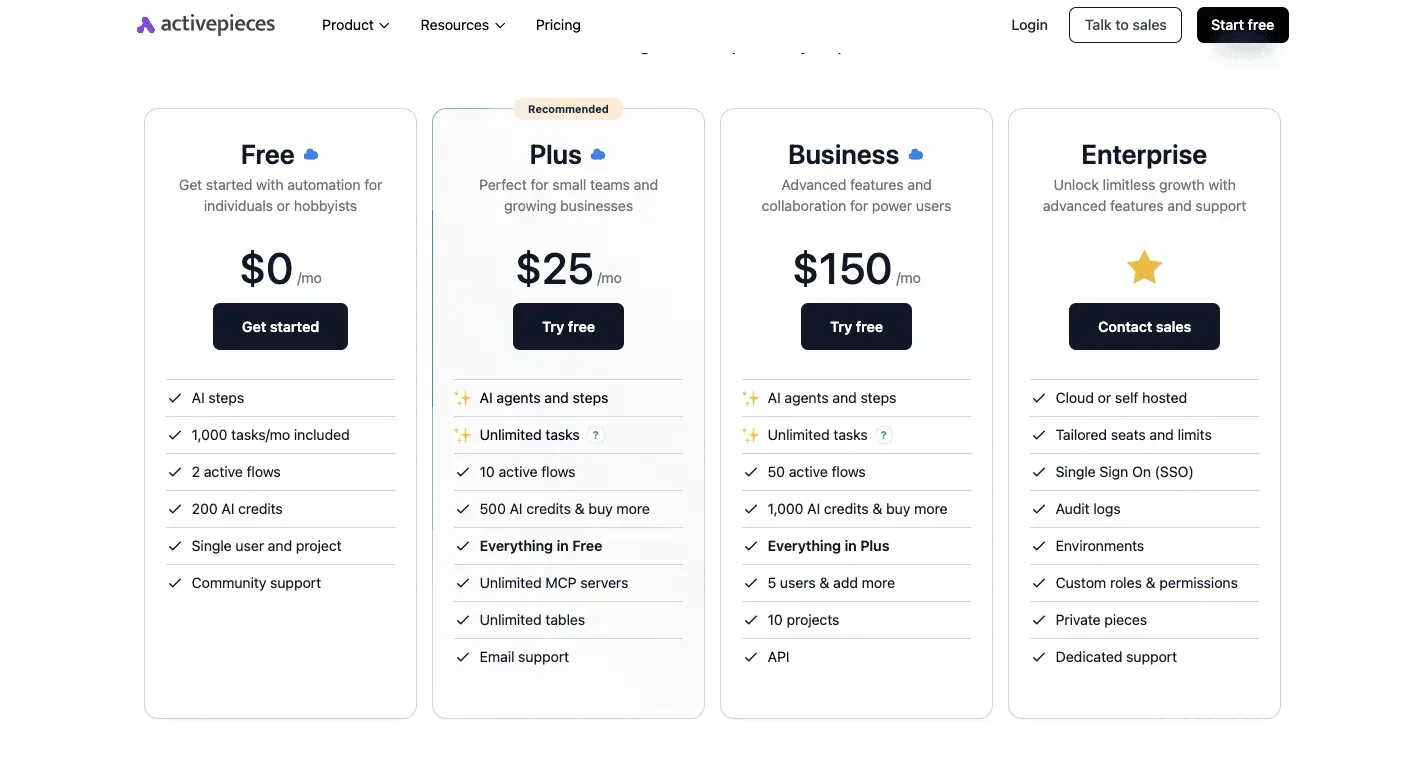
Chain length doesn't change the Activepieces bill: a run is 1 credit however many steps it has, and the free plan includes 1,000 credits a month, though an Ask AI step on a fast model costs 2.
I still wouldn't trust any of it until one run has completed in a test flow.
Build the workflow
When the sheet stops updating, the cause is usually a step that was never tested, not the schedule. Build it in this order and test each step before adding the next:
- Add a Schedule trigger set to Every Week, or whatever cadence your rate limit and budget allow. Start slower than you think you need.
- Add the Exa step. If the integration doesn't expose the parameters you set earlier (search type, timeout, result count), use an HTTP request step instead and send your API key in the header as you did in your first working request. Copy the body from that request rather than retyping it.
- Add a Google Sheets step to hold results. Here Google Sheets is simply the storage: Find Rows checks whether a query or URL is already recorded, and Add Row appends the new result.
- Optionally add an Ask AI step to summarize the output before it is stored.
In the screenshot below, a four-step version of this flow has the Find Rows step selected and its panel open.
The Search Value field holds {{step_2['output']}}, which is how a later step reads the output of an earlier one, and the Starting Row is set to 2 so the header row is skipped.

Take from it that every step reads its input by reference, so if step 2 returns nothing, step 3 searches for nothing and reports no error.

That reference is why the next section matters: a failure in one step can look like a success downstream.
Handle failed runs
When a run fails, Activepieces keeps a run history, and each run shows its steps with the input and output of every one. MoneyGram, Moneypenny, Alan and FundingSocieties run it in production.

Open a failed run, find the first step whose output is wrong rather than the last one that errored, and check the request parameters there. Rate-limit responses and oversized requests show up in that step's output.
After fixing the cause, retry the run from the failed step instead of restarting the whole flow, which avoids paying for the earlier Exa call a second time.
Use the error handling section on each step deliberately. Letting a flow continue past a failed Exa call is how empty rows get written.
When you have one search, one destination and a cron entry already available to you, a single script is enough.
Reach for Activepieces when you need visible run history, retries from a failed step, or teammates who must edit the flow without touching code; the core is MIT-licensed and ships with 747 integrations, so the Sheets step above is one of many possible destinations.
Frequently asked questions
Is there an official Exa 3.0, or is it a model version name?
Exa 3.0 is Exa's own announced release, so there is no need to treat it as an unverified label. What your job sends is a request with an API key and parameters, and those parameters decide behavior and cost.
Before you build, read the vendor's changelog and note the date you read it. If the name doesn't appear there, pin your request to the parameters you tested, not to the version label.
Can I automate Exa without writing code?
Yes, if your scheduler or workflow tool can send an HTTP request with a custom header and a JSON body. Create the API key once in Exa's dashboard, store it in the tool's credential store, and configure one request step.
Expect a silently malformed body to be the first failure, where the tool reports success while Exa returns an error. Run the step by hand and read the raw response before you schedule it.
Does Exa have a free tier I can automate on?
Check Exa's pricing page on the day you build, because free allowances and their limits are the part of a vendor page most likely to change. Don't assume that a free allowance covers a scheduled job.
A job that runs unattended will find the ceiling faster than you will. Make the workflow stop and alert on a limit response instead of retrying in a loop, and record the date you read the page.
How do I stop an automated Exa job from overspending?
Cap what each request can ask for, then cap how often it runs.
Keep the result count and any content-retrieval options at the minimum your downstream step actually uses, since those parameters usually drive cost. Next, set the schedule to the slowest interval that still serves the purpose.
Then log every call with its parameters so a bill can be traced to a request. If the dashboard offers spending limits or usage alerts, turn them on before the first scheduled run.
Test all of this in a throwaway workflow with a deliberately small cap, and only then promote it.
Where do I check whether Exa's limits have changed?
Use the vendor's own pages: the pricing page for rates and plans, the documentation for rate limits and request parameters, and the changelog for announced changes. Your account's usage view shows what you have actually consumed.
Don't rely on a blog post or a cached answer, including this article.
When a scheduled job starts failing without a change on your side, compare the date of your last verified read against the changelog first. A quiet limit change is a more likely cause than a broken setup.
Build it
Set this up in minutes.
No code required. Connect your accounts, and Activepieces runs it from there.
Start free Talk to sales