AWS Amplify Pricing: Free Tier and Costs (2026 Guide)

Nov 19, 202613 min read
Amplify's pay-as-you-go pricing and free tier
How AWS Amplify pricing works in 2026
You pay only for what you use. Amplify has no monthly plan fee, and a free tier absorbs small projects, much like the way Activepieces lets teams start without a bill.

That means your bill is the sum of meters, not a subscription you can read off one line. Amplify here means two things: hosting, which builds and serves your front end, and the backend tooling, which provisions separate AWS services on your behalf.
Before you copy any number into a budget, confirm the AWS Amplify pricing page for the region where your data must stay. The structure below follows that page as of 19 November 2026, and rates and free-tier allowances change and differ by region.
Pricing table: every meter, rate, free tier and limit
I haven't reproduced figures I couldn't verify against the page today. The table lists each meter, and the "confirmed on page" column says whether I could stand behind a number.
Where it says no, read the rate and free tier from the linked page rather than from memory.
| Meter | Free tier | Rate | Unit | Confirmed on page |
|---|---|---|---|---|
| Build minutes, Standard | See pricing page | See pricing page | Per build minute | No |
| Build minutes, Large | See pricing page | See pricing page | Per build minute | No |
| Build minutes, XLarge | See pricing page | See pricing page | Per build minute | No |
| CDN storage | See pricing page | See pricing page | Per GB stored | No |
| Data served | See pricing page | See pricing page | Per GB transferred | No |
| SSR requests | See pricing page | See pricing page | Per request volume | No |
| SSR duration | See pricing page | See pricing page | Per compute time | No |
| WAF | Not free | See pricing page | Per web ACL and rules | No |
You control build size more directly than anything else here. Larger build machines cost more per minute and only pay off if they shorten the build enough to offset the rate.

What Amplify bills for and what it does not
There is no seat fee and no flat plan charge. Amplify bills for builds, stored and served content, server-side rendering and the optional firewall.
Services that the backend tooling creates, such as databases, authentication and storage, appear on their own AWS line items under their own pricing.
That split is why the Amplify page alone understates the total.
If you are running this arithmetic for your own team, see what the same workload costs on Activepieces.
Monthly Amplify bill at three realistic site sizes
Traffic sets the bill, not any plan.
For a small marketing site at 10K monthly visitors, a mid-traffic SaaS front end at 100K and a high-traffic SSR app at 1M, the three worked figures below come from CodeWithMuh's Amplify cost calculator.

Read the monthly totals of $0, $5.25 and $27.75 as a slope, not three separate prices. According to Codewithmuh, the bill rises about fivefold from 100K to 1M visitors, so a tenfold traffic jump doesn't mean a tenfold cost jump.

Amplify cost for a small low-traffic site
At 10K visitors a month the calculator puts the bill at $0. That means a brochure site with occasional deploys sits inside the free allowances Amplify gives new accounts in the first year.
Amplify cost for a mid-size SSR app
At 100K visitors the same calculator gives $5.25 a month. The jump from $0 is where the free allowances stop covering you, and the extra is spread across the meters rather than being one large charge, meaning costs are traceable to specific resources.
When you deploy daily, build minutes pile up, and server-side rendering adds request and compute charges that a static site never incurs.
High-traffic app: where data transfer dominates
At 1M visitors the total reaches $27.75 a month. That's still small in absolute terms, though more than five times the 100K figure.
Every page view moves bytes out to the visitor, so at this size data served is the meter that grows fastest. Compressing images and caching aggressively cut that line directly.
Amplify charges and limits that surprise teams
Once traffic leaves the free allowance, the bill picks up five extra lines, and each one has a guardrail:
- Data out beyond 15 GB a month: set a transfer alert before launch.
- Server-side rendering (SSR) compute: render static pages wherever you can.
- Managed WAF (web application firewall): price it before you switch it on.
- AppSync, Cognito, Lambda, DynamoDB and S3, each billed separately: tag them so they're visible.
- Pull-request previews: delete them on merge.
Data transfer and SSR compute
Pages rendered on the server also bill compute for each request.
Look at the WAF, the clearest case. Under AWS's WAF pricing, the Amplify integration is $15 a month and one Web ACL (the rule container) is $5.
On a small site that comes to $30.60 a month once rules add $10 and requests $0.60, making WAF a material expense even for minimal deployments.

That's a fixed charge, however little traffic you have. If your obligation is appropriate security under GDPR Article 32, it's a cost to plan for, not to avoid.
Backend services billed separately from Amplify Hosting
Amplify Hosting itself isn't the database. AppSync, Cognito, Lambda, DynamoDB and S3 each arrive on their own line.
On the Amplify pricing page, 1 TB comes to $23.55 a month on Amplify Hosting and $23.55 on S3 Standard, so file storage is cheap.

The same terabyte in DynamoDB is $256 a month, nearly eleven times as much, so database costs dominate what you allocate for security. Keep bulk data in S3 and put only records you query in DynamoDB.
Previews, build time and quotas
Open a pull request and you get a full build with its own hosted copy. Build minutes and storage grow with the number of open pull requests, and abandoned branches keep costing.
Enable previews only for branches that need review. Check the service quotas in your AWS account before a launch, because a ceiling you meet on release day is a failed deploy.
Create an AWS Budgets alert at about half your expected monthly spend, and a second at your ceiling. Add a usage alert on data transfer, then tag every Amplify-created resource so Cost Explorer can show the neighbouring services separately.
Worth checking against a plan that does not meter every step: one credit covers a whole run on Activepieces.
Amplify against Vercel, Netlify and Cloudflare Pages
If your team is large, Amplify can suit you, because it charges no per-seat fee; the others fold into a plan what Amplify bills piecemeal.
Exact rates sit on each vendor's own pricing page, so check them before you budget.
Read the plan model and seats columns first, because they decide whether your bill follows headcount or traffic. The table shows how each host is billed, not what it costs.
| Amplify | Vercel | Netlify | Cloudflare Pages | |
|---|---|---|---|---|
| Plan model | Pure usage, no plan fee | Per-seat plan plus usage | Tiered plan with usage limits | Free, with paid tiers through Cloudflare's wider platform |
| Entry price | None; you pay per metered unit | Paid tier is per member | Paid tier is per member | Free to start |
| Free tier | Time-limited allowance for new AWS accounts | Hobby tier, restricted use | Free tier with monthly limits | Free tier with build limits |
| Bandwidth included | Small allowance, then metered | Allowance per plan | Allowance per plan | Static asset delivery not metered |
| Overage rate | Per GB served | Per GB beyond the allowance | Charged beyond the allowance | Not applicable to static assets |
| Build minutes | Metered per minute | Included, then extra | Included, then extra | Capped builds per month |
| SSR/functions | Billed per request and compute time | Metered functions | Metered functions | Priced as Workers |
| Seats | Not charged | Charged per member | Charged per member | Not charged |
| Cheaper when | Many collaborators, bursty traffic | Small team wanting managed Next.js | Small team wanting bundled features | Mostly static, high traffic |
Your real bill depends on how many people deploy and how much server-rendered traffic you serve.
When headcount is the biggest variable, Amplify wins. Designers, contractors and reviewers cost nothing to add, so a ten-person team pays for usage and not for ten seats.
It also suits teams already on AWS: the data stays in a region you choose, which matters when GDPR Chapter V limits where personal data may be processed.
For static sites with heavy traffic, Cloudflare Pages is usually cheaper, since delivering static assets isn't metered.
Vercel and Netlify are simpler for a small team that wants one invoice and no neighbouring AWS services starting quietly in the background. If your bill must be predictable before launch, a per-seat plan is easier to forecast than metered usage.
Checks before committing to Amplify
Run four checks before you commit, in this order:
- Price the app in the AWS Pricing Calculator.
- Set a budget alert.
- Deploy one real app.
- Read Cost Explorer after a week of traffic.
Estimate with the AWS Pricing Calculator
Start with the calculator, AWS's free tool for modelling a bill before you incur it. Enter build minutes, data transfer, and request volume for Amplify itself.
Then add every neighbouring service the app will start, such as storage, serverless functions, a database and authentication, because those usually outgrow the hosting line.
If personal data must stay inside a jurisdiction, that obligation fixes your region before price does, and rates differ between regions.
Model a quiet month, an expected month and a traffic spike, and write down the assumptions behind each.
Amplify budget alerts and cost allocation tags
Create a budget in AWS Budgets and alert on forecasted spend as well as actual spend. The forecast alert fires while there's still time to act.
Apply a cost allocation tag to the app and activate it in the billing console before the first deploy. Tags aren't applied to charges retroactively, so an untagged week can't be separated from the rest of the account later.
Then deploy one real app, leave it running for a week, and open Cost Explorer, AWS's billing report. Group by service, then by tag.
Compare the result with your calculator estimate. The gap between them is your correction factor.
Route deploy and cost alerts to your team
When a build fails or a budget alert fires, Activepieces can take it in through a webhook and forward it to the chat channel or ticket queue your team already watches.
Its free plan allows unlimited flows and 1,000 credits a month, and its published pricing page lists 1 credit per flow run, any number of steps, where Zapier's pricing page bills per task and Make's bills per module, so an alert that fans out to Slack and a ticket is still one credit.
This is optional: AWS emails these alerts natively, and a mailbox nobody reads is the only thing routing fixes.
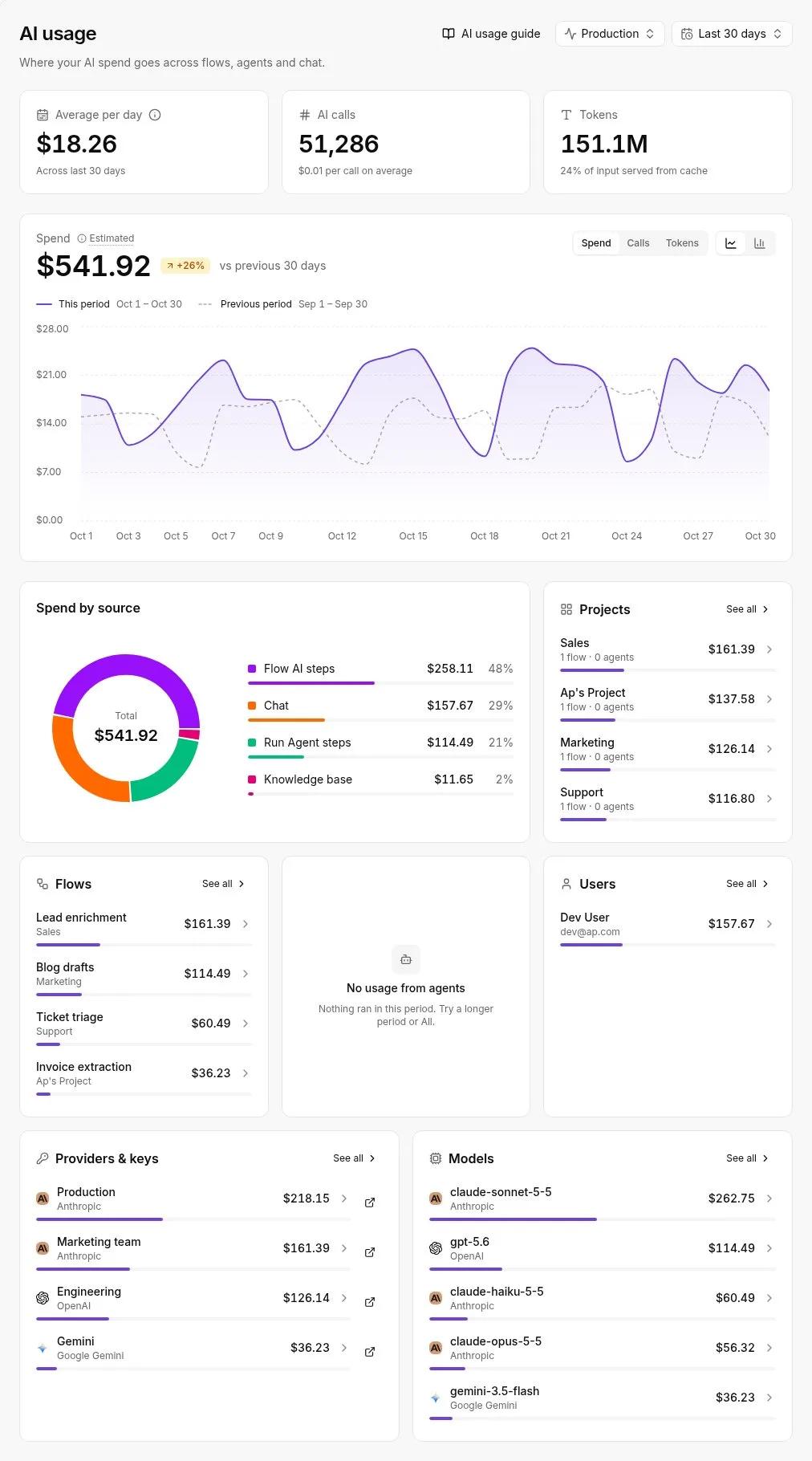
If any step calls an AI model, automation has its own meter. The usage view below breaks that spend down by flow, project, provider and model, which shows you which workflow is responsible when the total moves.
Treat that view as another line in the same budget, and include it when you rerun the calculator.
What Activepieces does about this
Activepieces doesn't change what Amplify charges. It helps with the part of the bill that goes unwatched: a build loop, a preview that never closed, a transfer spike you learn about on the invoice.
A flow can take a budget or build-failure webhook and post it to the channel your team reads, which is the routing step the alerts above need.
The automation meter is easy to predict. The free plan has unlimited flows and 1,000 credits a month, and one flow run costs one credit however many steps it has.
The community edition is MIT-licensed and can be self-hosted, so you can cap that line yourself.
Frequently asked questions
Is AWS Amplify free?
Not as a standing arrangement. Amplify Hosting has no monthly plan fee, but it meters build minutes, data transfer and storage, and a small site can stay inside the free allowance.
That allowance is a usage threshold, not a promise of zero. Once traffic or build frequency passes it, you pay the per-unit rates, and the services Amplify starts beside it are billed on their own terms.
Does the Amplify free tier expire after 12 months?
Treat it as temporary. The free allowance is tied to the age and terms of your AWS account, so check the current conditions on AWS's pricing page rather than relying on a remembered date.
Budget the metered rates from the first day. If the free allowance covers part of year one, you have a cushion, not a baseline, and the bill won't step up in surprising ways once it ends.
Is Amplify cheaper than Vercel?
It depends on what drives your bill. Amplify charges no plan fee and bills for build minutes and data transfer, so it tends to suit teams with modest traffic and several contributors, because adding people doesn't add a line item.
As the team grows, the comparison changes, because Vercel's pricing is organised around plans and seats. Price both with your own build frequency and monthly transfer before you decide. A headline per-unit rate says little about what you'll actually pay.
Can I cap my Amplify bill?
Not with a single switch that stops the service at a ceiling.
What you can do is set AWS Budgets alerts on the account, so a runaway build loop or a traffic spike reaches you by notification before the invoice does.
Pair those with a deliberate limit on how often branches build, and keep preview environments from multiplying quietly.
A budget alert tells you spend is rising; it's your configuration that stops it rising.
Do I pay for Amplify Gen 2 backend separately?
Yes, in the sense that matters for your budget. A Gen 2 backend is assembled from other AWS services, such as functions, a database, file storage and user authentication, and each is billed under its own pricing, not folded into Amplify Hosting.
Those services run in the AWS region you choose, which also decides where personal data is stored and processed. That matters if you have transfer restrictions under GDPR. Choose the region deliberately, then add every backend service to the same budget as hosting.
Related reading
References
Running the numbers
See what the same workload costs here.
Free forever plan, and every paid plan self-hosts at no extra cost.
See pricing Talk to sales