Azure Cosmos DB Pricing: A 2026 Guide to Costs

Nov 5, 202616 min read
Azure Cosmos DB is a cloud database billed on request units plus storage, and it often sits behind workflows built in tools like Activepieces that read and write its data. The capacity mode you pick decides how Azure charges for those units.
The rate card is public, but the bill depends on which row you land in. The person paged when throttling starts at 2am on a Tuesday is the one who chose it.

Azure Cosmos DB pricing today, plan by plan
Cosmos DB plans and meters compared
Read the table for what each plan or meter charges for and where it stops.
I left out the price and free-allowance columns because I couldn't confirm those figures against Microsoft's pricing page for this edition, and an unconfirmed number in a bill estimate does more damage than a blank.
Take the structure from it, then read the current rates off the vendor page before you budget.
| Plan or meter | Unit billed | Limits |
|---|---|---|
| Free tier | Allowance applied to RU/s and storage | One per Azure subscription; the rest of the account bills normally |
| Serverless | Request units consumed, plus storage | Single region only; suits intermittent traffic |
| Provisioned | Request units per second reserved, per hour | You pay for the reservation whether or not you use it |
| Autoscale | Highest RU/s reached in each hour | Scales within a ceiling you set; higher rate per RU/s than manual |
| Multi-region writes | RU/s, repeated in every region | Cost grows with each region you add |
| Backups | Storage for backup copies | Periodic or continuous; continuous costs extra |
| Analytical store | Storage and analytical operations | Billed separately from transactional storage |
| vCore Mongo | Cluster compute and storage | Not metered in request units |
Because each row has a separate meter, a bill is a sum of rows, not a single rate.
Think of a request unit as Cosmos DB's currency for the work a request costs:
- Reads, writes and queries all draw on the same pool, and heavier operations cost more
- Cost therefore follows what your queries do, not how many you send
- A point read is cheap and a cross-partition query with a filter on an unindexed field is not
- Whoever connects the database to automated jobs also inherits this meter, because a retry loop spends units as readily as a user does

Which capacity mode each row is meant for
Where a reservation would sit idle, serverless fits: spiky or low-volume workloads. Provisioned fits steady traffic you can predict. Autoscale fits traffic that swings but stays inside a known ceiling.
Multi-region writes, the analytical store and vCore Mongo each solve a separate problem, so add them only when you can name that problem.
If you are running this arithmetic for your own team, see what the same workload costs on Activepieces.
One monthly bill for a five-person team's workload
$5 a month on serverless, $23 on provisioned throughput, $35 on autoscale: that is the same 50 GB workload under three modes, so your choice of mode determines whether you spend $5 or $35 monthly.

The mode you pick, not the rate card, decides who explains the invoice.
Assume a five-person team running an internal app.
The page at 2am and the invoice at month end both go to one person, named as the owner of the Cosmos DB account.
The database holds 50 GB, and traffic is light and bursty: about 20 million request units (RUs) a month, mostly during working hours.
Every figure below uses that shape, so a heavier or steadier workload will move the numbers.
Cosmos DB serverless vs provisioned vs autoscale costs
At $0.25 per million, according to Confpad, serverless turns 20 million RUs into 20 × $0.25, which is $5 a month. Idle hours cost nothing, which suits a team whose traffic stops at 6pm.
Provision throughput and you pay for capacity whether or not you use it.
That's the price of reserved headroom, and for a light workload most of it sits unused.
Let capacity follow load and you pay a higher rate per unit of it.
That is autoscale, and C3x puts the result at $35 a month, roughly one and a half times provisioned, a premium that's smaller than provisioned's jump from serverless, which means you're trading $12 monthly for flexibility instead of paying $18 to jump from serverless.

It earns that premium only when spikes are large and unpredictable enough that a fixed setting would either throttle users or have to be set too high.
Where the cheapest mode flips
Serverless crosses provisioned near 250 million RUs a month.
Serverless starts far below the others and rises in a straight line with consumption, while provisioned stays flat until you need more capacity.
Below that point, serverless is the cheapest choice for this shape of workload. Beyond it, you're paying per request for traffic that a provisioned setting would carry more cheaply, so the review should happen well before the bill gets there.
Five line items in your Cosmos DB bill
Once you've chosen the capacity mode, five line items move the total: regions, multi-region writes, autoscale, request units per query, and backups with egress. Whoever owns the invoice should check each one before the 2am page about throttling arrives.
How regions and autoscale multiply Cosmos DB costs
Add a second region and the compute line roughly doubles, because every extra region replicates your provisioned throughput.
From $58 to $117 per 1,000 RU/s: that is the move Infracost shows for multi-region writes, so enabling them without a conflict-handling need doubles the cost.
Autoscale bills at 1.5x the standard rate, which only pays off if your traffic idles well below its peak. Continuous 7-day backup runs about $0.20/GB, so storage-heavy accounts feel it more than throughput-heavy ones.
Egress and 429 retries are the other two items shown, which means your total bill includes these charges on top of the base tier price.
Small alone, each line is large when stacked on the same account.
Per-query costs: cross-partition queries and 429s
Reads, writes and item size
Minimize write operations to control RU costs, because a 1 KB read costs 1 RU and a 1 KB write costs 4.95 RUs, according to Microsoft's request unit documentation.
Writes therefore cost about five times a point read, and a write-heavy service needs five times the provisioned headroom.
Size matters too: a 64 KB read costs 4.76 RUs and a 128 KB read costs 9.95, so trimming oversized items cuts cost directly.
Cosmos DB throttling and hard limits
When demand exceeds provisioned RU/s, Cosmos DB returns a 429. Each retry consumes client time and often more RUs, so a throttled workload costs more and runs slower.
Hard limits shape this as well: items cap at 2 MB, and a logical partition holds 20 GB, so a poorly chosen partition key hits a wall that more throughput can't fix.
Charges outside the RU figure
You will not see this in the RU figure: data leaving a region is billed by Azure per GB, so cross-region replication and external consumers add cost on top. Continuous backup adds its per-GB charge as well.
Support plans are a separate subscription-level fee, so confirm who approved it.
Cosmos DB reserved capacity discounts
Expect the lower discount. Reserved capacity runs 20 – 30% up to 1M RU/s, and 60 – 63% above it, per Microsoft's Cosmos DB blog. A small team will almost never reach the top band, so commit only when the baseline is steady.

Worth checking against a plan that does not meter every step: one credit covers a whole run on Activepieces.
Cosmos DB against DynamoDB, MongoDB Atlas and Firestore
Which is cheapest depends on workload shape.
Cosmos DB suits steady, well-modelled traffic, the pay-per-operation stores suit spiky or tiny workloads, and a flat-rate Postgres instance suits small apps with predictable load.
Side-by-side table on price, free allowance and limits
Dated November 2026, the table below compares how each service meters you, what it gives away, and where the bill surprises people. It carries no rates.
I've no figures I can confirm for this edition, so read the current price for each row from the vendor's own pricing page before you commit.
The table shows which unit each service bills in, and that decides who gets paged when the bill jumps.
| Service | Billing unit | Free allowance | Catch |
|---|---|---|---|
| Cosmos DB | Request units, provisioned, autoscaled or serverless | One free-tier account per subscription, with a monthly throughput and storage grant | One query can cost many times another, so the bill follows your query design |
| DynamoDB | Read and write request units on demand, or provisioned capacity | A small always-on free tier for storage and capacity | Item size rounds up, strongly consistent reads cost more, and scans read everything |
| MongoDB Atlas | Cluster tier billed by the hour | A free shared cluster with a small storage cap | Dedicated clusters bill whether or not anyone queries them |
| Firestore | Per document read, write and delete | A daily free quota | A query returning many documents bills every document |
| Flat-rate Postgres | Monthly fee per instance size | None worth planning around | You hit a hard ceiling when load outgrows the box, and someone must own backups and patching |
One query can cost many times another, so the bill follows your query design
Since every row bills a different unit, a price per million operations only compares like with like once you know how many operations your workload really makes.
When DynamoDB, MongoDB Atlas or Firestore is cheaper
When traffic is bursty or small, DynamoDB and Firestore win, because you pay per operation and an idle night costs close to nothing. That also means a runaway loop in a client is billed per read, so someone must own the alert on it.
If your data is already documents and you want a predictable hourly line, Atlas wins. You pay for capacity you may not use, but the bill can't spike with a bad query.
For a small app with steady load, flat-rate Postgres wins. The fee is fixed, and the bill stays the same however clumsy the queries are. The cost moves to people: you own tuning, backups and the 2am page when the disk fills.
When the baseline is steady enough to commit to and the queries are cheap in request units, Cosmos DB wins. If neither is true, one of the others is likely cheaper.
Building Cosmos DB spend alerts with an Activepieces workflow
Even the cheaper mode won't help if nobody sees the bill drifting. The first question is who gets told when it does. Azure can raise the alarm; it won't decide who owns the response.
What Azure already gives you for alerts
Azure covers detection with three built-in tools. Cost Management budgets let you set a spend threshold on a subscription, resource group or single account, and notify when actual or forecast spend crosses it.
That means you hear about a runaway bill before the invoice, not after.
Anomaly alerts flag spend that departs from your recent pattern, which catches the case where no fixed threshold was ever set.
Azure Monitor alerts watch the account's metrics, most usefully request unit consumption and throttled requests (HTTP 429). A rising consumption line tells you a query or a new feature is costing more per call.
A burst of 429s tells you the opposite problem: you're under-provisioned and users are being refused.
The gap is delivery. These alerts land in an action group, which sends email or calls a webhook to whoever is listed.
If that list is one person who has since changed roles, the alert goes to nobody in particular, and you find out from a customer.
Routing alerts when spending hits limits
An Activepieces flow with a schedule trigger can take spend figures from your cost export or an API call, branch on a threshold, and message Slack or email through its 747 integrations, which means almost any notification system is likely already wired in; if a system has no integration, generate one with AI and add it privately.
It is a monitoring add-on, not an answer to pricing, and it puts an owner behind each alert.
The flow below is a long, general-purpose example, not a Cosmos DB template.
It shows a schedule trigger feeding a Google Sheets lookup, a loop, a date step, an HTTP request, two AI steps, a sheet insert, a router with a Branch 1 and an Otherwise path, and a Gmail send step, meaning this is a multi-step orchestration with branching logic and external service integrations.
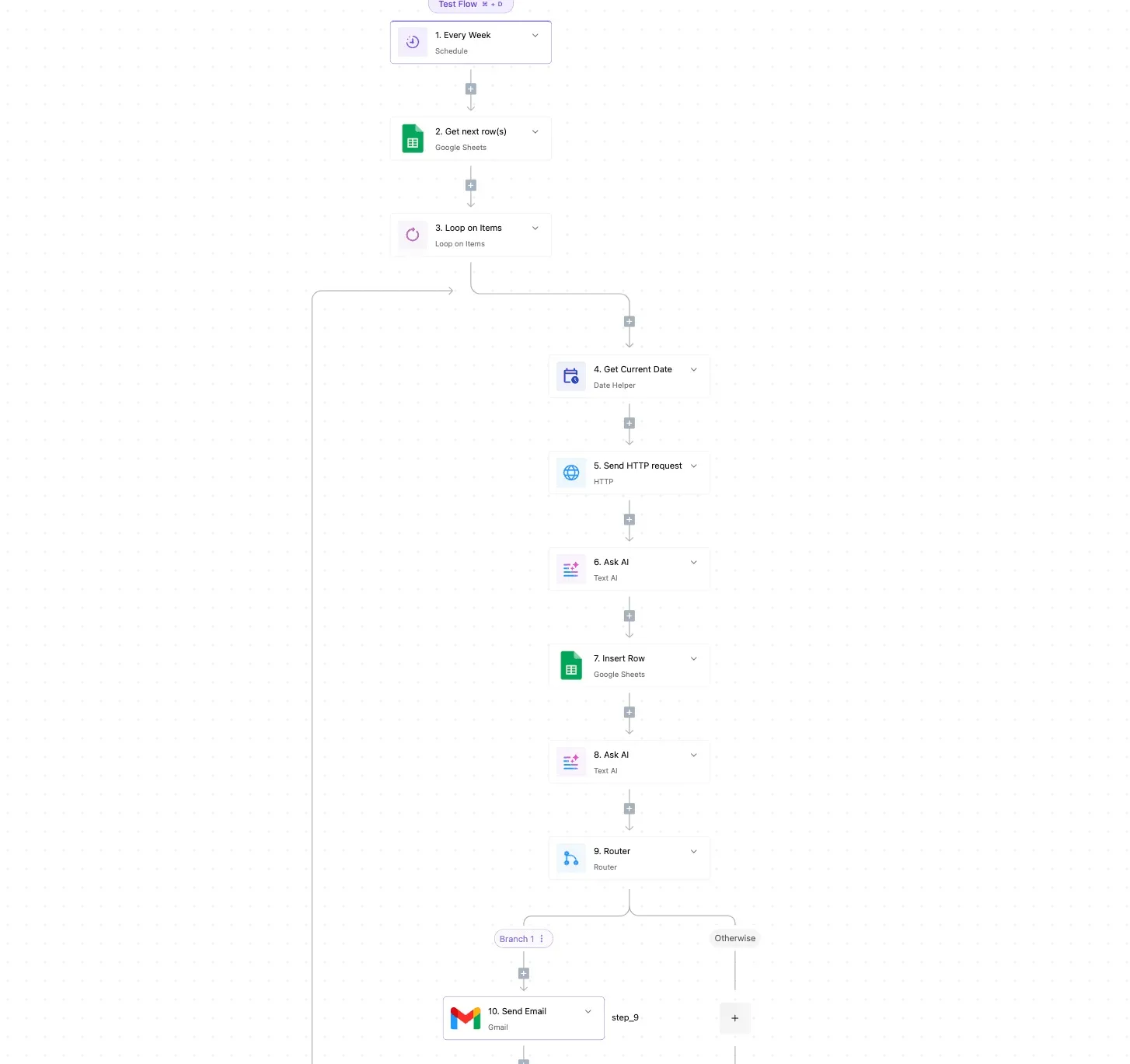
Take from it the shape rather than the length: a scheduled pull, a decision, and a message to a named person.
Applied here, a scheduled workflow can call the Azure cost or metrics endpoints over HTTP and compare the result with a threshold kept in a sheet.
The router can then send budget breaches to a ticket, throttling spikes to the on-call channel in Slack, and routine summaries to email. A run costs 1 credit however many steps it has, so a daily check fits inside the Free plan's 1,000 monthly credits.
Describe that check in the built-in chat and what it publishes is a live flow in your account, with a run trace that shows exactly what happened at each step, from the Azure call to the Slack post.
The sheet doubles as the record of who owns each account.
None of this changes what Cosmos DB charges. It shortens the time between a bad spend pattern and a person acting on it.
Seven steps to own your Cosmos DB bill
Start with one owner: name the person who gets paged when a throttled container breaks the app at 2am.
That person also owns the bill, and the seven steps below run in order from the worked bill you just saw.
Nothing in the first three steps can break production, because they are read-only.
- Note the date on Microsoft's Cosmos DB pricing page and write it beside every rate you use. Rates change, so a figure without a date can't be audited later.
- Open each container and record its capacity mode: provisioned throughput, autoscale or serverless. A container still on a default mode nobody chose is where overspend usually hides.
- Read seven days of normalized RU consumption per container in the metrics view. Seven days covers a full weekly cycle, so you see the weekday peak and the weekend trough instead of one calm afternoon.
Then act on what you read. A container that sits near zero for most of the week is paying for capacity nobody uses. A container with sharp, short peaks is paying for the peak all week.
- Move idle containers to serverless and spiky ones to autoscale. Check first that the container fits the limits of the target mode, and name the owner who approves the change, since a move can alter how the app behaves under load.
- Sort the queries by request-unit charge and fix the worst few. Cross-partition scans and missing index paths are the usual causes.
One expensive query repeated thousands of times raises the peak you provision for, so trimming it lowers the bill in every mode. Buying capacity first only locks in the waste.
Fixing queries comes before reservations for a plain reason. A reservation is priced against the load you have today, and an inflated load makes the commitment larger than it needs to be.
- Create a budget alert on the subscription or resource group, sent to the owner from the first step. An alert that goes to a shared inbox nobody reads isn't a control.
- Price reservations only for containers whose load stayed flat across the week and after the query fixes. A commitment on a spiky or idle container pays for capacity you won't use, so leave those on autoscale or serverless.

Run the steps again after the next billing cycle. The second pass shows whether the mode changes held.
Frequently asked questions
Before you rely on these answers
The body leaves five questions open, and each depends on a figure that only the vendor's pricing page can confirm today. Someone on your team should own checking those pages before a mode change goes live, not after the invoice arrives.
Free tier
Is Azure Cosmos DB free to use? Only within the free tier's allowance, which covers a fixed amount of throughput and storage on an account. Anything beyond it bills at the normal rate, so confirm the current allowance on the Azure Cosmos DB pricing page.
The free tier doesn't expire on a date, but does it limit how many accounts you can have? It does. It applies for the life of the account that has it, yet Azure restricts how many accounts per subscription can carry it.
A second account in the same subscription is billed in full, so check the free tier documentation before creating one.
Regions and capacity modes
Add a second region and the bill jumps, because each region holds its own full copy of the data and its own provisioned throughput, and both are billed per region.
Adding a region roughly multiplies the database portion of the bill, and writes replicated across regions consume capacity too.
The multi-region section of the pricing page shows how each region is charged.
You can't switch between serverless and provisioned throughput by changing a setting on a running account, at least historically. The usual route has been to create a new account in the other mode and move the data across.
Microsoft has been adding migration options, so read the current capacity-mode documentation before assuming either way. Plan the move as a project with an owner, not as a toggle.
MongoDB pricing
Is Cosmos DB for MongoDB priced differently from the NoSQL API? Yes, and it depends on which MongoDB offering you run. The request-unit-based option follows the same capacity logic as the NoSQL API.
The vCore-based option bills on cluster compute and storage instead, so the request-unit habits from the body don't carry over. Each has its own section of the pricing page, and the two shouldn't be compared without reading both.
Related reading
References
Running the numbers
See what the same workload costs here.
Free forever plan, and every paid plan self-hosts at no extra cost.
See pricing Talk to sales