
SOC 2 Automation Platform: Top Picks Compared (2026)

Oct 19, 202614 min read
Strip it down and a SOC 2 automation platform is software that collects audit evidence from your systems continuously, whether through built-in connectors or workflow tools like Activepieces, so the audit takes less effort. It doesn't replace your controls or your auditor.
As of 19 October 2026.
A Type I report says your controls had an appropriate design at one point in time. A Type II report says they operated effectively across a stretch of time, and that's the one customers' security reviews usually ask for.

Here are the four things the platform does:
SOC 2 platform purpose and functions
- It collects evidence from the systems you connect.
- It monitors controls and flags when one drifts.
- It hosts policies and the tasks that prove people followed them.
- It shares evidence with the auditor.
SOC 2 evidence collection and control monitoring
Connect your cloud accounts, identity provider, code host and ticketing tools, and the platform reads configuration and activity from them and stores timestamped records. Monitoring then tests those records against each control and raises an alert when something changes.
The failure to watch for is a silent gap: an integration token expires, the collector stops, and nobody notices until the auditor asks for the missing period.
The platform stores policies, records employee acknowledgements, and assigns recurring tasks such as quarterly access reviews and vendor assessments.
Don't expect the platform to perform the audit or issue the opinion; a licensed CPA firm does. It doesn't build your controls, so an unenforced access policy remains a failed control however tidy the dashboard looks.

The fastest way to settle a shortlist is to try one. Activepieces is free to try, no credit card.
SOC 2 platform options compared
Comparing the four vendors' own pages, none lets you price a first year from the website alone. The table below records what each vendor states and marks everything else "not published", so a blank is a finding rather than an oversight.
| Vendor | Pricing | Claimed integrations | Bundled audit | Other frameworks | Plan gating | Checked on |
|---|---|---|---|---|---|---|
| Vanta | Quote-only | Not published | Not published | Claims coverage beyond SOC 2 | Not published | October 2026 |
| Drata | Quote-only | Not published | Not published | Claims coverage beyond SOC 2 | Not published | October 2026 |
| Secureframe | Quote-only | Not published | Not published | Claims coverage beyond SOC 2 | Not published | October 2026 |
| Sprinto | Quote-only | Not published | Not published | Claims coverage beyond SOC 2 | Not published | October 2026 |
Every "not published" cell is a number you must get in writing before signing.
Ask each vendor for a first-year total covering the platform, the audit and any add-ons, and compare those totals rather than headline plans.
SOC 2 platform integrations and framework coverage
Though each vendor advertises integrations and additional frameworks, a logo wall tells you nothing about whether your stack is covered. The failure here is a connector that exists but doesn't pull the evidence your auditor samples, which leaves you collecting screenshots by hand.

Request the connector list for your own cloud provider, identity provider and ticketing system, and ask what each one collects.
Audit fees and what is bundled
Whether the auditor's fee sits inside the platform price is not stated on the pages checked. If it's separate, you pay two invoices and the platform's savings shrink accordingly.
Ask who the auditor is, whether you can bring your own, and whether the vendor bills the Type II observation window separately.
If a feature you need sits on a higher tier, have the quote name the tier.
The case against SOC 2 platforms
Even with the tier named in the quote, the sceptic's question stands:
- A small team can reach the same report with templates, a spreadsheet and an auditor, and may spend less doing it
- The auditor tests controls, not tooling
- A team that already keeps access reviews, change records and onboarding checklists in a shared drive has produced evidence the auditor can sample
- What the platform adds is collection speed, which matters only if collection is where your hours go
Second, pricing:
- Quotes are often opaque
- The failure shows up at renewal: the invoice arrives higher, the vendor now bills the integrations that made the dashboard green as add-ons, and leaving costs more than staying
If the evidence history lives only inside the vendor's system, cancelling means the next audit window opens with a gap. That is the third claim, lock-in.
An export that returns a flat file without the original timestamps and approvers is not evidence an auditor can rely on.
Fourth, and plainest: a tool doesn't pass an audit. A dashboard can show every check as passing while the report comes back with exceptions, because the auditor tested the control you actually operated, not the one the dashboard displayed.
I'm not asserting any of these as measured fact here, because I have no confirmed figures to cite.
Each would be proven by one published number: the all-in first-year cost against the template route, the renewal uplift in the contract, the fraction of evidence history that survives an export, and the share of customers who still received exceptions.
Should a vendor refuse to supply those four numbers, it has answered the sceptic for them.
Platform benefits in audit time and cost
Where a platform wins is in the hours it removes from collecting and writing up evidence, even though it doesn't do anything to make your controls real.
SOC 2 automation benchmarks and published figures
220 hours of manual work building the evidence package fall to 48 with automation, according to the Continuum GRC benchmark.
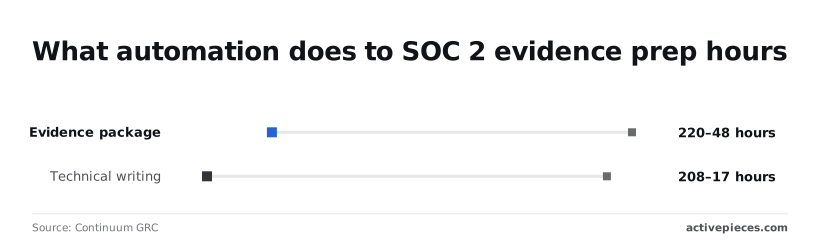
208 hours of technical writing fall to 17, because policies and control descriptions are generated from templates and live configuration instead of drafted from a blank page.
Across the whole effort, the ranges below show internal audit-prep work of 300 to 500 hours manually against 110 to 170 with automation tools.
Even the worst automated case, 170 hours, sits below the best manual case, 300, so the saving doesn't depend on a lucky scope.
Of the automated effort, 110 to 170 hours remain yours: deciding scope, fixing failing controls and answering the auditor.
It is the procedural failures that get expensive, not the technical ones:
- Buying before scoping, then discovering the platform lacks integrations for systems that are in your audit boundary, so the missing evidence returns to spreadsheets.
- Treating the dashboard as the report. Green checks show that a test passed, not that the control operated for the whole observation window.
- Skipping the auditor's view. If they can't sample evidence inside the platform, you export it by hand and lose the hours you paid to save.
- Connecting new tools, workflow automation included, without scoping them. Any system that touches in-scope data becomes part of the audit.
Green checks show that a test passed, not that the control operated for the whole observation window.
When manual SOC 2 evidence works instead
When the scope is small, manual evidence is defensible.
That means a handful of systems, one environment, and a team that already keeps change records and access reviews in a form an auditor accepts.
In that case, the 300-hour manual floor is unlikely to apply, and a licence mostly adds a second system to maintain.
It's also right when you're not yet sure of your boundary, since scoping first is cheaper than automating the wrong perimeter.
Reading a table only gets you so far. Build the same workflow in Activepieces and compare it yourself.
SOC 2 requirements for workflow automation
Once the perimeter is drawn, any workflow tool that moves customer data across it is inside the audit, and it has to meet the same controls as everything else.
When an automation runs under a shared service account, writes customer records to a place nobody reviews, and leaves no log of who changed the flow, your auditor finds it, and the finding lands on you, not on the compliance platform.
Activepieces is not a SOC 2 compliance platform, but a team automating evidence reminders or access reviews with it can check the table below line by line: its SOC 2 Type II attestation, SSO, SCIM, custom RBAC, audit logs and self-hosting, each with the evidence to request.
Treat it as a checklist for any automation vendor, not only this one.
| Requirement | What Activepieces has | Evidence to request |
|---|---|---|
| SOC 2 Type II | Attested | The report itself |
| SSO | Supported | Identity provider setup documentation |
| SCIM | Supported | Deprovisioning behavior on user removal |
| Custom RBAC | Supported | The permission model, per role |
| Audit logs | Available | What events are recorded and how to export them |
| EU or US cloud | Managed cloud in either region | Region confirmation for your account |
| Self-host and air-gap | Supported | Deployment documentation |
Nothing here confirms which of the four Cloud plans (Free, Plus, Team or Ultimate) includes each of these seven rows, so get that mapping, along with the security documents, through https://www.activepieces.com/sales.
How Activepieces meets each requirement
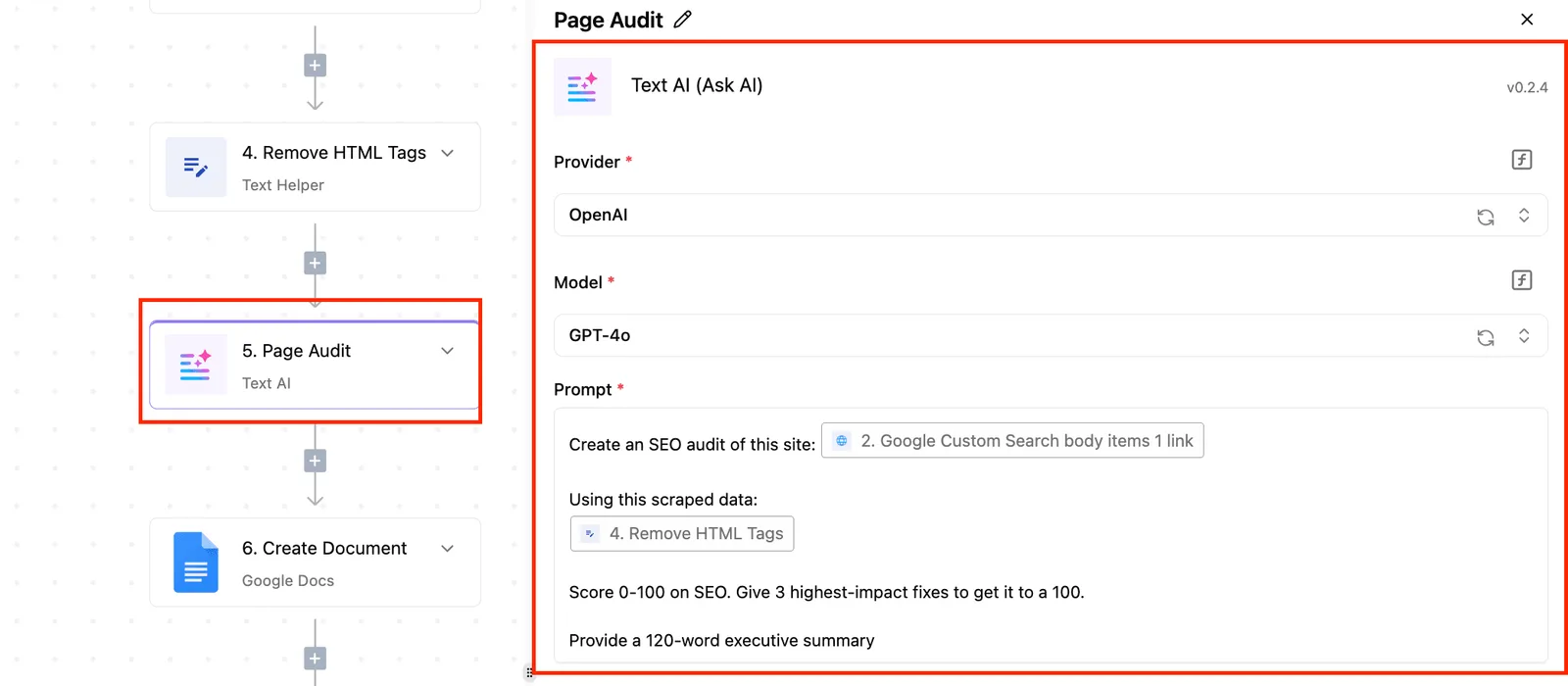
With SSO and SCIM, your identity provider grants and revokes access, so a departed engineer's flows stop running under their name. Custom RBAC limits who can edit a flow that touches production data. Audit logs give the auditor a record of changes.
Because the SOC 2 Type II report covers the vendor's own operation, you inherit that coverage as a subservice organization.
Do not expect Activepieces to replace a compliance platform: of the seven rows in the table, the Type II attestation covers the vendor's own operation, not your controls, and the other six are capabilities you still have to configure and evidence yourself, which means you're building your own compliance platform.
A compliance platform collects evidence and tracks controls. A workflow tool is one more system whose controls must produce evidence. Buy it as you would any vendor in scope.
If your team can't send data to a third-party cloud, you can self-host, including air-gapped, so data stays in its own environment.
The core is MIT-licensed, so your security reviewer can clone the public repository at github.com/activepieces/activepieces, trace the queue and worker architecture, and load-test a self-hosted or air-gapped deployment before anything is signed, instead of relying on a vendor's description.
The LICENSE file in that repository shows exactly where the MIT core ends: the packages/ee/ directories sit under a separate commercial licence. MoneyGram, Moneypenny, Alan and FundingSocieties run Activepieces in production. The audit burden for that infrastructure then becomes yours.
Questions to ask SOC 2 platform vendors
Ask every vendor the same seven questions in writing, because the first-year price only holds if the answers do.
- Report type and period: is it a SOC 2 Type II or a Type I, and what dates does the observation window cover? A Type I describes controls on one day, so it tells you nothing about whether they kept working.
- Scope: which products, environments and locations does the report cover? A clean report on the vendor's marketing site doesn't cover the service you will actually run.
- Sub-processors: who else touches your data, and how are you told when that list changes? Their failures become yours.
- Data location: where's data stored and processed, and can you choose the region? Get this wrong and a customer's residency clause is breached by default.
- SSO plan gating: which plan includes single sign-on, and is user provisioning included with it? SSO sold as an upgrade can quietly change which plan you need to buy.
- Log retention: how long are audit logs kept, and can you export them? Your auditor will ask for evidence from the whole observation window, and logs that expired earlier can't supply it.
- Data export: can you take your data and configuration out in a usable format when you leave? Without that, switching vendors means rebuilding from scratch.
Once the answers are in, the Monday plan is short and ordered:
- Write down your scope: the systems, data and customer commitments the audit must cover.
- Pick an auditor before you pick a platform, and ask which evidence formats they accept.
- Request written quotes from the auditor and each platform, covering the full first year.
Activepieces publishes its Cloud prices at https://www.activepieces.com/pricing: a free plan at $0 with unlimited flows, Plus at $20 a month and Team at $200 a month, so only Ultimate pricing and the security documents need https://www.activepieces.com/sales. Ask every other vendor for the equivalent in writing.
Frequently asked questions
You should be able to get each answer below from a vendor in writing, and where it can't be, that gap is a finding.
How long does a SOC 2 Type II take with an automation platform?
It takes the length of the observation window plus audit fieldwork, and the platform shortens only the preparation and evidence collection around that window. The window is the period during which controls must operate, and you agree its length with your auditor.
A platform can't compress it, so a vendor promising a Type II on a fixed fast schedule is promising something that depends on your auditor.
If you need a report quickly for a deal, ask your auditor whether a Type I first makes sense. It proves controls are designed correctly at one point in time, and it can unblock a buyer while the Type II window runs.
Platform versus audit, and doing it without one
Is a SOC 2 automation platform the same as a SOC 2 audit? No. The platform collects evidence and tracks tasks; the audit is an independent opinion issued by a licensed CPA firm. The tool produces the inputs, and only the auditor produces the report.
Can a startup get SOC 2 without a compliance platform? Yes. Spreadsheets, screenshots and a ticketing system have passed audits.
The cost is staff time spent gathering evidence by hand, and the risk is a control that quietly lapsed mid-window with nobody noticing.
You also choose the auditor yourself, with or without a platform, so a platform's bundled auditor referral is a convenience and not a requirement.
Relying on a compliant vendor
Does using a SOC 2 compliant vendor make my company compliant? No. A vendor's report covers that vendor's controls, not yours.
It does help you, because your auditor can rely on it for the services that vendor provides, but you still have to review its report, check that its scope covers what you actually use, and run your own access reviews, onboarding and incident response.
What happens to my evidence if I switch platforms?
You keep what you can export, so test the export before you sign. Ask whether evidence downloads in a readable format with timestamps and the original source records, or only as the platform's own summaries.
Switching mid-window is the dangerous case: if the new tool starts collecting later, you may have a gap your auditor must cover with manual samples. Switch right after a report is issued, not during the window.
Related reading
References
Still comparing
The fastest way to settle it is to build something.
Open source under MIT, so you can self-host the same thing later.
Start free Talk to sales