
BambooHR API: Keys, Rate Limits, and Endpoints (2026)

Nov 24, 202616 min read
Whoever generates the key sets the terms for everything else here.
The BambooHR API is a REST API served from your company's own subdomain, authenticated with a key generated from a user's profile and sent over HTTP Basic auth, which means any client, whether a hand-written script or a workflow tool like Activepieces, acts with exactly the access of the person who made it.

Content checked against BambooHR's own documentation on 24 Nov 2026, so treat anything BambooHR has changed since then as unverified.
Get your BambooHR API access key
What the BambooHR API is
It's an HTTP interface to the same employee, time-off and reporting data your HR team sees in the web app. Any caller can use it: a script, a scheduled job, or a workflow builder.
BambooHR doesn't care which, because it sees only a key and a request.
When the sync fails at 2am on a Tuesday, the page lands on whoever owns that key, so decide who that is before you write the first call.
BambooHR API access and plan requirements
You need two things to get access: a BambooHR plan that includes API use, and permission for the person generating the key to do so. Plan eligibility is a contract matter, so confirm it with BambooHR or your account owner instead of assuming it.
When the sync fails at 2am on a Tuesday, the page lands on whoever owns that key, so decide who that is before you write the first call.
Check the second condition just as carefully: a key can only ever reach what its owner can see, so a key from a low-privilege account will quietly return less data than your integration expects.
Generate an API key (stage 1, screenshot)
Look at the screenshot below and you see where the key is created from a user's profile in the BambooHR interface. Take from it that the key belongs to a person's account, not to the company or to a service role.

- Base URL sits on your company subdomain
- Key is generated from a user profile
- HTTP Basic auth uses the key as the username
- Access follows the key owner's permissions: If the owner leaves, changes role or loses permissions, the integration changes behavior or stops, and nothing in the key itself warns you. The fourth fact is the one that causes outages. That's why a named, durable owner matters more than any call you'll make.
OAuth for partner apps versus personal keys
If an internal automation is controlled by one accountable person, a personal key can work, though a dedicated service account is safer. OAuth is the route for partner applications that act on behalf of many customers' accounts, where handing around individual employees' keys would be unacceptable.
If you're building for your own company, start with a key and document its owner. If you're building a product other BambooHR customers will install, use OAuth. Which one applies to you decides the rest of your design.
Everything below works on Activepieces' free plan. Start without code or a credit card.
Send your first BambooHR API request
Send a GET to your company's BambooHR API address with the API key as the Basic auth username and Accept: application/json, and you get employee records back.
Whoever generated that key is who the call runs as, and who gets paged when it stops working.
Build the URL and auth header
Log in to BambooHR and the subdomain you see is your company domain. The base URL carries it, and everything else hangs off it:
https://api.bamboohr.com/api/gateway.php/{companyDomain}/v1/
Use HTTP Basic for authentication. Put the API key in the username position and any placeholder string in the password position, since BambooHR ignores the password.
Add Accept: application/json. Without it, you'll likely get XML back, and your parser will fail on a response that was perfectly valid.
Write down which user generated the key before you test anything. The key inherits that person's access, so a call that works today can return less data after that person changes role or leaves.
Request the directory endpoint:
curl -u "YOUR_API_KEY:x" \
 -H "Accept: application/json" \
 "https://api.bamboohr.com/api/gateway.php/{companyDomain}/v1/employees/directory"
When the call succeeds, you get a list of employees plus a description of the fields in it. Use this response to collect employee IDs. The directory is deliberately shallow, so it won't hold everything you need.

Take an ID from the directory and ask for named fields only:
curl -u "YOUR_API_KEY:x" \
 -H "Accept: application/json" \
 "https://api.bamboohr.com/api/gateway.php/{companyDomain}/v1/employees/{employeeId}?fields=firstName,lastName,jobTitle"
Ask for what you need and no more. Each extra field is one more thing the key owner's permissions must cover, and one more thing that can silently come back empty.
Confirm your BambooHR API credentials work
Although the dialog below comes from an automation platform's admin screen and enables OpenAI, not BambooHR, it still shows the shape a credential screen should have: a base URL in one field, a masked API key in another, and a Save button.

Once the key is masked, nobody can read it back, so the record of who created it has to live somewhere else.
For your own check, the directory call should return a list of employees, and the single-employee call should return only the fields you named.
A rejected-credentials error means the key or the domain is wrong. Missing fields or an empty list usually mean the key owner can't see that data, which is a permissions problem and not a syntax one.
Once both calls return data, you have a working connection and can start asking how long it'll keep working.
Understand BambooHR endpoints, pricing and rate limits
Before you schedule anything, decide the three things the connection depends on: the key owner's access, the endpoint you choose and limits BambooHR only partly publishes.
Read the table for what each endpoint family does and whose permissions it borrows. The takeaway: every row inherits the key owner's access, so one person's role change can silently empty several of them.
BambooHR API endpoint families and permissions
| Family | Reads or writes | Permission the key owner needs | Pagination or volume note |
|---|---|---|---|
| Employees | Reads and updates employee records | Access to the employee fields requested | Fields returned depend on the owner's view |
| Custom reports | Reads report output | Access to every field in the report | Reports list at 500–1000 records per page |
| Tabular data | Reads and writes table rows such as job history | Access to that table | Row count grows with employee history |
| Time off | Reads requests and balances; writes requests | Time-off access for the people involved | Scope by date range |
| Files | Reads and uploads employee documents | Access to the specific file categories | Scope by employee |
| Applicant tracking | Reads and writes candidates and postings | Hiring access | Scope by job |
| Webhooks | Pushes change events to your URL | Access to the monitored fields | Event-driven, no polling |
Per the List Reports reference, List Reports, dataset data and dataset fields each return 500 to 1000 records per page. That range isn't fixed, so loop until the response says there's no more data rather than assuming a page count.
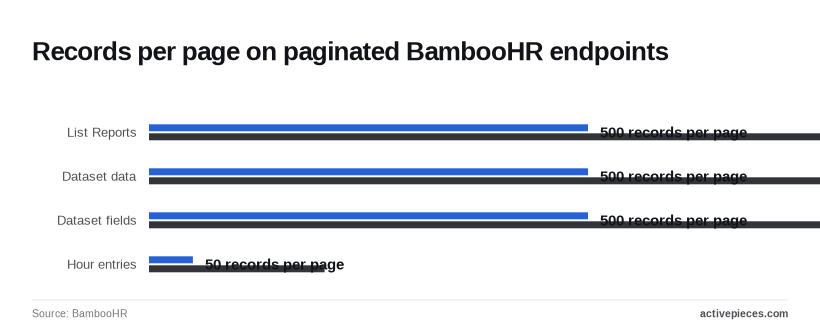
At only 50 to 200 records per page for hour entries, pulling 1000 time-tracking rows can take up to 20 calls where a report takes one, and those extra calls count against the same limits, which means a single time-tracking pull consumes as much of your limits as 20 reports.
Nothing in the pages cited here gives a price per call or a per-plan fee for API access; they confirm page sizes only. Treat API cost as unconfirmed.
Ask your BambooHR account contact in writing which plan includes it. Record the answer with the date, because the key owner's plan is what your integration depends on.
Published rate limit behaviour and what isn't published
I can't state a numeric request ceiling per tier, because the sources used here give none. Assume a limit exists and design for it. Back off when a call is refused, cache report output instead of re-requesting it, and prefer webhooks over polling.
Name who is paged when throttling begins, because an unpublished limit tends to surface as a failed overnight job, not as a warning.
Easier to see it running than to read about it: set it up free, no card.
Handle BambooHR API errors in production
When a call fails in production, one of five status codes usually explains it, and each points at a different person to page. Treat the code as a routing decision before you treat it as an error.
| Code | Usual cause | Fix |
|---|---|---|
| 400 | A requested field name is wrong | Check field names against the docs |
| 401 | The API key is wrong or revoked | Reissue the key and update the secret store |
| 403 | The key's owner lacks access to that data | Change the owner's permissions |
| 404 | The company subdomain is wrong | Correct the subdomain in configuration |
| 429 or 503 | Throttling or temporary unavailability | Wait for the Retry-After value, then retry |
Retry a 401 or 403 in a loop and it never succeeds, so only 429 and 503 belong in your retry path.
Permissions follow the key owner
When a 403 comes back, it means that person can't see the data, not that your code is broken, because a key carries the access of whoever generated it.
When that person leaves and their account is deactivated, the key can stop working. The integration fails with no change on your side.
Generate keys from a dedicated service account with a named owner, and record who that is.
Reduce BambooHR API calls with backoff and caching
Of everything here, call volume is where design choices show up most. Syncing 500 employees with a per-employee fetch takes 501 API calls, one directory call plus one per person, while the directory alone or a changed-since request takes 1 call each.
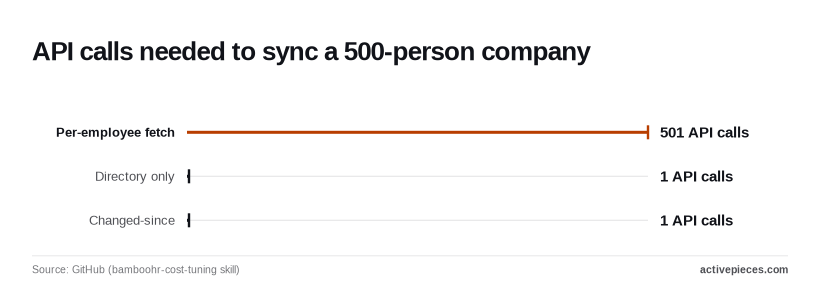
501 against 1 is the gap, so every nightly run of the looping version spends five hundred times the request budget you're trying not to exhaust.
Prefer the directory or a report to a loop, and use changed-since so each run asks only for what moved.
Cache what rarely changes. When a 429 does arrive, honor Retry-After and add jitter so parallel workers don't retry together.
Use BambooHR webhooks instead of polling
Even a one-call poll runs on a schedule whether or not anything changed. It consumes rate limit when nothing has. A webhook inverts that: BambooHR tells you when a record changes, and you fetch only that record.
Keep a slow changed-since poll as a backstop, because a missed webhook otherwise stays missed until someone notices stale data. Confirm the current webhook options and their limits in BambooHR's documentation before committing to the design.
Run a BambooHR sync with Activepieces
You don't hire for this; you describe it.
Describe the sync to the built-in chat in Activepieces, with the schedule, the BambooHR fields and the destination, and what it publishes is an ordinary flow in your account, identical to one a builder would have assembled step by step.
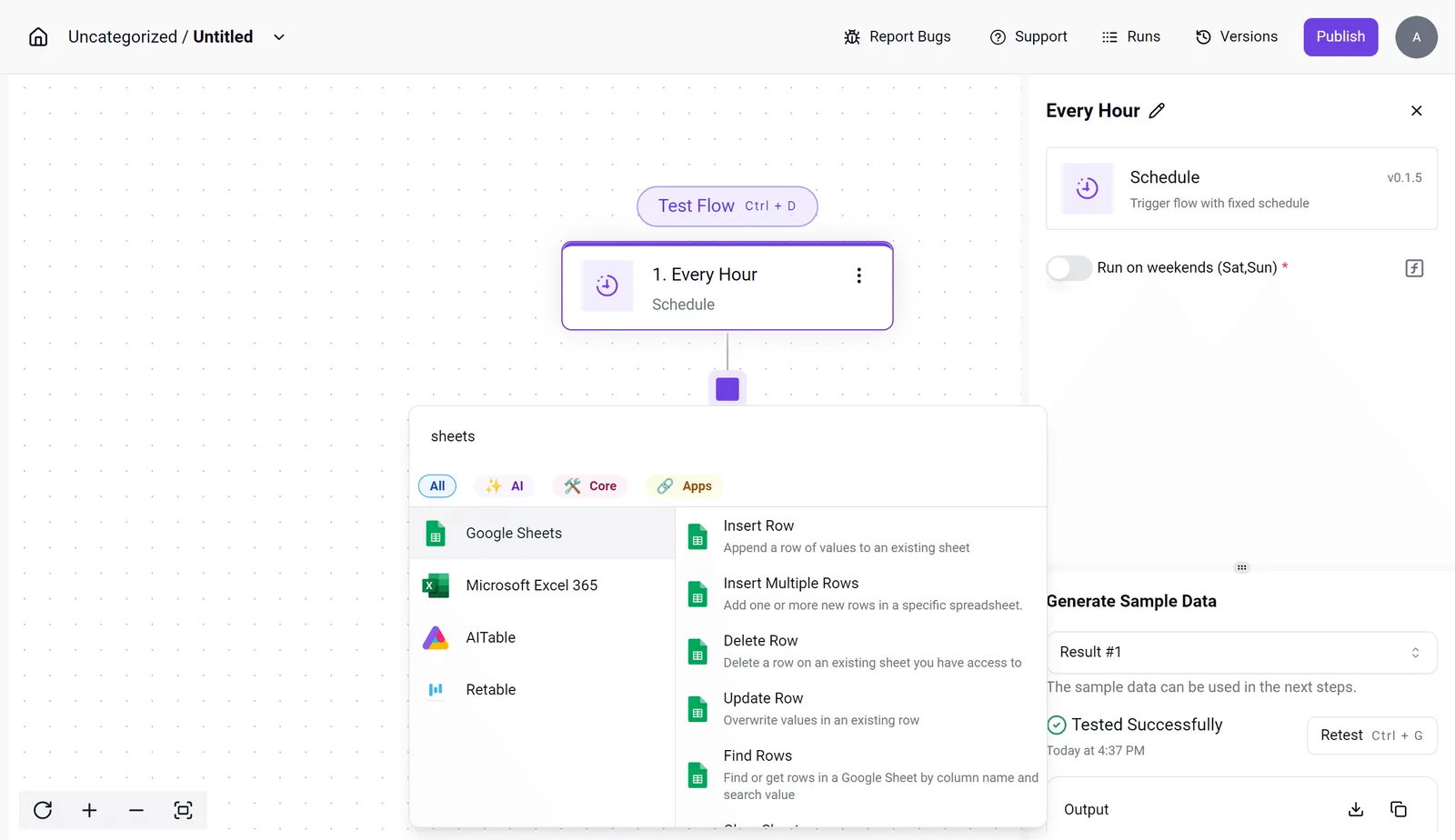
It sits under the same RBAC and audit logs as every flow built by hand, and every run leaves a trace of each step and its response that whoever gets paged can read without having written it or holding any certification.
MoneyGram, Moneypenny, Alan and FundingSocieties run Activepieces in production, and the free plan allows unlimited flows, so the first one costs nothing to try.
Webhook limits vary, so a schedule is the safer default here; check BambooHR's documentation before relying on events.
When to use direct BambooHR API code
One script, one owner, one destination: write the code. A short script run from a scheduler you already operate has fewer moving parts than a workflow platform, and nothing in Activepieces makes the BambooHR call itself safer.
A run is 1 credit however many steps it has, and the free plan's 1,000 credits a month cover that side, but BambooHR's limits are counted separately.
The key still belongs to a person's account, the permissions still follow that user, and the rate limits still apply.
What the tool changes is the 2am question. When the sync fails, a workflow gives whoever is paged a run history showing which step failed and with what response, and a retry setting they can read without opening a repository.
That matters once the person who wrote the script has moved on.
If your team already has logging, alerting and a named owner for scripts, the platform adds little.
Build a BambooHR new-hire sync workflow
Build the smallest useful version first: pull employee data on a schedule and write one row to a Google Sheet. The first run will show you which permissions your key actually has.
- Add a Schedule trigger. Pick an interval you can defend against BambooHR's rate limits, not the shortest one offered. Every run is a call you pay for later.
- Add the BambooHR connector, or an HTTP step if the connector lacks the endpoint you need. Store the API key in a connection, not in the step, and use a key issued from a service account, not a person's login, so the sync survives that person leaving. Set retries on this step, and keep them few so a failing call doesn't become a burst of polling.
- Map the fields. Select only what the destination needs, such as name, start date and department. Fields the key's user can't see will come back empty, so a blank value here is a permissions signal, not necessarily missing data.
- Add a Google Sheets step that writes one row. Use a single row on purpose: you're proving the path, not the volume.
- Run a test. Open the step output, confirm the row landed, then deliberately break the key and confirm the failure is visible to the person who owns it.
Five steps cover the whole path. The last one is the one that counts: a sync you've never seen fail isn't yet one you can hand over. Once that failure is visible and owned, widen the field mapping and the row count.
Frequently asked questions
Widening the mapping raises questions the body only touches, and most of them come back to who owns the answer when something breaks.
Is the BambooHR API free to use?
As far as I can verify, BambooHR doesn't charge per call. Whether API access is included on every plan is a point to confirm with BambooHR before you build.
If your plan turns out to restrict it, you find out after the integration is live and someone is paged.
Get the answer in writing from your account contact, and check it against the current docs.
Does the BambooHR API support webhooks?
BambooHR may offer webhooks, but check its documentation before relying on them; a schedule is the safer default for change detection. Polling spends your rate limit on records that didn't change. BambooHR doesn't publish that limit as a firm number.
Because webhooks only notify you of changes, you still fetch the record afterward, and you need a plan for missed deliveries.
Check the docs for which fields and events can trigger one, because that scope decides whether you can drop polling entirely or only reduce it.
Can I write data back to BambooHR through the API?
Yes, the API accepts writes to employee records and some other areas, but a write succeeds only if the key's owner has permission to change that field.
A read-only integration can pass every test and then fail on the first write because the owner's role never allowed it.
Treat each write field as its own permission check. Log rejected writes where a named person will see them.
What happens to my integration when the key owner leaves?
It breaks, usually without warning. A key is tied to the user who created it, so deactivating that account or changing their role can cut off access or quietly shrink what the key can see.
A shrunken key is worse than a dead one, because the integration keeps running and returns incomplete data.
Create keys under a dedicated service account with a named owner, record who that owner is, and put the key's rotation on a calendar.
Rotating means issuing a new key, switching the integration over, then revoking the old key. Do those steps in that order, so you never revoke the key your integration is still using.
Is there a sandbox or test account for the BambooHR API?
Don't assume one exists on your plan. I couldn't confirm a general-purpose sandbox, so ask BambooHR directly. If you have none, test against a separate trial or non-production account, never the live one.
Use records you can afford to corrupt, because a test that writes to real employees creates a payroll or compliance problem rather than a bug report.