
Trigger.dev Alternatives: Compared and Ranked (2026)

Nov 2, 202614 min read
Trigger.dev is a hosted service for running background jobs in code, according to Devtune.
It has a free tier of $5 in credits and 20 concurrent runs, then paid plans that bill per run and per second of compute, so you'll need a paid plan to go beyond testing.
It's new, and we haven't run it ourselves.
Check the date before you trust any figure here: everything below comes from the maker's pages and a pricing tracker, and was checked on 2026-11-02.
Activepieces has 746 integrations on an MIT-licensed core, and if you're weighing the two, treat these figures as a snapshot, not a quote.
What Trigger.dev says it does
On its launch-week page, the maker puts it most clearly, describing new React hooks in @trigger.dev/react-hooks for "triggering Trigger.dev tasks directly from your frontend applications."
So a button in your app can start a job without a backend route in between. That also means your front end now holds a path to your job queue, so check who can press that button before you adopt it.
Pricing and limits can change under you.
You sign up on the hosted service and write tasks in your own codebase. The plans are below.
| Plan | Base price | Included credits | Concurrency | Source |
|---|---|---|---|---|
| Free | $0 | $5 | 20 concurrent runs | Preprice |
| Hobby | $10/month | Not listed in our source | Not listed in our source | Preprice |
| Usage rate | $0.025 per 1k runs | Billed per run | Not applicable | Preprice |
Prices and plan limits checked against trigger.dev and trigger.dev and devtune.ai on November 2, 2026.
Look at the free row and the run charge together: the free tier is enough to test one job, while the run charge is small next to the compute charge below. Run count rarely drives the bill. Machine size and runtime do.

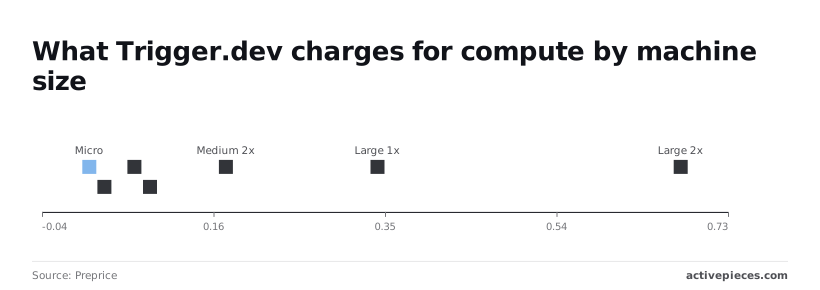
Compute pricing by machine size
According to Preprice, Trigger.dev charges for compute per 1,000 seconds, by machine size, which means your costs scale with both runtime and machine size. Micro costs $0.0169, about 6 cents for an hour of runtime, on Preprice.
Small 1x costs $0.0338 and Small 2x $0.0675, so doubling the size doubles the rate, per Preprice.
Step up to Medium 1x and the rate is $0.085, with Medium 2x at $0.17, roughly 61 cents per hour at the larger size, per Preprice, so doubling your machine size means doubling your hourly expense.
Large 1x costs $0.34, about $1.22 per hour, twenty times Micro, so Large instances cost an order of magnitude more than Micro instances.
When a job sits waiting on a slow API but runs on a Large machine, it pays Large rates for the whole wait. Start by finding which of your jobs run long.
Why teams move away from Trigger.dev
Ask why teams leave Trigger.dev and the answer is one of four:
- A short track record
- A security incident
- Cost and hosting fit
- Wanting a different kind of tool
Each points to a different check, so name yours before you compare anything.
Start with a short track record, which you test the way an operations team does:
- Ask what has failed for others
- Ask how the team handled it
- Ask whether anyone like you has run it through a quiet quarter
Trigger.dev security incident disclosure
Read the Trigger.dev incident post yourself. It is the company's own disclosure, and it opens, "There has been a security incident at Trigger.dev." It also says the company has blocked the exploit used. Stay within what it says.
If this is your reason, list which secrets and environment variables your tasks hold, because that list decides how much the post matters to you.
Cost and hosting fit
If the bill grows with your busiest week, that is a different problem from a deployment model your security team won't sign off. Pull your last few invoices and see which jobs drive the spend.
If the bill grows with your busiest week, that is a different problem from a deployment model your security team won't sign off.
Then ask whether the hosting arrangement matches where your data may live. Those are two separate checks, and a replacement can pass one and fail the other.
Trigger.dev alternatives for non-engineers
When code-first background jobs stop fitting, some teams want something a non-engineer can open, read and change. The screenshot below shows that kind of tool: a canvas called "Test Flow" with four steps.
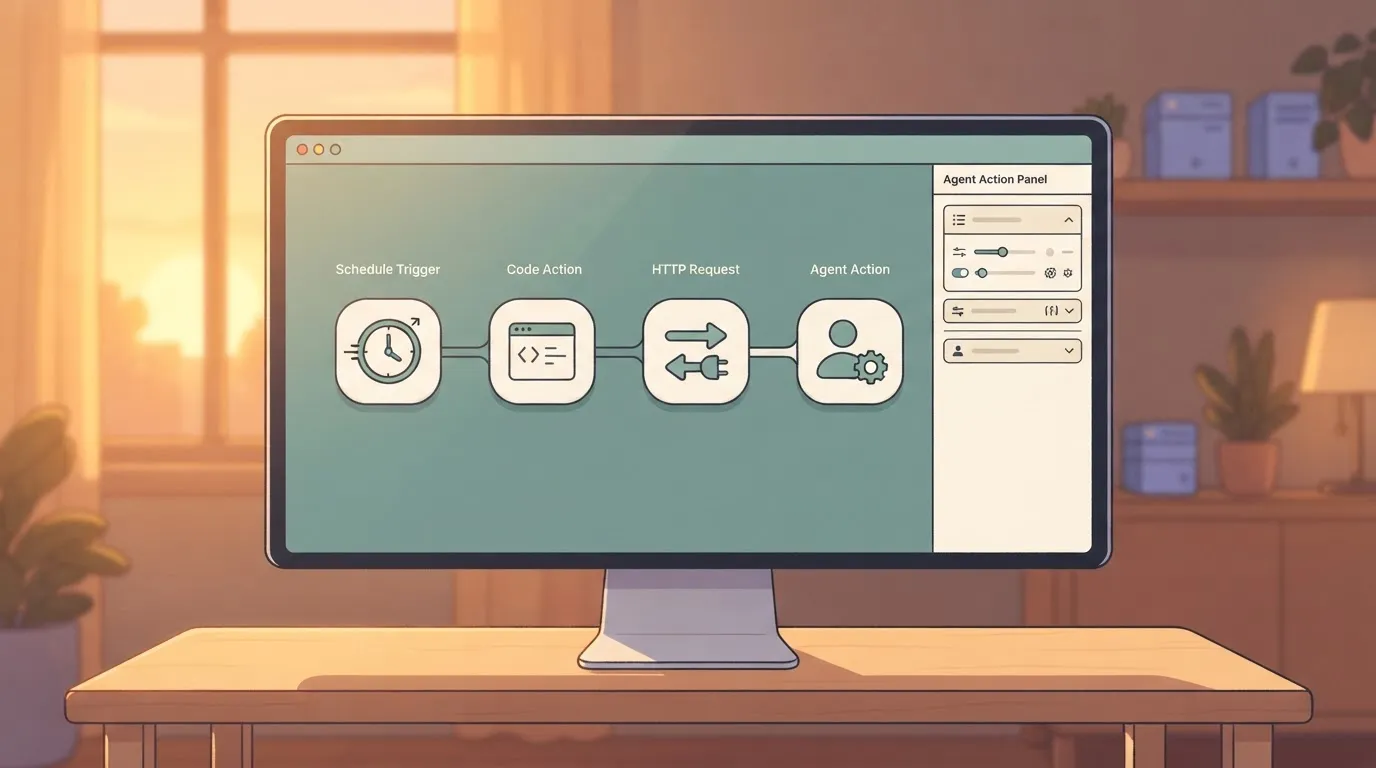
The steps are a daily schedule trigger, a code action that picks a topic, an HTTP request for keyword research, and an agent action named "SEO blog writer," which is open.
On the right, the agent action's panel holds a long written prompt with variable references to the earlier steps. The logic lives in a prompt and in connected steps, not in a deployed task file.
If your reason is this one, the next check is who will edit these flows after you hand them over.
The fastest way to settle a shortlist is to try one. Activepieces is free to try, no credit card.
Trigger.dev alternatives compared in one table
Compare six alternatives here. Each beats Trigger.dev at one thing, so the editor you identified a moment ago usually points to one row. A flow someone must change without a developer belongs in a different tool from a job that must survive a crashed server.

How the Trigger.dev comparison table was built
I assembled this table on 2 November 2026. It describes what each product is for, not what it costs.
For the same reason the cells carry no links. Treat each row as a shortlist entry, then open the vendor's own pricing and documentation pages before you rely on it.
Read the strength and limit columns together, because each limit is the price of that strength.
| Tool | Price | Core strength | Main limit | Suits | Reason for leaving |
|---|---|---|---|---|---|
| Inngest | No figure confirmed | Event-driven functions with retries and step logic | Shapes your code around its event model | Developers who think in events | You want event-triggered flows, not scheduled tasks |
| Temporal | No figure confirmed | Durable execution for long, critical processes | Heavy to learn and operate | Teams with an engineer who owns it | Jobs run for days and must never lose state |
| Hatchet | No figure confirmed | Task queue built on Postgres | Smaller ecosystem | Teams who want a simple queue they can host | You want self-hosting on a database you already run |
| Windmill | No figure confirmed | Scripts turned into flows with a UI | Interface is built around its own conventions | Mixed teams of coders and operators | Non-developers need to run and adjust jobs |
| n8n | No figure confirmed | Visual builder with many ready-made connections | Complex logic gets hard to read | Operations staff editing flows | The person editing is not a developer |
| Restate | No figure confirmed | Durable execution in a lightweight service | Younger, with less proven track record | Teams wanting Temporal's guarantees with less machinery | You want durability without Temporal's weight |
| Activepieces | Free: $0 with 1,000 credits a month; Plus: $20 a month; Team: $200 a month; Ultimate: custom price | Open source, MIT-licensed core with 746 integrations and unlimited flows on every plan | — | Teams automating a single team or every department, including MoneyGram, Moneypenny, Alan and FundingSocieties | — |
Which row answers which reason for leaving
Match your named reason to the last column, then ignore every other row.
If the editor is an operations person, that means n8n or Windmill. If the problem is a job that loses state mid-run, it means Temporal or Restate. If it's hosting, Hatchet. If it's events, Inngest.
Pick one row and move to the next step: choosing the single job you'll migrate first.
Connecting Trigger.dev to Activepieces workflows
Think of Activepieces as the workflow layer around Trigger.dev, not a replacement for it, and there's no Trigger.dev integration in its catalog or repository (checked 2026-11-02).
Picture the case: a refund request lands, someone has to approve it, and only then should a long-running job fire.
Put the approval and routing in a visual workflow. Put the job itself in code. Activepieces is built for the first part, and devtune.ai's dossier describes Trigger.dev as an open-source, TypeScript-native platform for background workflows and agents, which is the second.
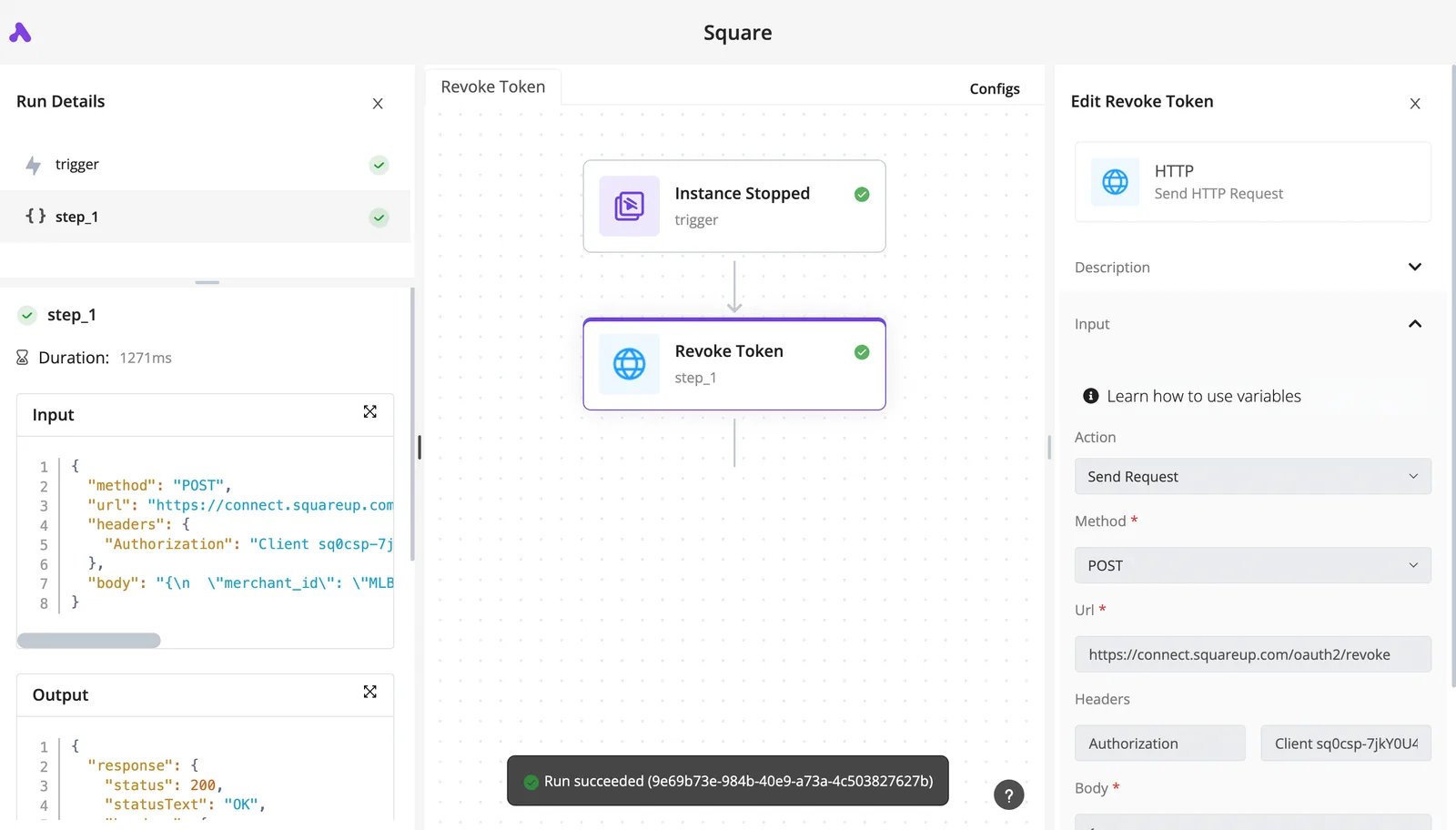
The three building blocks
In order of simplicity, the three building blocks below come from Activepieces' documentation. We haven't tested any of them against Trigger.dev, so treat each as a design to try on your one pilot job, not a verified recipe.
Picture the shape the simplest version takes in the illustration. It has an Activepieces workflow, a plain HTTP or webhook link, and a Trigger.dev task runner, with a "trigger" arrow going one way and a "callback" arrow coming back.
Note what's missing: there's no native-integration badge, so everything between the boxes is something you wire and maintain yourself.
Calling Trigger.dev with an HTTP request step
On Activepieces, deployment is a setting rather than a commitment, which matters when you are already leaving one hosted service.
A flow built on managed cloud and one built self-hosted share a codebase, and Git Sync and Releases, a documented feature, promotes a flow from one side to the other; self-hosting runs through Docker, Compose or Kubernetes.
A tool with no self-hosted edition makes that call for you, whatever the quality of your flows, and that is the real lock-in. SSO, SCIM, RBAC and audit logs come with both sides, so choosing one never costs you the other's controls.

The consequence is that you own the contract: the payload shape, the authentication, and what happens when the callback never arrives. Test that last case first, with a job that fails halfway.
Calling language models
If the reason you're leaving is that your jobs call language models, Activepieces' AI steps can be pointed at a custom provider.
That helps when the model call is the part you want to move into a workflow. It does nothing for the durable, long-running execution Trigger.dev provides, so don't read it as a substitute for that.
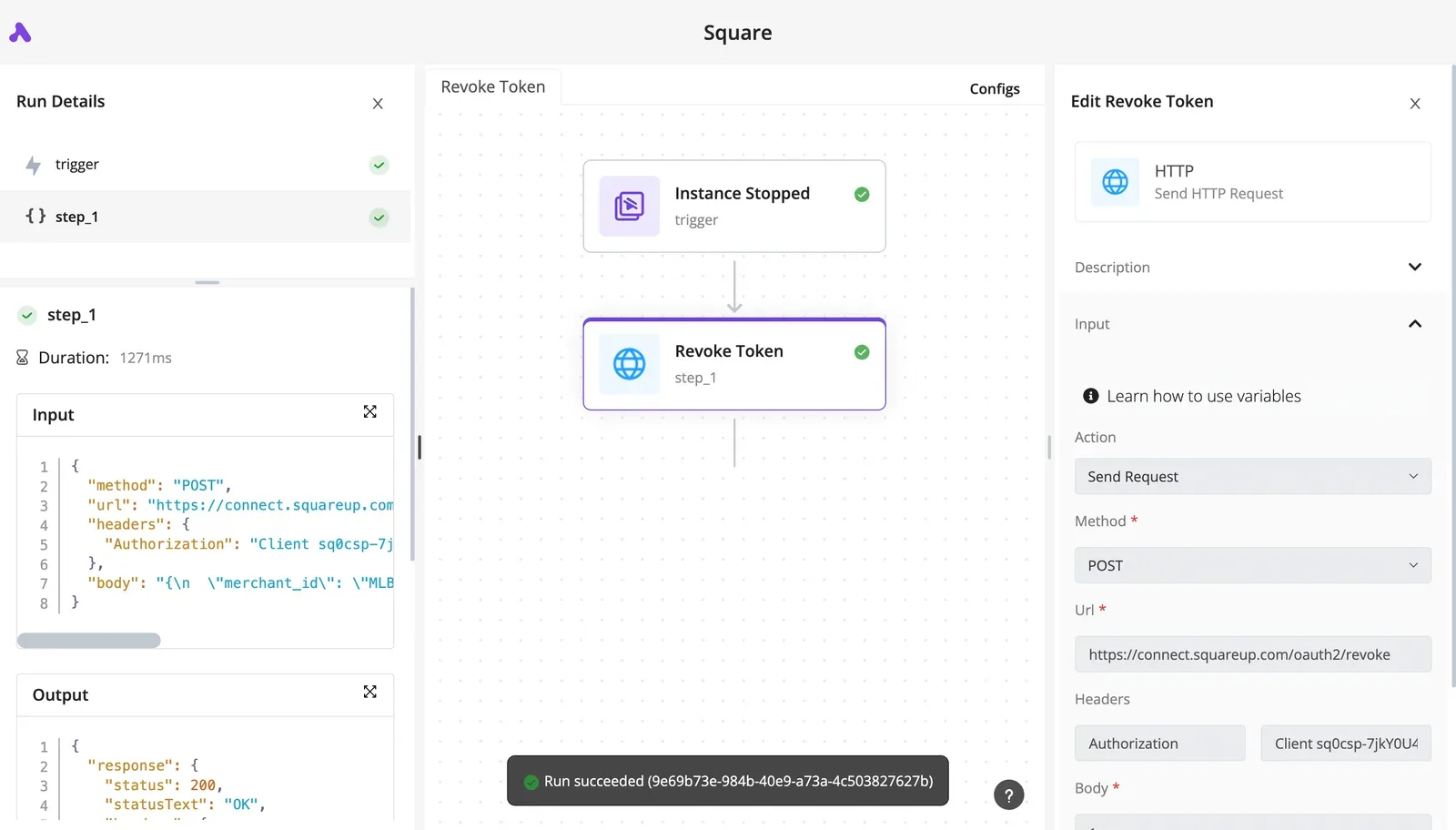
Using the Model Context Protocol
Then there is the Model Context Protocol (MCP), which Activepieces documents support for and which lets an AI client call tools exposed by a server.
This is the most indirect route and the one with the most moving parts. Reach for it only if an agent, not a person or a schedule, is what starts the job.
When Trigger.dev execution limits are the problem
If your reason for leaving is execution itself, such as long-running compute, retries, or concurrency limits, a workflow tool won't fix it. It sits in front of the runner and inherits its limits.
Choose it when the pain is hand-built glue and approvals, then move that one job first.
Your Monday plan for moving off Trigger.dev
Spend Monday listing what you run, and end the week with one job moved and checked, because that order stops you comparing tools before you know your reason.
- Inventory jobs and secrets.
- Name the one reason you're leaving.
- Shortlist two table rows that are strongest on that reason.
- Move one low-risk job.
- Run both side by side.
- Run the exit check on retries, logs and secrets.
Inventory your Trigger.dev jobs and secrets
Open the project and write down every task, what triggers it, and which secrets it reads. Secrets are the part most often missed. A key added to one task and forgotten will fail quietly after the move, so the list is your only protection.

Then write one sentence naming why you're leaving. If it needs the word "and", you have two reasons, so pick the one that hurts more.
Shortlist two alternatives and move one job
Read the comparison table on that reason alone and keep the two rows that are strongest on it. Ignore every other column.
Then choose the job to move: one you can replay safely, with no money or customer messages at stake. A nightly report is a better first move than a refund.
Run the old and new versions side by side with the same input. Let only one of them perform side effects, or you'll send every email twice and learn nothing about which copy was right.
Define done for your Trigger.dev migration
Picture a refund job that times out and retries. On the old setup it skipped the step that had already succeeded. On the new one it pays the customer twice, and nobody notices because the logs show only the final attempt.
Write the exit check before the move, and test it on the kind of person who'll use it: someone annoyed and in a hurry.
- Retries: a failed run repeats only the steps that didn't finish.
- Logs: on-call can find a failed run starting from a customer's email, without asking the person who built it.
- Secrets: every key from your inventory works in the new place, and you've rotated the old copies.
If the job passes, move the next one. If it fails, you've found the problem on a job that cost you little.
Frequently asked questions
Is Trigger.dev free to use?
Yes, up to a point: there is a free plan alongside paid tiers, and the code is open source, so you can also run it yourself and pay for infrastructure instead of a subscription.
Limits and prices change, so read the vendor's pricing page on the day you decide.
When the free tier that fit a test job doesn't fit the job you move second, the bill surprises people.
Can I self-host a Trigger.dev alternative?
Some can and some can't, so check this before you compare anything else. Trigger.dev itself can be self-hosted, which means leaving it for a self-hosted rival only helps if the reason you're leaving isn't operating the thing yourself.
If you're eyeing a managed cloud service such as AWS Lambda, there is no self-hosted version. Each vendor's documentation says which deployment modes it supports. Read it before a migration plan depends on one.
Is Trigger.dev the same as Activepieces?
No. Trigger.dev is a code-first platform: your developers write background jobs in a codebase and it runs them.
Activepieces connects apps through flows that people who don't write code can open and change, and it's usually a different purchase for a different team.
If you're comparing them, the real question is whether the people maintaining these jobs write code or build flows.
Which alternative is best for long-running AI jobs?
None is best across the board. It depends on which limit you're hitting.
If jobs die because they exceed a maximum run time, look for durable execution that survives long waits and restarts. If the pain is slow starts on short jobs, compare cold start and queue delay and ignore run-time ceilings.
When a long AI job calls a model, waits, and calls again, it fails for different reasons than one that is simply slow to begin.
Name which one you have, then test that job first. A vendor that handles your failure mode on one real job is worth more than a comparison chart.
Related reading
References
Still comparing
The fastest way to settle it is to build something.
Open source under MIT, so you can self-host the same thing later.
Start free Talk to sales