
Trigger.dev: Open-Source Workflow Orchestration Guide

Nov 2, 202612 min read
Trigger.dev is an open source, code-first framework for background tasks and workflows, and its durable AI agent tooling is the new part.
Long-running AI jobs now run as tasks, free of the request timeout. The facts below come from the maker's own documentation, which I read on 2 November 2026.
Here is how the maker describes it: "an open source background jobs framework that lets you write reliable workflows in plain async code," per the Trigger.dev docs. Developers own the workflow logic, so it's a build decision.
Teams already running Activepieces, whose MIT-licensed core carries 746 integrations, should expect a code layer beside it, not a swap, doing otherwise orphans all 746 integrations, which means months of integration effort lost.
Before you scope a pilot, you need the identity and access facts, and the table gives them. The company behind it is Trigger.dev, and the agent tooling is its latest release. The licence and the two deployment routes decide who must approve it.
How to deploy durable AI agents
| Item | Value |
|---|---|
| What it is | Open source framework for background tasks and workflows in async code |
| Maker | Trigger.dev |
| Founded | 2022 |
| Licence | Apache-2.0 |
| How obtained | Trigger.dev Cloud, or self-host via Docker or Kubernetes |
| Date pages read | 2 November 2026 |
| Activepieces | Open source AI automation platform with 746 integrations; Maker: Activepieces; Founded: —; Licence: MIT on the core, with the enterprise directories (packages/ee/) under a separate commercial licence; How obtained: Activepieces Cloud (free plan at $0) or self-host via the free Community Edition; Date pages read: — |
Per Github, Apache-2.0 is a permissive licence, so security teams can review the code and run it inside their own infrastructure.
The Cloud route suits a quick pilot, while self-hosting suits teams with data-residency rules. The platform dates from 2022, though the agent features are new.
Treat all of this as the maker's account, because every description here comes from Trigger.dev's own documentation, not third-party reviews. Test the agent claims in a small pilot before promising anything to a steering committee.
This takes minutes, not a project: automate it in Activepieces free.
How to leverage durable AI agents
Start the pilot with the failures durable execution is meant to remove, because long-running AI work no longer has to be rebuilt around timeouts, retries and lost state. Ordinary automations assume short steps, and a model call that thinks for minutes isn't one.
Durable execution means a task runs outside the request that started it, its progress is saved as it goes, and after a crash, a timeout or a deploy it resumes from where it stopped instead of starting over.

In this article, an "agent" task is simply a model-calling loop run as one of those tasks.
Provoke the four failures below on purpose: a request timeout that cuts off a long model call, state lost when a process restarts, a retry that repeats a side effect such as sending the same email twice, and no record of what happened once a run is over.
If a task survives all four and you can read its history afterward, the pilot has passed.
When a workflow tool built for quick steps gives out, it does so at one of these places. Your team has probably patched them with queues, checkpoints and hand-written logs, and that patching's the work durable execution aims to take over.
Where Trigger.dev fits
When an interruption would normally kill a run, Trigger.dev, a code-first platform for running background tasks and AI agents, is meant to let it survive. Teams write tasks in code rather than dragging steps onto a canvas.
Most will therefore connect it to the workflows they already run, handing it the long, fragile steps while the existing tool keeps the rest.
When Trigger.dev agents were released
The table below gives release dates. The company of the same name makes Trigger.dev, and the durable AI agent tooling is its recent addition.
Check the maker's changelog for the exact timing before you put one in a rollout plan, since a steering committee will ask which version you're piloting.
Whatever the tooling is said to do comes from the maker's own documentation and announcements. That makes it the maker's account of its product, not an independent measurement. The pilot is how you turn that account into your own evidence.

Run one long model task, interrupt it, and see whether it resumes where it stopped and whether you can read the record afterward.
What to know about Trigger.dev agents
Three things in Trigger.dev's docs can be checked against your pilot:
- A query API now exposes observability data
Before they go into a steering deck, verify them: the table below lists each claim with its date and the page that makes it.
| Date | Claim | Source |
|---|---|---|
| 2 July 2026 | v4.5.0 makes AI Agents generally available | Trigger.dev writing-tasks introduction |
| 10 Aug 2026 | Chat agent entry added | Trigger.dev writing-tasks introduction |
| Not dated on the page | Query API served at /api/v1/query | Trigger.dev observability query docs |
| Not dated on the page | Query results capped at 10k rows | Trigger.dev observability query docs |
| — | 746 integrations, counted from the open source monorepo | GitHub: activepieces/activepieces packages/pieces/community |
The pages below carry the detail.
For the general availability date and the chat agent entry, the source is the writing-tasks introduction.
The later date means the chat entry point's newer. Expect less field experience around it than around the core agent tasks.
How to query Trigger.dev observability data
There is an endpoint at /api/v1/query, according to the query docs. That matters for the second half of your pilot, because you can script the reading of the record afterward instead of checking a dashboard by eye.
The 10k row limit means one request is built for sampling and summaries, not for exporting a full history, so shape your queries to ask narrow questions.
Neither page dates the query API or its row limit, and neither claims anything about connecting to existing workflow tools. Treat integration as something your pilot establishes, not something the docs promise.
You can follow the rest of this with the builder open. Start free, no card.
How to connect trigger.dev to an Activepieces workflow today
There is no native support: Activepieces, the MIT-licensed flow builder many automation teams already use for triggers, app steps and AI steps, has shipped nothing specific to trigger.dev.
A check of its repository and integration catalog on 2 November 2026 found no trigger.dev integration. Three generic routes remain. None has been tested for this article.
Start at the top of the list below and move down only when the simpler route can't do the job. It ranks the routes by how little setup each needs.
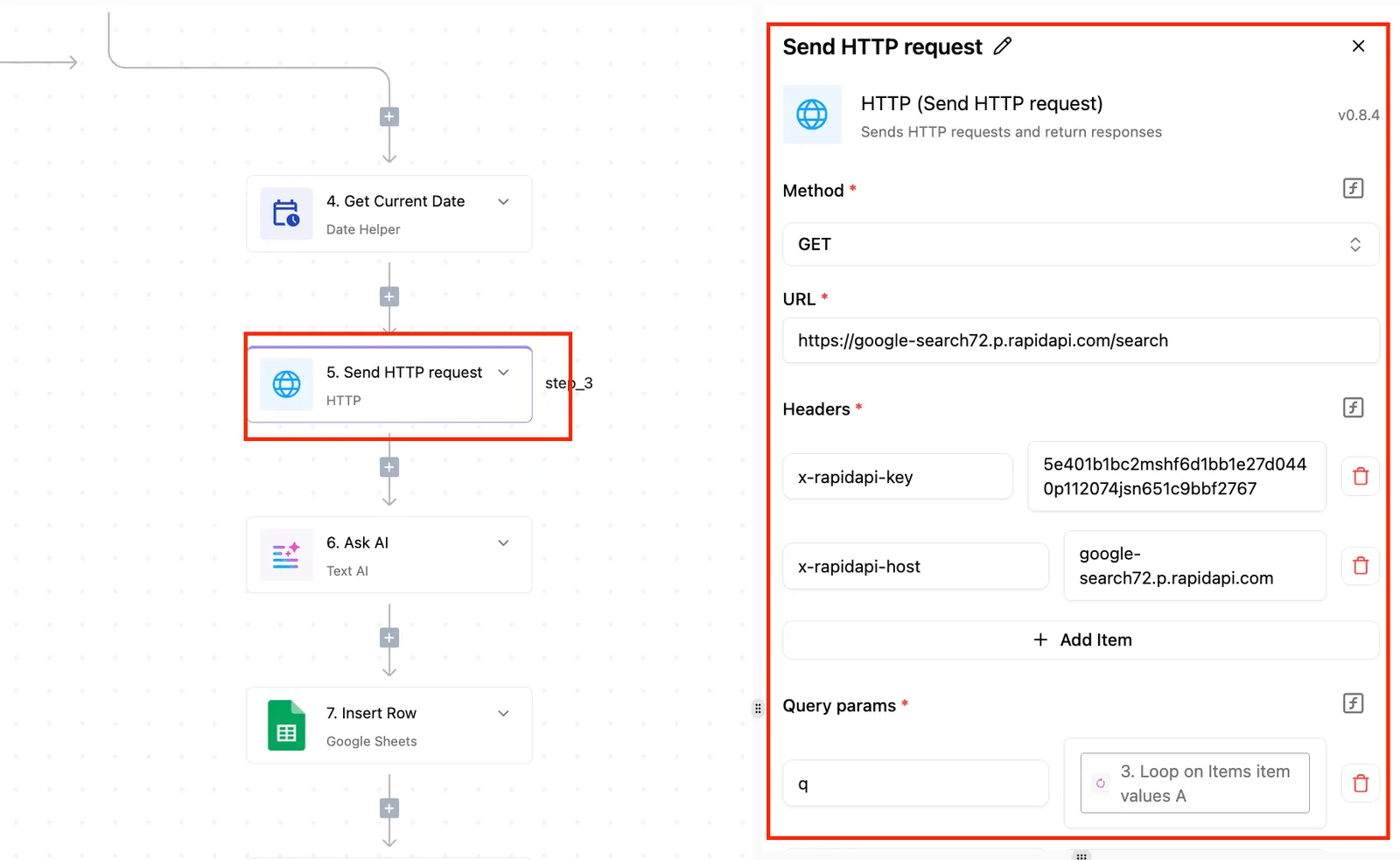
- An HTTP request step that calls the trigger.dev API with a Bearer secret key.
- An AI step using any major model or your own provider key.
- A connection to an MCP server.
The further down you go, the more of the integration you take on yourself, and the sections below say where.
How to call Trigger.dev with an HTTP request
Activepieces flows connect to other systems through integrations, and a run costs 1 credit however many steps it has, so the extra call doesn't change the bill.
Point it at the trigger.dev API, send the secret key as a Bearer token, and start a task from the flow.
Keep the key in a stored connection rather than typed into the step, or anyone who can edit the flow can read it.
The cost is that you own the result handling: the request starts the work, but your flow still needs a way to learn when long-running work finishes.
On the second route, Activepieces AI steps work with any major model or your own provider key, and when you bring your own AI keys on the Plus plan ($20 a month) each AI step costs 1 credit, so your monthly credit budget directly limits your step count.
This route only helps if something that answers as a model sits in front of your trigger.dev work, and that endpoint is code your team would write and host.
We found nothing from trigger.dev that provides one, so treat this as a build decision.
With an MCP server connection, a model in the flow can call tools instead of you wiring each request by hand. It gives the most flexibility and the least certainty.
What the model can do depends on the tools the server exposes, so list them in your pilot before you promise anything.
Activepieces needs no second catalog for this route.
The 746 integrations counted in packages/integrations/community of the MIT-licensed repo are each written as a integration, and the integration action that runs as a flow step is the same one a per-project MCP server exposes as a tool to Claude, ChatGPT, Cursor or an agent you built.
The Integrations Framework and MCP Server documentation describe that mechanism, so an HTTP step you set up for trigger.dev can become something an agent calls without being wired twice.
How to compare Trigger.dev pricing and plans
You pay for the plan plus machine time, which makes Trigger.dev cheap to pilot: each paid plan includes usage credits equal to its price.
Start with Free: the Trigger.dev pricing page lists it at $0 a month with $5 of credits, so a first pilot can cost nothing.
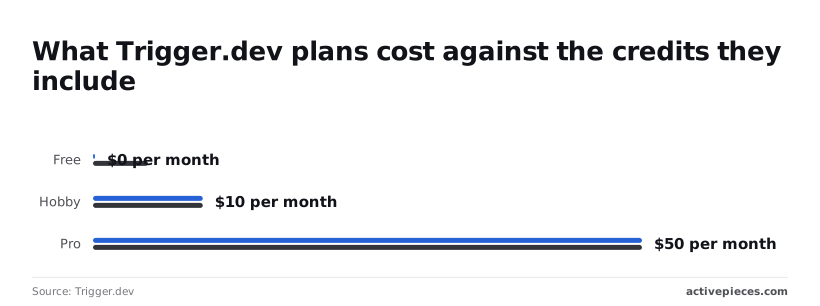
Hobby's $10 and Pro's $50, and each returns its price as credits, making neither a net cash expense, so there's no permanent cash loss. Size the pilot to what the credits cover before asking for budget.
Trigger.dev machine sizes and costs
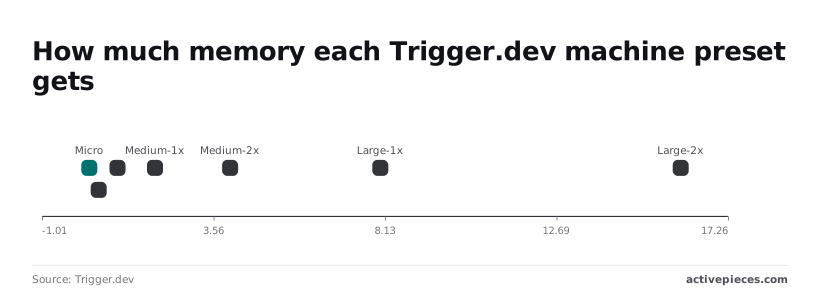
Per the machines documentation, you can configure the CPU and RAM of the machine a task runs on, so you can choose a machine appropriate for your workload.

So most model-calling steps fit a small machine, and only heavy data work needs more.
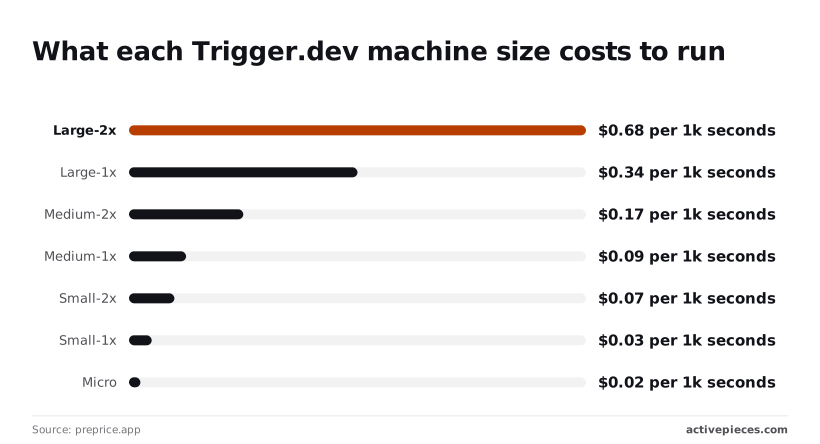
Larger machines cost more per second, so choose the smallest preset that fits.
To see who carries the work, use the table, which shows where Trigger.dev, a no-code workflow tool and a hand-built queue and worker differ. Take from it whether that is your developers, a business team, or your platform engineers.
| Trigger.dev | No-code workflow tool | Hand-built queue/worker | |
|---|---|---|---|
| How you pay | Plan plus per-second compute | Unstated | Your own servers and engineering time |
| Who writes the code | Your developers, in plain async code | Largely nobody | Your engineers, from scratch |
| Long-run handling | Built into the platform | Unstated | You build it |
| Visibility | Queryable runs via TRQL | Unstated | You build it |
TRQL is Trigger.dev's query language for asking questions of your run data, served through the query API described above.
That is why it sits beside your existing workflows rather than replacing them: Trigger.dev's documentation describes it as an open source background jobs framework.
What to watch in Trigger.dev
Because Trigger.dev sits beside your workflows, four things decide whether it stays a good fit: its changelog, its pricing page, its docs, and your automation platform's catalog. Each one tells you something the others can't, so a short checklist beats a general watch.
- The changelog, for new releases that change how durable runs behave
- The pricing page, for plan changes that alter what long-running work costs
- The docs, for query limits and machine sizes
- Your automation platform's integration catalog, for a native Trigger.dev integration
As for the first two, they show what the maker has already shipped and charged for, and the docs show whether your The heaviest job fits inside the stated limits.
(The input had no competitor compliment or superlative about a competitor, so I only capitalized it. If it was cut off, send the full sentence and I'll rework it.)
The catalog check matters most to teams that wire things together without writing code, because a native integration would shrink the glue code you maintain. Check all four before committing a production workflow. Check again before any renewal.
Per its own documentation, Trigger.dev's an open source background jobs framework. You write tasks in code and run them outside your request cycle, which is why long AI work no longer has to be redesigned around timeouts.
A team that wants a purely visual builder will find the code-first approach a real adoption hurdle.
Don't rely on a remembered release date. The maker is the Trigger.dev team, which publishes the product, docs and changelog. This article doesn't pin a release date. The changelog dates each release, so read it there before deciding how mature a given feature is.
Everything here traces to Trigger.dev's own documentation and public pages, which is the right primary source but also a maker's view.
Verify limits and prices against the live pages on the day you decide. They can change without notice. Where a page's silent, treat the point as unconfirmed and test it in a small pilot first.
Related reading
References
Build it
Set this up in minutes.
No code required. Connect your accounts, and Activepieces runs it from there.
Start free Talk to sales