
Activepieces Webhook Trigger Without Dropped Orders

Oct 24, 202616 min read
An Activepieces webhook is a Catch Webhook trigger. It gives a flow its own unique URL, and every HTTP request another system sends to that URL starts a run of the flow.
Flows are unlimited on every plan, including free, so each one can have its own address.
Nothing polls and nothing is scheduled, so the flow only works if the sender keeps reaching the right address. This section was checked against the documentation and pricing pages on 24 October 2026.
When the order webhook went silent
How webhooks capture incoming request data
In the editor, you add the Catch Webhook integration as the first step of a flow, and the editor shows a URL. The sender posts JSON to it, and the body, headers and query parameters become data the later steps can use.
That's the whole mechanism, which is why it feels finished after a few minutes.
The catch is that the editor shows more than one address for the same flow. One is for testing while you build. The other is the live URL that only receives traffic once the flow is published.

Mixing them up produces no error on the builder's side. It produces a flow that looks right and runs on nothing.
The workflow that was running
The shop was small: a storefront that sent each new order to a webhook, and a flow that turned every order into a fulfilment task for the person packing parcels.
Setup took an afternoon. The builder tested it by sending a sample order, watched the task appear, and moved on. Nobody tested the published URL, nobody decided what should happen if a request failed, and nobody was assigned to look at failed runs.

What the first failure looked like
At 23:40 an order came in and no task was created. No alert fired, no email arrived and nothing looked broken.
The storefront had been sending its orders to the test address, which only listens while the editor is waiting for a sample. The published Catch Webhook URL sat idle beside it.
eCommerceAgencies.org's illustration shows this: the store sends its order to the test URL while the live one waits. The clock reads 23:40. Take from it that the sender and the flow each believed they were working, so neither one reported a problem.
The morning pack list was short by every order placed overnight.
Everything below works on Activepieces' free plan. Start without code or a credit card.
Orders, hours, and customers lost overnight
One weekend of silent failure cost this shop 38 orders, 61 hours of not knowing, and a Monday spent rebuilding records by hand, a timeline that shows weekend failures can't be stopped until Monday, so the business ran completely blind for two and a half days.
That is the illustrative case, and they found out at least two days after the damage had begun.
Orders and hours lost
The flow broke on Friday evening and nobody noticed until Monday morning. That's 61 hours of customers paying and hearing nothing back. The 38 missed orders are the visible loss. The larger one is whether those customers come back, and that depends on the category.
According to eCommerceAgencies.org, 45–65% of Food & Beverage customers buy again, and 40–60% in Supplements. eCommerceAgencies.org's data shows that in Health & Beauty it's 35–50%, so a lost first order there still forfeits a likely second one.

Per eCommerceAgencies.org, Fashion falls to 22–35%, Jewelry to 12–20% and Electronics to 10–18%.
If you sell in the first two categories, you are gambling most of a customer's lifetime value on that first order arriving. A shop in the last two loses less per dropped order, but still loses the sale.

Cost of recovering lost webhook orders
Rebuilding meant matching payment records against the empty order list, then keying each order in by hand. Every affected customer also needed an apology.
| Item | This shop's illustrative figure | Cost in time or money |
|---|---|---|
| Orders missed | 38 | Revenue held until re-entered |
| Hours until noticed | 61 | Two and a half days of silence |
| Re-entry minutes | 6 per order, 228 total | About 3.8 staff hours |
| Customers emailed | 38 | About 1.3 staff hours at 2 minutes each |
| Refunds | 7 orders | $410 returned to customers who gave up waiting |
Illustrative figures for one shop, not a benchmark.
Together, the re-entry and email work came to roughly five hours of staff time. The refunds were the only direct cash cost, but the seven customers who asked for them are the likeliest never to return.
Each of these costs traces back to the 61 hours, because nothing told anyone the orders had stopped arriving. So why did nothing warn them?
What webhook triggers do with requests
Nothing warned them because a webhook trigger runs only when a sender posts to its URL. A call that never arrives or never lands leaves no failed run to look at. The sender pushes a payload, the flow starts, and that's the whole mechanism.

Test URL versus published URL
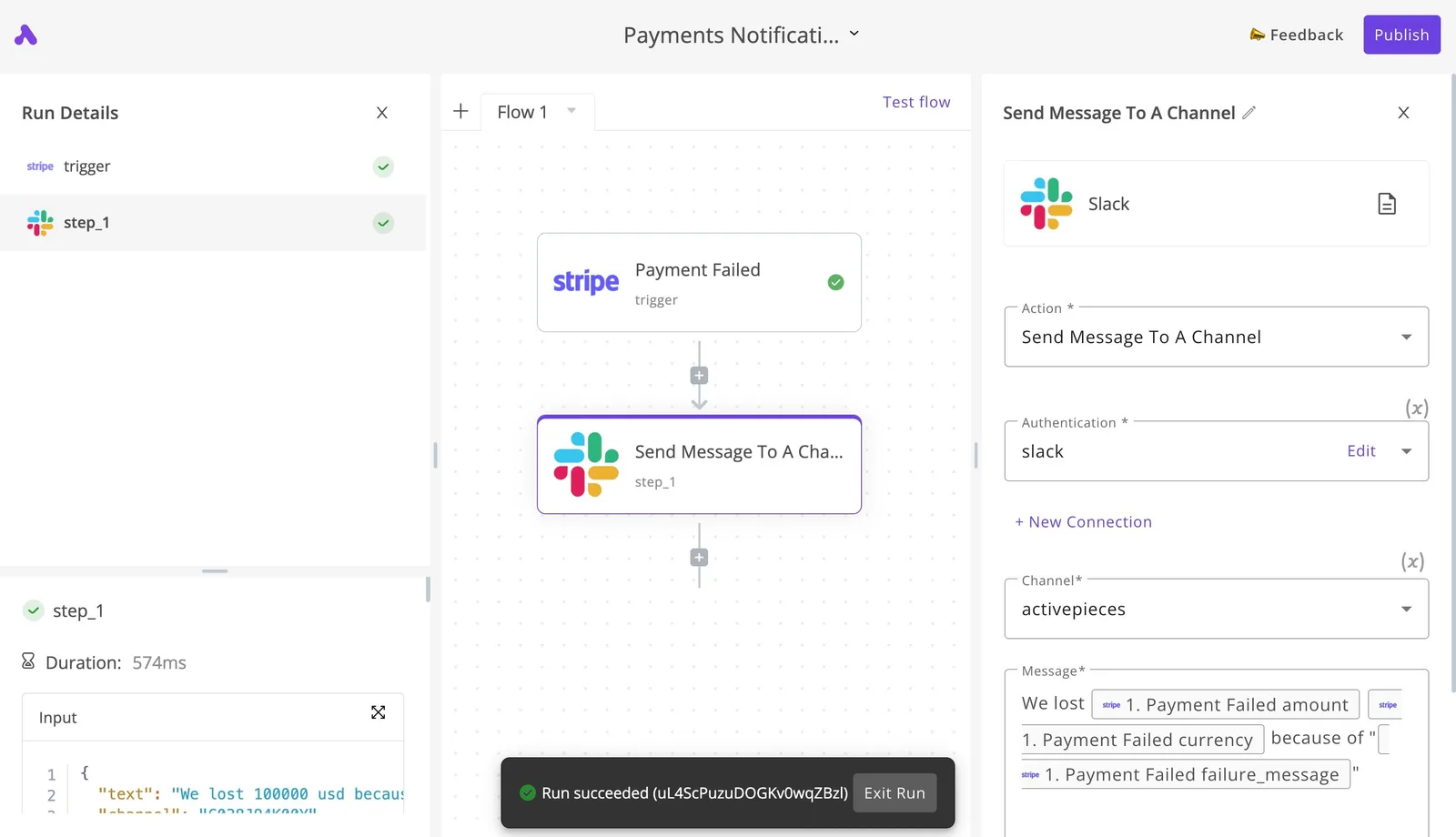
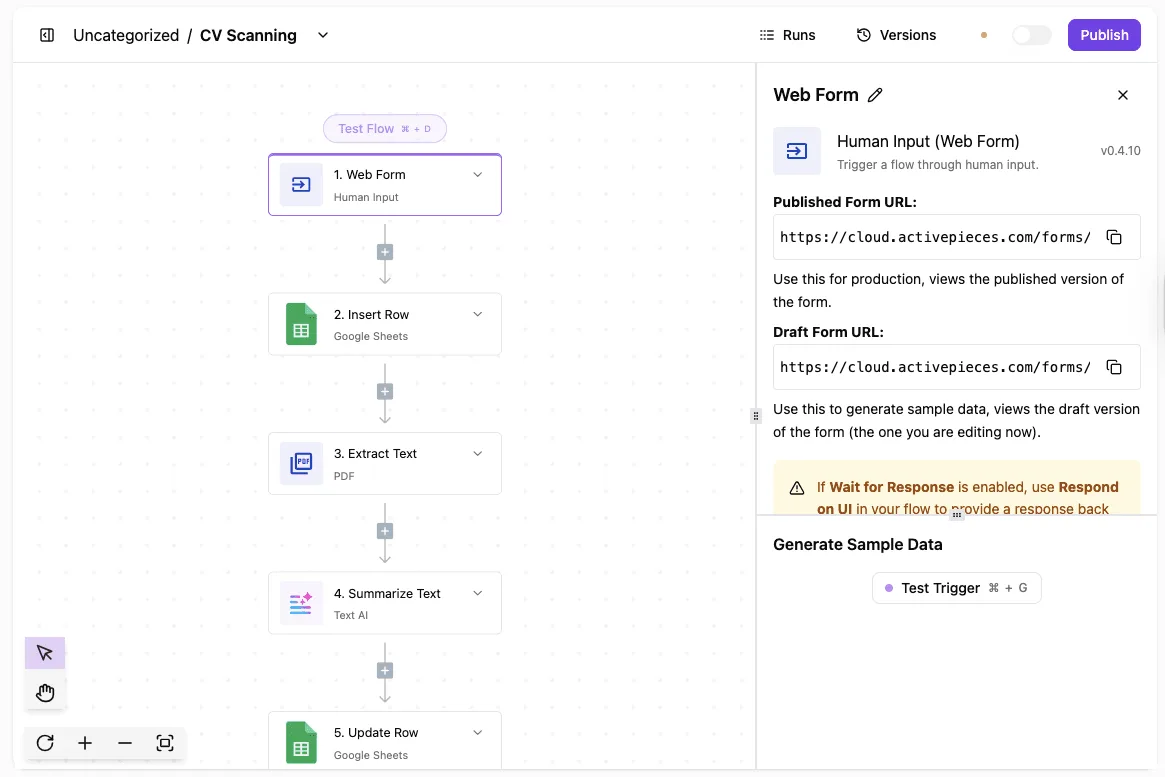
Open the trigger panel on the "CV Scanning" flow and you see a draft form URL and a published one, with a Test Trigger button below them.
Only the published URL runs the live flow, so a sender pointed at the draft address works in testing and then fails in production. Post a real payload to the published URL before you hand it to anyone.
Immediate response versus waiting for the workflow
The same panel warns about Wait for Response, because it holds the reply until every step has finished. Senders won't wait that long. Slack allows 3 seconds, so any flow that does real work before replying will look like a failure to it.
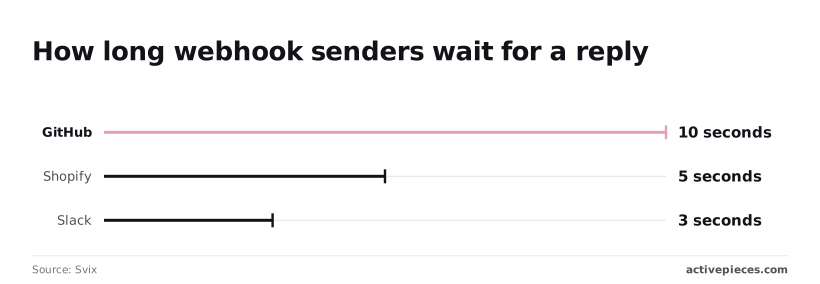
Shopify allows 5 seconds, enough for a quick lookup but not a PDF extraction and a summary, so document processing must happen asynchronously. GitHub allows 10 seconds, the most generous of the three, and still too short for a multi-step flow.
When a sender times out, it usually retries or gives up, so slow replies cause duplicate runs or lost events. Reply immediately and let the flow finish afterwards.
| Webhook | Polling trigger | Scheduled export | |
|---|---|---|---|
| Latency | Seconds | Up to one polling interval | Up to one schedule period |
| Receiver down | Event lost unless the sender retries | Picked up on the next poll | Picked up on the next run |
| Setup effort | Paste a URL into the sender | Credentials and a check interval | A job on the source side plus an import |
The table shows the trade. A webhook is fastest and cheapest to set up, but it depends on the receiver being up at the moment of delivery.
Polling and exports are slower and recover on their own. Choose a webhook when speed matters and you'll monitor retries. Choose polling when a missed event costs more than a delay.
Easier to see it running than to read about it: set it up free, no card.
What four mistakes broke the webhook
Pushing events means giving up the safety net polling provides. The shop lost orders through four mistakes in this order: the sender stayed on the test URL, nobody checked who sent requests, retries created duplicates, and no one watched failed runs.
The numbered timeline below shows each mistake at the point it struck. Read it as a chain, because fixing an early link doesn't excuse a later one.
The sentence that follows the timeline is the one to carry away: every mistake was a rollout gap, not a software defect, and a rollout checklist closes all four.
The flow was built and tested on the draft URL, and the sender was never repointed at the published one. This is the classic pilot-stage slip: the build works, the demo passes, and nobody owns the cutover.
Orders kept going to an address that was never meant to carry live traffic.
Anything that reached the endpoint was accepted. With no shared secret or signature check, a stray test call or a hostile one looked identical to a real order. Add the check before go-live, not after the first odd record appears.
Retries created duplicates
When a sender doesn't get a quick success reply, it resends, so one order can arrive more than once. The flow had no idempotency step, meaning no lookup of an order ID already processed.
Duplicates are the price of reliable delivery, and a template with the lookup built in is the cheapest way to make every new flow inherit that protection.
Failed runs nobody was watching
Nobody had pointed an alert at the failed runs sitting in the run history. The run limits in the documentation and on the pricing page also bound how much history and capacity you can count on, so check them against your order volume.
If the sender never delivered, the platform can't replay the event, so a failure on the sender's side stays invisible unless you reconcile orders against the source.
What webhook rules prevent failures now
Five steps in a fixed order are what the shop runs now, and the first four close the gaps that let orders vanish while the fifth catches whatever the sender never delivered, which means neither orders nor shipments can vanish silently anymore.
The sequence below is the rollout the shop adopted, and each step maps to a failure the earlier sections described.
- Publish the flow and re-point the sender.
- Add the shared-secret header check branch.
- Dedupe on order ID.
- Build the failure alert flow.
- Run a daily reconciliation against the store's order list.
The steps are grouped below by the problem each one solves, so a team can adopt them in stages rather than all at once.
Fix the URL and verify with a real order
Start by publishing the flow and pasting the published webhook URL into the sender. The draft URL used during building is a test address and doesn't run the live flow.
This was the shop's original break: the sender pointed at a URL nobody had exercised after publishing.
The check is deliberately dull. Place a real order in the store, then open the flow's run history and confirm that run appears with the order's data. Until a genuine order has landed there, the setup is untested, whatever the builder's test panel said.
Add a secret and a duplicate check
Next, make the flow refuse strangers and ignore repeats. The sender adds a shared-secret header to every request, and the first branch in the flow compares it to the stored value.
A request that fails the comparison ends there and never touches an order. Anyone who finds the URL can otherwise post fake orders into the flow.
When a sender doesn't get a quick response, it will send the same event again, and the second branch handles that. The flow looks up the order ID before doing any work. If the ID has been seen, the run stops.
That's what makes retries safe: the same order arriving twice produces one record, not two shipments.
Alert on failure and reconcile daily
The last two steps make failure visible. A separate alert flow watches for failed runs and messages a named person, so an error reaches someone the same day instead of sitting in run history.
Alerts only cover what the platform received. A daily reconciliation compares the store's own order list against the orders the flow processed and flags any that are missing.
This is the fix for the sender-side gap: it's the only check here that doesn't depend on the webhook arriving.
What Activepieces webhooks cost and require to self-host
Activepieces webhooks cost $0 on Cloud Free, $20/month on Plus, or the price of a small server if you self-host the MIT-licensed Community Edition.
The hosted tiers, including Cloud Free, and the self-hosted route give you a public URL without extra work, so users wanting public webhooks can start on the free tier.
Since the check above works without the webhook arriving, the open question is where the endpoint lives and who keeps it running.
The table sets the four routes side by side; the point to take from it is that the cheapest option moves the uptime job onto you.
| Route | Cost | Who runs it | Public URL | Fit |
|---|---|---|---|---|
| Cloud Free | $0 | Activepieces | Provided | Building and testing a first order flow |
| Plus | $20/month | Activepieces | Provided | A shop that wants hosted without a server |
| Community Edition (MIT; 2 vCPU, 4 GB) | VPS $6.49–$24/month | You | You set up the domain and HTTPS | Teams that want control of the data and the host |
| Enterprise | Via sales form | Hosted or self-hosted | Depends on deployment | SSO beyond Team, audit logs, embedding |
The skipped cutover is the step Activepieces makes deliberate: flows sync to git and move from a test environment to production through Release Management, so going live is a reviewed promotion rather than a click on publish.
A flow kept only in a vendor's editor has never been reviewed by anyone.
Git Sync and releases are part of the Ultimate plan, the Git Sync and Release Management documentation describes the same product on cloud or self-hosted, and MoneyGram, Moneypenny, Alan and FundingSocieties run Activepieces in production.
Check the pricing page for what each plan includes before you commit a team to one.
Self-hosting a webhook endpoint
To self-host, you run Activepieces in Docker on a server with 2 vCPU and 4 GB of memory, meaning the barrier to self-hosting isn't expensive infrastructure. A domain and HTTPS then go in front of it so senders can reach the webhook URL.
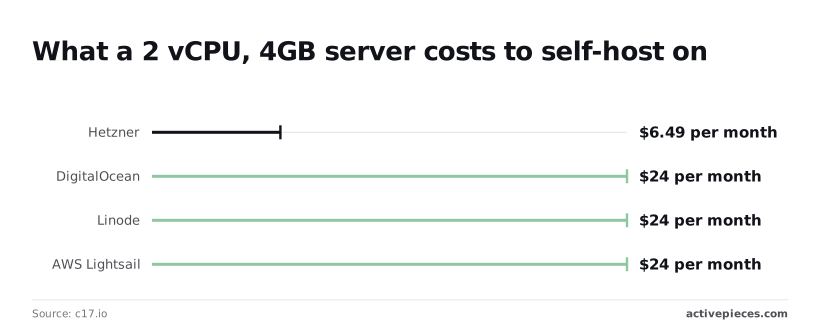
Per c17.io, Hetzner costs $6.49 a month for that size, so a small shop can run its order flow for roughly the price of one coffee.
DigitalOcean, Linode and AWS Lightsail each cost $24 a month, which is almost four times as much for the same specification, so selecting one of these negates the cost advantage of self-hosting.
Pick on price unless you already have an account elsewhere. Either way, test the published URL from outside your network, because a server that works on your laptop but not from the internet is the failure this article started with.
When a message queue beats webhook triggers
If your volume is high enough that you need guaranteed delivery, ordered processing or replay of every message, a dedicated message queue fits better than a webhook trigger.
Activepieces can sit behind it as the consumer, where a run costs 1 credit however many steps the flow has.
For SSO beyond Team, audit logs or embedding, use the sales form. The SOC 2 programme is in progress, not certified, so don't cite it to your auditors yet. To build the flow first, start free.

Frequently asked questions
Is the Catch Webhook URL secret? Treat it as semi-private, not as authentication: anyone who has the URL can send it data.
Keep it out of public repositories and shared screenshots, and have the flow check a shared secret or signature header from the sender before it acts on an order. Rotate it if it leaks.
Can a flow reply to the sender with custom data? Yes. By default the sender gets a quick acknowledgement, but a flow can hold the request open and return its own response, such as an order reference or a validation error.
The sender then waits for the flow to finish, so keep the steps before the reply short. Anything slow belongs after the reply or in a separate flow.
Does a webhook work on a self-hosted install behind a firewall? Only if the sender can reach it. The instance needs a public address, usually through a reverse proxy, with the instance's configured public URL matching it.
Otherwise the URL shown in the editor won't work from outside. For a sender inside your network, an internal address is enough. Test from the sender's side, not from your laptop.
How do I test a webhook without a real order? Send one yourself, in this order:
- Use the editor's test mode to capture a sample order and map your fields against it.
- Publish the flow.
- Post a sample order to the published URL with curl or any API client, not the test URL.
- Check that the run appears in the flow's run history and that the downstream action fired.
Step 3 is the one the shop skipped.
Open questions
Two limits are worth stating plainly. A sender that never delivered an event can't have it replayed from your side. A flow can be re-run for events it received, but nothing can fetch what never arrived, so the sender must resend.
If you need durable buffering or guaranteed delivery order, a message queue fits better than a bare webhook.
SOC 2 isn't finished: the programme is in progress, so don't describe the product as certified.
To build your first flow, start on a free hosted plan. To compare plans, read the pricing page of whichever platform you are weighing. For self-hosted enterprise, SSO beyond Team, audit logs or embedding, go through the vendor's sales team.