
Make.com Pricing 2026: Plans, Credits and Real Costs

Oct 14, 202614 min read
Make.com pricing today: every plan in one table
How Make.com pricing plans and credits work
Make.com pricing is a credit meter with a plan wrapped around it. You pay for how many module executions your scenarios consume each month, and the plan decides how often they may run and how long they're kept.
Make.com pricing is a subscription model in which each plan includes a monthly allowance of credits (formerly operations), with one credit typically spent per module execution in a scenario run, and the plan tier sets limits such as minimum run interval, execution time and log retention.
The table below, from the Make pricing page as read on 2026-10-14, shows the entry point of each plan. Take from it that interval and credits, not price, separate the tiers you can actually operate on.
Activepieces allows unlimited flows on every plan, including free, and its credits meter AI usage, so a ten-step build with no AI step in it consumes no credits, which is not true of Make's per-module or Zapier's per-task billing.
| Plan | Monthly price | Credits | Minimum interval |
|---|---|---|---|
| Free | $0 | 1,000 per month | 15 minutes |
| Core | From $9 | From 10,000 | 1 minute |
| Pro | Above Core at equal credits | Selectable tiers | 1 minute |
| Teams | Above Pro at equal credits | Selectable tiers | 1 minute |
| Enterprise | Custom quote | Negotiated | 1 minute |
Prices and plan limits checked against make.com on October 14, 2026.
Nothing's feature-gated by connector count, since Free also includes access to 3,500+ apps. The constraint is the 1,000 credits, which a single scenario running every 15 minutes can consume well before month end, so you're realistically limited to a couple of automated workflows, since Free allows 2 active scenarios.
What a credit (operation) is and how it is counted
In the standard case, each module that executes in a scenario run consumes one credit, and that is the unit Make bills for work done.
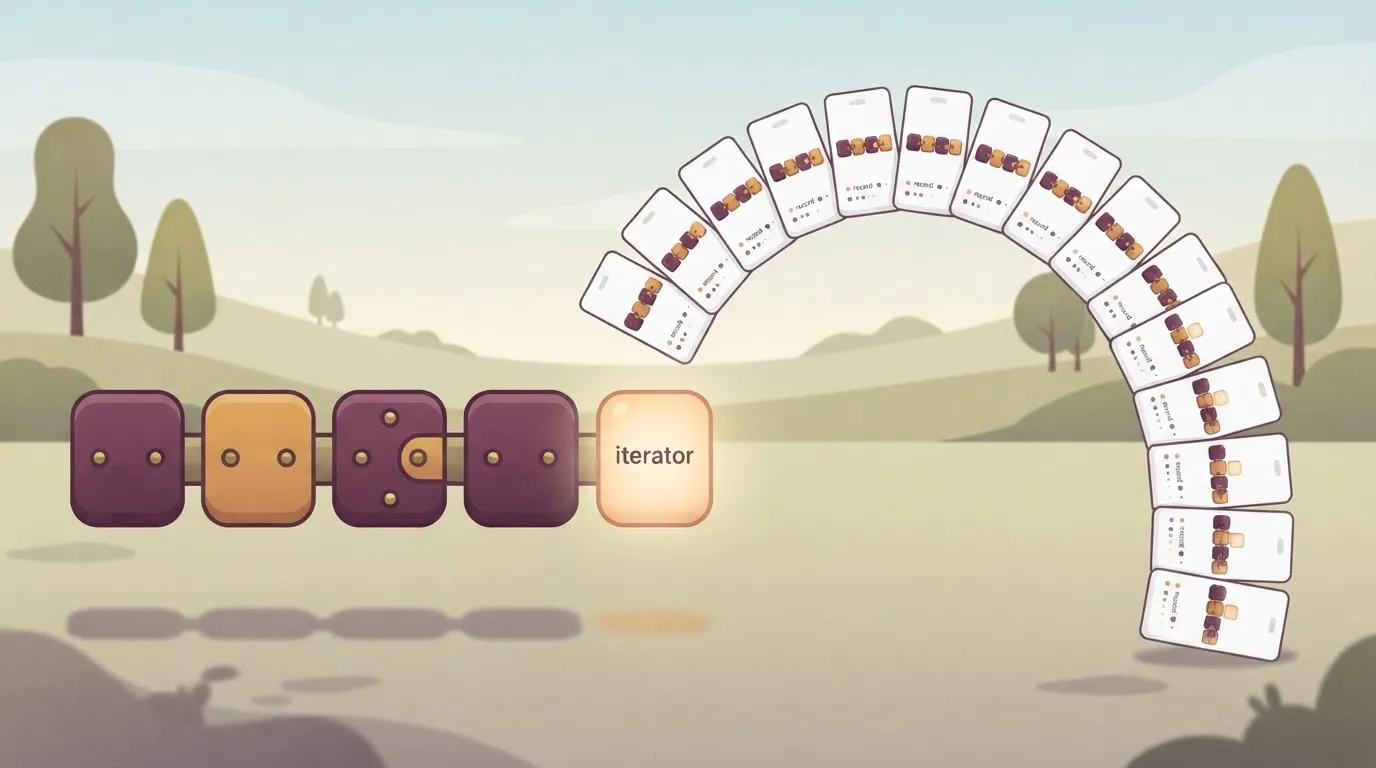
If a five-module scenario completes, it costs five credits. If it processes 20 records through an iterator, the modules downstream of it run 20 times, which means costs escalate well beyond five credits.
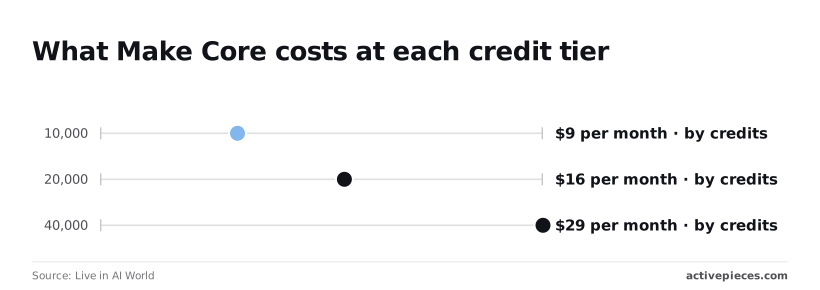
To see how the meter scales on Core, look at its price ladder, per Live in AI World:
- 10,000 credits costs $9 per month, so that's your baseline for light, low-frequency automation.
- 20,000 credits costs $16 per month, which means doubling capacity adds $7 rather than doubling the bill.
- 40,000 credits costs $29 per month, so each further doubling adds roughly $13, and the discount per credit narrows as you climb.
What changes between monthly and annual billing
Annual billing swaps flexibility for a lower effective rate: the pricing page lists a separate annual price per tier, and you commit to the year up front. The consequence is that a mis-sized tier becomes a sunk cost.

Monthly billing lets you correct a wrong estimate within a billing cycle.
If you are running this arithmetic for your own team, see what the same workload costs on Activepieces.
Hidden costs and limits raising Make bills
If you want to know what raises a Make bill, it is per-module credit counts, iterator multiplication, empty polls and token-priced AI, plus plan ceilings on frequency and history.
- Every module run costs 1 credit, so a ten-module scenario costs at least 10 credits per execution.
- Every item an iterator emits costs 1 credit per downstream module, so a 50-row array through three modules costs 150.
- Extra credits are bought in bundles of 1,000 or 10,000 at the fixed price defined in your subscription.
- A polling trigger that finds nothing still costs 1 credit per check.
- AI modules are priced by tokens, so cost follows prompt and response length, not run count.
Polling and iterators that inflate Make credit usage
Polling is the largest silent drain. A 2026 polling-versus-webhooks comparison found 742,000 noise requests against 8,000 useful ones.
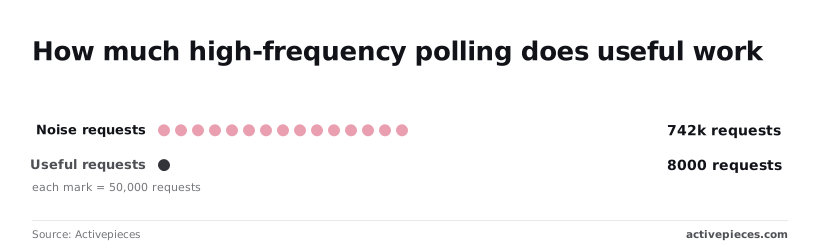
That's roughly 99% of checks returning nothing, so a scheduled trigger can spend almost its whole credit budget on empty answers. Where an app offers instant webhook triggers, use them.
Put an iterator in the path and it compounds this: a batch of 200 records through four modules is 800 credits in one run.
At zero credits, scenarios stop running until renewal or a top-up. For time-sensitive triggers, that means missed events, not merely a larger invoice.
On lower tiers, the minimum scheduling interval, maximum execution time, per-run data size and log retention are all restricted. These ceilings are plan-specific, so check each against your busiest scenario before choosing.
At zero credits, scenarios stop running until renewal or a top-up. For time-sensitive triggers, that means missed events, not merely a larger invoice.
A fifteen-minute polling interval's a functional constraint, not a cosmetic one, and short log retention leaves you without evidence when a failed run needs diagnosing a week later.
Estimating your Make bill in four steps
Estimate the bill by listing each scenario, counting the operations one run consumes, and multiplying by monthly runs with headroom. Then choose the plan whose interval, history and execution limits also fit, not just its credit allowance.
Step 1: List scenarios and their triggers
Write down every scenario you intend to run and what starts it: a schedule, a webhook, or a polling trigger. The trigger type matters because it decides how often the scenario runs, and run count's the multiplier on everything that follows.
Schedule a scenario and its count is predictable. With a webhook scenario, the count is however often the sending system fires, so you have to ask that system's owner for real volumes rather than guess.
Step 2: Count module operations per run
Open each scenario and count the modules that execute on a typical run, including the trigger.
Then adjust for iterators and aggregators: a module placed after an iterator runs once per item, so a scenario handling a batch costs far more than its module count suggests.
Count routers carefully too, because only the branch that actually executes spends operations.
Next, multiply operations per run by runs per month for each scenario and sum the results. Then add twenty percent.
The margin covers retries, volume spikes and the scenario you forget to list.
Step 4: Match the total to a plan and check the interval
Choose the smallest tier whose credit allowance covers your padded total. Then test that tier against the constraints from the previous section: the shortest scheduling interval, how long execution history's kept, and the maximum run time per scenario.
A plan that fits the credits but forces a slower polling interval has failed the estimate.
To see how this plays out, take three worked shapes:
| Profile | Typical scenarios | What dominates the total | What to watch |
|---|---|---|---|
| Small | A few linear scenarios, such as form to spreadsheet to notification | Run count, since each run is only a few modules | Interval, if you need near-real-time response |
| Mid | Several scenarios mixing schedules and webhooks | Webhook volume you do not control | Headroom for spikes |
| Heavy | Batch syncs using iterators over large record sets | Items per batch, not modules per run | Execution time limits and history retention |
If the heavy profile lands near a tier boundary, price the next tier up before committing, because one oversized batch can erase the savings.
Worth checking against a plan that does not meter every step: one credit covers a whole run on Activepieces.
Make.com against Zapier and n8n on price
On Make, an oversized batch erases savings, while on its rivals it behaves differently, because Make charges per module operation, Zapier per task and n8n per workflow execution. Each vendor's pricing page was checked in October 2026.
How Make, Zapier and n8n meter usage
Make counts a credit (formerly an operation) for each module that runs. A scenario that loops over 20 records through three modules therefore consumes far more than one that makes a single call.
Zapier counts tasks, meaning successful action steps, so the cost grows with the number of actions per record rather than with the trigger.
n8n counts one execution per workflow run, whatever happens inside it. That makes n8n the least sensitive to batch size of the three, and Make the most sensitive.
Make, Zapier and n8n price at 10,000 units
At 10,000 units of monthly volume, the table sets the three against each other, using Make's Core plan and Zapier's annual-billing tier.
Read the cost column alongside the metered unit, because 10,000 credits, 10,000 tasks and 10,000 executions aren't the same amount of work.
| Entry paid price | Metered unit | Cost at 10,000 (mid tier) | Minimum polling interval | Self-hosting | |
|---|---|---|---|---|---|
| Make | Core is the first paid tier | Credit per module run | $9 on Core | Shortens as the plan rises | No |
| Zapier | Professional is the first paid tier | Task per successful action | $129 on annual billing | Shortens as the plan rises | No |
| n8n | Cloud plans sit above a free self-hosted edition | Execution per workflow run | Execution-based; no execution fee if self-hosted | Set in the schedule trigger | Yes |
| Activepieces | Plus is the first paid tier, at $20 a month | Credit | — | — | Yes |
On Make and Zapier, polling frequency is a plan limit. A workflow that must check for new data every minute can force an upgrade even when volume doesn't.
n8n removes that limit only if you run it yourself, which swaps a subscription for server and maintenance work.
When Make is still the cheaper choice
When a scenario is short, branches little and handles one record per run, Make stays cheaper. In that shape, its credit count tracks Zapier's task count closely, and the price gap on the table favors Make.
Once you iterate over large arrays, the advantage narrows, because every module inside the loop bills again.
At that point, an n8n execution that processes the whole batch at once becomes the cheaper design. Price your heaviest scenario module by module before treating the table as a verdict.
Where Activepieces fits if Make's metering is the problem
If per-step charges dominate your bill, or you need to run the automation engine on your own infrastructure, Activepieces is worth testing: its core is MIT-licensed and self-hostable, with 740 integrations in the open source monorepo.
Otherwise Make's metering is usually workable once you have priced it.
How execution steps consume credits
Take a scenario with a router, an iterator and six API calls. Make counts each module execution, so it spends credits on every one of them.
Activepieces doesn't meter steps at all: flows are unlimited on every plan and credits meter AI usage. The practical effect is that a long chain of non-AI steps consumes no credits there, where that same scenario spends a credit on every module execution on Make.
The Free plan is $0 with 1,000 credits a month and unlimited flows, Plus is $20 a month and Team is $200, all listed on the Activepieces pricing page, so upgrading from free to Plus costs $20 per month.

The table below sets the two side by side. Read the credit-meter row first, because the entry price and credit allowance mean nothing until you know what one credit buys.
| Make | Activepieces | |
|---|---|---|
| Entry price | $9 | $20 |
| Included credits | 10,000 | 1,000 a month on Free |
| What a credit meters | Each module execution | AI usage |
| Self-hosting | No; Make runs in its own cloud | Yes, through the open-source edition |
| Where Make is stronger | Mature routing, error handling and a broad module catalogue | Younger tooling; the gain is cost predictability |
If your flows are short, the $20 Activepieces entry price against Make's $9 buys nothing, since a three-step scenario costs only three Make credits per run.
It pays off only where step count's what inflates your Make bill, as with the 800-credit iterator run above, which consumes no credits on Activepieces unless it contains AI steps.
Don't expect self-hosting to remove the bill; it changes it. You stop paying per run, but you take on servers, upgrades, backups and uptime, and someone on your team now owns them.
Rebuilding one scenario as a test
Take the module-by-module price you already worked out for your heaviest scenario and rebuild only that one in Activepieces, after checking its connectors against the 740 integrations in the open source monorepo, ensuring you won't be blocked by missing connectors.
Don't migrate everything on the strength of a pricing page.
Then, in order:
- Run it against the same inputs for a representative week.
- Count the credits its AI steps use.
- Compare the total with the credits Make consumed.
Watch where the rebuild fights you. A router with nested conditions, a custom error path or a connector that exists in Make but not here will cost engineering hours, and those hours belong in the comparison.
If the rebuild is cheaper and behaves the same, you have a reason to move. If it's roughly equal, Make's tooling depth's likely worth keeping.
Frequently asked questions
Is Make.com free to use?
Yes, Make has a Free plan, but it's a capped evaluation tier, not a production one.
What the Free plan limits
You get a small credit allowance on the Free plan, tighter limits on how often scenarios can run, and shorter history and execution time than paid plans.
That means a scenario polling every minute may be impossible on Free, so test your real trigger interval before you build around it.
Cancelling and downgrading
You can cancel or downgrade at any time from your account's billing settings, and a downgrade generally applies from the next billing period instead of refunding the current one.
Before you drop a tier, check the lower plan's limits on run frequency, history and execution time. A scenario that fits your credit budget can still break on those limits.
How failed runs are charged
When a run fails at its fourth module, it has already spent the credits for the first three, because failed runs are charged partly: credits are consumed by the operations that actually executed.
Error handling therefore affects cost as well as reliability. Retries, and routes that re-run steps after a failure, each add to the bill.
Whether unused credits roll over
Don't expect unused credits to roll over by default. Credits are an allowance for the billing period, and Make's docs treat unused ones as expiring when it ends, so a quiet month doesn't build a reserve.
Size your tier to your typical consumption, and treat any spike as a case for buying extra credits instead of a bigger plan.
Is Make cheaper than Zapier for high-volume workflows?
Sometimes, but the answer depends on how each tool counts usage, not on the sticker price. Make bills credits per module operation, so scenarios with many steps or large batches of records can cost more than they look.
Count both for the same workflow, because Zapier bills per task, so the comparison only holds if you do. Price your own scenario step by step on each platform, and give extra weight to anything that loops or iterates over records.
Related reading
References
Running the numbers
See what the same workload costs here.
Free forever plan, and every paid plan self-hosts at no extra cost.
See pricing Talk to sales