
Polling vs Webhooks for Integration Triggers in 2026

Oct 14, 202614 min read
Polling is the scheduled, repetitive interrogation of an external interface to check for data updates. When you set an automated workflow to run "as fast as possible," it creates a persistent background load that treats silence as an expensive operational event.
This load consumes rate limits regardless of whether your business is actually transacting.
How polling loops exceed API quotas
The 60-second lead synchronization loop
To ensure near-instant responsiveness, a standard lead-routing sequence often defaults to a one-minute interval. One such example is built using Activepieces to connect a marketing form to a sales database, where MoneyGram and Moneypenny run automations in production.
According to Webhookagent's analysis, this frequency results in 1,440 checks every 24 hours, which means the system is constantly pinging the server regardless of actual activity. Your integration consumes over a thousand API calls daily even if not a single customer fills out a form.
A baseline of "ghost traffic" is created, eating into the daily allowance of your customer relationship management (CRM) platform.
Why the CRM issued a 429 Too Many Requests error
When the cumulative volume of these frequent checks added up across many integrations, the system came under strain. This triggered an error, since when a call exceeds a request limit, an error is returned.

Before the business day even began, the 60-second polling cadence had already consumed a noticeable slice of the daily quota of the Salesforce CRM platform. This left your sales team unable to access or update records until the quota reset.
Wasted API calls from empty polling requests
The inefficiency of this model is best illustrated by the disparity between total requests and actual data retrieved. In a typical polling environment, data from WittyCoder demonstrates that the system generates 742,000 units of noise. These represent empty requests that return no new information.
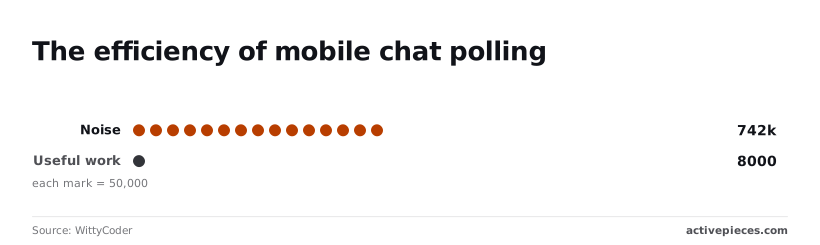
To maintain a real-time feel through polling, the following data highlights the extreme overhead required: In this environment, the system generates 742,000 noise requests compared to only 8,000 requests of useful work, so the vast majority of your processing power is being entirely wasted.
98.9% of the operational budget for this task is spent confirming that nothing has happened. When noise dominates the logs to this degree, the risk of a total system lockout increases because the margin for actual work disappears.
The fastest way to settle a shortlist is to try one. Activepieces is free to try, no credit card.
The high noise of standard polling
The 99% failure rate of high-frequency checks
Massive volumes of "empty" requests are created by frequent polling, consuming rate limits without transferring any actual data.
According to Hook0, an integration checking for updates every minute performs many requests for every one that actually finds a new event, meaning your API usage is dominated by empty responses.
The ratio climbs to 360 requests per event when that frequency increases to a five-second interval, indicating that the efficiency of your polling strategy degrades rapidly as you attempt to reduce latency, so your system becomes increasingly expensive to operate as it tries to keep pace.
This forces you to maintain infrastructure for roughly 99% overhead of pure noise, for no functional gain, meaning your budget is being consumed by traffic that serves no purpose.
In contrast, a Webhook-based architecture maintains a 1:1 ratio. Every incoming packet represents a billable, actionable event.
A "429 Too Many Requests" error is eventually triggered by this constant stream of "no-op" traffic. This happens with providers such as the CRM platform Salesforce or the version control provider GitHub.
Why 'Useful Work' is the only metric that justifies an API call
Operating at high frequency without filtering creates a liability where the cost of the check exceeds the value of the data. Running a check every minute results in 43,200 executions per month if an automation platform charges per execution.
You pay for tens of thousands of "success" signals that resulted in zero database updates.
You must measure "Useful Work" to prevent the mere act of watching for work from consuming your automation budget. This is the ratio of successful data transforms to total requests.
Manual data recovery after rate-limit errors
You must manually reconcile the resulting data gaps when rate-limiting errors interrupt polling cycles. The API returns a 429 error, halting the synchronization engine.
The system misses three critical updates during the lockout period. You spend two hours writing a custom script to fetch the missing records and re-sync the state. This manual intervention turns a "set and forget" automation into a recurring maintenance debt.
Why architecture dictates polling frequency
Platform-imposed polling intervals determine the maximum speed of a business process, forcing you to choose between operational lag and increased subscription costs.
A "real-time" inventory update can actually be fifteen minutes out of sync when an automation tool only checks for new data every quarter-hour. This delay leads to overselling or customer service friction.
Standard 15-minute intervals vs. high-frequency 1-minute checks
The gap between standard and high-frequency polling is rarely a technical limitation. It's almost always a monetization strategy that increases the cost of time-sensitive data.
A 15-minute wait between checks is often mandated by choosing a lower-tier plan. This means a high-priority lead could sit unaddressed in a CRM for a full quarter of an hour before the first automated touchpoint occurs.
The gap between standard and high-frequency polling is rarely a technical limitation. It's almost always a monetization strategy that increases the cost of time-sensitive data.
The following table illustrates how platform selection and budget directly constrain the minimum possible latency for automated tasks.
| Platform | Plan Tier | Minimum Polling Interval |
|---|---|---|
| Zapier | Free | 15 minutes |
| Zapier | Professional | 1 minute |
| Make | Core | 1 minute |
| Pipedream | Basic | 1 minute |
| Activepieces | Free | — |
High-frequency polling consumes task quotas faster if the workflow involves filtering out noise.
Rate limits in shared cloud environments
API providers enforce strict pagination and rate limits to protect their infrastructure. These limits restrict how much data a single poll can retrieve before the connection drops.
Even if an automation triggers frequently, it's still bound by the "MaxResults" parameter of the source system. A high-volume sync will fall behind if the incoming data rate exceeds the per-request limit.
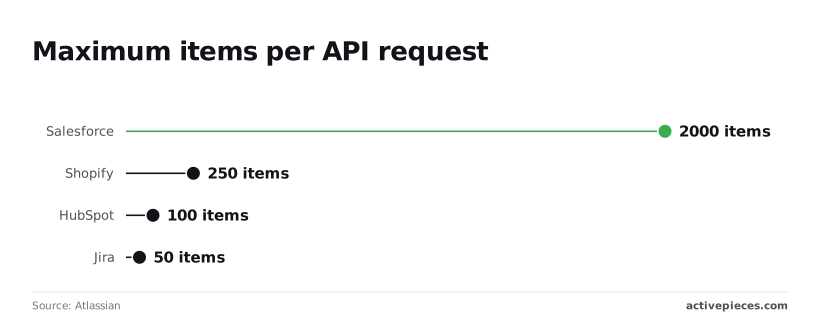
Salesforce query batches have a suggested maximum of 2,000 records, though the actual batch size can differ, so a massive migration can proceed with fewer API calls. Shopify limits requests to 250 records, which requires more frequent polling to keep high-volume stores synchronized.
Webhook advantages
Batches are restricted to 100 records by HubSpot, increasing the risk of a backlog during peak marketing events. Jira caps results at 50 records, so you must poll more aggressively to maintain an accurate dashboard.
Webhooks shift the architectural burden from the automation tool to the source application. They send data the instant an event occurs rather than waiting for a scheduled check.
This "push" model eliminates the 1-minute or 15-minute wait entirely. A "New Order" notification reaches the warehouse the second the customer clicks purchase.
Only when there is actual work to do does the automation platform wake up. Webhooks remove the "polling tax" of empty checks, though they require the source system to support outbound HTTP requests.

Reading a table only gets you so far. Build the same workflow in Activepieces and compare it yourself.
How Activepieces manages polling intervals and rate limits
Activepieces provides a central control plane to govern how frequently an automation platform queries external systems, offering unlimited flows on every plan, with each run metered as one credit.
This prevents the silent budget creep of unnecessary API calls, as the pricing page confirms every flow run consumes just one credit regardless of internal complexity.
By decoupling the trigger frequency from the execution logic, the platform allows you to match the polling rate to the actual volatility of the data source.
Configuring custom polling schedules for legacy APIs
Activepieces allows you to define specific execution windows when integrating with older databases or internal tools that lack push notifications, using an MIT-licensed core that can be self-hosted to keep sensitive polling traffic within your own firewall. This helps avoid exhausting API quotas.
The interface provides a visual configuration for the Schedule trigger. Here, you can dictate not just the frequency, but also the specific days of the week the automation is active.
The following view demonstrates this control within the flow builder.
The modal has category tabs: All, AI, Core, and Apps. On the right side, a settings panel shows the Schedule trigger configuration with a "Run on weekends" toggle, and below that a "Generate Sample Data" section showing a successful test result.]

This configuration ensures that a workflow querying a Google Sheet for new rows doesn't consume resources during hours when the office is closed.
By restricting these checks to business hours, you reduce your total step count. It also lowers the risk of being throttled by the target service.
Switching to webhooks for zero-latency automation
For modern services like GitHub or Stripe, Activepieces offers native webhook listeners that eliminate the need for polling entirely, contributing to a library of 733 integrations that prioritize event-driven triggers, which means users can automate complex workflows without worrying about missing critical updates.
This architectural shift moves the burden of monitoring from the automation platform to the source system. The source only sends data when a specific event occurs.
Because the flow remains dormant until a payload is received, you avoid the "polling tax" of empty runs. It also achieves near-instant data synchronization.
Using built-in 'Delay' and 'Retry' logic to survive API outages
Activepieces mitigates the risk of intermittent connection failures by providing granular retry policies and delay steps within the flow itself, which run in the air-gapped build exactly as they do in the managed cloud.

The run is the meter, not the steps inside it, meaning a complex ten-step recovery sequence costs exactly the same as a basic two-step flow.
This ensures that building resilient, multi-stage error handling doesn't inflate the bill, as the pricing page confirms every flow run consumes just one credit regardless of internal complexity.
A buffer is created that protects data integrity. It doesn't require manual intervention from you to restart stalled processes.
Optimizing the payload to reduce total API calls
Efficiency in data synchronization depends on maximizing the density of each request rather than increasing the cadence of the checks themselves.
Moving from a mindset of constant pings to strategic fetches allows your system to handle larger bursts of activity without triggering protective throttling mechanisms.
Efficiency in data synchronization depends on maximizing the density of each request rather than increasing the cadence of the checks themselves.
Identifying 'High-Volume, Low-Value' polling workflows
High-volume flows are characterized by frequent requests to endpoints that rarely yield new information. This creates a significant gap between the cost of the check and the value of the result.
Fundamentally, this data demonstrates that the standard polling model is inefficient. Nearly every request is a sunk cost that provides zero operational utility.
Consequently, you must audit your logs to identify which triggers have a high failure-to-success ratio before these silent costs scale alongside your business.
Calculating your API budget against trigger frequency
A sustainable API budget requires balancing the desired freshness of data against the hard caps imposed by service providers. These include the CRM platform Salesforce or the ERP system SAP.
If a workflow polls every minute, it consumes over forty thousand calls per month.
Daily limits of a standard API license can be quickly exhausted by this volume. This leads to service blackouts for other critical business functions.
Calculating this budget involves determining the maximum allowable delay for a specific business process, such as a lead follow-up.
It also requires identifying the total daily API call limit provided by the vendor's current subscription tier. Finally, allocate a specific percentage of that limit to polling so that enough headroom remains for manual searches and bulk exports.
Batching requests to stay under the rate limit
Batching transforms a series of individual pings into a single, comprehensive request that retrieves multiple records at once. This drastically reduces the number of round-trips to the server.
By configuring a middleware or an integration tool to fetch all records updated since the last timestamp in one go, your system maintains high throughput.
It stays well below the rate-limiting thresholds that typically penalize high-frequency pings.
This approach is particularly effective for high-velocity environments where dozens of events may occur within a single polling interval. Instead of triggering fifty separate workflows for fifty new rows in a Google Sheet, a batched request processes the entire delta as one unit.
Frequently asked questions about polling triggers
Can I force a polling trigger to run faster than the platform limit?
Platform-enforced polling intervals are hard constraints designed to protect the infrastructure of the automation provider. You can't bypass these limits through configuration alone.
Attempting to circumvent these frequencies by nesting multiple "wait" steps or recursive loops typically results in a suspended account. This happens for violating fair-use policies, which cuts off all business-critical workflows without warning.
If the native refresh rate of a tool is insufficient for a specific operational requirement, the only viable path is to migrate that specific integration. This could be to a developer-hosted script or a platform that supports real-time webhooks.
Does every API call by a polling trigger count toward my bill?
Most automation platforms charge based on the number of times a workflow is successfully triggered. The underlying API calls made to check for new data often consume the rate limits of the connected service.
If a workflow polls a CRM every minute to see if a deal has closed, it may exhaust the daily API quota of that CRM before noon.
Other integrated tools are prevented from accessing customer data. It creates a hidden operational cost where the "free" check for updates eventually forces a mid-month upgrade to a more expensive tier of the third-party software.
What is the difference between long polling and short polling?
The primary distinction lies in how long the connection remains open, which dictates how much overhead is generated by the server.
Short polling sends a request and expects an immediate response, even if no new data exists, which creates constant, repetitive traffic. Long polling keeps the request open until the server has new information or a timeout occurs.
This reduces the total number of headers exchanged and lowers the burden on the network.
How do I know if an app supports webhooks instead of polling?
Verification requires auditing the "API Reference" or "Developer Documentation" of the specific software to see if it lists a "Webhooks" or "Subscriptions" endpoint.
If the documentation only mentions "GET" methods for retrieving lists of items, the application is likely limited to polling.
A delay between an event occurring and the automation starting must be accepted.
A definitive sign of webhook support is the presence of a configuration screen within the app’s settings that asks for a "Payload URL." This is the destination for data the moment a change is recorded.
Related reading
References
Still comparing
The fastest way to settle it is to build something.
Open source under MIT, so you can self-host the same thing later.
Start free Talk to sales