
Webhooks vs Polling: When to Use Each (2026 Guide)

Oct 19, 202614 min read
Whether the client initiates a request at set intervals or the server pushes data the moment an event occurs determines how data exchange functions.
This architectural choice dictates how a system complies with data residency requirements, as the frequency and direction of these transfers determine where sensitive information sits during transit.
Webhooks and polling move data differently
Polling: The scheduled request model
When a client asks a server for updates at fixed intervals, it creates a predictable but resource-intensive communication loop known as polling.
In this model, the client repeatedly sends requests to an API, which usually returns an empty response if no new records exist.
Developers often use this method when connecting to legacy systems that lack outbound notification capabilities. This ensures that data retrieval happens on a schedule you control.
Webhooks: The event-driven push model
Webhooks function as automated "push" notifications where a source system sends data to a destination URL immediately after a specific trigger occurs.
Instead of the client asking for updates, the server acts as the initiator. It sends a payload to a listener (such as a workflow automation tool like Activepieces) whenever a user takes an action.
By eliminating constant status checks, this model allows systems to remain idle until there is actual data to process, reducing unnecessary network traffic.
The latency gap between push and pull
The primary difference between these two mechanisms lies in how quickly a system reflects a real-world change. The following comparison illustrates the structural difference in how these protocols handle timing:
Polling introduces a deliberate delay equal to the time between scheduled checks. Consequently, webhooks are necessary for workflows that require near-instantaneous data synchronization across distributed environments.
The fastest way to settle a shortlist is to try one. Activepieces is free to try, no credit card.
Four criteria for choosing a data delivery method
Architectural decisions between polling and webhooks depend on how a system balances immediate data availability against the operational burden of maintaining a persistent listener.
Real-time delivery vs. batch processing
Latency measures the duration between an event occurring in a source system and the destination receiving the payload. In a webhook architecture, the source pushes data the moment a trigger occurs, which satisfies the requirements for time-sensitive operations like fraud detection.
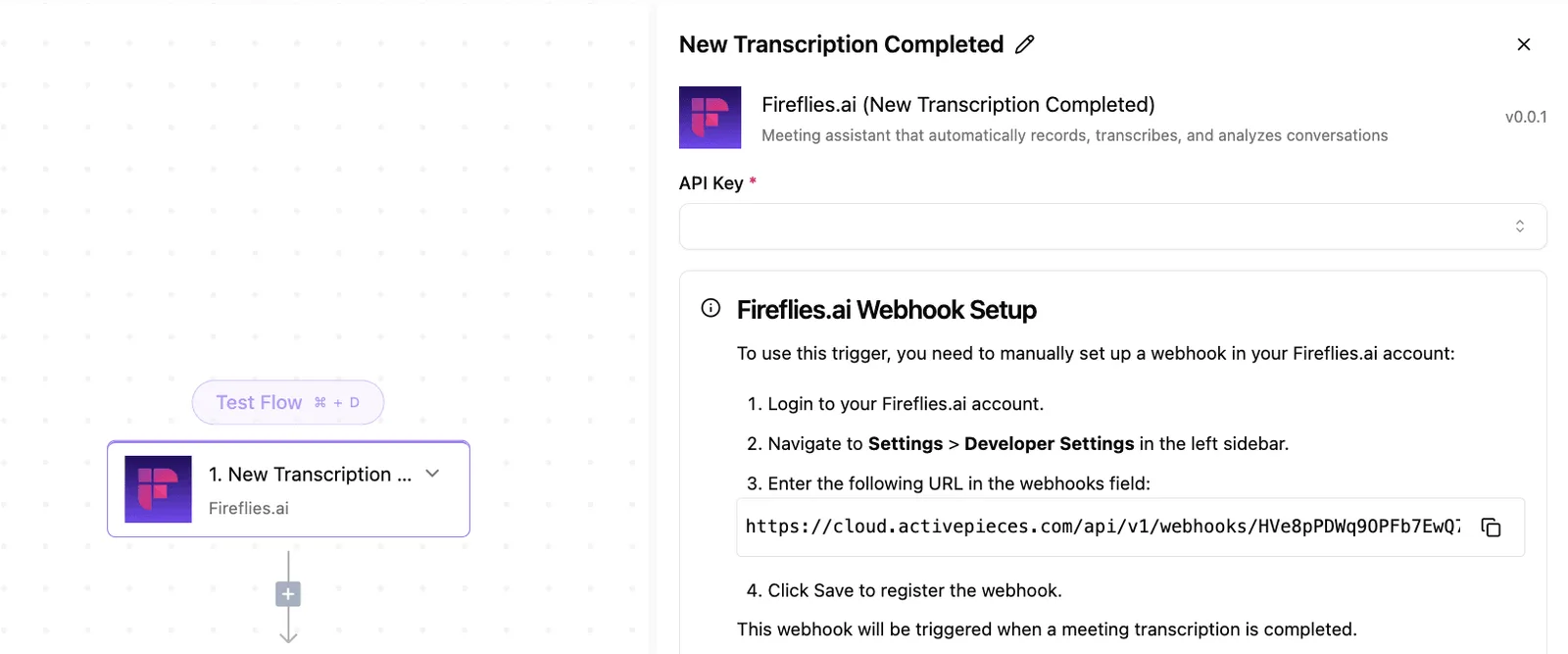
If a system checks for updates every ten minutes, it will frequently process data that is already several minutes old. This mandatory delay is the hallmark of polling.
Resource consumption at scale
Frequent polling creates high overhead because the majority of requests return no new data, resulting in wasted CPU cycles and unnecessary bandwidth charges for empty responses.
Webhooks are more efficient at scale because they only consume resources when there is an actual payload to deliver, which reduces the total number of HTTP requests hitting the gateway.
Handling system downtime and missed events
Webhooks operate as "fire and forget" by default. If the receiving server is down, some senders lose the data unless they implement retry logic with exponential backoff; Stripe, for example, automatically retries undelivered events for up to three days.
Because the system can simply fetch all missed records once it returns online, polling is inherently more resilient to receiver downtime. This prevents data gaps during maintenance windows.
Implementation and maintenance overhead
Webhooks require a publicly accessible endpoint and robust security measures, such as verifying HMAC signatures to prevent unauthorized data injection.
The obvious advantage of polling is that it is easier to secure behind a firewall. However, it requires developers to manage state (tracking the "last seen" ID) to avoid processing the same record twice.
The fragility of the push-only model
Webhooks introduce architectural fragility. They shift the responsibility of data persistence from the sender to the receiver, creating a single point of failure during periods of high latency or downtime.
A webhook is a "fire and forget" mechanism that requires the receiving endpoint to be available at the exact millisecond the event occurs. Polling allows a system to request data when it is ready to process it.
Why webhooks are cheaper for low-frequency events
By eliminating the overhead of constant API requests that return empty results, webhooks reduce infrastructure costs for low-volume workflows.
If a system only receives one event per hour, a webhook executes exactly one HTTP POST, whereas a one-minute polling interval would waste 59 requests. This efficiency allows developers to stay within the free tiers of API rate limits.
The 'Thundering Herd' problem in webhook bursts
When a sudden spike in source activity occurs, it can overwhelm a receiver with a "thundering herd" of concurrent requests, leading to dropped packets.
Because webhooks lack native backpressure controls, a burst of 1,000 simultaneous events can trigger a 503 Service Unavailable error. A marketing campaign that generates rapid signups could inadvertently crash the very CRM integration meant to capture them.
Webhook retry windows by provider
The window for recovering missed data varies significantly by provider, meaning a short outage can lead to permanent data loss depending on which service is sending the push.
The following table illustrates how long specific services will attempt to redeliver a failed event before they purge the data from their outbound queue.
| Provider | Maximum Retry Window (Hours) | Consequence of Failure |
|---|---|---|
| Stripe | 72 | A system has three days to recover before payment records are lost to the "black box." |
| Twilio | 4 | A four-hour window means an engineer must resolve a server crash before lunch to avoid losing communication logs. |
| PagerDuty | 48 | A 48-hour window gives engineers ample time to resolve an outage before webhooks are dropped. |
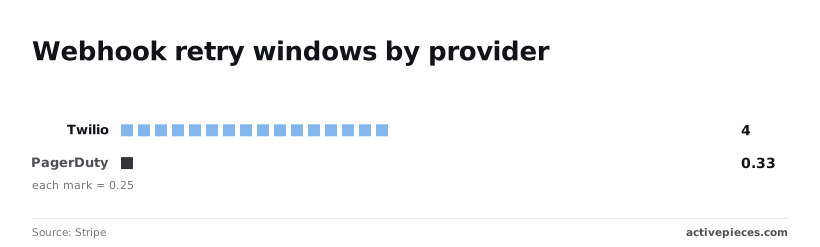
These variations dictate the required service-level objectives for your ingestion layer. If the retry window expires, the data is typically unrecoverable through the webhook channel alone.
Hybrid architectures solve the reliability problem
A resilient integration architecture utilizes polling as a deterministic safety net to verify that the system successfully processed and recorded every event initially triggered by a webhook.
Relying solely on push events creates a single point of failure where a silent network drop results in permanent data loss. By layering periodic pulls on top of real-time triggers, an engineer ensures that the system state eventually reflects the source of truth.
Relying solely on push events creates a single point of failure where a silent network drop results in permanent data loss.
Activepieces bridges this gap by allowing teams to mix both methods, using webhooks for immediate speed while leveraging its automated retries and polling-based recovery to ensure no data is lost during outages.
The logic that handles these decisions sits in the MIT-licensed core, where the Flow Execution Engine and AI Integration pages in the public monorepo define exactly how state is managed.
This transparency ensures that every tool call or retry attempt is visible in the run-details UI, providing a verifiable trace that proprietary platforms cannot match.
Using polling as a fallback for missed webhooks
Polling serves as a secondary audit trail that catches events lost during webhook provider outages or local processing failures.
When an external service like the Stripe payment gateway experiences a delivery delay, a scheduled polling job can query their API for all "succeeded" charges within the last hour to identify missing records.
Polling serves as a secondary audit trail that catches events lost during webhook provider outages or local processing failures.
Initial syncs vs. incremental updates
Webhook streams are forward-looking, meaning they cannot populate a new system with existing data generated before the user activated the integration.
To achieve a complete operational picture, the system must perform an initial sync via a bulk API request to pull the entire historical dataset.
Reconciliation jobs for data integrity
Reconciliation jobs act as a scheduled verification layer that compares the record counts between two systems to guarantee long-term data consistency.
| Component | Description |
|---|---|
| The Source of Truth | The primary database, such as a HubSpot CRM, where the master record resides. |
| The Target System | The downstream application, such as a SQL data warehouse, that must mirror the source. |
| The Reconciliation Logic | The script that identifies discrepancies between the two and triggers a corrective sync. |
This process transforms the integration from a "fire and forget" stream into a verifiable system of record.
Reading a table only gets you so far. Build the same workflow in Activepieces and compare it yourself.
Managing data flows with Activepieces
Activepieces is a transparent orchestration layer. It eliminates the "black box" risk by centralizing the execution logic of both real-time webhooks and scheduled polling within a self-hosted or auditable environment.
By moving the integration logic out of hidden scripts and into a visible engine, organizations ensure that data processing remains compliant with data residency requirements.
Activepieces syncs these flows to git and promotes them through Release Management, ensuring that a webhook listener or polling schedule is versioned and reviewed as software rather than just saved in a private history.
This allows teams to move logic from a test environment to production as a deliberate step, a capability documented in the Git Sync and Release Management features available on both cloud and self-hosted versions.
Companies like MoneyGram and Moneypenny run Activepieces to maintain this level of control over their critical data pipelines.
Automating webhook catchers for instant triggers
Webhook listeners in Activepieces function as permanent, documented endpoints that capture inbound data bursts without requiring a manually configured listener service.
This removes the common "silent failure" scenario where a cloud provider’s transient endpoint expires, meaning that every incoming payload is logged and visible for immediate audit.
Scheduling pollers for legacy API support
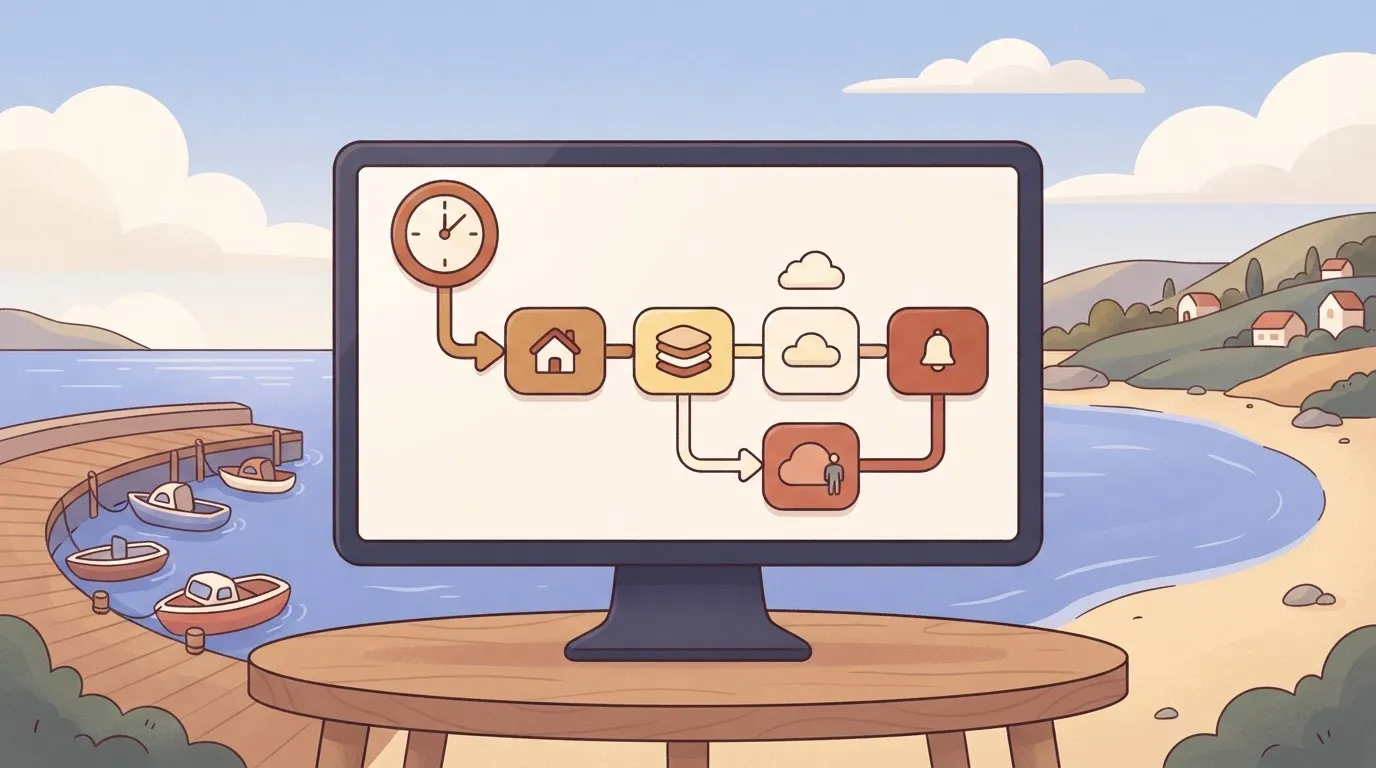
The platform utilizes a visual flow builder to bridge the gap between modern event-driven systems and legacy software that lacks webhook capabilities. The interface shown here demonstrates a scheduled trigger configured to query spreadsheet applications like Google Sheets or Microsoft Excel 365 at specific intervals.

This synchronizes data locked in static files with the rest of the stack.
By selecting specific actions such as "Find Rows" or "Update Row," an architect defines the exact scope of data access, which prevents the "over-permissioning" of API keys.
Built-in retry logic for failed deliveries
Standardizing the response to network timeouts or downstream API outages through automated retries prevents the data gaps that typically occur during intermittent service interruptions.
Within the Activepieces engine, a failed step triggers a documented retry sequence rather than simply dropping the packet, which means the system maintains a complete chain of custody for every record.

For organizations that require absolute visibility into how their data is processed, the ability to audit the execution engine directly against the UI trace provides a level of transparency that closed systems cannot match.
Activepieces is the better choice for engineering teams who prioritize compliance and version control, as it treats integration logic as auditable public code rather than a hidden configuration.
By bridging the gap between visual orchestration and a transparent monorepo, it ensures that every automated step remains verifiable and production-ready.
The role of managed automation platforms
While open-source engines provide transparency, managed platforms like Zapier excel at rapid prototyping and broad ecosystem connectivity. These tools are often the first choice for teams that need to connect disparate SaaS tools without managing infrastructure.
Zapier offers a massive library of pre-built connectors that handle the heavy lifting of API authentication and payload parsing. For non-technical users, the ability to set up a "Zap" in minutes provides immediate business value.

Speed of deployment in managed ecosystems
The primary advantage of a managed service is the reduction in time-to-market for simple integrations. A marketing team can connect a lead form to a mailing list using a pre-configured webhook template without involving the engineering department.
Handling high-volume connectors
Managed platforms are built to handle the initial burst of a webhook, acting as a buffer between the source and the destination. They provide a user-friendly interface for viewing task history and manually replaying failed runs.
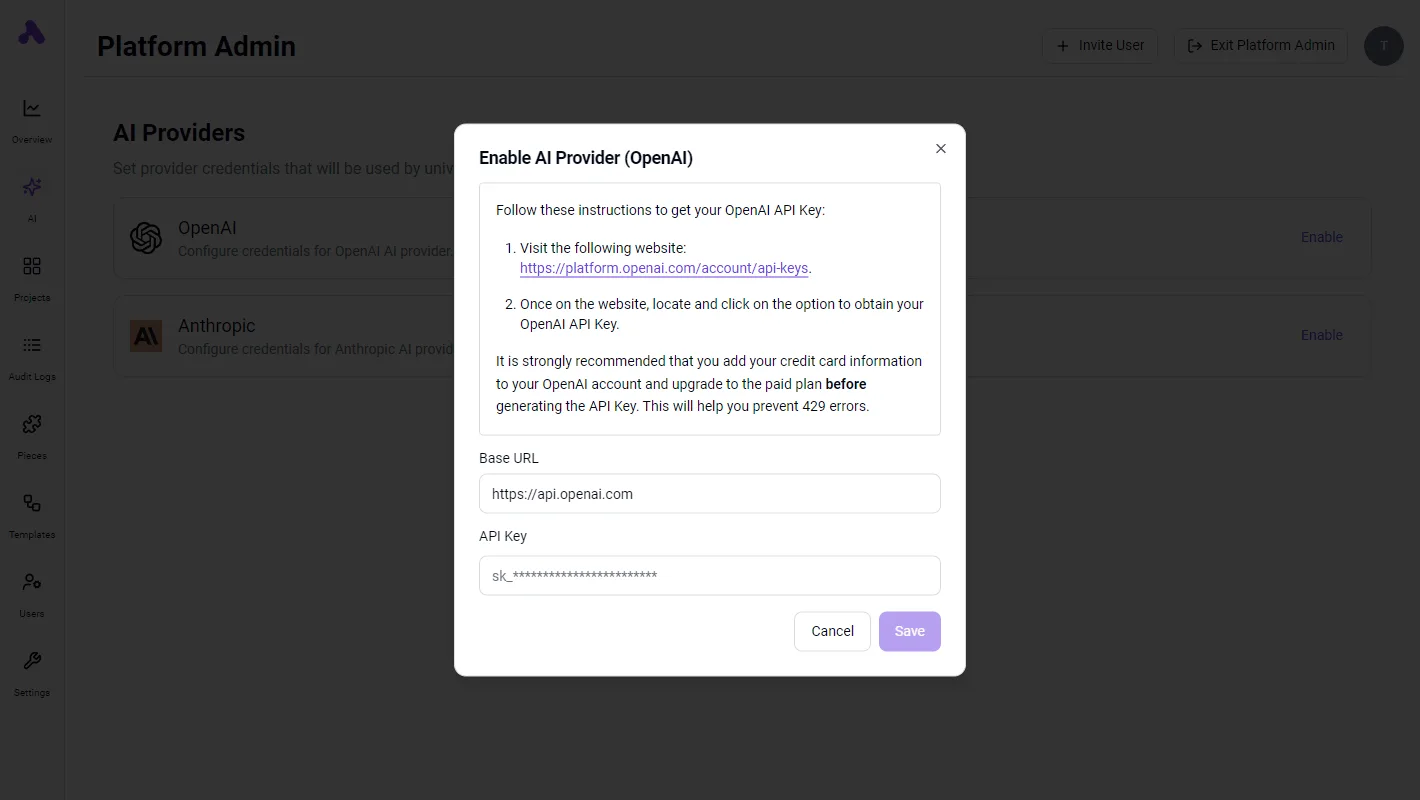
However, these platforms often operate as proprietary environments where the underlying execution logic is hidden. This makes them ideal for convenience but less suitable for workflows that require strict data residency.
Choosing the right method for your next integration
Selecting an integration method requires balancing the immediate need for low latency against the long-term requirement for auditability and data recovery.
The high-frequency data decision tree
Use a webhook when the event triggers a time-sensitive downstream action, such as a customer-facing notification or a security alert.
When the source system lacks a retry policy, use a polling interval to ensure that a temporary network outage does not result in a permanent loss of the data packet.
Use a hybrid approach when the integration handles financial records or compliance-related logs, providing a secondary check to catch any missed asynchronous signals.
Auditing your current API consumption
An audit of existing data flows identifies hidden points of failure where "fire and forget" webhooks may be silently dropping data.
To perform this check, compare the event logs of the source platform against the execution logs in your internal database. You can use the audit trail in the identity provider Okta to verify that every successful "post" resulted in a completed transaction.
Setting up your first webhook listener
A resilient webhook listener must be configured to acknowledge receipt immediately before beginning any heavy processing logic.
- Define a publicly accessible URL on a server that supports Transport Layer Security (TLS).
- Check the digital signature provided in the header by the sender, such as the signatures sent by the payment processor Stripe.
- Direct the incoming payload into a message queue rather than processing it synchronously. This allows the listener to return a "200 OK" status to the sender instantly.
Frequently asked questions
How do I secure a webhook endpoint?
Verification of the sender’s identity through Hashed Message Authentication Code (HMAC) signatures ensures that your endpoint only processes legitimate payloads from the intended source.
When a service like the payment processor Stripe sends an event, it includes a signature in the header that you must validate against a shared secret.
Failing to perform this check leaves your system vulnerable to injection attacks where malicious actors spoof data to trigger internal workflows.
Can I convert a polling API into a webhook?
You can simulate webhook behavior for a legacy API by using a middleware "poller". This tool monitors for state changes and emits an HTTP POST request only when new data is detected.
This architectural pattern, often implemented via serverless functions, reduces the compute load on your primary listener because the listener only activates when there is actionable information rather than running on a fixed, unproductive schedule.
What happens if my server is down when a webhook hits?
If your server is unavailable, the data can be lost unless the sending service implements a retry policy with exponential backoff.
The version control platform GitHub retries failed deliveries for up to twenty-four hours, meaning transient outages do not result in permanent data gaps.
The automation tool Zapier holds failed tasks in a queue for manual or automatic replay depending on the subscription tier, which provides a buffer against temporary downstream service interruptions.
Is polling always slower than webhooks?
Only in terms of event-to-execution latency is polling slower.
It is often more reliable for high-volume data synchronization where API rate limits would otherwise throttle a flood of individual webhook hits.
By fetching records in batches, you stay within the architectural constraints of the provider. A sudden burst of webhooks could trigger a 429 Too Many Requests error and cause your listener to drop incoming packets.
Related reading
References
Still comparing
The fastest way to settle it is to build something.
Open source under MIT, so you can self-host the same thing later.
Start free Talk to sales