
Brave Search API MCP Server: Setup Guide (2026)

Nov 12, 202615 min read
Without a Brave API key, the open-source Brave Search MCP server does nothing, so the key is the first thing to sort out.
The server is a program that lets an AI client call Brave Search API endpoints as tools, whether that client is a desktop assistant or a workflow tool such as Activepieces.
It only forwards requests, and Brave's index does the searching.
Brave Search MCP server overview
What MCP is and what the server wraps
The server is the term people most often mistake for the search itself, and four terms carry the rest of this article:
- MCP (Model Context Protocol) is a standard that lets an AI client discover and call external tools through one interface.
- The Brave Search API is Brave's hosted service that returns results from its own independent index.
- The MCP server is a small program that exposes Brave Search API endpoints to an MCP client as named tools.
- The API key is the credential Brave issues to your account, which the server sends with every request.
When a query returns something odd, the cause is in the API, the plan or your tool choice, and never in some clever layer inside the wrapper. The server stores no results and ranks nothing.
MCP also doesn't solve authentication hygiene, retries or cost control for you.
What you need before you start
You need three things: a Brave account with an API key, a plan whose limits match how often your client will search, and an MCP-capable client to run the server.
That client can be a desktop assistant, a coding editor, or an automation platform.
Pick the plan before wiring anything up. A client that searches freely against a tight limit will start failing mid-task, and the error looks like a broken tool when it's really a quota.
Everything here was checked on 12 November 2026 against three sources:
- Brave's API documentation
- Brave's pricing page
- the server's public repository
Treat that date as the point after which you should re-verify anything you depend on, because plan terms and tool lists change. Next, we look at how the server is configured, starting with the key.
This takes minutes, not a project: automate it in Activepieces free.
How the Brave Search MCP works
Strip it down and the Brave Search MCP server is a translation layer. It takes a tool call from your AI client, turns it into an HTTPS request to the Brave Search API, and hands the JSON back to the model.
That's nearly all it does, which is why it stays cheap to run.
Client, server and API: the request path
Only the server box ever holds the API key.
(illustration: AI client → Brave MCP server → Brave Search API)
Compared with a raw API call, the server adds three things. It publishes tool schemas, so the model knows each tool's name, its arguments and their types before it calls anything.
It supports discovery, so any MCP client can list those tools without custom glue. And it lets several clients share one configured server instead of each carrying its own HTTP code and its own copy of the key.
Past those three, it is all passthrough. If a search returns something odd, the cause is almost always the query parameters or the Brave response, not a layer in between.
Brave Search MCP stdio vs HTTP transport
With stdio, the client launches the server as a child process and talks to it over standard input and output. Nothing listens on a port, and the process dies with the client. That suits a single developer on one machine.

With HTTP, the server runs on its own and clients connect over the network, which suits a team sharing one instance.
The cost is that you now own a network service, so you need to think about who can reach it. MCP doesn't solve that for you.
Where the API key is read
At startup the server reads the key from an environment variable, not from the model's prompt or tool arguments. In stdio mode, your client's config passes that variable to the child process. In HTTP mode, set it in the environment of the service itself.
Either way, a missing or wrong key doesn't fail at launch in a way you'll notice. It surfaces later as an auth error on the first search, so test one query right after setup.
Next comes choosing which of the server's tools to expose to the model.
Brave Search MCP tool capabilities
Out of the box you get eight tools. The table shows which return links, which return rich objects, and which need a paid plan, so you can expose only what your agent's task requires. The tool count per category comes from the Docker Hub listing.
| Tool | Data returned | API plan required | Agent task it suits | Added since older tutorials |
|---|---|---|---|---|
| Web | Titles, URLs, snippets | Free | General lookup | No |
| Local (two tools) | Business listings, details | Paid | "Near me" queries | Second tool added |
| News | Dated articles | Free | Recent events | Yes |
| Image | Image results | Free | Visual sourcing | Yes |
| Video | Video results | Free | Finding tutorials | Yes |
| Summarizer | Generated summary | Paid | Condensing results | Yes |
| LLM context | Page content for prompts | Check your plan | Grounding answers | Yes |
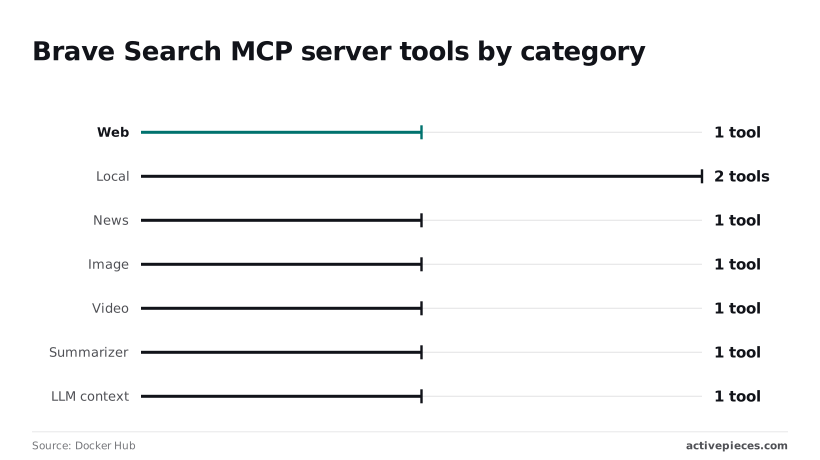
One call covers general lookup, and a second keeps recent articles from drowning in evergreen pages, since web is one tool and news is one tool. Expose both only if your agent answers time-sensitive questions.
If location doesn't matter, skip local. It has two tools, the largest category, so it adds the most definitions to the model's context, and it needs a paid plan.
Image and video are one tool each, and each costs a query per call, so they eat your quota when exposed by default.
On a free key the summarizer fails, because it is one tool and it depends on a prior web search. The LLM context tool returns page content rather than snippets, which can make the summarizer redundant.
Copy a config from an early tutorial and you get only web and local search, because everything else in the table is newer. That config exposes a stale subset. Check your client's tool list against the table before relying on it.
Setup for Claude, Cursor and VS Code
You set it up the same way in all three clients. Put the key in an environment variable, point the client's JSON config at the server's launch command, restart, and prove it works with one query.
The order matters because most failures come from skipping one of these steps.
- Create a Brave API key in the dashboard.
- Set
BRAVE_API_KEYto that key. - Add the npx or Docker command from the repository README to the client's JSON config.
- Fully restart the client.
- Run one test query.
Everything below is detail on those steps, plus the places they go wrong.
Sign in to the Brave Search API dashboard, choose a plan, and generate a key. Pick the plan deliberately, because its limits are what you'll hit first once an agent starts searching in a loop.
Copy the key once and keep it out of any file you commit.
Brave Search MCP config for each client
When a pasted block is silently ignored, the cause is most often one word. Claude Desktop and Cursor both read a top-level mcpServers object. VS Code uses a servers object in .vscode/mcp.json.
Each entry needs a command (npx with the package name, or docker run with the image), its arguments, and an env entry carrying BRAVE_API_KEY. Copy the exact package or image name from the repository rather than from a blog post, since names drift.
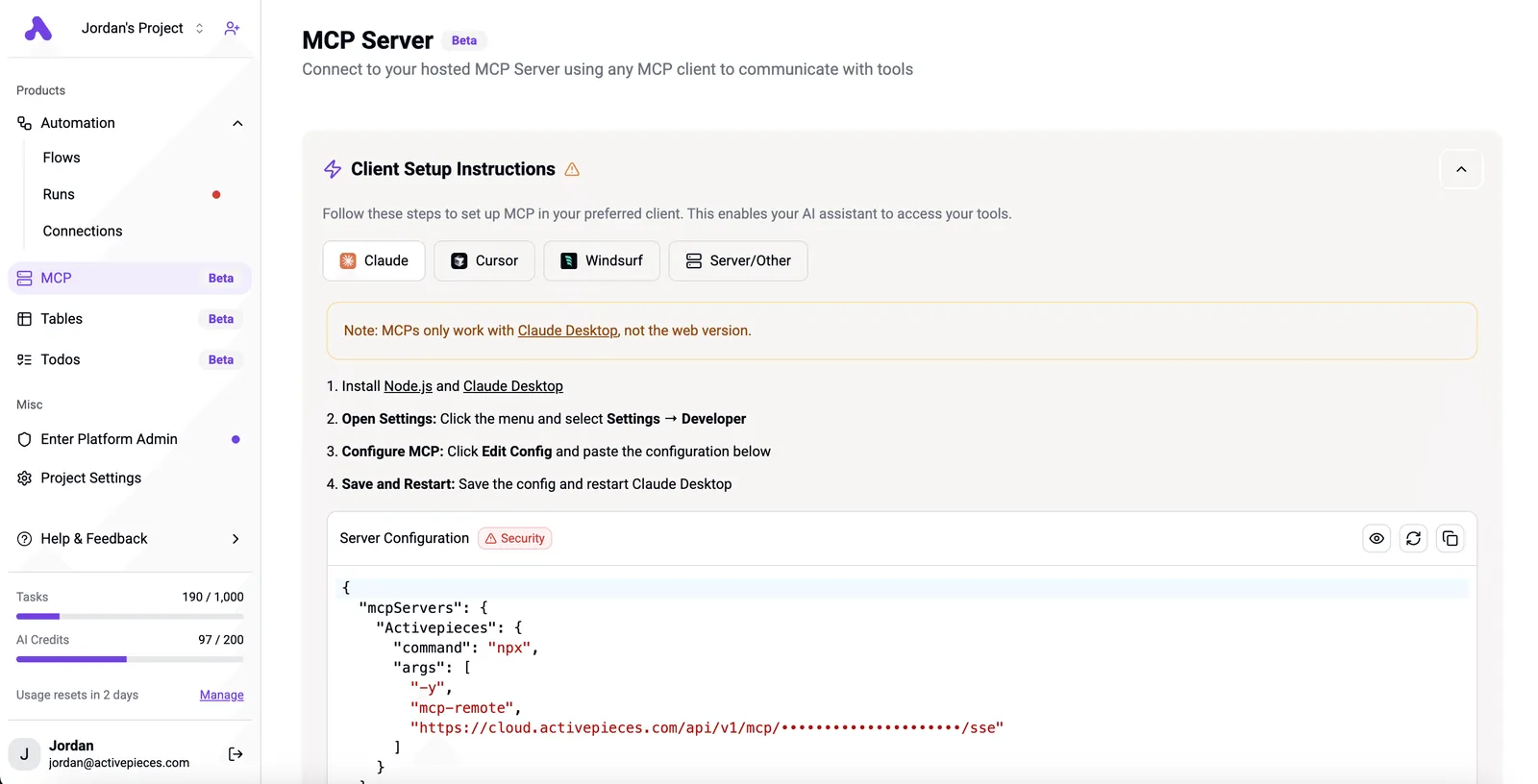
Activepieces runs a per-project MCP server, so the Claude, Cursor or Windsurf client holding this Brave entry can also create, edit and explain flows through tool calls, with no builder UI opened. Teams at MoneyGram, Moneypenny, Alan and FundingSocieties run Activepieces.

It keeps audit logs and run history, so a team can see what happened when something breaks.
Test the Brave Search MCP with one query
Ask something that can only be answered from the live web, and watch for a tool call to the Brave server rather than an answer from the model's memory.
If you see spawn npx ENOENT or a server marked as failed, the client couldn't find the launch command on its PATH. If calls return an authorization error, the key never reached the process. Fix whichever it's before adding a second server.
You can follow the rest of this with the builder open. Start free, no card.
Brave Search API pricing and limits
Expect metered billing with a small free allowance: 1,000 free searches a month since February 2026, and rate limits that differ sharply by endpoint.
Plans, price per 1,000 requests and rate limits
Three times now the allowance has moved. Implicator reports 2,000 free searches a month before August 2025, 5,000 from August 2025, and 1,000 from February 2026.
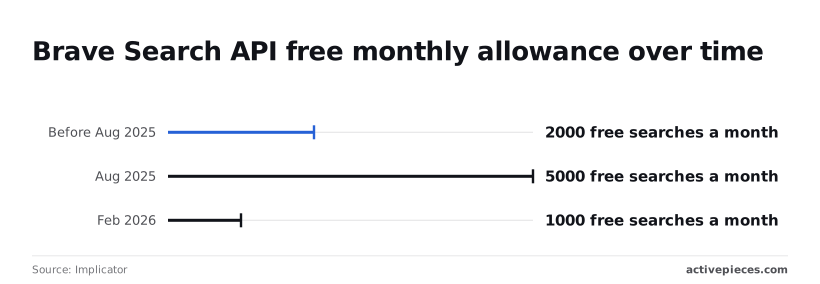
Any tutorial quoting 2,000 or 5,000 is stale, and a prototype sized to those numbers will start billing you sooner than you expect.
Day to day, rate limits matter more. The table shows queries per second by endpoint, and the gap between Answers and the others is the number to plan around.
| Endpoint | Rate limit (queries per second) |
|---|---|
| Search | 50 |
| Answers | 2 |
| Spellcheck/Autosuggest | 100 |
With Search at 50, an agent firing parallel tool calls will rarely hit a ceiling. With Answers at 2, a shared server will throttle as soon as a few users ask at once.
Pricing is per 1,000 requests (per 10,000 for Spellcheck), so check your dashboard for the current rates.
The strongest case against choosing Brave
In under a year the free tier changed twice and shrank to a fifth of its August 2025 size. If your budget assumed the free tier, a default config that lets the model search freely is now a billing risk, not a convenience.
The answer is that the server is a thin wrapper. Your cost is requests times price, and you control the request count: cap results per call, and don't let the model loop on retries.
**If your budget assumed the free tier, a default config that lets the model search freely is now a billing risk, not a convenience.
Match the endpoint to the traffic. Websearchapi notes that search suits agents making many calls, since 50 queries per second absorbs bursts.
Answers suits low-volume, single-user work, where 2 per second never bites, per Websearchapi. Spellcheck/Autosuggest suits typing-time suggestions, where 100 per second keeps up with keystrokes.
Mistakes that break Brave Search MCP setups
That per-second headroom is easy to waste, because six setup mistakes cause most broken Brave Search MCP installs, and each has a short fix. The list below pairs every mistake with its repair, so you can audit a config in one pass.
- A key committed to a config repo: move it to an environment variable and rotate it.
- A key from the wrong plan: regenerate it under the plan you actually pay for.
- Parallel calls hitting the rate limit (issues #162 and #238): serialize or queue them.
- Every tool enabled: expose only the tools the agent needs.
- Stale tutorials: check the tool names against the server's current README.
- Unfetched snippets: fetch the page before quoting it.
The first three need more than one line.
If "env": {"BRAVE_API_KEY": "BSA..."} sits inside a committed mcp.json, that is a published credential. Anyone with repo access can spend your quota, so reference the variable and keep the value out of version control.
A key from a different plan than the one you budgeted fails in the opposite way: limits that don't match your assumptions, discovered mid-task.
Brave Search API rate-limit errors from parallel calls
When an agent fans out searches faster than the plan allows, it sees 429 Too Many Requests. A pricing breakdown models an agent task at 20 search calls, but measured web research agents average 33.8 per task.
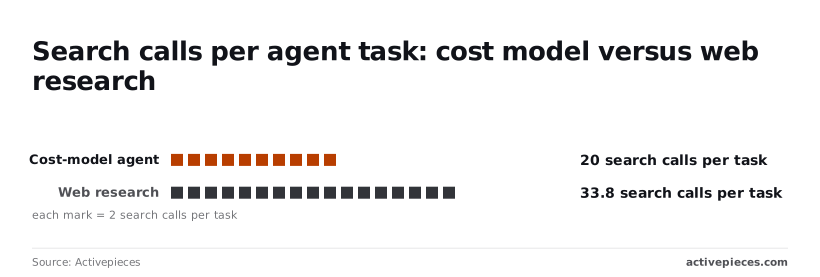
That's about 69% more than the model assumes, so a budget built on 20 runs dry roughly 40% early. Cap concurrency and size your quota on the higher number.
If your research agent only needs web search, image, news and video tools gain it nothing except noise and a wider chance of a wrong call. Each enabled tool adds its description to every prompt, and the model must choose among them.

None of this is solved by the protocol. It's configuration you own.
Fix scheduled search jobs with Activepieces
Use the MCP server when an agent is asking questions live, and use an Activepieces workflow when the same search has to run every morning without anyone asking.
That split follows from the configuration you now own, and the free plan covers it: unlimited flows and 1,000 credits a month, where a run is 1 credit however many steps it has, so a daily search uses about 30.
When a workflow beats an agent tool call
When the answer is always "yes, at 8am," an agent deciding whether to search is wasted effort. A schedule has no tool-choice step to get wrong.
The failure you see in the logs is 429 Too Many Requests, and it comes from plan limits, not from the model. A fixed daily call keeps your request count predictable.
- A schedule trigger fires once a day.
- An HTTP step calls the Brave web search endpoint with your brand query, sending the API key in the
X-Subscription-Tokenheader. - A filter step drops any result whose URL you have already seen, using stored state from the previous run.
- The remaining results are formatted into a short summary.
- A Slack or email step sends it, and stays silent when nothing is new.

In this flow the key lives in the HTTP step, so it's the same credential decision you made earlier, just stored in a workflow instead of an MCP config. Rotate it in one place, and keep it out of the message payload.
The next part covers what this setup leaves for you to handle.
Limits of automating Brave Search MCP jobs
It doesn't replace the MCP server for interactive work: it can't decide mid-conversation that a follow-up search is needed. It doesn't raise your plan limits or choose between Brave's tools for you; you still pick the endpoint in the HTTP step.

And it won't judge relevance, so a noisy brand name still produces noisy summaries. Checked against Activepieces' integration list on 12 November 2026; recheck before building on it.
Frequently asked questions
Is the Brave Search MCP server free to use?
Using the server costs nothing, but every search it makes spends your Brave API key's quota, and that quota depends on your plan. Brave has offered a free plan with a capped allowance.
Because plans change, read the current limits on Brave's pricing page before you build anything on them. Once the cap is hit, requests fail instead of degrading gracefully, so a looping agent can use up a month's allowance in an afternoon.
Does the Brave Search MCP server work with ChatGPT?
Only if ChatGPT can reach the server over HTTP. The default setup runs as a local process over stdio, which desktop clients launch themselves, and a hosted chat product can't start a process on your machine.
You would need to run the server in its HTTP mode on a URL ChatGPT can reach, then add it as a connector.
Whether your ChatGPT plan allows custom connectors is a question for OpenAI's current documentation. MCP client support is still uneven, and I would test before promising anyone this works.
Can I run the Brave Search MCP server remotely?
Yes, the server can run over HTTP as well as stdio, which makes it usable from a host other than your laptop. The catch's that you now own a network service.
A public endpoint holding your API key lets anyone who finds it spend your quota. Put it behind a gateway or a private network, and keep the key in the server's environment instead of in client configs that get shared.
Does Brave store my search queries sent through the API?
I can't confirm Brave's retention terms here, so read its API terms and privacy policy before sending anything sensitive. Brave markets its search as privacy-focused, but that's a claim about Brave, not about your whole pipeline.
Your MCP client, your model provider and any logging layer you add may each keep the same queries. Treat every query as data leaving your boundary.
Related reading
References
Build it
Set this up in minutes.
No code required. Connect your accounts, and Activepieces runs it from there.
Start free Talk to sales