
DeepSeek Web Search API Agents: Cost and Setup (2026)

Oct 19, 202614 min read
The Search / Fetch API is a DeepSeek service that lets your code run web searches and fetch pages through DeepSeek's own in-house search engine, whether you call it directly or wire it into a workflow tool like Activepieces.

It's new enough that you should treat every detail as provisional.
A DeepSeek web search API agent is a program that calls the Search / Fetch API to run searches and retrieve pages, then uses the results to decide its next step, within the API's documented limits and error responses.
You call it through the same API you'd use for its models today, and DeepSeek announced it as available on its pricing page and its updates page.
What the DeepSeek Search and Fetch API is
What DeepSeek says it does
Read DeepSeek's own wording and it is short: the API is "powered by our in-house search engine and supporting web search and fetch." Its Chinese-language API page repeats the claim, describing a self-developed engine.
That gives you two operations, search and fetch, and nothing more is promised.
Search and fetch details DeepSeek docs don't state
Look for a price and you'll find one: the pages I read state $0.75 per 1,000 successful requests for both search and fetch, as the table below shows.
They also say nothing I could find about rate limits, size caps on fetched pages or how failures are reported.
Test with one small request before you build anything around it.
DeepSeek API documentation sources and check date
Everything here comes from DeepSeek's own pages, read on 2026-10-19. The table shows what each page confirms and where the gaps are. You can see which parts are safe to build on today.
| Item | Value | Source page | Checked 2026-10-19 |
|---|---|---|---|
| Maker | DeepSeek | API docs | Yes |
| API version | 1.0.0 | API docs | Yes |
| Change-log date | 2026-10-17 | Updates page | Yes |
| Search price | $0.75 per 1,000 successful requests | Pricing page | Yes |
| Fetch price | $0.75 per 1,000 successful requests | Pricing page | Yes |
Prices and plan limits checked against api-docs.deepseek.com and api-docs.deepseek.com and api-docs.deepseek.com and api-docs.deepseek.com and github.com and docs.claude.com and claude.com and openai.com and gemini.google on October 19, 2026.
Because rate limits for these endpoints are not documented, the order of work is fixed: wire up a minimal request first, then read the errors it returns before you design around them.
Everything below works on Activepieces' free plan. Start without code or a credit card.
Get a DeepSeek Search and Fetch API key
Do them in this order: create an account, create a key, store it as a secret, set the base URL, and make one authenticated call. A key pasted into an automation step is the failure you'll debug later.
- Create the account.
- Create an API key.
- Store the key as a secret.
- Set the base URL from the docs.
- Send one authenticated request.
Create the account and API key
Sign up on DeepSeek's platform, then open the API keys page and create a key. Copy it immediately.
Platforms of this kind typically show a key in full only once, so a closed dialog means a new key, and anything that already used the old one breaks silently.
Give the key a name that says what will use it, so you can revoke it without guessing.
Store the DeepSeek API key safely
Put the key in an environment variable or your automation tool's secret store, never in the request body, a shared flow, or a repository.
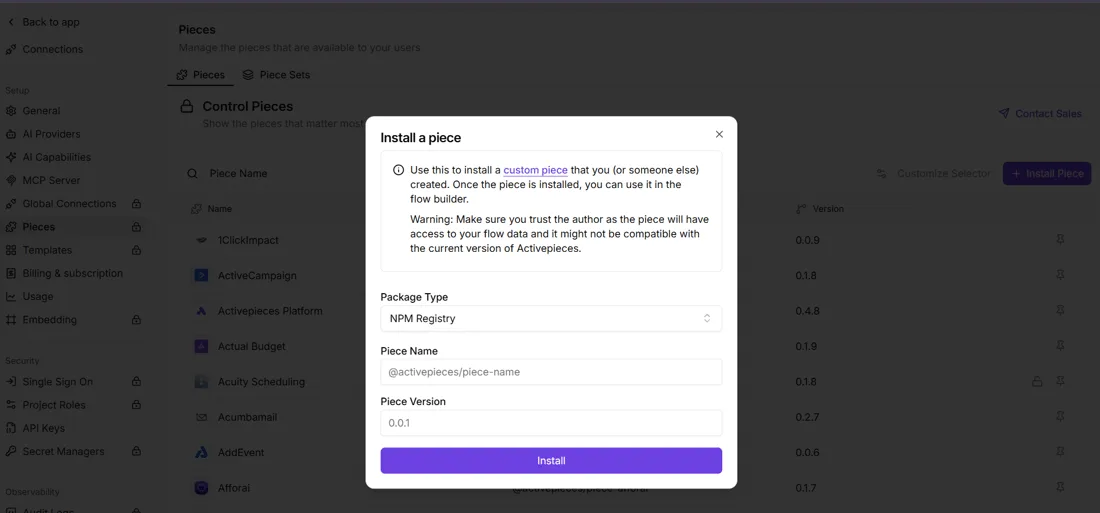
The admin dialog below, an automation builder's install form, asks only for package type, name and version. It has no credential field, so the key belongs in the tool's separate connection or secret settings.

Next, set the base URL exactly as the docs list it, and read it from configuration too. Hardcoding it means a later endpoint change costs you a code edit.
Confirm authentication
Send the smallest request the docs show, with the key supplied the way the docs specify. A successful response proves three things: the key is valid, the base URL is right, and the secret reaches your code.
If it fails, read the status and error body before changing anything.
Models, endpoints, pricing and rate limits as documented
According to DeepSeek's docs, as read on 2026-10-19, a Search and a Fetch endpoint exist at $0.75 per 1,000 successful requests, free until 00:00 Beijing time on 1 Nov 2026.
No rate limit is published for either, so teams can't know their safe ceiling without testing.
DeepSeek search and fetch endpoints and models
Read the table for what each call does, what it costs and what limit applies. Take from it that every limit cell is empty, so your agent cannot assume a ceiling.
| Call | What it does | Price | Rate limit |
|---|---|---|---|
| Search | Returns results for a query | $0.75 per 1,000 successful requests; free until 00:00 Beijing, 1 Nov 2026 | Not published |
| Fetch | Retrieves the content of a given page | $0.75 per 1,000 successful requests; free until the same cutoff | Not published |
| Harness calls (Claude Code, Codex) | Agent tools calling the same two endpoints | Free until 00:00 Beijing, 1 Nov 2026, then billed per request | Not published |

Wire up one Search and one Fetch before adding a harness, so you know which layer produced any failure.
DeepSeek Search API price per unit compared
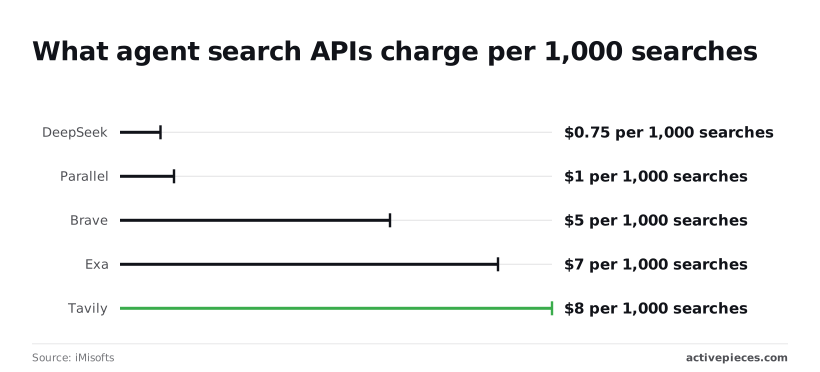
At $0.75, the rate is the cheapest in iMisofts' comparison.
Everyone else costs more: Parallel charges $1, Brave $5, Exa $7 and Tavily $8 per 1,000 searches, so DeepSeek wins any price-based selection.
Only successful requests are billed, so failures should not add to the bill.
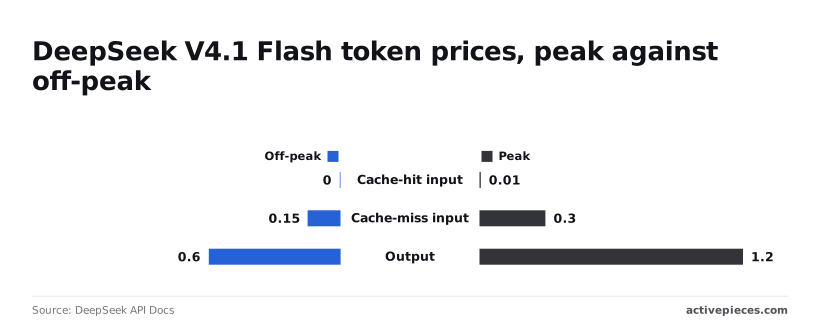
On tokens, deepseek-flash (V4.1 Flash) follows DeepSeek's pricing page. Cache-hit input runs $0.003–$0.006 per 1M tokens, cache-miss input $0.15–$0.3, and output $0.6–$1.2.
Rate limits by tier
No tiers and no numbers are published. Build in retries with backoff, cap concurrency yourself, and log every refusal. The first real limit you meet will come from a failed request.
Easier to see it running than to read about it: set it up free, no card.
Send a minimal search-and-fetch request that returns results
Send one search call with only a query and a count, and check that results come back before you build anything around it. When that call fails, the cause is usually one of the field limits below, which is why they come first.
We haven't run this ourselves; the example mirrors the docs as read on 2026-10-19.
DeepSeek search request fields and authentication
Take the endpoint URL and the authentication header from the docs page itself, since a copied header from an old post is how you get a confusing rejection. The body is JSON:
{
 "query": "deepseek search api limits",
 "count": 5
}
Read the documented Search fields below as the cases your agent must handle before it sends a request:
Reading the DeepSeek search response
On success you get a list of results. Check each one for its summary and its source before trusting it. Print the raw response once and keep it, because later error handling will be written against what you actually saw.
Turning it into an agent loop
Run the loop in three steps, in this order:
- Search with a trimmed query and a small count.
- Fetch only the results whose summaries look relevant.
- Answer from the fetched text, and say so when nothing relevant came back.
Put the length check on query in code before step 1, so a bad request never leaves your system. Cap the loop at a fixed number of iterations, because an agent that keeps searching after an error will keep failing.
Run the DeepSeek agent as a step in an Activepieces workflow
From a schedule, form or webhook, Activepieces can start the DeepSeek call and send the result to a sheet or Slack, two of its 742 integrations. The iteration cap then lives in one place instead of in a loop nobody is watching.
Use your own DeepSeek provider key
Activepieces works with any major model or your own provider key, so DeepSeek spend can land on your own account. Its catalog also lists a DeepSeek integration, @activepieces/piece-deepseek, with a single action.
Nothing I can point at shows that either one wraps DeepSeek's search-and-fetch endpoints. Treat both as model access, and check the integration's action list before assuming it can search.
Once the DeepSeek integration is connected in Activepieces, an agent can call it: the same action that runs as a flow step is exposed as a tool on the project's MCP server, which Claude, ChatGPT, Cursor or an agent of your own can reach.
There is no second catalog to publish to, so the DeepSeek call is wired once, not twice.
Every connector is an agent tool, all 742 of them counted in the MIT-licensed open source repo, where the mechanism sits in packages/pieces; MoneyGram, Moneypenny, Alan and FundingSocieties run Activepieces in production, and we haven't run this particular call ourselves.
Build a workflow that searches on a schedule
Start with a Schedule trigger. The builder shows it as "1. Every Hour", with an option to skip weekends and a sample-data panel that reads "Tested Successfully" once the trigger fires.
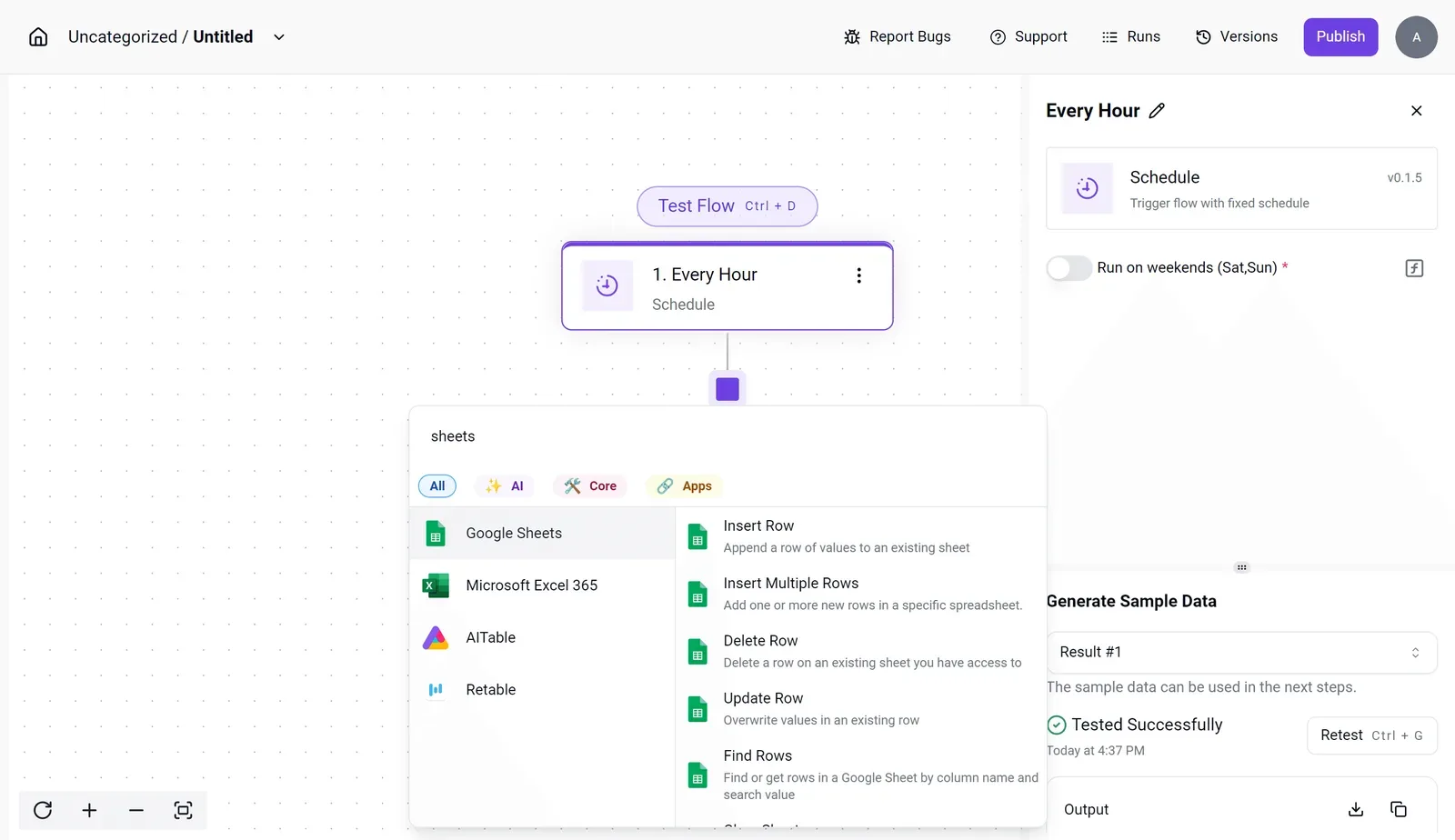
That last status matters: a trigger that hasn't produced sample data gives later steps nothing to map, so test it before you add anything.
After that, the next-step picker offers a spreadsheet action such as Insert Row under Google Sheets.
Add your DeepSeek call between the trigger and that row. Hold the query and the iteration cap as fixed values in the flow, and write failures to the sheet as rows too, so a bad hour shows up as a row and not as silence.
With a form or webhook trigger the setup is the same. The difference is that a person or another system decides when the call runs, so repeated submissions can drive repeated calls.
When to call the API directly instead
If the integration's single action doesn't expose the search and fetch parameters you need, use the generic HTTP step against DeepSeek's documented endpoint.
That's also the right route when you need to read raw error bodies and branch on them, because a wrapper may flatten them into one failure.
Keep the trigger and the sheet or Slack delivery in Activepieces, where flows are unlimited on every plan including free, and let the HTTP step carry the request you validated first.
Errors and limits to handle before production
Before production, five failures matter: a bad key, an empty balance, rate limiting, a server error and a timeout. Only some are worth retrying, and the HTTP step you validated should treat them differently.
Authentication and balance errors
Read the retry column first: a retry loop around a 401 or 402 just burns time. The table below follows DeepSeek's error docs as read on 2026-10-19.
| Failure | Documented code | Cause | Fix | Retry? |
|---|---|---|---|---|
| Authentication | 401 | Wrong or missing API key | Check the key and the header | No |
| Insufficient balance | 402 | Account out of funds | Top up | No |
| Rate limiting | 429 | Requests arriving too fast | Slow down | Yes, with backoff |
| Server error | 500 | Fault on DeepSeek's side | Wait | Yes, a few times |
| Timeout | No status code | Connection closed before inference began | Shorten the request | Once, then alert |
Alert a human on 401 and 402 instead of looping.
Rate limits and retries
You can't size a flow around a number, because DeepSeek doesn't publish a fixed per-account limit. Cap attempts at three, double the wait each time, and add jitter.
Set a spend cap on your side, because a retry bug with a live balance is the expensive failure. Log the status code, the query and the attempt count on every call.
Set a spend cap on your side, because a retry bug with a live balance is the expensive failure.
Fetched content you shouldn't trust blindly
Around one third of AI search answers make unsupported claims, New Scientist reports.
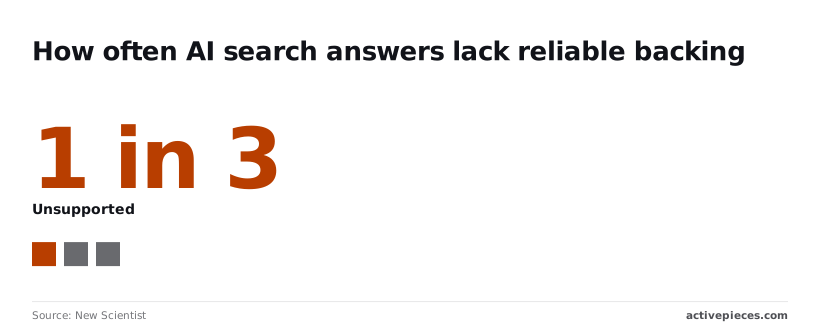
Assume roughly one in three summaries could fail a check, so never let fetched text trigger an action unreviewed. Keep the source URL beside every claim, and have the agent refuse to act when it can't.
Checklist for using the DeepSeek API in agents
- Send one minimal request and record the response.
- Branch on 401 and 402 to an alert, never a retry.
- Add capped backoff for 429, 500 and timeouts.
- Set a spend cap.
- Log every call.
- Require a source URL for each claim.
Frequently asked questions
Refusing to act on an unsourced claim is only workable if you know which questions the docs answer and which they leave blank.
Is the DeepSeek search API free to use?
Not past 1 Nov 2026. The docs read on 2026-10-19 name that date as the start of per-request billing for harness calls, and they state a price of $0.75 per 1,000 successful requests for Search and for Fetch.
Anything you build now should budget at $0.75 per 1,000 successful requests, though DeepSeek reserves the right to adjust prices.
Can I self-host DeepSeek web search?
Not according to the pages, which describe search and fetch as a hosted API and offer no self-hosted search component.
Plan on calling DeepSeek's service. Don't assume you can run the search step yourself because model weights exist elsewhere, since the docs don't connect the two.
Which DeepSeek model should an agent use?
Start with deepseek-flash, which is the fast, cheap model and supports vision. Move a step to deepseek-v4-pro only when Flash fails on the reasoning, such as judging conflicting sources.
The docs don't say whether the search tool behaves differently between the two, so test both against the same minimal request before committing.
How do I stop an agent overspending on searches?
Put the limit in your own code, not the prompt. Give each run a fixed budget of search and fetch calls, count every call, and halt with a logged reason when the budget runs out.
Stop on the first documented error rather than retrying blindly, because a retry loop is how a small bug becomes a large bill.
You can't size that budget precisely yet, because the docs leave these open:
Rate limits per tier
Maximum fetched page size
Whether the version number will change
Keep each of these as a config value, not a constant, so that when DeepSeek fills one in you change a setting instead of rewriting the agent.