
Outlook MCP Server Setup for AI Agents (2026)

Oct 18, 202614 min read
An Outlook MCP server lets an AI client read, search and send Outlook mail and manage calendar events through Microsoft Graph.
The fastest version is a community server with the narrowest scopes your admin will approve, and if you later want those mailbox actions to feed into broader automations, a workflow tool such as Activepieces can sit alongside it. Checked 2026-10-18.
Choose the fastest Outlook MCP path
What an Outlook MCP server does
The client never touches Outlook directly. Between them sits a small server process that turns the client's tool calls into Graph API requests: the client asks it to "list unread mail," and it calls Graph with your OAuth token.

When it works, you can ask the client for today's meetings or draft a reply, and it acts on your real mailbox.
The padlock on the Graph hop marks the OAuth token, and that hop is where setups actually break.
The failures sit at the lock, and they look like AADSTS65001: The user or administrator has not consented to use the application.
That's a consent problem, and no MCP configuration fixes it.
If you would rather not host anything, Activepieces can fill the middle box, with 741 integrations in its MIT-licensed core, meaning you have broad options for connecting other services, but this guide builds the local version.
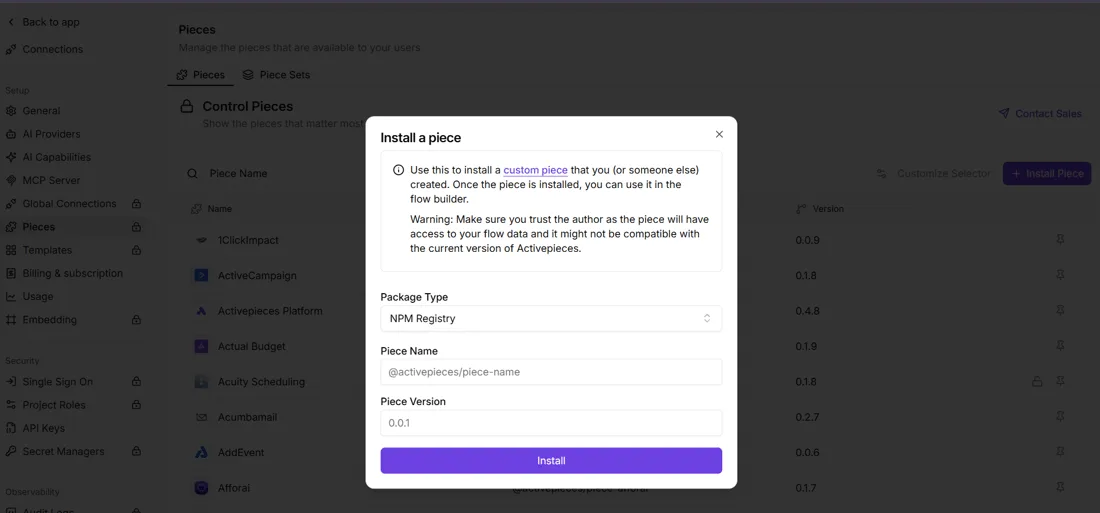
Which server to pick
Pick a community server unless your tenant policy says otherwise. According to Fewservers, Softeria's M365 server has 1,041 GitHub stars, more than the other four servers we compared combined, so it has substantially stronger community adoption.
Far behind it, by GitHub's data, are the rest:
- ryaker's Outlook server has 443
- PnP's CLI for Microsoft 365 has 133
- Aanerud's Office server has 55
- mpalermiti's Outlook server has 40
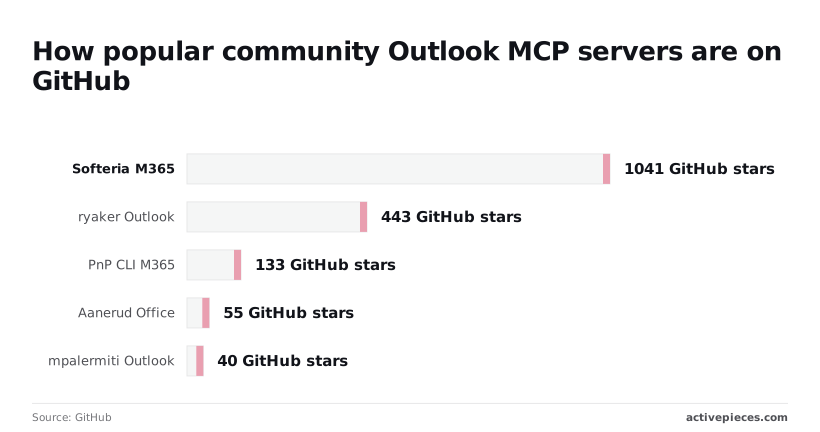
Below roughly 100 stars, expect to read the source when something breaks.
You need three things:
- A Microsoft account with a mailbox that a Graph app can reach.
- An app registration, which is the identity your token is issued to.
- An admin who will approve the scopes you request.
Ask for the smallest set that covers your use. Read-only mail and calendar scopes get approved faster than send or full-access ones, and a rejected request costs you more time than the setup itself.
Everything below works on Activepieces' free plan. Start without code or a credit card.
Register an app and grant Graph permissions
Register one app in the Entra admin center, give it delegated Graph permissions for Mail.Read, Calendars.ReadWrite and offline_access, and get consent recorded. Skip that last step and every sign-in dies with AADSTS65001: The user or administrator has not consented to use the application.
Register the application
In the Entra admin center, open App registrations and choose New registration. Name it something an auditor will recognize later, like "Outlook MCP server". Pick single-tenant unless you really serve other organizations, because single-tenant keeps the consent conversation inside your own admin team.
Add your redirect URI as a Web or Mobile and desktop platform, matching exactly what your server sends, including the trailing slash.
Copy the Application (client) ID and the Directory (tenant) ID from the overview page. Then open Certificates & secrets, create a client secret, and copy its value immediately. Entra shows it once, so closing the page means generating another.
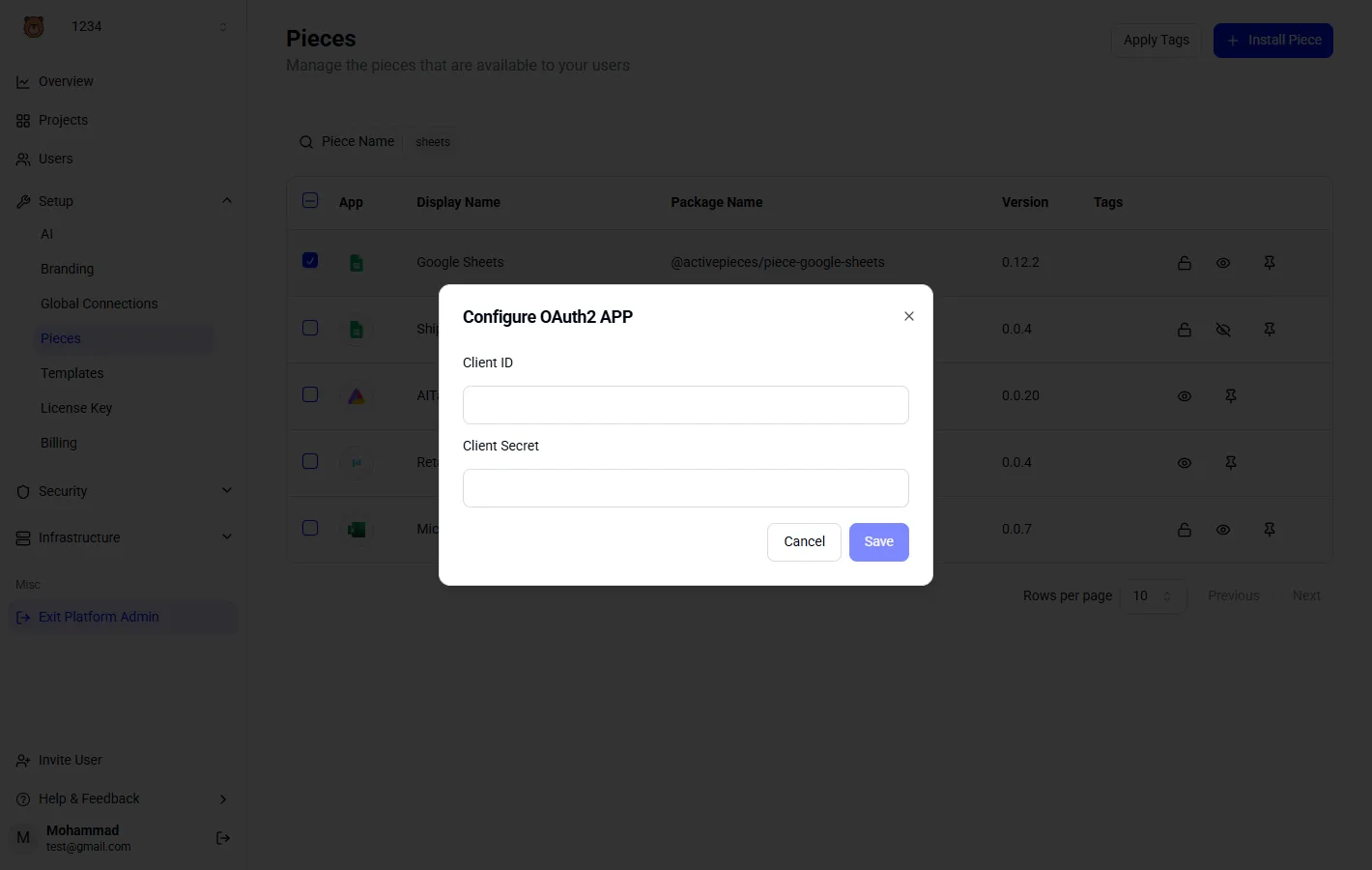
Those values go into the dialog below, titled Configure OAuth2 APP, in a client that asks for them: a Client ID field, a Client Secret field, and a Save button.
The client ID is an identifier you can share, but the secret is a credential, so keep it out of your repo.
Under API permissions, add Microsoft Graph, choose Delegated, and select only these:
Mail.Read, which reads the signed-in user's mail without being able to change or send any of itCalendars.ReadWrite, which covers reading events and creating or updating themoffline_access, which returns a refresh token so the server doesn't force a new login whenever the access token expires

Don't add Mail.ReadWrite or Mail.Send "just in case". Each one widens what an admin has to approve, and you can add it later when a tool needs it.
If users can't consent for themselves, a Global Administrator or Privileged Role Administrator opens API permissions and selects Grant admin consent. Confirm the status column shows granted for every row. Consent granted before you added a scope doesn't cover it, so re-grant after any change.
Install the server and connect your client
Install the server, give it your app registration's values, point your client at it, and sign in once. That sign-in is where the consent from the last stage either holds or fails with AADSTS65001.
Set the environment values
From your app registration, the server needs three things: the tenant ID, the client ID, and the list of scopes you asked your admin to approve.
Put them in environment variables or a .env file the server reads at startup, using the names in the server's own README.
Request exactly the scopes that were consented, no more. If the server asks for a scope your admin never approved, you get AADSTS65001: The user or administrator has not consented to use the application, and the MCP layer takes the blame for a consent problem.
Get the tenant ID wrong and you see AADSTS700016 instead, which means the app doesn't exist in the directory you're signing into.
Add the server to the client config
Because your AI client launches the server as a subprocess, its MCP config needs a command, its arguments, and the environment values from the previous step. Pass them in the config's env block rather than relying on your shell.
When a client starts from a desktop launcher, it often doesn't inherit your terminal's variables, and the server then boots with empty credentials and fails at sign-in, not at launch.
Restart the client fully after editing the config.
- Start the client and trigger the first Outlook tool call, or the server's login command if it has one.
- Complete the Microsoft sign-in in the browser and accept the consent prompt.
- Ask the client to list its tools and check that the mail and calendar tools are there.
- Run one read-only call, such as listing recent messages.
When the tools appear, all that's proven is that the client can talk to the server. It says nothing about Graph.
Only the read-only call proves the token works, so don't skip it. If tools appear but the call returns a 403, the scope is missing from the token, and you're back to re-granting consent.
When the tools appear, all that's proven is that the client can talk to the server. It says nothing about Graph.
Easier to see it running than to read about it: set it up free, no card.
Test your server before enabling send
Start with a test that only reads mail and creates drafts. A 403 on a read costs you a retry, while a wrong call to send costs you a message in someone's inbox.
The first prompts and the settings that contain them:
- Ask the server to list the subjects of your five most recent inbox messages.
- Ask it to show today's calendar.
- Ask it to summarize or read messages, not send or draft replies. Reading needs only Mail.Read.
- Leave Mail.Send unconsented. Without it in the token, Graph rejects a send call no matter what the model decides to do, so a bad prompt ends in an error instead of an email.
- Require approval on each tool call in your MCP client, so you see the arguments before anything runs.
The inbox read proves Mail.Read, and the calendar call proves Calendars.ReadWrite. If one fails, the failing scope points you straight at the grant to fix.
MCP doesn't yet give you a reliable way to tell a harmless read from a destructive write from the tool description alone, so the approval dialog is your only check on what the model is about to do.
You're done with this stage when the five subjects the server returns match what Outlook shows you, in the same order.
That one confirmed read tells you the app registration, consent, token and server all work together. Only then does it make sense to ask your admin whether sending is worth the wider scope.
Fix Outlook MCP errors and limits
When an Outlook MCP call fails, it's nearly always a consent or token failure surfacing through the client. The fix lives in your Entra app registration or your sign-in, not in the MCP config. The table maps each symptom to its cause.
| Symptom | Cause | Fix |
|---|---|---|
| AADSTS65001 | Nobody has consented to the scopes requested | Have an admin grant consent, or trim the scopes to what they'll approve |
| AADSTS700016 | Client ID not found in the tenant you signed into | Check the client ID and the tenant, and the account type the app supports |
| 401 | Token missing, expired or issued for the wrong audience | Sign in again and request the token for Graph |
| 403 | Token is valid but lacks the scope for that call | Add the scope, consent again, get a fresh token |
| 429 with Retry-After | Graph is throttling you | Wait the stated time, then retry with backoff |
| Tools missing in client | Server never started or crashed at launch | Run it by hand, read stderr, restart the client |
Read the table by the code, not the message text.
If you see AADSTS65001, the consent prompt never completed. If your admin blocks user consent, it'll fail every time until they approve it.
AADSTS700016 usually means the app was registered for one kind of account and you signed in with another, such as a personal account against a work-only registration.
For a 401, look at the token itself. A 403 is about what the token may do. The classic case is a read-only scope calling a send endpoint. Decode the token and check its scopes before touching anything else.
On a 429, honor Retry-After rather than guessing. Graph also caps attachment size on simple requests, so large files need an upload session. Your tool should report that limit instead of failing silently.
If the tool list is empty, the server process almost always died. Logging to stdout can corrupt the protocol stream, so send logs to stderr. After fixing the process, fully restart the client; MCP doesn't yet reliably pick up a changed server on its own.

When to use Activepieces alongside an Outlook MCP server
Use Activepieces when the work should happen without anyone typing a prompt. A restarted client fixes an MCP session, but a job that must fire at 7am has no client to restart.
Ask a question in an AI client and an MCP server answers: it calls Graph with your token, and it stops. Nothing runs while you're away. Four jobs fit that badly and work better as a workflow:
- Filing new mail into a sheet
- Daily calendar digests
- Alerts on mail from a particular sender
- Scheduled attachment saving
Each is a trigger plus a fixed action, so a model deciding what to do on every run adds cost and failure modes for no gain.
Official Microsoft server or a community one
For this decision, the choice doesn't matter. Activepieces has its own Outlook connector, one of the 741 integrations counted in its open source monorepo, so a workflow doesn't depend on whichever MCP server you picked.
It can also expose a workflow as an MCP tool. Your client then calls "save this week's attachments" instead of getting open-ended mailbox access, which keeps the scope your admin approved smaller.
Prerequisites for an Outlook MCP server
Nothing in Activepieces is required to get an Outlook MCP server working. Fix consent and tokens first, since those failures happen before any automation layer is involved.
Once the Outlook integration is connected, an agent can call it: the action that runs as a step in your flow is also a tool schema on the project's MCP server, so Claude, ChatGPT or Cursor reach the Graph permissions you already consented to.
Nothing gets exported or wired up a second time, and that matters because a catalog you have to re-integrate for your agents is a second migration.
The Integrations Framework and MCP Server docs describe it, and packages/integrations in the MIT-licensed open source repo shows one integration action behind both uses.
Once that works, the cost question is short.
The pricing below, as listed on the Activepieces pricing page in October 2026, shows a steep step at the top, and the first two tiers are where most single-mailbox automations will be tried, which means you'll face a significant cost jump when you try to scale.
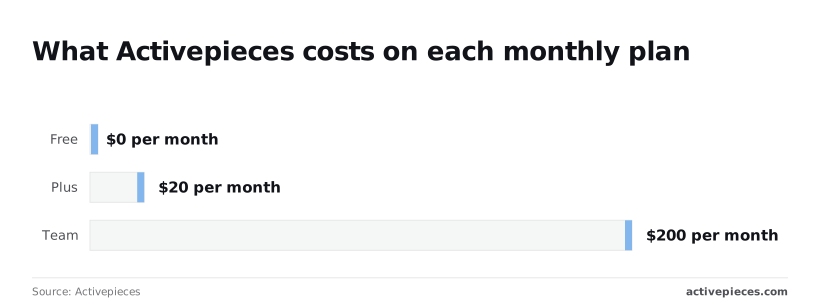
At 0 $ per month, Free lets you build the sender alert and see whether it earns its keep before paying anything. Plus is 20 $ per month, cheap enough to run on one person's budget without a purchasing conversation.
Team is 200 $ per month, ten times Plus, which only makes sense once several people share the workflows.
Start on Free with one trigger, one action, and the narrowest Graph scope that covers it.
Frequently asked questions
Most of these answers come back to one error, AADSTS65001: nobody has consented to the scope the app asked for.
There's no official Microsoft Outlook MCP server I can point you to as the standard way to reach Outlook mail. The servers people actually run are community-built wrappers around Microsoft Graph.
Check who maintains one, and which scopes it requests, before you sign in with a work account.
With personal Outlook.com accounts, an Outlook MCP server works if the server's app registration allows personal Microsoft accounts and you sign in with delegated permissions.
Many setups register for work accounts only, and then a personal login fails at the sign-in screen. That's a registration setting, not an MCP bug. Tenant-level admin policies don't apply to a personal account, so there's no admin to ask.
Is it safe to let an AI send email from my Outlook?
Only as safe as the scope you grant, so don't grant Mail.Send first. Start with read access and draft creation, and have a human press send.
Once the model can send, a prompt injection hidden in an incoming message can mail anyone as you. MCP has no built-in answer to that, and no confirmation layer protects you unless you build one.
Do I need an IT admin to set it up?
Often, but not always. Some tenants let users consent to low-risk delegated scopes themselves. Many block user consent entirely, and then every scope waits for an admin.
A request for read-only mail access is far easier to approve than one for send rights across the whole mailbox. Send your admin the exact scope list and the reason for each, not "access to Outlook."
For working inside Outlook itself, Microsoft 365 Copilot needs no token plumbing from you. It's a different product, though, not a way to connect Claude or any other MCP client to your mailbox.
If you want your own agent to read and draft mail, you still need a Graph app registration and consent.