
Perplexity MCP Server: Setup Guide and Tools

Oct 11, 202616 min read
Setting up the Perplexity MCP server in 2026 allows developers to bridge the gap between real-time web search and local LLM environments, providing a robust framework for building context-aware applications.
By configuring the Model Context Protocol, you can enable your AI agents to query the live internet with the same precision as a human researcher.
As you begin integrating these tools into your workflow, perhaps while exploring automation options like Activepieces to connect your various services, the process involves obtaining an API key and defining the server parameters within your configuration file.
This setup ensures that your local models remain grounded in current events, significantly reducing hallucinations and improving the overall accuracy of automated responses.
What the Perplexity MCP server enables for LLMs
Rather than relying on an internal knowledge cutoff, the Perplexity MCP server acts as a standardized bridge that allows an LLM to query the live internet through Perplexity’s search infrastructure.
By mapping environment variables to a local host, you move from a model that guesses about recent events to one that cites current sources.
Live web access vs. static training data
Standard models like Claude Sonnet 5.5 are limited by their training data. They can't natively verify facts that occurred after their weights were frozen.
By mapping environment variables to a local host, you move from a model that guesses about recent events to one that cites current sources.
Integrating the Perplexity MCP server solves this by giving the model a "search" tool it can trigger whenever a prompt requires real-time information.
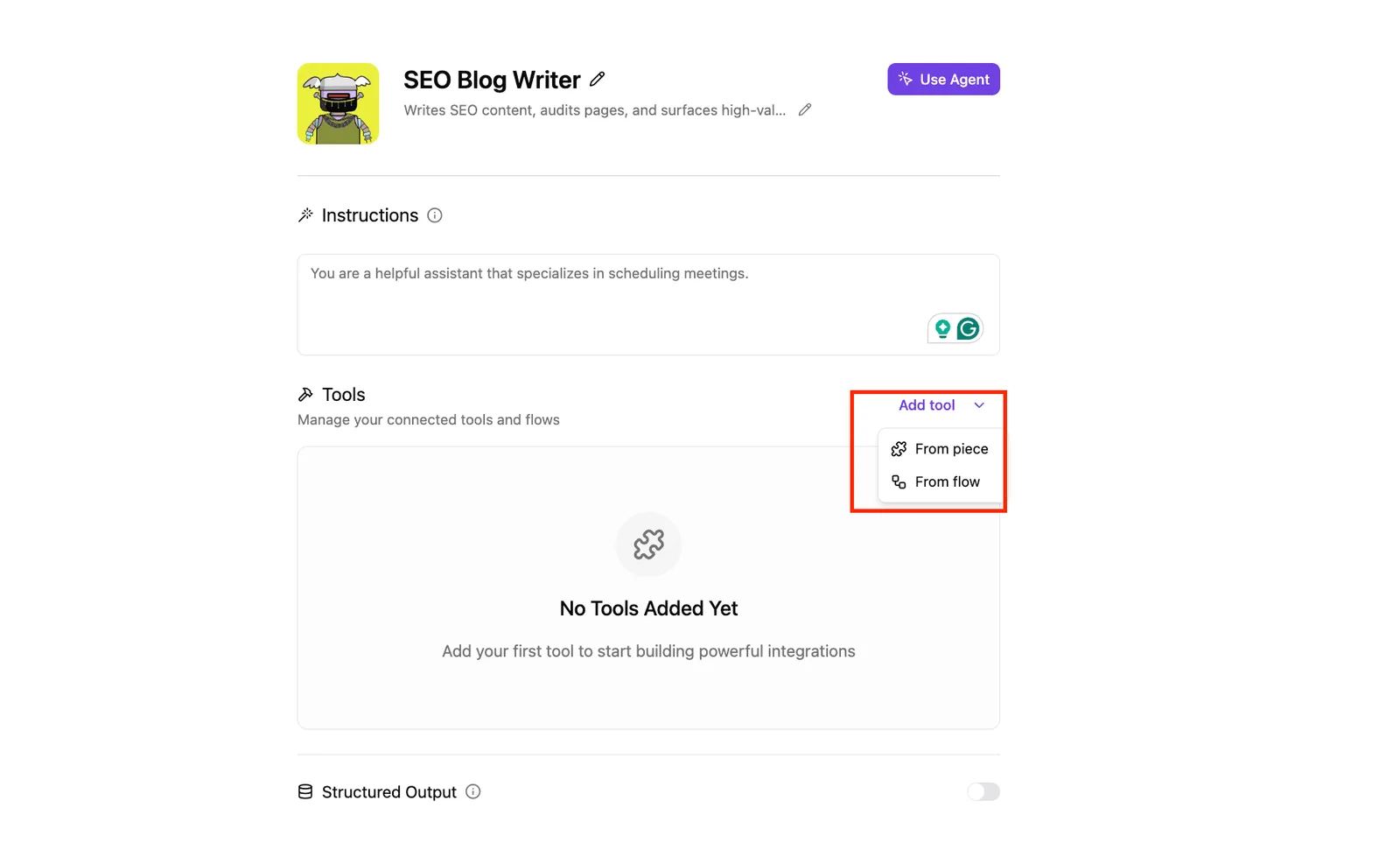
The moment a integration is connected in Activepieces, an agent can call it.
Any integration registered once functions as both a flow step and a tool schema on the Activepieces per-project MCP server, making it instantly reachable from Claude, ChatGPT, or Cursor without a second migration.
This architectural shift prevents the hallucination of news events and ensures that technical documentation queries return the latest syntax instead of deprecated API calls.
Perplexity MCP server setup requirements
To ensure the handshake between the LLM and the search API is secure and functional, setting up this bridge requires a specific set of local and cloud-based assets.
Missing any of these components will result in a connection error or a silent failure where the model reverts to its static training data.
A Perplexity Pro API key with an active credit balance is required to authenticate search requests. You must have a local installation of Node.js (version 18 or higher) to execute the server script.
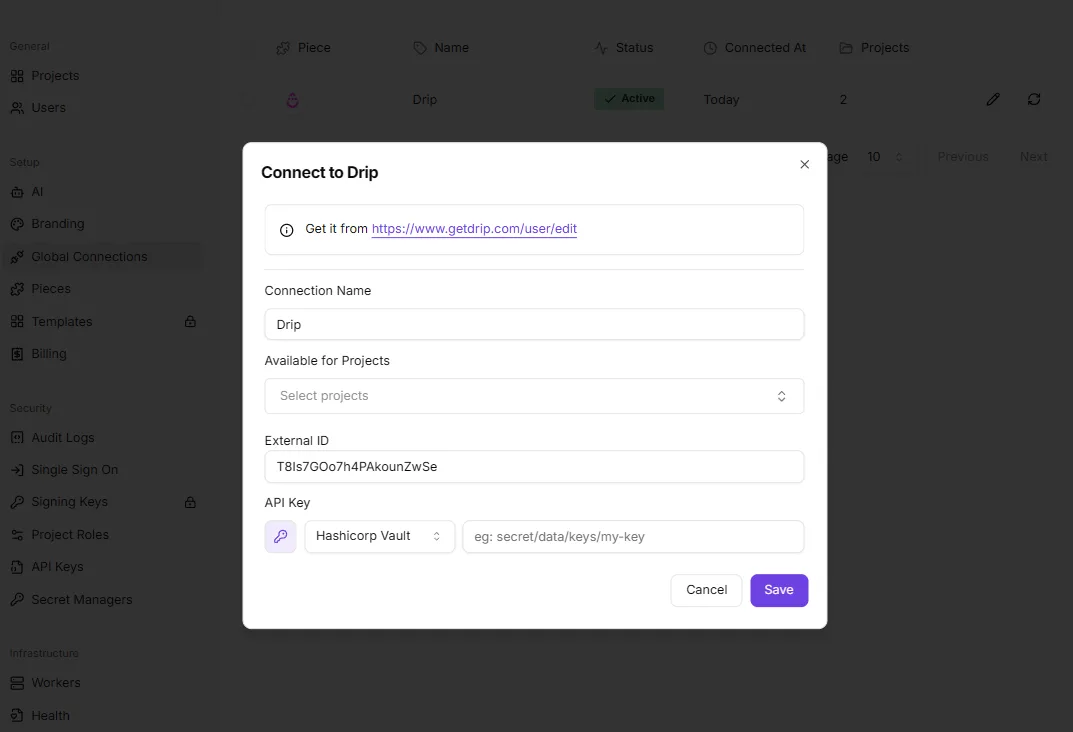
Finally, you need a compatible MCP host, such as Claude Desktop or Cursor, to manage the model's tool definitions.
Once these prerequisites are met, the configuration involves editing a single JSON file to point the host toward the server's entry point.
What is the Model Context Protocol (MCP)
The Model Context Protocol (MCP) is a universal translator between diverse AI models and external data sources. It eliminates the need for custom-coded plugins for every new model release.
When you ask a question about today's market, the host identifies the Perplexity tool, executes a background process via Node.js, and injects the search results into the model's context window.
This protocol-based approach ensures that the method for accessing live web data remains identical and stable. This holds true whether you're using Gemini 3.8 Flash for speed or Claude Opus 5.5 for deep reasoning.
This takes minutes, not a project: automate it in Activepieces free.
Step-by-step Perplexity MCP server installation guide
Installing the Perplexity MCP server requires a few targeted modifications to your local environment files to bridge the gap between your local LLM client and the live web.
This process turns a standard chat interface into a tool-aware research agent by exposing the Perplexity API as a callable function within the Model Context Protocol framework.
Installing the MCP server via NPM
By pulling the official @modelcontextprotocol/server-perplexity package, you avoid the manual overhead of managing individual script dependencies or building the server from source.
You install the server using the Node Package Manager (NPM) to ensure the necessary runtime binaries are accessible to your local machine’s execution path.
This installation creates a bridge that allows Claude Sonnet 5.5 to delegate search queries to the Perplexity engine whenever it detects a prompt requiring real-time data.
Configuring the Claude Desktop JSON file
Modifying the configuration file is the critical step that tells your desktop client exactly how to communicate with the Perplexity API.
A single syntax error in the JSON structure will prevent the client from launching, so precision in mapping your environment variables is mandatory for a functional integration.
The following installation sequence establishes the connection:
- Generate your Perplexity API key;
- Open the Claude Desktop configuration JSON;
- Insert the Perplexity MCP server block;
- Restart the Claude Desktop application.
Defining the server configuration block
The configuration block must be placed inside the mcpServers object of your claude_desktop_config.json file. This snippet defines the execution command and passes your API key as an environment variable.
{
 "mcpServers": {
 "perplexity": {
 "command": "npx",
 "args": [
 "-y",
 "@modelcontextprotocol/server-perplexity"
 ],
 "env": {
 "PERPLEXITY_API_KEY": "YOUR_API_KEY_HERE"
 }
 }
 }
}
Ensure you replace the placeholder text with your actual Perplexity API key. This specific syntax allows the host to spawn a Node process that manages the search lifecycle.
Once these steps are completed, the "Tools" icon will appear in your chat interface, signifying that the model now has permission to exit its training data sandbox.
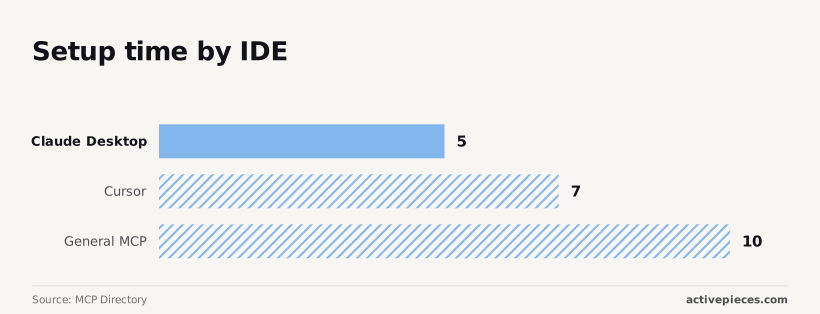
Setup time for Claude Desktop vs Cursor vs General MCP
The time required to enable these capabilities varies based on how the specific IDE or client handles external tool definitions. Because Claude Desktop uses a centralized JSON file for all MCP servers, it offers a streamlined path compared to more complex environments.

| Host Environment | Setup Time | Configuration Complexity |
|---|---|---|
| Claude Desktop | 5 minutes | Single centralized JSON file for all tool registrations. |
| Cursor | 7 minutes | Requires individual plugin configuration per project or globally. |
| General MCP | 10 minutes | Requires manual handling of the transport layer and session lifecycle. |
While the manual effort differs, the result is the same: your model gains the ability to verify facts against the live web rather than relying on cached knowledge.
Configuring search parameters and tool definitions
Effective search configuration requires mapping the perplexity_search tool to specific environment variables to control how the model navigates the live web.
By defining these parameters, you prevent the LLM from hallucinating outdated facts by forcing it to prioritize the Perplexity API’s real-time index over its own training data.
Using the perplexity_search tool effectively
The perplexity_search tool is the primary bridge between the MCP server and the internet. It requires precise parameter tuning to balance cost and accuracy.
10 minutes is all it takes for a general MCP configuration, according to the MCP Directory, which means users can integrate new tools into their workflow with minimal downtime.
A developer can move from a blind model to a web-aware agent in the time it takes to brew a pot of coffee.
The following table illustrates how these parameters dictate the model's behavior and output diversity.
| Parameter | Type | Range | Default |
|---|---|---|---|
| search_type | online vs. Local | N/A | online |
| frequency_penalty | numeric | 0 to 1 | 0.2 |
| presence_penalty | numeric | 0 to 1 | 0.0 |

This parameter set ensures that an online search type forces a fresh crawl rather than hitting a local cache. This is vital for news-sensitive queries.
A frequency_penalty of 0.2 is the standard for reducing repetitive phrasing. This prevents the model from getting stuck in a loop when summarizing multiple search results.
Consequently, these settings transform the raw API response into a readable research summary.
Choosing between Perplexity sonar model sizes
Choosing between model sizes determines the complexity of the reasoning applied to the retrieved search results.
The while the setup for Claude Desktop takes only 5 minutes, the choice of backend model significantly impacts latency, so developers must balance speed of deployment against the responsiveness of their final application.
sonar-small is optimized for rapid fact-retrieval where speed is the priority.
sonar-large is necessary for synthesizing contradictory reports from multiple sources. Users must trade off between immediate response times and the depth of analytical reasoning.
7 minutes is the setup time for Cursor, reflecting the slightly higher complexity of mapping the binary paths within that specific IDE, requiring a bit more technical precision from the user during installation, which means the initial barrier to entry is higher than for simpler text editors.
Using a larger model ensures that long-form reasoning tasks, such as those handled by Claude Opus 5.5, have a sufficiently intelligent search partner to parse dense technical documentation.
Writing system prompts for Perplexity search citations
The system prompt must explicitly instruct the model to use the provided search tool before answering any query involving current events or specific data points.
This instruction ensures that models like Gemini 3.8 Flash or GPT-6 Astra don't default to their internal weights when a verifiable fact is required.
By enforcing a "search-first" policy in the system prompt, you ensure every claim is backed by a URL. This creates a verifiable audit trail for the user, turning a standard chat interface into a transparent research engine that cites its sources in real-time.
You can follow the rest of this with the builder open. Start free, no card.
Troubleshooting common Perplexity MCP connection errors
Connection failures in the Model Context Protocol (MCP) typically stem from environment mismatches or strict tier-based gating rather than logic errors within the LLM.
If the bridge between a flagship model like Claude Opus 5.5 and the Perplexity API fails, the system reverts to a static state, losing the ability to verify claims against the live web.
Identifying the specific error code allows you to distinguish between a local configuration blunder and a provider-side restriction.
Fixing Node.js path errors in MCP server
When the host application can't locate the Node.js runtime required to boot the MCP server, a "Command not found" or execution error occurs.
Because desktop applications often don't inherit the shell’s $PATH, you must provide the absolute path to the node executable in your configuration file.
Using a relative path or a simple alias like node will cause the connection to hang indefinitely. The research tools will never appear in the model's interface.
Fixing Perplexity API key 401 errors
A 401 error signifies that the API key provided in the environment variables is either malformed, expired, or lacks the necessary permissions for the sonar-reasoning models.
This usually happens when a user copies a key from a restricted project instead of a global API dashboard, resulting in a handshake failure.
Without a valid, active credential, the MCP server can't authenticate the request. This forces the LLM to rely on its internal training data rather than the real-time index.
Managing Perplexity API rate limits and quotas
A 429 error indicates that your implementation has exceeded the request-per-minute (RPM) or token-per-minute (TPM) ceiling defined by your specific API tier. These limits are enforced strictly to prevent infrastructure saturation.
A high-frequency agent using Gemini 3.8 Flash for rapid-fire queries may trigger a lockout within seconds. To maintain service continuity, you must implement exponential backoff in your request logic or upgrade your tier to increase the throughput capacity.
The following failure points represent the most frequent interruptions in the data pipeline:
- Invalid API Key (401 error) stops all outbound traffic at the authentication gate.
- Node.js Path Not Found (command execution error) prevents the local server instance from initializing.
- Rate Limit Exceeded (429 error) based on 2026 API tier limits throttles the research engine during peak usage, forcing automated tasks to pause until the account's quota resets, so workflows relying on continuous data processing will inevitably experience intermittent downtime.
Once these connection hurdles are cleared, the system moves from basic connectivity to optimizing the actual search parameters for better precision.
Scaling Perplexity search across business workflows
Scaling research workflows across team tools
Scaling Perplexity beyond a single browser tab requires an automation layer to handle the hand-off between live web data and your team’s internal communication tools.
By utilizing an automation platform to bridge the gap, you can ensure that the output from a model like Claude Sonnet 5.5 doesn't sit idle in a chat interface but instead moves immediately to where decisions are made.
Every search call an agent initiates is visible in the run details, and since the engine driving these research tasks is public code in the MIT-licensed core, the logic behind each tool-call decision is fully inspectable.
By centralizing the data flow this way, a single research query can update a project channel and a tracking spreadsheet simultaneously, eliminating the manual copy-paste cycle that usually degrades data integrity.

This multi-endpoint delivery ensures that technical and non-technical stakeholders receive the same verified information in their preferred environment.
Connecting Perplexity to your company CRM
Integrating real-time search into a customer relationship management system turns a static database of names into a dynamic intelligence tool. When a new lead is added to a CRM, the system can trigger a search for recent press releases or financial filings.
This allows a model like Gemini 3.8 Flash to extract relevant pain points before the first sales call. This immediate enrichment means account executives enter meetings with context that is minutes old rather than weeks old.
Automating market monitoring with Perplexity MCP
Standardizing market intelligence involves moving from reactive searching to proactive, scheduled monitoring of competitors and industry trends. By setting a recurring trigger, the MCP server can scan for specific regulatory changes or product launches and feed that raw data into GPT-6 Astra for high-level reasoning.
Google Sheets acts as the historical archive for trend analysis. Slack provides immediate alerts for high-priority market shifts. Discord serves as the collaborative space for technical teardowns of competitor updates.
What Activepieces does about this
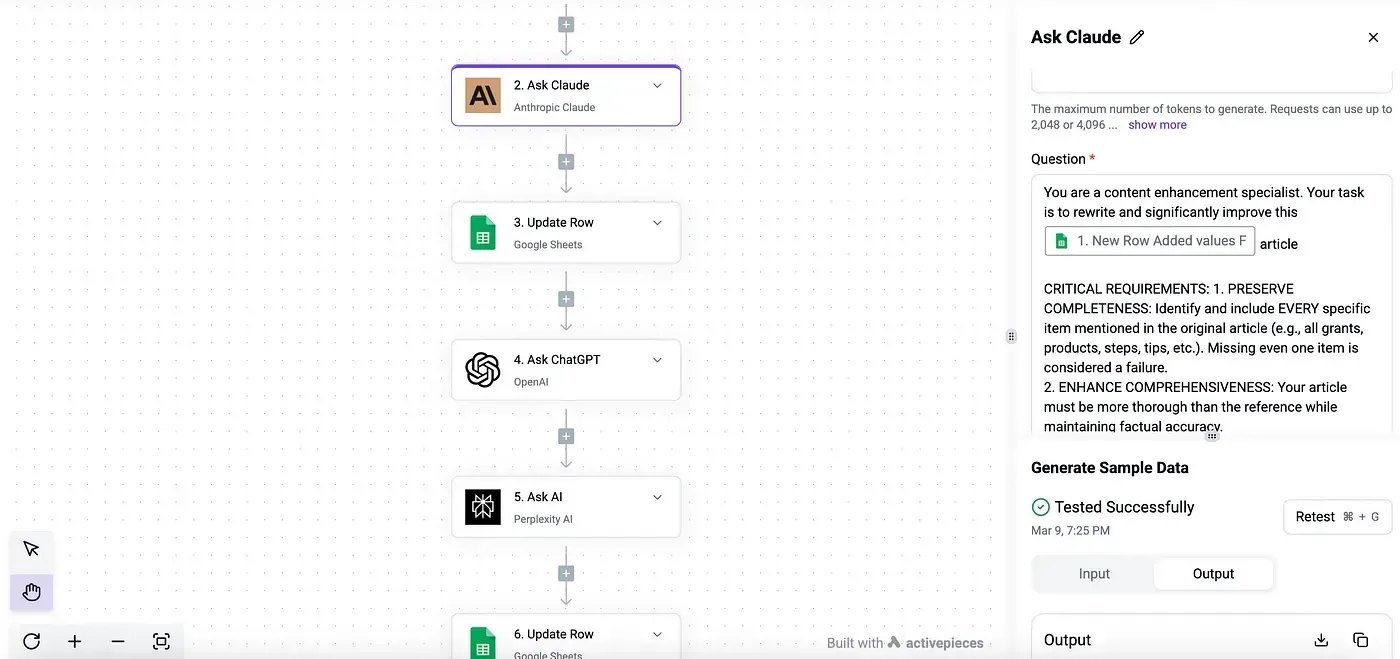
Activepieces provides the automation infrastructure to turn these local MCP configurations into scalable, multi-user research workflows. While a local JSON setup connects a single desktop client to the web, Activepieces acts as a centralized orchestrator that manages the Perplexity API handshake across your entire stack.
Because the platform is built on an MIT-licensed core, teams can self-host the engine to ensure that sensitive search queries and API keys remain within their own infrastructure rather than passing through a third-party cloud.
The platform eliminates the manual configuration of environment variables for every new team member by providing a visual interface to map the Perplexity MCP server to various LLMs.
When a search is triggered, Activepieces handles the transport layer and session lifecycle, ensuring that the 429 rate limits are managed through built-in error handling and retry logic.
This prevents the silent failures common in local setups, as every interaction between the LLM and the Perplexity API is logged and auditable in the run history.
For organizations scaling these capabilities, Activepieces allows the Perplexity tool to be shared across different projects without repeating the 10-minute manual installation.
A single registration of the MCP server makes it available as a tool for Claude, GPT-6, or internal bots, allowing a company to standardize how their AI agents cite live sources.
This centralized approach ensures that every department, from sales to engineering, uses the same verified search parameters and model versions, maintaining consistency in the data retrieved from the live web.
Frequently asked questions about Perplexity MCP
Does Perplexity MCP require a paid Pro subscription?
You don't need a Perplexity Pro consumer subscription to use the MCP server. However, you must maintain a positive balance in your Perplexity API settings to avoid immediate execution failures.
While the consumer Pro tier offers a monthly credit for API usage, the MCP server communicates directly with the sonar-reasoning models via a pay-as-you-go credit system.
If your API dashboard shows a zero balance, the server will return a 401 error regardless of your personal subscription status. Your research agents will lose their connection to live web data until you manually top up the account.
Can I use Perplexity MCP with VS Code and Cursor?
Integrating the Perplexity MCP server with editors like Cursor or VS Code allows flagship models to pull real-time documentation directly into your active coding session. Because these editors support the Model Context Protocol, you can point your IDE configuration to the local Perplexity executable.
This setup prevents the hallucination loop where an LLM suggests deprecated libraries. The model can now verify the latest syntax against the live web before writing a single line to your file.
How do I secure my Perplexity API key in the config file?
Storing your Perplexity API key as a plain-text string in a standard JSON configuration file exposes your billing credits to anyone with read access to your local directory.
The safest method is to define the key as a system environment variable and reference that variable within your MCP settings.
By using an environment variable, you ensure that your credentials are never committed to version control. This protects you from accidental public disclosure if you share your IDE configuration or dotfiles on a repository.
Is there a limit to the number of searches per hour?
The Perplexity API enforces rate limits based on your account tier, which dictates how many concurrent research requests your MCP server can handle.
If you trigger a high-volume agentic workflow using Gemini 3.8 Flash, you may hit a 429 status code if the requests exceed the allowed queries per minute.
Exceeding these limits causes the MCP server to time out. You must implement basic retry logic or exponential backoff in your automation scripts to ensure that long-running research tasks complete without losing data.
Related reading
References
Build it
Set this up in minutes.
No code required. Connect your accounts, and Activepieces runs it from there.
Start free Talk to sales