
Asana MCP Server: Setup Guide and Config 2026

Oct 8, 202614 min read
The Asana Model Context Protocol (CORE) server is a standardized translation layer. It allows an LLM to read, create, and modify tasks by mapping natural language prompts to specific REST API endpoints, which can be further extended through tools like Activepieces to bridge disparate workflows.
This bridge removes the need for custom glue code by providing a uniform interface. Models like Claude Sonnet 5.5 or GPT-6 Astra can query this interface to understand the state of a project workspace.

Asana MCP server architecture and requirements
What the Model Context Protocol does for Asana
By establishing a secure, structured communication channel, the Model Context Protocol enables an LLM to treat the Asana API as a local extension of its own reasoning capabilities.
A central 'MCP Server' node connects to 'Claude Desktop' via JSON-RPC over stdio on the left, and to the 'Asana API' via HTTPS/REST on the right, requiring a 'Personal Access Token' for authentication.
You maintain full control over the session's scope and permissions because the LLM never touches the Asana database directly. Following this handoff, the model can execute complex project management sequences without manual data entry.
Node.js environment and system requirements for Asana MCP
To manage the persistent connection between the desktop client and the remote API, a local MCP server requires a stable JavaScript runtime environment. Node.js (v18 or higher) provides the underlying engine for executing the server code and managing asynchronous API requests.
Installation of the @modelcontextprotocol/server-asana library is handled by the npm package manager. A compatible host application, such as the Claude Desktop app, is necessary to parse the MCP config file and render the tool UI.
Finding the right Asana implementation for your stack
Every connector is an agent tool in Activepieces, where registering a integration once allows it to function as a flow step and a tool schema on a per-project MCP server simultaneously.
This eliminates the need to re-integrate a catalog for your agents or manage a separate export step for ChatGPT and Claude.
You can verify this mechanism in the Integrations Framework documentation and the open source repository, where the same logic that powers a standard automation is exposed directly as an MCP tool.
Generating your Asana Personal Access Token (PAT)
A Personal Access Token (PAT) grants the MCP server the same permissions as your Asana user account. For non-OAuth command-line tools, you must generate this in the Asana Developer Console under the "My Apps" section.
Add the token to a local claude_desktop_config.json file after you generate it so the LLM can identify itself to Asana's servers during every request. Failure to secure this token locally results in a 401 Unauthorized error.
Locating the configuration file on your system
The configuration file resides in different hidden directories depending on your operating system. On macOS, you can find or create the file at ~/Library/Application Support/Claude/claude_desktop_config.json. Windows users should navigate to %APPDATA%\Claude\claude_desktop_config.json to perform the edit.
If the directory or file does not exist yet, you must create them manually using a text editor. Ensure the file extension is strictly .json and not .txt to allow the application to parse the settings.
This takes minutes, not a project: automate it in Activepieces free.
The growing ecosystem of Model Context Protocol servers
Why community servers dominate the registry
Community-driven development is the primary engine for the Model Context Protocol (MCP). Independent developers prioritize immediate utility over the lengthy legal and product roadmaps required for official releases.
A contributor can wrap the Asana REST API in an MCP-compliant TypeScript layer in a weekend, while a vendor might spend months vetting a connector for security compliance.
Because these servers are built by the very engineers using them, they frequently include specialized endpoints for niche tasks, such as granular sub-task dependencies, which "standard" integrations often omit.
Choosing official versus community Asana MCP servers
Official servers provide a baseline of stability and long-term support. Community forks can't guarantee these standards, making official versions the necessary choice for production environments where a breaking API change could halt operations.
Official implementations typically adhere to stricter rate-limiting headers and error-handling schemas. This ensures the agent receives clear feedback when it hits a throttle limit.
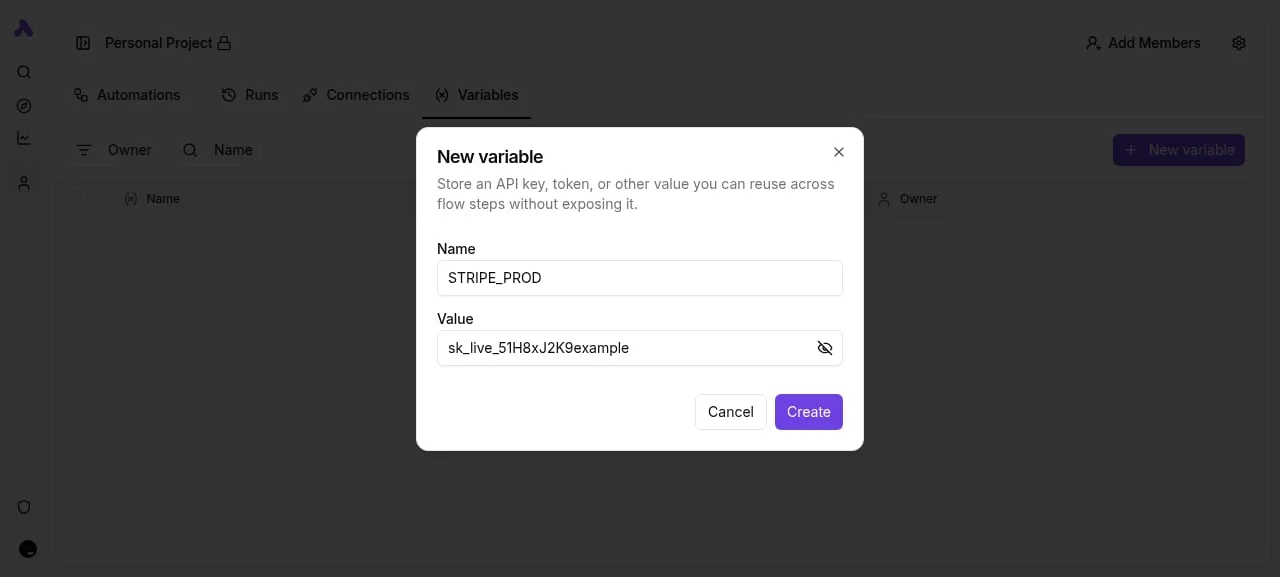
[SCREENSHOT: The Activepieces flow builder with a Data Selector modal open in the center. The modal shows two tabs: "Data" and "Variables", with the Variables tab active. A search field labeled "Search variables" is visible, and below it is a list showing one variable "STRIPE_PROD" with a purple icon. On the right side, a Code step panel is open showing input configuration with a "context" field and an "Add Item" button. The flow canvas in the background shows a trigger step and a code step (step 2).]
Managing credentials in orchestration layers
By using this abstraction layer, developers can map production keys to specific code steps without hardcoding sensitive credentials into the MCP server configuration itself.
Node.js-based servers offer the most straightforward path for developers using Claude Sonnet 5.5, as they leverage existing npm packages for Asana to handle complex authentication flows.
Python implementations are better suited for data-heavy environments where the agent needs to perform local analysis on task metadata.
The highest level of environment isolation is provided by Dockerized MCP containers. This keeps the local file system protected even if the model attempts an unintended command.
Step 1: Installing and configuring the server locally
To prevent the Model Context Protocol (MCP) from failing silently during the handshake, local installation requires precise environmental variables.
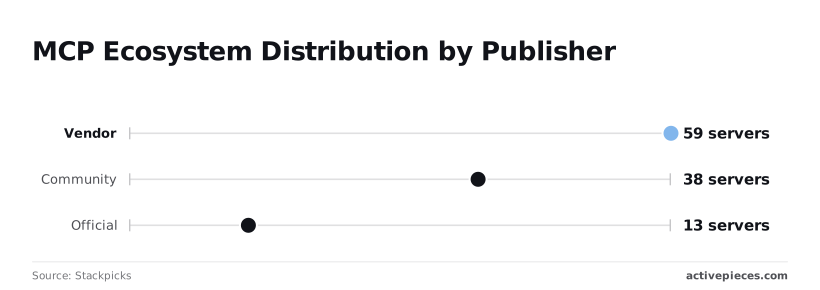
While the ecosystem is growing, the Stackpicks registry shows that official implementations are the minority, with only 13 official servers compared to 59 vendor-provided and 38 community-built servers, suggesting that users must rely heavily on third-party reliability for their integrations.
Running the server with npx mcp-server-asana
Use the npx command to fetch the latest build of the Asana connector to initiate the server without a permanent global install.
- Run
export ASANA_ACCESS_TOKEN=your_token_hereto store the credential in your current session. - Execute
npx @modelcontextprotocol/server-asanato pull the package into a temporary cache and start the stdio transport layer.
Editing the claude_desktop_config.JSON file
For persistent use within a host like Claude Desktop, you must hardcode the server configuration into the claude_desktop_config.json file.
{
 "mcpServers": {
 "asana": {
 "command": "npx",
 "args": ["-y", "@modelcontextprotocol/server-asana"],
 "env": {
 "ASANA_ACCESS_TOKEN": "your_token_here"
 }
 }
 }
}
This JSON structure ensures the ASANA_ACCESS_TOKEN is passed to the shell environment every time the model initializes.
Verifying the connection in the MCP toolbar
Restart the desktop client once the configuration file is saved to trigger a refresh of the attached tools. Look for the hammer icon in the interface, which indicates that the MCP host has successfully parsed your JSON.
If the icon remains grey, the process has likely timed out. This is common when npx takes longer than 30 seconds to resolve the package, which means the command will likely time out before it can execute.
In this case, a local npm install is necessary for stability.
You can follow the rest of this with the builder open. Start free, no card.
Step 2: Managing tasks and projects through the LLM
The Asana MCP server exposes a granular set of tools that allow models like Claude Opus 5.5 or GPT-6 Astra to interact with the Asana API as an authenticated agent.
| Resource | Read Access | Write Access | Administrative |
|---|---|---|---|
| Tasks | List/Get by ID | Create/Update | Delete/Archive |
| Projects | List by Workspace | Create/Update | Membership Management |
| Users | Get Profile/Me | N/A | Workspace Invitation |
| Workspaces | List Available | N/A | Workspace Settings |
Searching for tasks by workspace and assignee
Effective task retrieval requires the model to pass a valid workspace_gid and assignee_gid.
Because Asana doesn't support cross-workspace searching in a single call, the LLM must first use the list_workspaces tool to identify the correct environment. The agent then only processes active work relevant to the current user.
Creating new tasks with custom field support
The create_task tool allows the LLM to populate standard fields and inject data into custom_fields.
The agent must first query the project schema to identify the gid of the custom field and its permitted values to use these successfully.
Without this verification, the LLM may attempt to pass a string to a numeric field, resulting in a 400 Bad Request error, so the API call will fail to process.
Fetching project schemas for context-aware updates
Accessing the project schema via the get_project tool provides the LLM with the structural requirements of a specific workflow, including section names and custom field definitions.
By reading the schema first, the model ensures that every update it proposes aligns with the existing rules of the project board.
Handling Asana API limits and common errors encountered
Asana API constraints dictate the operational ceiling of any agentic workflow. This forces developers to implement backoff strategies to prevent the Model Context Protocol (MCP) server from crashing.
Managing 429 Too Many Requests errors
The Asana API enforces strict rate limits. An agent that attempts to update dozens of subtasks simultaneously will trigger a 429 status code.
The server must capture the Retry-After header value to pause the agent. Free Tier accounts are limited to 150 requests per minute, while Paid Tier accounts allow 1,500 requests per minute, creating a tenfold difference in potential throughput for users.
Both tiers share a Search API limit of 60 requests per minute, meaning that upgrading your account provides no advantage for this specific feature.
Asana search results pagination limit explained
Asana restricts search result sets to 100 items per page. An agent tasked with auditing a large department will only see a partial snapshot unless it explicitly handles offset tokens.
Why the server cannot access organization-level settings
The standard personal access tokens used by most MCP configurations don't grant entry to administrative objects, such as workspace-wide security settings.
Service Accounts restrict Workspace Settings to prevent unauthorized permission escalations. Audit Logs are only accessible via the Audit Suite API, which requires Enterprise-tier credentials. SCIM gateways lock User Provisioning to ensure IT departments maintain control over seat counts.
Scaling Asana automation beyond single-user sessions
Local Model Context Protocol (MCP) implementations fail for teams because they bind the intelligence of a model to the ephemeral state of a single workstation.
When to scale automated business workflows
An agent is a user, not just code, and scaling Asana tools for a business requires the same governance applied to employees. Activepieces places every agent within a unified access model where RBAC, SSO, and SCIM control what it can connect to.
Local Model Context Protocol (MCP) implementations fail for teams because they bind the intelligence of a model to the ephemeral state of a single workstation.
Companies like MoneyGram and FundingSocieties run this in production to ensure that every tool call is logged with its specific inputs and outputs.
Setting up Asana webhooks for real-time triggers
Standard MCP servers rely on polling, which forces a model to repeatedly burn tokens just to discover if a task status has changed.
Webhooks allow the system to remain dormant until an actual change happens. A webhook-enabled workflow allows the agent to immediately re-prioritize a sprint the moment a "Blocker" tag is applied by a human teammate.
Managing OAuth for team-wide tool access
Scaling an agent to a team manager requires replacing individual Personal Access Tokens with OAuth.
Using a single PAT means every action the agent takes is logged under one person's name, destroying the audit trail. Implementing OAuth ensures that the agent acts with scoped permissions for different team members.

What Activepieces does about this
Activepieces bridges the gap between local experimentation and production-grade reliability by providing a managed environment for these agentic tools. While manual MCP setups require you to manage Node.js runtimes and local JSON configurations, Activepieces allows you to deploy these connectors as persistent, cloud-hosted tools.
Under the MIT License, the platform provides an open-source framework where the Asana integration is maintained as a first-class integration, ensuring that the underlying API mappings are kept up to date without manual npm updates.
To solve the fragility of local credentials, Activepieces centralizes authentication through a secure credential manager. Instead of hardcoding Personal Access Tokens into a desktop config file, you can utilize the platform's OAuth2 support to grant agents scoped access.
This approach allows organizations like MoneyGram to maintain strict security standards while giving LLMs the ability to interact with project data.
The platform handles the complex handshake between the Model Context Protocol and the Asana API, providing a stable endpoint that doesn't rely on a single user's terminal session remaining active.
The platform also addresses the rate-limiting and pagination issues inherent in the Asana API by implementing automated retry logic and data handling within its flow builder.
When an agent triggers a search that exceeds the 100-item limit, Activepieces can orchestrate the necessary offsets and loops to present a complete dataset to the LLM.
This transforms the agent from a tool that might fail on large projects into a reliable manager capable of auditing entire workspaces.
By moving the logic from a local npx command to a structured workflow, you gain visibility into every tool call through detailed execution logs.
Frequently asked questions about Asana MCP?
Why is my Asana MCP server failing to start?
A failure to start typically indicates that the Node.js runtime can't locate the entry point or the environment variables are missing.
The global installation path for the Model Context Protocol (MCP) inspector is likely missing from your system’s PATH variable if the terminal returns a command not found error.
This prevents the shell from executing the server binary. You must also verify that your Asana Personal Access Token is exported in your current session.
Otherwise, the server will immediately terminate with an authentication error because it lacks the credentials required to handshake with the Asana API.
Can I use the Asana MCP server with ChatGPT or Gemini?
Compatibility depends entirely on whether the client interface supports the MCP standard, which currently limits direct usage to specific IDEs and desktop assistants.
While you can use Claude Opus 5.5 or Gemini 3.8 Flash to generate the code for a custom bridge, neither the standard ChatGPT web interface nor the Gemini web app can connect to a local MCP server running on your machine.
You must deploy the server to a publicly accessible endpoint to use these models as project managers. You could also use a desktop client like Claude Desktop that acts as the host for the protocol.
How do I update the Asana MCP server to the latest version?
Updating requires a manual re-installation of the package via the node package manager to overwrite the existing local files. Because MCP servers are often distributed as git repositories or npm packages, running a global install command ensures you pull the latest schema definitions.
This prevents the server from crashing when Asana introduces new required fields to their task objects. You should check the repository regularly for updates to ensure compatibility with the current Asana API version.
Is my Personal Access Token stored securely?
Security is entirely dependent on your local configuration because the MCP server doesn't provide a built-in encrypted vault for credentials.
Any process with read access to your user directory can exfiltrate your Asana identity if you hardcode the token into a cleartext configuration file.
You should use a system keychain or an environment variable manager to inject the token at runtime.
Related reading
References
Build it
Set this up in minutes.
No code required. Connect your accounts, and Activepieces runs it from there.
Start free Talk to sales