
Browserless Pricing: Plans and Overage Costs (2026)

Oct 20, 202614 min read
According to Browserless, the service sells four self-serve plans.
The number that separates them is concurrency: how many browsers can run at once, from 2 on Free to 100 on Scale. Check your own job's peak against that before you look at price, whether the job is a standalone script or one step in a flow built with Activepieces.
Browserless pricing is the set of subscription tiers through which the hosted headless-browser service charges for usage, with each plan defined by its monthly usage units, its concurrency (browsers running at once) and its session limits.
Browserless runs web browsers in the cloud so your code can load pages, click, and collect data without hosting browsers itself. Teams use it for scraping, screenshots and testing.
You pay in usage units, so cost follows how much work you send.
Plan-by-plan table: price, inclusions and limits
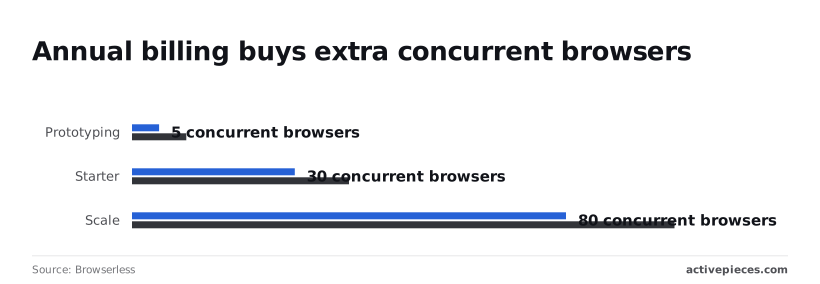
Commit for a year and the same plan can handle more parallel work, because annual billing raises the concurrency ceiling. The table shows concurrency and overage for the paid plans, checked against Browserless's pricing page on 2026-10-20.
I could confirm only the figures below that are filled in. Where a cell says "Not confirmed", I could not verify the number, so read it off the live pricing page rather than trusting a guess.
| Plan | Base price (monthly – annual) | Included units per month | Session time limit | Concurrent browsers (monthly – annual) | Overage per 1,000 units |
|---|---|---|---|---|---|
| Free | Not confirmed – $0 (billed annually) | 1,000 | Not confirmed | 2 | None; upgrade to exceed |
| Prototyping | Not confirmed – Not confirmed | Not confirmed | Not confirmed | 5 – 10 | $2.00 |
| Starter | Not confirmed – Not confirmed | Not confirmed | Not confirmed | 30 – 40 | $1.70 |
| Scale | Not confirmed – Not confirmed | Not confirmed | Not confirmed | 80 – 100 | $1.50 |
Ask for three browsers at once on Free and the third queues behind the other two. Free costs $0 a month, billed annually, and includes 1,000 units a month and 2 concurrent browsers.

You must upgrade to a paid plan to exceed either limit. That's enough to test a script.
Cost per 1,000 units by plan
Move up a tier and the overage rate drops, from $2.00 per 1,000 units on Prototyping to $1.70 on Starter and $1.50 on Scale, making higher tiers more economical per unit. A job that regularly overruns its included units is cheapest on a bigger plan.
On Prototyping, each extra thousand units costs about 33% more than on Scale, so a plan that looks cheap can become the most expensive one.
A worked monthly bill
A bill is the base price, plus overage on every unit past the included allowance. Say your job runs 2,000 five-minute sessions beyond what the plan includes. At 10 units a session, that is 20,000 extra units, or 20 blocks of 1,000.

Prototyping charges 20 × $2.00 = $40.00 in overage, Starter 20 × $1.70 = $34.00, and Scale 20 × $1.50 = $30.00. Add each plan's base price from the pricing page to get the full bill.
Since I couldn't confirm those base prices, the sum is yours to finish, but the overage gap of $10.00 between Prototyping and Scale is the part that grows with volume.
I haven't priced anything past Scale's ceiling of 100 concurrent browsers on annual billing, and the figures above cover only the self-serve plans. If your peak is higher, count it before assuming any plan fits.
If you are running this arithmetic for your own team, see what the same workload costs on Activepieces.
What Browserless plans cost at realistic usage
Find the cheapest plan whose concurrency limit survives your busiest moment, then add overage if your monthly unit total spills past what that plan includes.
| Workload | Units per month | Peak concurrency | Plan that fits | Monthly bill including overage |
|---|---|---|---|---|
| Nightly scrape of a few hundred pages | Low and predictable | One or two sessions | Entry tier | Base price, overage unlikely |
| Steady PDF or screenshot service | Moderate, grows with customers | A handful, steady all day | Mid tier | Base price, overage as volume climbs |
| Bursty agent or test suite | Uneven, swings month to month | Many at once, briefly | Whichever tier covers the spike | Base price plus overage in heavy months |
Browserless pricing for a light nightly scrape
Once a night, a few hundred pages barely touch any plan's limits, so the entry tier covers it and the bill stays flat.
The one thing to watch is extras like proxies or captcha solving, which can count differently from a plain page load, so a scrape against a guarded site can cost more than the page count suggests.
When a PDF or screenshot service runs all day, the sticker price matters less than whether your usual traffic sits comfortably inside the included units. If it does, the bill is predictable.
If it hovers near the edge, every busy month adds overage, and the next tier up can be cheaper than paying that overage repeatedly.
Browserless pricing for bursty agents and test suites
Here concurrency sets the price. A test suite that fires many sessions at once forces you onto a higher tier even if the monthly total is small, or it queues and runs slowly.

Staggering runs or capping parallel sessions can let a cheaper plan carry the same work.
Hidden costs and limits Browserless users hit
Expect surprises in four places: how units are counted, how many sessions run at once, how long one session may last, and the work around the invoice that never appears on it.
How Browserless usage units are counted
Leave a page open longer and it costs more, because units tick up by time open and by data moved. The steps below show how one session becomes a bill, and the figures come from the Browserless unit documentation.
- A session open for 30 seconds costs 1 unit.
- A 5-minute session costs 10 units.
- Each 1 MB through a residential proxy costs 6 units.
- Add the total to your running count and compare it with the monthly allowance.
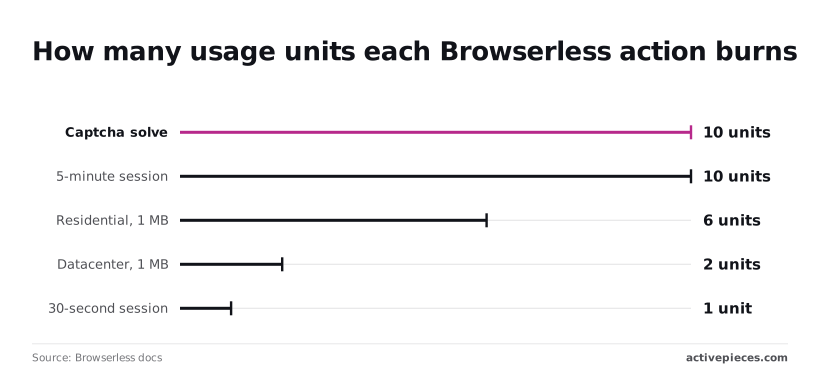
On residential proxies, a page-heavy job can therefore cost more in data than in time. Datacenter proxies run 2 units per MB, a third of the residential rate, so use them wherever the target site accepts them.
If a site challenges you on every visit, your usage can double, because a captcha solve costs 10 units, the same as a whole five-minute session.
Hit the concurrency ceiling, the number of sessions that can run at the same moment, and extra requests wait in line, which slows your job without raising the bill.
Past the allowance, paid plans bill overage per unit, while Free plans reject new requests, so check that before a busy month.
When a job needs longer than a plan's session limit, it gets cut off partway, and you pay for the units it burned before failing. Every plan limits how long one session can stay open, so split long jobs into shorter sessions.
None of your engineer's hours spent on retries, proxy tuning and captcha handling appear on the invoice. Each retry also burns fresh units, so a flaky script pays you back twice, in time and in usage.

Worth checking against a plan that does not meter every step: one credit covers a whole run on Activepieces.
Browserless against its closest alternatives on price
Run the same flaky script on different vendors and it costs different amounts, because each counts usage differently. Browserless is cheapest for short, bursty jobs while its rivals win on bundled extras or steady, heavy load.
The table below shows what each one bills for and what comes included, so you can see which meter your job would run against. I've left out plan prices because they change often; take them from each vendor's own pricing page.
| Entry price | Billing unit | Included usage | Concurrency | Bundled proxies/CAPTCHA | Best-fit workload | |
|---|---|---|---|---|---|---|
| Browserless | Monthly subscription, with a free tier to test | Usage units, tied to session time | A unit allowance per plan | Capped by plan | Proxies and CAPTCHA solving available, metered in units | Short, bursty jobs and existing Playwright or Puppeteer scripts |
| Browserbase | Monthly subscription | Browser time, plus session limits | Hours allowance per plan | Capped by plan | Proxies and CAPTCHA handling built into plans | Agent-style browsing and sites that fight automation |
| Apify | Monthly subscription with prepaid credit | Compute and platform usage | Credit allowance per plan | Limited by memory you allocate | Proxies billed separately; CAPTCHA via prebuilt tools | Scheduled scraping using ready-made scrapers |
| Self-hosted Playwright/Puppeteer | Software is free; you pay for servers | Server hours | Whatever your machine handles | Limited by your hardware | None; you buy and wire them in | Steady, high-volume work with an engineer to maintain it |
Nobody bills the same thing. Compare plans by sticker price and you're comparing different meters.
When a cheaper Browserless alternative wins
When jobs run around the clock, self-hosting wins, because a server you already pay for costs the same busy or idle.
Nobody bills the same thing. Compare plans by sticker price and you're comparing different meters.
Apify wins when a ready-made scraper already does your task, since you skip writing and maintaining the script. Browserbase wins when blocked requests are your main cost, because bundled proxies and CAPTCHA handling spare you separate bills.
When Browserless is the better value
If your work arrives in bursts and each session is short, Browserless wins. You pay for the units you burn rather than for a server idling between jobs.
Browserless also suits teams with Playwright or Puppeteer scripts already written, since they can point them at a hosted browser and skip the rebuild.
Sending Browserless output into business apps with Activepieces
You still have a second problem once you know your session length and parallel jobs. Browserless gives you a browser that does the work, but it does nothing with what comes back.
A page capture or scraped table lands in the response and sits there until something picks it up.
Activepieces picks it up. It doesn't replace Browserless, and it doesn't make a browser run any cheaper or faster.
Its core is MIT-licensed, as the repository's LICENSE file on GitHub states, and the 742 integrations on the far side of the browser are counted directly from the packages/pieces/community folder of that same open-source monorepo, not taken from a marketing page.
What it does is run on a schedule, call the Browserless REST API through an HTTP step, and pass the result along to the places your team already looks.
In practice, a scheduler starts an Activepieces flow, the flow's HTTP step calls Browserless, and the result fans out to a spreadsheet that gains new rows, a PDF saved in a storage folder, and a Slack message.
The browser is one box in the middle, and everything on either side of it is plumbing you would otherwise build or do by hand.
When a workflow tool fits and when it does not
It fits if your job is "every morning, grab this page, and get the answer to people who will never open a terminal." Without a tool like this, someone copies results into a sheet by hand, or the check simply stops happening the week that person is busy.
Skip the flow and you carry a recurring chore with a person attached; setting one up costs an afternoon.
It doesn't fit if you already run code. If a script of yours calls Browserless today, adding a row to a sheet or posting to Slack is a few more lines in that same script.
A second tool just gives you another place for things to break and another account to manage.
It also doesn't fix a bad plan choice. A flow that fires many Browserless calls at once still meets the same concurrency and session limits you sized earlier, so schedule jobs with that ceiling in mind.
A Monday checklist for choosing a Browserless plan
Put your own numbers against the limits by working through seven steps, in order, before you pay for anything. Skipping them means buying a plan on its sticker price and finding out the real cost on the invoice.
- Count the pages your jobs load in a month. This is what the usage units are charged against, so a guess here carries straight into your bill.
- Record the most sessions running at the same moment, not the average. Concurrency limits bite at the peak, and a job that queues at the busiest hour is the one your customers notice.
- Time an average session from start to finish. Long sessions hold a slot for longer, so they can exhaust your concurrency even when your page count looks small.
For step 4, lay those three figures beside the plan table and keep only the plans that clear all three. A plan that fits your page count but not your peak will look cheap right up until jobs start waiting.
- Run one ordinary week on the candidate plan, then read the usage dashboard against your estimates. Where the dashboard disagrees with you, trust the dashboard and redo step 4.
- Set an overage alert before you go live. Without one, a runaway script or a busy season spends your money quietly, and you learn about it after the charge.
- Put a review date in the calendar and compare Browserless against at least one alternative then. Your workload will change, and a plan that fit in spring can be the wrong one by autumn.
Frequently asked questions
Because plans and limits get revised, and a stale answer here would cost you, settle these five questions against Browserless's own pricing and documentation pages at your next plan check.
Does Browserless have a free plan?
Browserless has offered a free tier for trying the hosted service, but treat it as a trial, not a home for real work.
Its limits are small enough that a steady job will outgrow it. Read the current allowance on the pricing page before you count on it.
Can I self-host Browserless instead of paying for the cloud?
Yes, Browserless publishes container images you can run on your own servers. The catch is that you trade a bill for upkeep: someone has to patch, monitor and restart it.
The license also treats commercial use differently from personal use, so read its terms before you build a business on it.
What happens if I exceed my Browserless plan's usage?
Going over means paid plans are charged overage per unit, while Free plans have new requests rejected, so each case hurts differently.
Ask Browserless support, and read the plan terms, before your first heavy month.
Is Browserless cheaper than Browserbase?
It depends on your workload, and no sticker comparison settles it. The two vendors may meter usage, concurrency and session length differently, so the same job can price out very differently.
Run your own job's numbers through both current pricing pages and compare the totals.
Can I change or cancel a Browserless plan at any time?
Check the billing terms before you commit, particularly whether monthly and annual plans are treated differently. Monthly billing generally leaves you the most room to move.
An annual commitment may lock you in even after your workload shifts. If you do pick annual, put the renewal date in your calendar so the decision is yours and not the default.
References
Running the numbers
See what the same workload costs here.
Free forever plan, and every paid plan self-hosts at no extra cost.
See pricing Talk to sales