
Builder.io Pricing 2026: Plans, Costs, and Credits

Nov 10, 202614 min read
Builder.io Plans and Prices Compared in One Table
Builder.io pricing summary and date checked
Builder.io is a visual development platform where teams build and edit web pages and apps with a visual editor, a headless CMS and AI. Its plans differ less in monthly price than in the limit each one meters: seats, AI credits or usage.
Builder.io pricing is the set of tiered plans that charge for the platform, each capped by a metered limit (seats, AI credits or usage), so the limit you hit first, not the monthly sticker price, determines what a team actually pays.

The pricing page was last checked on 10 November 2026.
The plan table
Line up the pricing pages of comparable tools and the layout repeats: tiers side by side, a price at the top, a feature list below.
The Activepieces page follows it too, with Free at $0 for 1,000 credits a month and Team at $200 a month flat for 25 users, which means you're not paying per user.
Look at how many rows are caps (users, credits, projects, flows) and how few are features. Those caps, not the headline price, are what you'll hit first.
| Column on the pricing page | What it tells you | What it decides |
|---|---|---|
| Plan | The tier name and who it is aimed at | Which row of caps applies to you |
| Monthly price | What you pay month to month | Your cost if you are not ready to commit |
| Annual price | The discounted rate if you pay for the year | Whether commitment is worth it before you know your usage |
| Seats | How many people can work in the account | Whether cost grows with headcount |
| Credits or usage | The metered unit, such as AI credits | Whether cost grows with what you build and run |
| Gating features | What sits behind a higher tier, such as SSO or audit logs | Whether a compliance need forces an upgrade |
How to read the limit that decides your plan
Start with the metered unit, then read the price. Look for the row that counts something: seats, credits or usage.
If a plan caps seats, the bill scales with the number of people, so a team that adds a contractor pays for them. If it caps credits, the bill scales with how often you use the AI, so heavy iteration costs more than occasional use.

If it caps usage, a busy month can cost more than a quiet one, and you can't predict the bill from the sticker price.
Then check the gating features. A requirement such as single sign-on or audit logs can push you to a higher plan regardless of your seat or credit count.
Finally, compare monthly and annual prices only after you know which limit binds.
If you are running this arithmetic for your own team, see what the same workload costs on Activepieces.
Five-person team monthly billing costs
$175 a month is what a five-person marketing-site team on Pro pays on monthly billing, and the credit allowance, not the seat price, is what pushes it there, so the effective per-person cost is $35 rather than the $30 base rate.


The four steps below get you to that number.
- Count seats and multiply by the per-seat rate.
- Builder estimates monthly credit burn against 500 credits per user.
- Add $25 for every 500 credits over, plus any extra seats, which means costs increase by $25 per 500-credit increment.
- Total the month, then multiply by twelve for the year.
Seat prices
On Builder.io's pricing page, Pro is $30 per user per month, meaning every hire costs you an extra $30. Five seats cost $150.
Team is $50 per user, so five seats cost $250. That $100 gap buys you nothing until your usage or your needs justify it, so start on Pro.
Builder.io credits and overage charges
Each user gets 500 credits, so five seats pool 2,500. The page doesn't state how many credits one page edit or one generated section consumes.
Assume the team burns 3,000 credits, which is 500 over the pool.
Because overage is $25 per 500 credits, that 500-credit shortfall adds one $25 block.
Builder.io annual billing discount per user
Pay annually and Pro drops to $24 per user and Team to $40 on Builder.io's annual billing, meaning annual billing for Pro costs 20% less per user. Five Pro seats fall from $150 to $120.
The page doesn't say whether the top-up is also discounted, so this estimate keeps it at $25.
On monthly billing the total is $175 a month ($150 for seats plus the $25 top-up), or $2,100 a year.
On annual billing it's $145 a month ($120 plus $25), or $1,740 a year, which means you must commit to the full year.

The annual rate saves $360 a year, but only if you stay at five seats and 3,000 credits, meaning scaling up eliminates the savings.
Other team sizes
At three Pro seats on monthly billing, the pool is 1,500 credits. Seats cost $90.
Hidden Costs and Limits Builder.io Users Hit
It is the limits, not the sticker price, that surprise Builder.io users: credits, seats, tier-gated features and integration time. You can check each one on the Builder.io pricing page before you commit.
- Free credits are shared across the whole space, and the cap is 15 per day, so one heavy user can drain the allowance for everyone.
- Paid plans include 500 credits per user, so the pool grows only as you add seats.
- Rollover has a 2x cap, so unused credits stop accumulating past that point.
- Seat caps are 5 and 20, which set the headcount each plan can hold.
- Design-system limits vary by tier, so the plan that fits your headcount may not fit your component library.

Usage and credit limits
Evaluate in a single sprint and you will hit the 15-per-day cap on the free tier, which rations a trial by day, not by month.
On paid plans, the 2x rollover cap rewards steady use and does nothing for a team that is quiet for a month and then spikes.
Builder.io seat limits and role rules
Paying for Pro buys more capacity, not more people: Free allows 5 seats at most, and Pro also allows 5. A sixth teammate forces a move to Team.
A team larger than 20 has outgrown all three tiers listed, since Team allows 20 seats at most. Role rules decide who among those seats can edit and who can only view, so check which roles count against the cap.
Activepieces prices the same problem differently: it meters credits, not headcount, and unlimited flows ship on every plan, including free. Its Team plan is $200 a month flat with 25 users and 50,000 credits included, so the 21st person costs nothing extra.

Alan and FundingSocieties run production automation on it, and the Activepieces pricing page sets the 25-user, 50,000-credit Team allowance beside unlimited flows on every plan.
Design-system limits are the clearest example of feature gating, so compare the tier's feature list against your real project before you choose.
You pay for the SDK integration in engineering hours, and it isn't on any plan page. Budget it as a one-time cost, and remember that the more of your site is built on Builder.io, the more it costs to leave.
Worth checking against a plan that does not meter every step: one credit covers a whole run on Activepieces.
Builder.io Alternatives Compared on Price and Limits
Until you match its limit to your team's actual workload, the cheapest sticker price tells you little, because every alternative here meters something different from Builder.io.
The table below sets five products side by side on entry paid price, the metered unit, whether visual editing is included, and the cost of one five-person workload.
Read the metered column first, because that's the limit that moves the bill. I haven't confirmed any figures from the vendors' own pricing pages as of 2026-11-10, so every price cell reads "not found, checked 2026-11-10" rather than a guess.
| Product | Entry paid price | What is metered | Visual editing | Five-person workload cost |
|---|---|---|---|---|
| Webflow | Not found, checked 2026-11-10 | Not found, checked 2026-11-10 | Not found, checked 2026-11-10 | Not found, checked 2026-11-10 |
| Framer | Not found, checked 2026-11-10 | Not found, checked 2026-11-10 | Not found, checked 2026-11-10 | Not found, checked 2026-11-10 |
| Contentful | Not found, checked 2026-11-10 | Not found, checked 2026-11-10 | Not found, checked 2026-11-10 | Not found, checked 2026-11-10 |
| Sanity | Not found, checked 2026-11-10 | Not found, checked 2026-11-10 | Not found, checked 2026-11-10 | Not found, checked 2026-11-10 |
| Builder.io | Not found, checked 2026-11-10 | Not found, checked 2026-11-10 | Not found, checked 2026-11-10 | Not found, checked 2026-11-10 |
Look at the empty cells: they are the finding.
Pull each plan page yourself and fill in the row before you commit.
Visual builders: Webflow and Framer
Webflow and Framer both let your team edit the page visually, so visual editing is part of the product rather than something you bolt on.
Their plans are tied to the site, so check what each plan caps per site and per editor seat, because adding a fifth person can move you to a different plan.
Headless CMS: Contentful and Sanity
Since Contentful and Sanity store content and leave the front end to you, the bill follows content and API use rather than pages.
Visual editing is the item to verify, since it may sit on a higher plan or need developer setup.
Check the limits on users, content records and API calls.
Cheapest option for the five-person workload
I can't name the cheapest option from unverified vendor figures, but the method is fixed.
Set the same five editors, the same page count and the same monthly traffic against each row's metered unit, then compare the totals instead of the entry prices. The option whose limit your workload crosses last is the cheapest one, whatever its sticker price says.
Connecting Builder.io Publishing to Other Tools with Activepieces
When a publish event starts a flow in another tool through Activepieces, the flow side is counted separately from Builder.io's own limits, in Activepieces credits, and unlimited flows come on every plan, including the $0 Free plan.
The option whose limit your workload crosses last is the cheapest one, whatever its sticker price says.
What it changes is where the follow-up work happens: the notification, the cache purge or the record in a spreadsheet runs as a flow in Activepieces, which has 747 integrations counted from its open source monorepo.
You aren't paying for more Builder.io capacity to do it.
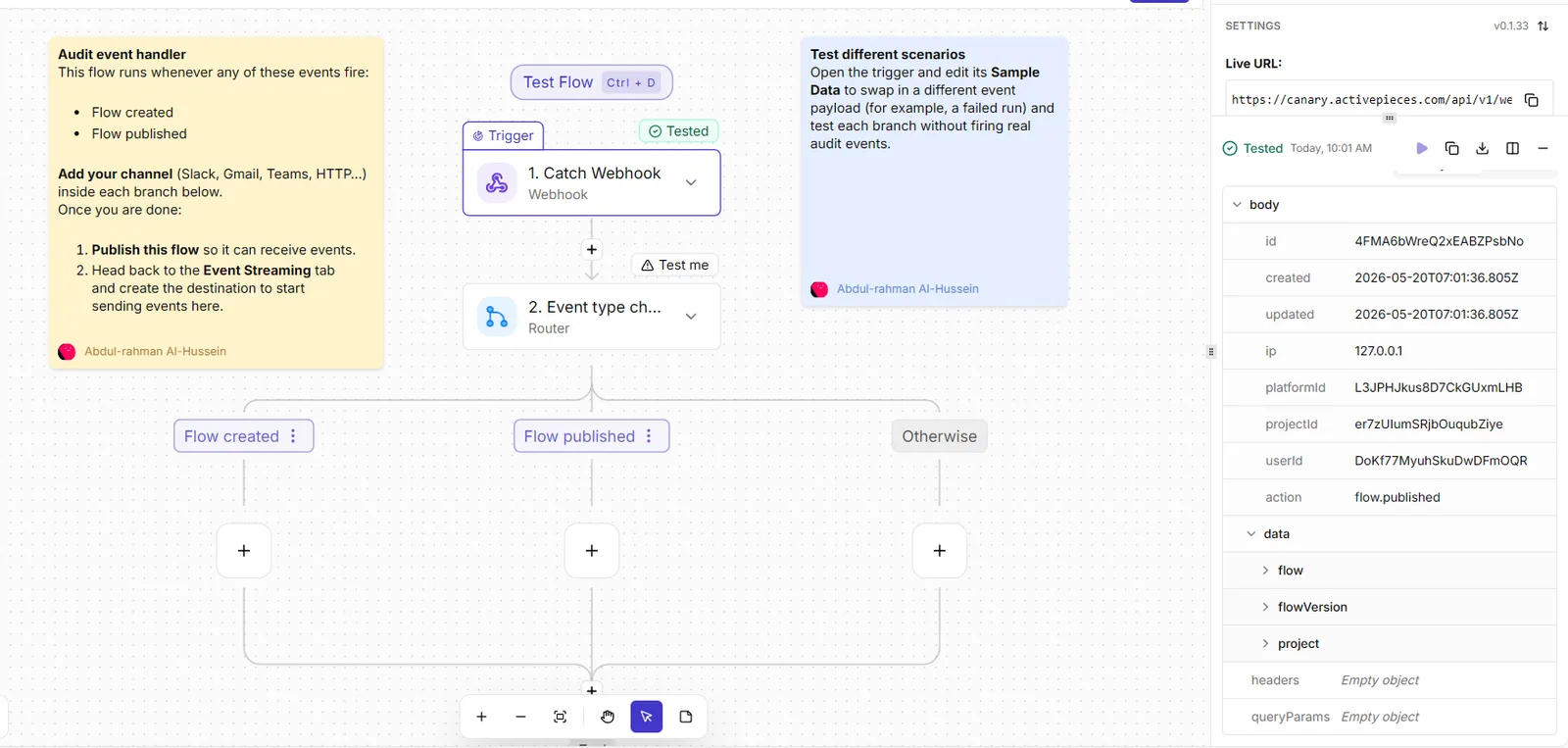
The unit to watch is the credit. Each publish that fires the webhook starts one run, and a run costs 1 credit however many steps it has, which is what Activepieces counts against your plan.
AI steps cost more, from 2 to 20 credits depending on the model.
Check the credit allowance on your Activepieces plan against how often your team publishes before you rely on it for anything important: Free includes 1,000 credits a month, Plus 10,000 and Team 50,000.
A team that publishes in bursts will use up credits sooner than the average suggests.
Four steps set it up, and the last one is the proof that it works:
- Create a new flow in Activepieces and choose Catch Webhook as its trigger.
- Copy the webhook URL that the trigger displays.
- In Builder.io, open the webhook settings and paste that URL in as a destination for publish events.
- Publish a test entry in Builder.io, then open the flow's run history in Activepieces and open the run.
The run is the useful part. It shows the exact payload Builder.io sent, so you can see which fields are available before you build any later step.
If the run is missing, the URL was pasted wrongly or the entry didn't publish. Fix that first, because every later step in the flow reads from this payload.
Once the run shows up with the data you expect, add the actions that follow the trigger and map fields from the payload into them.
Keep each flow to one job, so that a failed run points at one cause and the run count stays tied to something you can name.
The cost question then goes back to where this article started: which limit your publishing volume reaches first, Builder.io's 500 credits per user or the 1,000 monthly credits on Activepieces Free, where one run costs 1 credit.
Frequently asked questions
Is there a free Builder.io plan, and what makes it not enough?
Because the free tier is metered in credits, it runs out when your publishing volume spends the allowance, not when your team grows. Each AI generation draws credits down.
Publish steadily and you will reach the end of the free allowance well before you need any paid feature. Check the credit allowance on the pricing page the day you decide, because the free figure has differed between older and current versions of the page.
Does Builder.io charge per seat or per usage?
It does both, and the limit you reach first sets the bill. Paid plans carry a seat count and a credit allowance.
With heavy generation usage, a small team is limited by credits, so adding people changes little. A large team with light usage is limited by seats, so credits sit unused.
Work out your monthly generations and your headcount, then see which one forces the higher plan.
Can I downgrade or cancel Builder.io mid-month?
Read the terms on the billing page before you commit, because they decide this and I haven't confirmed them. Two things matter.
First, whether a downgrade takes effect immediately or at the end of the billing period. Second, what happens to credits you have already paid for. If the answer is that they lapse, a mid-month cancellation saves you nothing for that month.
Does Builder.io offer annual or startup discounts?
Annual billing is the usual way to lower the per-month rate, and the pricing page lists monthly and annual prices side by side.
The saving is real only if you are sure of your usage for the whole year, since you pay up front for a limit you may not need.
I haven't confirmed a startup programme, so ask Builder.io's sales team directly instead of assuming one exists.
How often does Builder.io change its pricing?
Often enough that you should treat any figure, including those in this article, as dated.
Between older and current pages the free credit allowance has already differed, which shows the metered unit and its size can shift without the plan name changing.
Before you budget, recheck three things on the live pricing page: the credit allowance, what happens when credits reach zero, and whether unused credits roll over. Those answers decide the real monthly cost, and they are the ones that move.
Related reading
References
Running the numbers
See what the same workload costs here.
Free forever plan, and every paid plan self-hosts at no extra cost.
See pricing Talk to sales