Bubble.io Pricing in 2026: Plans and Real Costs

Oct 28, 202616 min read
The price is only the entry fee. Bubble's paid plans run from $29 to $549 a month, depending on tier and app type. Figures were checked on 28 October 2026.
Bubble.io Plans, Prices and Limits Table
What you pay beyond the tier depends on how many workload units your app consumes, and that count climbs with every background job, API call and scheduled workflow, including the ones that Activepieces or any other automation tool triggers from outside.
Pay for a Bubble plan and you get an allowance of workload units, the meter Bubble uses to measure how much server work your app does.
A workload unit counts server effort from searches, workflows, API calls and page loads.
So two apps on the same plan can use very different amounts. An app that fetches a whole table on every page load spends its allowance faster than one that fetches ten filtered rows, and the plan price is identical for both.

Every current plan in one table
If you want each plan's cost at a glance, the table below has it. Bubble's compare page lists three price points per paid plan, which is why each row shows a range.
Read the top of each range as the cost of the more demanding configuration, because that's where most production apps end up.
| Plan | Monthly price range |
|---|---|
| Free | $0 |
| Starter | $29 – $59 |
| Growth | $119 – $209 |
| Team | $349 – $549 |
| Enterprise | Quoted individually |
Even inside a single tier the spread can be wide. Starter runs $32, $42 and $59. Growth runs $119, $169 and $209, a spread of $90. Team runs $349, $449 and $549, a spread of $200.
The jump between tiers is therefore smaller than the jump you can make by choosing the wrong configuration inside one.
Moving from the top of Starter ($59) to the bottom of Growth ($119) adds $60 a month, or $720 a year, before any usage grows.
Because the free plan costs nothing, it suits building and testing. Treat it as a place to measure how many workload units your design consumes.
On the free plan, do that measuring before you commit to a paid tier, because it's the only way to price the workload rather than guess at it.
How overage and extra workload units are billed
When an app outruns its allowance, the extra consumption is billed on top of the plan. Cost then follows your app's queries and workflows, not the tier you picked.
Activepieces runs scheduled automations outside Bubble, so that work stops drawing on the Bubble meter, and its Free plan includes 1,000 credits a month with unlimited flows.
If you are running this arithmetic for your own team, see what the same workload costs on Activepieces.
The Night One builder's Bill Jumped
You only keep as much of an allowance as the app's design lets you. In this modelled example one looping workflow spends a month of it in a night, then bills the excess at the most expensive rate Bubble sells.
02:10, the scheduled workflow starts looping
On the Starter plan, which includes 175K workload units (WU) a month, the builder runs a solo booking app. At 02:10 a scheduled backend workflow re-triggers itself instead of finishing, so each pass queues the next.

Until then the app idles at about 3K WU an hour, so this is a bug in the app's design rather than a surge in customers.
Flat until 02:10, then climbing sharply: that is what the chart shows for hourly consumption, with the 175K allowance marked. The line crossing that mark before sunrise means the monthly limit was spent overnight.
Bubble Usage Metrics Showing Workload Unit Spike
By 08:00 the model shows roughly 360K WU burned, about double the whole month's allowance. Almost all of it was burned after 02:10.
Nobody was booking at that hour, so the metrics log shows backend workflows as the dominant cost. Pages and database searches barely moved.
In the model, bookings also stall for about three hours while the app's throttled, so the builder pays in lost appointments as well as units.
The overage in units and dollars
About 185K WU sit above the allowance. What that costs depends on how the units are bought, per the Bubble Forum:

| Route | Cost per 1,000 WU | Cost of 185K WU |
|---|---|---|
| Tier 5 overage | $0.08 | about $14.80 |
| Tier 2 overage | $0.14 | about $25.90 |
| Tier 1 overage | $0.15 | about $27.75 |
| Pure overage | $0.30 | about $55.50 |
Nearly four times the Tier 5 rate: that is what pure overage, at $0.30 per 1,000 WU, costs.
An unplanned spike on a small plan therefore lands at the top of that table, and the same burn on a higher tier would've cost a fraction as much.
At about $55 the bill is survivable. The pattern is the problem, because every runaway loop is priced at the worst rate available.
That's why the next question is the design of the app, not the tier.
Why Workload Units Climb Faster Than Expected
Every operation has a small fixed cost, and your app's design multiplies it by records, schedules and users. That is why workload units climb.
The table uses an illustrative directory app with one search over 1,000 records, a backend workflow every minute, and a signup that creates a record.
Read the right column as the part you control. Figures come from the Bubble Manual, checked 28 October 2026.
| Operation | Cost per action | How it multiplies in the example app |
|---|---|---|
| Database search | 0.3 WU plus 0.015 per record | 15.3 WU for one search over 1,000 records |
| Write (create thing) | 0.5 WU | 0.5 WU per signup, repeated for every record created |
| Backend workflow action | 0.6 WU | 864 WU a day if it runs every minute |
| Plugin call | No flat rate | Depends on the plugin's own server work |
| API call (inbound) | 0.01 WU | 100 calls cost 1 WU |
| Storage | Not metered per action | Grows with files kept, not with clicks |
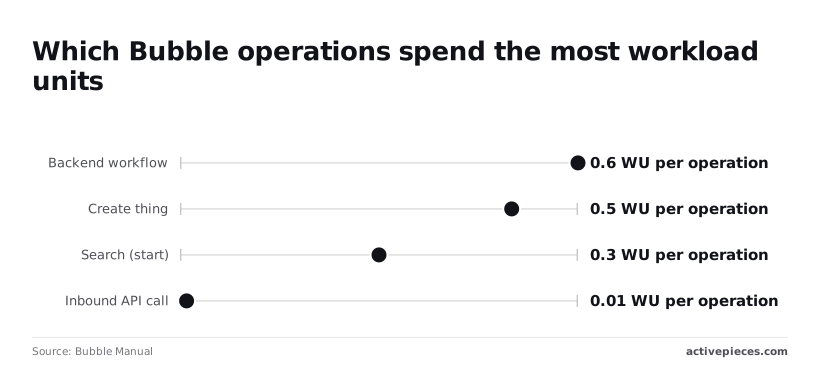
Two rows dominate: the search and the schedule. The next sections show why.
Searches, privacy rules and recurring workflows
At 0.3 WU a search looks cheap, but the 0.015 per record is the real meter. An unconstrained search over 1,000 records costs 15.3 WU, about fifty times the starting fee, so filtering in the query rather than on the page decides your bill.

Before a single user arrives, a minute-by-minute schedule burns 864 WU a day, at 0.6 WU per backend workflow action. A create-thing write at 0.5 WU is cheap alone and expensive inside a loop.
Plugins, API calls and file storage
At 0.01 WU, an inbound API call is cheap, so a hundred calls cost one unit. Volume rarely hurts here. What hurts is what each call triggers: if every call fires a 0.6 WU backend workflow, the call is the rounding error.

Price plugins by what they do on the server, since the manual's calculation gives them no flat rate. Storage isn't charged per action, so it's a capacity question, not a workload one.
Because the allowance is fixed per plan, a design that wastes 15.3 WU per search burns through it on traffic alone. Trimming the search or the schedule usually costs less than moving up a tier.
Worth checking against a plan that does not meter every step: one credit covers a whole run on Activepieces.
Bubble Workload Unit Caps and Usage Rules
To stop a repeat spike, the fix was a short list of guardrails, each tied to a point where workload units get spent. That way the next runaway search or loop gets caught in days rather than at the invoice.
**Trimming the search or the schedule usually costs less than moving up a tier.
Bubble Usage Alerts and Spending Limits
Start with whatever Bubble's account settings currently offer for usage notifications and overage controls, and confirm it in the docs rather than assuming.
If you can set a threshold alert, set it well below the plan's allowance, because an alert that fires at the limit only tells you that you've already crossed it.
If Bubble gives you no hard spending cap on your plan, treat that as a design fact: overage is billed, so the cap has to live in the app.
The trigger to act on is any week where consumption is running ahead of the pace that fits the allowance, not the day it runs out.
Query and workflow design rules
Looking back, most of the spend came from searches that pulled more than the page needed and recurring workflows that kept processing after their job was done. Three rules replaced that:
- Constrain every search on the server side, with filters inside the search itself, not filtering a broad result afterward.
- Put a switch on every recurring workflow, a field the workflow checks first, so you can stop it without editing and redeploying logic.
- Build values once and reuse them, rather than recomputing them in every repeating group cell.
In the formula editor below, combine joins "hello" and "world" with a space as the separator, and a preview underneath reads "hello world".
The point is that the editor shows the result before anything runs, so you can test an expression on a sample value instead of discovering its cost on live data.
With the expression checked, the next job is deciding who looks at the numbers and when.
A monthly workload review
Once a month, open the workload breakdown and sort by what consumed the most. Look at the top few items, and ask of each whether it earns its cost.
The trigger for a rewrite is any single search or workflow that dominates the total, or any new feature whose consumption you didn't predict before launch.
Record the result next to the previous month's, because the trend tells you more than one reading. A slow climb means a design is getting heavier, and fixing it then costs less than moving up a tier.
Bubble Compared With Its Closest Alternatives
Of these four, Bubble is the one that bills you for what your app does rather than how big it is. Its price moves with your design while the others move with your headcount or your data.
Closest to Bubble are Adalo, FlutterFlow and Softr, and each meters something different. The same booking app (customers search slots, book, get a confirmation, and an admin edits availability) therefore gets expensive for different reasons on each.
Read the table as a guide to where your bill will come from, not as a price list. It shows what each tool counts and what that means for the booking app.
| Tool | What usage is metered on | What tends to force an upgrade | What drives the booking app's cost |
|---|---|---|---|
| Bubble | Workload units consumed by searches, workflows and database writes | Running out of the plan's workload allowance | How many searches and workflows each booking triggers |
| Adalo | Plan tier, with limits on apps and stored data | Needing more apps, more data or publishing options | Volume of bookings and customers stored |
| FlutterFlow | Seats and features on the builder side | Needing more collaborators or export and deployment features | Team size, plus a separate backend bill |
| Softr | Records and users on the plan | Outgrowing record or user caps | Customers and booking rows held in the data source |
I've left dollar figures out on purpose. Prices change, and the number that matters is the one on each vendor's own pricing page on the day you decide. Check the date on whichever page you use.
Others are cheaper or fit better in specific cases. If your app is mostly a front end over data that already lives elsewhere, Softr's record-based metering is easier to forecast than workload units.
If you want to ship native mobile code and have a developer on the team, FlutterFlow's per-seat model avoids usage surprises, though its backend is a second bill.
Bubble fits worse when you can't control how heavy your workflows get, because the allowance is the one limit you can hit without adding a single user.
That leaves the practical step: estimate the workload your booking flow generates per month, then compare tools against it.
Moving Backend Jobs Out of Bubble With Activepieces
To take background jobs off Bubble's workload meter you can use Activepieces, an MIT-licensed automation tool with 770+ integrations that runs scheduled flows and connects services, but it can't replace the app itself.
It has no page editor or user-facing interface, so it only helps with work that never needed to run inside Bubble.
What stays in Bubble and what moves
Running on a timer or a poll, not because a user clicked something, is the one trait the jobs that suit moving out share. Each can call Bubble through its Data API to read or write only the records it needs:
- Scheduled syncs that copy records between Bubble and another system
- Nightly data imports from spreadsheets or exports
- Third-party API polling that checks an outside service for changes
- Email digests assembled from Bubble data and sent on a schedule
Each of these, run as a backend workflow, burns workload whether or not anyone is using the app. On Activepieces the run is the meter: 1 credit, however many steps sit inside it.
Zapier's pricing page bills per task and Make's bills per module, so on those a ten-step sync costs ten times the two-step workaround it replaced.
Here the looping, filtering and formatting can be split into small, reliable steps without the bill noticing, and Bubble only handles the reads and writes.
Everything tied to the user's session stays put: pages, logins, privacy rules, the booking form and any workflow that must respond instantly to a click. Splitting those across two tools adds latency and a second place to debug.
Calling into Bubble still costs workload, so the saving comes from the logic that no longer runs inside it, not from the call disappearing.
So the fit is narrow. It pays off when your estimate shows scheduled jobs making up a large share of monthly workload, and it does little when most of the load comes from users browsing and booking.
How do other platforms price similar jobs
As of 28 October 2026, Activepieces prices a job by its own usage terms, listed on its pricing page, not in Bubble's workload units. So the Bubble workload figure doesn't carry across.
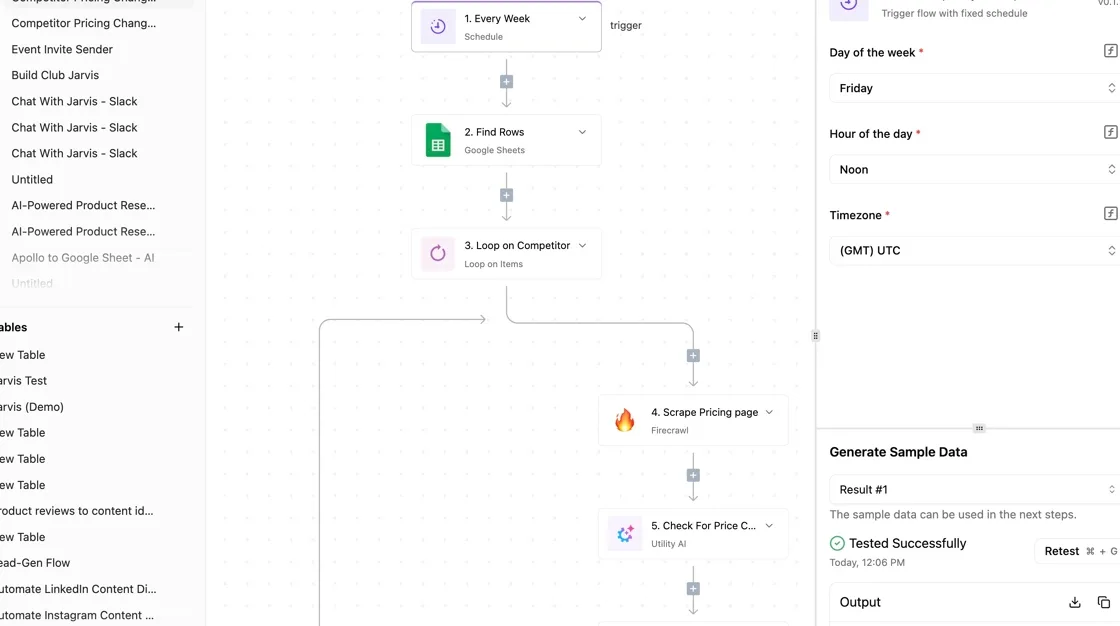
Count the monthly runs of each moved job, find what the page counts as a unit, and price that number.
Run that count next to your Bubble estimate: a nightly sync is 30 credits a month and a poll every 15 minutes is 2,880, against 1,000 credits on the Free plan and 10,000 on Plus at $20 a month, with $0.007 a credit beyond that.
If the moved jobs cost less there than the workload they free up in Bubble, the split is worth the extra moving part.
Frequently asked questions
Is Bubble.io free to use?
Yes for building, not for running a live product. The Free plan lets you design and test an app, but features a launched business needs, such as a custom domain, sit on paid plans.
So treat Free as a place to prototype and measure, not as launch pricing. Confirm the current feature split on Bubble's pricing page before you rely on it.
Does Bubble charge extra when I go over my workload units?
Yes, going past the allowance can cost money, and it happens per unit rather than as a forced jump to the next tier.
The metered unit is workload, so a badly designed search or a recurring workflow that runs too often is what generates the extra charge.
Check your account's settings for how overage is handled, and set alerts so you see it before the invoice does. If the overage line keeps growing, the app's design is costing you more than the plan is.
Can I downgrade a Bubble plan without losing my app?
Downgrade and your app and its data stay in your account, but a lower plan has a smaller allowance and fewer features. Anything that depends on a higher-tier feature may stop working or become unavailable until you restore it.
Before downgrading, compare what the app actually consumed in its busiest recent period against the lower plan's allowance. If usage wouldn't fit, the downgrade only moves the cost into overage.
Does Bubble offer a discount for annual billing?
Yes, Bubble prices annual billing below paying month by month. On annual billing, the saving applies to the plan fee, not to workload. A badly optimized app costs the same in consumption whichever way you pay.
Commit to annual billing only after the app's usage has settled, because it locks in a tier. A twelve-month prepayment on a plan you outgrow or never needed is a worse deal than the discount suggests.
Is there a way to estimate workload units before launch?
Not precisely, but you can get a usable estimate by measuring. Run the app in development with realistic test data, then use Bubble's built-in usage and workload views to see which pages, searches and workflows consume the most.
Multiply the heaviest actions by how often real users will trigger them. The result is a range, not a quote, but it tells you which tier to price and which parts of the design to fix before they reach a bill.
Related reading
References
Running the numbers
See what the same workload costs here.
Free forever plan, and every paid plan self-hosts at no extra cost.
See pricing Talk to sales