
AI Agent Builder for Customer Support Teams

Oct 19, 202618 min read
Buy a support agent builder when it closes conversations correctly and hands the rest to a person with the context intact, whether it's a dedicated helpdesk tool or a flexible Activepieces workflow wired into your inbox.
If it only answers quickly, it's a chatbot with a bigger price tag.
Judge it on resolved tickets and clean handoffs, because a wrong escalation costs you a customer long before a slow launch does.
Agent builders that resolve support tickets
What an AI agent builder is
An AI agent builder for customer support is a tool for assembling an agent that reads a customer's message, looks up the facts it needs, and takes an action such as issuing a refund or changing an address.
It also decides when to stop and pass the case to a human.
What the builder supplies is the integrations: a model, connections to your help center and order system, rules for what the agent may do, and a way to test it.
Activepieces lets teams wire this up themselves, with 742 integrations in an MIT-licensed core, but the definition holds whichever product you pick.
Take an angry email: "You charged me twice and nobody has answered in three days." A useful agent finds both charges, confirms the duplicate, refunds one within the limit you set, and tells the customer.
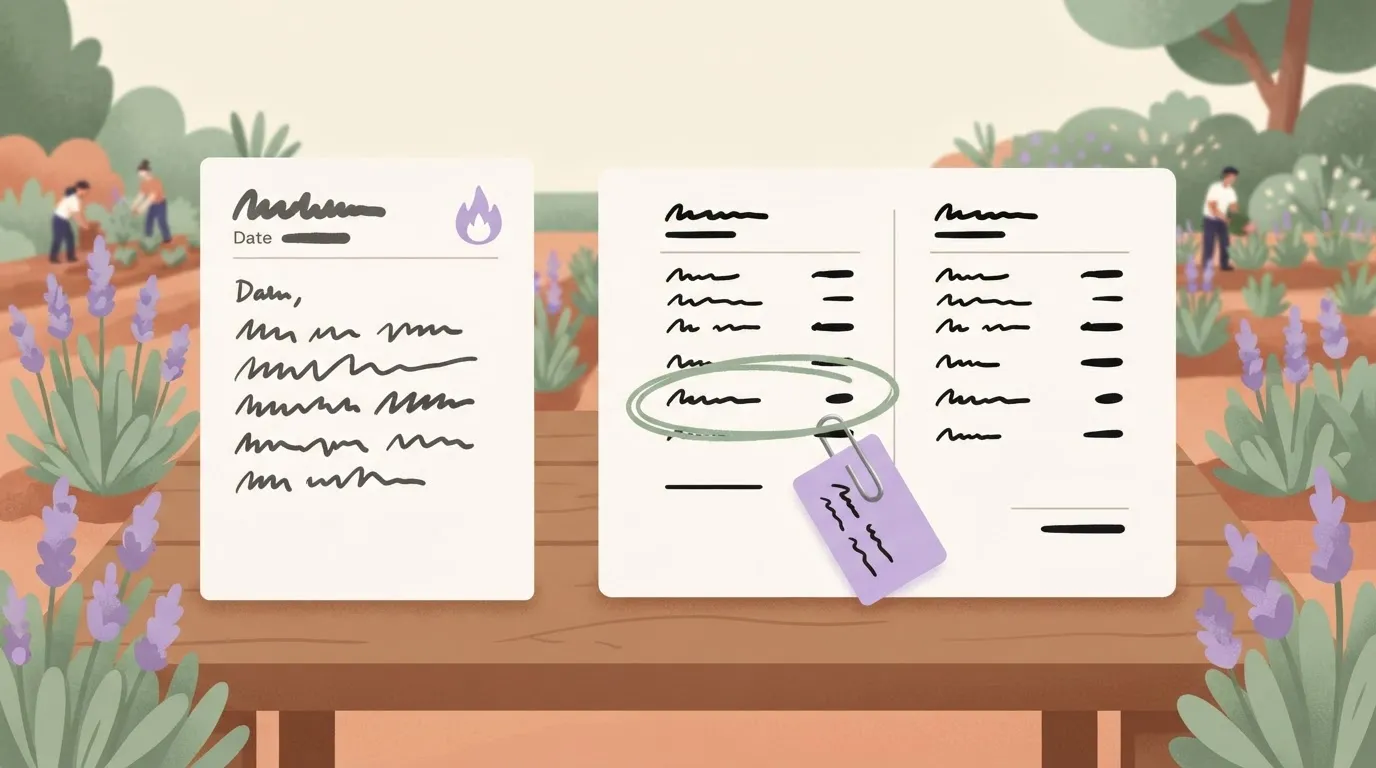
If the refund is above that limit, it hands the case over with the charges already pulled up.
AI agent builder versus scripted chatbot
When a vendor demo looks impressive, go back to the table of differences below. It shows where a scripted chatbot stops and an agent starts, and each line is something you can test with a real ticket.
- A scripted chatbot follows a fixed decision path of menus and keywords, while an agent chooses its next step from what the customer actually wrote.
- A chatbot can only return canned answers, while an agent reads your knowledge base and customer records to answer from current facts.
- A chatbot points the customer to a link, while an agent takes actions in your systems, such as issuing a refund or updating an order.
- A chatbot often dumps the customer into a queue with no history, while an agent hands off on defined rules and passes along the conversation summary and what it already tried.
The last item matters most. An agent that acts without good escalation rules can refund the wrong order or stall a furious customer, and that mistake costs more than a slow answer would have.
That means a missing figure is a gap in what vendors disclose, and you should ask the vendor directly before you rely on it.
Everything below works on Activepieces' free plan. Start without code or a credit card.
Support agent workflow from question to action
Six steps, in a fixed order: that is what a support agent runs. A wrong answer almost always traces to one of them failing quietly while the others carry on as if nothing happened.
The sequence is intake from the channel, knowledge retrieval, reasoning by the model, a tool action, a guardrail check, and a handoff to a person.
Tickets go wrong in three places, and the row below marks them along those six steps: a stale article, a missing permission, and an invented policy. Read it as a map of where to test, because each break point needs a different test.

Knowledge retrieval in support agents
Once a message arrives from chat, email or a form, the agent searches your help content for passages that match it and hands them to the model. Take a customer writing, angry, that a refund promised in an email never arrived.
If the refund article still describes last year's process, the agent will explain it fluently and be wrong. That's the stale article, and it costs you a second, angrier contact. Fixing it means cleaning the knowledge base before you launch.
Actions against order and ticket systems
Next the model may act: look up an order, check a shipping status, update or tag a ticket. Each action runs under a permission you granted.
If the agent can read orders but not refunds, it will either stall or tell the customer something it can't back up. That's the missing permission. Test every action with a real ticket, including one the agent should refuse.
Guardrails and human handoff
Against the invented policy, a confident promise of a refund window your company never offered, your defence is the guardrail: the check that stops a reply before it goes out.
When a check trips, the agent should pass the case to a person with the conversation and the actions already taken attached.
A handoff that makes the customer repeat themselves costs more than a slow answer, so judge the vendor on that handoff first.
Agent builder adoption and resolution rates
50% to 85% is the share resolved without a handoff, depending on industry, so every handoff you avoid is one you didn't have to get right. Teams use agent builders for three jobs: tier-one answers, triage and agent assist.
Tier-one ticket resolution with support agents
This is password resets, order status and refund-policy questions. Open.cx puts e-commerce at 70-85% of conversations, so a store with clean policy pages can plan on most "where is my order" emails never reaching a person.
Travel sits at 60-80% and B2C SaaS at 65-80%; budget for a human queue sized to the remainder, not to zero. The fraction not handled by those percentages still arrives.
When the agent can't resolve, it should tag, summarize and route. B2B SaaS, telecom and fintech each sit at 50-70% in the same Open.cx data.
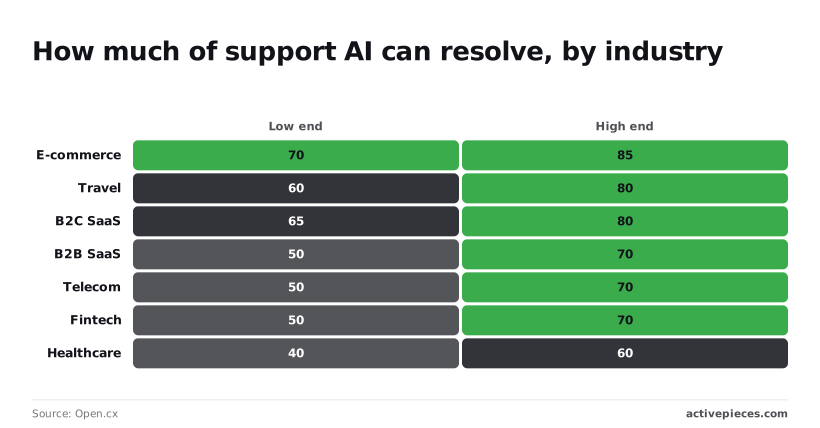
That means up to half of your tickets still need a person, and a routing rule that sends a locked-out account to billing costs you more than any slow reply.
Agent assist for humans
Here the agent drafts replies and pulls account history while a person sends the answer. It suits the 30-50% of regulated or account-specific tickets that shouldn't be fully automated, because a wrong draft gets caught before the customer sees it.
Those ranges are ceilings for an industry, not promises from a vendor.
Test a vendor's claim rather than trusting it. Your own real resolution rate, counting only conversations where the customer didn't come back, is the one figure that would disprove this article's thesis.
Support agent pricing and requirements
$0.99 to $2 is the range of published per-resolution prices. Your own resolution rate decides how many of 5,000 conversations you pay for and how many still reach a person.
Your total cost for that volume hinges entirely on how many escalate to a human.
Per-resolution versus per-seat agent pricing
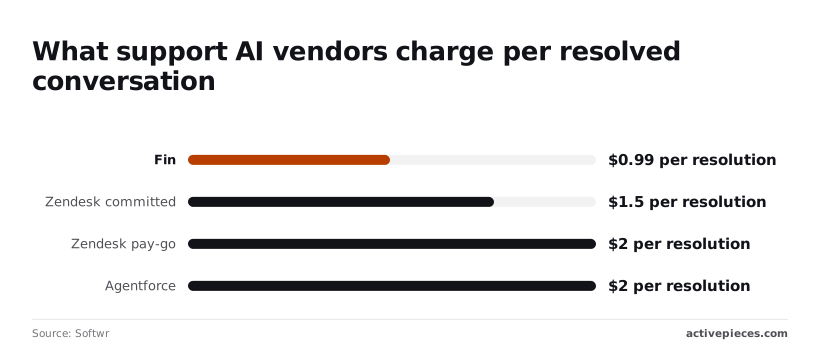
On Softwr's list, Fin costs $0.99 per resolution, Zendesk $1.50 committed and $2 pay-as-you-go, and Agentforce, Salesforce's agent product, $2. Pay-as-you-go means unpredictable volume costs you 50 cents more every time than the committed rate.
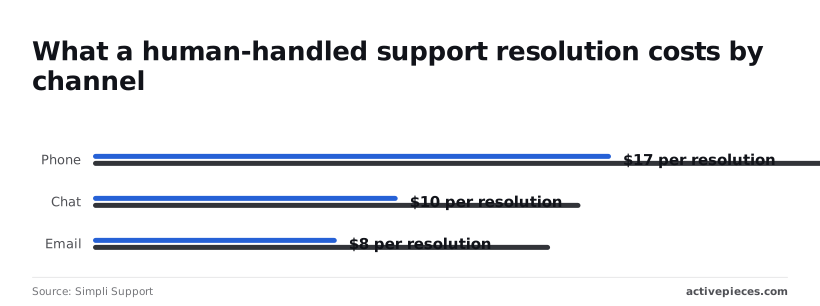
Simpli Support puts a human-handled ticket at $8–15 for email, $10–16 for chat and $17–25 for phone, so even $2 is cheap, but only when the customer doesn't write back. A seat plan bills you either way.
Assume a 50% resolution rate, so 2,500 conversations count as resolved. The table shows that per-resolution pricing tracks your outcome, while the other models charge for volume or effort.
| Model | Entry cost | Billing unit | Prerequisites | 5,000 conversations |
|---|---|---|---|---|
| Per-resolution vendor | $0.99–$2 | Resolved conversation | Clean knowledge base, handoff rules | $2,475–$5,000 |
| Per-conversation vendor | Set by contract | Every conversation | Same, plus a resolution audit | Billed on all 5,000 |
| Seat or usage plan | Per seat | Agent seat or usage | Staff to supervise | Fixed, resolved or not |
| Build-your-own | Model usage | Tokens plus staff time | Engineer to maintain it | Usage plus upkeep |
The other 2,500 still reach staff. At chat rates that's $25,000–$40,000, far more than the vendor line, so handoff quality drives the total.
Beyond price, four things need to be in place before launch:
- A knowledge base with outdated answers removed.
- Written rules for when the agent must hand off, such as refund disputes or an angry customer.
- A way to count customers who came back after a "resolution".
- A handoff that passes the full conversation to the human.
The case for managed support agents
Buy the helpdesk-native agent when your help center is clean, your escalation rules are simple, and nobody on the team can maintain a custom build.
The case for buying the native agent
Because the agent already sits inside the tool your team works in, it reads tickets, macros and customer history without a connector, and it hands off inside the same queue.
You switch it on, point it at the help center and test it with last month's angry emails.
For a team with no engineer, that's a real advantage, because nothing breaks that you have to fix yourself.
That's why the opposing view is strong. If most of your tickets are password resets and order-status questions, you'll get most of the benefit with almost none of the work.
Before you decide, compare the two routes in the table below on the dimensions that decide the purchase. Read the last column first: it says when managed wins, and for many teams it does.
| Helpdesk-native managed agent | Builder-based agent | Managed wins when | |
|---|---|---|---|
| Launch time | Days, since the data is already connected | Weeks, since you wire sources and handoffs | You need it live before a seasonal peak |
| Engineering needed | Little or none | Someone to build and maintain flows | You have no engineer to spare |
| Lock-in | High: rules and history live in one vendor | Lower: logic moves with you | You'll stay on this helpdesk for years |
| Cost at 50,000 conversations | Per-resolution fees add up quickly | Model and tooling costs, plus your time | Volume is low or resolutions are simple |
| Handoff control | Limited to the vendor's settings | You define each trigger and the context passed | Wrong escalations are cheap in your business |
Where the last column doesn't describe you, the next part applies.
Why control over handoffs still matters
A wrong escalation costs more than a slow launch. Picture a customer writing that they were charged twice and they'll dispute it with their bank tomorrow.
A wrong escalation costs more than a slow launch.
If the agent keeps answering with refund-policy text, you lose the customer. If it sends them to a human with no summary, an agent pays to ask everything again.
A builder lets you write the rule: a chargeback threat goes to a person, with the order number and the customer's own words attached. A managed agent may offer only a confidence threshold or a keyword list. Test that before you sign.
Easier to see it running than to read about it: set it up free, no card.
Mistakes that sink support agent launches
Five patterns account for most failed launches: an unedited knowledge base, no escalation path, measuring deflection instead of resolution, no QA loop, and policy answers nobody owns. Each has a fix you can apply before go-live. The sections below group them by where they bite.
Outdated knowledge base content in support agents
Whatever you give an agent is what it answers from, so an outdated refund page becomes an outdated refund answer, delivered politely and with confidence.
Two articles that disagree about the return window mean the agent picks one, and the customer who got the wrong one writes back angry.
Before launch, read your top articles the way a customer would. Delete duplicates, date every policy page, and name one person who approves changes. Then run your last month of real tickets through the agent and check which article each answer came from.
Measuring deflection instead of resolution
The customer stopped talking to you; that is all deflection tells you. They may have been helped, or they may have given up and called their bank.
Judge the agent by resolved conversations: did the customer's problem get fixed, and did they stay fixed? A cheap proxy is whether the same person contacts you again about the same issue within a week.

Read a sample of "deflected" chats every week, starting with the ones that ended abruptly.
Missing escalation rules for support agents
When a conversation is wrongly held, the customer repeats themselves, the human starts cold, and the complaint is now about the bot. That costs more than a slow handoff.
Write escalation rules before launch: angry language, a request for a person, a refund above your limit, anything legal or involving safety. Make the handoff carry the full transcript and a one-line summary.
Then review a fixed sample every week, because without that loop the agent drifts and nobody notices until a customer posts a screenshot.
No owner for support agent policy answers
In 2024, a tribunal held Air Canada responsible after its website chatbot gave a customer wrong information about bereavement fares. The airline argued the chatbot was a separate entity; the tribunal rejected that.
What you take from it: whatever your agent says, you said. Give each policy area (refunds, warranties, cancellations) a named owner who signs off on the agent's wording and reviews it whenever the policy changes.
Build a support triage workflow with Activepieces
Where a policy owner's wording has to be applied the same way every time, Activepieces fits, and MoneyGram, Moneypenny, Alan and FundingSocieties run it in production.
It's a workflow builder that lets you put an AI step, a human approval and your own lookup logic in one visible chain.
Don't expect a resolution-priced agent here: Activepieces won't bill you per resolved conversation or tell you which conversations were resolved.
Plans are priced by the month (Plus $20, Team $200), with unlimited flows on every plan, so you build the flow and you do the cost math yourself.
Look at the homepage canvas for the shape: a trigger, an AI Agent step with a purple border, a condition that splits the path, then apps that act on each branch.
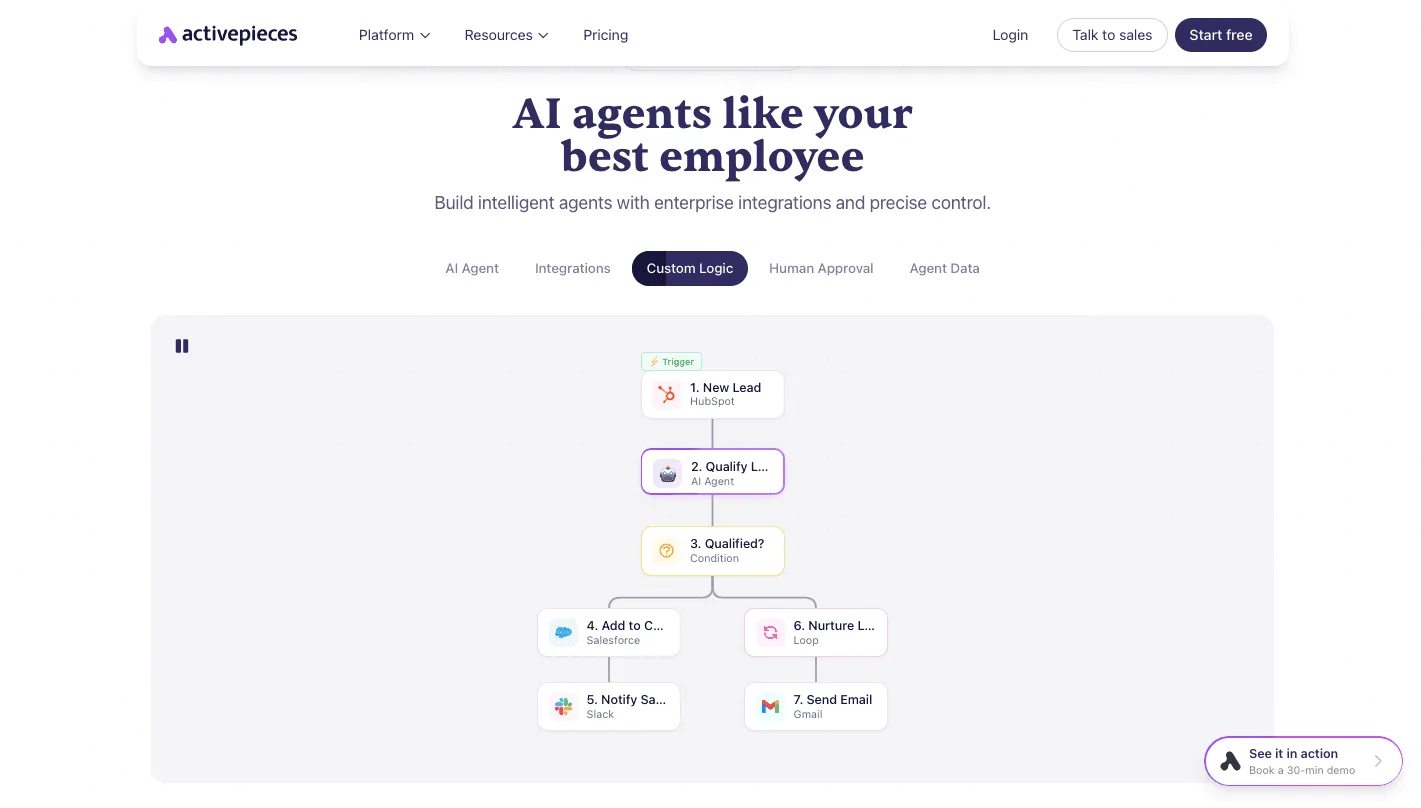
Take from it that the AI step is one box among others, and the condition after it's where your escalation rule lives. Both flows below follow that pattern.
The Zendesk, Slack, Gmail and Intercom steps are integrations, counted among the 742 integrations in the MIT-licensed core under packages/integrations/community, and the Integrations Framework and MCP Server documentation describe one integration action doing two jobs: it runs as a step in a flow and it is exposed as a tool on the project's MCP server.
An agent in Claude, ChatGPT or Cursor can therefore call "post the reply in Zendesk" without a second integration.
Flow 1, triage and draft with approval. Trigger: a new ticket arrives in Zendesk, the help desk where your tickets already live.
- An AI step reads the ticket and drafts a reply using only the policy wording your owners signed off on.
- A Slack message sends the draft to the support channel with an approval request.
- On approval, Zendesk posts the reply. On rejection, the ticket stays open for a person.
Send a wrong reply to an angry customer and it costs more than a slow one, so the human approval comes before anything is sent. Loosen it only after you have read enough rejected drafts to know why they were rejected.

Flow 2, order lookup with escalation. Trigger: a new message in Gmail or Intercom, the chat tool for customer messages.
- An AI step pulls the order number from the message.
- A lookup step fetches that order from your store or database.
- A condition checks the result. If the order is found and the question is routine, send the status. If the order is missing, the customer's angry about a refund, or the lookup fails, hand it to a person in Slack with the message and the order details attached.
Test this one with your worst real email, not a polite sample. If the handoff arrives without the order details, the flow has failed, however fast it ran.
To try both, start on the free plan at https://cloud.activepieces.com/sign-up: $0, no card, with 1,000 credits a month, unlimited flows and up to 5 users.
How to choose a support agent builder
Start with one high-volume ticket type, and do these six things in this order before you sign anything.
A wrong answer sent to an angry customer costs you more than a slow answer ever will, so every step below is built to catch mistakes before the customer sees them.
- Pick the ticket type your team answers most often, such as "where is my order" or password resets. Pick a single type because one queue gives you a clean pool of tickets to judge, and a mixed pile hides which answers failed.
- Clean ten articles. Open the ten help articles that queue relies on. Delete outdated steps, merge duplicates and fix any article that contradicts another. A bot repeats whatever you give it, so a stale refund policy becomes a wrong promise in writing.
- Set escalation rules. Write down what goes straight to a person: refund disputes, legal threats, anything with a cancellation in the subject line, any customer who writes twice in a row. A missed escalation means an upset customer talks to a machine longer, so err toward handing off.
- Define resolution rate. Count a conversation as resolved only if the customer didn't come back about the same issue within a few days and no person had to fix it. Otherwise you're measuring how often the bot replied, not how often it helped.
- Run draft-only for two weeks. Let the agent write replies that your team reads and approves before sending. You get real tickets and real errors with no customer exposed to them.
- Compare cost per resolution. Divide the vendor's bill by the conversations that passed your definition, then set that against what it would cost to build and maintain your own.
If the number holds after two weeks, you have evidence worth paying for. A draft-only build on your own queue can run on the free plan, where flows wait for the next day's credits once the 1,000 monthly credits are spent.
Frequently asked questions
Can an AI agent builder replace a support team?
Can an AI agent builder replace a support team? No, it takes over the repetitive tickets and leaves the rest to people.
A wrongly closed refund dispute costs you the customer, while a slow handoff costs you minutes. Keep staff on billing disputes, angry escalations and anything involving account access.
Do I need to code to build a support agent?
Do I need to code to build a support agent? Not for a first working version, since most builders let you connect a help desk and knowledge base visually.
Someone still has to read transcripts and fix the articles the agent misquotes. Code helps when you need custom ticket fields or a lookup in your order system.
Which model should a support agent use?
Which model should a support agent use? Use a small, fast model for sorting and routing, and a stronger one for writing replies.
Claude Haiku 5.5 suits classifying incoming tickets, and Claude Sonnet 5.5 suits drafting answers that must stay accurate and calm. Whatever you choose, test it on a real angry email from your own queue before trusting it.
How long does it take to launch one?
How long does it take to launch one? A rough version can run within an afternoon, but a version you can trust takes longer.
The extra time goes to cleaning the knowledge base, writing escalation rules and working out cost per resolution. Skip those and you launch quickly, then spend weeks apologizing for confident wrong answers.
Do I have to tell customers they're talking to an AI?
Do I have to tell customers they're talking to an AI? In many places the law requires it, and where it doesn't, you should still do it.
Customers who discover a bot they thought was a person arrive at the human agent angrier. Check the rules where your customers live, and say so in the first message.