
Odoo Studio vs Custom Development for AI Workflows (2026)

Oct 2, 202615 min read
When evaluating the landscape of business process management, the choice between Odoo Studio Automation and chat-built AI workflows often hinges on the desired level of technical abstraction.
Odoo Studio provides a structured, low-code environment that excels at modifying internal database triggers and UI elements within a unified ecosystem.
Conversely, AI-driven workflows allow users to describe complex logic in natural language, which can then be translated into executable scripts or connected via platforms like Activepieces to bridge disparate software stacks.
While Odoo offers deep native integration, the flexibility of AI-generated sequences provides a distinct advantage for organizations requiring rapid prototyping across multiple third-party applications. Ultimately, the decision rests on whether a company prioritizes a centralized ERP framework or
Odoo Studio vs AI-Generated Automation logic
When a critical customer issue sits untouched for four hours at 9:00 AM, a support manager is usually looking at a technical bottleneck.
This delay happens because Odoo Studio can't natively parse unstructured data from Zendesk or trigger a GitHub deployment without manual Python scripting.
Studio operates as a high-speed trigger within the PostgreSQL environment for immediate field-level changes.
By contrast, chat-built automations use Large Language Models to bridge the ERP with external software ecosystems. Whether a workflow remains locked inside the database or scales across a company's entire technical stack depends entirely on this distinction.
Studio: The native database trigger approach
High-speed, synchronous actions that occur when a user creates or updates a record within the Odoo database are the primary domain of Studio.
It executes triggers in milliseconds because it runs on the same server as your business data. This proximity prevents the lag often seen in third-party API calls.
A rigid boundary is the trade-off. The system restricts you to the data models already defined in your Odoo instance.
If a workflow requires pulling a shipping status from a logistics provider, Studio requires the user to write "Execute Python Code" blocks. The simplicity of a "no-code" tool is lost the moment the business logic leaves the Odoo server.
Chat-built: The LLM-driven external logic approach
Natural language requirements become functional workflows through the use of AI. Activepieces manages the API handshakes between Odoo and the outside world, acting as the execution layer for these requirements.
The simplicity of a "no-code" tool is lost the moment the business logic leaves the Odoo server.
Every other platform searches its templates, but Activepieces writes yours.
Ask the AI chat for a workflow with no template (for example, "when a Stripe payment fails twice, create a HubSpot task and message the account owner on Slack") and watch it build and publish that flow instead of returning a search result.
Non-linear logic is where this method excels. It can analyze the sentiment of an incoming email to decide whether to tag a lead in Odoo or escalate it to a Slack channel.
By moving the logic to an external layer, you avoid cluttering the ERP with complex scripts. Separating these layers is critical for maintaining system health.
An error in an external AI-generated script won't lock your Odoo database, whereas a faulty Studio Python trigger can prevent users from saving records entirely.
Primary use cases for each method
The scale of the operation and the complexity of the tech stack usually dictate the choice.
The price is a major driver for Odoo adoption.
Odoo's entry price is $24.90, compared to $80 for MS Dynamics 365, $110 for SAP Business One, and $165 for Salesforce, leaving significantly more budget for other operational investments, which means businesses can allocate capital toward growth rather than software overhead.
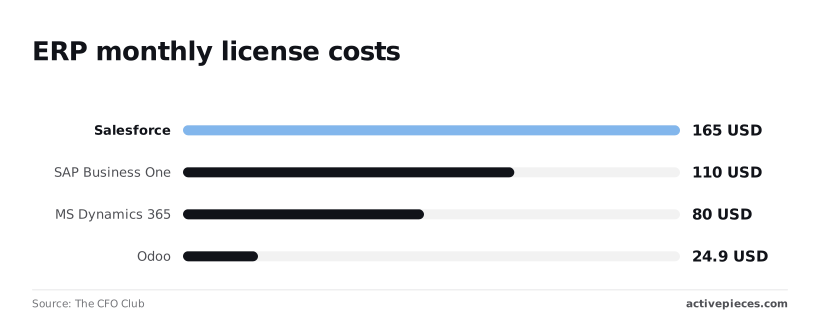
Companies often use the savings from Odoo’s lower subscription cost (less than 15% of Salesforce) to integrate a wider variety of specialized tools, so the total cost of ownership remains lower even when adding third-party features.
Github reports that manual context-switching between apps results in a median incident response time of 4 hours.
Critical customer issues often sit untouched for half a business day because of this friction. According to Github's analysis, automated correlation takes just 0.08 hours (5 minutes), so developers can identify and resolve security vulnerabilities almost as soon as they emerge.

High-priority failures alert themes almost the moment they occur.
As the business grows, the ability to prompt an AI to sync Odoo invoices with QuickBooks and notify the account manager if the total exceeds $5,000 becomes more scalable than building individual triggers for every possible scenario in Studio, thereby reducing the long-term maintenance burden on IT staff, which means the company can adapt its financial workflows without constant developer intervention.
The fastest way to settle a shortlist is to try one. Activepieces is free to try, no credit card.
Criteria for evaluating Odoo automation strategies
The decision depends on whether the logic needs to live inside the database or act as a bridge to the outside world.
While Studio provides immediate access to internal fields, chat-built automations allow non-technical staff to describe complex sequences that Odoo's native interface cannot represent without custom Python code.
The decision depends on whether the logic needs to live inside the database or act as a bridge to the outside world.
Odoo Studio speed vs API setup barriers
Simple field updates are fastest in Studio because it utilizes the existing Odoo framework without requiring API authentication.
Multi-step logic, such as creating a task in Odoo and a folder in Google Drive if a lead comes from a specific LinkedIn campaign, has a lower barrier when using chat-built workflows.
These actions would otherwise require writing custom models or using Odoo's technical "Automated Actions" menu.
Maintaining Odoo automations across version upgrades
Native Studio changes stay within the database, ensuring they migrate automatically during minor version updates.
Moderate maintenance is required for external chat-built workflows because they rely on the Odoo External API. If a field name changes during a major version upgrade, the external connection will break until a user updates the mapping manually.
The following table outlines the trade-offs between these two approaches across core operational requirements:
| Dimension | Odoo Studio | Chat-built (External) |
|---|---|---|
| Implementation Speed | Minutes | Hours |
| Maintenance | Low (Native) | Moderate (External) |
| Connectivity | Internal | External Ecosystems |
| Reliability | High (Database-level) | Variable (Network-dependent) |
Connecting Odoo to Slack and Shopify
Workflows that involve third-party tools like Slack or Shopify are not suitable for Studio. It is strictly limited to the Odoo ecosystem.
Chat-built automations excel here by acting as a translator between Odoo's data structures and the JSON formats required by external services.
Error handling in Odoo automation logs
Internal Studio triggers rarely fail unless the database itself is down.
Exactly which step failed when sending a contract via DocuSign or a message via Twilio is visible in the transparent execution logs of chat-built automations.
This visibility means a support manager can re-run a failed step without needing to roll back the entire Odoo database state.
Odoo Studio excels at internal database consistency
Modifying the internal structure of an Odoo database is fastest through Studio because it operates directly on the existing PostgreSQL schema without requiring external API calls.
Odoo Studio's local execution speed advantage
Changes are written directly to the Odoo environment by Studio. There's no network transit time. This local execution model ensures that when a user saves a record, the validation rules fire before the database commit is finalized.
[The split-screen diagram: On the left, 'Odoo Studio' shows a single gear inside a box labeled 'Database'. On the right, 'Chat-built AI' shows a brain icon generating a branching flowchart.]
Studio is contained, as the left side of the visual demonstrates; it moves data within the walls of the Odoo server to prevent lag.
Native interface and schema management
Within the Odoo ecosystem, Odoo Studio is the only tool that can modify the user experience directly. It allows administrators to add new fields, change form layouts, and create custom reports without leaving the browser.
This deep integration makes it the superior choice for data integrity. When you define a required field or a unique constraint in Studio, the rule is enforced at the database level for every user and every connected application.
Limits of Odoo Studio's Python code block
Studio offers an "Execute Python Code" action, but it lacks the pre-built authentication libraries required to talk to external APIs like Shopify or Slack.
A developer must manually write the boilerplate code for OAuth2 handshakes and error handling. A simple notification task turns into a maintenance burden here.
Why Studio breaks during Odoo version migrations
XML records in the database store Studio-created customizations. These often reference specific field names or views that change when Odoo releases a major version update.
Automated migration scripts provided by Odoo S.A. May fail to resolve dependencies because these changes aren't part of a standard module structure. This results in the database failing to start after an upgrade, forcing a manual cleanup of the ir.model.data table.
Reading a table only gets you so far. Build the same workflow in Activepieces and compare it yourself.
Chat-built automations solve for complex logic gaps
Teams can bypass the rigid constraints of Odoo's UI by using AI-driven automation to generate bespoke scripts for non-linear business logic. While Odoo Studio excels at updating a single field, it struggles with multi-step reasoning.
Parsing an unstructured email to determine if a lead should be routed to a technical specialist or a general sales rep is a prime example.
By using Large Language Models to generate code, users can build these sophisticated decision trees without writing every line of syntax manually.
Translating business English into Python scripts
A user can ask a chat interface to look up the customer’s lifetime value and apply a discount only if they haven't had a refund in the last year.
The resulting Python script can interact with the Odoo API to perform checks that the standard automated actions cannot. The person who understands the business problem is the one designing the solution.

The hidden cost of hosting custom scripts
A dedicated execution environment is required to run AI-generated scripts. Users must choose a hosting method for these scripts.
Serverless functions, such as AWS Lambda, charge based on execution time. Other choices include persistent virtual private servers, which require manual updates, or third-party integration platforms, which provide a managed environment but introduce a recurring subscription cost.
Security risks of AI-generated Odoo code
Non-existent library functions or insecure patterns can appear in "hallucinated" code produced by AI models. These can lead to data leaks if deployed without a manual audit.
A script might suggest using an outdated authentication method that exposes credentials in plain text within the logs. Because the AI doesn't have the context of a specific company’s security posture, every generated snippet must be treated as an unverified draft.

How Activepieces bridges the Odoo automation gap
Activepieces runs AI-generated logic across 734 integrations, providing a visual interface to host and run Odoo automations that exceed the capabilities of Odoo Studio, which allows for more complex cross-platform workflows, so users are no longer restricted by the limitations of the native platform.
Deploying AI logic without a server team
Complex business logic can be deployed by non-developers through Activepieces by wrapping raw Python snippets into a managed workflow.
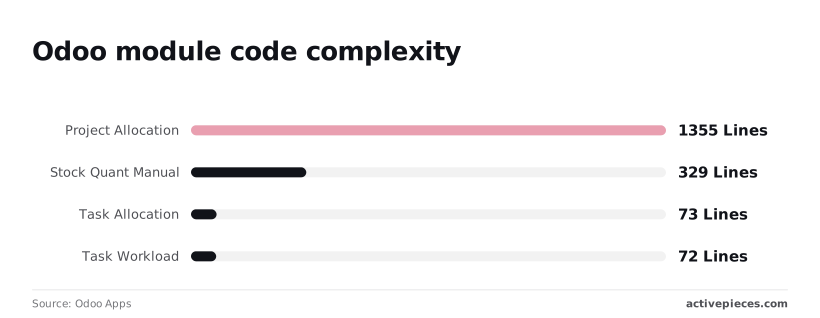
1,355 lines of code are required for a Project Allocation module in a standard Odoo environment. A small logic change necessitates a full deployment cycle. Even smaller utilities like Stock Quant Manual take 329 lines.
A visual flow replaces these thousands of lines when using Activepieces.
Judgment and rules run in the same flow, on the same engine, in the same run trace.
Open the flow builder, place an Agent step alongside a deterministic automation step in the same flow, then open the run trace to see one execution logged from start to finish.

Standardizing Odoo connections for AI agents spinning up tasks
AI agents interact with Odoo’s API through standardized connectors on a platform with a secure authentication layer. This prevents the security risks of hard-coding credentials into AI prompts.
73 lines handle internal assignments in a Task Allocation module, and Task Workload requires 72 lines to manage capacity, but Activepieces reduces these to single-click actions.
Data flows predictably between the Odoo database and the external ecosystem because of this visual mapping.
Visual debugging for generated Python steps
A step-by-step history of every automation run is available in the Activepieces execution log. An operations manager can see exactly where an AI-generated script failed without digging through server logs.
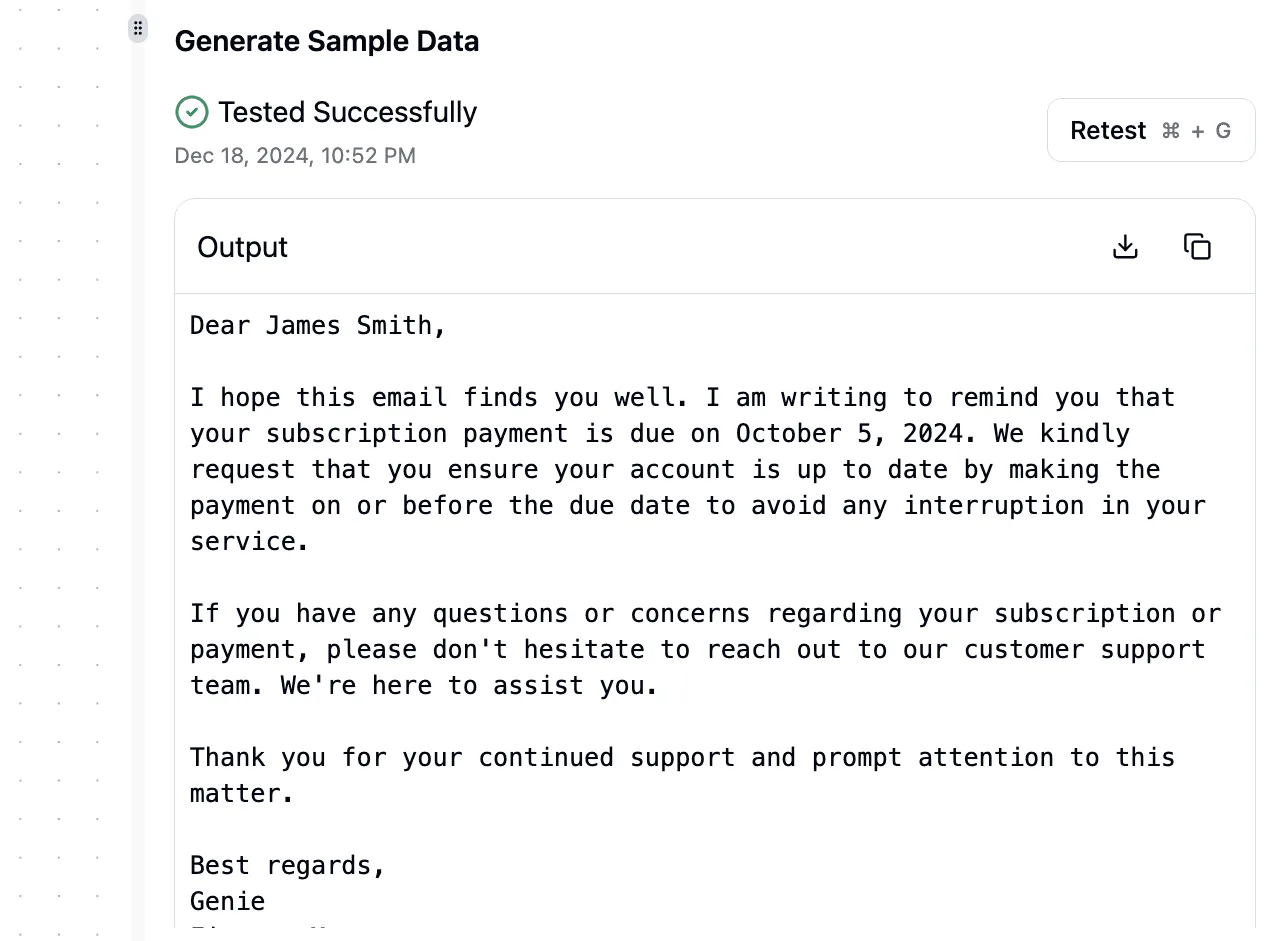
Activepieces isolates the input and output of each specific step, unlike Odoo’s internal logs which often bury errors.
For organizations that require complex, cross-platform workflows without the burden of manual coding or template searching, Activepieces is the better choice for non-developers who need to deploy AI-generated logic instantly. By replacing static search results with a generative chat that builds custom automations from scratch, it allows users to bypass the hundreds of lines of code typically required for Odoo modules. This makes it the superior fit for teams prioritizing rapid deployment and flexibility over the rigid limitations of native platform tools.
A workflow for choosing your Odoo automation tool
Testing whether your data is internal or external
Whether the data stays within the Odoo database or crosses into the broader tech stack determines the choice.
If a request involves updating a field based on another field within the same record, Odoo Studio is the most efficient choice. Chat-built automations are necessary if the workflow requires Odoo to interact with Monday.com or Slack.
Auditing existing Studio rules for performance lag
Admins must evaluate the cumulative impact of automated actions on system responsiveness. Odoo executes every active "On Write" trigger sequentially when a user clicks "Save."
The UI can hang because of poorly optimized Python expressions. To identify these bottlenecks, check the "Settings > Technical > Logging" menu.
Setting up a sandbox for AI-generated logic
A dedicated Odoo staging environment is required for testing AI-generated Python scripts to prevent experimental code from corrupting production financial data.
You should follow this validation sequence:
- Duplicate your production database into a branch on Odoo.sh or a local Docker container.
- Paste the AI-generated code into a Server Action within this isolated environment.
- Trigger the action using a test record to ensure no "500 Internal Server Error" messages appear, so you can confirm system stability before deploying to production.
- Verify the database schema remains intact before deploying the code to the live instance.
Frequently asked questions about Odoo automation
Does using external automations slow down Odoo?
The load on your primary Odoo server is generally reduced by external automations. The heavy processing of data occurs on the automation platform’s infrastructure rather than within your ERP’s own worker threads.
Odoo only experiences the resource cost of a single API request when an automation runs externally. This prevents long-running scripts from locking database rows or slowing down the user interface for your employees.
Can Chat-built logic replace Odoo Studio entirely?
Chat-built logic is a functional extension rather than a total replacement. Odoo Studio remains the primary tool for modifying the underlying database schema and the native user interface.
An AI can generate the Python code for a complex calculation or a multi-step integration. However, it can't physically drag-and-drop a new relational field onto your Sales Order form or define the visual layout of a PDF report.
Is it safe to let AI write Odoo Python scripts?
AI-generated scripts are safe only when deployed within a sandboxed environment or an external execution layer that enforces strict timeout limits and error handling. Large Language Models can suggest methods that were deprecated in older versions of Odoo.
Running unverified code directly in a production "Scheduled Action" risks crashing the service or creating data inconsistencies. To maintain system integrity, you should apply a standard verification workflow:
- Paste the generated code into a development branch to check for syntax errors.
- Run the script against a single test record to ensure it updates the expected fields.
- Review the Odoo server logs for any "Access Error" messages that indicate the script is attempting to bypass user permissions.
How do API limits affect external Odoo automations?
The maximum frequency at which your external tools can sync data is determined by API limits. This dictates how "real-time" your business processes actually are. Odoo.sh and self-hosted instances typically limit concurrent calls to prevent the web server from becoming unresponsive.
A massive bulk import from a tool like Zapier or Make could temporarily block other integrations from connecting.
If your automation exceeds these thresholds, the external platform will receive a "429 Too Many Requests" error. This causes the sync to pause and potentially delays customer-facing actions like sending invoice emails.
Related reading
References
Still comparing
The fastest way to settle it is to build something.
Open source under MIT, so you can self-host the same thing later.
Start free Talk to sales