
Centralized Credential Management for Automation

Nov 22, 202616 min read
Centralized credential management for automation means keeping every API key, OAuth token and password your workflows use in one governed store. There you can see who holds each secret, rotate it, and revoke it without opening individual workflows.
The test is whether one person can answer "who owns this connection?" from a single screen, not how many integrations a platform lists.
Read the list below as a first sort by buyer type. Each option gets one line; most check dates remain unconfirmed. The plan-level detail that decides each pick comes later.
Centralized Credential Management for Automation, in Short
The test is whether one person can answer "who owns this connection?" from a single screen, not how many integrations a platform lists.
- Activepieces: teams that want an open-source platform they can self-host and keep connection data inside their own infrastructure.
- n8n: technical teams that build many custom workflows and are comfortable managing credentials alongside code.
- Make: small and mid-sized teams building visual scenarios who need shared connections without a heavy admin layer.
- Zapier: business teams that prioritize speed of setup and need to check which plan unlocks admin controls over shared connections.
- Workato: larger organizations with a central integration team that must govern connections across departments.
- Power Automate: organizations already standardized on Microsoft 365 that want connections governed by their existing tenant administration.
- External secrets manager: teams with a security function that already runs a dedicated vault and wants workflows to read secrets from it, so the automation tool never becomes the system of record.
None of these is a universal best. Each fits a different answer to who administers secrets and where they may live.
What centralized credential management covers and excludes
The term covers three capabilities. Visibility is a list of every credential and the workflows that use it, and rotation is replacing a secret once, with every dependent workflow picking up the change.
The third is revocation (cutting off a credential immediately when a person leaves or a token leaks). If a platform lacks any one of these, you still have a manual process, and an expired shared token will find it.
It doesn't mean single sign-on for the platform itself, which controls who logs in rather than which secrets workflows hold.
It also doesn't mean having many connectors. A platform can list thousands of integrations and still scatter each token inside individual workflows, where nobody can audit it.
How I judged the picks
I judged each option on the same three questions. Can an administrator see every stored credential in one place, can they rotate it once without editing each workflow, and can they revoke it centrally?
Because several platforms reserve these controls for higher tiers, each pick is read against what its own documentation says it offers by plan. Where a vendor doesn't state a control, I treat it as unconfirmed rather than assumed.
Everything below works on Activepieces' free plan. Start without code or a credit card.
Cost of an expired credential token outage
For 6.5 hours in this illustrative composite, which isn't a real customer, every dependent workflow halted, because one expired CRM token belonged to an employee who had already left.
How an expired automation token halts workflows
Nothing about the expiry is unusual. By Microsoft Learn, default access tokens last 1 hour for Google and for Microsoft, and 12 hours for Slack, so every integration renews constantly.
Per Microsoft Learn, refresh tokens run longer: 24 hours for a Microsoft single-page-app, 720 hours (30 days) for Slack with PKCE, and 2,160 hours (90 days) for Microsoft.
Months after its owner left, a credential can therefore fail, long after the offboarding checklist closed.
To see the gap between failure and discovery, follow the timeline below.
- 17:30, day one: the token's owner leaves and IT deactivates the account.
- 02:10, day two: the CRM refresh token expires.
- 02:11: lead-routing and invoicing workflows begin failing.
- 02:11 to 08:40: no alert reaches anyone, because failure notices go to the departed owner's mailbox.
- 08:40: a sales manager notices empty queues and escalates.
- 09:25: an admin reissues the token under their own login.
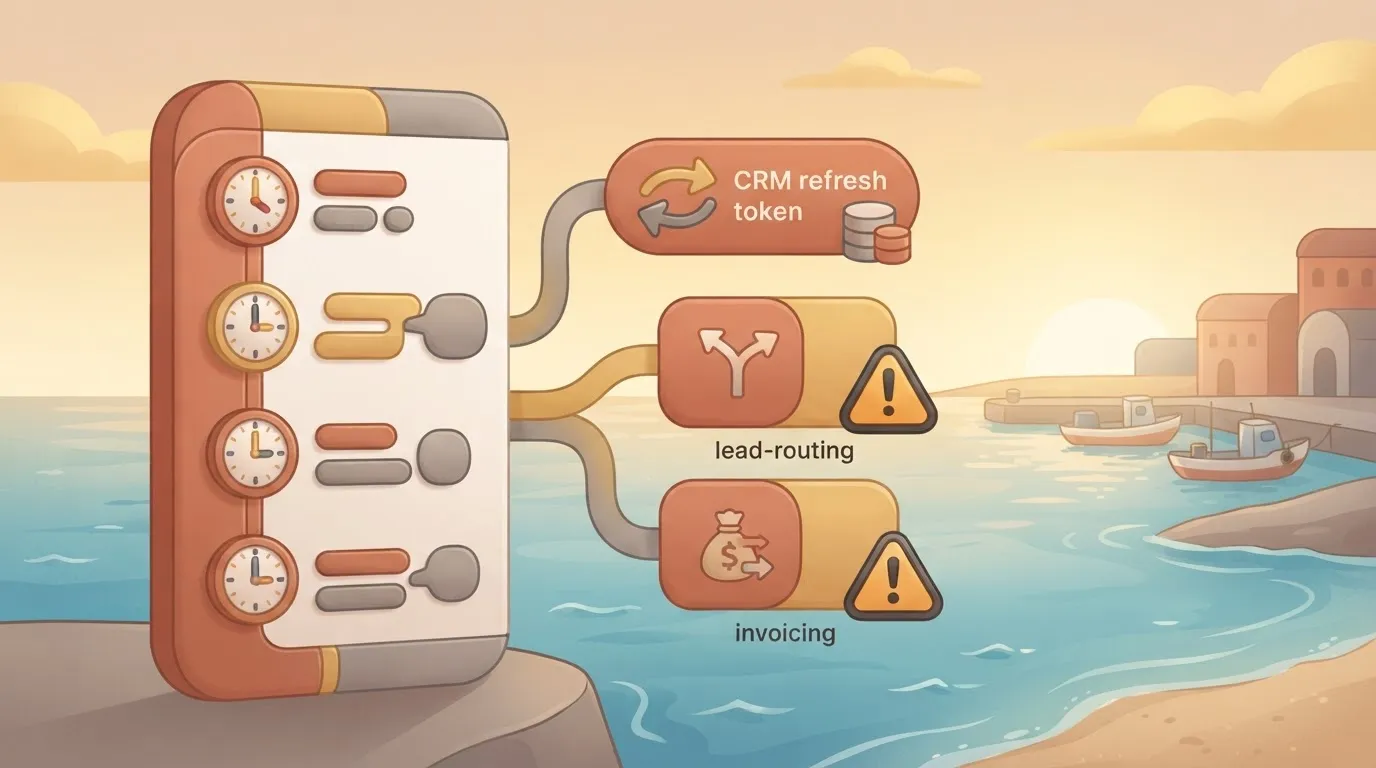
The silence between steps 3 and 5 is the cost; the expiry itself was ordinary. Next, what that silence cost.
Downtime cost of credential failures in automation
For scale only, ManageEngine, citing Gartner and EMA, and New Relic put a minute of downtime at $23,750 for a large enterprise and $33,333 for a high-impact outage.
Those are industry estimates for full outages, so they show how fast minutes compound, not what this case lost.

Nobody else could see the token, nobody tracked an expiry date, and revoking or rotating it needed the leaver's account, because it was a personal login reused as a shared connection.
Those three gaps, not the vendor's token lifetime, are what the next sections test each platform against.
Comparison Table of Credential Management by Platform
You cannot learn from any platform's pricing page alone whether one owner can see, rotate and revoke a shared connection. The table below records what each vendor's own pages support and marks the rest unconfirmed.
Take from it which row to ask a vendor to prove, not which to buy.
| Platform | Plan price with controls | Strength | Limit | Best for | Check date |
|---|---|---|---|---|---|
| Zapier | Unconfirmed | Connections shared across a team account | Admin-level revoke by plan unconfirmed | Small teams with one named connection owner | Unconfirmed |
| Make | Unconfirmed | Connections scoped to a team or organization | Rotation tooling unconfirmed | Teams separating client scenarios | Unconfirmed |
| n8n | Unconfirmed | Self-hosting keeps credentials in your infrastructure | External secrets support by plan unconfirmed | Teams that must hold credentials themselves | Unconfirmed |
| Workato | Unconfirmed | Enterprise connection and audit management | Pricing is quote-based, so unconfirmed | Large governed estates | Unconfirmed |
| Power Automate | Unconfirmed | Connections tied to Microsoft identities and admin policies | Strongest inside the Microsoft estate | Organizations already on Microsoft 365 | Unconfirmed |
| Activepieces | Unconfirmed | Self-hostable | Central rotation and revocation unconfirmed | Not yet judged | Unconfirmed |
| Vault or AWS Secrets Manager | Unconfirmed | Central store with rotation and access logging | You build the link to each workflow tool | Mixed estates with many tools | Unconfirmed |
How to read the credential management comparison
Read each row against the three gaps: who can see a connection, who can rotate it, and who can revoke it from one place. The strength column says which gap the vendor's own material addresses. The limit column says where the evidence stops.
In the Best for column, the entry names the owner you need: a person who holds the connection, a platform admin, or a security team running a store outside the tool.
One row differs in kind: external secrets. It doesn't replace the automation platform. It moves the secret out of the platform, so a rotation happens once and every workflow that reads it follows.

Unconfirmed credential controls in vendor documentation
Where a cell says unconfirmed, no vendor page we could cite settles it. Treat that as an open question, not a negative.
Ask the vendor for three things.
The first is the admin documentation naming the permission scope that lets a non-owner revoke a connection, the second is the plan or contract clause that includes it, and the third is the audit log entry that proves a rotation happened.
Until you hold those three, the row is a claim, not a control. The next sections test each platform against them.
Platform-by-platform Verdicts on Credential Controls
Answer six questions only from each platform's own pricing page, docs or changelog, and write the date you checked beside the answer. They are, in the order each block below follows:
- Where do the credentials live, and who owns the connection?
- Who can share or reuse a connection?
- Is there an audit trail, and can you rotate or revoke the secret from one place?
- Does it connect to an external secrets manager?
- What changes when you self-host?
- What limit would send a buyer elsewhere?
Below, those questions are applied to each tool, showing where its answers depend on plan.
Verdicts by platform
For Workato, start with who owns each connection and which workspace or environment it is bound to. Then confirm that the plan you are quoted includes audit logging and secrets-manager hookup, not only the enterprise description.
For Make, check whether a connection belongs to a team or to the person who created it, and whether other scenarios can reuse it. The limit to look for is how far revocation reaches once a shared connection is in use.
n8n and Zapier: custody and ownership
Self-hosting changes the answer most for n8n. You hold the instance, its database and its encryption key, so rotation and backup become your duty. Ask which plan unlocks external secrets support.
For Zapier, find out which person's login each connected account depends on. If the person who authorised it leaves, ask what breaks and who can reassign it. That ownership answer is the verdict.
Power Automate and external secrets managers
For Microsoft Power Automate, connections follow a Microsoft identity and sit inside an environment. Read the environment and data-policy documentation to see who can create, share or use a connection, and what survives when an account is disabled.
When the platform only fetches the credential, a dedicated secrets manager can hold it, log every read and rotate it on a schedule.
This works only if the platform supports that fetch on your plan. Where it doesn't, the manager sits beside the workflow tool and the shared token is still pasted into it.

Easier to see it running than to read about it: set it up free, no card.
Where Activepieces Fits Credential Management
Activepieces stores a connection once, scopes it to a project, and lets every workflow in that project reuse it; global connections, which are shared beyond one project, come with the Team plan at $200 a month for 25 users.
The controls that let an admin see and revoke across projects are only partly confirmed. That's why the shared token pasted into a separate tool is the case to test it against.
What the docs confirm
In Activepieces, a connection is its own object, separate from any single workflow. A flow picks the connection by name, so the token is entered once and not copied into each step.
The core is MIT-licensed and public on GitHub, so how a flow resolves a connection can be read in the code rather than taken on trust.
When it expires, you re-authenticate that one connection and every flow that uses it recovers. For the shared-token problem, that's the core of the answer.
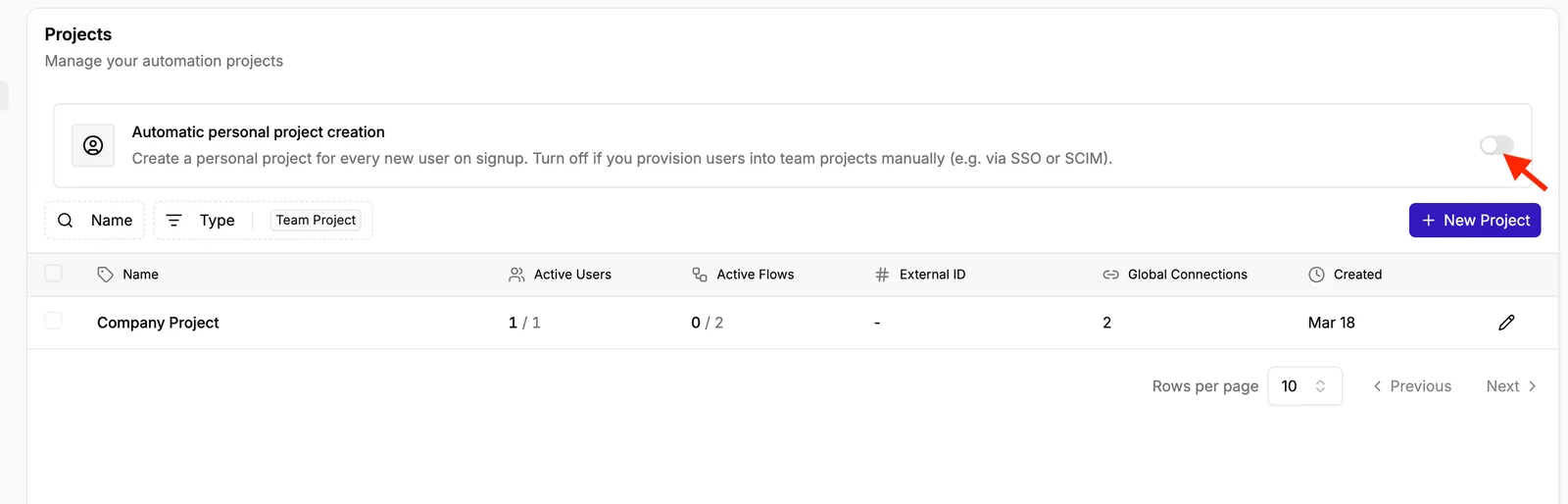
Ask who owns a connection and the project answers. The admin page below lists each project with its active users, active flows, and a count of global connections.
Read that last column first when you audit: a global connection is shared beyond one project, so its owner is the person you need to name before anything else.
Look at the screenshot, which shows a single "Company Project" with two global connections.
The page also notes that personal projects are created automatically for new users on signup, which means every new user starts with a space where they can add their own connections. Those are credentials you didn't provision.
Activepieces can send the secrets behind a connection, API keys and OAuth tokens included, to your own secret manager instead of its database, on a self-hosted instance or the enterprise cloud tier.
Secret manager integration is listed on the Ultimate plan, which is sold through sales, alongside SCIM, custom RBAC and audit logs.
Point a self-hosted instance at an external secret manager and the credentials are absent when you inspect the database, so no vendor, Activepieces included, holds the token that expired in this story.
Zapier and Make keep credentials in their own cloud, and neither has a self-hosted edition to route around that. MoneyGram, Moneypenny, Alan and FundingSocieties run Activepieces in production, on an MIT-licensed core with 25,670 GitHub stars.
What is not confirmed or sits on paid plans
I couldn't confirm from Activepieces' public pages the exact scope of rotation. SSO and standard roles come with the Team plan at $200 a month, while audit logs and custom RBAC are listed on the Ultimate plan, priced through sales.
I couldn't confirm whether the logs record who read or changed a connection, or whether the roles separate using a connection from editing it.
I haven't verified which admin and governance features are tied to paid or enterprise editions, though some are. Pricing and plan limits were checked against the vendor's pages on 2026-11-22 and can change, so ask for the current plan matrix in writing.
Rotation is the clearest gap. Re-authenticating one connection is manual, and I found no documented scheduled rotation or expiry alert.
Who should pick it and who should not
Pick it if your team wants open-source workflow software, a choice between hosting it yourself or paying for hosted, and connections organised by project with a clear owner. It suits a small group that can name who owns each credential.
Look elsewhere if you need documented audit trails, enforced rotation schedules, or a vault integration you can verify before purchase. Until the vendor confirms those controls in writing, a platform that publishes them is the safer pick.
Credential management rules that replaced shared tokens
Once the shared token was gone, four rules took its place: a named owner for each credential, one connection per service, an expiry alert before the rotation date, and an offboarding check that revokes access.
Credential management rules for automation teams
- Every connection has one named owner, a person rather than a team inbox, recorded beside the connection itself.
- Each service gets one connection, so revoking it ends access in one place instead of across copied tokens.
- An expiry alert fires before the rotation date, early enough to rotate on a working day instead of during an outage.
- Offboarding includes a check that no connection still runs under a departed person's login.
27.4% of incidents involving stolen or compromised credentials came through OAuth tokens or API keys (Vorlon 2026), and 44% of security teams use a secrets management system (Akeyless 2024); the chart below compares the two.
The samples differ, so read them as a pairing, not a ratio.
More than a quarter of credential incidents involve the token types your automations hold, while fewer than half of teams have a system built to manage them.
One step keeps slipping: revocation. GitGuardian found 9% of valid leaked secrets still unrevoked a week after the developer responded. The person knew, acted, and the credential still worked. That's why the offboarding check comes first when you enforce these rules.
- List every automation connection and write its owner beside it. Any connection without an owner is the first to rotate.
- Find services with more than one connection and merge them into one.
- Record each credential's expiry date and set an alert ahead of it.
- Compare recent leavers against connection owners, and revoke or reassign anything still tied to them.
- Ask each vendor, in writing, for the documents and settings that prove the controls:
- the plan page or order form naming the plan that includes credential visibility and revocation
- the audit-log documentation showing who created, used and revoked a connection
- the setting that lets an administrator revoke a connection another user created
- the self-hosting terms, if you run the platform yourself, stating which of these controls still apply
Frequently asked questions
Is a secrets manager better than a built-in credential store?
It's better when it gives you what the built-in store lacks: one place to see every secret, rotate it and revoke it across tools.
If it logs access, scopes each credential to a named owner and lets an admin revoke it without editing every workflow, a platform's own store is adequate.
Ask each vendor for the secrets-manager documentation and the plan on which it is available, because support often differs by tier.
Does self-hosting an automation platform make credentials safer?
Not by itself. Self-hosting moves custody of the encryption key, the database and the backups to you, so the question becomes who holds the key and who can read the database.
It removes the vendor's cloud from the path but adds your own patching and access control.
Request the vendor's self-hosting encryption documentation. Confirm how credentials are encrypted at rest, where the key lives and whether the audit and SSO features you rely on in the hosted plans are also present in the self-hosted edition.
How often should automation credentials be rotated?
Rotate on a schedule your security policy sets, and also on every event that changes who can use the credential: an offboarding, a contractor ending, a suspected leak. The interval matters less than whether rotation is possible from one place without breaking workflows.
Check how each platform handles expiry. OAuth tokens that refresh on their own behave differently from static API keys, which stay valid until someone replaces them. A shared token with no expiry and no named owner is the one that fails an audit.
What should happen to credentials when an employee leaves?
Three things, in order. First, list every connection the person created or owned, since a connection tied to a personal account stops working or stays exposed when that account is removed.
Second, reassign each connection to a team owner or replace it with a service account.
Third, rotate any secret the person could view, and confirm in the audit log that the old credential is no longer in use.
If a platform can't show you who owns a connection, the offboarding check can't be completed, and that gap should count against it in your evaluation.