
How to choose a Mistral model size for automation in 2026

Oct 31, 202615 min read
Matching a model’s parameter count to the specific complexity of a business task is the technical practice known as Mistral model sizing. This selection process ensures that you don't waste expensive compute cycles on a task that a smaller model could handle with identical accuracy.
The Mistral hierarchy functions as a three-tiered pyramid, according to reports from Ownrig. The wide base is Ministral 3 3B for efficiency, the middle tier is Ministral 3 8B for reasoning, and the apex is Mistral Large 3.

Platforms that resell model access often lock you into their chosen provider and markup, effectively deciding your AI strategy before you start.
Activepieces runs whatever Mistral model you have already deployed (on your own provider key and at your own direct rate) so that model spend lands on your infrastructure account rather than being sold back to you.
Mistral model sizing for automated workflows
Platforms that resell model access often lock you into their chosen provider and markup, effectively deciding your AI strategy before you start.
You can verify the Bring-Your-Own-Key availability by tier on the pricing page, which ensures your model costs scale exactly with your provider's rates rather than a platform's per-task markup.
Parameters versus performance in automation
Knowledge density and the ability to follow complex, multi-step instructions are dictated by the raw parameter count of a model.
This made it a specialized tool for high-speed classification or simple data extraction where the context window was narrow.
Substantially more capacity is available when you scale up to Ministral 3 8B for tasks requiring comparative analysis. This provides the cognitive overhead to handle nuanced formatting or basic decision trees.
At the top of the stack, Mistral Large 3 offers a much larger parameter count for frontier-level tasks. This is required for frontier-level reasoning and long-horizon agentic work where a minor logic error would break the entire workflow.

Balancing latency and reasoning when picking Mistral size
Choosing a model size is a direct negotiation between how fast a response returns and how much thinking occurs during the generation. While a frontier model like Claude Fable 5.1 handles demanding reasoning, Mistral’s smaller models offer lower latency for real-time applications.
Choosing a model size is a direct negotiation between how fast a response returns and how much thinking occurs during the generation.
- Ministral 3 3B is best for sub-second responses in simple chatbots.
- Ministral 3 8B balances speed with the ability to handle complex JSON schemas.
- Mistral Large 3 prioritizes accuracy over speed for sensitive financial or legal summaries.
Hardware requirements for local hosting
Operational costs for your infrastructure are determined by the physical memory required to run these models.
Ministral 3 3B can run on a single consumer-grade GPU with 8GB of VRAM. This means a startup can host it on basic cloud instances for minimal overhead.
Ministral 3 8B is built for edge and local deployment, so quantized versions fit consumer-grade hardware.
Moving to enterprise-grade A6000 or A100 hardware becomes a necessity at this scale. This shift effectively prices out small-scale developers.
Multi-GPU setups or significant quantization are typically required for Mistral Large 3.
This increases the hosting budget to hundreds of dollars per month compared to the free or $20 tiers found in managed SaaS offerings, making the model prohibitively expensive for individual developers, which effectively excludes hobbyists from deploying these applications, so they are forced to seek out cheaper, less powerful alternatives.
Consequently, you must weigh the benefits of self-hosting against a substantial financial commitment.
Everything below works on Activepieces' free plan. Start without code or a credit card.
Step 1: Deploying Ministral 3 3B for high-speed classification
High-volume classification tasks find their optimal balance of low latency and instruction following in Ministral 3 3B, where larger models introduce unnecessary cost and lag.
Deploying this model locally or on a private instance ensures that sensitive support data never leaves your infrastructure. This satisfies strict data residency requirements for enterprise compliance.
Setting up Ollama to run Ministral 3 3B
Running Ministral 3 3B requires a local inference engine to manage the model weights and provide a standardized API endpoint. Ollama is this management layer, handling the memory allocation and hardware acceleration automatically so that you can interact with the model via standard HTTP requests.
To set up the background service, you must download the Ollama installer for your specific operating system. Execute ollama pull mistral in your terminal to fetch the model weights.
Furthermore, run ollama serve to initialize the local server. This listens on port 11434 by default.
Structuring classification prompts for Ministral 3 3B
Restricting a classification prompt to a fixed set of labels prevents the model from generating conversational filler that breaks downstream automation logic.
Because Ministral 3 3B is highly sensitive to the order of instructions, placing the output constraints at the end of the prompt ensures the model prioritizes the format over descriptive text.
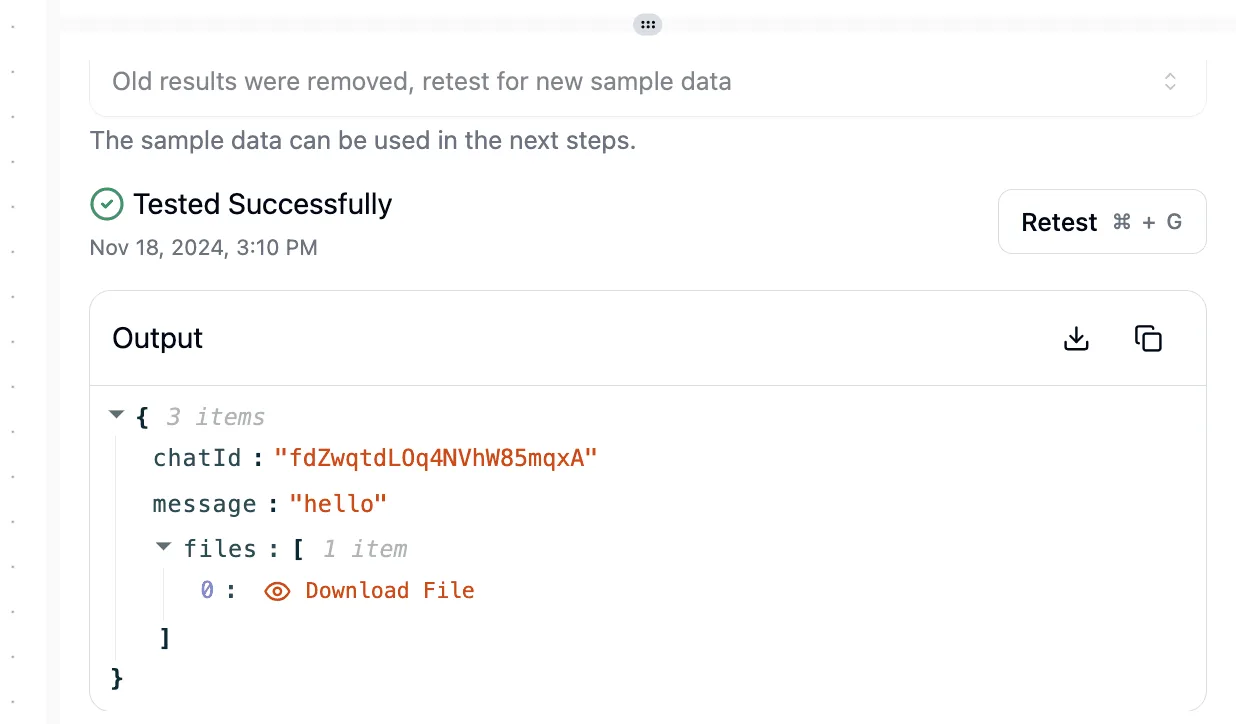
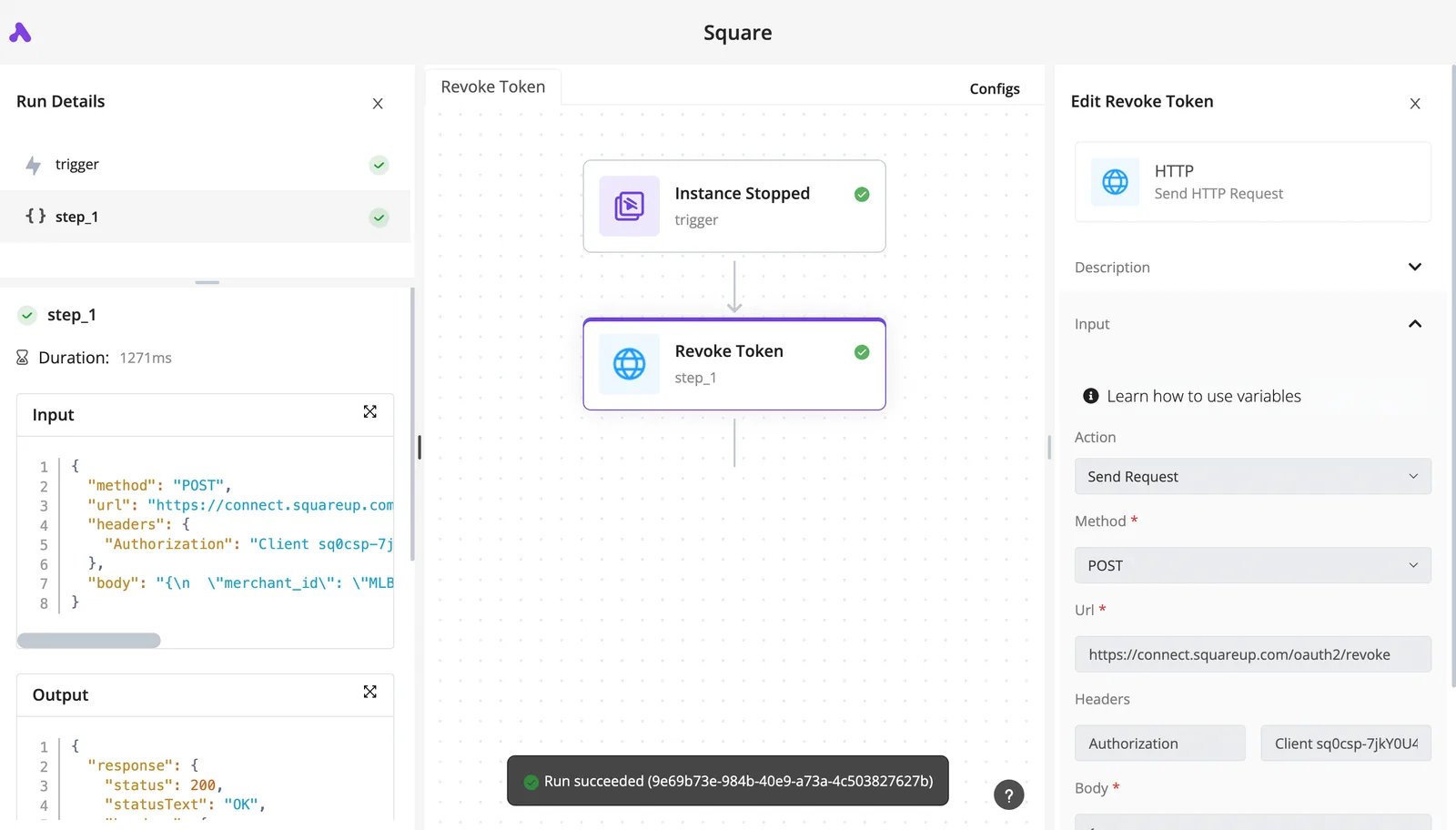
When a trigger initiates a token revocation based on a specific event, the following log shows a successful automated workflow. The execution details confirm that the HTTP request was formatted correctly and received a valid response from the external service provider.
[SCREENSHOT PLACEHOLDER: A completed flow run in Activepieces showing the Run Details panel on the left with trigger and step_1 both marked with green checkmarks. The center shows a flow diagram with "Instance Stopped" trigger and "Revoke Token" step_1 connected by an arrow, both with success indicators.
The left panel displays the step1 details. These include Duration (1271ms), Input showing a JSON POST request to squareup.com with Authorization header, and Output showing a JSON response with status 200 and "OK" statusText. The right panel shows the "Edit Revoke Token" configuration for an HTTP Send Request action with Method set to POST and Url field populated. A green success banner at the bottom states "Run succeeded (9e69b73e-984b-40e9-a73a-4c50382762b)"]
This successful execution demonstrates how a classified intent can trigger a precise API call without manual intervention.
Testing Ministral 3 3B response latency
Latency testing is the final step to ensure the model meets the requirements for real-time user interfaces. By measuring the time to first token and total duration, you can confirm that the classification happens fast enough to prevent a delay in the application frontend.
Wrap your API call in a timing script using curl or a Python library like time. Send a batch of varied support tickets to the endpoint to account for fluctuations in text length.
Finally, check the total_duration field in the Ollama response body to verify the processing speed.
Step 2: Scaling to Ministral 3 8B for complex data extraction
Complex data transformation is enabled by Ministral 3 8B, which activates a subset of parameters for each token to balance efficiency and reasoning.
This approach allows the model to handle messy, unstructured inputs. Smaller models like Ministral 3 8B may be less reliable on such tasks, so test them on your own data.
Allocating VRAM for Ministral 3 8B
Because the model loads a substantial total parameter count while only executing a fraction during inference, deploying Ministral 3 8B requires a specialized memory strategy. You must ensure your GPU cluster has sufficient Video Random Access Memory (VRAM) to hold the entire model weights simultaneously.
Throughput will be destroyed if you offload layers to system RAM, which bottlenecks the MoE switching logic.
Using 4-bit quantization is a standard requirement for consumer-grade hardware. This compression reduces the memory footprint so that the model fits into a single high-end workstation card rather than requiring a multi-node server.
Configuring JSON mode for reliable outputs hardware
Reliable data extraction depends on the model's ability to strictly adhere to a schema. This is best achieved by enabling the native JSON mode in the Mistral API or local inference engines.
Custom regex cleanup scripts are required if the model prepends conversational filler like "Here is your data," which breaks automated parsers. The following table demonstrates how Ministral 3 8B transforms inconsistent human input into a machine-readable format:
| Raw Email Input | Ministral 3 8B JSON Output |
|---|---|
| "I sent the wire for $500.50 on Tuesday, Jan 14th, 2025." | {"date": "2025-01-14", "amount": 500.50} |
| "The invoice from 12/05/24 was paid in full ($1,200)." | {"date": "2024-12-05", "amount": 1200.00} |
| "Check #402 for $85.00 arrived on the 3rd of March." | {"date": "2025-03-03", "amount": 85.00} |
Prices and plan limits checked against docs.claude.com and claude.com and openai.com and gemini.google on September 26, 2026.
Securing this structural consistency ensures that downstream databases can ingest the output without manual intervention.
Testing Ministral 3 8B long-context accuracy
When processing large batches of documents, you must verify that the model maintains focus across the entire context window to prevent "lost in the middle" phenomena.
Ministral 3 8B excels at retrieving specific facts from the center of a long prompt. This means you can feed it multiple pages of correspondence without losing the ability to extract the final settlement amount.
Instruct the model to provide a "thought" field before the JSON object to confirm the extraction is grounded in the text. This forced reasoning step exposes the logic the model used to resolve conflicting dates or currencies.
Easier to see it running than to read about it: set it up free, no card.
Step 3: Implementing Mistral Large 3 for nuanced decision logic
Mistral Large 3 is the definitive choice for tasks where the cost of a logic error outweighs the savings of a smaller model. This is specifically true when processing dense, multi-page technical documentation.
While Mistral Small 4 handles routine classification, the flagship model is required to maintain a coherent narrative thread across a 20-page PDF. The following workflow ensures that nuanced context is preserved rather than lost to token limits:
- Chunk the document into 10k token segments to prevent the model from losing focus on middle-paragraph details.
- Generate recursive summaries for each chunk so that local context is compressed without losing specific data points.
- Synthesize the final executive summary to ensure the overarching argument of the document is reflected in the output.
This tiered approach allows the model to act as a high-level editor, identifying contradictions between page two and page eighteen that a single-pass summary would likely miss.
Managing infrastructure costs for Mistral Large 3
Deploying Mistral Large 3 requires a deliberate infrastructure strategy because its high parameter count translates directly to increased latency and higher cost per token.
You should reserve this model strictly for the final synthesis or complex reasoning steps. This helps to avoid inflating your API bill on simple formatting tasks.
Stitching an agent framework to a workflow tool usually means managing two separate execution engines with a fragile callback.
Activepieces runs both in a single engine, placing an Agent step alongside deterministic automation steps in the same flow definition, so judgment and fixed rules run in a single run trace.
You can open the flow builder and place an Agent step next to a deterministic step to see one execution logged from start to finish, rather than two systems bridged by a webhook.
Handling multi-lingual and high-precision tasks
Mistral Large 3 excels in environments where code, mathematical notation, and multiple natural languages intersect within a single document. Its architecture is optimized to prevent "hallucination drift" in technical summaries, which is critical when a summary must serve as a legal or technical record.
Linguistic parity is maintained across dozens of languages, unlike smaller models that might struggle with the grammar of non-English technical specifications. This ensures that a summary of a French engineering manual remains technically accurate when translated into English, preventing dangerous misinterpretations of safety protocols.
Establishing a fallback strategy for smaller models
A robust system uses Mistral Large 3 as the "judge" while delegating bulk labor to smaller, faster models to optimize throughput.
You can implement a validation loop where Ministral 3 8B performs the initial data extraction. Mistral Large 3 then only intervenes if the confidence score falls below a specific threshold.
Frontier-level intelligence is not wasted on predictable patterns in this hybrid approach. By routing only the most ambiguous cases to the largest model, you maintain human-level nuance at a fraction of the total operational cost.
Connecting Mistral to your business stack with Activepieces
Activepieces provides the visual orchestration layer required to bridge a self-hosted Mistral instance with third-party services like Slack, Google Sheets, or GitHub. By using a workflow builder, you transform a static model response into a trigger-based event that modifies data across your infrastructure.

MoneyGram and FundingSocieties run Activepieces to manage these complex automation environments where model outputs must reliably trigger business actions.
Authenticating your local Mistral endpoint
To connect a private Mistral instance to the workflow, you must use the HTTP Request integration to target your specific server URL and API key.
Unlike cloud-native integrations that use pre-defined OAuth flows, a self-hosted deployment requires a manual header configuration. This ensures the automation engine can bypass your firewall.
Select the HTTP Request integration and set the method to POST. Input your local IP address or internal DNS name followed by the completions endpoint, which directs the traffic to your specific Mistral container.

Additionally, add an Authorization header containing your Bearer token. This ensures the request isn't rejected by the model’s security layer.
Mapping model outputs to downstream app fields
Once the Mistral model generates a response, you use the data mapping tool to inject that text into the variables of the next step in the sequence.
This ensures that the specific output from a model is placed exactly where the destination application expects it. For example, this applies to a summary generated by Ministral 3 8B.
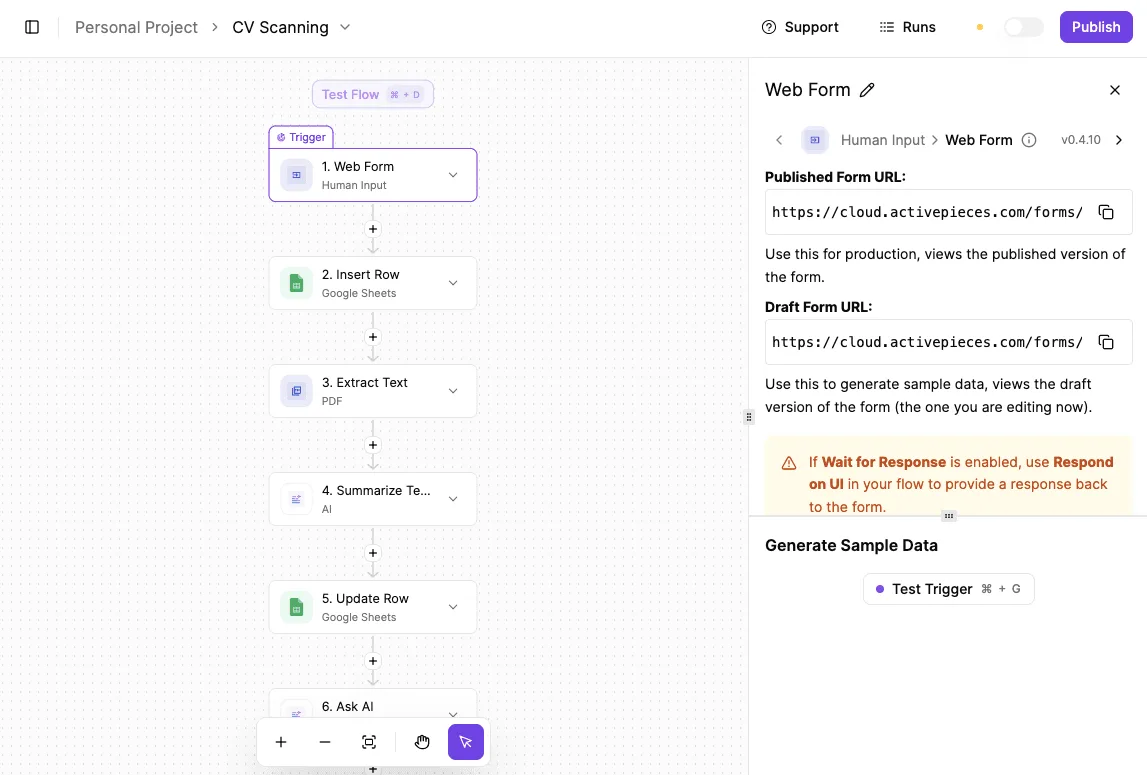
The workflow builder canvas shows a four-step AI agent flow titled "Test Flow" where a scheduled trigger initiates a series of actions ending in a blog post generation.
By selecting the Agent action in Step 4, you can see how variables from the "SEO Keyword Sea..." HTTP request are pulled directly into the prompt. This ensures the model receives the correct context without manual data entry.
Granular control over how different models interact within a single chain is allowed by this mapping. You might use Mistral Small 4 to categorize an incoming support ticket. Then, map that category into a branching logic step that determines which specialized model handles the reply.

Building a self-hosted automation loop
By deploying Activepieces via Docker alongside your Mistral models, you create a private ecosystem under the MIT licence on the core.
In this environment, data moves from your internal database to the LLM and back to your systems without crossing the public internet, utilizing any of the 735 integrations available in the open source repository, which provides a massive library of pre-built connectors to streamline your workflow.
The process begins with a trigger, such as a Schedule integration or a Webhook from an internal CRM. Next, the HTTP integration sends the payload to Mistral Large 3 for high-reasoning tasks.
Finally, the output is sent to a local PostgreSQL instance or an internal file share to maintain a permanent record of the AI's decision.
This architecture ensures that if your internet connection drops, your internal automations continue to function. This is because all components reside on the same local network.
Mistral deployment checklist for Monday morning
Measuring Mistral Large token throughput
Actual speeds at which your local hardware serves response fragments must be measured to ensure the user experience remains interactive. Low throughput causes noticeable lag in chat interfaces, which often leads to users refreshing the page and triggering redundant, costly API calls.
Throughput should stay high enough that text appears faster than a human can read if you are deploying Ministral 3 8B. Otherwise, the hardware bottleneck will negate the speed benefits of the smaller architecture.
Evaluating the 'Good Enough' threshold for model downsizing
Identifying the smallest version that maintains logical consistency for your specific prompts is the key to selecting the right model. Running a massive model like Mistral Large 3 for simple data extraction is a waste of compute resources.
Hallucinations requiring manual correction will result from pushing Ministral 3 3B to handle complex legal reasoning. You have reached the "Good Enough" threshold when the model passes your edge-case tests without falling into infinite loops or nonsensical output, allowing you to minimize your memory footprint.
Securing the local API endpoint for internal use
Local deployments must be restricted to authorized network traffic to prevent internal tools from becoming vectors for data exfiltration.
Because Mistral models often serve as the backend for sensitive internal databases, an exposed endpoint allows any device on the network to query your private data without an audit trail.
Use a reverse proxy or firewall rules to ensure only your application server can reach the model port. This effectively isolates the intelligence layer from the broader corporate intranet.