Chutes AI MCP: What It Is and How It Works (2026)

Nov 11, 202614 min read
Chutes AI MCP means Chutes serves the model behind an MCP-capable client, while MCP, the Model Context Protocol, is how that client reaches tools, whether those are a custom server or a workflow platform such as Activepieces.
We checked Chutes' site, docs and changelog on 2026-11-11, and found no MCP tool server that Chutes itself ships.
Chutes AI MCP is a setup in which a Chutes-hosted model powers an MCP-capable client, and that client separately connects to one or more MCP tool servers, so the model, the tools and the billing are configured and paid for as distinct pieces.
Three separate integrations:
- The model
- The tools
- The billing
That's the whole job: Chutes hosts models and answers inference requests, generating text and billing for it. It doesn't run your tools, hold your credentials for other services, or decide when a tool gets called.

Chutes AI MCP meaning and requirements
MCP: the tool protocol
A client uses MCP to discover and call tools on a server. The server exposes the tools, and the client relays calls between the model and the server.
Which model sits behind the client, or who pays for it, the protocol doesn't say. Nor does it say whether a given model is any good at choosing tools. That last gap is where a lot of "it connected but did nothing" reports come from.
Where the two actually meet
They meet in one place only: your client.
When a call fails, you're debugging one of two links, not one product, because a tool server never sees your Chutes account and a Chutes key never grants access to a tool.
You need three things, each from a different place:
When a call fails, you're debugging one of two links, not one product, because a tool server never sees your Chutes account and a Chutes key never grants access to a tool.
- A Chutes account with an API key for the model.
- A client that supports MCP and lets you point it at a custom model endpoint. Some visual workflow builders, such as Activepieces, can sit in that role.
- An MCP tool server from whoever publishes the tools you want, since Chutes isn't that source.
Check each one separately before you connect them.
Everything below works on Activepieces' free plan. Start without code or a credit card.
The stalled MCP agent on Chutes
Skip those separate checks and you get this: the agent keeps calling a tool that returns nothing. No layer in the client treats an empty result as a reason to stop. The scenario below is illustrative, not a real incident log.
Picture a support-triage agent running on a Chutes-hosted model and talking to two MCP tool servers: one that reads and updates the ticket queue, and one that searches the help-centre articles.
09:12 first bad run
When the first search call comes back with an empty result, the model treats that as "try again" rather than "nothing found". Nothing errors, so the client has no reason to intervene. The log:

- 09:12 first empty tool call from the search server
- identical search call repeated, same arguments, same empty result
- identical call repeated again, still no error raised anywhere
- ticket queue not moving, because the ticket server is never reached
- run still going, still billing tokens against the model
Noticing the stalled MCP agent loop
By 09:40, someone on the support team is asking why the queue looks frozen. The agent's status page says "running", the model endpoint is up, and both tool servers answer when poked by hand.
Every check passes, which is exactly the trap: the fault sits in the join between them. The client never capped repeated identical calls, and the model never got a clear signal that an empty result was final.

Stopping the stalled Chutes MCP agent
At 11:05 a human stops the run by hand. The fix sits in the client, not in Chutes or either MCP server.
Cap repeated identical tool calls, return an explicit "no results" message instead of an empty body, and set a budget on the run so a stall can't bill indefinitely. MCP gives you the wiring and none of these guardrails.
Stalled agent costs in requests and hours
Within minutes, a stalled agent costs you its daily request allowance, and your staff hours for the rest of the week. The hours are the larger bill.

Say an agent calls a tool that keeps failing and retries 12 times per run, across 40 runs, which means the underlying failure is never diagnosed.
| Row | Illustrative figure | How it was priced | Source |
|---|---|---|---|
| Failed runs | 40 | Scenario assumption | Chutes pricing page, checked 2026-11-11 |
| Requests consumed | 480 | 40 runs × 12 retries | Chutes pricing page, checked 2026-11-11 |
| Untriaged tickets | 40 | One per failed run | Chutes pricing page, checked 2026-11-11 |
| Staff hours | 10 | 15 minutes per ticket | Chutes pricing page, checked 2026-11-11 |
| Token spend | $0 extra | Flat monthly plan fee | Chutes pricing page, checked 2026-11-11 |
Stalled agent tickets and staff hours lost
Forty failed runs produce forty tickets; at fifteen minutes each, that's ten staff hours reading identical logs.
Against the plan, the 480 requests matter too. RPWithAI lists Base at $3/mo with 300 requests per day, so this loop exhausts Base before the 40th run finishes and everything after it fails for a different reason.
Chutes request and token spend from looped calls
On a flat plan the loop adds no per-token cost; it shows up as the cap.
Plus, at $10/mo, allows 2000 requests per day, so the same loop uses about a quarter of it and the agent keeps running.
At $20/mo, Pro allows 5000, so the loop uses under a tenth of it. The higher tiers don't fix the bug. They hide it for longer, and a loop with no retry limit will still reach 5000.
For plan prices and daily request counts, go to the Chutes pricing page, checked on 2026-11-11. It says nothing about MCP tool-server billing, so assume that's billed or limited separately by whoever hosts the tools.
The Chutes MCP setup failure
The setup also failed at less visible seams: a model that never emits a tool call, a wrong endpoint or key, a cold start, and a tool server trusted with too much.

| Cause | How visible | Time to find | The fix | Docs page |
|---|---|---|---|---|
| Model without tool-calling | Silent; plain text comes back | Hours | Switch to a model that supports tools | The model's Chutes listing |
| Endpoint or model-name mismatch | Loud; 404 or "model not found" | Minutes | Copy the exact base URL and model ID | Chutes API docs |
| Key handling | Loud; 401 or 403 | Minutes | Separate keys for model and tool server | Your client's MCP config docs |
| Rate limits or cold starts | Intermittent; timeouts | Days | Raise timeouts, add retries | Chutes API docs |
| Unparseable tool output | Silent; model ignores result | Hours | Return structured JSON from the tool | The MCP server's own docs |
Endpoint, key and model-name errors
95.3% of endpoints are network reachable, Glintbase found, but only 87.1% speak MCP, and just 56.9% complete the handshake and list tools.

Roughly four in ten fail after the network works, so a green ping proves almost nothing.
From the client, a wrong model name and a wrong key look alike, so test each leg alone.
Chutes rate limits, cold starts and retries
You need a baseline to separate slow from broken.
TheKnownGood measured time to first response on Chutes: Kimi K2.5 at 1.3 seconds, DeepSeek V4 Flash at 1.6, MiniMax M2.5 at 1.7, Kimi K2.6 at 1.8 and Kimi K3 at 1.9, meaning all of them get your first tokens in under two seconds.

Gemma 4 31B took 3 seconds.
Easier to see it running than to read about it: set it up free, no card.
Connecting Business Apps to a Chutes Agent with Activepieces
Read-only scopes only help if something controls who can change them, and Activepieces handles that side through role-based access control: SSO and standard roles on the Team plan ($200 a month, 25 users included), custom roles and SCIM on Ultimate, so basic RBAC is accessible at the Team level.
It's the tool side of the pair, a server that hands your client a set of callable actions, and it has nothing to do with which model answers.
Exposing workflows and integrations to clients
As an automation platform, Activepieces can expose its workflows and its 747 integrations, counted from the MIT-licensed open source monorepo, to an MCP client as tools, meaning integration gaps are unlikely to be a limiting factor.
Your client connects to it the way it connects to any MCP server, and the model on the other end of that client can then call what you exposed.
The MCP server is included on the free plan, alongside unlimited flows, whichever model your client uses.
Below is the Agents view of the dashboard, with the MCP entry sitting in the left sidebar next to Flows, Tables and Connections. It shows two example agents, "Blog Author Enricher" and "SEO blog writer".
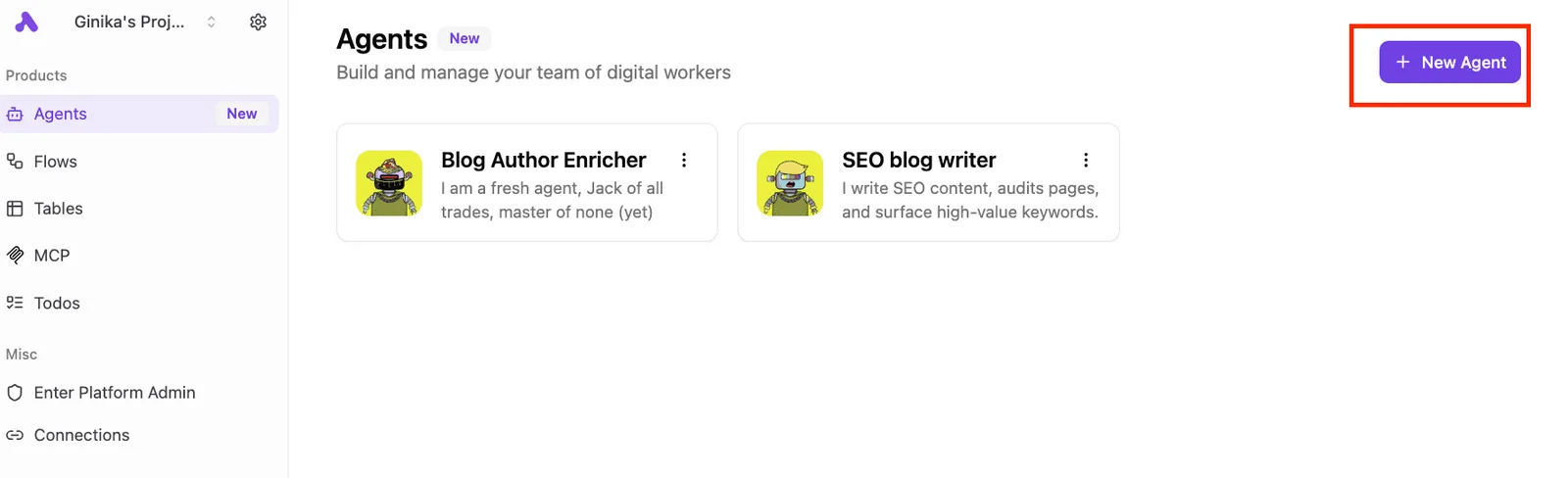
What to take from it is that an integration you connect in Activepieces runs two ways at once: as a step in a flow, and as a tool on the per-project MCP server.
It's the same integration action in both roles, and you can confirm that in packages/integrations in the MIT-licensed open source repo.
For a Chutes-backed client, that means nothing is wired twice.
The apps you connected for flows are already tools it can list, whether the client is Claude, ChatGPT, Cursor or an agent you built yourself, and the 747 integrations come with no export step, which means you don't lose your automations when you switch clients.
A catalog you have to re-integrate for your agents is a second migration, and this one skips it. The MCP entry is the one that matters for this article.
Next comes the practical consequence. Activepieces doesn't host a model, doesn't replace Chutes, and doesn't merge billing.
Chutes still bills for inference, and with your own AI keys on Plus ($20 a month) every AI step is 1 Activepieces credit while the model cost goes to your own provider bill, so your costs are split between platform and compute provider.
Whatever the connected apps charge is a separate matter, and so is what your Activepieces plan covers: the free plan includes 1,000 credits a month and unlimited flows. Three systems, three accounts, and your client is the only thing joining them.
When it fits and when it does not
It fits when the work you want the model to do already exists as an Activepieces flow. It also fits when you need a business app, such as a CRM or a spreadsheet, reachable without writing your own MCP server.
MoneyGram, Moneypenny, Alan and FundingSocieties run Activepieces in production.
You pick what to expose, and that selection is your first control over what a misread prompt can touch.
It doesn't fit if your tools already sit behind an MCP server that works.
Adding Activepieces then gives you a second hop to debug, a second set of credentials, and a second place for a tool call to fail silently, plus 1 credit for every flow run behind it, however many steps it has. Skip it.
It also fixes nothing about the model. A weak tool-calling model on Chutes stays weak with a well-built Activepieces server in front of it.
Chutes MCP rules and checks to add
Check the model, the tool server and the billing as three separate things, because the weak-model failure above shows no single setting covers all three.
- Run a one-call tool test against the exact Chutes model you will ship.
- Set the loop-iteration cap in your client.
- Set the spend cap on the Chutes account.
- Start every tool server read-only.
- Add an alert for empty responses.
- Name one person who owns the whole chain.
Before connecting: a one-call test
Send one prompt that requires one tool, with one expected set of arguments, and read the raw response.
If the model answers in prose instead of emitting a tool call, or mangles the arguments, you've learned the problem sits in the model half, and no amount of server work will fix it.
Chutes MCP agent caps and alerts while running
Nothing in the model or the server will stop a confused agent from retrying forever, so the loop-iteration cap lives in the client, which owns the loop.
Spend is capped separately, on the Chutes account, which won't know about tool-side costs. Keep tool servers read-only until the logs look clean, then open writes one tool at a time.
Alert on empty responses. A model that fails to call a tool often returns nothing at all, and nothing raises no error. Whoever gets that alert is your named owner, and the name goes in the runbook.
When the model you picked changes underneath you, MCP won't tell you, because models get added, repriced and retired. Reread the Chutes pricing and model list monthly, then rerun the one-call test on whatever you're actually using.
Common Chutes AI MCP questions
Read these answers as of 2026-11-11, because they come from vendor documentation, and anything that's changed since is stale and the one-call test outranks this page.
Does Chutes AI have its own MCP server? Treat it as no unless the Chutes docs list one on the day you check.
Chutes hosts models behind an inference endpoint, and the MCP tool server is a separate process your client launches. If a tool call fails, you're debugging the server, not the model. Source: Chutes documentation, checked 2026-11-11.
Which Chutes models support tool calling?
It varies by model, and the model list doesn't guarantee it for every entry.
Read the listing for the specific model, then send one request with a single tool definition and see whether you get a structured call back or plain text pretending to be one.
If a model answers in prose, it isn't wired for tools, whatever the client claims. Source: Chutes model listings, checked 2026-11-11.
Is Chutes AI MCP free to use? There's no single "MCP" charge to be free or paid.
Model usage is billed under your Chutes plan, the MCP server may carry its own pricing or API costs, and your client may bill separately. Add up all three before you call anything free.
Source: Chutes pricing page, plus each tool server's own terms, checked 2026-11-11.
Can I use Chutes with Claude Desktop or Cursor?
Both are MCP clients, so they can run tool servers. Whether they send requests to a Chutes-hosted model is a different question, and it depends on whether the client lets you set a custom model endpoint.
Claude Desktop is built around Anthropic's own models, so check its settings before assuming otherwise. Cursor's docs cover custom endpoints and MCP configuration separately. Source: each client's documentation, checked 2026-11-11.
Is it safe to give an MCP server write access? Not by default. Start read-only, scope the token to one project, and require confirmation on any call that changes data.
A model that misreads a tool description will act on the misreading with whatever permissions you gave it. MCP doesn't enforce least privilege for you. Source: the MCP specification's security guidance, checked 2026-11-11.