Doppler Pricing 2026: Plans, Limits and Costs

Nov 8, 202616 min read
Doppler pricing by plan
Doppler pricing and plan limits in short
Read the limits before you adopt it: Doppler's headline price is a per-user rate, but your real bill is set by caps on seats, projects, environments and integrations, and those caps tend to bite once you wire secrets into automation, whether through CI scripts or a workflow tool like Activepieces.

Doppler's a hosted secrets manager: a service that stores your passwords and API keys and hands them to your apps.
It's got three plans, and a small team can outgrow the first one without noticing, and then they're suddenly constrained by its limits, so they'll be mid-sprint when the wall hits.
Plan table: price, inclusions and limits
When you read the table below, it sets the three plans side by side on the six dimensions that decide cost.
It's read from doppler.com/pricing as of 2026-11-08, and it shows direction rather than exact caps, which you should confirm on that page before you commit.
What to take from it: the price per user is the smallest part of the story, and every limit column moves as you change plans.
| Plan | Price per user | Included users | Projects | Environments per project | Integration connections | Activity log retention |
|---|---|---|---|---|---|---|
| Developer | Free | Small fixed cap | Capped | Capped | Capped | Shortest |
| Team | Charged per user | Grows with paid seats | Higher cap | Higher cap | Higher cap | Longer |
| Enterprise | Quoted by sales | Set by contract | Set by contract | Set by contract | Set by contract | Longest, set by contract |
Prices and plan limits checked against doppler.com on November 8, 2026.
Hitting a cap means upgrading on Doppler's schedule, not yours. Each cap is a place where a growing team hits a wall.
Hitting a cap means upgrading on Doppler's schedule, not yours.
What the free tier does and does not cover
Once a fourth person, a second app or a staging copy arrives, the free Developer plan stops being enough.
It covers a solo builder or a very small team running one app. Those are normal events for a small team, and each one counts against a limit.
Whether your secrets feed a web app or a workflow built in Activepieces, Doppler's caps on projects and environments apply the same way; Activepieces' own free plan adds no cap on flows, only 1,000 credits a month and up to 5 users, so workflow design is unbounded but execution and collaboration are constrained.
If a key leaks and you need to know who touched it last month, the free plan's activity log is the shortest and may not reach back far enough.
Doing nothing about this costs you at the worst moment, an incident, which is when you can least afford to learn the limit.
The fix is cheap: count your people, apps and environments today, then compare them with the table before you sign up.
If you are running this arithmetic for your own team, see what the same workload costs on Activepieces.
What Each Doppler Plan Costs at Realistic Usage
Seats set your bill first. A solo builder pays little, a small team pays per head, and a larger team needing single sign-on (SSO) may be pushed to a plan you can't price from a list.
Doppler cost for a solo developer
At $21 a month for one person on the Team plan, a side project carries a fixed monthly charge before it earns anything, so the project has real costs before generating revenue.

Check the project and environment limits on your plan before you build. A solo builder with a staging copy and a production copy is already using more than one environment.
The cost of skipping that check is a surprise at the exact moment you add a second app.
Five-person team with dev, staging and production
Here the price is seats multiplied by the rate, and the three environments are what you check against the limits, meaning any rate change affects all your seats immediately.
Ten seats cost $210 a month, or $300 with roles, so the add-on raises the bill by roughly 43 percent.
If your contractor should only see development secrets, you need roles, and you should budget for them from day one. A five-person team lands between the 3-seat and 10-seat bars.
Because the cost grows in a straight line, the surprise comes from the add-on and the limits, not from the seat count.
Twenty-person team that needs SSO and audit logs
At 25 seats the chart reaches $525 a month, or $750 with roles, so role management costs an extra $225 monthly.
But SSO and audit logs are the two features to confirm on the plan page before you assume Team includes them. I don't have a confirmed price for any plan above Team, so I won't guess one.

If the tier you need is priced by quote, ask for the quote before you migrate.
Moving 20 people's secrets and then learning the real price is the expensive order to do it in. Doing the sums first costs you an afternoon, and doing them afterwards costs you a migration.
Doppler usage limits and costs
The bill grows through seats first, then through limits and gated features that force you onto the next plan. You meet most of them after you've already moved your secrets in.
Doppler per-user seat costs as teams grow

Developer includes 3 users, so a fourth hire means paying $8 a month for an extra user. On Doppler's pricing page, the monthly bill depends on team size and on whether you add the $9 custom roles add-on:

| Team size | Without roles | With roles |
|---|---|---|
| 3 people | $63 | $90 |
| 10 people | $210 | $300 |
| 25 people | $525 | $750 |
At every size the add-on adds the same 43 percent, because it costs the same per person.
Doppler plan limits that force an upgrade
Several limits tend to catch small teams. Developer includes 3 users, so the fourth person adds $8 a month. Projects are capped at 10, which a team running several small apps can use up quickly.
With environments capped at 4 per project, you can cover development, staging and production but have no room for a per-branch or QA environment.
SSO is gated, and your security-minded customers may ask about it first. Secret rotation matters the day someone leaves the team. The support tier decides whether an outage gets a person or a documentation link.
Doppler audit log retention by plan
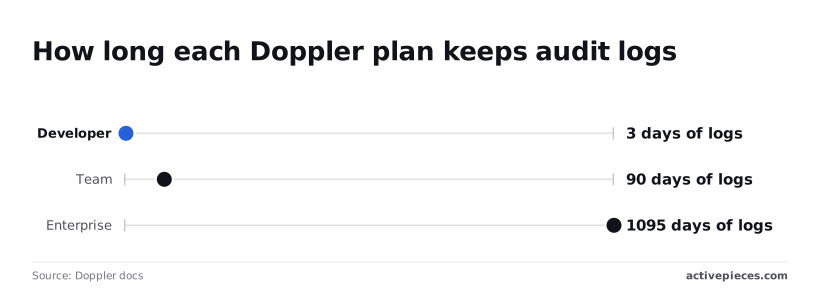
Per Doppler's platform limits, Developer keeps 3 days of logs, so anything older than a long weekend can't be looked up.
Team keeps 90 days, which covers most incident reviews but falls short of an annual audit, meaning full-year compliance reviews require either exporting data or upgrading tiers. Enterprise offers custom activity log retention, which means your incident history can be kept to survive multiple annual audit cycles.

If a customer asks for a SOC 2 report, the log history you'll need to show them only exists on the top plan.
The break-even point for the next plan
"$27 a month at 3 people, $90 at 10 and $225 at 25: that is what the add-on costs, and each additional team member adds $9 monthly for this add-on, which means every new hire permanently increases this monthly bill."
Once that add-on alone approaches the gap between your Team bill and an Enterprise quote, the higher plan is the cheaper one. It includes the controls you were buying piecemeal.
Ask for the Enterprise quote before you hire. Count the migration time as part of the price, because moving secrets out of a hosted service is work you pay for in hours.
Worth checking against a plan that does not meter every step: one credit covers a whole run on Activepieces.
Doppler versus other secret managers
While your team stays small and you want someone else to run it, Doppler's cheapest. As headcount grows, or if you can run the software yourself, a usage-based or self-hosted tool often costs less.
To see what your bill does as people join, look at how each tool charges in the table below. It carries no dollar figures, because prices change. Take the pricing basis from it, then put your own headcount into each vendor's current pricing page.
| Tool | Entry price | Pricing basis | Free tier | Self-hosting | Cost at 5 and 20 people |
|---|---|---|---|---|---|
| Doppler | Free plan, then paid per person | Per seat, with project and environment limits per plan | Yes, with tight limits | Hosted; on-prem only on Enterprise | Predictable at 5 if you stay under the caps; climbs steadily with each person by 20 |
| Infisical | Free plan, then paid | Per person or machine identity on the hosted version | Yes | Yes, with some features reserved for paid editions | Similar to Doppler hosted; near the cost of your own server if you self-host |
| Vault | Free to run yourself; HashiCorp also sells a hosted version | Hosted version billed by cluster size, not by person | Self-hosted community edition | Yes | Headcount barely moves the bill; the cost is the person who maintains it |
| AWS Secrets Manager | No monthly minimum | Per secret stored, plus per API call | No standing free plan | No, AWS only | Tracks how many secrets and lookups you have, not how many people |
When Doppler per-seat pricing wins
A per-seat price wins when you have few people and many secrets. Five developers sharing a few dozen keys pay for five seats however often the app reads them, so the bill is easy to forecast. You also avoid hiring anyone to run it.
Check the project and environment limits before you commit, because those caps, not the seat price, are what push a small team up a plan.
When usage-based or self-hosted secret managers win
Usage-based pricing wins when headcount is high and secrets are few. Twenty people reading a small set of keys cost AWS Secrets Manager almost nothing extra, while a per-seat tool charges for every one of them.
Self-hosting wins when someone already runs your servers. Otherwise, the cost of doing nothing about upkeep is an outage the day the secrets service goes down.
Automating Doppler Change Alerts With Activepieces
Activepieces won't lower your Doppler bill, but it can make sure someone hears about a changed secret or a failed sync before an outage does the telling.
It's optional, and a small team can skip it and lose nothing on price; its free plan is $0 with 1,000 credits a month if you do want it.
If you do want the alerts, Activepieces can receive webhooks from Doppler and turn them into messages in Slack, email or a ticket. It has an MIT-licensed core, 747 integrations counted in its public GitHub monorepo, and unlimited flows on every plan, free included.
That means your team learns the same day that a key was edited or a sync stopped, instead of finding out when an app starts failing.
Before building anything, check Doppler's documentation to see whether webhooks are available on your plan. That's a seat-and-plan question like the others in this article, and it's better answered before you build than after.
Secret manager integration limitations
One boundary is worth stating plainly.
Activepieces' integration with external secret managers is an enterprise feature, listed in the enterprise governance set alongside SCIM, custom RBAC, SSO/SAML and audit logs, and "secret managers" appears by name in the feature list of the Ultimate plan on the Activepieces pricing page, which is priced through sales.
Point a self-hosted instance at your own secret manager and the connection credentials are absent from the Activepieces database, which is the table you can open and read.
So this workflow doesn't pull secrets out of Doppler into Activepieces. It only listens for Doppler's notifications. If you wanted Activepieces to read your secrets directly, that would sit on the Ultimate plan or the enterprise control tier, both quoted by sales.
The sketch below shows the whole shape. A Doppler project sends a webhook to an Activepieces flow, and the flow fans out to a Slack message, an email and a ticket, which costs 1 credit a run however many steps it has.
Read it as one signal in, three places it can land, and pick only the ones your team will actually watch.
What the workflow does
Doppler sends a notice when something in a project changes. Activepieces catches it in a flow and passes it along.
You choose where it goes: a Slack channel for quick visibility, an email to whoever owns the project, a ticket if changes need a paper trail.
Most small teams need only one of the three. Start with the one people already check every day.
When Doppler change alerts aren't worth building
If one or two people manage all your secrets and already sit in the Doppler dashboard, the alerts tell them what they just did. Skip it.
The same goes if your Doppler plan doesn't include webhooks, since you would be paying for a higher tier just to get a notification.
And a flow is one more thing that can break quietly. If nobody will own it, the upkeep cost from the previous section applies to the alert system too.
A Monday Checklist for Choosing a Doppler Plan
Count first and price second. Six checks, done in order, tell you which Doppler plan you need and what it will cost before a surprise bill or a missing feature finds you.
- Count the people who need access and the environments (development, staging, production) you run.
- List the features you can't do without: single sign-on, audit log retention, secret rotation.
- Compute the monthly cost from the prices on the pricing page.
- Work out where the next plan up becomes cheaper than adding more seats to this one.
- Confirm every term on doppler.com/pricing, since plans change.
- Trial the free tier on one non-critical project.
For its Developer plan, the figures below come from Doppler's pricing page.
| Item | Developer plan | What it means for you |
|---|---|---|
| Base price | Free for 3 users | A team of three pays nothing for seats |
| Extra users | $8 a month each | A team of five pays for two extra seats, $16 a month |
| Activity log retention | 3 days | A problem noticed after a long weekend may leave no trail to read |
The seat math is the easy part. The retention line is the one to weigh against how fast your team notices trouble.
Whether the next plan up is worth it depends on its price and on what you need from it, so read that on the pricing page rather than guessing.
The free tier covers a small group working on a real project, and that's enough to learn whether the tool fits how you work.
Once the fourth person joins your team, the $8 meter starts, and anything that depends on longer log history or other features will need a plan check first. Growth is not what the free tier is for.
Pick one project where an outage costs you nothing, move its secrets over, and have everyone who will use it log in. If your required features from step two are missing, you'll find out in an afternoon rather than after you've moved production.
Frequently asked questions
Once you've run the afternoon test, a handful of questions usually remain. These four are the ones the steps above leave open:
- Is Doppler free?
- What happens once you pass the included seats?
- Do webhooks depend on your plan?
- Does annual billing change the price?
What I can answer and what to check
The first two are answered below. For the last two, I won't guess: both are plan-level details, so read them off the current pricing page for the exact plan you are considering.
The remaining answers follow the same rule: what I can say plainly, and what to check.
Free plan limits
Is Doppler free for small projects? Yes, there's a free plan, but it comes with caps on seats, projects and environments. A solo developer with one app often fits inside it.
A team that adds a staging environment, a second app or a contractor can hit a cap quickly, so count those three things before you assume the bill stays at zero.
What drives the price
Does Doppler charge per seat or per secret? The cost is driven by people and by how your work is organised, not by how many secrets you store.
Adding a teammate or a new project moves you toward a paid tier. Adding another API key doesn't.
Self-hosting
Can you self-host Doppler to avoid the subscription? Doppler is sold as a hosted service for small teams, and an on-prem option is available only on the Enterprise plan.
If self-hosting is a hard requirement, ask Doppler's sales team directly rather than assuming it exists, because the answer changes which tools belong on your shortlist.
Downgrading a plan
What happens to your app if you downgrade a Doppler plan? Because plan limits decide what you can keep and edit, a downgrade can leave you over a cap.
Before you downgrade, export your secrets and read what Doppler does with anything beyond the new limits. Doing nothing about this can mean a deploy fails on the day you can least afford it.
Doppler versus AWS Secrets Manager on cost
Is Doppler cheaper than AWS Secrets Manager for a small team? It depends on which number is bigger for you, people or secrets.
AWS Secrets Manager charges by the secret stored and by usage, while Doppler charges by seat and plan. A small team with many secrets tends to favour Doppler. A larger team with few secrets can come out ahead on AWS.
Related reading
References
Running the numbers
See what the same workload costs here.
Free forever plan, and every paid plan self-hosts at no extra cost.
See pricing Talk to sales