Honeycomb Pricing 2026: Plans, Costs & Free Tier

Nov 8, 202614 min read
Honeycomb is an observability service that bills by the volume of events your application sends it, not by hosts or seats.
Your cost is spans per request multiplied by requests per month, and that holds whether those requests come from users or from background automations such as workflows built in Activepieces.
Honeycomb pricing is the usage-based billing model in which each plan's cost is set by the number of events (trace spans and structured logs) your application sends per month, so the sticker price of a tier matters less than your event volume and sampling rate.
Honeycomb pricing today and how it's charged
Honeycomb pricing summary as of November 2026
As of 2026-11-08, honeycomb.io/pricing shows a free tier and paid plans above it, and every plan is metered on events. The plan name sets your allowance and features; your instrumentation sets how fast you use it up.

What counts as a billable event
Here's what Honeycomb counts and what it leaves off the bill:
- Each span in a trace is one event, so a request that passes through many instrumented calls is billed once per call.
- Each structured log event you send is one event, so verbose logging has a direct price.
- Each event derived from a metric is one event, so high-cardinality metrics converted this way add to the total.
- Seats and querying aren't billed as events, so adding teammates or running more queries doesn't raise the count.

You control the first three in code. That's why sampling, which decides how many of those events leave your app at all, matters more to the bill than the plan you choose, and it's where the comparison with alternatives gets decided.
If you are running this arithmetic for your own team, see what the same workload costs on Activepieces.
Every current Honeycomb plan, price and limit
Honeycomb sells three plans, Free, Pro and Enterprise, and the only limits that are clearly published are the event allowances, which is the number your sampling rate controls.
Plan comparison table
Start with the events row, because it's the only row where the plans are separated by a figure you can plan around.
The table shows each plan's published limits side by side. Every cell marked contact sales is a number you can't budget until someone answers an email.
| Free | Pro | Enterprise | |
|---|---|---|---|
| Price | Free | Starting at $150 per month | Contact sales |
| Events per month | 20M | 50M to 750M | Contact sales |
| Data points | Contact sales | Contact sales | Contact sales |
| Seats | Contact sales | Contact sales | Contact sales |
| SLOs | Contact sales | Contact sales | Contact sales |
| Support | Contact sales | Contact sales | Contact sales |
| SSO | Contact sales | Contact sales | Contact sales |

Only the event range is something you can use today. A 50M to 750M Pro band is a fifteen-fold spread.
Look at the gaps before the filled cells. I wouldn't sign off a budget with a price column that reads contact sales, because a plan you can't price is a plan you can't compare against alternatives.
Three gaps change the answer most:
- Without Pro's price at a given event volume, you can't compute a cost per million events, which is the unit this whole comparison runs on.
- If seats are capped, headcount becomes a second cost driver the volume argument ignores.
- If SSO or SLOs are reserved for Enterprise, a security requirement forces you into the one plan with no published price.
What Honeycomb costs for a small production app
Under 20M events a month, a small production app pays nothing; at 50M it pays about $150, then roughly $3.00 for every additional million.
Events equal requests times spans per request times the share you keep after sampling. A request that produces 10 spans is 10 events, so 1M requests a month is 10M events.

Sampling at 50% halves that. Count spans from your tracing setup before you pick a plan.
Example Honeycomb bills at different traffic levels
At 1M requests and 10 spans each, a side project sends 10M events, under the 20M free line, so the bill is $0.
A five-person team with 5M requests at 10 spans sends 50M events, which Honeycomb's Pro pricing puts at $150 a month. A busier product with 25M requests at 10 spans sends 250M events and pays $750 a month.
The takeaway is that the line is straight: no volume discount shows up in the published rate.

Because it's straight, doubling volume doubles the bill. 100M events costs $300, and 750M costs $2,250 a month.
The point where the next plan is cheaper
At a flat $3.00 per million, the next plan is cheaper once its quoted monthly price divided by $3.00 is below your event count. Pro's published price starts at $150 a month, so a crossover can be computed.
If the answer needs a sales call to decode, sample harder first.
Hidden Honeycomb costs and limits teams hit
When a Honeycomb bill surprises you, the cause is usually event count. Each of these costs is a way your event count grows or a way the plan caps what you can do with it.
How auto-instrumentation inflates Honeycomb event counts
One user request can become dozens of events before you write any code, because auto-instrumentation wraps each HTTP call, database query and framework hook in its own span. Honeycomb bills on events, and every span's an event.
Your bill then tracks how deep your call graph runs, not how many requests you serve. Check the per-request span count in a staging trace before launch, and turn off the instrumentation libraries you don't read.
Your bill then tracks how deep your call graph runs, not how many requests you serve.
Honeycomb data retention and dataset limits
If you investigate incidents weeks later, or compare against last quarter's behavior, the retention window decides what you can answer. It's a fixed window set by your plan, so data past it is gone.
Datasets carry limits too, and a team that splits one service into many datasets can hit them sooner than expected.
Honeycomb overage charges and ingest throttling
Past your plan's allowance, events are billed as overage, and the rate depends on whether you're on current or legacy pricing. Overage is where a traffic spike or a noisy retry loop turns into a real invoice.
Ingest throttling is the other side: if you exceed limits, Honeycomb can slow or drop incoming events. That protects your bill but can leave a gap in the data during the very incident you're debugging.
Some features sit behind higher tiers, SSO among them. A small team can outgrow its plan because a security review requires single sign-on, not because traffic grew.
Price that upgrade before you commit.
Worth checking against a plan that does not meter every step: one credit covers a whole run on Activepieces.
Honeycomb against Datadog, Grafana Cloud and New Relic
Before prices compare, you need to know what each vendor counts.
The four here count different things, so the table below sets out the unit, the free tier and what inflates each bill. It carries no dollar figures, because the unit matters more than the sticker.
| Honeycomb | Datadog | Grafana Cloud | New Relic | |
|---|---|---|---|---|
| Pricing unit | Events per month | Hosts, plus separate fees per product | Usage by data type: metric series, log volume, trace volume | Gigabytes ingested, plus paid users |
| Free tier | Yes, capped by event count | Yes, limited in scope | Yes, with caps per data type | Yes, capped by ingest |
| Entry paid price | Plan tier set by event volume | Per host, per product | Pay-as-you-go beyond the free caps | Ingest beyond the free cap, plus per full user |
| Retention | Set by plan | Differs by product | Differs by signal | Differs by data type |
| What grows the bill fastest | Unsampled traffic and wide events | Host count and added products | Metric series and log volume | Ingest volume and full-platform seats |
| Best suited to | Small teams debugging high-cardinality problems, willing to sample | Teams wanting infrastructure, logs and tracing from one vendor | Teams already running Prometheus or other open-source tooling | Teams with few engineers and a predictable data flow |
Read the "grows fastest" row before any other. A host-priced bill climbs when you add servers, while an event-priced bill climbs when you add traffic, and a traffic spike hits Honeycomb hardest unless sampling is in place.
That makes Honeycomb the wrong choice in two cases. If your app is a handful of hosts doing enormous request volume and you can't or won't sample, per-host pricing may be cheaper.
If you need infrastructure metrics and logs in the same tool, you'll be stitching products together or paying for a second vendor.
Before you trust any cell, check the vendor's own pricing page on the day you decide, since each of these vendors changes plans often.
Routing Honeycomb alerts into workflows with Activepieces
Your Honeycomb bill won't move because of Activepieces.
It only decides where an alert goes after Honeycomb fires it, and with an MIT-licensed core and 747 integrations it covers a lot of destinations, so it belongs in the stack only if your routing needs outgrow what Honeycomb already does itself.
Since the units above only forecast once you've counted your own events, treat this as a question of plumbing, not of cost.
When Honeycomb's native alert integrations are enough
If an alert needs to land in one Slack channel, or page one on-call tool, Honeycomb's own notification integrations already do that.
Adding a workflow tool in between means one more service to run, one more place for an alert to fail silently, and one more thing to debug at 3 a.m.
For a small team with a single destination per alert, the cheapest path is the one with the fewest hops, and that's the native integration.
You also gain nothing on volume. Your trigger and SLO alerts fire at the same rate whether they go straight to Slack or through a flow. Event count and sampling still set the bill, and no routing layer touches either.
What a webhook-driven workflow adds
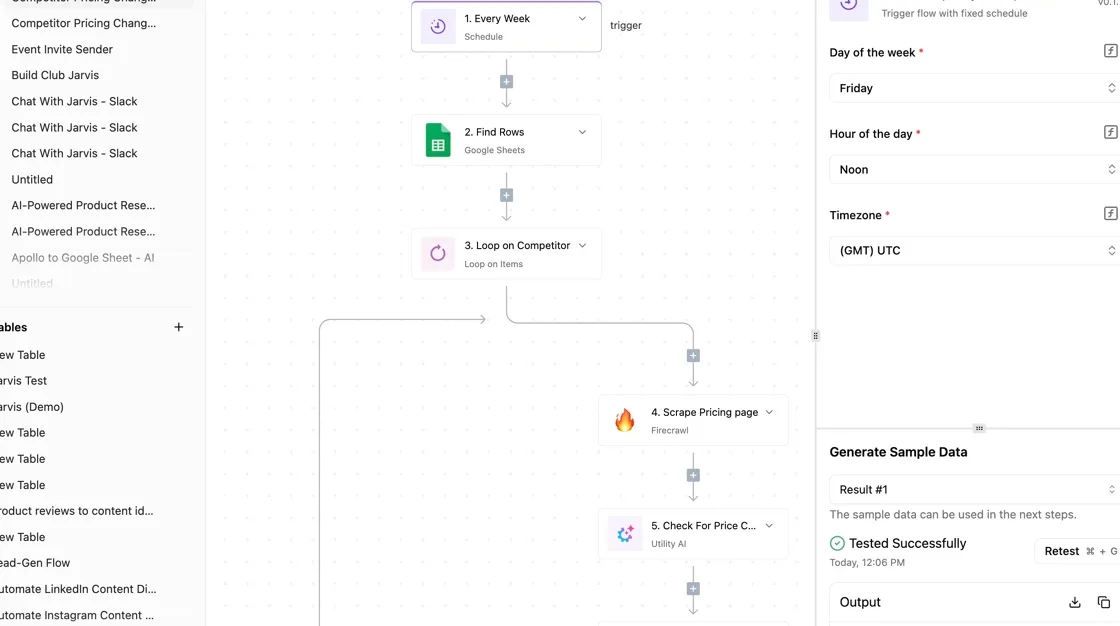
When one alert has to do several jobs at once, a webhook starts to matter. Honeycomb triggers and SLO alerts can send a webhook, and Activepieces can receive it as the start of a flow.
Flows are unlimited on every plan, including free, so one flow per alert type doesn't run into a cap.
Read it as one alert fanning out to three destinations, with the branching logic living in the flow rather than in Honeycomb.
Activepieces' published pricing is 1 credit per flow run, whatever the number of steps, so that three-way fan-out costs one credit, the same as a lone Slack post, and the free plan's 1,000 credits a month cover 1,000 such alerts.

AI steps cost more credits, so the fan-out is flat only when it has none.
You can keep Honeycomb alerts simple and put the rules elsewhere:
- Page on-call only for the SLO burn
- Open a ticket for the slower trigger
- Post both to Slack
Changing who gets told then means editing a flow, not every alert definition.
What follows from this is a narrow recommendation. Start with native integrations, and add Activepieces when you catch yourself wanting one alert to reach several systems with conditions between them.
The free plan costs $0 and takes up to 5 users, so trying it before you commit costs nothing.
A Monday plan for keeping Honeycomb costs down
Spend Monday on six steps that cut events before Honeycomb counts them. Event volume is the meter, and an alert that fires on a bill nobody controls is just a warning.
The list runs from the free check to the one that needs a price conversation:
- Read last month's event count.
- Add head or tail sampling, using Refinery if you want tail decisions.
- Drop health-check spans.
- Trim attributes nobody queries.
- Set a usage alert.
- Compare your trimmed volume to the next tier before renewal.
Pull last month's event count and split it by service. One chatty service usually produces most of the total, so that's where sampling pays first.
Sampling and filtering to cut Honeycomb events
Decide when a trace starts and you have head sampling: cheap, but blind to whether the trace later errors. Tail sampling decides after the trace finishes, so you keep every error and slow request and thin out the fast successes.
Refinery is Honeycomb's sampling proxy for this, and the cost is one more service you run.
Drop health-check spans next. Load balancers ping constantly, the spans tell you nothing, and each one still counts as an event.
Trim attributes last. Billing follows event count, so this saves less on the invoice than dropping spans does. It mostly keeps events readable.
Set the alert below your plan's event limit, so you hear about a spike while there's still room to sample harder. Then put a review date on the calendar ahead of renewal.
Compare your trimmed volume with the next tier's threshold, and ask for the overage rate in writing rather than accepting a sales call as an answer.
Frequently asked questions
Is Honeycomb free?
Is Honeycomb free to use? Yes, there's a free plan, but it's capped by event volume rather than by seats or a trial clock.
A small app can stay on it indefinitely, while a chatty one outgrows it fast. Count the events your app emits per request before assuming you fit, because that count decides it, not the plan name.
Per-user charges
Does Honeycomb charge per user? No, the bill follows events, not people, so adding a teammate or contractor doesn't by itself raise it.
The catch is indirect: more people querying tends to mean more instrumentation, and more instrumentation means more events. Confirm the seat terms for your specific plan on the pricing page before you budget around them.
Exceeding your event limit
What happens if I exceed my event limit? It depends on your plan, which is why the overage rate is the number to get in writing.
Paid plans generally bill the extra events at an overage rate, while a free plan stops short of a bill and limits what you can send.
Sampling is your first lever: dropping low-value events, such as health checks and successful fast requests, cuts volume before the meter sees it.
Changing plans mid-month
Can I change Honeycomb plans mid-month? Plan changes are generally possible during a billing period, but that's a billing-terms question, not a guess.
Ask support to state the proration in writing before you move. Do that before a traffic spike, not after, since an upgrade timed badly can cost you twice.
Honeycomb versus Datadog
Is Honeycomb cheaper than Datadog? It depends on your event volume and how much you sample. Datadog prices by host and by product, so a few hosts with heavy telemetry can favor one vendor, and many hosts with light telemetry the other.
Run the arithmetic on your own volume for both. If either vendor needs a sales call to produce the number, treat that as a cost too.
Related reading
References
Running the numbers
See what the same workload costs here.
Free forever plan, and every paid plan self-hosts at no extra cost.
See pricing Talk to sales