
Open Source Alternatives to Azure Logic Apps

Oct 3, 202613 min read
Organizations embedded in the Microsoft ecosystem typically rely on Azure Logic Apps as their primary integration platform as a service (iPaaS). It provides a low-code environment to connect disparate cloud and on-premises services.
Use azure logic apps for enterprise automation
It's the glue for complex enterprise architectures, though the shift toward open-source engines like Activepieces suggests a growing demand for platforms that prioritize resource efficiency.
With an MIT licence on the core, the platform allows teams to inspect the engine's resource usage directly rather than relying on proprietary black-box metrics.
The designer-first workflow engine
By using a visual designer, the platform abstracts away the underlying JSON code. This allows architects to map business logic without writing boilerplate integration scripts.
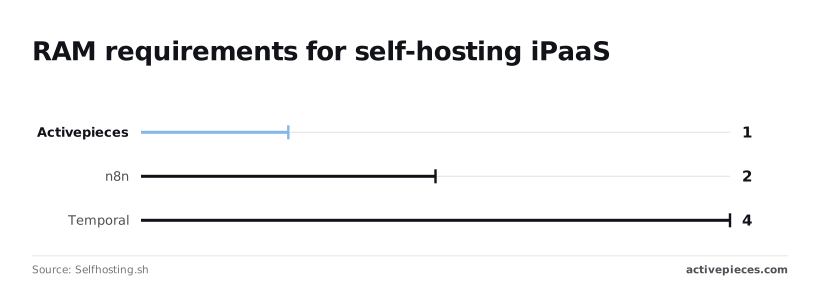
While this speeds up initial deployment, it forces teams into a specific infrastructure footprint. According to data from Selfhosting.sh, different automation engines require vastly different baseline resources to maintain stability:
| Engine | Minimum RAM (GB) | Minimum CPU (Cores) |
|---|---|---|
| Activepieces | 1 | 1 |
| n8n | 2 | 8 |
| Temporal | 4 | 16 |
1GB of RAM is all that Activepieces requires, as shown above.
Automation Atlas notes that Temporal demands 4GB of RAM and 16 CPU cores. Following these requirements ensures the engine doesn't crash during peak execution bursts.
Azure logic apps pricing tiers explained
To balance cost against performance predictability, Azure splits its service into two distinct billing models. The Consumption tier bills per action execution. A recursive loop that accidentally runs 10,000 times will result in a surprise bill.
Dedicated compute resources are granted by the Standard tier, which uses a fixed-price hosting model. This requires the user to pay for the "always-on" capacity regardless of whether a single workflow runs.
For enterprise budgeting, this Standard tier introduces absolute cost predictability across high-volume environments. This fixed-fee structure allows infrastructure teams to treat automation as a stable, forecasted line item.
Managed connectors and triggers in logic apps
Managed connectors act as pre-built API wrappers for external services like the Salesforce CRM or the Jira project management tool. They remove the need to manually handle OAuth 2.0 handshakes.
Every time a "trigger" (such as a new email arriving in an Outlook inbox) polls a service for new data, it counts as an execution.
Because these connectors are proprietary and hosted by Microsoft, the user sacrifices granular control over data residency. The user gains the convenience of not maintaining the underlying API integration code.
The fastest way to settle a shortlist is to try one. Activepieces is free to try, no credit card.
Why businesses seek open source alternatives
Logic Apps users increasingly pivot toward open-source models to reclaim control over their infrastructure and eliminate the "cloud tax" on every automated step.
The case for staying with azure logic apps
Azure Logic Apps remains the gold standard for deep integration within the Microsoft 365 and Azure environments. The platform offers native, high-performance connectors for services like Azure Key Vault and Service Bus that open-source tools often struggle to replicate with the same level of security.
Enterprises with strict compliance requirements benefit from Microsoft’s global footprint and built-in certifications. The platform handles the heavy lifting of regional data residency and disaster recovery.
Native integration and security
The platform excels at managing identity through Azure Active Directory without requiring external secrets management. Because the engine is a first-party service, it can use Managed Identities to access other Azure resources, ensuring that no credentials ever exist in the workflow code.

This native security model reduces the attack surface for enterprise integrations. A security architect can enforce policies that prevent data from leaving the Azure tenant, a level of control that is difficult to mirror when using third-party or self-hosted engines.
Furthermore, the Standard tier allows workflows to deploy directly within an Azure Virtual Network (VNet). This ensures that all data traffic remains entirely isolated from the public internet, satisfying strict corporate data sovereignty mandates.
Logic apps uptime and reliability at scale
Microsoft manages the underlying serverless infrastructure, providing a 99.9% availability SLA that covers both the engine and the managed connectors, so businesses can offload the burden of uptime maintenance to the provider.
For organizations that process millions of events daily, the ability to offload infrastructure maintenance to a global provider is a significant advantage. The platform scales automatically to meet demand, ensuring that mission-critical business processes do not fail due to local resource exhaustion.

This managed elasticity eliminates the need for an internal DevOps team to monitor container health or database replication. When a sudden transaction spike occurs, Azure provisions the necessary underlying compute instantly and transparently.
Escaping the Azure ecosystem lock-in
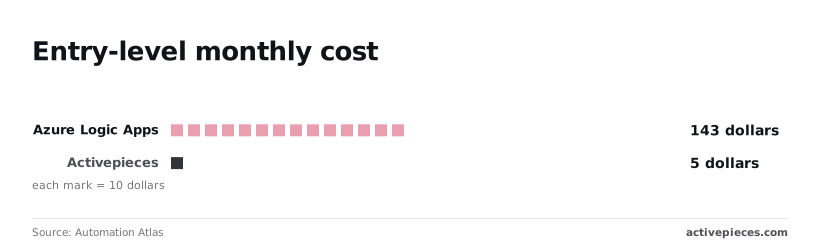
A dependency on the Microsoft ecosystem is forced when choosing Azure Logic Apps, where their proprietary JSON-based workflow definition language traps your entire automation logic. Automation Atlas reports that the complexity of these managed environments is reflected in 143 distinct configuration options.
Basic triggers will not function unless an ops manager masters a massive surface area. If you ever need to leave Azure, you can't simply export your workflows to a different cloud provider without a complete manual rewrite.
Predicting costs at high execution volumes
Successful scaling turns into a financial liability under the per-action billing model in Logic Apps. Every loop, condition, and variable initialization adds to the monthly invoice.
Successful scaling turns into a financial liability under the per-action billing model in Logic Apps.
Activepieces addresses this by decoupling the complexity of the workflow from the cost of running it.
Its published pricing page shows a model of 1 credit per flow run regardless of the number of steps, which contrasts with the per-task or per-module billing found on the Zapier and Make pricing pages.
The following table demonstrates how these structural differences impact the operational overhead of an automation stack:
| Dimension | Black Box (Logic Apps) | Open Source Alternatives |
|---|---|---|
| Data Sovereignty | Cloud-only (Microsoft Data Centers) | Self-hosted (On-prem or Private Cloud) |
| Cost Predictability | Per-execution (Usage-based spikes) | Flat/Self-hosted (Fixed infrastructure) |
| Portability | Locked to Azure Resource Manager | Containerized (Docker/Kubernetes) |
Data residency and self-hosting requirements
The inability to self-host Logic Apps creates a compliance bottleneck for industries like healthcare or fintech. Sensitive PII (Personally Identifiable Information) must traverse Microsoft’s public multi-tenant infrastructure.
Activepieces provides a path for these regulated environments by offering an air-gapped edition that maintains feature parity with its cloud offering. The self-hosted documentation lists the same enterprise features (including SSO, SCIM, custom RBAC, and secret manager integration) as the managed cloud version.
Organizations like MoneyGram and FundingSocieties run this in production to maintain full control over their data residency.
By moving to an open-source framework, teams can keep data entirely within their own Virtual Private Cloud (VPC).
Choose paths for replacing logic apps
Matching the architectural pattern to the specific technical debt you're trying to retire is required when selecting a replacement for Azure Logic Apps.
Visual-first platforms for business operations
Visual-first platforms replace the "drag-and-drop" convenience of Logic Apps while eliminating the opaque pricing of the Consumption tier.
Activepieces offers 735+ integrations in its open source monorepo, with roughly 60% of those contributed by the community, so users have access to a vast ecosystem of connectors built by peers.
A DevOps team can automate common SaaS handshakes without writing a single line of authentication boilerplate.
Roughly 100+ integrations each are provided by competitors like Zapier and Pabbly, as Softlist notes.
While Azure maintains the highest raw count, the open-source alternatives allow for self-hosting.
Orchestration engines for complex state management
Workflows that might last for weeks or involve thousands of retries are the specialty of orchestration engines like Temporal or Camunda. Unlike Logic Apps, which has a 90-day maximum run limit, these engines store state in a persistent database.

A workflow can survive a full server cluster reboot without losing its place. This path is strictly for engineering teams, as it lacks a visual designer.
Every step is defined in code (Java, Go, or TypeScript). You trade the "citizen developer" accessibility for a 100% predictable execution flow that can be unit-tested like any other microservice.
Data-centric tools for high-volume synchronization
Data-centric tools like Airbyte or Fivetran are a more robust replacement for Logic App "Batch" triggers when the goal is moving massive datasets. Logic Apps often timeout when processing JSON payloads exceeding 100MB.
Specialized engines use stream-based processing to handle gigabytes of data. By moving synchronization tasks to a dedicated ELT tool, you prevent your operational workflows from being throttled by heavy compute requirements.
Reading a table only gets you so far. Build the same workflow in Activepieces and compare it yourself.
Migrating your first workflow to Activepieces in thirty minutes
Activepieces provides unlimited flows on every plan, including free, which replaces the opaque, variable costs of Azure Logic Apps with a predictable environment where you control the execution limits.
While Logic Apps forces you into a specific resource group and billing tier before you can even send a test ping, this open-source alternative runs as a single containerized stack on your own infrastructure.
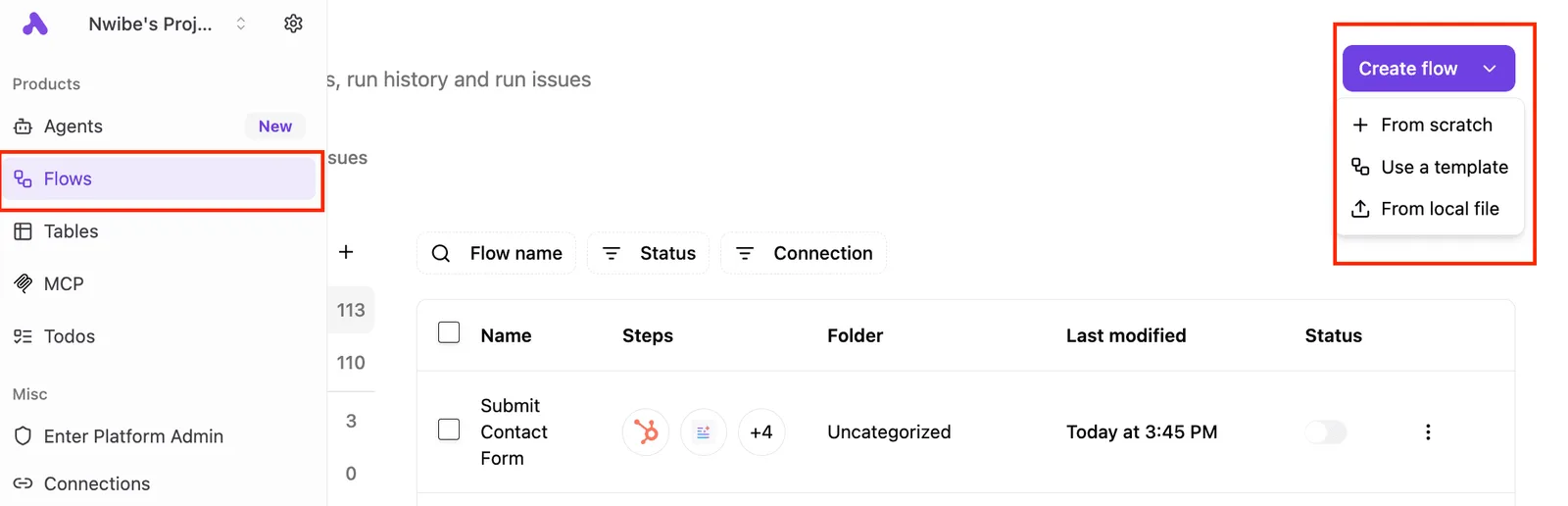
Deploying the instance via Docker Compose
Self-hosting ensures that sensitive payload data never leaves your virtual private cloud, eliminating the compliance headaches of third-party data processing agreements.
- Pull the Activepieces Docker image to ensure you're running the latest stable build.
- Configure the environment variables for Postgres and Redis so the system has persistent storage for your workflow history.
- Launch the container to initialize the web-based dashboard on your local or server port.
- Authenticate and create a new flow to establish your first workspace.
- Map the HTTP Trigger to the incoming request to begin receiving external data.
Self-hosting ensures that sensitive payload data never leaves your virtual private cloud, eliminating the compliance headaches of third-party data processing agreements.
Once these containers are healthy, you've got a functional automation backend that doesn't charge you a premium for every successful "step" executed.
Configuring your first secure connection
Managing credentials in Activepieces avoids the "connector sprawl" common in Azure, as the platform's 24,473 GitHub stars reflect a community-driven approach to streamlining how integrations handle sensitive data.
You provide specific API keys or OAuth tokens directly within the integration configuration instead of using global service principals. This isolation means that a compromised key for a single marketing tool can't be used to pivot into your core cloud infrastructure.
Building a webhook to spreadsheet automation
Replicating a standard "Webhook to Spreadsheet" flow demonstrates how the platform handles data mapping without the complex JSON Schema requirements of Logic Apps.
- The HTTP Trigger provides a unique URL that accepts POST requests.
- The Data Mapper allows you to drag-and-drop fields from the incoming request directly into spreadsheet columns.
- The Test Flow button executes the logic against real data immediately.
This setup mirrors the functionality of a Logic App but keeps the execution logs on your own disk.
How to start your open source migration
Identifying high-cost, low-risk workflows allows you to prove the migration's ROI without risking production downtime.
The most effective migration candidates share specific characteristics:
- Workflows currently on the 'Consumption' tier with high variable costs.
- Internal utility scripts with no customer-facing SLA.
- Flows requiring custom npm packages not supported in the standard Logic Apps environment.
Moving these specific tasks first ensures that any initial configuration hurdles only affect internal team dashboards.
Auditing your current Azure connector usage
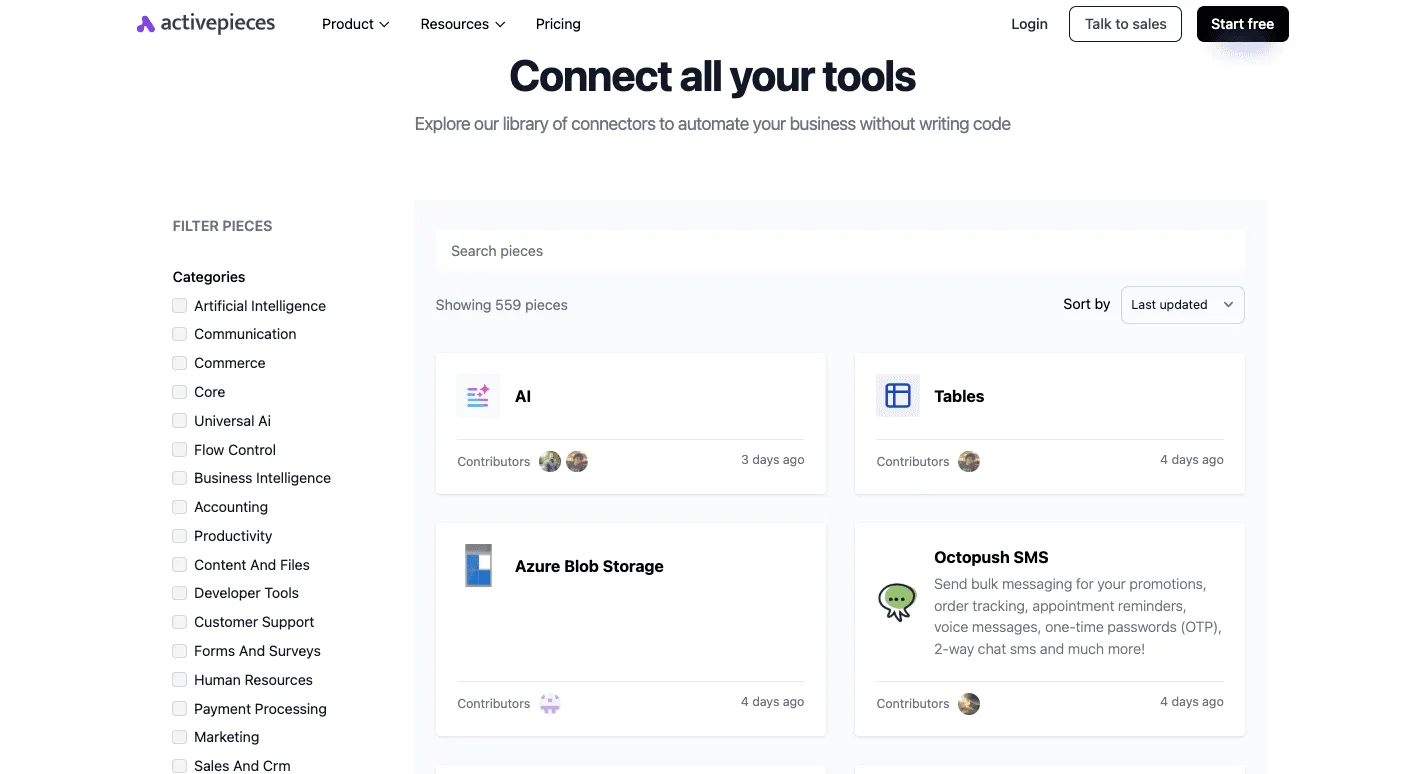
To identify which proprietary hooks have open-source equivalents, you must export a list of every active connector in your Resource Group. Many Azure-native connectors, like the one for Blob Storage, have direct counterparts in self-hosted engines.
If you find workflows relying heavily on the Integration Account for B2B mapping, these should stay in Azure for now. The complexity of replicating EDIFACT or X12 processing manually often outweighs the immediate cost savings.
Setting up a local development sandbox
Running your new automation engine inside a Docker container on your workstation allows you to test triggers without incurring a single cent in execution fees.
This local setup ensures that when you misconfigure a loop you only stress your local CPU rather than your department's budget.
Once the workflow successfully processes a mock payload locally, you can move the configuration file to a staging server.
Mapping Logic App expressions to JavaScript steps
Translating Workflow Definition Language (WDL) into standard JavaScript functions eliminates the "black box" nature of Azure’s hidden expression language.
When you replace a complex @concat() or @split() expression with a native JavaScript string method, you gain the ability to use standard debugging tools to see exactly how data transforms at each step.
This transparency means that when a flow fails, you can console log the specific variable causing the break.
Frequently asked questions about open source iPaaS
How do open source tools handle Azure Active Directory?
By acting as a registered application via the OAuth 2.0 protocol, open source integration tools connect to Azure Active Directory, the Microsoft identity management service.
This architecture ensures that your workflows never handle raw user passwords, reducing the risk of a credential leak during a process execution.
By configuring a Service Principal (a non-human identity for the application) within the Azure portal, you can grant the workflow engine specific, granular permissions to read from a SharePoint document library or trigger a message in Microsoft Teams.
This approach mirrors the security posture of native Logic Apps connectors. Your existing security policies regarding conditional access and multi-factor authentication remain the primary gatekeepers for your data.
Can I run open source alternatives on my own VPC?
You can host open source integration engines within your own Virtual Private Cloud (VPC), which is a private, isolated section of a cloud provider’s network. Deploying inside a VPC allows you to place the automation engine behind your corporate firewall.
Internal databases and proprietary APIs never have to be exposed to the public internet. Because the software is distributed as a Docker container (a standardized package of code and its dependencies) you can run it on any infrastructure that supports containerization.
This deployment model eliminates the need for the "On-premises Data Gateway" required by Azure. This simplifies your network architecture and removes a common point of failure in hybrid cloud setups.
What is the performance difference for high-concurrency tasks?
The performance of open source tools during high-concurrency tasks is limited only by the CPU and memory you allocate to the hosting server. These are periods where hundreds of workflows trigger simultaneously.
Unlike multi-tenant cloud services that may throttle your execution speed to protect other users, a self-hosted instance provides dedicated resources for your specific triggers.
If a marketing campaign suddenly floods your webhook with thousands of lead captures, you can scale your underlying infrastructure horizontally to process the queue without waiting for a third-party provider to allocate more capacity.
This control prevents the "noisy neighbor" effect, where another company’s traffic spike could theoretically cause latency in your mission-critical business logic.
Related reading
References
Still comparing
The fastest way to settle it is to build something.
Open source under MIT, so you can self-host the same thing later.
Start free Talk to sales