
n8n AI Agent Node Explained: Tools, Memory, Cost

Oct 21, 202615 min read
The AI Agent node is a built-in n8n node where a chat model chooses among the tools you connect to it, much as agent steps in Activepieces and other workflow builders do. It calls them in a loop and stops when it can answer.
It's a loop around a model, not a separate kind of intelligence.
Drop the node on the canvas and it does nothing until you attach a model. Your prompt goes in, the model decides whether it needs a tool, n8n runs that tool, and the result goes back to the model.
That repeats until the model returns text instead of a tool request. The text is your output.
Along its bottom edge, the node has three connector slots: The Chat Model slot is required, so setup is straightforward. Plug in a model such as one from Anthropic, OpenAI or Google.
- Memory is optional. Without it, every execution starts blank and the agent forgets the previous message.
- Tools are optional but usually the point. Each tool you attach, such as HTTP Request, Google Sheets or Calculator, is an option the model can call.
Learn what the n8n AI Agent node does
When a tool description is vague, the model makes wrong calls, because it sees each tool's name and description. The agent's own instructions go in the System Message field under Options.
How the tool-calling loop decides when to stop
Nothing judges the loop. It stops when the model answers without requesting a tool, or when it hits the Max Iterations option on the node.
If you leave that cap alone and the model keeps re-calling a tool that returns something unhelpful, you pay for each extra round trip.
Below, a diagram shows the cycle:
- Chat Trigger feeds the AI Agent
- The agent alternates between the chat model and three tools (HTTP Request, Google Sheets, Calculator)
- Memory sits underneath
- The final answer leaves on one arrow
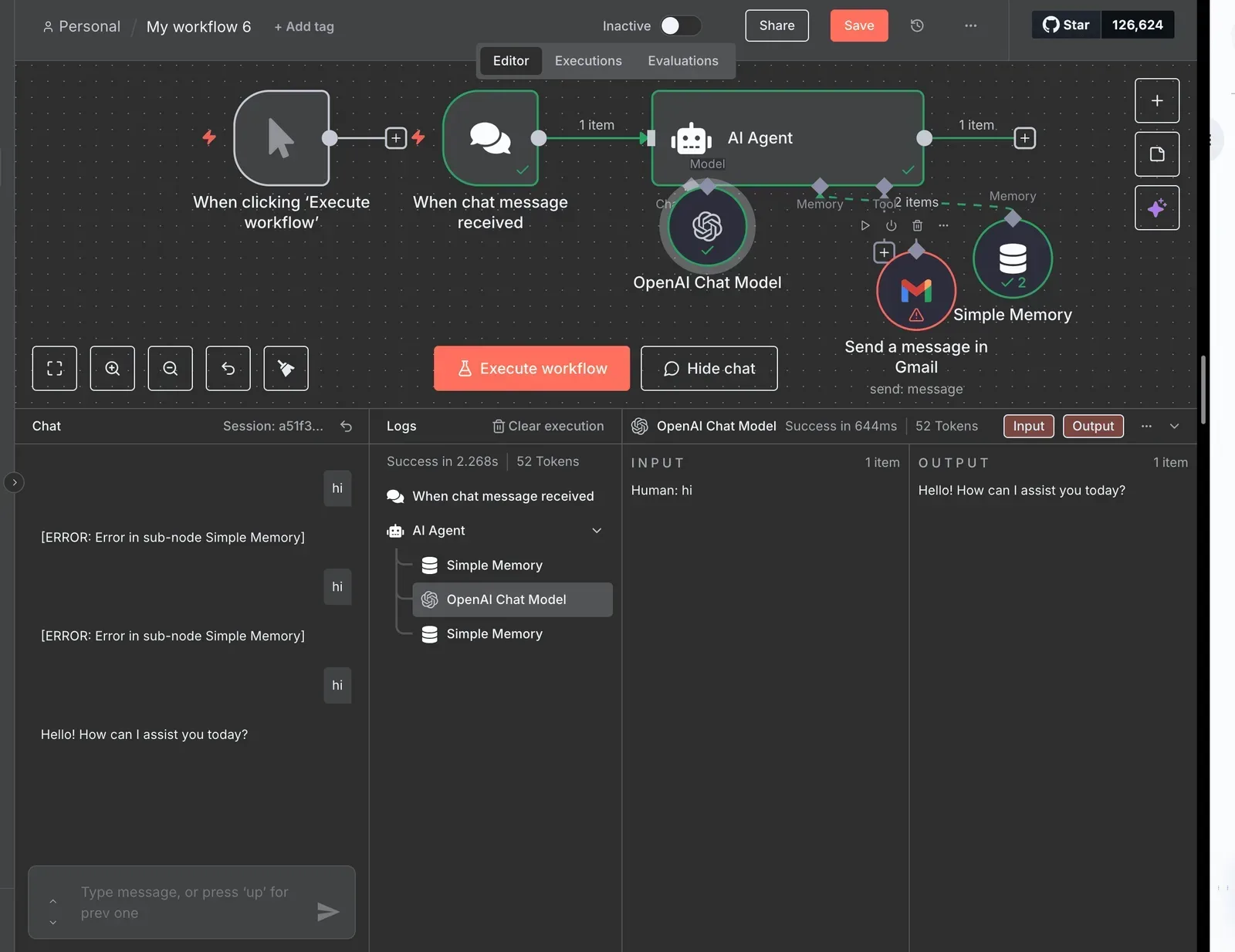
Read it as a circle with one exit, because everything you control later in this article is either a limit on the circle or a condition for the exit.
Since the circle only exits when the model says so, narrow tools and a capped iteration count are what keep a run bounded.
Agent versus a normal workflow
Node one, then node two, then an IF branch you drew yourself: that is a normal workflow, a fixed path. The agent replaces that path with the model's choice at runtime.
Use a workflow when you can draw the steps in advance, because it's cheaper and you can read every run. Use the agent when the next step depends on text you can't predict.
The same loop shows up in other builders, so the trade-off is about the pattern, not one product.
Everything below works on Activepieces' free plan. Start without code or a credit card.
Build a working n8n AI agent
Once you've built it, the pattern is easy to judge, so here are seven stages, each of which leaves something you can test before adding the next.
The list is the whole build; the stages below say what to type and what to look at in the log.
- Add a Chat Trigger node.
- Add an AI Agent node and connect it to the trigger.
- Attach a chat model and its credentials.
- Send a test reply.
- Attach Simple Memory.
- Add one tool.
- Force a tool call and set Max Iterations.
If a stage doesn't work, stop there. Every later stage assumes the one before it passes.
Stage 1: Chat Trigger, AI Agent and a chat model
Add Chat Trigger, then AI Agent, and wire the trigger's output into the agent. On the agent's Chat Model connector, add a chat model node for your provider, create the credential with your API key, and pick a model.
Claude Sonnet 5.5 is a sensible middle choice.
Click Open Chat and say hello. If you get a reply, stages one to four are done. If you get a credential error, fix it now, because it will look like an agent problem later.
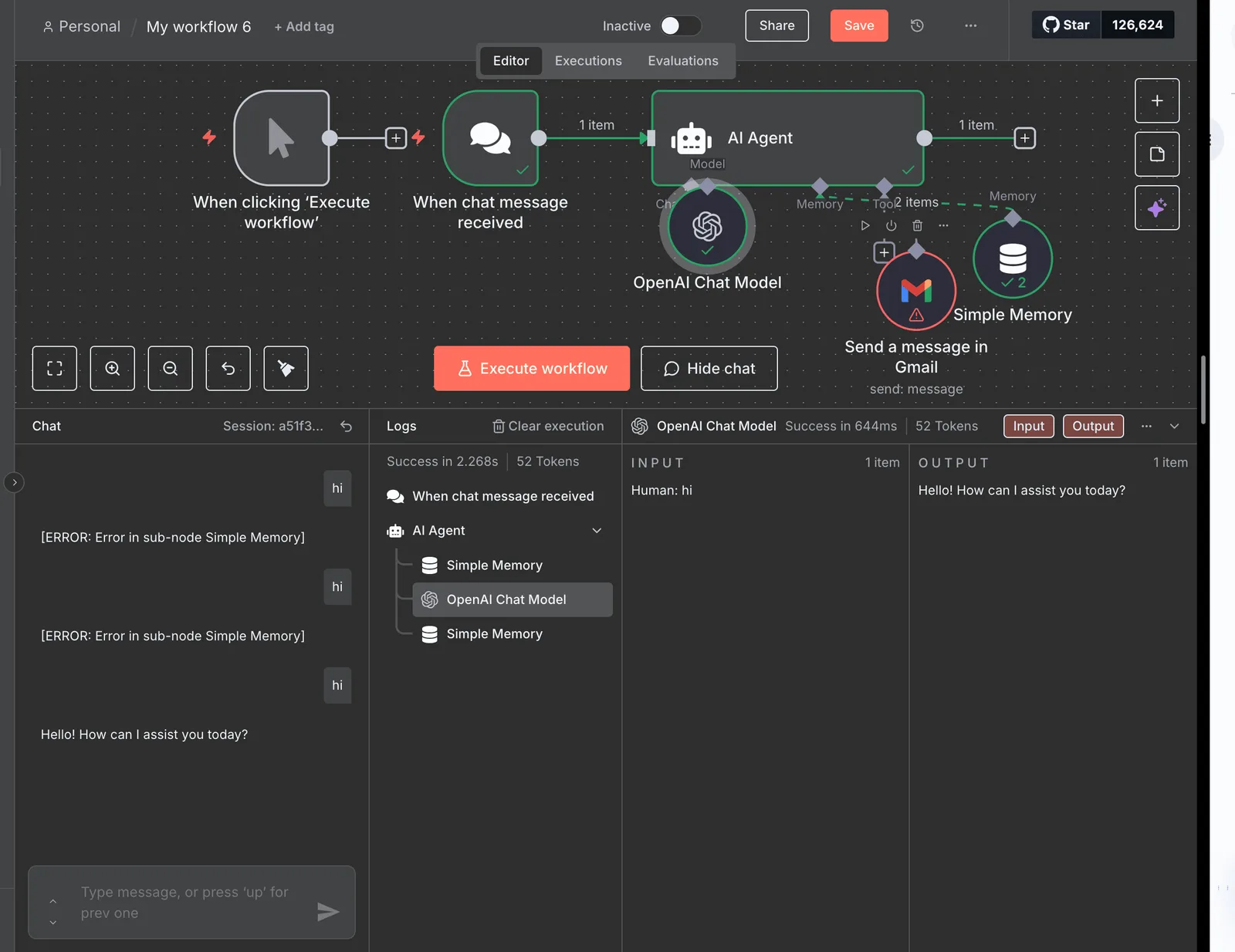
On the Memory connector, attach Simple Memory. Tell the chat your name, then ask for it back. Without memory it can't answer.
In the agent, open Options, choose System Message, and write what the agent is for and what it must refuse. Keep it short enough that you would reread it yourself.
Stage 3: Give it one tool and watch the call
On the Tool connector, add Calculator. It needs no credentials, so any failure is the loop's, not the tool's. Ask the agent to multiply two large numbers.
Then open the execution's log and expand the agent step. You should see the model decide to call the tool, the tool's input and output, and then the final answer.
That sequence is the loop, and it's what you'll be reading whenever a run goes wrong.
Set Max Iterations in the n8n AI Agent
Back in the agent's Options, find Max Iterations. It caps how many times the agent can go around the loop in one run. Lower it to the smallest value allowed and repeat the multiplication.
Expect the run to stop with an error instead of an answer, because the tool call used up the budget. Raise it to a sensible ceiling afterwards.
You've now seen the cap fail loudly, which is much better than discovering it on a looping run you're paying for.
What n8n AI agents cost and require
You pay three separate bills for an n8n agent: the n8n plan or your own server, the time you spend maintaining it, and the model provider's token meter. Only the last one grows with how hard each run works.
Side by side, the five sit in the table below, dated 2026-10-21. Read the "what counts" column first, because it shows that n8n's meter and the model's meter measure different things.
| What counts as an execution | Monthly cap | Price | License | Maintainer | |
|---|---|---|---|---|---|
| n8n Cloud Starter | One complete workflow run, however many nodes | Smallest allotment | Lowest paid tier | Hosted service | n8n |
| n8n Cloud Pro | Same | Larger allotment | Mid tier | Hosted service | n8n |
| n8n Cloud Business | Same | Largest allotment | Highest tier | Hosted service | n8n |
| Self-hosted Community Edition | Same | None set by n8n | Free to run, plus your server | Sustainable Use License | You |
| Model provider bill | Not counted; metered in tokens | Whatever limit you set | Per token used | Provider's terms | Provider |
Prices and plan limits checked against docs.claude.com and claude.com and openai.com and gemini.google on October 20, 2026.
Nothing in the table caps tokens, so that ceiling is yours to set.
Call twelve tools inside one run and it is still one execution on Cloud. Your monthly cap therefore tells you how many times the workflow fired, not how much work each firing did.
Check the allotment for each tier on n8n's pricing page before you pick one.
Your monthly cap therefore tells you how many times the workflow fired, not how much work each firing did.
On Community Edition the execution cap disappears, but the Sustainable Use License limits what you may do with it, chiefly selling it or hosting it as a service for others. Using it for your own internal workflows is the case it permits.
Updates, backups and the database are now your job, so the free price buys you a pager.
Model token costs sit outside n8n's bill
When Turion measured token use per agent run at three sizes, this is what came back:
- Support triage: about 1,600 tokens per run.
- Research with 5 tools: about 38,200 tokens per run.
- Research with 12 tools: about 66,000 tokens per run.
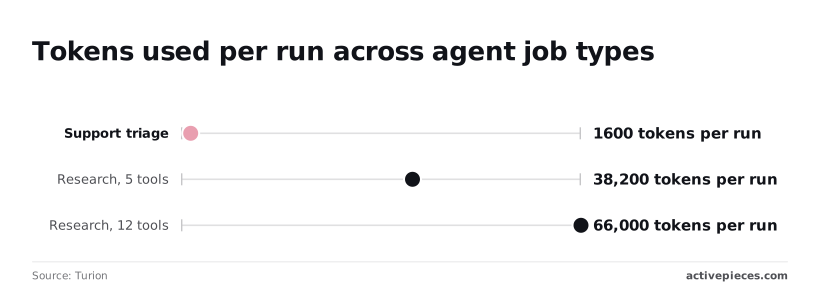
That's roughly a 41-fold spread between the smallest and largest job, with the same single execution on n8n's side. A triage agent can run all month inside a small plan, while a 12-tool researcher can cost more in tokens than the whole subscription.
So set the ceiling before you build. Multiply the tokens for your job by expected runs per day, price that at your provider's rate, and put a spend limit on the API key.

Then cap the agent's maximum iterations, as you saw in the previous section, so one looping run can't spend the month's budget.
Easier to see it running than to read about it: set it up free, no card.
Avoid common n8n AI agent mistakes
Forget any of seven limits, the iteration cap among them, and every omission fails the same way: nothing stops the agent from doing more than the job needs.
The table pairs each mistake with its fix and the field where you set it, so you can check a workflow against it row by row.
| Mistake | What goes wrong | The fix | The setting to use |
|---|---|---|---|
| Vague prompt | The agent guesses its role and improvises | State the job, the output format and what to refuse | System Message in the agent's Options |
| Too many tools | It picks the wrong tool or misfires | Give each agent a few narrow tools | One-sentence Description on every tool |
| No iteration cap | One looping run burns the budget | Set a low ceiling | Max Iterations |
| Unbounded memory | Every run resends a growing history | Keep only recent turns | Context Window Length on the memory node |
| No error branch | A failed tool call stops the run silently | Route failures to an alert | On Error: Continue (using error output) |
| Agent instead of fixed workflow | You pay for reasoning on known steps | Use plain nodes | A normal node chain |
| Open webhook | Anyone with the URL triggers paid calls | Require a credential | Authentication: Header Auth |
Below, the rows with the largest cost are explained.
Too many tools and vague tool descriptions
With one tool, tool-calling accuracy is 95–96%, and with five it is 85–91%, according to Presenc AI. At 20 or more tools it drops to 65–78%, so roughly one call in three or four goes wrong.
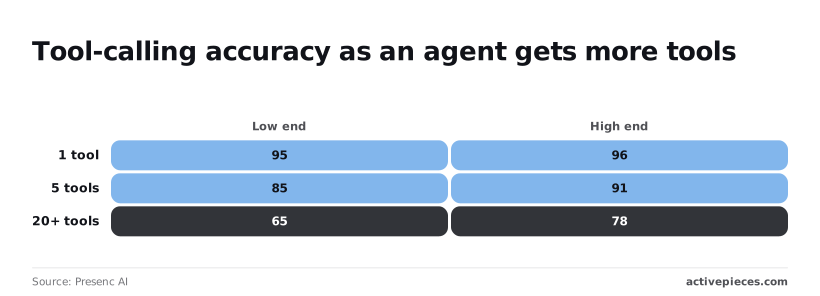
Split a wide agent into narrow ones, and write each Description so the model knows when to use the tool, not just what it is.
When a loop runs away, Max Iterations is what stops it. Context Window Length does the same for memory: without it, each turn resends the whole conversation, so the token bill climbs with every message.
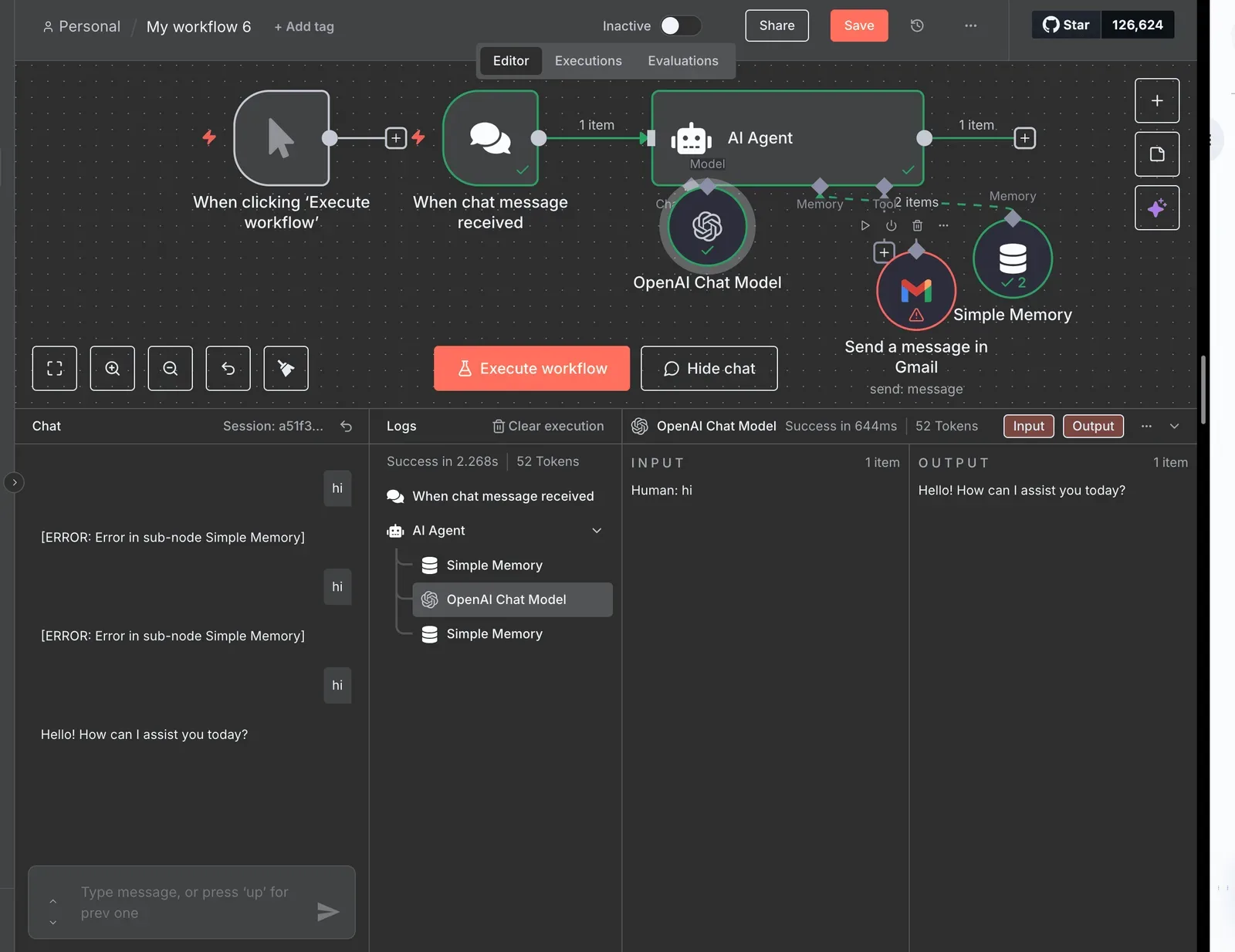
If you can list the steps in advance, build them as ordinary nodes. An agent spends a model call deciding what to do next at each step, which is wasted money when the answer is always the same.
Set On Error to Continue (using error output) on the agent and wire that output to a Slack or email alert, so failures reach a person.
On the Webhook node, set Authentication to Header Auth. An open URL lets anyone trigger your model calls and run up your bill.
Run the same agent job in Activepieces
You can rebuild the same bounded worker in Activepieces: an agent is a bounded reasoning loop with a defined set of tools, a place to stop and ask a person, and a record of what it did.
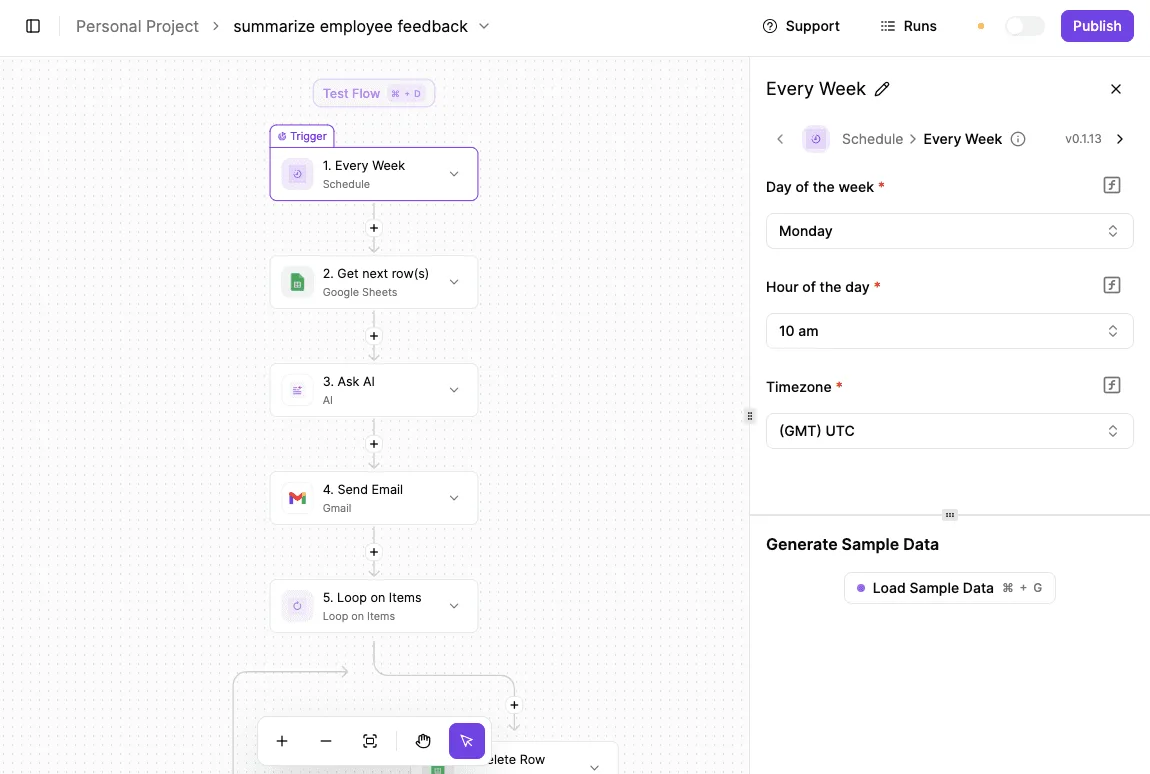
MoneyGram, Moneypenny, Alan and FundingSocieties run Activepieces in production.
The difference is that an Agent step sits in the same flow as your deterministic steps, so the model's judgment and your fixed rules share one engine and one run trace, rather than an agent bridged to a workflow tool by a webhook.
Open a run and you see one execution, start to finish.
Where n8n friction shows up
It tends to arrive in three places. The first is the licence: n8n's core is under the Sustainable Use License, which matters if you plan to resell or embed workflows in a product.
The second is upkeep: self-hosting means you own the updates, the database and the queue.
Third comes the agent itself, where the node's flexibility makes it easy to wire up too many tools and leave memory and cost unbounded.
None of these is a reason to leave. If your agent runs fine in n8n with a narrow toolset, a memory choice and a spending cap, stay.
This section is for the reader who has hit one of those walls and wants to see the same job elsewhere.
Building the workflow without approval
Because Activepieces has an MIT-licensed core, the licence question is simpler. It also has a free cloud plan that asks for no card, which means you can build the whole flow before anyone approves a budget.
You can also self-host it if the data has to stay on your own machines.
Expect the same shape as the n8n build. You start with a trigger, add an AI step that holds your instructions, then give it only the integrations the job needs.
Think of integrations as Activepieces' connectors: Gmail to read or send mail, Slack to post a message to a channel, Google Sheets to read or append rows.
There are 743 of them in the open source monorepo, roughly 60% community-contributed, and the full list is at activepieces.com/integrations, so you benefit from both official and community support.
Keep your n8n AI agent build simple
Keep the discipline from the earlier sections. Pick one trigger. Give the AI step two or three integrations, not ten, so it's more likely to select the right one.
Put a human step before anything that sends mail or writes to a sheet, and make that message short enough that the approver reads it rather than clicking yes. Then test with a handful of real inputs before you switch it on.

Because nothing carries over from n8n, treat the old workflow as a specification, not a file. Write down its trigger, its tools and its stopping condition, and build from that list.
The free cloud plan at activepieces.com gives you 1,000 credits a month, unlimited flows and up to 5 users.
Frequently asked questions
Is the n8n AI Agent node free to use?
Nothing extra is charged for the node itself, because it ships with every n8n plan, but you still pay for the model behind it. Self-hosting the community edition carries no n8n fee, though the Sustainable Use License limits how you can commercialize it.
On n8n's cloud plans you pay by plan, and the chat model provider bills your tokens separately. That second bill is the one a looping agent can inflate.
Which chat models can the n8n AI Agent use?
You can use any model you can attach through a Chat Model sub-node, as long as it supports tool calling. Anthropic, OpenAI, Google, Mistral, xAI and DeepSeek all have options, and Ollama covers local models.
For a first build, Claude Sonnet 5.5 or GPT-6.1 Sol balance cost and reliability. For a router that only picks a tool, Claude Haiku 5.5 or GPT-6 Luna is usually enough.
A model without tool calling will answer in text and never touch your tools, which looks like a broken agent but is a wrong model.
Does each tool call count as an n8n execution?
No. An execution is one workflow run, and tools that are nodes inside the agent run within that same execution, however many times the agent loops. What grows with every loop is the token count sent to the model.
Set Max Iterations on the Agent node, so a confused agent stops after a few passes instead of running up the model bill. Check your plan's own rules for sub-workflows used as tools, since I haven't verified how every plan counts them.
Can an n8n agent run on a schedule rather than from chat?
Yes. Replace the Chat Trigger with a Schedule Trigger, a webhook or an app trigger. Then open the Agent node, set Source for Prompt to "Define below", and map the incoming data into the Prompt field.
Skip the memory sub-node for these runs, because nobody is having a conversation and each run should start clean.
Have the final step write its result somewhere a person will actually look, such as a message or a row, because no one is watching the chat window.
Do I need to code to build an n8n AI agent?
No. You wire the Agent node to a chat model and tool nodes on the canvas and write the instructions in plain language.
When you map data into the prompt, expressions help, and the Code tool is there if a tool needs custom logic.
Most narrow agents never need it. Spend that effort on the system message and on tool descriptions short enough that the model picks the right one.