
What Does Gumloop Pricing Cost per Workflow Run?

Oct 17, 202615 min read
Gumloop prices a plan as a tier plus a monthly credit allowance, and the free tier's allowance is now zero.
Every run draws down credits, so the allowance, not the tier name, sets what you can actually do each month, a pattern worth checking in any automation tool, whether it's Gumloop or an open-source option like Activepieces.
Gumloop pricing is the structure by which the platform charges for its AI workflow automation, combining a subscription tier with a monthly allowance of credits that each workflow run consumes according to the steps and AI models it uses.

Gumloop pricing today, plan by plan
The plan table, checked 17 October 2026
Where Gumloop's pricing page gave no figure in the material checked, the cell says "not published", so don't assume a number is hiding behind it. The table shows what I could confirm for each plan.
| Plan | Monthly price | Included credits | Seats | Concurrency and other limits | Gated features |
|---|---|---|---|---|---|
| Pro | Not published | Not published | Not published | Not published | Not published |
| Team / Enterprise | Not published | Not published | Not published | Not published | Not published |
Most of the grid is empty, which is the first finding. You can't price a workload from the tier names alone, and the free row shows why.
What a credit buys and how Gumloop meters it
Run a flow and it spends credits, and model calls spend more, which makes the credit the metered unit. Treat the allowance as your real budget.
That budget can move fast, and the free plan's history shows it. According to Usagepricing, it gave 5,000 credits a month in 2024, so a hobby project could run for free.
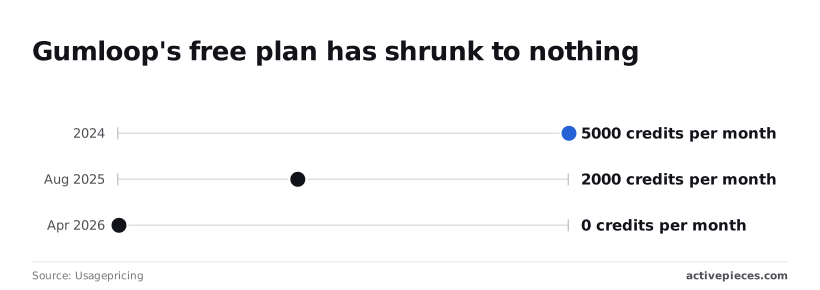
By April 2026 it was 0, so any test run now costs money. If you budget from an old blog post, you'll be wrong in the direction that hurts.
**By April 2026 it was 0, so any test run now costs money.
Gumloop enterprise pricing and negotiated terms
If Gumloop doesn't list it on the public page, it falls under negotiated terms:
- Seat bundles
- Higher concurrency
- Added features
You can't compare a negotiated price line by line.
Before putting Gumloop beside open-source options such as Activepieces, get a written quote that states the credit allowance and limits. Without those figures you can't turn the quote into a cost per run, and that conversion is what the rest of this article walks through.

If you are running this arithmetic for your own team, see what the same workload costs on Activepieces.
What Gumloop plans cost at realistic usage
To get monthly cost at realistic usage, multiply credits per run by runs per month and match the result against a plan's credit allowance. The Pro price of $37 a month is published on the pricing page, but costs still depend on credits per step.
The unit metered is the credit, and a run spends several: one per step, more for heavier AI model calls.
Three cases appear below as the arithmetic you would run. Take from the table that the plan follows the credit total, not the headcount, and that the moment the total passes the allowance triggers the next tier.
| Case | Credits per run | Runs per month | Credits needed | Plan that fits | Monthly estimate (USD) | Trigger for next tier |
|---|---|---|---|---|---|---|
| Solo user | Sum of each step's cost | A few a day, times 30 | Credits per run × runs | Lowest tier whose allowance covers the total | That tier's listed price | Adding one long AI chain |
| Five-person team, one agent | Agent steps plus model calls | 2,000 | Credits per run × 2,000 | Mid tier, if the allowance clears the total | That tier's price, plus any top-ups | A second agent, or a costlier model |
| Heavy case | Long chains with several model calls | 20,000 | Credits per run × 20,000 | Highest self-serve tier, or a custom quote | Listed price plus overage, or the quote | Allowance or seat limits |
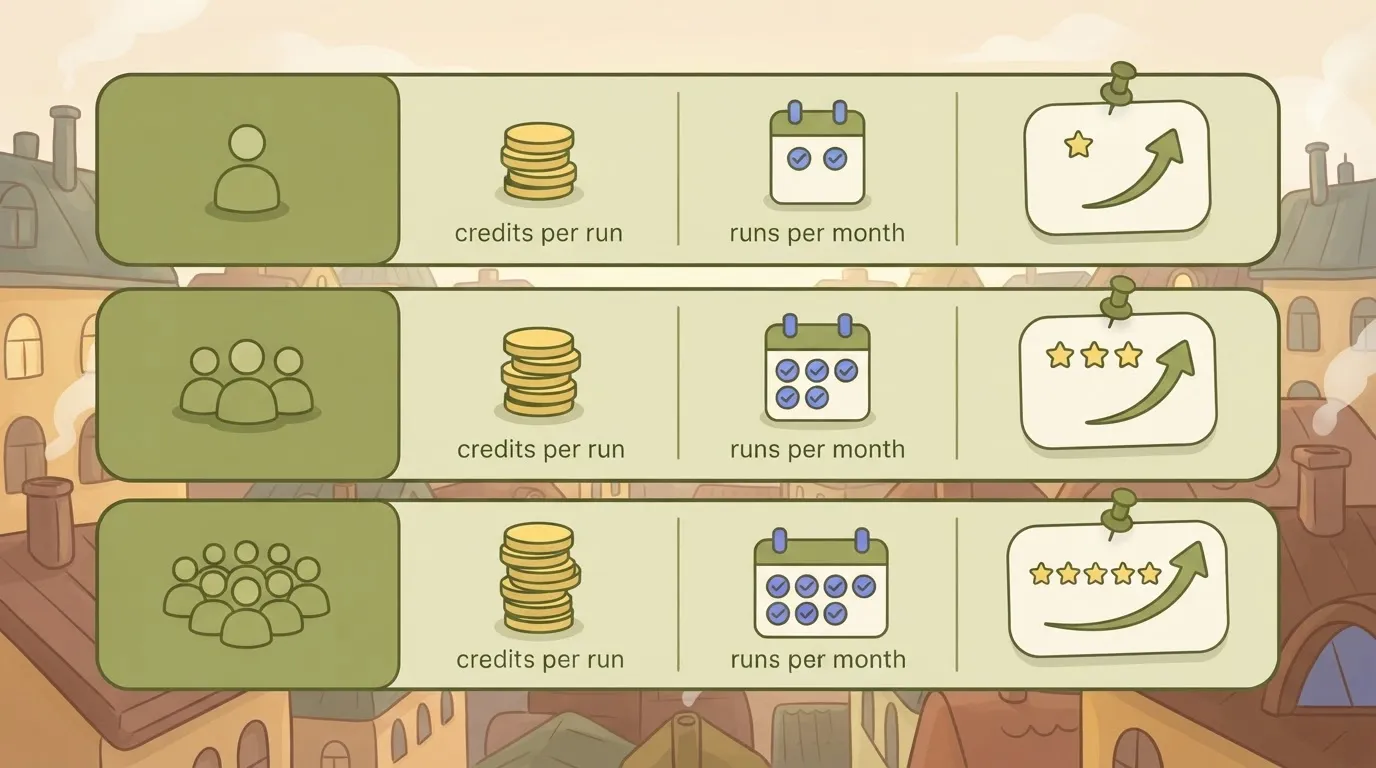
Each row ends in a trigger, so you know what pushes you up before it appears on an invoice.
For a solo user, a few runs a day is a small monthly total, so the plan question is mostly whether the cheapest tier's allowance covers it.
It usually does until you add a long AI chain, because one model-heavy step can cost more than the rest of the workflow combined.
At 2,000 runs, a single extra credit per run adds 2,000 credits a month, so you can't ignore per-run pricing at realistic scales.
Small per-run changes therefore decide whether the team stays inside its allowance or buys top-ups, and model choice matters more than seat count.
Ten times the team case, 20,000 runs means every step you trim saves tenfold. Price this case last, after you've measured credits per run on a real sample.
Hidden costs and limits Gumloop users hit
Measured credits per run only matter if you know which lines sit outside the plan price:
- The credit allowance
- Seat and concurrency caps
- Tier-gated features
- Model or app charges billed elsewhere
Credits that run out mid-month
20,000 credits sounds generous for Pro, but Workflowmath splits it into 7,400 credits paid at list price and 12,600 bonus credits.
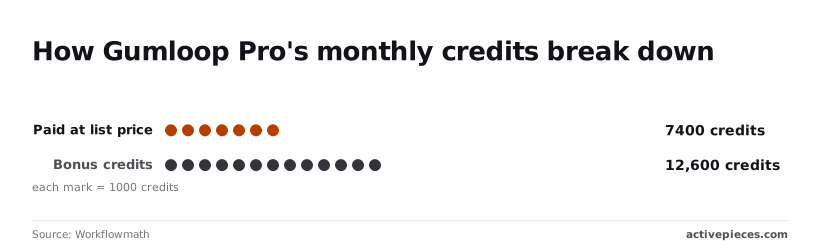
Activepieces calculates that only 37% of the headline number is what the price buys, so a tier comparison built on 20,000 overstates your baseline if the bonus is ever trimmed.
Every model call then drains that pool like this:
- According to Docs, take the provider's cost for the call and divide it by $0.005 to get credits, so each call has a cost in credits.
- Halve the credits if you run the call on your own API key.
- Subtract the result from your remaining allowance.
- Once the allowance is gone, each further credit bills at $0.005.

Run your sample through these four steps and you'll have a monthly credit count, which tells you whether overage is a rounding error or the main line item, so you don't waste effort optimizing the wrong problem.
Credits are only one meter. Seats, simultaneous runs and how long run history is kept are set per tier, so a team that fits the allowance can still hit a ceiling.
Read these limits on the pricing page for the tier you are considering, because a concurrency cap turns a burst of runs into a queue.
If your workload needs a capability that sits above Pro, the real comparison is the higher tier's price against your credit math, not Pro's price. Check which tier unlocks each feature before you commit a pilot to it.

Third-party model and app costs outside the bill
Bringing your own API key halves the credit charge, but the provider then invoices you directly. The saving is real only if you add that second invoice back in.
Paid apps the workflow touches carry their own subscriptions too, and none of them appear on Gumloop's bill.
Once those lines are in your total, the credit estimate is complete enough to compare against other tools.
Worth checking against a plan that does not meter every step: one credit covers a whole run on Activepieces.
Gumloop against Zapier, n8n, Make and Activepieces on cost
Against $20 for Activepieces Plus, Gumloop Pro costs $37 a month, but a monthly entry price only tells you where the meter starts, so compare the metered unit next.
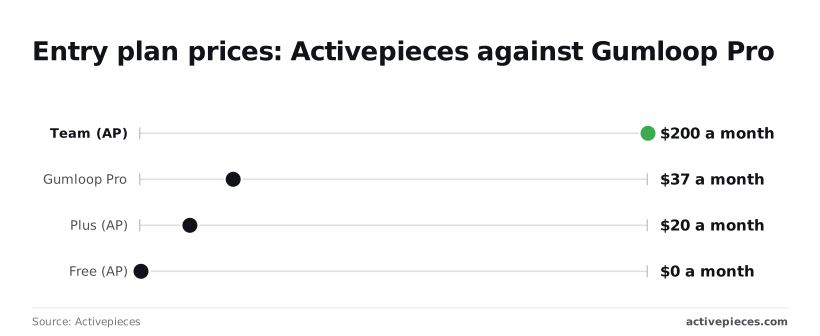
In the chart above, Activepieces's Free tier ($0), Plus ($20) and Team ($200) sit beside Gumloop Pro. The $0 tier means you can run a real workload before paying anything.
The jump from $20 to $200 means Activepieces has a clear step you must justify, while Gumloop Pro sits in between with credits layered on top, so you'll need solid metrics to justify choosing Activepieces at that price point.
The table below shows what each tool meters and whether you can leave it.
| Tool | Billing unit | Free tier | Self-hosting |
|---|---|---|---|
| Gumloop | Credits | Yes | No |
| Zapier | Tasks | Yes | No |
| n8n | Workflow executions | Self-hosted community edition | Yes |
| Make | Credits (formerly operations) | Yes | No |
| Activepieces | Flow runs (1 credit each) | Yes | Yes |
Check each vendor's current pricing page before you commit. I've left out per-run costs at 1,000 and 20,000 runs because they depend on how many steps each run takes, which is what your credit estimate from the previous section gives you.
Ten steps can mean ten billed units every time the workflow fires, because a task or credit is a step, not a run. Multiply your steps by your runs before comparing any two tiers, or the comparison is meaningless.
Activepieces' pricing page lists 1 credit per flow run, however many steps the flow has, where Zapier's page bills per task and Make's bills per credit., so a ten-step flow costs the same as a two-step one.
Activepieces's AI agent step works across its integrations, called pieces. Count how many of your own apps appear there, because an app that is missing means custom work you'll pay for in time.
Self-hosting changes the math. On Activepieces and n8n you can run the software on your own servers, so the bill becomes infrastructure rather than a per-unit meter.
Gumloop, Zapier and Make are hosted only, so their meters apply to every run. You can try Activepieces free and price your own workload there.
When Activepieces is the better fit than Gumloop
Activepieces runs on your own infrastructure under an MIT-licensed core, bills 1 credit per flow run instead of per step, which means workflows cost the same regardless of complexity, and reaches 741 integrations counted from its open source monorepo.
If those are your requirements, they are the reasons to move; otherwise Gumloop's setup is quicker.
Where the AI agent step runs across integrations
Activepieces is an open source automation platform, and its AI agent step can use the same integrations (called pieces) that ordinary flows use. The library below lets you browse by category, from communication and commerce to developer tools, and sort by popularity.
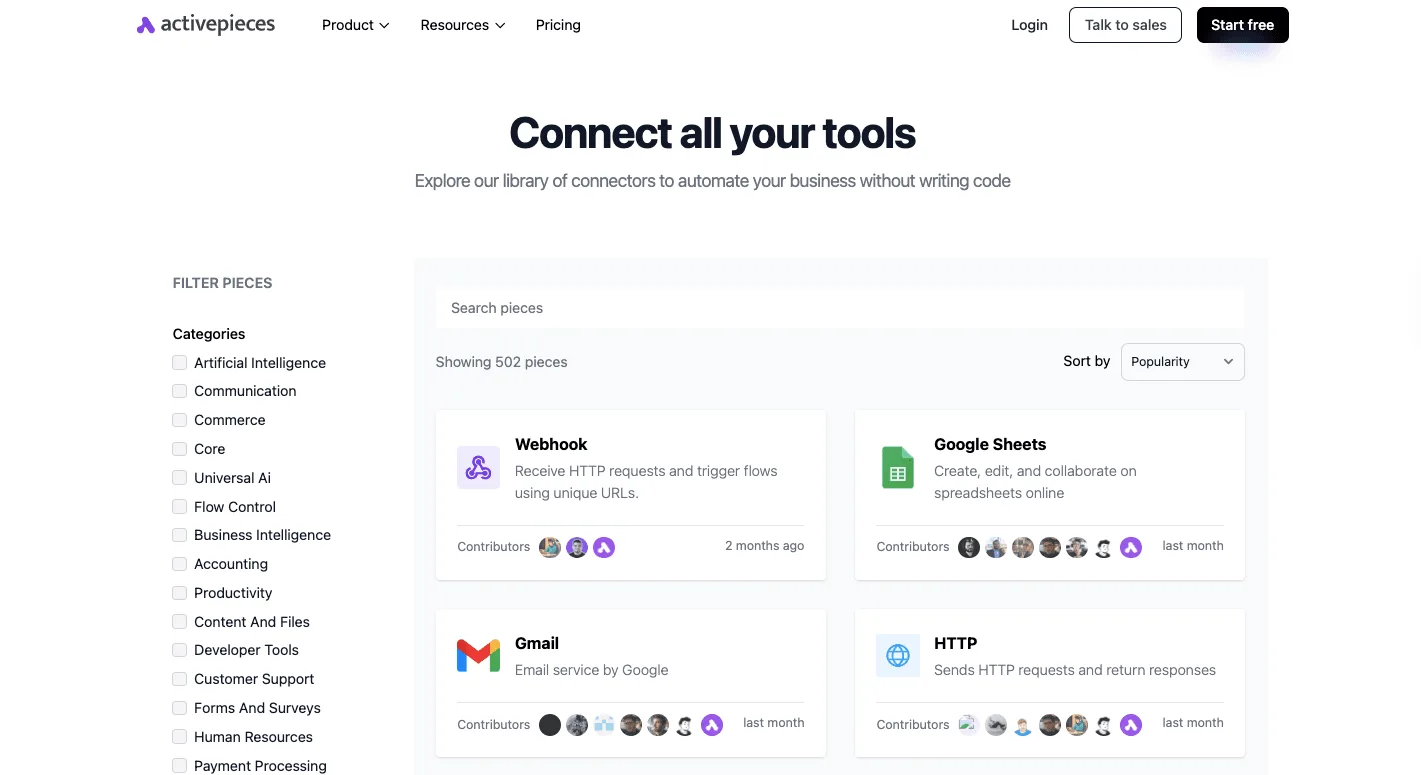
That tells you the agent isn't confined to a short list of apps: the community directory of the open source monorepo holds 741 integrations, and if one exists for a tool, the agent can act in it, meaning you can likely automate across your entire existing tool chain.

Before committing, check the specific apps you depend on against that list. Coverage of your own stack matters more than the size of the catalog.
Self-hosting and approval steps
Because the core is MIT-licensed and published in a public GitHub repository, you can run it on your own servers and keep workflow data inside your network. That's the clearest reason to pick it over a hosted-only credit product.
If your security team asks where customer records are processed, you can answer directly.
For the same reason, approval steps matter. A flow can pause and wait for a person to sign off before the agent sends the email or updates the record. If a mistaken action is costly to reverse, that pause is cheaper than any cleanup afterward.
The Activepieces free plan carries 1,000 credits a month with unlimited flows, so you can run your own sample against it.
Where Gumloop remains the simpler choice
If nobody on your team wants to maintain a server, self-hosting is a burden rather than a benefit. If your agent only drafts or analyzes and never acts on its own, approval steps add little.
And if you want one hosted product with AI built in from the start, Gumloop asks less setup of you, even though its credits need pricing out first.
If the first three needs describe you, try Activepieces free and compare the result with your credit estimate.
How to choose a Gumloop plan this week
That estimate takes about a week to build, and it only works in this order: price the workflows you actually run in credits, then pick the plan that covers them.
The seven steps below take you from a list of workflows to a date on the calendar, so you have a concrete deadline.
- List every workflow you plan to run, noting the apps it touches and the model it calls.
- Run each one on the free tier and read the credits it used per run.
- Multiply each reading by the runs you expect per month.
- Add a buffer to the total.
- Check whether any feature you need is gated to a higher plan.
- Choose monthly or annual billing.
- Set a usage alert and a re-check date.
Together, steps one to three give you a base number, and steps four to seven turn it into a purchase.
Until you've watched a workflow consume some credits, it has no price, because credits are the metered unit. Test with real inputs, not a one-line sample.
A long document costs more than a short one, and a test on tiny input understates your bill.
Test with the model you intend to ship, then try a cheaper one on the same workflow. The gap between the two readings shows how much of your bill is a model choice you can change.
Price the plan with a buffer
Add a buffer, because prompts get edited, inputs run longer than your samples, and failed runs get retried. Without one, you'll find the ceiling mid-month, when workflows stop or overage begins.
Then look at gated features. If one you need sits only on a higher tier, that tier sets your price whatever your credit total says.
Usually there is a discount for annual billing, but the saving is paid for with a commitment made before your estimate has been proven. If your numbers come from a week of tests, start monthly.
Put the usage alert below the cap, not at it, so the warning arrives while you can still react.
Then book a re-check after your first full billing cycle and compare real credits against your estimate. If the estimate held, moving to annual is a sound bet. If it missed, you'll have the correction before it compounds.
Frequently asked questions
As checked in October 2026, these answers come from Gumloop's pricing and documentation pages. Re-check them before you commit, because plan terms change.
Is Gumloop free to use?
Yes, Gumloop has a free plan, but it's capped by a monthly credit allowance. Once you exhaust it, the free plan stops being free to run in practice: you either wait for the reset or move to a paid tier.
Treat it as a way to measure your own workload in credits, not as a place to run production.
Do unused credits roll over?
Do unused Gumloop credits roll over? Assume they don't unless the pricing page says otherwise for your plan. Allowances are granted per billing period, so a quiet month leaves you with nothing banked for a busy one.
If your usage is spiky, size the plan to your busiest month, or confirm the carry-over terms for your tier before buying.
Can I bring my own API key?
Can I bring my own API key to Gumloop? Yes, you can connect your own model provider key, and doing so reduces the credits a run consumes. The model charge then lands on your provider invoice instead of your Gumloop allowance.
That moves cost rather than deleting it, so price both bills together before deciding it saves money.
Are there annual billing discounts?
Does Gumloop offer discounts for annual billing? The pricing page presents an annual billing option, and the discount applies to the plan fee.
It doesn't change how many credits a run uses. If your real bill is dominated by credit consumption, an annual discount trims the smaller part of the cost.
Can Gumloop be self-hosted?
Can Gumloop be self-hosted? Gumloop is sold as a hosted cloud service, and its public pricing lists no self-hosted option. Your workloads and data run on its infrastructure.
If self-hosting is a hard requirement, ask Gumloop sales directly rather than assuming an enterprise tier covers it.
Related reading
References
Running the numbers
See what the same workload costs here.
Free forever plan, and every paid plan self-hosts at no extra cost.
See pricing Talk to sales