
How Much Does DocuSign Pricing 2026 Cost?

Oct 12, 202615 min read
Choosing between low-volume utility and high-cost scalability is the central challenge of DocuSign’s 2026 pricing structure. Crossing a threshold by even one document, whether sent manually or through an automation tool like Activepieces, triggers per-envelope overage fees.
The platform now operates on a "fair use" logic that penalizes your growth. Selecting a tier is less about features and more about predicting your exact annual output.
DocuSign pricing plans and feature limits
Personal plan for solo users
At the Personal plan level, you are capped at 5 envelopes per month. If you're a freelance consultant signing more than one contract per week, you'll hit a hard wall before the month ends.

At $120 per year, this tier lacks basic custom branding, which means businesses must compromise on professional presentation to save on subscription costs. Your clients see DocuSign’s logo rather than your own, which potentially undermines the professional appearance of a high-value agreement.
Standard plan for small teams
The IAM Starter plan operates on an annual fee of $480 per user (billed at $40 per month), which grants each user access to a fixed capacity of 100 envelope sends per year, meaning each document sent costs $4.80.

This upfront payment covers the entire year of service regardless of whether you send one document or ninety-nine.
By introducing a tiered efficiency model, the Standard plan ensures the cost per document drops as you approach the 100-envelope cap, rewarding consistent but strictly limited usage.
According to data from esign.ai, sending 25 envelopes results in an effective cost of $12 each, so users pay a significant premium for low-volume usage. This is a significant premium for your low-activity usage.
| Envelopes Sent | Effective Cost Per Document |
|---|---|
| 25 envelopes | $12 |
| 50 envelopes | $6 |
| 75 envelopes | $4 |
| 100 envelopes | $3 |
Prices and plan limits checked against ecom.docusign.com on October 12, 2026.
The figures in the table represent the amortized cost of your $300 investment based on actual consumption, so your per-unit expense fluctuates depending on how frequently you utilize the service.
If you only use a fraction of your 100-envelope allotment, your realized price per signature skyrockets.
The most efficient point occurs just before the "fair use" policy begins to apply surcharges for additional sends. This allows you to maximize your budget without triggering unexpected fees.
DocuSign envelope limits for multiple user accounts
The 100-envelope cap applies per user rather than as a fixed ceiling shared across the entire account. If you add a second or third user to the IAM Starter plan, each user retains their own 100-envelope allowance per year.
This creates a diminishing return for every new team member invited to the platform.
A team of five users on the IAM Starter plan each retain their own 100-envelope allowance per year rather than sharing a single pool, so heavy individual users can still trigger overage fees independently.
| Feature | IAM Starter ($480/yr) | IAM Standard ($1,620/yr) | IAM Professional ($2,700/yr) |
|---|---|---|---|
| Annual Envelope Limit | 100 Envelopes | 100 Envelopes | 100 Envelopes |
| Custom Branding | None | Basic | Full |
| Advanced Fields | None | None | Included |
These figures demonstrate that the Standard plan is only cost-effective if you operate near the upper limit of the quota.

DocuSign Business Pro plan pricing and limits
Business Pro targets teams that require complex document logic, but it holds the same 100-envelope baseline as the Standard plan.
You pay $75 per user per month, billed annually with a 3-user minimum totaling $2,700 annually, primarily for features like signer attachments and drawing fields rather than increased volume, meaning the plan is poorly suited for high-frequency workflows.
Activepieces uses a credit-based billing system that meters AI usage while offering unlimited flows on every plan. This ensures that builders aren't taxed for breaking work into smaller, more resilient modules, as a ten-step process costs the same to run as a two-step workaround.

This model allows teams to orchestrate DocuSign triggers without the meter running on every internal logic gate, as shown on the published pricing page where every plan includes unlimited flows.
$480 is the total cost, yet it strictly limits your account to 100 envelopes. This limit forces you to audit your automated triggers monthly to avoid unexpected billing spikes.
Enterprise Pro for high-volume scaling
Enterprise Pro is the only tier that has negotiable envelope pools, which you'll need if you're processing more than 1,000 documents annually.
Because it removes the rigid 100-envelope ceiling found in lower tiers, it prevents the workflow stoppages that occur when a standard account reaches its limit mid-quarter. However, this flexibility comes with a requirement for direct sales intervention, removing the transparency of the self-service pricing model.
If you are running this arithmetic for your own team, see what the same workload costs on Activepieces.
Hidden math of envelope usage limits
A hard ceiling of 100 envelopes per user annually is the foundation of the standard DocuSign pricing model. This effectively converts a fixed subscription into a variable tax on your growth.
Once you cross this threshold, the "fair use" policy triggers a shift from predictable monthly billing to a defensive procurement exercise where every additional signature carries a premium.
A hard ceiling of 100 envelopes per user annually is the foundation of the standard DocuSign pricing model. This effectively converts a fixed subscription into a variable tax on your growth.
Calculating the effective cost per envelope
The value of a DocuSign seat diminishes the closer you get to your hundredth document. The platform doesn't roll over unused capacity into the next billing cycle.
Nobody gets a refund for unused capacity. This means if you're a low-volume user who sends only ten envelopes per year, you're paying a massive premium for the infrastructure.
A mid-volume user hitting the cap mid-quarter faces an immediate choice between an expensive tier upgrade or per-envelope overage fees.
$3.60 to $8.00 is the penalty range for exceeding the 100-envelope limit, leaving frequent senders vulnerable to unpredictable monthly expenses, which means budgeting for these services becomes an exercise in guesswork. This can quickly double the projected cost of a standard contract.
An annual reset policy wipes the slate clean every twelve months, preventing you from banking the capacity you paid for during slow months to cover busier seasons.
DocuSign SMS and ID verification add-on costs
Security features marketed as standard protections often carry per-transaction surcharges. DocuSign bills these entirely separately from the base envelope count.
These consumption-based fees apply to every individual attempt at verification. A recipient who fails to enter a code correctly on their first try generates a second charge for you.

$2.50 is the cost to verify a government ID, billed regardless of whether the document is successfully signed, so you risk losing money on every incomplete transaction. SMS authentication surcharges are a recurring fee for every multi-factor text message sent to a signer.
This makes high-security workflows significantly more expensive than standard email-based ones.
Hidden charges for API and integration access
Connecting DocuSign to external systems like Salesforce or GitHub often requires moving to a higher-tier plan or paying for specific connector licenses. These integrations are rarely "plug-and-play" in the base tier. This forces you to pay for the privilege of automating your own data entry.
You pay more to work faster. This creates a friction point where the cost of the integration can exceed the labor savings it was intended to provide. These surcharges mean that the more efficient your workflow becomes, the more DocuSign extracts in platform fees.
DocuSign alternatives compared on total annual cost
Lower entry points are available from DocuSign alternatives if you need to avoid the steep $540 per-user annual fee of the Business Pro tier. This tier forces you into high-overhead contracts just to access basic power-user features.
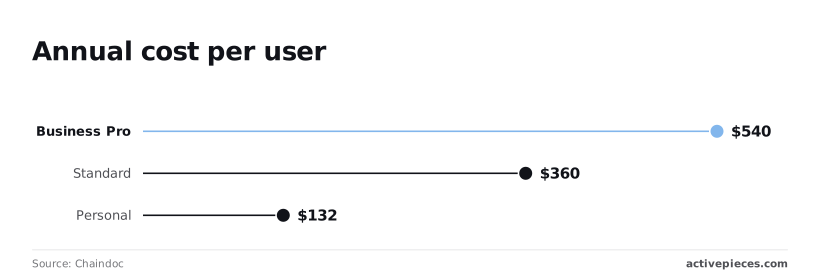
Even the $360 Standard plan and the $132 Personal option quickly become liabilities when volume spikes, forcing a costly migration to higher tiers, so users are effectively penalized for their own business growth.
Every additional envelope sent beyond the hidden "fair use" cap triggers a manual billing adjustment. This means unpredictable monthly expenses for your growing team.
The following table demonstrates the variance in total ownership costs for a typical five-user team processing a moderate volume of 500 documents annually.
| Provider | Annual Cost (5 Users / 500 Docs) | Primary Value Driver |
|---|---|---|
| DocuSign | $2,250+ | Industry standard with high overage risk |
| PandaDoc | $2,940 | Document creation and sales CRM focus |
| Dropbox Sign | $1,500 | Simple high-volume flat rates |
| Adobe Acrobat Standard | $1,019 | Deep integration with PDF workflows |
While DocuSign commands a premium, this comparison highlights that the market has fragmented into specialized tiers that favor different operational scales.
Adobe Acrobat Sign for ecosystem lock-in
For a five-user team, Adobe Acrobat Sign costs approximately $1,799 annually, creating a significant fixed overhead for small organizations, which means these businesses must prioritize this expense over other potential growth investments.
If your firm is already paying for Creative Cloud, you're effectively paying twice for document management. This pricing structure serves organizations where the legal department refuses to leave the Acrobat environment. It represents a significant markup over standalone competitors.
Dropbox Sign for simple high-volume signing
Dropbox Sign prices a five-user team at $1,500 per year, representing a notable commitment of capital for a mid-sized department that could otherwise be directed toward scaling operations, so leadership must carefully weigh this expense against other growth initiatives.
This provides a predictable $300-per-seat ceiling that eliminates the envelope-counting anxiety found in DocuSign’s Business Pro tier.
Because this plan includes unlimited signature requests, it's the most stable choice for high-velocity HR departments that can't predict their monthly hiring volume.
Signnow for budget-conscious teams
SignNow has the most aggressive pricing for small operations. A five-user team costs just $900 annually, allowing teams to allocate those saved funds toward other operational requirements, so the software effectively pays for a portion of its own utility.
You can run your entire signing workflow for less than the cost of two DocuSign Business Pro seats.
Capital can then be reallocated to other operational needs.
This 60% savings over the market leader makes it the only viable option for startups that need API access without the enterprise-level price tag, ensuring that technical integration does not become a barrier to entry, as the lower cost preserves the runway necessary for early-stage development.
It preserves essential runway during early growth phases.
Worth checking against a plan that does not meter every step: one credit covers a whole run on Activepieces.
Automating DocuSign workflows with Activepieces
Activepieces eliminates the manual overhead of tracking document lifecycles by synchronizing DocuSign status changes directly with external databases and communication tools. This automation removes the requirement for administrative staff to possess full "Power User" seats simply to monitor envelope progress.
Regulated organizations like MoneyGram and FundingSocieties run these automations in production using the air-gapped edition for maximum control.
The platform provides the same enterprise feature set (including SSO, SCIM, and custom RBAC) whether it is self-hosted or managed in the cloud, ensuring that security requirements for sensitive legal data are met without sacrificing functionality.
The efficiency of this approach is visible in how the platform handles failure states before they require human intervention. The following workflow demonstrates an automated response to a payment disruption. A failed transaction immediately triggers a notification to the relevant internal channel.
[SCREENSHOT: A workflow automation canvas showing a two-step flow titled "Payments Notificati..." with a Stripe "Payment Failed" trigger connected to a Slack "Send Message To A Channel" action. The right panel displays the Slack action configuration with fields for Action (Send Message To A Channel), Authentication (slack), Channel (activepieces), and Message (showing a template with payment failure details). The left sidebar shows Run Details with step_1 marked as completed with a 574ms duration. A success notification at the bottom indicates "Run succeeded".]

A billing discrepancy is flagged in milliseconds by this specific logic. This prevents a signed document from sitting idle while the underlying transaction remains unverified.
Once the notification is delivered, the workflow can be extended to include advanced logic handled by frontier-class models. Claude Sonnet 5.5 parses the specific error codes from the Stripe metadata to suggest a remediation strategy in the Slack message.
Gemini 3.1 Pro updates the corresponding record in the CRM to reflect a "Payment Hold" status, preventing the sales team from initiating onboarding. GPT-6 Luna generates a personalized follow-up email to the signer, providing a direct link to update their payment method without manual drafting.
Monday morning checklist for DocuSign contract renewals
A contract renewal is the only window where you can leverage your actual consumption data to prevent the automatic application of restrictive envelope caps that trigger overage fees.
Before the sales representative presents the standard tiered structure, you must audit the previous twelve months of activity to identify where "fair use" definitions collide with your automated workflows.
How to audit usage before DocuSign renewal
Before the sales representative presents the standard tiered structure, you must audit the previous twelve months of activity:
- Calculate the peak monthly envelope volume rather than the annual average for the envelope velocity audit.
- List every instance of the Salesforce customer relationship management platform or the GitHub software development hosting service connected to the account for the integration surface area.
- Identify workflows that pass document metadata to the Gemini 3.8 Flash long-horizon agentic coding model or the Claude Sonnet 5.5 speed-intelligence hybrid for frontier model routing.
- Total the number of times government-issued ID checks were required.
Mapping these requirements against the 2026 feature availability follows the volume quantification. DocuSign restricts specific administrative controls to their highest enterprise agreements. If you're a mid-volume user, you might be forced into a high-volume tier simply to retain oversight.
| Requirement | Consequence of Omission |
|---|---|
| Network Isolation | Without this specific security configuration, document traffic travels over public gateways, violating internal compliance for sensitive legal data. |
| Sandbox Persistence | If the testing environment lacks a dedicated persistent refresh cycle, developers are rebuild integration logic against volatile data, delaying deployment. |
| Advanced Recipient Routing | Choosing a tier without conditional routing logic means every complex signing order must be manually managed by an administrator, increasing the risk of human error. |
Frequently asked questions about DocuSign costs
Is there a truly free version of DocuSign?
DocuSign has a free edition that allows for signing an unlimited number of documents. It restricts you from sending more than a few documents for signature to others.
This means the version functions primarily as a personal storage locker for incoming requests rather than a functional tool for your business outbound workflows.
Once the initial sending limit is reached, the "Send" button is effectively disabled until you upgrade to a paid monthly or annual subscription.
Does DocuSign offer a nonprofit discount?
Registered 5001(c)(3) organizations can access discounted rates through the TechSoup marketplace, which reduces the upfront cost of the Standard and Business Pro editions.
This discount is applied only to the base subscription fee. You're still subject to the same strict envelope caps and overage penalties as commercial entities.
If a nonprofit exceeds its allotted volume during a high-intensity fundraising drive, the discounted rate doesn't protect them from the standard per-envelope overage charges.
Can I buy extra envelopes without upgrading my plan?
On the standard web-based plans, you can't purchase one-off "booster packs" of envelopes. A sudden spike in contract volume requires a permanent move to a higher-cost tier.
While enterprise-level contracts allow for negotiated volume blocks, the self-service tiers are rigid. You must either commit to a more expensive annual plan or face the fair-use throttling mechanisms.
This lack of modularity forces mid-volume users to pay for a higher ceiling they may only hit once a year.
What happens if I exceed my envelope limit?
When you surpass the "Fair Use Policy" threshold, DocuSign reserves the right to prevent the sending of new documents or to charge a per-envelope fee for every transaction beyond the cap.
These overages are often billed at a higher effective rate than the envelopes included in the base plan. This leads to unpredictable monthly invoices.
In extreme cases of repeated overages, account managers may lock the administrative dashboard until you sign a contract for a higher-volume enterprise agreement.
Related reading
Running the numbers
See what the same workload costs here.
Free forever plan, and every paid plan self-hosts at no extra cost.
See pricing Talk to sales