
What Is ZCode? Z.ai's Coding Agent Explained (2026)
What is ZCode Agent 2026 is explained here to help you evaluate if this autonomous engineer fits your current software development and deployment workflows.

Covers admin-panel settings for governed workspaces: which permissions and audit controls actually prevent failures, and which don't.
ContributorSeptember 28, 202612 min read
This article was researched and fact-checked by an advanced research system.
ZCode Agent 2026 represents a significant leap in autonomous software development, functioning as a sophisticated AI engineer capable of managing complex coding tasks from conception to deployment.
By leveraging advanced large language models, the system can interpret high-level requirements, generate optimized code, and perform rigorous debugging without constant human intervention.
As organizations look to streamline their technical workflows, many are integrating these capabilities with automation tools, such as Activepieces which connects various cloud services, to ensure that the AI's output is seamlessly synchronized across their entire development stack.
This evolution in AI-driven engineering not only accelerates the production cycle but also allows human developers to focus on high-level architecture and creative problem-solving rather than repeti
ZCode Agent 2026 technology assumptions explained
While model versions continue to advance, the architectural principles of agentic orchestration remain constant. The value of ZCode Agent 2026 lies not just in these advanced models, but in how they are integrated into your existing operational workflows.
This takes minutes, not a project: automate it in Activepieces free.
Define the zcode agent 2026 role
Rather than just suggesting syntax, ZCode Agent 2026 functions as a specialized AI-native software engineer that utilizes autonomous reasoning to execute end-to-end development cycles.
It interprets high-level requirements and translates them into functional codebases, reducing the cognitive load on senior engineers.
How ZCode orchestrates third-party AI models
ZCode is not a single standalone model, but rather a sophisticated platform that orchestrates various third-party LLMs to suit specific engineering tasks.
While it uses Z.ai GLM 5.3 as its default reasoning engine, it acts as a wrapper that allows users to swap in specialized models for different phases of the lifecycle.
This architectural flexibility means the agent can leverage Gemini 3.8 Flash for rapid greenfield development or switch to Gemini 3.8 Live for audio-based debugging. By functioning as an orchestrator, ZCode ensures the most efficient model handles the specific sub-task.
Standardized communication for agentic tools
The Model Context Protocol (MCP) serves as the open standard that makes this orchestration possible. It provides a universal way for AI agents to connect to external data sources and tools without custom code.

By using this protocol, ZCode treats any connected service as a native capability.
The agent uses MCP to securely exchange context and execute commands, creating a reliable bridge between the reasoning model and the software environment.
Activepieces runs as a per-project MCP server, so Claude, Cursor or Windsurf can create, edit and explain a flow without you ever opening a separate builder UI.
That requires handing over real CRUD control through an open protocol, not a chat widget answering questions about a UI it cannot touch. A chat window that only describes your automation is a demo.
One that builds it, with the tool calls logged, is the product.
A chat window that only describes your automation is a demo.
Moving beyond the "sandbox" phase is the primary goal. The agent can pull context from live Jira tickets to resolve bugs without manual data exports.
ZCode Agent 2026 long-horizon task management
The 2026 release shifts the focus to long-horizon task management. According to data from DevOS, an agent now produces 60 units of raw output, which represents a significant volume of code that must be validated for architectural consistency.
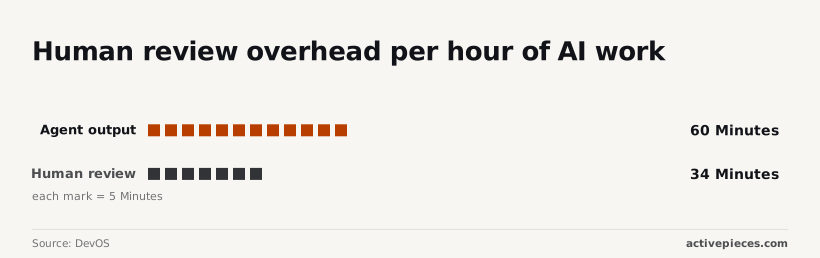
The 2026 agent produces 60 units of code for every 34 units of human review time, creating high-velocity output while reducing bottlenecking.
ZCode introduced basic file-level editing. ZCode added repository-wide context awareness. ZCode enabled autonomous reasoning for multi-step feature implementation. This progression ensures that teams are building on a stabilized framework.
ZCode Agent architecture enables autonomous problem solving
ZCode Agent operates by cycling through a continuous reasoning-action loop that allows it to validate its own assumptions against the actual state of your environment.
The reasoning engine and task planning
According to Zcode, the ZCode Agent uses Z.ai GLM 5.3, an open-weight model with a 1M-token context window. This model serves as the primary decision-maker for complex task decomposition.
This recursive loop ensures the agent does not merely guess at a solution but instead iterates until the terminal confirms a successful execution.
How ZCode interacts with your codebase
Through a direct connection to the local environment, the agent gains agency, utilizing a specific set of interfaces to manipulate data and verify system states.
The File System is where it performs read and write operations. Build commands, test suites, and system logs are managed through the Terminal. The Browser provides screenshot understanding to verify that UI changes render correctly.
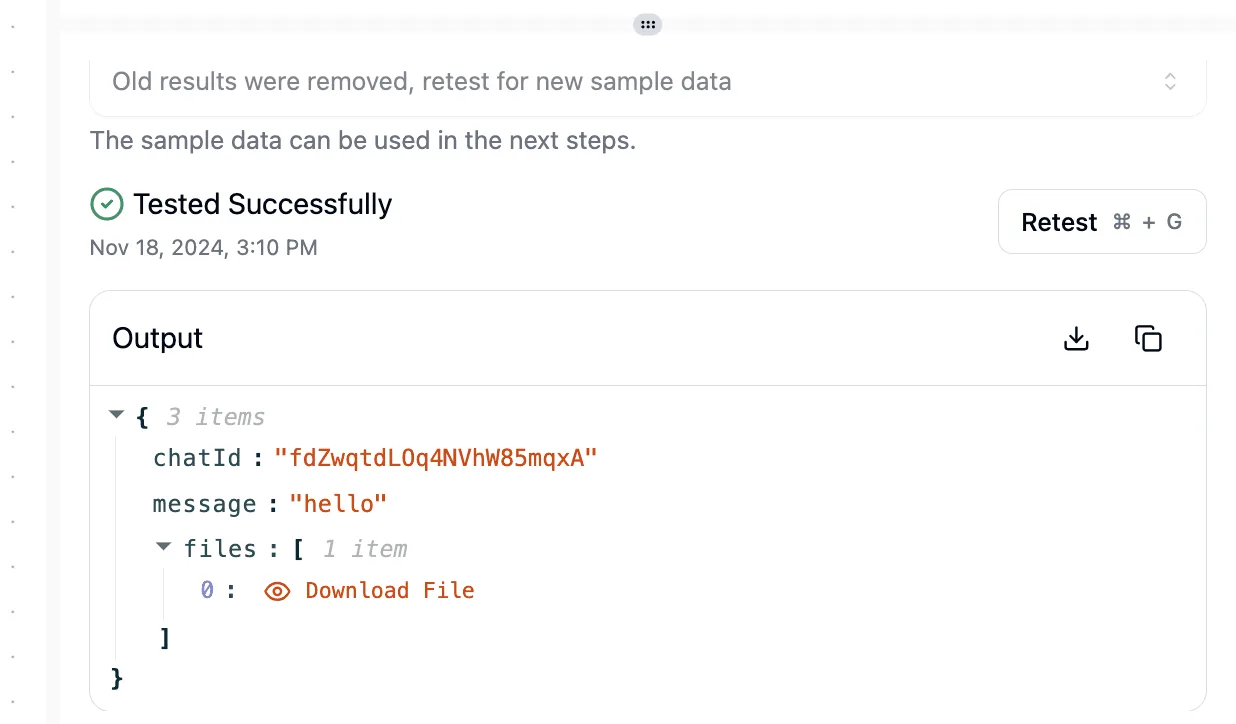
ZCode Agent handling multi-file code refactoring
By maintaining a persistent state across multiple files, ZCode Agent handles cross-functional changes, synchronizing updates between a database schema and API endpoints.
Because the agent can read the output of its own test runs, it identifies missing imports or type mismatches across the entire workspace. A refactor is only complete when the integrated test suite returns a zero exit code.
Accessing ZCode Agent through official Z.AI channels
Access to ZCode Agent 2026 is provided primarily through a local desktop environment or a managed cloud portal.
Operating as the official harness for the Z.ai GLM 5.3 model, the interface allows for "vibe coding" workflows where natural language intent is translated into multi-agent execution across local and remote environments.

GitHub repository and local installation
For developers who require the agent to interact with sensitive source code without sending full file buffers to cloud storage, local deployment is the standard.
The ZCode desktop application is distributed for Linux via AppImage, alongside native builds for other major operating systems, to ensure the agent inherits the user's local permissions.
The agent can utilize the user’s existing SSH keys and environment variables by installing locally, preventing credential leakage.
Zcode Cloud subscription tiers and limits
For teams that prefer not to maintain local compute resources, the ZCode Cloud portal provides a managed alternative.
Subscription tiers are divided into Lite, Pro, and Max levels, with each level defining the maximum number of concurrent agents allowed to work on a single workspace.
Access to more sophisticated reasoning models, such as GPT-6 Sol or Claude Opus 5.5, is granted at higher tiers.
Enterprise deployment options
To prevent autonomous agents from modifying production infrastructure without a verified audit trail, enterprise environments require centralized oversight.
The Single Sign On (SSO) settings page within the admin panel allows organizations to enforce identity provider (IdP) authentication.
Active toggles for Google and SAML 2.0 integration are available on the SSO configuration screen, allowing administrators to enable secure authentication protocols immediately. Admins use these to restrict workspace access to verified corporate domains.

You can follow the rest of this with the builder open. Start free, no card.
ZCode Agent compared to established AI coding assistants
ZCode Agent 2026 maintains the highest verified autonomy scores among current coding tools, allowing it to resolve complex repository-level tickets with minimal human intervention.
| Tool | Autonomy Score (AMI) | SWE-bench-Verified | Base Model |
|---|---|---|---|
| ZCode Agent | 2.4 | 77.8 | Z.ai GLM 5.3 |
| Claude Code | Not listed | 74.9 | Claude Sonnet 5 |
| GitHub Copilot | 1.1 | 18.2 | GPT-6 Sol |
Prices and plan limits checked against github.com and zcode.z.ai and zcode.z.ai and docs.claude.com and openai.com and gemini.google on September 28, 2026.
ZCode Agent benchmark results and pricing compared
As the table demonstrates, ZCode integrates the Z.ai GLM 5.3 model.
According to Cursor Pricing, ZCode Pro costs 56 USD per month, whereas Cursor Pro is only 20 USD and GitHub Copilot Business sits at 19 USD.
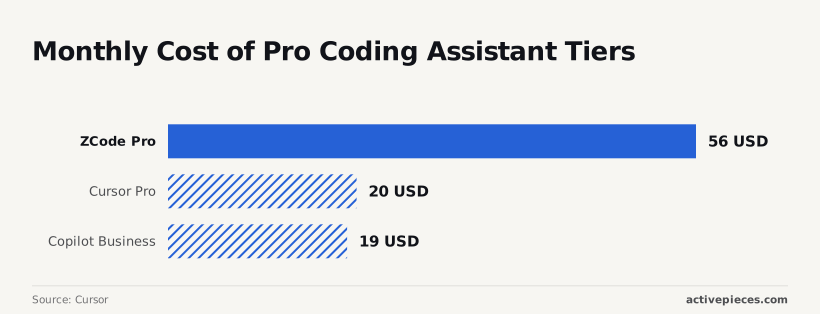
A team of ten will spend more annually to gain ZCode's higher autonomy.
Native support for Z.ai GLM 5.3 is introduced in the 2026 release. It has a 1M-token context window so that the agent can reason across an entire microservice architecture without losing track of upstream dependencies.
Admins can restrict the agent's file-system access to specific directories using a dedicated "Sandbox Manager" panel, preventing it from reading sensitive environment variables.
ZCode transitioned to the current v3.14.3 build released on 2026-9-23, which supports the Z.ai GLM 5.3 backbone.
Strengths and limitations of the ZCode Agent ecosystem
ZCode Agent best use cases for prototyping
When operating within greenfield feature development, ZCode Agent 2026 achieves its highest success rates. The lack of technical debt allows the underlying Gemini 3.8 Flash model to generate clean, compilable structures.
While the agent has high success in greenfield development, it shows low success refactoring legacy monoliths with circular dependencies.
ZCode Agent challenges with legacy codebases
When it encounters legacy monoliths containing circular dependencies, ZCode hits its primary failure mode.
When a change in one service triggers a cascade of side effects in a poorly decoupled database layer, the agent often attempts to fix symptoms rather than the root cause.
Security considerations for autonomous agents
Strict branch protection rules are required when granting ZCode write access to a GitHub repository to prevent the agent from merging unreviewed code into production.
Without a "Human-in-the-Loop" gate, an autonomous agent could inadvertently introduce vulnerabilities. The environment must be configured by admins so that the agent operates within a restricted container.
Scaling ZCode Agent output with Activepieces automation
The moment a integration is connected in Activepieces, an agent can call it.
Register a integration once and it runs two ways at once: as a step inside a flow, and as a tool schema on Activepieces' per-project MCP server, reachable from Claude, ChatGPT, Cursor, or an agent you built yourself.
There is no separate catalog to publish to, no export step, nothing to wire up twice. A catalog you have to re-integrate for your agents is not a catalog. It is a second migration.
By using the Activepieces Flow Builder to link the ZCode API with external triggers, admins prevent the "agent silo."
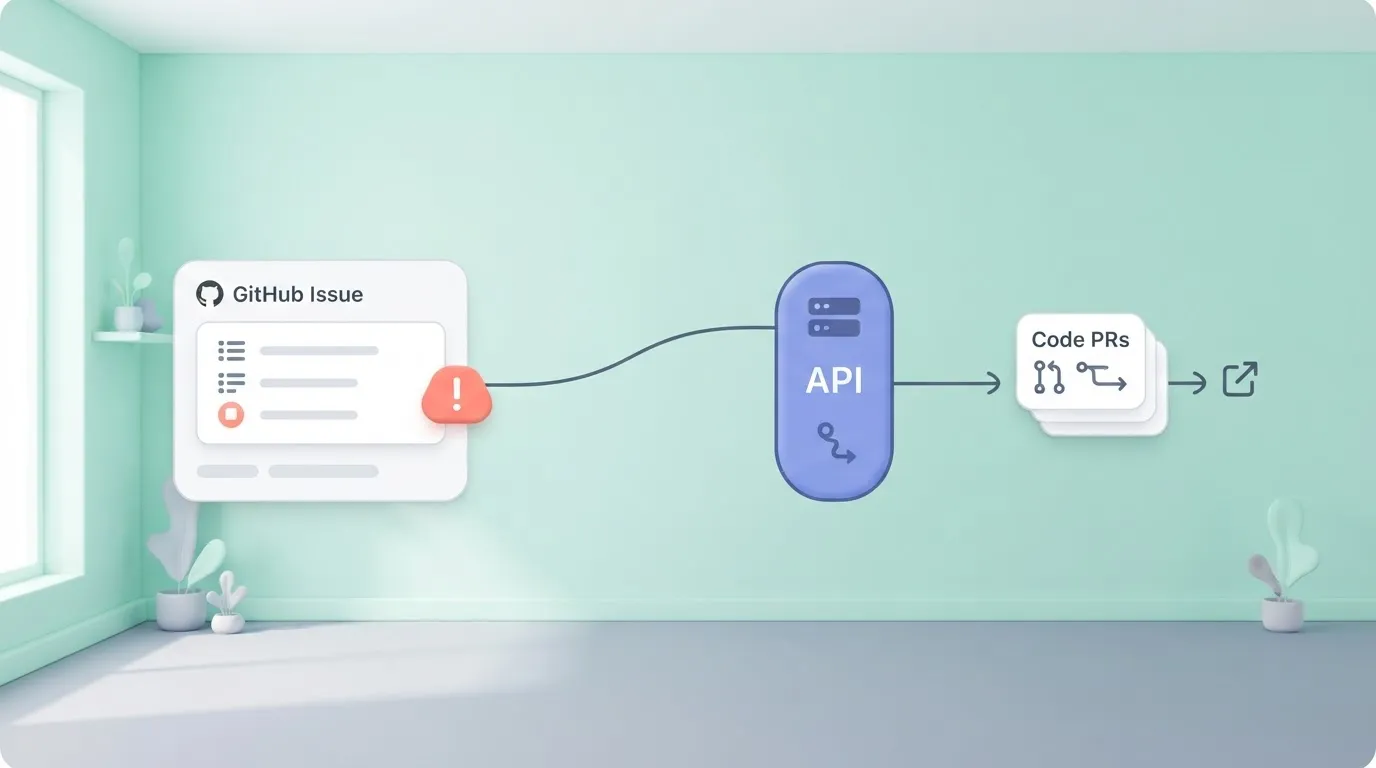
The system can trigger on GitHub Issue creation, send issue context to ZCode Agent via API, validate ZCode output in a sandbox, and post a PR link to Slack for human review.
Every connector in Activepieces is exposed as an agent tool, meaning the same action that runs in a production flow is available as an MCP tool for ZCode.
You can verify this mechanism in the Integrations Framework documentation or the open source repo, where the same integration action serves both deterministic flows and agentic tool calls.
This allows teams like MoneyGram and FundingSocieties to run complex automations where the agent has immediate access to the same integrations used by their core infrastructure.
ZCode's open source origins and developer tools
Designed to unify the fragmented developer experience, ZCode was developed by Z.ai as a comprehensive AI programming workbench.
It provides a desktop application for local editing, a browser interface for remote collaboration, and a terminal-based Agent.
Administrators can inspect the runtime environment because the maintainers open-sourced the client, backend service, and Agent CLI source code.
Functioning as a persistent background service, it utilizes the Z.ai GLM 5.3 model to handle a context window of one million tokens.
Activepieces provides the MIT-licensed core that allows these agents to interact with a company's own apps and data under central governance.
By stabilizing the API endpoints, Z.ai ensures that third-party orchestrators can reliably call the ZCode Agent without fear of breaking changes.
The Monday morning ZCode implementation checklist
Technical leads can evaluate ZCode Agent 2026 by deploying it into a fenced development environment where its agentic capabilities are restricted to non-privileged branch operations.
Within your version control system, you must explicitly define the scope of the agent’s write-access.
A baseline for how the agent handles long-horizon coding tasks is provided by testing ZCode against a flagship reasoning model like Claude Opus 5.5 or GPT-6 Sol.
- Verify the Node.js and pnpm environment, so that the development setup matches the exact specifications required for compatibility.
- Clone the ZCode repository and run pnpm dev:web.
- Assign a non-critical 'Good First Issue' to the agent via the CLI.
Completion of this sequence confirms that the local runtime is compatible with the ZCode core services.
Frequently asked questions about ZCode Agent 2026
Across any language represented in the training data of your selected underlying model, ZCode Agent 2026 functions effectively.
When configured to use Gemini 3.1 Pro or Claude Opus 5.5, the agent maintains context across polyglot repositories, allowing refactors across different backends within the same session.
Does ZCode Agent require a GPU to run locally?
Whether you are hosting the inference engine or merely the agentic orchestration layer determines the local hardware requirements.
A dedicated workstation GPU is necessary only if you are self-hosting open-weight models like Mistral Large 3.
Standard enterprise laptops can run the ZCode orchestration client by offloading heavy computation to hosted APIs such as GPT-6 Sol.
Dedicated AI accelerators are required for real-time audio analysis via Gemini 3.8 Live. This ensures the voice-to-code feedback loop remains instantaneous.
The specific workspace privacy toggle located in the Z.ai Admin Console governs data handling.
Enabling the "Zero-Retention" flag ensures that prompts sent to models like Claude Fable 5.1 are never used for base model training, so your unique architectural patterns remain exclusive to your organization.
Related reading
Build it
Set this up in minutes.
No code required. Connect your accounts, and Activepieces runs it from there.
Start free Talk to sales