
Claude Enterprise Automation Routes for Admins

Nov 10, 202614 min read
Pick the route first, because the route decides who holds the connection when something breaks. Automation on Claude Enterprise runs through in-app features, Claude Code, or the API called from a workflow tool such as Activepieces. Each has a different owner, trigger, runtime and bill.
If you want the fastest path, it is the in-app route: Projects and connectors, configured inside the Claude Enterprise workspace you already have. Nothing new is deployed, and an identity your admins can already see in the console holds the connection.
This article was checked on 2026-11-10, and the product facts come from Anthropic's own pages. Where a detail varies by organisation or changes between plan terms, I say so rather than guess.
Claude Enterprise automation is three separate routes
What Claude Enterprise includes, per Anthropic's pricing page
The console governs; it isn't an execution engine. The Enterprise plan covers the in-app surface and the admin layer that governs it: who gets access, which connectors are switched on, and what usage limits apply.

Call the API from outside the workspace and it is a different arrangement: Activepieces places an Agent step beside deterministic steps in one flow, AI usage is metered in credits, or moves to your own provider bill with Bring-Your-Own-Key, and credentials are held centrally per project.
| Route | Who sets it up | Trigger | Where it runs | How it's billed |
|---|---|---|---|---|
| In-app features (Projects, connectors) | Workspace admin enables; members use | A person starts a conversation | Inside the Claude Enterprise workspace | Under the Enterprise plan |
| Claude Code | A developer, within limits the admin sets | A developer's command or a scripted invocation | The developer's machine or a build environment | Through the Enterprise plan or an API key, depending on how the organisation provisions it |
| API from a workflow tool | An automation builder, with an API key issued to them | An event in the workflow tool, such as a schedule or incoming message | In the workflow tool, with model calls made over the API | Separately, by API usage |
Prices and plan limits checked against docs.claude.com and claude.com and openai.com and gemini.google on November 9, 2026.
Which route fits which job
Use the in-app route when a person is in the loop and the work is drafting, analysis or lookup against approved connectors. Use Claude Code when the job is engineering work and the developer owns the environment.

Use the API from a workflow tool when an event must trigger work with no one present. That last choice moves execution outside the console, which is where governance and runtime start to blur.
Everything below works on Activepieces' free plan. Start without code or a credit card.
Enterprise workspace and access setup
Make every access, identity, and spending decision in the Enterprise console, in a fixed order, so that when execution moves elsewhere nothing in the runtime holds governance settings. Each step depends on the one before it:
- Verify the domain.
- Configure SSO.
- Enable SCIM provisioning.
- Assign roles.
- Set spend and usage controls.
- Set retention.
Write down a named owner beside each step before you start.
Verify the domain and turn on SSO
Before SSO or anything after it can work, you need proof that your organization controls the email domain, and domain verification is that proof. Have whoever manages your DNS records add the verification record, because the console can't confirm a domain that someone else controls.
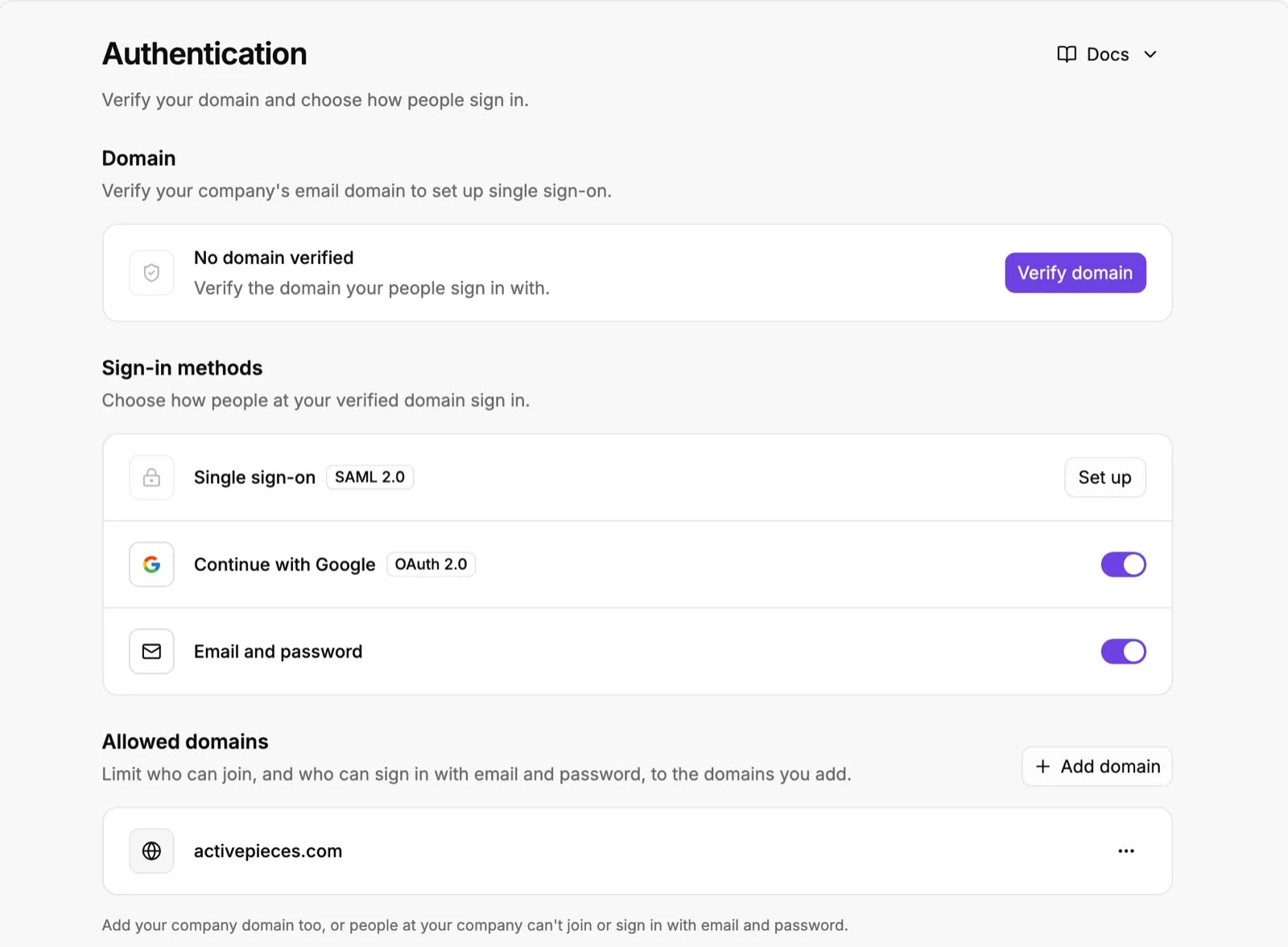
Then configure SSO against your identity provider, the system that holds your employee accounts. Record which administrator owns that connection and which token or certificate it uses, and set a renewal date.
An SSO connection that expires unnoticed locks out the whole workspace, not one user.
Provision users with SCIM and set roles
Without SCIM, offboarding depends on someone remembering to remove access by hand, and a departed employee keeps working credentials until they do. SCIM provisioning lets your identity provider create and remove accounts in the workspace automatically.

Assign roles after provisioning, not before, so that every account you grant permissions to arrives through the identity provider. Give the admin role to as few people as the job allows, and record each holder.
Anyone who can change connectors or limits can change what your automations can reach.
Set spend and usage controls
Set spend and usage controls before any automation runs. They cap what the organization, and the groups within it, can consume. An automated flow keeps consuming until something stops it, and without a cap a faulty loop becomes a billing event that nobody approved.
Finish with retention, which decides how long conversation data is kept. Choose it deliberately, because it applies to what your later flows produce as well as to what people type by hand.
An automated flow keeps consuming until something stops it, and without a cap a faulty loop becomes a billing event that nobody approved.
Claude Projects for reusable task automation
To build without changing any console setting, start with a Project: one named workspace holding the instructions and reference files for a single task. Name an owner for it before anything else.
Create a Claude Project and instructions
Create the Project under an account that will still exist in a year, not a contractor's login, and record that person as the owner. Projects belong to whoever creates them, so an unowned Project is the first thing that breaks at a handover.

Write the instructions as a short checklist, in this order:
- State the task in one sentence, including who receives the output.
- List the inputs the Project should expect, and what to do when one is missing.
- Specify the output format exactly, such as headings, fields and length.
- Name what the Project mustn't do, such as inventing figures or quoting outside the uploaded files.
Skip step 4 and confident but unsupported answers follow later.
Claude Project knowledge file limits
Upload only the files the task needs: style guides, field definitions, approved examples. According to Fast.io, Pro Projects hold up to 200 thousand tokens of knowledge.

That's enough for a handful of reference documents, but a full policy library won't fit, so choose what goes in.
500 thousand tokens each: that is where Claude puts Team and Enterprise. That's 2.5 times the Pro ceiling, so a task that needed trimming on Pro can carry its full reference set on either plan.

Check which plan the owner's account sits on before you plan the file set, because a Project built for 500 thousand tokens won't fit if the owner is on Pro, per Claude.
Share it with the right group
Share the Project with the named group that runs the task, not with the whole organization. Each person added gains access to every file inside it, so confirm that nothing in the knowledge set is wider than the group's own clearance.
Then test it before anyone depends on it. Run three cases: a normal input, an input with a missing field, and an input that tries to pull the Project outside its files.
Log the result of each against the instructions, and fix the instructions, not the test. A Project that passes all three is ready to be called from the flow.
Easier to see it running than to read about it: set it up free, no card.
Claude connection to company tools and event triggers
What Claude can hold is one question and what it can touch is another, and that reach comes from two separate switches: an admin enables connectors and MCP servers in the Enterprise console, and a workflow tool calls the Messages API with a Console key when an event fires.
Name the owner of every connection before enabling it. An organization admin turns each connector or MCP server on in the Enterprise console, and each user then authenticates with their own account.
Claude acts with that person's permissions, not a shared identity. A connector approved without checking its read and write scopes gives every seat that scope.
Call the Claude API from an event-driven workflow
Because seats and API usage are billed separately, a seat licence doesn't cover automated runs. The route has four steps:
- Create a key in the Console, owned by a service account and not a named employee, so it survives a departure.
- Store it in the workflow tool's credential vault, never in a step's plain text.
- Send a Messages API call from a step that fires on a trigger such as a new ticket or form submission.
- Write the response back to the system that raised the event.
Before you pick a model, note that input and output are priced differently, per Anthropic's pricing page. Per the Docs, Haiku 5.5 costs $0.10 per million input tokens and $0.50 output, so classification and routing can run at volume for pennies.

Sonnet 5.5 is $2 and $10, which suits drafting and summarising where quality shows.
Double Sonnet on both sides, Opus 5.5 is $4 and $20, so reserve it for steps where a wrong answer costs more than the difference.
Output costs five times input on every model, so a prompt that asks for a short structured reply saves more than one that trims the input.
Haiku 5.5's role is described on the models overview.
Read the hosting column first, because it decides who holds the Console key and who patches the server. The table sets the five ways to run that call side by side.
| Option | Setup effort | Hosting | Entry price |
|---|---|---|---|
| Activepieces | Low to moderate | Cloud or self-hosted | No per-task licence fee when self-hosted; you pay for the server |
| Custom code | Highest; you build retries, logging and scheduling | Your own compute | Engineering time plus compute |
| Zapier | Lowest | Vendor cloud only | Professional $29.99/mo for 750 tasks; Team $103.50/mo |
| n8n | Moderate | Cloud or self-hosted | No per-task licence fee when self-hosted; you pay for the server |
| Make | Low to moderate | Vendor cloud only | Core $10.59/mo |
If the trigger is busy, the 750 tasks on Zapier's Professional plan can run out in days, so estimate event volume before choosing it. Self-hosting removes the task meter but makes you the owner of the server holding your key.
Build the Activepieces version as three steps in one flow, with the Anthropic step coming from its 747 integrations, all counted in the open source monorepo on GitHub: a trigger that receives the event, an Anthropic step that sends the prompt with the vault-stored key, and a write-back step that posts the result to the originating system.
Because all three sit in one flow, the run trace logs a single execution from trigger to write-back.
Place an Agent step in the flow builder beside those deterministic steps and the same trace still shows one execution, with the Agent step as a line inside it rather than a second system reached by a callback.
Claude Enterprise automation limits and error fixes
When a run fails, the trace shows the failing step, and the cause is almost always a limit someone set or a credential someone owns.
The table below sorts each symptom by layer, with a column that separates plan limits from API tier limits (checked 2026-11-10).
| Symptom | Likely cause | Fix | Limit type |
|---|---|---|---|
| Usage limit reached, then resets | The plan's usage allowance for the window is spent | Wait for the reset, or have the admin change the plan or seat allocation | Plan limit |
| Context or file limit | The conversation, or an attached file, exceeds what the model or plan accepts | Start a new conversation, split the file, or send a summary instead of the raw document | Plan limit (app); model limit (API) |
| API 429 | Requests or tokens exceeded the organization's rate limit | Back off and retry, smooth the request rate, or request a higher tier | API tier limit |
| API 529 | The service is temporarily overloaded | Retry with delay; no key or plan change helps | Neither; capacity |
| API 401 | The API key is missing, invalid, or revoked | Issue a new key under the right owner and update the flow's stored credential | Credential |
| API 403 | The key is valid but lacks permission for the resource | Grant the scope in the admin console, or use a key that holds it | Permission |
Read the last column first. A plan limit is fixed by an administrator in the Enterprise console; an API tier limit is fixed on the API account, and a flow that mixes the two will have people raising the wrong one.
Usage and context limits in the app
When a usage-limit message appears, the allowance for the current window is spent, and the only documented remedies are waiting for the reset or changing the plan.
Context and file limits are different: they concern the size of one conversation, so a bigger plan doesn't clear them. Shorten the input or start fresh.
API errors and rate limits
Your organization sent too much, too fast: that is a 429, the tier limit, so retries with backoff are the first fix and a tier increase the second.
A 529 isn't your limit at all. It reports overload on the service side, so retry later and don't touch keys.
Retrying a 401 or 403 unchanged will fail identically each time, so configure those steps to stop and report rather than loop.
Connector and permission failures
When you see a 401, the credential itself is wrong: expired, revoked, or pasted into the wrong field. A 403 means the credential is accepted but its scope is too narrow.
Name the token type and scope before changing anything, then confirm the connector is enabled for that user in the Enterprise console.
Frequently asked questions
Not from the Enterprise console: a schedule belongs to the flow that runs the Agent, so the trigger and the run trace sit with the flow's owner. The console decides who may connect what; it doesn't execute work.
Source: Anthropic's Claude Enterprise product page, as of 2026-11-10.
Do Enterprise seats include API access? No. A seat licenses a person to use Claude in the apps, while API access runs through a separate Console organization with its own keys and billing.
Source: Anthropic's pricing and Console documentation, as of 2026-11-10.
Is our data used to train Claude on Enterprise? By default, Anthropic doesn't train its models on content from its commercial products, which include Enterprise and the API. This default covers commercial terms only; consumer plans follow different settings.
Source: Anthropic Privacy Center, as of 2026-11-10.
How many seats are needed for Claude Enterprise? Anthropic's pricing page lists a 20 seat minimum, at US$20 per seat per month billed annually, plus usage at API rates.
Source: Anthropic's Enterprise plan page, as of 2026-11-10.
Can Claude Enterprise connect to Slack, Google Drive and Jira?
Yes, through connectors: Slack is the messaging source, Google Drive the document store, and Jira the ticket tracker. An admin decides in the console which connectors are allowed, and each person then authenticates with their own account.
That means the data a run can reach follows that person's permissions, and a shared service login would hide who the owner is. Source: Anthropic Help Center, connectors documentation, as of 2026-11-10.