
Claude Team Plan (2026 Guide)

Oct 31, 202616 min read
Compare Claude Team plan pricing and features
Claude Team plan pricing summary for small teams
When a seat hits its usage limit, you get pushed toward a pricier tier. Claude Team is the per-seat plan for groups, so your bill scales with headcount, even if some people, say those who only Activepieces workflows touch occasionally, barely use their seat.
It happens fast on the individual ladder. Free costs $0 per month on Claude's pricing page, with limited usage every 5 hours and every week, so it suits a trial and not a working day.
According to Claude's pricing page, Pro is $20 per month, which is the baseline every Team seat gets compared against.
Max is $100 per month according to Claude, five times Pro, so one heavy user who outgrows Pro costs as much as five Pro seats. Ultra is $200 per month, so a few power users can outspend the rest of a small team combined.
Every current plan in one table
Read the table below for one thing: only Team and Enterprise are designed for a group, and the other three charge one person. It sets all five plans side by side, letting you compare them directly.
| Plan | Monthly price | Billed per | Stated limit |
|---|---|---|---|
| Free | $0 | Person | Limited usage every 5 hours and every week; up to 5 Projects |
| Pro | $20 | Person | Higher usage than Free |
| Max | From $100 | Person | Higher usage than Pro |
| Team | Per seat, listed on the pricing page | Seat | Usage allowance per seat |
| Enterprise | $20 per seat, billed annually (20 seat minimum) | Contract | Agreed with Anthropic |
Prices and plan limits checked against docs.claude.com and claude.com and openai.com and gemini.google on October 30, 2026.
viz type=step title="What Claude's individual plans cost each month" unit="$ per month" source="Claude - https://claude.com/pricing"00 for Max and $200 for Ultra." Free: 0 Pro: 20 Max: 100 Ultra: 200
Source: Claude pricing page, checked 31 October 2026.
If the limits column looks vague, that is on purpose. Anthropic states usage as allowances that reset, so a seat that looks cheap can still stall mid-task at 4 p.m. That's the cost to measure, and the rest of this article shows how.
What Team adds that Pro does not have
With Team you get group management: one bill for everyone and admin control over who has a seat. Pro is a personal account, so with ten Pro subscribers you reconcile ten expense lines and have no central view of who is stuck at their limit.
That missing view is the problem, and headcount pricing is what produces it: every seat is a line item, so IT hands out a few and everyone else waits.
Per-seat pricing rations automation, and Activepieces doesn't: it meters credits by use and ships unlimited flows on every plan, so adding a person costs nothing until they run something, within the user count each plan includes (up to 5 users on Free and Plus).

Each team works in its own project, with only the apps an admin has allowed and credentials held centrally. Alan and Funding Societies run production automation on it, and the credit structure is on its pricing page.
This takes minutes, not a project: automate it in Activepieces free.
Calculate Team costs by usage tier
Do not multiply headcount by the seat price. Your Team bill is the total of each person priced at the plan that covers them: tag every person light, regular or heavy, price each one, and add it up.
One person burning through a seat's allowance is exactly why each person gets their own row.
Build the seat sheet
Open a spreadsheet with one row per person: name, role, and a usage tag. Light means a few prompts a week, regular means daily use, heavy means they hit limits mid-day.
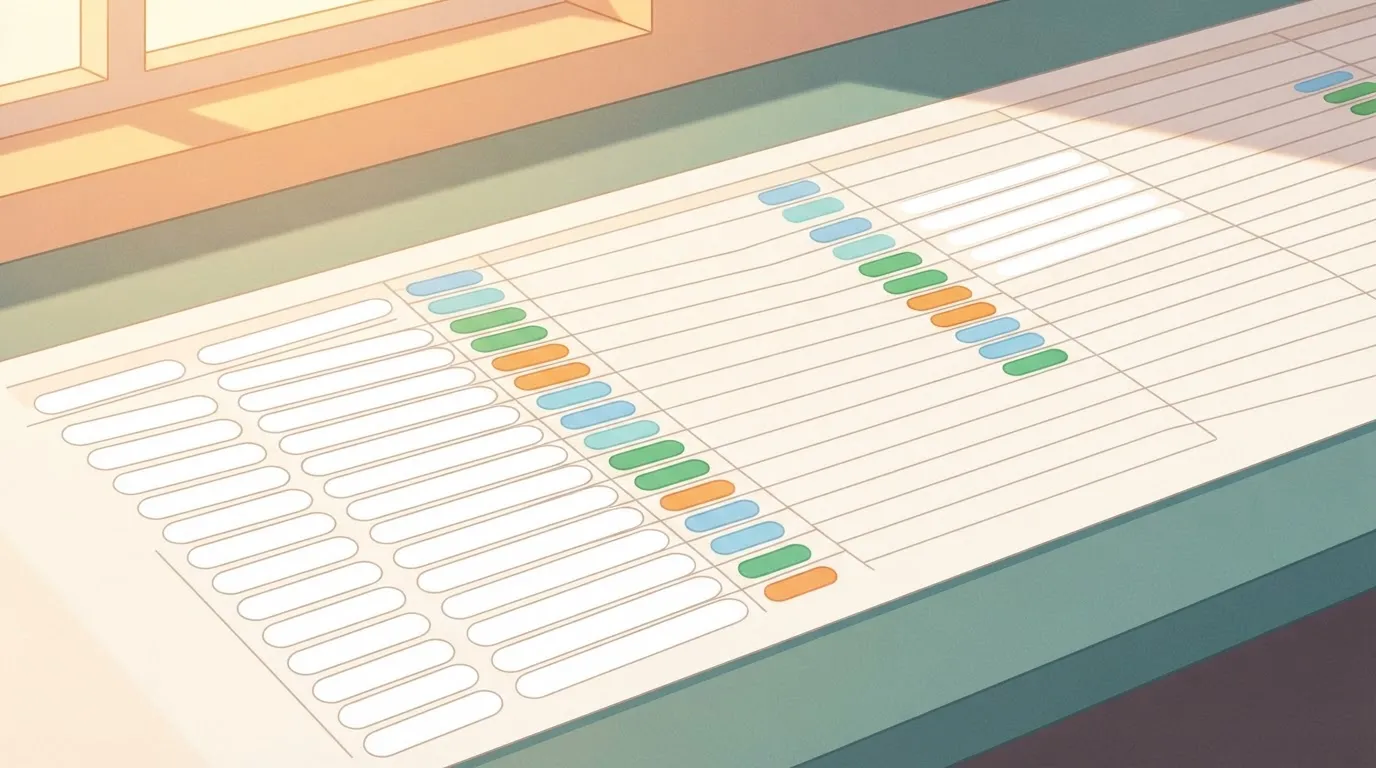
Then assign a plan to each row: standard Team seat for light and regular, a higher tier for heavy. Ask the people themselves, or check their usage for two weeks. Guessing is how you end up with a 2 AM message from someone locked out.
Also count seats you'll actually use. At one insurer, Logic of Logic reports 100% of ChatGPT Enterprise licences purchased, 97% activated and 85% active weekly.
Guessing is how you end up with a 2 AM message from someone locked out.
Roughly one licence in seven sat idle in a given week, so buying a seat per head overpays unless you check who really logs in.
Worked totals for 5, 15 and 40 people
To get the totals, split each team 40/40/20 across light, regular and heavy; the table below shows them as formulas. T is your standard Team seat price, H the higher-tier price, P the Pro price.
Plug in current prices from Anthropic's pricing page, since they change.
| Team size | Light | Regular | Heavy | Plan assigned | Team monthly | Team annual | All on Pro (monthly / annual) |
|---|---|---|---|---|---|---|---|
| 5 | 2 | 2 | 1 | 4 standard, 1 higher tier | 4T + H | 12 × (4T + H) | 5P / 60P |
| 15 | 6 | 6 | 3 | 12 standard, 3 higher tier | 12T + 3H | 12 × (12T + 3H) | 15P / 180P |
| 40 | 16 | 16 | 8 | 32 standard, 8 higher tier | 32T + 8H | 12 × (32T + 8H) | 40P / 480P |
Each heavy user swaps a T for an H, so the bill rises with how many people hit limits, not with headcount alone. That is what drives the gap in the heavy column.
Team versus the same people on Pro
On paper Pro is cheaper per head, but it gives you no shared admin and no central billing, and you pay for it in scattered receipts.
Compare the Pro column with your Team column and ask whether the difference buys anything you'd otherwise do by hand.
, which is where to trim before you commit.

Review Team limits and hidden costs
The seat price is only the floor: usage windows, weekly caps, extra usage billing, seat minimums and tax decide how many of your people end up on a higher tier.
Once you've priced each person against a tier, these are the numbers that move what's left.
Usage windows and weekly caps
Mid-task, your heaviest users hit the window first. Claude's allowance resets on a rolling window and is also capped weekly, both set out on Anthropic's help pages, so the cost shows up as a stalled afternoon before it shows up on an invoice.
Note which heavy features (long documents, big uploads, agentic work, the larger models) draw the allowance down faster, because one person running those can exhaust a cap that ten light users never touch.
Ask your power users what they were doing when they last got cut off.
Extra usage and premium seats
When someone hits the cap, they wait for the reset, or you pay for extra usage or move them up a tier. Those are different bills.
Work out which your team would choose, because a few people on extra usage can cost more than a handful of upgraded seats. If your heavy users are few and predictable, upgrade them. If the spikes are scattered, metered extra usage may suit you better.
Minimum seats, tax and billing
If your group is small, you may pay for seats it never fills: Team plans have a minimum seat count. Tax usually comes on top of the listed price, so budget from the invoiced total, not the page figure.
Copy these seven into your sheet, each with the date you read it, since the help pages change:
- Rolling usage window length, which tells you how soon a blocked person is back.
- Weekly cap, which tells you whether a bad Monday costs you the week.
- Features that use more allowance, which tells you who your heavy users really are.
- Behaviour at the cap, whether it's a wait or a prompt to pay.
- Extra usage billing, the rate and whether you can set a ceiling.
- Minimum seats, which sets your floor.
- Tax, which turns the quote into the real total.
With those filled in, you can price each person against a tier instead of guessing at an average.
You can follow the rest of this with the builder open. Start free, no card.
Compare Team with ChatGPT and Gemini
Claude Team's per-seat model sits beside two other seat plans and one metered option, so you can decide between a seat-based commitment and per-use pricing. Once you've priced each person against a tier, the published gaps matter as much as the prices.
Look at what each vendor actually publishes in the table. Where I couldn't confirm a figure, it says so, and you should treat that blank as a question for the sales rep before you commit.
| Plan | Seat price | Minimum seats | Stated limits | Admin and data controls | Fit |
|---|---|---|---|---|---|
| Claude Team | $20 per seat/month billed annually; $25 if billed monthly | Teams of 2 to 150 | Premium seats get 5x more usage than standard seats | not published | Groups whose heavy users you have already identified |
| ChatGPT Business | not published | Starting at 2 users | not published | not published | Teams already standardised on OpenAI tooling |
| Google Workspace with Gemini | not published | not published | not published | not published | Companies that live in Google's office apps |
| Claude API | Pay per token | None | Not seat-based | Set in your own code | Spiky or automated usage |
You can't pick a winner from a brochure when four rows say "not published", which means you need to contact sales for the missing information. Run your own usage numbers against each vendor's current quote.
When the API is cheaper than seats
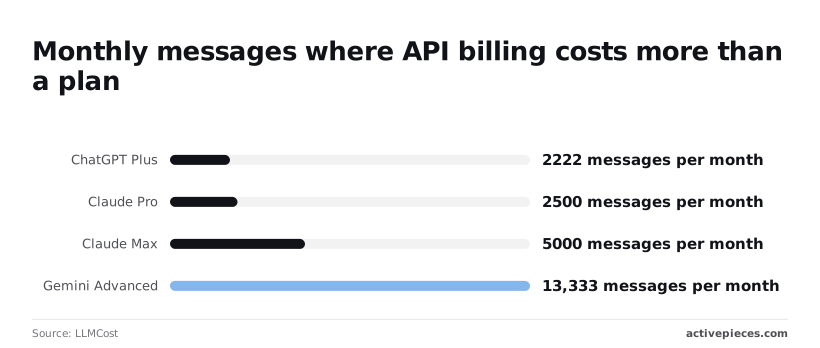
Below a certain message count, metered billing wins, and LLMCost calculates where that line sits. ChatGPT Plus breaks even at 2,222 messages a month, so anyone sending fewer is overpaying for the subscription.
Claude Pro breaks even at 2,500, and Claude Max at 5,000. Gemini Advanced sits at 13,333, so a Gemini seat is the hardest of the four to beat with the API.
Check each person's monthly message count against these thresholds. Most light users fall under them, which makes seats the wrong tool for those people.
Pro is enough when a person stays under the 2,500-message line, never hits a limit, and needs no shared admin controls. For those people, a Team seat buys nothing they'll use.
Keep Team for the staff who need central administration or who regularly bump into limits.
Fix repetitive Claude work with Activepieces
Activepieces does nothing to Claude's pricing. It's an automation tool, and it only helps when the work eating your seat allowance is the same task repeated by hand.
A workflow that calls Claude with your own API key puts the model cost on your own provider bill, while Activepieces Plus is $20 a month flat for 10,000 credits, with overage at $0.007 a credit beyond that, and a run is 1 credit however many steps it has, so your Activepieces cost is a predictable base plus credits used, and model cost sits on your own provider bill.
So if the people you'd otherwise upgrade are hitting limits on routine jobs, the fix may not be a higher tier at all. It may be taking the job out of the chat window.
Which Claude tasks to automate in workflows
Ask whether a person is doing the same thing in the same shape every time. Three jobs usually pass:
- Summarising support tickets as they arrive
- Drafting first-pass replies for a human to review and send
- Sorting form submissions into categories
Each one is a person pasting text into a chat, waiting, and copying the answer back out. That's the worst use of a seat allowance, since the allowance drains on work nobody needs to be present for.

Anything that needs judgement, back-and-forth or a different question each time stays in the chat, where a seat is the right tool.
In the illustration below, one pile of tickets takes two paths. On the left, a person pastes them into a Claude chat and the seat allowance meter fills.
On the right, an Activepieces flow runs trigger, Claude API call, output, and with your own AI key the Claude step costs 1 credit while the model cost goes to your own provider.
Take from it that the same work can draw on two different meters, and that you choose which one.
How automation changes your Claude Team bill
Move a task into a workflow and it comes off the seat allowance and lands on a usage bill. That helps if the heavy users were heavy only because of repetitive work, since they may stay on a cheaper plan.
You swap a fixed cost for a variable one. A seat costs the same however much it's used.
An API-driven flow costs more when ticket volume spikes, and a badly built flow that loops or retries can run up charges nobody notices until the invoice. Set a spending cap and check the first week's usage before you trust it.
What to check before buying Team seats
Spend the first hour of Monday on five checks, in order, and spend nothing on seats until the last one is done.
Don't buy seats on a guess. Price your actual people against the actual page, and write down when you looked, because plan names, limits and prices change and a quote from memory is how a budget gets blown.
Here's the order I would run it in:
- Reopen the pricing page and record the date next to every plan you note. A figure with no date can't be trusted in a month.
- Run the seat sheet with real names: one row per person, marked by how often they hit a usage limit. A headcount average hides the three heavy users who drive the bill.
- Trial a few of those heavy users on Pro for two weeks. If they never hit a wall, the plan isn't your problem.
- Confirm Team's seat minimum and annual terms in writing. A minimum above your real user count means you pay for empty chairs.
- Set a review date on the calendar, so the decision gets rechecked instead of inherited.
That order puts the cheap evidence ahead of the contract.
Fill the right-hand column from the dated page you saved, not from this article. The table below sets the plans side by side on who gets billed and what you must verify.
| Plan | Billed to | Verify before deciding |
|---|---|---|
| Pro | Each person, individually | Whether your heavy users still hit limits during the trial |
| Team | The company, per seat | Seat minimum, annual terms, and the cost of any higher-usage seats |
| Alternatives | Varies by vendor | Whether their limits and pricing suit your repetitive work |
Once several people use it and someone has to add and remove them, Team gives the company one bill and central control over who has access.
It doesn't raise a limit for a person who is already capped, so check how heavy users are handled on the page.
The decision rule: if the trial shows few people hitting limits, stay on Pro and revisit on your review date. If many do, price Team with the higher tier included.
Frequently asked questions
Once you have priced the seats, these practical questions come up, and the answers are short because the details sit in the billing terms.
Can I upgrade from Pro to Team without losing my chats?
Not automatically. A Team workspace is a separate organization from anyone's personal Pro account, so chat history stays where it was created.
Before you move people, have each person export or copy anything they need, and keep the Pro subscription running until they've confirmed nothing is missing. I'd rather pay one overlapping month than reconstruct a project's context from memory.
Does Claude Team train on your company's data?
Does Claude Team train on your company's data? By default, no. Anthropic's commercial terms say it doesn't train its models on content from Team and Enterprise customers.
Read the current terms yourself and keep a copy for your security review, because your legal team will ask for the source and not for my summary.
Is there a free trial for the Team plan?
Is there a free trial for the Team plan? Don't plan around one. Offers change, and I won't promise something the sign-up page may not show.
Instead, run a small pilot with a few heavy users on paid seats. It tells you more than a trial would, because it shows how many of them hit the usage limits.
Can Team members be on different seat types?
Can Team members be on different seat types? Yes. Team lets you assign different seat types within one workspace, and that's what makes the pricing approach in this article workable.
Put the people who hit limits on the higher tier and leave everyone else on the standard seat. You don't have to upgrade the whole team because three people are heavy users.
Do unused Claude Team seats get refunded mid-term?
Do unused Claude Team seats get refunded mid-term? Assume not. Seat changes often take effect at the next billing date, with no credit for the remaining time.
Treat every seat as committed until you've read the cancellation and proration terms. That's also why you should measure usage first and buy seats second.
Related reading
References
Build it
Set this up in minutes.
No code required. Connect your accounts, and Activepieces runs it from there.
Start free Talk to sales