
Composio Pricing Explained for Small Agent Teams

Nov 24, 202614 min read
Composio bills by tool calls, so the plan you pick matters less than how many calls your agents make and how many accounts they connect, a pattern that also holds for workflow tools like Activepieces where usage drives the bill more than the tier does.
Composio is an integration and auth layer for AI agents: it handles the OAuth and API connections that let an agent act in other apps, and it meters each action the agent runs.

Read the table below as the seven dimensions that set your bill. It's taken from composio.dev/pricing on 2026-11-24. Where a cell says "Not confirmed," I couldn't verify the value, so read it off the live page and don't assume it.
Composio Pricing Today, Plan by Plan
| Plan | Price | Included tool calls | Overage | Account limit | Requests per minute | Log retention | Support |
|---|---|---|---|---|---|---|---|
| Hobby | Not confirmed | Not confirmed | Not confirmed | Not confirmed | Not confirmed | Not confirmed | Not confirmed |
| Pro | Not confirmed | Not confirmed | Not confirmed | Not confirmed | Not confirmed | Not confirmed | Not confirmed |
| Enterprise | Unpublished | Unpublished | Unpublished | Unpublished | Unpublished | Unpublished | Unpublished |
Whether a prototype fits on Hobby, the entry plan, or you pay for Pro within the first week of real traffic comes down to its included calls, account cap and rate limit. Count your calls per agent run before trusting it.
Pro raises the ceilings and adds overage billing, so spend grows with volume instead of stopping at a wall. Work out calls per run times runs per month, then compare that to the included allowance.
Teams weighing other automation tools such as Activepieces should put them on the same unit before comparing prices.
Because Enterprise is unpublished, sales quotes every figure. Negotiate on the same columns: call volume, account limit, rate limit, retention and support.
If you are running this arithmetic for your own team, see what the same workload costs on Activepieces.
What Composio Costs at Three Realistic Usage Sizes
$0.0003 overage per call is the only rate I can state, which means other charges aren't detailed here. The table prices that alone and leaves plan names, base fees and included calls out rather than guess them.
It shows what the metered unit costs if every call counted as overage, which's the ceiling a tier's included allowance then reduces.
| Monthly calls | Overage at $0.0003 per call |
|---|---|
| 1,000 | $0.30 |
| 50,000 | $15 |
| 1,000,000 | $300 |
| 1,000,000, each call retried once (2,000,000 billed) | $600 |

Watch the last row, where retries come in: if failed calls count as calls, a flaky integration doubles your bill without adding a single successful action.
Check how Composio counts retries before you trust any total.
At about 1,000 calls a month, call volume's almost irrelevant: the metered cost tops out at thirty cents, so the base fee and the free tier's limits decide everything. Compare plans on connected-account caps and log retention, not price per call.
At about 50,000 calls a month, fifteen dollars of overage at most means the plan's included allowance matters more than the per-call rate.
Here a tier's rate limits, not its price, are what push teams to upgrade, because a limit hit during a burst costs more than the calls themselves.
At about 1 million calls a month, three hundred dollars of metered usage at the ceiling, doubled by retries, is where the per-call rate starts to outweigh the base fee.
Because these charges and limits tend to surprise teams, confirm them on Composio's pricing page before committing, since I couldn't verify them here:
- Overage rates once you pass included calls
- Connected-account limits per tier
- Rate limits that force an upgrade
- Log retention windows
- Whether SSO sits behind a higher tier
- Which tiers include support
Composio's tooling cost compared to savings
Put the objection at its strongest: the tool-call bill is small next to your LLM spend. It's also far smaller than the engineer-weeks Composio saves you on OAuth flows, token refresh and connector maintenance.
If one engineer-week costs more than a year of the plan, you could argue that counting calls is false economy.
How retries multiply the billed call count
That holds only if the call count is what you think it's. It starts at 45 logical calls, the ones your code meant to make.
135 billed calls is where the SDK's own retries lift it. A wrapper you wrote around the SDK takes it to 270. A gateway in front of the wrapper takes it to 540.
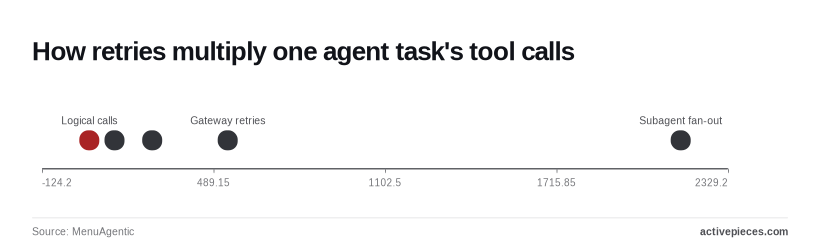
Subagent fan-out, where each spawned agent repeats the whole stack, ends at 2,160.
That's a 48x gap between the number you planned for and the number metered, so you've massively miscalculated. The point's not that every task hits the ceiling.
Each layer retries independently and none of them knows about the others, so the multiplier moves with how flaky an upstream API is on a given day. A bill that swings with someone else's uptime is hard to budget, even if its average is small.
When Composio pricing works against small teams
Under one condition, then, the objection is right. Your logical calls must be few, and your retries must live in a single layer you control, with fan-out capped.
A bill that swings with someone else's uptime is hard to budget, even if its average is small.
Then the bill is the call count you forecast, it stays inside your plan's included volume, and the engineering time you save is the larger number. If you can't show that, the 2,160 figure is the one to price against.
That means measuring billed calls per task in a pilot before you compare plan names.
Composio Against Arcade, Pipedream, Nango and Zapier MCP
When your agent calls many different apps for many end users, Composio's cheaper. It loses to narrower tools when you need few integrations or want to run the infrastructure yourself.
Comparison table on price, billing unit and limits
For each vendor, the table below lists the metered unit and what to check. I left out dollar figures because I confirmed none for this integration. Take each vendor's current rate from its own pricing page and multiply by your pilot's count.
| Vendor | Free allowance | Billing unit | Starting price | Cost at 50,000 actions | Integrations | Self-hosting | End-user auth billing | Check date |
|---|---|---|---|---|---|---|---|---|
| Composio | Free tier with a monthly call cap | Tool calls | Paid tiers above the free cap | Depends on whether your tier includes that volume or charges overage | Broad catalog of SaaS apps | Enterprise option | Tied to connected accounts and tier | Confirm on the live page before buying |
| Arcade | Free tier exists | Tool executions and hosted worker usage | Paid tiers above free | Depends on execution count and worker use | Narrower, agent-focused catalog | Offered for some deployments | Handled per user in its auth layer | Confirm on the live page before buying |
| Pipedream | Free tier with limited runs | Compute credits per invocation | Paid tiers above free | Depends on credits each workflow consumes | Large app library | None | Connected accounts are a separate limit | Confirm on the live page before buying |
| Nango | Free tier exists | Connections plus operations | Paid tiers above free | Depends on connection count more than call count | Wide API catalog, built around syncs | Open-source version | Billed per connection | Confirm on the live page before buying |
| Zapier MCP | Free plan with a small task cap | Tasks | Paid Zapier plans | Rises with every tool call counted as a task | Very large app list | None | Included in the Zapier account | Confirm on the live page before buying |
| Activepieces | 1,000 credits a month, unlimited flows, up to 5 users, free forever with no card needed | Credits (a run is 1 credit however many steps it has) | $0 on Free; Plus is $20 a month flat | Team is $200 a month flat and includes 50,000 credits a month | 750 integrations | Yes: free Community Edition under the MIT licence; every plan can run on Activepieces Cloud or on-prem | — | 2026-10-23 |
Because the units differ, equal call counts won't produce equal bills. Nango's bill follows connections, while Zapier MCP's follows tasks.
Composio's cheaper when one agent spans many apps and a flat per-call rate beats paying for tasks or compute credits on every step. Check whether your tier's connected-account limit binds before its call limit does.
Nango suits a product with few integrations and many syncs, and its open-source version suits teams that must host their own. Zapier MCP's simplest when your team already pays for Zapier. Pipedream fits workflows with custom code between calls.
Worth checking against a plan that does not meter every step: one credit covers a whole run on Activepieces.
Where Activepieces Fits Beside Composio
If your work's a fixed sequence of steps rather than per-user agent access, Activepieces fits. Its pricing page bills on credits, so you count credits, not seats or connected accounts.
A run is 1 credit however many steps it has, so a ten-step flow costs the same as a two-step one, where Zapier's pricing page bills per task and Make's per module.
On the free plan you get 1,000 credits at $0 a month, which is enough to prove a workflow works but not to run one on a schedule all month.
Plus raises the allowance to 10,000 credits for $20 a month, so ten times the volume costs $20 more.
Team gives 50,000 credits for $200 a month, which means a fivefold jump in allowance costs ten times as much.
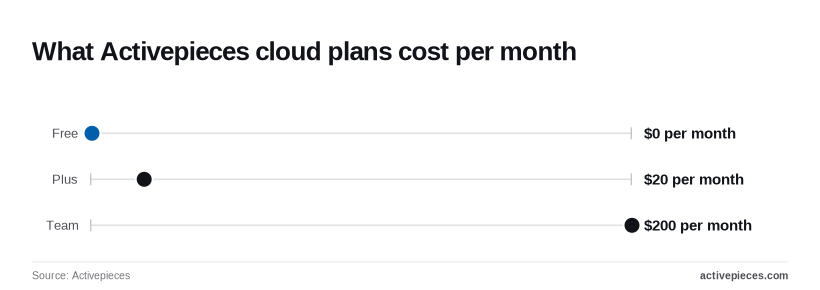
Per credit, Plus's $0.002 and Team's $0.004, so the bigger plan's the more expensive way to buy volume unless you need what else comes with it. Estimate your monthly credit use before you pick a plan name.
Unlimited workflows on every plan
Activepieces meters the run rather than the flow, so it lets you build unlimited flows on every plan, including the free one, and four cases play to that.
The first's deterministic multi-step workflows, where the same trigger runs the same chain of actions every time and you can predict credit use per run.
The second's agent access through the Activepieces MCP server, which lets an agent call your workflows as tools instead of wiring each app itself.
The third's self-hosting, where data must stay on your own infrastructure and you'd rather run the software than rent a metered cloud allowance. The fourth's a team with a small set of known connections, such as one company's own accounts, not thousands of customers' accounts.
That last case marks the gap. Activepieces doesn't replace managed per-end-user auth.
If you ship a multi-tenant product where each customer connects their own accounts, you still need something that handles those logins, token refresh and isolation per user, and that's the job you came to Composio for.
So the choice's not which tool is cheaper in the abstract. It's whether your cost is driven by workflow runs, where credits are the right meter, or by how many customer accounts you must manage.

What to measure before choosing Composio
Your cost depends on two numbers, tool calls per month and connected end-user accounts, so measure both from your own logs before you read a single plan name. Six steps get you there, in this order:
- Count the tool calls your agent actually made, taken from its logs over a full month, not from a demo run. A call's the unit being metered, so this count's your baseline.
- Multiply that count by your retry factor. Failed calls that your agent repeats still consume volume, so a flaky integration inflates the bill beyond what the logs of successful work suggest.
- Compare your connected accounts and your peak requests per minute to each tier's limits. A plan that covers your monthly total can still fail you if the account cap or rate limit is lower than your real usage.
- Set usage alerts as soon as you have a plan, so a runaway loop shows up as a notification instead of an invoice.
- Get the overage terms in writing before you commit.
- Re-check the pricing page before you renew, because plans and limits change.
Measure your call volume first
Pull a month of agent logs and count one line per tool call. Then separate calls that succeeded from calls that were retried, and apply that ratio to your forecast.
If you're launching something new, run it against a small group of real users and extrapolate by user count. This tells you whether credits per workflow run or accounts per customer will drive your cost.
Use the free tier as a measuring instrument, not a trial. Connect as many test accounts as you expect to need and push your real request rate through it.
Where it throttles or refuses a connection is the limit your paid tier must clear, and you'll learn that before you have paid anything.
Composio overage terms to confirm in writing
Ask what happens when you pass a limit: does service stop, slow down, or keep running at a per-call rate? Ask for that rate and for how the alert thresholds work.
A plan that degrades silently and a plan that bills silently carry different risks, and only the written answer tells you which one you're buying.
Frequently asked questions
Is Composio free to use? Yes, there's a free tier, but it's capped on the units that drive the bill: tool calls and connected accounts. It suits prototyping.
Count your expected monthly calls against its limits before you build on it, because an agent that loops or retries can use up a free allowance quickly.
What happens when I exceed my Composio plan limits? You either move to a higher tier or pay for usage beyond what the plan includes, depending on the plan. Read the overage terms on the pricing page for the tier you're considering.
A plan that blocks calls at the limit's an outage risk in production. A plan that bills past the limit's a budget risk. They need different safeguards.
Does Composio charge per tool call or per user? Both dimensions matter. Tool-call volume's metered, and the number of connected accounts (your end users' linked apps) 's limited by tier.
A product with many users making few calls each and a product with few users making heavy automated calls can land on different plans. Estimate both numbers separately, then check which one hits a limit first.
Self-hosting and discounts
Can I self-host Composio to avoid usage fees? Not as a simple way around metering. The SDK and some components are open source, but the managed platform (hosted authentication, token refresh, tool execution) 's what the plans price.
Self-hosting trades usage fees for your own infrastructure and maintenance time. If you need a self-managed deployment, ask the vendor directly rather than assuming it's on offer.
Does Composio offer startup or annual discounts? The pricing page's the only source I would trust here, and I have no confirmed discount terms to quote. If you're early-stage or committing for a year, ask sales before paying list price.
Do it after you have your call count, because a discount on the wrong plan's still the wrong plan.
Related reading
References
Running the numbers
See what the same workload costs here.
Free forever plan, and every paid plan self-hosts at no extra cost.
See pricing Talk to sales