
Datadog API: Keys, Endpoints, and Getting Started

Nov 1, 202616 min read
The Datadog API is an HTTP/JSON interface served from the regional site domain your account lives on, which means it is easy to call from scripts or from workflow tools like Activepieces as well as from your own code.
Every call needs an API key, plus an application key for anything that reads or changes account configuration.
Treat that pairing as the first design decision, because a single key pair used everywhere is where most production trouble starts. Details here match docs.datadoghq.com as of 1 November 2026.
Anything the Datadog UI does with your data, you can do over HTTP. That's why failure handling matters from the first call: retry a 429 or a 5xx from a metrics submitter with backoff instead of dropping it.
The families below cover most of what teams automate. Each family has its own limits, so plan per endpoint rather than per account.
Datadog REST API with authentication
Datadog API endpoints for sending and reading data
- Submit metrics through the metrics endpoints under
/api/v1/seriesand/api/v2/series. - Send logs through the logs intake, which is a separate host from the main API.
- Post events through the events endpoints.
- Query metrics through the metrics query endpoints, and search logs through the logs search endpoints.
- Manage monitors through the monitors endpoints, including creating, muting and deleting them.
- Manage dashboards through the dashboards endpoints.
- Create and update incidents through the incidents endpoints.
The API key alone mostly authenticates sending. Reading and managing generally also require an application key, which is the one you can scope.
That split is the lever the rest of this article keeps pulling: a log forwarder has no business holding a key that can delete monitors.
If an endpoint you need has no ready-made connector, Activepieces doesn't leave you waiting on a vendor release: 746 integrations are counted straight from its MIT-licensed open source monorepo, roughly 60% of them community-contributed, and you can generate a missing one with AI and add it privately to your own instance.

The raw API is still what you need to understand first.
Which regional site your account lives on
Datadog runs separate sites, each with its own domain, and your keys only work against the site where they were created.
Calling the wrong domain returns an authentication failure that looks exactly like a bad key, so check the site in your account URL before you debug anything else.
Make the domain a configuration value, not a constant in code, so moving between sites or environments is a one-line change.
Calling the wrong domain returns an authentication failure that looks exactly like a bad key, so check the site in your account URL before you debug anything else.
Which plan includes API access
Take plan access from Datadog's own pricing and documentation pages, not from assumptions. Individual endpoints and features can depend on which products your account has enabled, such as logs or incident management.
If a call returns a permission or not-found error on an endpoint the docs say exists, confirm the product is enabled on your account before suspecting your code.
Everything below works on Activepieces' free plan. Start without code or a credit card.
Authentication with API keys, application keys and scopes
Once the product is enabled, rule out the key next: use a scoped application key owned by a service account, not a personal key that inherits everything you can do. The steps, in order:
- Create a service account in Organization Settings.
- Create an application key on that service account.
- Tick only the scopes the integration needs.
- Store both keys in a secret manager.
- Send
DD-API-KEYandDD-APPLICATION-KEYto the domain for your Datadog site.

Create the keys
The API key identifies your organization. The application key identifies who is calling and what they may do. Many calls need both, so a leaked API key alone is less dangerous than a leaked application key.
Create the application key on the service account, not on your own profile. When you leave the company, a personal key goes with your account.
The service account's key keeps working, and you can revoke it without touching anyone's login. Key management is described at https://docs.datadoghq.com/account_management/api-app-keys/.
A new application key inherits its owner's permissions unless you restrict it. Tick only what the job needs, such as read access to monitors for a dashboard sync.
A compromised key then can't delete dashboards or mute alerts. A 403 on a call that worked yesterday usually means a scope was removed or never added.
A minimal working request
Load both keys from your secret manager into environment variables, then call the endpoint on your own site's domain:
curl -s "https://api.datadoghq.com/api/v1/monitor" \
 -H "DD-API-KEY: ${DD_API_KEY}" \
 -H "DD-APPLICATION-KEY: ${DD_APP_KEY}"
api.datadoghq.com is the US1 site. EU and other regional accounts use a different domain, and a key sent to the wrong one fails as if it were invalid.
This was checked against the docs on 2026-11-01. Treat any failure here as an auth problem before you debug the payload.
If you're writing your own scripts and services, keys on a service account are the route this article covers. For an integration other organizations will install, check the current Datadog docs for whether OAuth applies to your case rather than assuming it does.
Know Datadog endpoint costs
Datadog bills for the data you send and keep, not for the number of API calls. A chatty integration costs nothing until it creates custom metrics or ships log volume. The table shows each endpoint family and its billing basis.
| Resource | Purpose | Path | Billing basis |
|---|---|---|---|
| Metrics | Submit and query time series | v2 /api/v2/series (v1 /api/v1/series still exists) |
Custom metrics, $5 per 100/month |
| Logs | Ship log lines | v2 /api/v2/logs |
$0.10 per GB |
| Events | Post and read event stream entries | v1 /api/v1/events |
No per-call charge |
| Monitors | Create and manage alerts | v1 /api/v1/monitor |
No per-call charge |
| Dashboards | Manage dashboards as code | v1 /api/v1/dashboard |
No per-call charge |
| Incidents | Declare and update incidents | v2 /api/v2/incidents |
No per-call charge |
Only two rows can surprise your invoice, and both are intake endpoints, which means you need only investigate these two if your bill surprises you. The rest are management APIs where your constraint is the rate limit, not the bill.
Datadog metrics and logs intake limits
The metrics endpoint caps a request at 0.5 MB raw and 5 MB unzipped, per the Datadog submit-metrics docs, so requests exceeding 5 MB unzipped will be rejected.
A batching loop must therefore split on bytes, not on point count, or large tag sets will get a 413 rejection.
Per Datadog, the same page gives logs a 1 MB ceiling per single log and 5 MB per payload, meaning exceeding either limit will cause rejection.
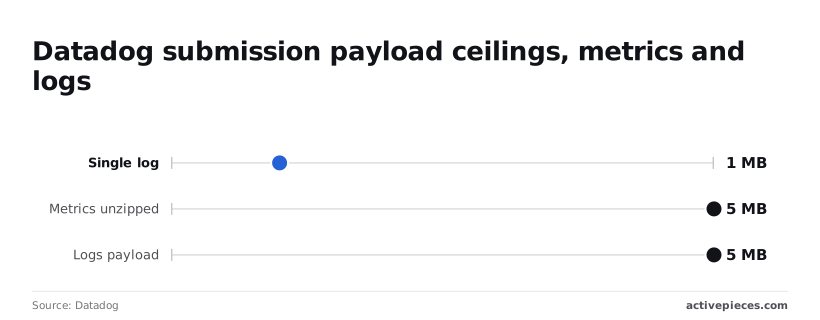
One oversized stack trace needs truncating before you send it, and a batch needs flushing before it crosses 5 MB, or your submission will fail at Datadog. Treat both limits as retry-proof failures: resending the same oversized body will fail the same way.
Datadog monitors, dashboards and incidents endpoints
Before you copy a path from an old snippet, check the version. These resources are mostly v1 for monitors and dashboards and v2 for incidents.
Calls here are not billed. The monitors you create are what drive alerting behavior, so a script that creates duplicates on every retry is a correctness problem, not a cost problem. Look up by name or tag before creating, which makes the retry safe.
Datadog custom metrics and logs pricing
Custom metrics are billed at $5 per 100 per month, and logs are billed at $0.10 per GB, making your monthly bill proportional to consumption of both, so you can't afford to ignore either cost driver.
Each unique metric name and tag combination counts toward the custom metrics figure. Adding a high-cardinality tag such as a user ID can multiply your bill without changing your total call count. Prices change, so confirm them on Datadog's pricing page before budgeting.

Easier to see it running than to read about it: set it up free, no card.
Read rate limit headers
Limits differ per endpoint and per organization. The X-RateLimit response headers tell you the period, what you have left and when the window resets, so you can back off precisely instead of guessing.
The argument for ignoring them goes like this: Datadog's limits are generous, most integrations never approach them, and a 429 is just a signal to wait and try again.
Wrap the call in exponential backoff, ship it, and move on. For a dashboard that reads a handful of widgets, that's true, and the extra machinery looks like over-engineering.
Blind retry treats every 429 as the same event, and that is its weakness. It's not. A burst that clears in seconds and a quota that stays exhausted for the rest of the window need different responses, and a flat backoff handles neither well.
Datadog rate limit header fields explained
Read the headers on every response, not only on failures. They give you the limit for that endpoint, the length of the period, the requests remaining and the seconds until reset.
That changes the retry logic. On a 429, sleep until the reset value instead of a guessed delay, and add jitter so parallel workers don't wake together and trip the limit again.

Before you fan out, check the remaining count, so a batch job can slow itself down before the first rejection. Log the endpoint name beside each header set, because one worker's pattern is invisible in aggregate.
Why per-endpoint limits still bite
A generous default tells you nothing about the endpoint you actually call.
Plan around the lowest bar you touch, not the highest.
That gap is where the trouble comes from. A service that submits freely will never see a limit, so nothing warns you. Then a reporting job queries metrics, hits a far tighter ceiling and stalls.
If that job shares a key with your ingestion path, one key takes the blame for both. Limits also apply per organization, so a second team's polling can spend your allowance.
Which is why separate scoped keys per workload matter: each job gets its own identity and its own headers to read.
Troubleshoot Datadog API errors
Most Datadog API errors trace to a short list of causes, and the status code tells you which one before you open a log. Because each job now has its own key, a failure points at one workload instead of a shared credential.
The table below maps each code to the meaning in Datadog's API documentation, the cause you'll usually find, and the fix. Start with the cause column, since the documented meaning is rarely enough to act on.
| Code | Docs meaning | Usual cause | Fix |
|---|---|---|---|
| 400 | Bad request | Malformed JSON, or a payload over the endpoint's size limit | Validate the body; split large submissions |
| 401 | Unauthorized | Wrong site domain, or API and application keys swapped | Match the base URL to your site; recheck header order |
| 403 | Forbidden | Key is valid but its application key lacks a scope | Add the scope to that job's key |
| 404 | Not found | Wrong site domain or a mistyped resource ID | Confirm the host and the ID |
| 429 | Too many requests | Rate limit hit for that endpoint | Back off using the rate-limit headers |
| 5xx | Server error | Transient failure on Datadog's side | Retry with backoff; log the request |
Work down the table in order. The first three rows are your configuration; the last two are load, so you'll set the former and track the latter.
When a 401 comes back, the request almost always never authenticated: you're calling the wrong site's domain, or DD-API-KEY and DD-APPLICATION-KEY hold each other's values.
A 403 means authentication worked and authorization didn't, so the application key is missing a scope. Grant the narrowest scope that covers the call, not a broader key.
Retrying a 400 is wasted effort, because the problem is in your request. Check the JSON first, then the body size, since submission endpoints reject oversized payloads. Split the batch and resend. The limits page documents what applies per endpoint.
Handle Datadog 429 and 5xx with backoff
When a 429 arrives, read the rate-limit headers the response carries and wait for the reset they report instead of guessing. Retry 5xx responses with exponential backoff and jitter, with a capped attempt count.
Every failed call should have its request ID logged, because Datadog support can trace a request from that ID where a timestamp alone is ambiguous. Batching reduces the calls that trigger 429s in the first place.
Call the same Datadog endpoints with Activepieces
Activepieces can call the same Datadog endpoints for low-volume jobs like creating an event, muting a monitor or sending an incident to chat.
It takes the same scoped keys and obeys the same limits you already read about, and a run costs 1 credit however many steps it has, against 1,000 credits a month on the free plan.
When a no-code workflow is enough
Batching cuts the calls that cause 429s, but some calls are better not written as code at all.
When an incident opens, a workflow can post a summary to a chat channel and mute a noisy monitor, which is a handful of requests per trigger.
That's a good fit for Activepieces, since you can generate a integration for the endpoint with AI and add it privately to your own instance, and flows are unlimited on every plan, including free.
The screenshot below shows the shape of such a flow in a different app. It has a trigger, then one HTTP request step that POSTs to a revoke endpoint with an Authorization header.
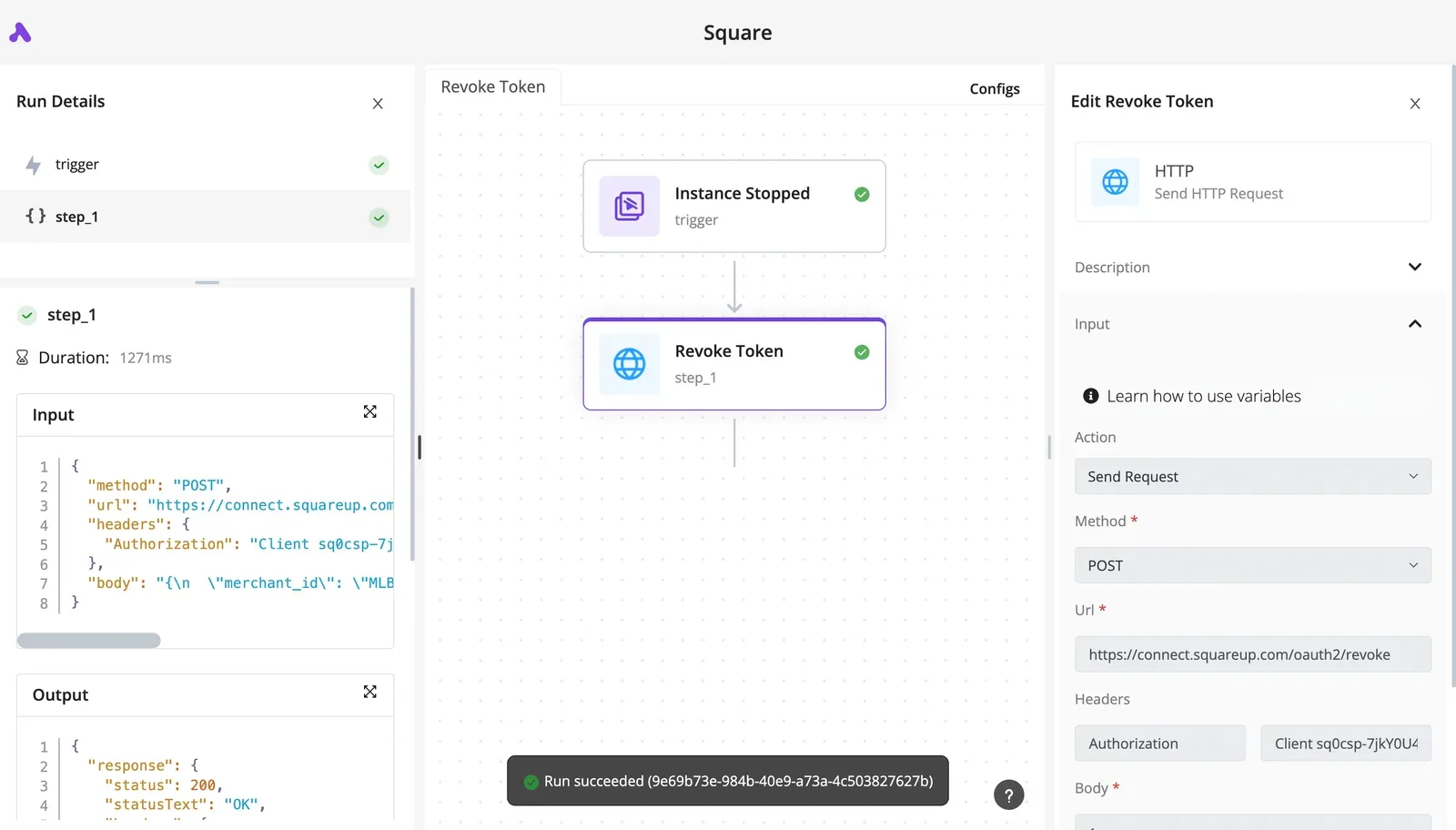
The run details panel on the left holds the JSON in and out of each step.
When a run fails, read that panel first, because it shows the status and body the API actually returned. A Datadog flow looks the same, with a Datadog URL and Datadog's key headers.
What a workflow doesn't replace
High-volume intake is what it doesn't replace. Streaming logs, metrics or traces through a workflow engine means one execution per event, and you'll hit rate limits you can't tune from inside a flow.
That traffic belongs in the Datadog Agent or in code that batches and backs off.
Rate limits still apply to a flow. A 429 inside a step is a failed step, so decide what the flow should do about it: add a retry on the step, or let the run fail visibly so someone checks it.
Silent loops are the worse outcome.
Use the scoped key in the connection
Build the connection with an application key scoped to what the flow does, not the over-powered key you use elsewhere. A flow that only creates events needs permission to create events. A flow that mutes monitors needs monitor write access and nothing broader.
If the flow's credentials leak through a shared workspace or a copied template, the damage stops at that scope.
In the HTTP step, set the API key and application key as headers, using the connection's stored values rather than pasting them into the step. Keep one connection per flow purpose so you can revoke one without breaking the rest.

Then read the response headers in the run details. They show your remaining budget for that endpoint, which is the number to check before you add a second trigger to the same flow.
Frequently asked questions
Is the Datadog API free to use?
Calling the API carries no separate charge, but it's not independent of your plan. Access depends on having a Datadog account, and the data you read or write is billed under that account's normal product usage.
Every call you make also draws on the rate limits the headers report, so a free-to-call API still has a budget you can exhaust.
Can I rotate a Datadog application key without downtime?
Yes, if you treat rotation as an overlap rather than a swap. Create the new application key with the same scopes, deploy it to every consumer, confirm requests succeed with it, and only then revoke the old one.
Revoking first is how a rotation becomes an outage. Rotating one scoped key per integration also keeps the blast radius to one service instead of everything sharing a single key.
Does Datadog have an official client library?
Datadog publishes official API clients for several common languages, and they're the sensible starting point because they model the endpoints and request shapes for you.
Check how the client you choose handles a 429 response. If it doesn't retry with backoff, wrap it yourself and have the wrapper also read the rate-limit headers before it sends the next call.
How do I ask Datadog to raise a rate limit?
Contact Datadog support through your account and say which endpoint is limiting you, what call volume you need, and why batching or caching won't cover it. A specific request tied to one endpoint gets a clearer answer than a general ask for more capacity.
Before you file it, make sure your retry logic already honors the reset header, since support will reasonably ask whether you're backing off correctly.