Evernote Pricing in 2026: What Each Plan Costs

Nov 3, 202613 min read
How much you can store before the app stops you, not what it costs, is the real difference between the three Evernote plans: Free, Starter and Advanced, a limit that matters most to anyone who, like teams routing notes into other tools with Activepieces, ends up saving far more than they expected.
Evernote pricing in November 2026, plan by plan
The plan table: price, inclusions and limits
Look at how fast the ceiling rises in the table below, which shows each plan's note and notebook ceiling. The free plan fits a single project, while Starter is built for an ongoing collection.
| Plan | Notes | Notebooks |
|---|---|---|
| Free | 50 | 1 |
| Starter | 1,000 | 20 |
| Advanced | Unlimited | Unlimited |
Prices and plan limits checked against evernote.com on November 3, 2026.
Free costs nothing, and Starter is $99 a year, so compare it against the limit you expect to hit rather than against a price.
What the free plan limits cover
You'll hit a wall within weeks if you use the free plan as a real archive: it allows 50 notes, one notebook and one device.
Fifty notes is a few weeks of meeting notes or receipts for most people. One notebook means you can't separate work from home, and one device means your phone and laptop can't both hold the same notes.

Activepieces reaches 746 integrations, counted from its open source monorepo, and none of them changes Evernote's 50-note, one-notebook, one-device caps, which means those integrations cannot overcome Evernote's restrictions.
Which limits rise on paid tiers
At 1,000 notes and 20 notebooks, Starter gives you twenty times the free note allowance. That's enough to sort notes by client, project or year without merging everything into one pile.
If you won't pass 1,000 notes or 20 notebooks, you'd be paying for room you never use. Advanced removes the note and notebook ceilings, so it only pays off if you expect to cross them.
If you are running this arithmetic for your own team, see what the same workload costs on Activepieces.
Free account limits in practice
Whichever ceiling you hit first, you tend to hit it at a bad moment, so picture a freelance bookkeeper, Dana, an illustrative user, not a real one.
Evernote free plan limit reached error
On a client call, Dana pastes a receipt into a new note. Evernote refuses the save and says she has reached her plan's limit.
The note's gone unless she deletes something.
Next to what long-time users report, her archive's small. In Mark Stout's roundup:
- Matt Maldre holds 25,000 notes, so a free cap would have stopped him years before he got there
- Jamie Rubin has 12,000, which is half that and still far past any entry-level allowance
- Ev Oputa has 6,453
- Péter Polgár has 5,000
- Even the smallest of the four's a hundred times a 50-note cap, so the free plan fits a trial, not a working archive

What the workarounds cost in time
To make room, Dana can delete old notes, merge several into one, or export the oldest to a folder on her computer. Each one works for a week or two.
If she merges, she has to read every note first; if she exports, the receipt she needs next April lives somewhere search can't reach.
If she spends twenty minutes a week on this, that's about seventeen hours a year of housekeeping to avoid a bill, and the first missing record costs more than those hours.
The upgrade price at this usage
Multiply the paid plan's monthly price by twelve and set it against those hours at your own hourly rate; that's the honest comparison.
For someone holding even Polgár's 5,000 notes, the paid tier is the cheaper option, because the free plan can't hold the archive at all.
Hidden Evernote costs and limits behind that failure
It was the note count that sank Dana, and the only fix's a plan jump: from 50 notes on Free to 1,000 on Starter, a 20x step you pay for whether or not you need all of it, so Dana either overpays for unused capacity or stays capped.
Limits people hit first
Fifty disappears fast, as long-time users show. In a Matt Maldre roundup of archives, Mark Stout had 24,000 notes and Jamie Rubin 12,000, so both would have hit the Free cap in their first weeks.
At the modest end of that list, Ev Oputa's 6,453 and Péter Polgár's 5,000 are each still a hundred times the Free limit.
Pay for Starter with an archive like Oputa's or Polgár's and you run out again, since Evernote's plan comparison lists Starter at up to 1,000 notes. For them the real choice's Advanced, and Starter only delays the bill.
Evernote billing terms and renewal costs
Pay monthly and the bill climbs noticeably. Harmon Enterprises puts Starter at $8.25 to $14.99 a month, and Advanced at $20.83 to $24.99, effectively doubling the monthly cost between tiers. The low end of each range's the annual rate spread over twelve months.
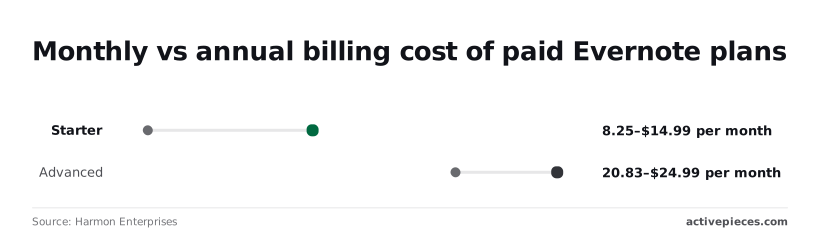
Pay monthly at $14.99 and Starter costs roughly $81 a year more than its $99.00 annual charge, per Evernote's own page, so month-to-month payment carries an $81 annual tax.
Advanced monthly adds about $50 a year over the annual rate, extending this payment tax through the higher tiers, so monthly customers pay about $50 extra annually on Advanced, versus roughly $81 on Starter.
On annual billing you pay more up front, and you're committed for the year. If you aren't sure the plan fits, start monthly for a short stretch, then switch once you know which limit you hit first.
Evernote pricing versus alternatives
Unless the limit you hit first's one a rival simply doesn't have, staying on Evernote's usually cheaper than moving. Leaving costs you hours of exporting and re-sorting, and that bill arrives whether or not the new tool's cheaper.
Free plans compared
Each free plan fails in a different place. Evernote's free plan caps how much you can keep, so a growing library eventually forces the upgrade. Notion's free plan's generous for one person but tightens once others join.
With a Microsoft account, OneNote's free, but its room's shared with your other files in the same Microsoft storage, so photos and documents can crowd out your notes. Obsidian's app's free and stores notes on your own device, so the only ceiling's your hard drive.
Evernote paid tiers compared with alternatives
Three of the four charge per person, so a household or small team multiplies the cost, while Obsidian charges only for optional extras.
That pattern is what to take from the table below, which sets the four side by side on the columns that decide the bill.
Prices change, so confirm the current figure on each vendor's own pricing page before you commit.
| Free-plan limits | Cheapest paid price | Storage or note limit | Cost for five people per year | |
|---|---|---|---|---|
| Evernote | Caps on stored material | One paid tier per person | Raised on paid tiers | Five separate subscriptions |
| Notion | Tighter once others join | Per member | Fewer restrictions on paid | Five member seats |
| OneNote | Shares your Microsoft storage | Through extra Microsoft storage or a Microsoft 365 plan | Set by your Microsoft allowance | Depends on how each person buys storage |
| Obsidian | App itself is free | Only for sync and publishing add-ons | Your own disk | Add-on fees only for those who want them |
Follow the limit, not the logo. If storage stops you, Obsidian or OneNote may dodge the problem. If collaboration stops you, Evernote and Notion are the real contenders.
To move, you export every note, check that formatting and attachments survived, and rebuild your folders. Do nothing and you keep paying the upgrade price. Move and you pay in time. Switch only if the rival removes the limit you actually hit.
Worth checking against a plan that does not meter every step: one credit covers a whole run on Activepieces.
Evernote capture automation with Activepieces
Activepieces can send your emails, form responses and app data into Evernote on their own, and how many flows you create is never what it charges for: its pricing page lists unlimited flows on every plan from Free through Ultimate, and only runs spend credits, at 1 credit a run.

So one small flow per source, one for email, one for forms, one per app, costs nothing extra to keep, whereas Zapier charges a task for each action and Make a credit for each module, so the tidy version gets dearer every time it runs.
It does nothing to Evernote's limits or price, so every note it creates's still a note you pay for in space.
That second part matters more than the first. Automation's a faster way to fill a free plan, and a faster fill means you reach the limit sooner.
If you were going to hit a wall in a year by typing notes by hand, a workflow can bring that wall much closer without you noticing.
What can be automated into Evernote
Activepieces works by "flows". You pick something that starts it (a new email, a submitted form, a change in another app), and it then carries out steps you set, ending with a new note in a notebook you choose.
Its Free plan includes 1,000 credits a month, enough for 1,000 such runs, which is twenty times Evernote's 50-note cap, leaving Evernote's restriction as the real bottleneck.
You build this by connecting boxes on a screen, not by writing code, and you can run it on your own server or use the company's hosted version.
Look at the picture below for the usual shape: three sources feed one workflow, which writes into a single notebook, and the counter on the notebook's the number to watch.
Three sources, one workflow and one notebook's also how people end up with a full account. Each source adds notes at its own pace, and the notebook counts them all together, so the counter climbs faster than any one source suggests.

Automated notes still count against limits
Whether a machine made the note makes no difference to Evernote. A form response saved at 3 a.m. uses the same allowance as a page you typed yourself.
A flow that saves every email in an inbox spends that allowance on messages you may never reopen.
So treat the workflow like any other spending decision, and count before you build it:
- Estimate how many notes each source will create in a typical month.
- Add those together and compare the total with the limit you are closest to.
- Narrow the trigger, for instance to emails with a certain label or forms of one type, until the total fits.
If the narrowed total still crowds your plan, that's the useful finding. It tells you which limit forces your upgrade, and that, not the monthly price, is the figure to choose a tier by.
Monday checks before paying for or leaving Evernote
Spend one Monday morning on five checks, in this order, and you'll know which limit you hit first and what ignoring it would cost you:
- Count your notes, notebooks and the devices you sync.
- Mark which limit sits closest.
- Compare the annual price against the monthly price for the tier that clears that limit.
- Export a backup of every notebook.
- Set a renewal reminder.
Check your usage against the limits
Open your account settings and read off what you actually use: how many notes, how many notebooks, how many devices are signed in.
Skip the count and you pay for a tier on a guess. Or you learn about a limit mid-sync, when a note refuses to save and the thing you needed is stuck on one device.
Once you have the counts, mark the limit you're closest to. That one decides everything that follows.
Pick the tier by the first limit you hit
Choose the cheapest tier that lifts that one limit, not the one with the longest feature list. If devices are your wall, a tier built around extra storage gives you nothing. Then compare annual and monthly billing for that tier alone.
Commit to the whole year and annual usually costs less per month; stay monthly and you can walk away when the need passes. If you're unsure you'll still be using Evernote by next year, monthly's the cheaper mistake.
Export Evernote notebooks before changing plans
Export every notebook before you upgrade, downgrade or cancel. A plan change can restrict what you can reach, and a backup taken afterward may hold less than you own. Store the file somewhere other than Evernote itself.
Last, put a reminder on your calendar ahead of the renewal date, so the charge arrives as a decision you made rather than a surprise on your statement.
Frequently asked questions
When the renewal reminder goes off, you need to know what you'd do, and these are the four questions that usually come up that day.
Is Evernote still free to use?
Yes, there's a free plan, but it's capped, and those caps are what push people to pay.
Treat it as a trial of your own habits: if you keep running into the same limit, that limit tells you which paid tier to buy.
If you never hit one, you have no reason to upgrade, and paying anyway's the cost of doing nothing about a reminder.
Can I downgrade from a paid Evernote plan without losing notes?
Drop to a lower plan and your notes aren't deleted. What changes is what you can do with them. If your account holds more than the lower plan allows, expect to be blocked from adding new material until you trim it or upgrade again.
Before you downgrade, export anything you can't afford to be locked out of. An export takes a few minutes, and a lockout in the middle of a work week costs far more.
Does Evernote offer discounts for teams or education?
If you're buying for a group, Evernote's team plans are priced for groups, and the vendor may offer education pricing or other deals from time to time.
I can't confirm the current terms, so don't budget around a discount you haven't seen in writing. Ask Evernote's sales or support team directly, and ask before you buy, because discounts are rarely applied after the fact.
Can I cancel Evernote and get a refund?
It depends on where you bought. A subscription billed through Evernote's website follows Evernote's own refund policy, while one billed through an app store follows that store's rules.
Watch annual plans most closely, since you've paid for the whole year up front and a partial refund isn't something to count on.
Read the refund terms on your billing page before the renewal date. Cancelling before the charge's always cheaper than asking for money back afterward.
Related reading
References
Running the numbers
See what the same workload costs here.
Free forever plan, and every paid plan self-hosts at no extra cost.
See pricing Talk to sales