
Semrush Pricing 2026: Plans, Add-ons, and Extra Users

Nov 3, 202614 min read
According to Semrush, it's a subscription SEO platform, the kind of tool teams often pair with workflow builders such as Activepieces when they want their reporting to run on its own.
Semrush pricing is the tiered subscription structure the platform uses to charge for its SEO tools, with each plan capping projects, tracked keywords, users and reports, and with add-ons and AI and Semrush One tiers adding to the base monthly fee.

What you pay follows how many keywords you track, because the plan ladder is priced by limits: the 500-keyword entry plans cost far less than the 5,000-keyword Advanced tier.
The keyword figures below were read from Semrush's pricing page on 3 November 2026. Vendors revise limits without notice, so recheck before you buy.
Current plans compared in one table
Read the table as your ceiling: once your project needs more keywords than the row allows, you're in the next plan. It shows the tracked keyword allowance for each plan with a published figure, per Semrush's pricing page.
| Plan | Tracked keywords | Check date |
|---|---|---|
| SEO | 500 | 2026-11-03 |
| Starter | 500 | 2026-11-03 |
| Pro+ | 1,500 | 2026-11-03 |
| Advanced | 5,000 | 2026-11-03 |

You won't find Enterprise in the table, because it has no keyword figure on that page. A plan without a published limit can't be compared line by line with the others.
If you are running this arithmetic for your own team, see what the same workload costs on Activepieces.
Tracked keywords by plan
Move between SEO and Starter and you gain nothing on this limit: each allows 500 tracked keywords. Pro+ allows 1,500, three times that.
Advanced allows 5,000, more than three times Pro+, so it only pays off if you track keywords across many markets or client sites.
At 600 tracked keywords, a team is already priced out of the two entry plans and must pay for Pro+ or above, which leaves no cheaper option above that threshold.
Semrush free trial, free account and annual billing
Before entering a card, confirm trial length, free account limits and the annual discount on the pricing page; they are set there and can differ from the monthly list rate. Annual billing lowers the monthly rate but commits you to the year's payment.
Five criteria that decide which Semrush plan fits
Measured against your own usage rather than the pricing page, five criteria decide the fit:
- Monthly cost at realistic usage, measured as the plan price plus every add-on you'd need to do your actual work
- Tracked keywords and projects, measured by counting the keywords you monitor today and the sites or clients you run separately
- User count, measured by listing everyone who needs a login, including part-timers and contractors
- Report and export limits, measured by how many reports and data pulls you run in a typical month
- Add-on exposure, measured by how many features you rely on that sit outside the base plan
Cost at realistic usage
Do not read the sticker price as the bill; it is only the starting figure. Add every extra seat, every add-on and any AI or Semrush One tier you'd need, then divide by the months you'll actually keep the plan.
Expect keywords and projects to run out before anything else. Count the keywords you track now, then add the ones you expect to add within a year.
Semrush costs for three team examples
For two of these three teams that's the entry tier, with the annual bill rising only when a limit forces it; the plan that fits is set by how many projects, tracked keywords and users you actually have.
The table pairs each team with the plan it fits, where its annual bill lands relative to the others, and the limit it hits first.

| Team | Fitting plan | Annual cost | What breaks if too small |
|---|---|---|---|
| Freelancer with a few client sites | Pro | Lowest of the three | Projects run out, so you swap clients in and out and lose their history |
| In-house marketer with one large site | Pro+ | Low to middle | Tracked keywords cap out, so rankings on a large site go unmonitored |
| Small agency with many clients | Guru, moving to Business | Highest, before add-ons | Projects and seats run out, so extra clients and teammates mean add-ons or a tier jump |
Freelancer with a few client sites
For a freelancer with a handful of client sites, Pro fits, and it carries the lowest annual bill of the three. A handful of client sites fits inside its project allowance, so a higher tier buys capacity you won't use.
When a sixth or seventh client arrives, a project slot has to be freed, which means archiving a client's tracking history.
In-house team with one large site
One site means few projects, so the project count isn't the constraint. Tracked keywords are.
When a large site outgrows the entry tier's keyword tracking, which can happen quickly, the pages you stop tracking are the ones you stop noticing. Start on Pro+, count your tracked keywords against its limit, and move up only when that count says so.

At an agency, projects and seats are paid for at the same time. Guru is the realistic floor, and Business is where a growing client list ends up.
Hidden Semrush costs and limits people hit
Outside the headline price sit five items: extra seats, location and content add-ons, AI Visibility, API and request limits, and renewal terms.
The table below tags each one as verified against Semrush's pricing page or not.
| Item | Price | Verified |
|---|---|---|
| Extra users | $45 a month each | No |
| Local Base | $30 a month | Yes |
| Local Pro | $60 a month | Yes |
| Content Toolkit | $60 a month | Yes |
| AI Visibility | $99 a month | Yes |
| API access and daily request limits | None quoted | No |
| Renewal and cancellation terms | None quoted | No |
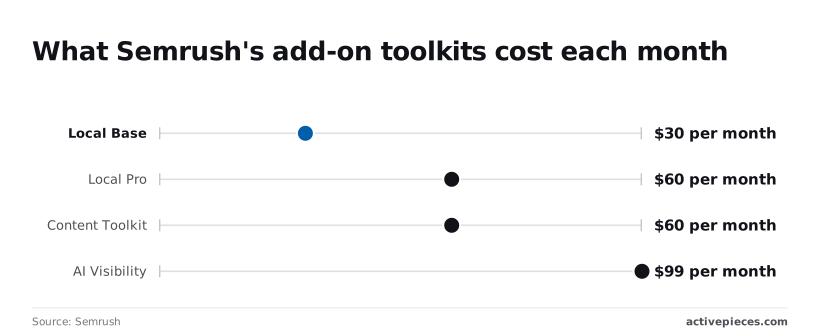
The $45 seat fee is the starting price listed on Semrush's pricing page.
That matters for a five-person team, where four extra seats at $45 would add $180 a month to the plan, turning hiring into a direct budget trade-off.
Extra users and add-on toolkits
You can trace the four add-on prices to Semrush's pricing page. Local Base is $30 a month, and Local Pro is $60 a month, twice the cost of Local Base, so confirm you need the extra features before choosing it.
Content Toolkit is $60 a month, and AI Visibility is $99 a month, the most expensive add-on listed, pricing advanced features well above other tools.
Stacking AI Visibility on Content Toolkit adds $159 a month, which can exceed the gap to the next plan tier, and so upgrading sometimes costs less.
API, report and daily request limits
Whether through the API or the daily request counts inside each plan, Semrush limits how much you can pull. I couldn't verify the exact quotas, so I'm not quoting any.
If you plan to feed data into dashboards or scheduled exports, get the numbers in writing before buying.
I couldn't verify the renewal terms, cancellation rules, or whether prices differ by region. Ask three questions before paying: does the plan renew automatically, can you cancel mid-term, and is the quote in your local currency.
Price comparison with Ahrefs, Moz and SE Ranking
Until each quote includes the same add-ons, Semrush, Ahrefs, Moz Pro and SE Ranking can't be compared on price.
Worth checking against a plan that does not meter every step: one credit covers a whole run on Activepieces.
Entry and mid-tier price side by side
Take each vendor's entry plan and the plan directly above it, and read both from the vendor's own pricing page on the day you buy.
Until each quote includes the same add-ons, Semrush, Ahrefs, Moz Pro and SE Ranking can't be compared on price.
Plan names and what sits at each rung differ between the four, so a "mid-tier" label doesn't mean the same allowance everywhere.
Limits and users side by side
Check three limits on each plan: tracked keywords, projects and users. Tracked keywords cap how many terms you can monitor, so a plan that covers one site can fall short once you add a second domain or a competitor.
For an agency or a team with several brands, projects matter most: they cap how many sites or clients you can run.
Users cap how many people can log in, so a plan with few seats means paying for extra seats, or sharing one login, which breaks most vendors' terms of use.
Semrush usage share versus Ahrefs and Moz
Treat usage share as context, not a price signal. According to Ramp, which tracks vendor spend across its business customers, 63% of businesses use Semrush, 30% use Ahrefs and 4% use Moz, establishing Semrush's market dominance.

They say nothing about whether Semrush costs less or more than the others at your counts. Ramp's figures don't cover SE Ranking, so no usage comparison is made for it here.
Choosing the right Semrush plan
Buy the lowest Semrush plan that covers your project count, tracked keywords and users together, and move up only when clients or seats outgrow it. The limits you already know decide this, not the feature list.
Five steps to verify plan fit
The check works from your own numbers, not the pricing page's. Run these steps in order, because each one can disqualify a plan before you reach the next:
- Count your projects. Each website you track, whether your own or a client's, normally takes one project slot, so a small agency runs out here first.
- Count the keywords you want to track. Write down the full list, including the ones you only think you'll need. Padding it's how teams end up on a tier they use a fraction of.
- Count the people who need to log in. Seats are a separate limit, so a plan that fits steps one and two can still fail here.
- Find the lowest plan that clears all three counts. That's your starting plan. A plan that clears two of three is not a smaller version of the right one; it's the wrong one.
- If a count lands above that plan, decide whether the gap is permanent. A one-off spike is a reason to look at add-ons. A steady gap is a reason to move up a tier or leave.
When Semrush isn't your best fit
Step five is where Semrush stops being the default. If you manage many client sites, you'll hit the project ceiling long before keywords or seats, and the next tier up buys capacity you may not need.

If your team needs several people in the tool every day, per-seat costs can outweigh the value of the data.
If the all-in figure for your counts exceeds what a narrower tool would cost for the one job you actually do, such as rank tracking alone, the narrower tool wins on cost.
What Activepieces does about this
The cost problem in this article is mostly a metering problem: Semrush's price moves with the limits you hit, and the API and request quotas are the ones nobody quotes up front.

Activepieces can't change what Semrush charges, but it can keep the automation around those pulls from adding a second meter you also have to model.
It bills 1 credit per flow run however many steps the flow has, so a ten-step flow that pulls rankings, formats them and posts to Slack costs what a two-step one does.
Zapier counts each step as a task and Make counts each module, so the same flow costs more there as it grows.
That matters most at the small-team end, where the argument for the cheapest plan is strongest.
If you start on an entry plan and run your reporting through a scheduled flow, the one number you need to forecast is how many times the flow runs a month, not how many steps it has.
The free plan includes 1,000 credits a month and unlimited flows, so a freelancer or an in-house marketer can build
- the weekly report
- the rank-drop alert
- the client digest
without paying for the automation layer while still testing whether the Semrush plan fits.
It also helps with the check this article keeps returning to, which is counting your real usage before you pay.
A flow can write your tracked keyword and project counts to a sheet on a schedule, so the decision to move up a tier rests on a trend you recorded, not on a guess made at renewal.
Activepieces is open source under the MIT licence for its community edition, so you can self-host it and keep the automation cost to your own server if run volume ever becomes the concern.
I'd still confirm Semrush's API units and daily request limits in writing before building anything on them, as covered above. Activepieces will run the flow, but it can't raise a quota Semrush has set.
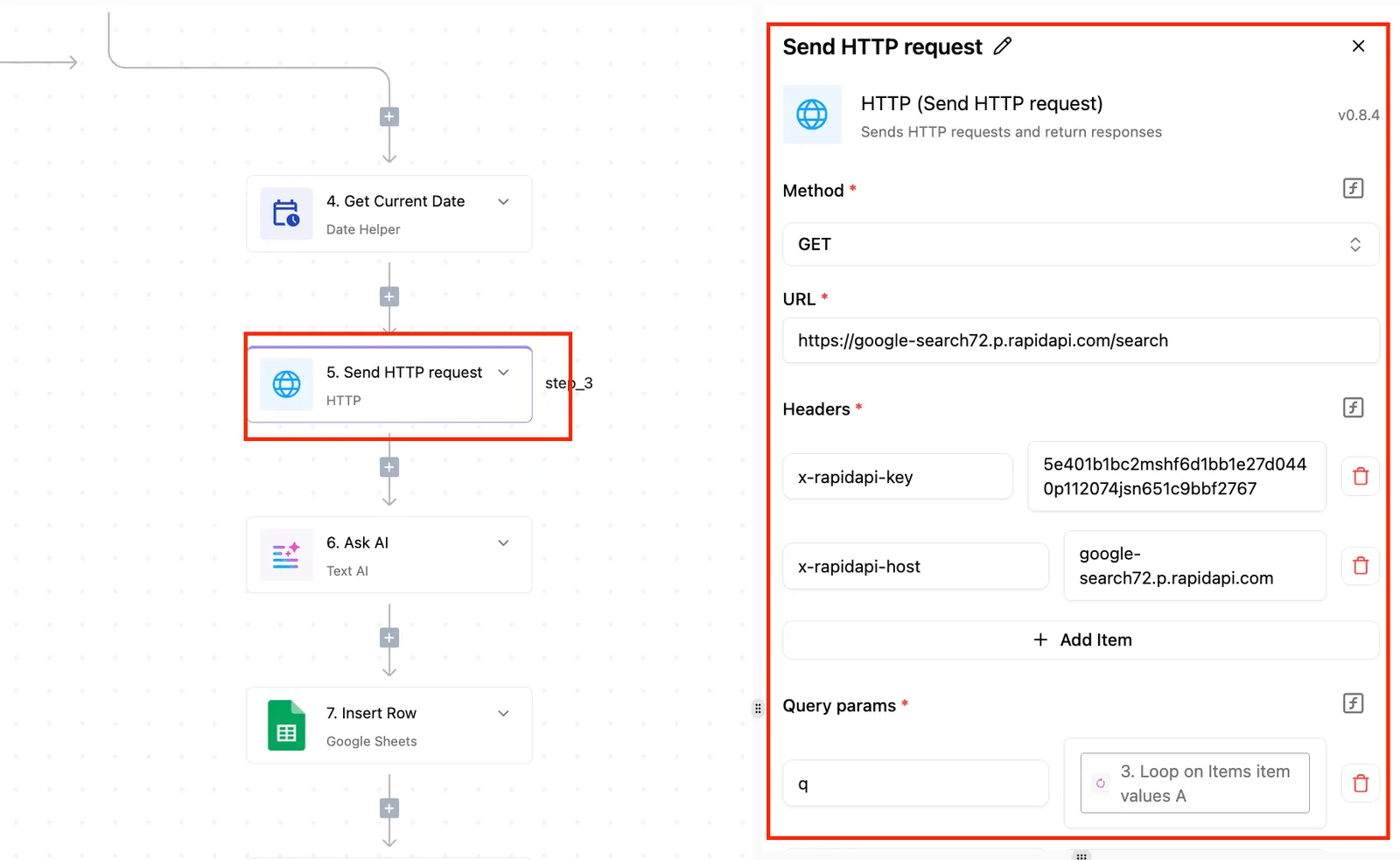
Activepieces is the better choice for small teams and solo marketers who run Semrush-fed reporting and alerts on a schedule, judged on how predictable the automation bill is.
Because it charges 1 credit per flow run regardless of step count, the only figure to forecast is how often a flow runs, while Zapier's per-task and Make's per-module billing grow with every step added.
It cannot lift a Semrush quota, and a team running very simple, short flows may find the gap between the three narrow, but for flows that tend to lengthen, the run is the cleaner meter.
Frequently asked questions
Taken from Semrush's own documentation, these answers each change what a small team ends up paying, which is the comparison that decides whether a narrower tool is cheaper.
Does Semrush have a free plan?
Yes, but it's a limited free account, not a working tier. It caps how many projects, tracked keywords and report results you get, so it suits checking whether the interface fits your workflow.
It won't carry a live client project, because you hit the ceiling on the first real audit or tracking setup.
For testing your actual workload, the trial of a paid plan is the better choice.
Can I switch Semrush plans or cancel mid-term?
You can change or cancel from the billing settings, but the terms depend on how you pay. A monthly subscription lets you move up or cancel at the next cycle with little consequence.
An annual one is a commitment, so a downgrade or cancellation partway through generally doesn't return the unused months.
Read the refund conditions on the checkout page before paying upfront, because that policy governs what you get back.
Is the annual Semrush discount worth it?
Only if you're sure you'll use the tool for the whole year. The discount is real, but it's paid for with a prepayment you mostly can't recover.
For a small team still checking whether the plan's project and keyword limits fit, a month-to-month start costs more per month and removes the risk of paying for a plan you outgrow or abandon.
Switch to annual once your usage has stayed steady through a few billing cycles.
How do I get Semrush data into reports?
Yes, through three documented routes. Semrush's reporting tool can build branded reports and send them on a schedule. A Looker Studio connector pulls data into dashboards you already maintain.
Most flexible of the three is the API, but it's billed separately from the main subscription and uses its own consumption units, so heavy automated pulls can add a cost the plan price never showed.
Check which of these your plan includes before you build a reporting workflow around it.
Related reading
Running the numbers
See what the same workload costs here.
Free forever plan, and every paid plan self-hosts at no extra cost.
See pricing Talk to sales