
Exa Websets V2: Features, Pricing and Changes

Nov 22, 202611 min read
Exa, the web search API company, released Websets v2, and its own changelog is the record this article relies on.
I report anything below that traces to the changelog as Exa's claim and flag everything else as unverified, much as a team wiring up a Activepieces workflow would label which inputs came from a vendor and which they had checked themselves.
Exa Websets v2 is the second major version of Exa's Websets product, which searches the web for entities such as companies or people and returns them as structured, verified lists that workflows can use.

Exa Websets v2 release date
What Exa released and when
Treat the table below as the anchor for the rest of the integration. It shows the release as the changelog frames it.
If you can't tie a later claim about speed, price or fetch behavior to an Exa page, it doesn't carry the weight of these rows.
| Release item | What Exa's page states |
|---|---|
| Product | Exa Websets |
| Version | v2 |
| Source | Exa's changelog |
| Date page checked | 2026-11-22 |
Beyond these rows, nothing is confirmed. Everything about changed behavior, such as what a workflow can now fetch, comes after this and gets its own sourcing.
What a Webset is, in Exa's own words
In Exa's documentation, a Webset's a collection of web items, such as companies or people, that Exa finds against criteria you define and can then enrich with extra fields.
That matters to anyone wiring it into Activepieces, where a run is 1 credit however many steps it has: the unit you call is a long-running collection job, not a single search request, and the extra steps a job like that needs add nothing to the credit count.

A trigger that expects an instant response'll fail on that assumption.
If you are running this arithmetic for your own team, see what the same workload costs on Activepieces.
Exa Websets v2 impact on automation
Where a workflow waits on a list the web has to supply, Websets v2 matters. Any documented change to what comes back, how quickly, or at what price lands on that waiting step.

Exa's docs describe a Webset as a collection of web entities, such as companies or people, matched to criteria you write and optionally enriched with extra fields. Four jobs follow from that, and each has one step that can't run until the fetch returns:
- Building a lead list, where the step that pushes new rows into an outreach tool needs the matched entities first, so a partial fetch becomes a partial send.
- Researching a set of companies, where the summarizing step reads whatever the fetch returned, so the research is only as complete as that result.
- Enriching records in a CRM, where the write-back step maps enrichment values onto fields, and a missing value leaves a blank field on a live record.
- Filling a spreadsheet with fresh entries, where the append step has to wait for the fetch to finish, or it appends nothing.

That shows where the fetch sits in each job. What matters next is what happens when it changes.
Where a change to the data source hits a running automation
Nothing breaks in the fetch itself; the damage shows up in the step after it. If the shape of a result changes, a field mapping fails quietly and writes blanks.
If delivery gets slower, a trigger built to expect an immediate answer times out. If pricing moves, a scheduled run that was cheap becomes a line item.
If the shape of a result changes, a field mapping fails quietly and writes blanks.
So read Exa's dated pages against those downstream steps first, and treat everything else as unverified.
New capabilities in Exa Websets v2
Nothing counts as measurably new until a figure sits on a dated Exa page, and I've confirmed no such figure, so this section reports no numbers.
For a workflow, a capability only matters if it changes what a step can fetch. Read Exa's changelog and docs for each claimed capability and ask which input or output field it adds.
If a feature adds no field your downstream step can map, it doesn't change anything for you, however prominent the announcement.
Numbers Exa publishes
If a speed, volume or price claim lacks a stated figure, a unit or a date, treat it as unquantified. A speed claim with no unit can't be set against your timeout, and a price claim with no date can't go into a quote.
I've verified no row below yet. The table shows how this section scores each category of change.
| Change | Exa's stated figure | Breaking-change risk | Exa source page, date |
|---|---|---|---|
| What a workflow can fetch | Unquantified here | Not stated here | Exa changelog; date not confirmed |
| Speed | Unquantified here | Not stated here | Exa docs; date not confirmed |
| Price | Unquantified here | Not stated here | Exa pricing page; date not confirmed |
Until a row carries a figure and a date from Exa itself, it stays out of any estimate.
I haven't verified any endpoint, parameter or response-field change. Before upgrading, diff Exa's current API reference against the request and response shapes your workflow already uses. A renamed field breaks a mapping silently, so run a test call before switching production traffic.
Worth checking against a plan that does not meter every step: one credit covers a whole run on Activepieces.
Activepieces support for Exa Websets, shipped on a dated release
We've got no dated Activepieces release for Websets v2 to cite, so treat native support as unconfirmed until you see an Exa integration in your own workspace. The core is MIT-licensed and public, so you can look for an Exa integration in the repo yourself.
We've also not run Websets v2 ourselves.
Exa Websets v2 release notes and sources
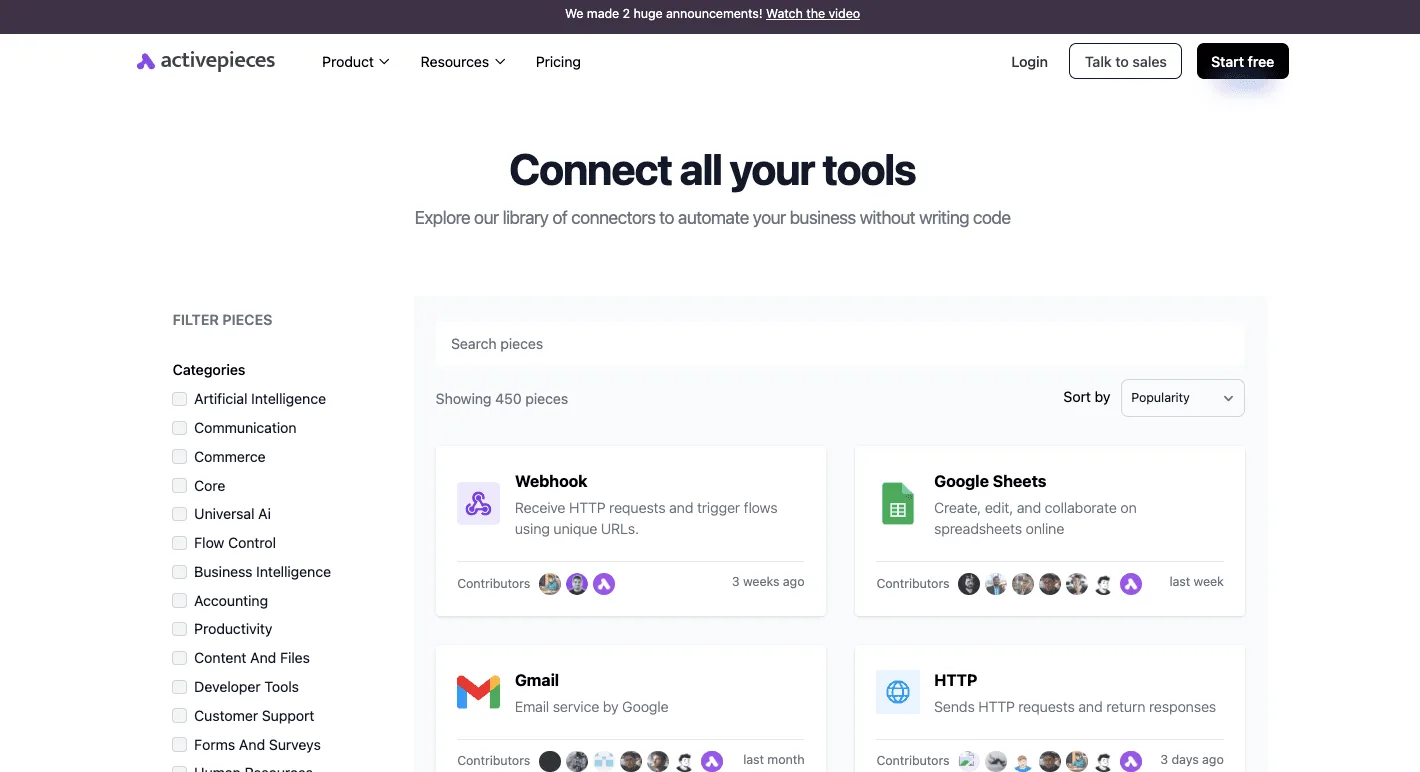
450 integrations are listed in the Activepieces connectors library, sorted by popularity, so most users locate the connector they need quickly.
We can't point to a changelog entry or release link tying any of them to Websets, and a count that size says nothing about whether the one trigger or action you need exists.
Until Activepieces publishes a dated note, assume no Websets-specific actions, such as creating a Webset or reading its items, are available. The MIT-licensed core is public on GitHub, where it has 25,653 stars, so the integrations directory shows what exists today.
Connecting Exa to a workflow today
Two pieces on the library page are what you can build with: Webhook receives HTTP requests and starts a flow, and HTTP sends requests and returns responses.
Those two cover a call to Exa's API and a callback from it, provided you map the fields yourself. That puts the renamed-field risk from the previous section on you, since no integration'll absorb it.
On the output side, rows and notifications are the easy part, since Google Sheets and Gmail sit on the same page. The sourcing side is the part you configure by hand.
Budget matters here. Activepieces' pricing page lists:
- 1,000 credits a month on Free: - 10,000 credits on Plus
- 50,000 credits on Team
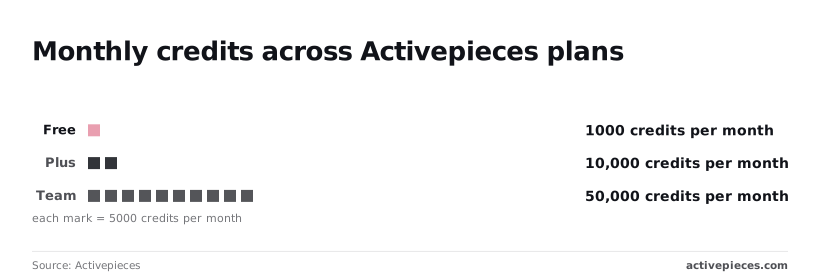
1,000 credits on Free is enough to test a mapping, not to poll a Webset on a schedule. Check what one run consumes before choosing a tier.
Exa Websets v2 cost and speed
Only once it's priced does consumption per run matter. As of 2026-11-22 I couldn't confirm a published per-unit price or stated latency for Websets v2 or for Brave, Parallel or Tavily, so the table marks those cells "Not published".
Exa's published pricing
No per-unit Websets v2 price or latency figure is confirmed here, so I won't quote one. Budget from your own run logs, not from a rate card.
Don't read funding as a quality claim; it's context. According to Jason Grad on LinkedIn (Sep 2026), Exa has raised $361m, Brave $252m, Parallel $230m and Tavily $25m.
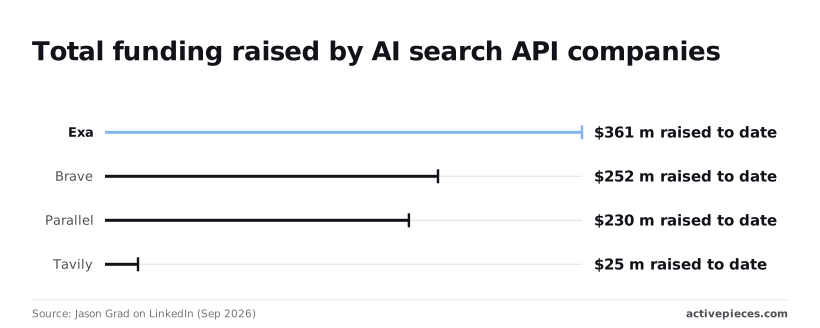
Exa's $361m means it's well capitalised, which says nothing about what a run costs you. Tavily's $25m is a fraction of that, so check its terms and roadmap before you build a long-lived workflow on it.
Read the gaps in the table as the finding: a price or speed that isn't published can't be put in a spec. It sets each vendor against the same four columns.
| Vendor | Published price per unit | Stated speed | Output type | Source and check date |
|---|---|---|---|---|
| Exa Websets v2 | Not published | Not published | Enriched lists of web entities | Exa pages, 2026-11-22 |
| Brave | Not published | Not published | Search results | Brave pages, 2026-11-22 |
| Parallel | Not published | Not published | Search and research output | Parallel pages, 2026-11-22 |
| Tavily | Not published | Not published | Search results | Tavily pages, 2026-11-22 |
Until a vendor prints a number, run one identical job through each and record cost and time yourself.
Exa Websets v2 performance monitoring
Whether v2 changes what your workflow can fetch, how fast, and at what price comes down to four dated pages. Each is checked against what you've already recorded from your own test job.
Exa Websets v2 pages to check for changes
Work down the list below in the order that catches a breaking change soonest. It shows where a change would first be written down, so you know which page to open before a workflow misbehaves rather than after.
- Open the Exa changelog and note the date of every entry that touches Websets.
- Check for v1 deprecation notices, since a removed endpoint breaks a workflow without warning.
- Recheck the pricing page against the cost you measured in your own test run.
- Read the release notes of the automation platform you build on, because a new action or trigger there's what lets a workflow use a v2 feature without custom code.
- On Monday, run one existing v1 workflow against the docs.
Re-read the changelog and deprecation notices before you edit any workflow. Check pricing whenever a job's bill differs from your recorded figure. Write the date you last read each page next to your notes. Anything you can't trace to one of these pages stays unverified.
Pick the v1 workflow that runs most often and compare its calls and field mappings line by line with the current docs.
Mark each as unchanged, changed or missing. That list is your migration scope, and it comes from Exa's pages rather than from anyone's summary.
Frequently asked questions
Exa's pages settle the migration scope but leave four practical questions open, and wherever they say nothing, the answer below is "not stated" rather than a guess.
Will existing v1 automations keep working?
Whether existing Exa Websets v1 automations keep working isn't stated. Nothing in the sources gathered here commits Exa to a v1 shutdown date or to indefinite support.
Until Exa publishes one, treat any v1 workflow as unscheduled migration work. Keep its call sites easy to find so the cutover is a small diff rather than a hunt.
Can you verify v2 integration status?
Whether you can use Exa Websets v2 in Activepieces today isn't stated.
What is stated is how a connected integration behaves: register the HTTP integration once and it runs as a flow step and as a tool on the project's MCP server, so Claude, ChatGPT, Cursor or an agent of your own can call your Exa request without a second integration or an export step.
The same integration action serves both, and you can confirm it in packages/integrations in the open source repo.
Check the integration's own action list against the v2 changes in your migration scope. If the field you need is missing, a raw HTTP request step to Exa's API is the fallback you can verify yourself.
Where does Exa publish v2 pricing?
Where Exa publishes Websets v2 pricing isn't stated in the material reviewed. Pricing is the figure most likely to decide whether a workflow is worth running.
Read it from Exa's own pricing and documentation pages on the day you budget. Don't take it from a third-party summary, including this one.
Has v2 integration support been tested?
Whether Activepieces tested Exa Websets v2 isn't stated. No test report or changelog entry confirming it appears in the sources.
Treat v2 support there as unverified until you've run one real workflow end to end.
Related reading
References
Running the numbers
See what the same workload costs here.
Free forever plan, and every paid plan self-hosts at no extra cost.
See pricing Talk to sales