
SendGrid Pricing 2026: Plans, Free Trial and Costs

Oct 20, 202613 min read
SendGrid pricing is a monthly fee set by plan and email volume.
It also carries limits on daily sending, validation and IP use that can stop your mail without the fee ever changing, which is worth remembering whether you send straight from the API or route messages through an automation tool such as Activepieces.
The listed price is the floor of your bill, not the bill itself.
Divide the monthly fee by the emails you actually send and you get your real cost per email. That number shifts whenever volume, add-ons or limits shift. This section is current as of 2026-10-20.
SendGrid pricing by plan, checked October 2026
The plan table: price, inclusions and limits
Every current plan from the free trial up to Pro at 2.5M is in the table, and each cell links to SendGrid's own pricing page.
Read the limits column first: it tells you what you can send on your busiest day, which the price column never will. I've left the dollar amounts on SendGrid's page instead of copying them here, so you read the figure that's live today.

| Plan | Monthly price | Included emails | Daily, validation and IP limits |
|---|---|---|---|
| Free trial (60 days) | Trial price | Trial allowance, 60 days | Trial limits |
| Essentials 50k | Plan price | 50k emails | Essentials limits |
| Essentials 100k | Plan price | 100k emails | Essentials limits |
| Pro 100k | Plan price | 100k emails | Pro limits |
| Pro 2.5M | Plan price | 2.5M emails | Pro limits |
Prices and plan limits checked against support.sendgrid.com on October 20, 2026.
Compare Essentials 100k with Pro 100k. The included volume is identical, so whatever separates the prices is the limits and features around the volume.
The table above covers the Email API, which is transactional sending priced by monthly volume.
Marketing Campaigns is SendGrid's separate product for list-based sends, with its own pricing. If you need both, you're reading two price lists, and you have to work out the cost per email for each one.

What the pricing page does not put in the table
You only meet the moment a tier stops working when a send fails or a bill arrives, because the page shows tiers and nothing more. A daily limit, a validation cap or a shared-versus-dedicated IP decision stays invisible until then.
Add-ons sit outside the plan price too, so they raise the cost per email without appearing in any row.
Pull your highest-volume day from the last quarter and check it against the daily limit before you compare monthly prices.
You don't need to hire for this, you describe it: tell the built-in chat in Activepieces to total last quarter's sends by day and flag the highest against your plan's daily limit, and it publishes a live flow in your account, identical to one a builder would have wired by hand.
That flow sits under the same RBAC and audit logs as every other, and each run leaves a trace anyone on the team can read, no certification needed. MoneyGram, Moneypenny, Alan and FundingSocieties run Activepieces in production.
Once you know your peak, the rest of this article is about sizing a plan to it.
If you are running this arithmetic for your own team, see what the same workload costs on Activepieces.
Send cap stopping order emails
At 09:12 a promotional send used up the store's monthly allowance, and from that minute the account rejected every order confirmation.
The store below is a composite, not a real customer, and it's a small online shop that sends both marketing and transactional mail through one account.
The timeline shows that the cap doesn't distinguish a campaign from a receipt, so the cheapest email in the account can starve the most important one.
- The store queues the promotional send to the whole list, assuming the plan has room.
- The account starts rejecting order confirmations, so customers who buy during the promotion get no receipt.
- Customers email the store asking where their orders are, which is the first signal the team receives.
- The team upgrades the plan mid-cycle, and sending resumes only after that.
The campaign was meant to bring in orders, and the same campaign ensured the store couldn't confirm them.
Missing order emails after a SendGrid cap
After paying, the first customer reached the thank-you page and waited for an email that never came. With no receipt, they couldn't tell whether the payment had worked, so they wrote to the store.
The campaign was meant to bring in orders, and the same campaign ensured the store couldn't confirm them.
What the team checked and in what order
The complaint pointed at the order system, so that is where the team started, and they found the orders intact.
They then looked at the mail logs and saw the rejections, which led them to the account's usage page, where the allowance showed as spent. Only then did they connect the rejections to the morning's promotion.
The upgrade came last, which means the diagnosis took longer than the fix.
What that month cost at realistic sending volume
The month cost more than the plan said. The tier a store lands in sets the bill, and a mid-cycle spike moves it into a tier it never budgeted for.
The plan the store thought it needed
On an average month, the plan looked cheap. Per-email price on SendGrid's Pro tier falls as volume rises: GoodPostal's pricing breakdown puts it at $0.90 per 1,000 emails at 100K.

According to GoodPostal, at that rate 100K emails is about $34.95, so a store budgeting from the average month sees a small, tidy number. That number only holds while sending stays inside the tier.
Higher SendGrid tier costs after the cap

The per-1,000 price keeps falling: $0.83 at 300K, $0.71 at 700K, $0.53 at 1.5M and $0.44 at 2.5M, which means you must achieve massive scale for acceptable rates.
At 700K the implied bill is roughly $497, far above the $90 the store planned for, so they cannot send at that volume without a major budget increase. The falling rate lowers the cost of each email while raising the total.
The gap between each pair of bars is the price of sizing to the average.
Where the page gives no figure, the chart carries none either. GoodPostal lists no price for add-ons or for mid-cycle upgrade fees, so those aren't in the bars.
The upgrade is therefore a step in the bill, not a slope.
Cost of blocked SendGrid email sending
The pricing page gives no figure for blocked sending, and I won't invent one. What can be said is how the cost arises. When sending stops, order confirmations and password resets don't arrive.
Customers then write to support asking where their order is. Each of those tickets takes staff time, and each unconfirmed order is a chance for a chargeback or an abandoned purchase.
Measure those two losses from your own ticket and order logs for the blocked window. No published rate card will price them for you.
Worth checking against a plan that does not meter every step: one credit covers a whole run on Activepieces.
Hidden costs and limits behind a SendGrid bill
Three things set a SendGrid bill: where it counts your volume, what you bolt on and which limit stops your sending. Price each one against your store's busiest day.
Volume caps and what happens when you reach them
One flash-sale weekend can decide your tier, even if the other 28 days are quiet, because SendGrid counts volume against the plan's allowance, not against your average month.
Support's 60-day free trial shows the principle at small scale.
According to Support, it allows up to 100 emails a day through the web API or SMTP, so you can't rehearse a launch-day send on it. Your first real test of peak volume happens on a paid plan, with customers watching.
SendGrid dedicated IP, validation and add-on costs
Most stores reach first for a dedicated IP, and SendGrid bills it per IP, per month. Cloud Server for Email puts SendGrid at $30, Postmark at $50 and Mailgun at $59, meaning your provider choice directly affects your monthly bill.

Mailgun's IP costs $29 more each month than SendGrid's, which is $348 a year, making SendGrid the more economical choice. Postmark's costs $20 more, or $240 a year.
SendGrid's the cheapest of the three here, but a second IP doubles the line, so $30 is a floor.
SendGrid contact, user, retention and support limits
You won't see these limits on the pricing page, yet each can force an upgrade without any rise in send volume. For a store, five items decide whether a plan holds:
- where the plan counts your monthly volume
- the dedicated IP, at $30 a month per IP
- how long activity data is retained
- the contact and user limits
- the rate limit, and what sending does at the cap
When a customer disputes an order email months later, retention decides whether you can answer, because history that's expired can't be searched.
Contact and user caps hit when you add a marketer or a contractor. Rate limits matter most at the cap, since a queue that slows delivery turns a receipt sent in seconds into one sent in minutes.
Compare SendGrid's pricing with other services
At 100k emails a month, SendGrid is cheaper than Mailgun and Postmark but about three and a half times the price of Amazon SES. The cap behaviour you just read about is part of what you pay for.
Comparison table on entry price, cost at 100k and limits
The figures below come from Sendvia and GoodPostal and were checked in October 2026. Read the 100k column as a cost per thousand., SES's $10 is $0.10, Mailgun's $90 is $0.90 and Postmark's $126 is $1.26.
| Provider | Entry price | Cost at 100k a month | Included extras | Behaviour at the cap |
|---|---|---|---|---|
| SendGrid | $19.95 | $34.95 | Transactional and marketing sending in one account | Moves you to the next tier |
| Mailgun | $15 | $90 | Features rise with the tier | Overage billed or tier upgrade |
| Postmark | $15 | $126 | Separate streams for transactional and broadcast mail | Overage billed per thousand |
| Amazon SES | $1 | $10 | Pay per use, extras billed separately | Sending quota raised on request |
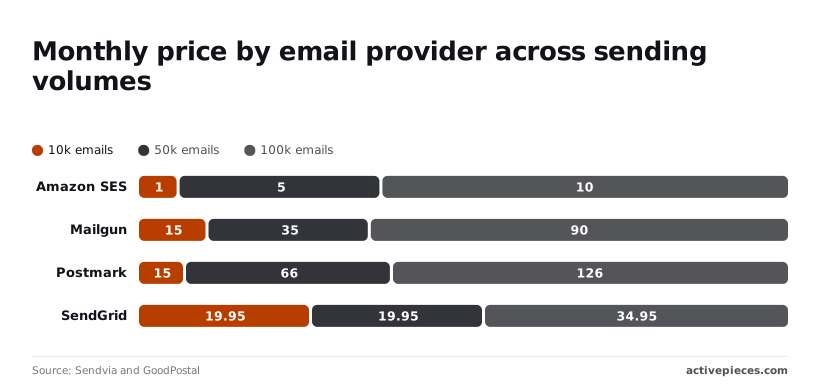
SendGrid's price barely moves at first: $19.95 at the two lower volumes, then $34.95 at 100k. That flat stretch is the appeal, and it means a growing team pays almost nothing extra until the jump.
Mailgun climbs from $15 to $35 to $90, and Postmark from $15 to $66 to $126, so both cost more with every step up.
SendGrid wins if your volume sits on that flat $19.95 stretch, or if one account must send both receipts and campaigns, so you're getting either flat pricing or account consolidation.
When switching from SendGrid isn't worth it
If the monthly saving is under what a migration costs you, skip the move. Moving sender reputation, templates and webhooks to SES takes real hours, and SES leaves more of the work to you.
A saving of a few dollars a month rarely repays that, but the same table shows Mailgun and Postmark are the ones that get dearer as you grow.
Run this send-limit alert in Activepieces
Since switching vendors saves so little, the cheaper fix is a flow that warns you before the allowance runs out, so the bill never surprises you.
It checks usage on a schedule and alerts at a percentage you choose, leaving time to change plans or pause campaigns.
The four steps below are the whole build, and the only judgment call is the percentage, which should leave room for your busiest day:
- Trigger the flow on a schedule once a day, so a spike shows up within a day rather than at month end.
- Call SendGrid's usage endpoint with your API key in a plain HTTP step, not a dedicated integration.
- Add a condition that checks sent volume against your plan allowance and continues only when it crosses your chosen percentage.
- Post to a Slack channel or send an email to whoever owns the budget.
Keep order emails on a separate path, with their own check and a lower threshold, because a blocked receipt costs you more than a delayed newsletter. Marketing sends can be throttled; transactional ones shouldn't be.
You can build this flow on the free Activepieces plan, which includes unlimited flows and 1,000 credits a month. Credits meter AI usage, so a flow with no AI step doesn't draw on them.

Frequently asked questions
Does SendGrid still have a free plan? Not as a permanent plan, as far as the current pricing page shows. The free offer is now a time-limited trial.
That means any flow you build on it has an expiry date, so budget for the paid tier from the first day. Check the page before you commit, because this is the tier SendGrid changes most often.
Can I cancel or downgrade a SendGrid plan mid-month?
You can usually cancel or downgrade yourself from the account's billing settings, but expect the change to take effect at the next billing cycle, not immediately.
Don't count on a prorated refund for the days you didn't use. If you downgrade after a busy month, confirm that the lower tier's sending limit still covers your peak day. Otherwise you've saved a few dollars and bought a blocked send.
Do SendGrid prices include taxes or overage fees?
Treat the listed price as the base charge only. Sales tax or VAT is generally added at checkout depending on where you are billed, and the pricing page doesn't show it.
Overage works differently by plan: some tiers bill for extra volume, and others simply stop sending until the next cycle.
The second case costs you nothing on the invoice and a great deal in missed password resets. Find out which one your tier does before you launch.
Is SendGrid cheaper than Amazon SES?
Per message, Amazon SES (Amazon's pay-as-you-go email service) is usually cheaper, especially at high volume, because you pay for what you send and there are no tiers to climb.
SendGrid charges more because it bundles things SES leaves to you: templates, analytics, deliverability tooling and support.
So the honest comparison is the SES bill plus the engineering hours to rebuild those integrations, against the SendGrid bill. At low volume, the SendGrid premium is often the cheaper option once you price your own time.

At high volume, the gap widens and the sums favour SES. Run both numbers against your busiest day, not your average one.
Related reading
Running the numbers
See what the same workload costs here.
Free forever plan, and every paid plan self-hosts at no extra cost.
See pricing Talk to sales