
Figma API: How to Use the REST API (2026 Guide)

Nov 20, 202616 min read
The Figma REST API lets you read files, nodes, rendered images and variables over HTTPS with a token. Figma limits it per plan and per seat rather than per account.
Figma REST API and nightly sync
viz type=dumbbell title="Dev and Full seat prices across Figma paid plans" unit="$ per seat per month" source="Figma - https://www.figma.com/pricing/" before="Dev seat" after="Full seat"2 vs As of 2026-11-20, that's what a five-person design-ops team ran into when their nightly token-and-image sync, a job they had wired up in Activepieces, started failing without an error anyone saw.
A Figma API rate limit is a cap on how many REST API requests a token can make in a given time window, set per plan and per seat, with a 429 response and a Retry-After header telling the client to stop and wait before retrying.
You don't need a paid plan to get access, since any Figma account can generate a token from its settings. What the plan decides is which endpoints answer and how fast. The Figma developer docs are the reference for both.
The sync used a personal access token, and a personal access token acts as one person, so every call counted against a single seat's limit.
An OAuth app acts for each user who authorizes it, which spreads calls across seats but adds a consent flow the team didn't need for a script. Either way, request only the scopes the endpoints need.
It looks like four calls. It can still exhaust the budget, because each of the four endpoints in the table draws on the same per-seat allowance.
| Endpoint | What it returns | Rate-limit tier | Token scope needed | What the sync used it for |
|---|---|---|---|---|
| GET file | The full document tree | Per-plan, per-seat; set per endpoint in the docs | File content, read | Finding the frames to export |
| GET file nodes | Chosen nodes only | Same budget | File content, read | Narrower reads once frames were known |
| GET images | Temporary URLs to renders | Same budget | File content, read | Exporting images |
| GET variables | Local and published variables | Same budget; plan-restricted | Variables, read | Pulling design tokens |
The figures are 30 hours after a failed sync, 91.2 hours on Starter, 96 hours on Pro, 110.5 hours on the Images API and 100 hours for a repeat offender.
Fetching the whole file when you need a few nodes spends the same budget on far more data.
Past the limit, requests return a 429 with a Retry-After header. Figma doesn't bill per call, as far as its docs state; the cost is the limit. A sync that ignores that header keeps failing without any visible error.
curl -H "X-Figma-Token: $FIGMA_TOKEN" \
 "https://api.figma.com/v1/files/FILE_KEY"
If you get a 200, the token works. A 429, per Forum, means read Retry-After and wait. You can make the same calls without code through Activepieces, and the limits above still apply.
This takes minutes, not a project: automate it in Activepieces free.
Nightly Figma sync failure from 429 errors
At 02:14 the limits above broke the nightly sync. Figma began returning 429 responses. The script read them as empty results, and the design-token files went stale without raising a single error.
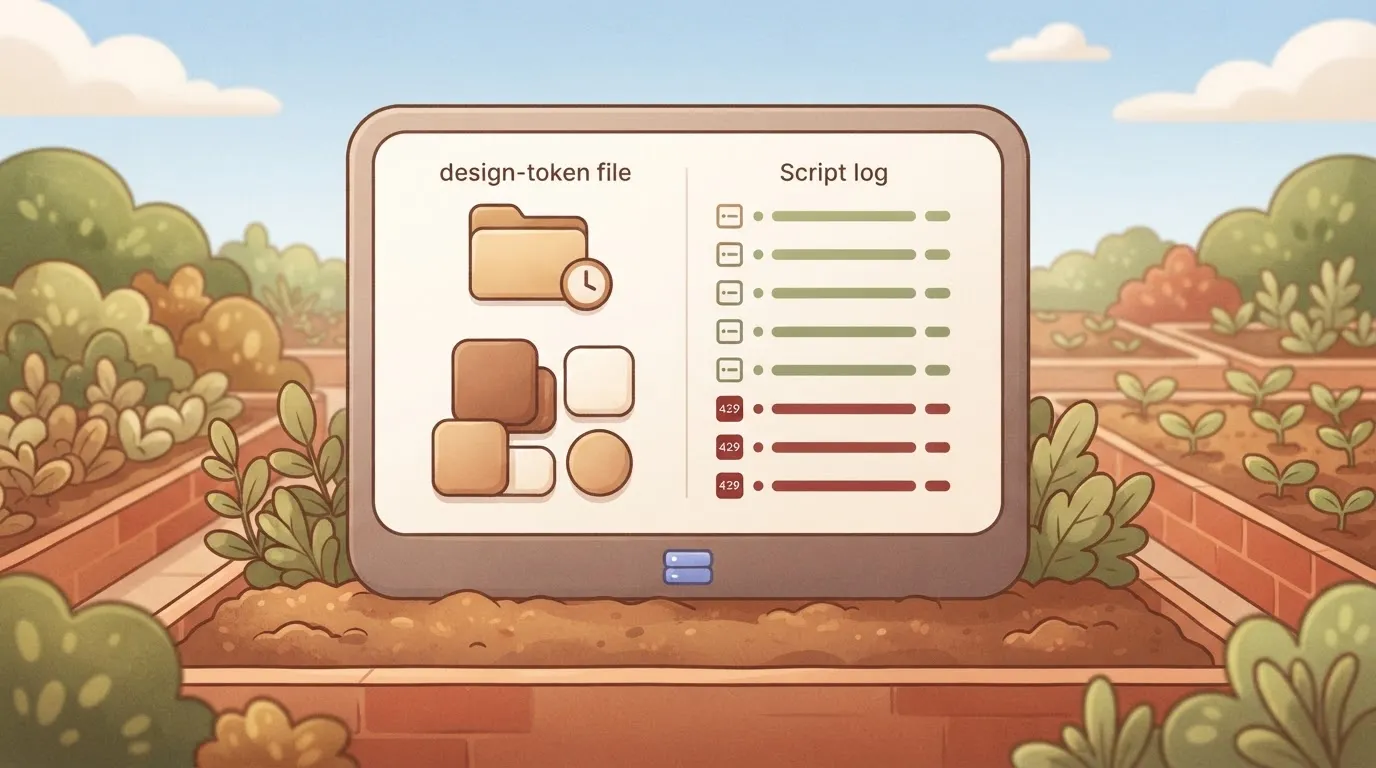
Nightly sync running normally before the limit
The job started on schedule at 02:00. It walked the team's files one after another, requesting each file's styles and variables. It then wrote the results to the token files that the front-end build reads.
For the first fourteen minutes it behaved exactly as it had on every earlier night, so nothing in the logs from this window looks wrong.
That's part of the problem: the script had no record of how close it was running to its allowance, so the first sign of trouble was the trouble itself.
First 429 response from the Figma API
When Figma started answering with 429 Too Many Requests at 02:14, each response carried a Retry-After header, and the script never read it. Its request wrapper caught the non-success status, logged one line at a low severity, and returned an empty list.
Handed an empty list, the next stage took it as a legitimate answer for that file: no styles, nothing to write. It skipped the write, moved on to the next file, and sent another request straight away, which drew another 429.

It finished on time and exited with a success code. The scheduler recorded a green run.
Nothing after 02:14 got written. Every file from that point kept its previous tokens, because the script had updated only the files it fetched before it.
So the token set was now a mix of fresh and stale values with nothing marking which was which.
Spotting stale design tokens after the sync
At 07:40 a developer saw a component rendering a colour that no longer matched the design file. They checked Figma, confirmed the design was correct, then checked the token file and found its last-modified time was from the previous day.
Only then did anyone open the sync logs, where the 429 lines were visible, scattered among otherwise normal output.
Between 02:14 and 07:40 nothing alerted, because the script reported success on a run that had failed. The fixes in the next sections start from one rule: never treat a rate-limited call as an empty result.
Cost of a failed Figma sync
Because the sync read a rate-limited call as an empty result, nothing in the logs flagged the cost. It arrived as engineering hours, stale files, stale exports, builds with outdated tokens and designers waiting.
Follow the chain in order. The nightly job hit its limit partway through and got a 429 with a Retry-After header, according to Forum.
It treated the response as "no changes" and exited cleanly, so the job reported success while files and exports stayed as they were.
Nobody saw it until a designer noticed that a published change hadn't reached the code. By then the job had succeeded on paper for several nights, and every one of those nights had added to the backlog.
How to count Figma sync failure costs
Treat the case below as illustrative: it's built to show how this team counted the damage. It's not a Figma statistic, and the table gives the units and counting rules rather than measured values.
Count the same five quantities in your own incident and you can tell a one-night slip from a silent week.
| Quantity | Unit | How counted |
|---|---|---|
| Engineering hours to diagnose | Hours | Time from the first report of a missing change to the 429 being identified as the cause, summed across everyone who worked on it |
| Stale files | Files | Files whose last-synced version was older than their last-edited version in Figma |
| Stale exports | Exports | Image and asset exports in the repository that did not match the current published design |
| Builds with outdated tokens | Builds | Builds that ran while the token files lagged the design source |
| Designer waiting hours | Hours | Time designers spent blocked on a change they had finished but could not see in a build |
Nobody started with the rate limit, because the job reported success, and that made engineering hours the largest line. They checked the designer's publish, the export settings and the token pipeline first, and each of those checks ruled out something that was working.
Count stale files and exports separately even though they share a cause, since each one needs its own re-fetch.
You can follow the rest of this with the builder open. Start free, no card.
Figma's rate limits by plan and seat
One number was never going to describe them. The limits depend on plan, seat type and endpoint tier, and the sync treated them as one number and ignored the Retry-After header, which is why the job failed.
Rate limits by plan, seat and endpoint
Read the table as a warning that you can't size a sync from a single published figure. It shows the limits as Figma's rate-limit documentation reads on 20 November 2026; where it prints no number, the cell says so.
| Seat type and plan | Tier 1 | Tier 2 | Tier 3 |
|---|---|---|---|
| View/Collab, any plan | 20 per month | not published | not published |
| Dev/Full, Professional | 10 per minute | not published | not published |
| Dev/Full, Organization | not published | not published | not published |
| Dev/Full, Enterprise | not published | not published | not published |
For the higher plans, our job couldn't compute a safe request rate, so it should have been built to react to the 429, not to a guessed ceiling.
Seats also cost money: per Figma's pricing page, seats run $12 to $16 per month on Professional, $25 to $55 on Organization and $35 to $90 on Enterprise. The spread means the seat type you assign to the sync's token is a budget decision.

Figma API 429 and Retry-After header
When you're over the limit you get a 429, and Retry-After says how long to stay away. The sync logged the 429, retried at once and kept going, so each retry counted against the limit again.
On Figma's forum, users report long cooldowns. The figures are 30 hours after a failed sync, 91.2 hours on Starter, 96 hours on Pro, 110.5 hours on the Images API and 100 hours for a repeat offender. These are user reports, not a documented guarantee.
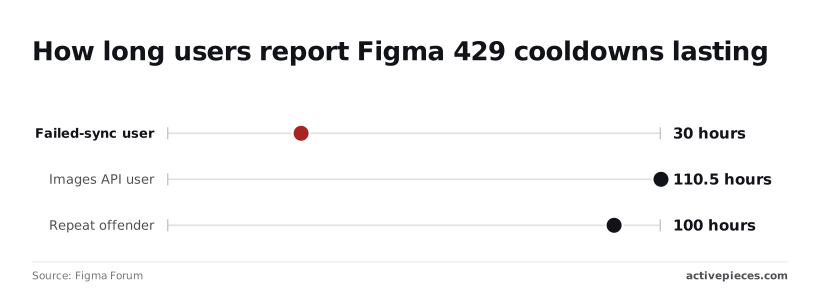
Still, a nightly job that trips one of these windows stays down for days, not minutes, and every night it runs blind during that time is another failed run.
Figma API 403, 404 and 400 errors
If the token lacks access to the file you get a 403, and if the file key is wrong or the file isn't visible to that token you get a 404. Retrying fixes neither, so the sync should log them and skip the file.

Then there's the 400: it means the request itself is malformed. Timeouts and oversized responses come from asking for whole files when the job needed a few nodes, which the later section on narrower requests addresses.
Fixes that prevent Figma sync failures
To stop it recurring, the team made four changes: narrower requests, honouring Retry-After, using webhooks over polling, and refusing to write when a run fails.
Now the job runs in a fixed order, which shows that the write is the last step and that every earlier step can end the run without touching stored data:
- Check the cache by file version.
- Request only the node IDs the job needs.
- Call the API.
- On a 429, wait for Retry-After, with capped backoff.
- Never write on error.
- Alert if the run is short.
Each step is covered below.
Retry backoff that honours Retry-After
When the API returns a 429, the job reads Retry-After and sleeps at least that long. Backoff applies only when the header is missing, and it has a ceiling, so a bad day produces a failed run rather than a job that sleeps until morning.
If an HTTP API publishes a retry hint, it deserves the same loop. The header is the server telling you when it'll next listen, and a guessed delay is worse.
Fetch less: node IDs, versions and caching
Store the file version next to each cached result. If the version hasn't changed, the job skips the file entirely, so no call is spent on it.
For files that did change, ask for the specific node IDs rather than the whole document. This reduces both rate-limit consumption and the timeouts the earlier section described. Any versioned or ETag-style API supports the same cache-first pattern.
Ask every file whether anything happened and most of the answers are no. A webhook subscription for file updates reverses that: Figma tells you, and the job fetches only the files named in the events.
Keep a slow reconciliation pass in case an event is dropped, but it doesn't have to be the main path.
Preventing failed syncs overwriting token files
The original failure was silent because errors were swallowed and partial results were written as if they were complete. Now any error aborts before the write, and yesterday's data stays in place.
The job also compares what it fetched against what it expected, and alerts when the count falls short. Give the token read-only scope and limit it to the files the job needs, so a bug can't do more than read.
Calling the Figma API without code in Activepieces
You can rebuild the same scheduled pull as an Activepieces workflow, with the read-only token stored as a connection.
If the Figma connector doesn't cover an endpoint the sync needs, you don't wait for a vendor release: you can have the integration generated with AI and add it privately to your own instance, and roughly 60% of the 750 integrations in the open source monorepo were contributed by the community.
Figma's per-plan, per-seat limits and its Retry-After header apply exactly as they did to the script.
Here is the shape of the workflow. It has a schedule trigger, the Figma connector or an HTTP step using the token connection, a retry step, then the file write, with a failure branch to an alert.
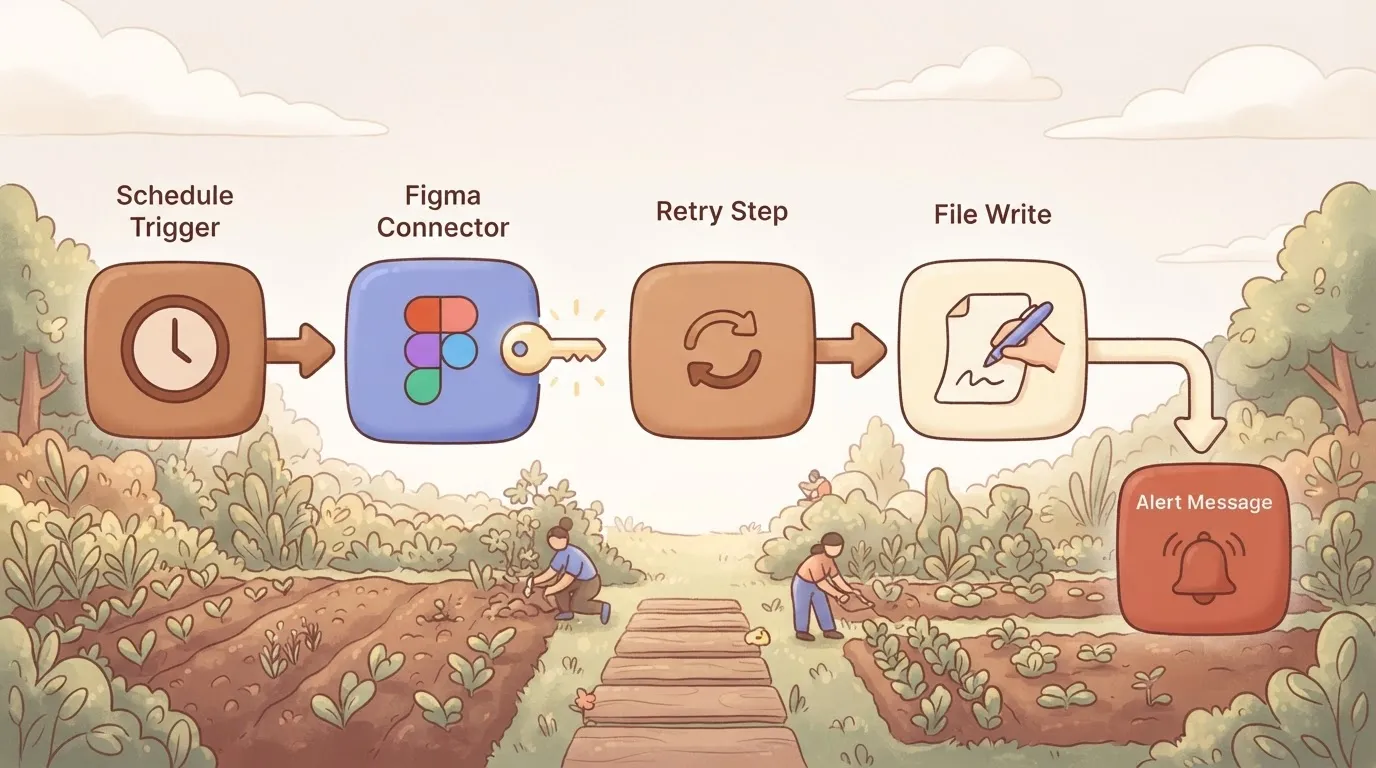
Read it as a reminder that the limits sit at the Figma call, not in the tool around it.
What the connector and HTTP step cover
Check the connector's action list against what your sync reads before building on it, because it covers only the actions it lists.
If an endpoint you need is missing, the HTTP step can call it directly, using the same token connection, so the token never sits in the workflow body.
Neither route changes Figma's side of the exchange. A connector that fetches whole files on every run over-calls just as the nightly sync did. Narrow the request, for example by asking for specific files or nodes rather than everything, and keep the file list short.
Retries and failure alerts
Nobody was told when the original job hit a limit and got a refusal. Here, enable retry on the call step and add a failure branch that sends an alert message with the file name and the response status.
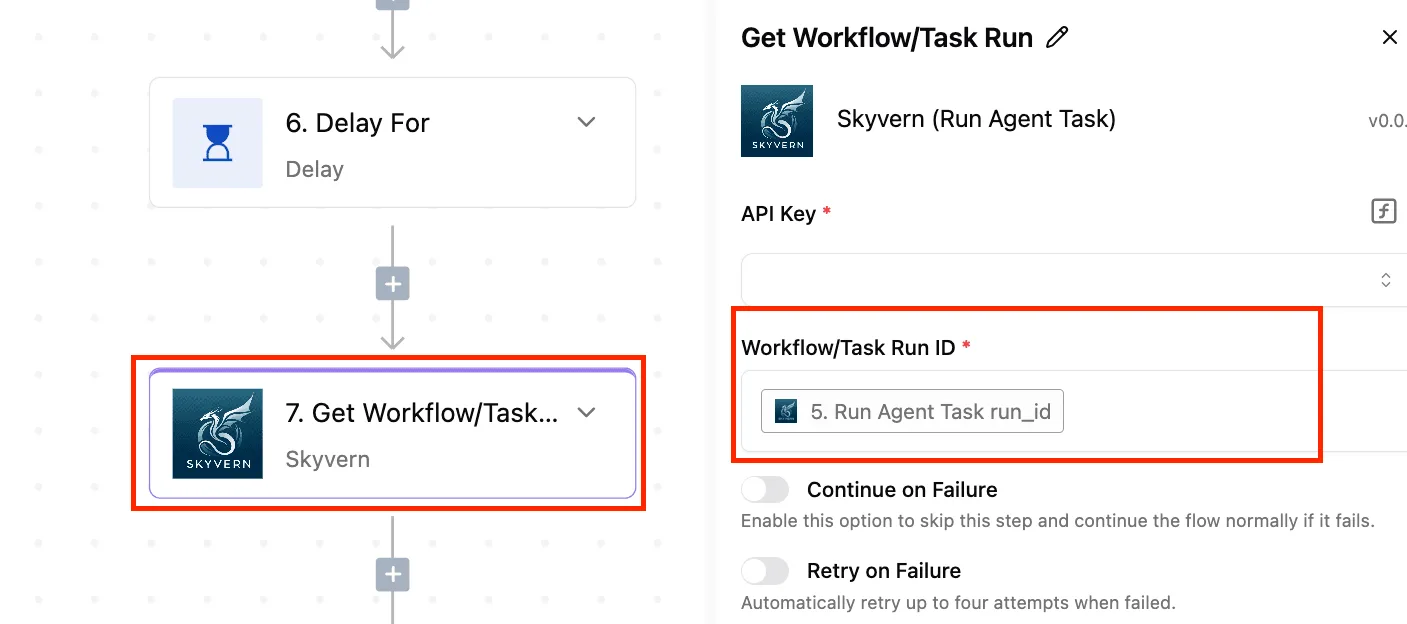
Fire a retry immediately and you repeat the mistake, so check the run log for the Retry-After value Figma returned and confirm the wait matches it.
If your retry settings can't honour that header, lengthen the delay by hand and say so in the alert text. Cache what you've already fetched, so a retry doesn't repeat work that succeeded.
- Open last night's run and confirm every file was written, not just that the run shows as complete.
- Find any rate-limit response in the log and compare the wait before the retry with the Retry-After value.
- Confirm the alert branch actually fires: force a failure with a revoked test token and see that the message arrives.
Frequently asked questions
Re-check before you build on any of these answers, because plan terms and limits are the parts most likely to change. Figma's developer docs were checked on 2026-11-20 for every answer below.
Is the Figma API free to use? Yes, calling the REST API doesn't carry a separate charge, and there's no API-only price tier in Figma's docs.
What does vary by plan is how much you can call. Rate limits depend on the plan and the seat type behind the token, so "free to call" doesn't mean "free to call in a loop."
Can I use the Figma API on a free plan?
Yes, you can generate a token and make requests from a free plan, but expect the lowest rate limits. A nightly sync that works on a paid Full seat can start returning 429 responses when pointed at a free-plan file or a View seat.
Read the Retry-After header and the X-Figma-Rate-Limit-Type header on those responses. Together they tell you how long to wait and which kind of limit you hit.
Does the Figma API support writing to files?
Mostly no: the REST API is built for reading files, images, components and comments, and its write surface is narrow. It can post comments, and Figma documents a Variables API for managing variables, which is gated to certain plans.
Changing the contents of a design file is the job of the Plugin API, which runs inside Figma rather than over HTTP. For a read-only sync, request only the read scope your endpoints need, so the token can't do more than the job requires.
How long do Figma personal access tokens last?
They expire. Figma has moved personal access tokens to a set expiry that you choose when you create them, with a maximum lifetime. A token that was fine last quarter can therefore start failing authentication with no change on your side.
Put the expiry date somewhere your team will see it, and treat a sudden 403 on a long-running job as a possible expired token before you suspect the code.
Does Figma offer webhooks for file changes? Yes. Figma documents webhooks (version 2) that fire on events such as file updates, version updates, library publishes and comments.
Instead of polling every file nightly and spending your rate-limit budget on files that didn't change, you can fetch only the files a webhook reports as changed.
Related reading
References
Build it
Set this up in minutes.
No code required. Connect your accounts, and Activepieces runs it from there.
Start free Talk to sales