Figma Pricing 2026: Plans, Seats, and Billing Costs

Nov 1, 202614 min read
Figma figma.com/professional bills per seat per month, a figure that teams tracking spend in spreadsheets or in workflows built with tools like Activepieces will recognise.
According to Figma, a Full seat costs $0 on Starter, $16 on Professional, $55 on Organization and $90 on Enterprise, meaning the plan you choose directly determines your Full seat cost.
Figma seat-based pricing is the billing model in which each person on a team is assigned a seat type, such as Full, Dev, Collab or Viewer, and the monthly cost depends on that seat type as well as on the plan the team subscribes to.
The plan sets the rate, but each person's seat type decides what you pay for them. Figures are current as of 1 November 2026.
The plan table
The jump between rows matters most. The table shows the Full seat rate on each plan, the unit it is billed in, and where to confirm it.
Moving a Full seat from Professional to Organization more than triples its price, so the plan name alone moves the bill less than who sits on which seat.
| Plan | Full seat price | Billing basis | Pricing page |
|---|---|---|---|
| Starter | $0 | Per seat, per month | figma.com/pricing |
| Professional | $16 | Per seat, per month | figma.com/pricing |
| Organization | $55 | Per seat, per month | figma.com/pricing |
| Enterprise | $90 | Per seat, per month | figma.com/pricing |
Prices and plan limits checked against figma.com on November 1, 2026.
How seat types change the price
Not all users cost the same on Organization plan. A Full seat is $55, a Dev seat is $25 and a Collab seat is $5, so teams can reduce costs by mixing different seat tiers.

A reviewer who only comments, assigned a Full seat by default, costs eleven times what the Collab seat would.
Professional shows the same shape at lower prices: Full $16, Dev $12 and Collab $3.
Reviewers get comment notifications whatever the seat, so the seat should match what the person edits, not how often they appear in the file.
Monthly versus annual billing
Every figure above is a per-seat, per-month rate. Multiply it by seats and by the months in your term, and read the billing toggle on the pricing page before you do, because this table doesn't give separate monthly and annual prices.
What Figma costs at three realistic team sizes
At every size, the seat assignments on your Members list move the bill more than the plan name does, and the gap widens as headcount grows. A count of who holds which seat is the input; the tier is only a multiplier on it.
Figma pricing for a three-person studio
Three people is too few for a mismatch to hide, so a plan upgrade buys you little at this size. If all three hold Full seats, you pay the Full rate three times, whatever the plan is called.
A count of who holds which seat is the input; the tier is only a multiplier on it.
The one check worth making is whether anyone only reads files and leaves comments. If so, that person is on a seat built for editing, and the cost is a line item with no usage behind it.
Fifteen-person product team
The mix starts to dominate here. A typical team of this size has a handful of designers who edit, several developers who inspect designs and pull specs, and a tail of product managers and stakeholders who comment.
Put everyone on Full seats and you pay editing rates for people who never edit. Assign seats by what each person does and the same headcount costs noticeably less, on the same plan.

The failure mode is inertia: seats get granted at onboarding and nobody revisits them, so the bill reflects the org chart from a year ago.
Figma pricing for a sixty-person organisation
At this scale, the seat spread outweighs the tier choice. The viewer-and-commenter population is large, so each wrongly assigned Full seat repeats dozens of times. Admin controls and similar features can justify a higher plan, but sloppy assignment isn't a reason to buy one.

If you are running this arithmetic for your own team, see what the same workload costs on Activepieces.
Hidden costs and limits that surprise Figma buyers
Most of the surprises trace back to seat type: who must edit, which seat the credits come with, and which features sit above the plan you bought. Five checks cover them:
- Starter keeps 30 days of version history, so you can't restore older states of a file on that plan.
- A viewer who needs to edit needs a Full seat.
- AI credits differ by seat, not just by plan.
- Dev Mode access follows the seat a person has.
- Figma gates admin and security features to Organization or Enterprise.
Seat upgrades nobody budgeted
"Can you just fix this one thing?" is how a free viewer becomes a paid Full seat. Count the people who edited a file in the last month before renewal, and budget for that number rather than your current seat list.
Do the same for engineers who need Dev Mode, since access follows the seat.
If a team needs admin and security controls, it is paying for the plan jump, not for more design capacity, because they start at Organization.
Figma AI credits and usage limits by plan
Monthly AI credits run between 500 and 3,000 on Professional, between 500 and 3,500 on Organization, and between 500 and 4,250 on Enterprise, according to Figma's pricing FAQ.

Only Full seats reach the top of each range. A collaborator on a lower seat is working from the 500 floor whichever plan you buy, so moving up a tier doesn't fix their allowance. Changing their seat does.
Until an admin removes it, a seat stays assigned, so a leaver's Full seat keeps costing money. Add seat removal to the offboarding checklist and compare the seat list against your current staff list each quarter.
Figma compared with Sketch, Penpot and Framer
Once the seat list matches the staff list, the remaining question is whether the seats sit in the right tool. Figma suits mixed teams, Penpot suits self-hosters, Sketch suits Mac-only design staff, and Framer suits teams publishing sites.
These four tools charge for different things, so a price per editor is only comparable when you also check what the editor is building. Read the last column first.
| Price per editor | Free-tier limits | Collaboration model | Developer handoff | Hosting | Better buy when | |
|---|---|---|---|---|---|---|
| Figma | Paid per seat, rate set by seat type | Free plan caps projects and files | Browser-first, live multiplayer | Dev Mode seat for inspecting and specs | Vendor cloud only | Designers, developers and reviewers all work in one file |
| Sketch | Paid per editor subscription | Trial, not a standing free plan | Mac app for editing, web for sharing and review | Web inspector for shared documents | Vendor cloud for sharing | Every editor is on macOS |
| Penpot | Free to use; paid plans exist for hosted teams | Hosted free tier is generous | Browser-based, real-time | Inspect tab exposes CSS-ready values | Vendor cloud or self-hosted | You need to host your own data or cut licence spend |
| Framer | Paid per site and per editor | Free plan publishes on a vendor subdomain | Browser-based, real-time | Publishes the site directly, so little handoff | Vendor hosting | The output is a live marketing site |
When Sketch or Penpot costs less than Figma
If your legal or security team wants the files on your own infrastructure, Penpot is cheaper, since self-hosting removes the per-seat licence. The cost moves to whoever patches and backs up the server.
Sketch is cheaper for an all-Mac design team that rarely needs outside editors. Framer is cheaper when design and publishing are one job, because you stop paying for a design seat plus a separate site builder.
When switching costs more than it saves
If most of your seats are viewers and commenters, Figma's cheaper seat types already cover them, and a move saves little. Migration cost lands on the people who already have working files, components and plugins.
Your engineers will feel the break in developer handoff habits before finance sees any saving. Audit the seats first, then decide whether a different tool would still beat the corrected bill.
Worth checking against a plan that does not meter every step: one credit covers a whole run on Activepieces.
Right-sizing Figma seats with Activepieces
On Activepieces you can build a scheduled workflow that gathers your seat data and sends the list to a person who approves it before any seat is removed, drawing on 746 integrations, with an MIT-licensed core and unlimited flows on every plan, including free, so cost won't stand in the way of automating this process.

It doesn't lower Figma's price or change what any seat type costs.
Describe the audit in its built-in chat, naming Figma as the source and Slack as the destination, and what comes back is a published flow in your account, the same kind a builder would assemble by hand, running under the same RBAC and audit logs as every other flow, with a run trace that records what each step did on every run.

That limit matters. The tool reports and routes; a person still has to downgrade the seat in Figma's admin settings. Treat it as the thing that makes the audit happen on schedule instead of when someone remembers.
Scheduled seat audit
Start with a schedule trigger, then a step that pulls the member list and each member's seat type from Figma. Filter for people holding a paid seat with no recent activity, and send that list to the person who owns the bill.
Because the check repeats, a seat assigned during a one-off project doesn't sit unnoticed for a whole billing cycle.
The catch is access. Figma's API and admin-level data are tied to the plan and to your role on it, so confirm your plan exposes member and seat data before you build anything.
If it doesn't, the flow has nothing to read, and a manual export from the admin panel is the fallback.
"Inactive" is your definition, not Figma's: a developer who opens files twice a quarter may be correctly seated, so route the list to a human rather than auto-downgrading.
Figma comment and handoff alerts without Full seats
People are often given an editor seat only so they can see comments or catch a handoff. That is a common reason for over-seating, and this second use, though smaller, removes it.
A flow that forwards new comments to a Slack channel or an email address lets reviewers respond without holding a seat they otherwise wouldn't need.
The screenshot shows the same pattern with a different trigger: a two-step flow where a Stripe "Payment Failed" event feeds a Slack "Send Message To A Channel" action.
The run details show the first step completed and the run marked as succeeded, which is how you confirm a flow fired before you trust it. Swap Figma in as the trigger and the structure is identical.
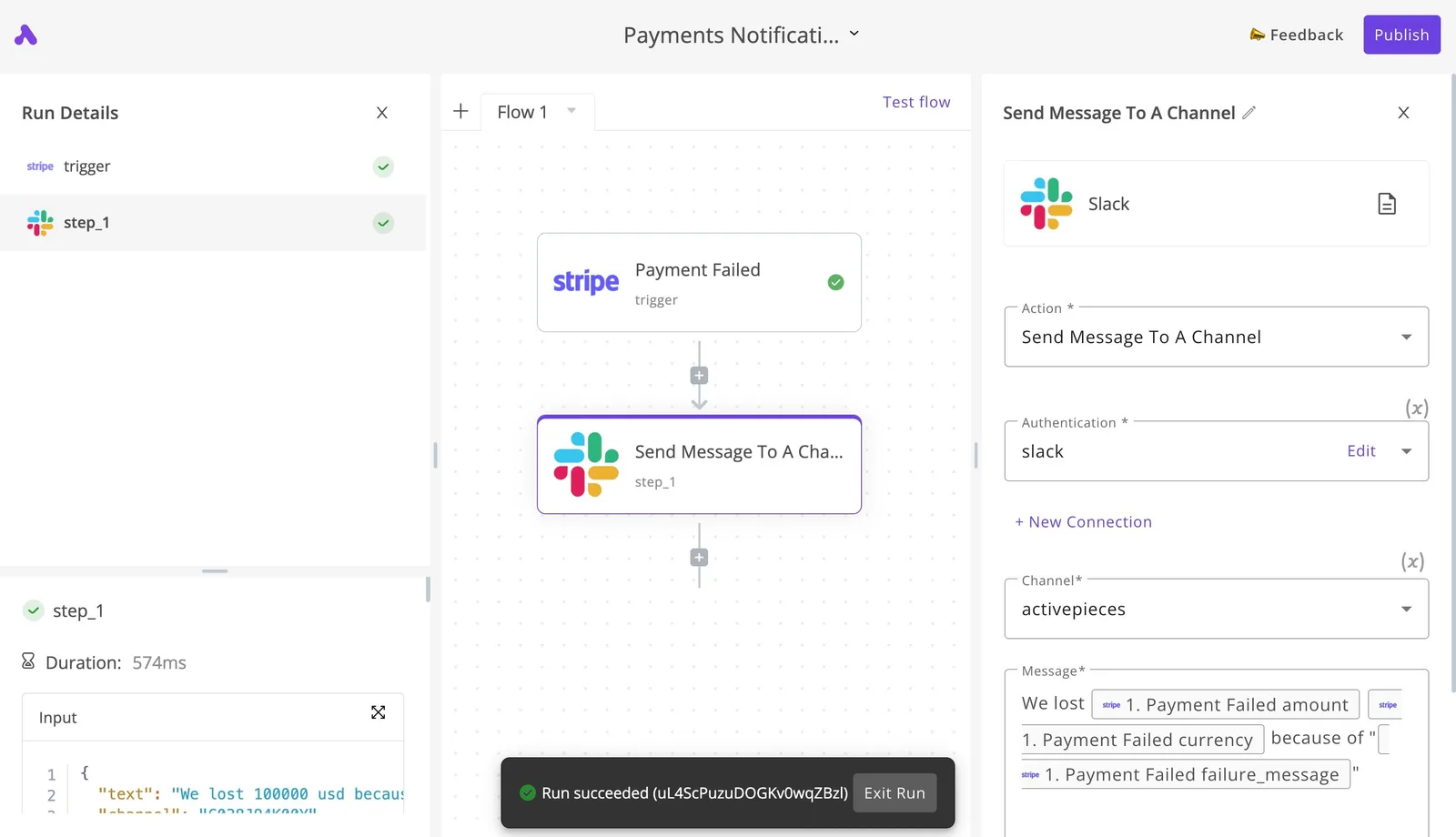
Build the audit first, then the alerts, and test each by checking the run log rather than assuming delivery.
A Monday checklist for choosing a Figma plan
Audit the seats first and choose the plan last. Verify each step against the admin panel's member list, not against what you remember about who uses Figma.
The list below runs in the order that avoids paying for a tier before you know which seats it must cover. Skipping ahead is how a team ends up on a higher plan to fix a problem that a seat change would have solved.
- Count people by what they do in the file, not by job title.
- Assign each person a Full, Dev or Collab seat to match.
- Price annual billing against monthly for that exact seat mix.
- Check which features are gated by plan tier.
- Set a quarterly seat review.
- Decide whether an alternative tool deserves a trial.
Count Figma editors, reviewers and developers
Export the member list. Sort everyone into three groups: people who build and edit design files, people who only read, comment or approve, and engineers who inspect designs to write code.
Titles mislead here. A product manager who comments daily is a reviewer, and a designer who hasn't opened a file in months is a seat you are paying for at the highest rate.
Map the groups to Full, Dev and Collab seats, and reassign anyone whose actual activity doesn't match their current seat.
Price the plan against gated features
Price the resulting seat mix on annual and monthly billing. Annual is cheaper per seat, but it locks in the headcount you counted today, so a seat you can't yet justify shouldn't go into that commitment.
viz type=step title="What one Full Figma seat costs on each plan" unit="$ per seat per month" source="Figma - https://www.figma.com/pricing/"6, $55 and then $90 a month as the plan moves up." Starter: 0 Professional: 16 Organization: 55 Enterprise: 90
Then check the gated features. If one tier-locked feature is the only reason for a more expensive plan, ask whether the team uses it weekly or only wanted it once.
If it's the latter, you're paying a tier premium on every seat for one occasional need.
Schedule the next seat review
Put the quarterly review on the admin's calendar with the member list export as its only agenda item. Seats drift as contractors leave and reviewers start editing, and nothing in Figma flags that drift for you.

If the audit shows most of your seats are Full seats used only for light edits, run a time-boxed trial of another design tool and compare the bills.
Frequently asked questions
Check the seat before you check the tier, because each answer below turns on the seat type assigned to a person, not on the plan name.
Is Figma still free to use in 2026? Yes, Figma still has a free Starter plan, but it's capped on files, pages and version history.
Treat it as a way to find out which of your people need to edit, not as a place to run a team. If someone hits a cap, that's a signal to look at their seat.
Do viewers and commenters need a paid seat?
Viewing and commenting generally don't require a paid editing seat, which is the reason to keep reviewers off Full seats.
When an admin assigns a Full seat to a stakeholder who only reads and comments, that is the usual failure. Open the members list in your admin settings and look at what each person actually does.
Seat names and permissions have changed before, so confirm against Figma's current seat documentation.
Can I switch Figma plans mid-year?
You can change plans, but billing behavior depends on whether you pay monthly or annually, and on which plan you are moving to.
Upgrades are usually the easy direction. Downgrades and seat reductions may not refund what you already paid. Read the billing page for your plan before changing anything, and audit seats first so you only change the plan once.
Does Figma offer education or nonprofit discounts? Figma runs an education program for verified students and educators, and it has offered nonprofit pricing through an application.
Eligibility is checked, so a personal account isn't covered automatically. Apply through Figma's official pages, and don't assume a discount carries over if your organization changes plan.
What happens to my files if I downgrade?
Your files aren't deleted, but features tied to the paid plan stop working. On a drop to Starter, limits on files, pages and version history can leave some content read-only or harder to reach.
Before you downgrade, export or duplicate anything you can't afford to lose, and move those files into projects you'll still be able to edit.
Related reading
Running the numbers
See what the same workload costs here.
Free forever plan, and every paid plan self-hosts at no extra cost.
See pricing Talk to sales