
Claude Code Pricing 2026: Plans, Limits, and Costs

Oct 28, 202614 min read
Claude Code pricing by plan
How Claude Code pricing works for solo developers
You pay for whichever cap you hit first, because Claude Code pricing is a ladder of flat monthly plans with usage caps, not a charge per task, much like how teams running automations in tools such as Activepieces think about budgeting for work in bulk rather than one item at a time.

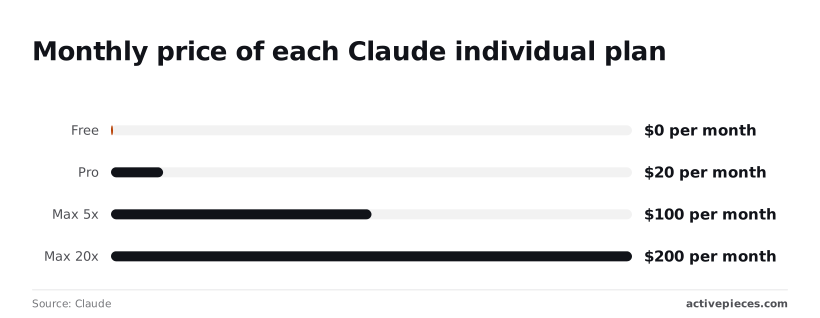
On Claude's pricing page checked in October 2026, the steps are $0, $20, $100 and $200 a month, meaning anyone can start using Claude at no cost.
Claude Code pricing is the structure of flat monthly plan tiers, each with its own usage limits, that determines how much you can use Claude Code before being capped, rather than a fee charged per task or per request.
Claude's pricing shows Pro costs $20 a month, or $17 a month billed annually ($200 up front), so the discount requires long-term commitment. Committing for a year saves $40 and only makes sense if you already know Pro survives your heaviest week.
$100 buys Max 5x, five times Pro's price, so you're buying headroom, not new features. Max 20x costs $200.
Per Techcrunch's analysis, that's double the $100 plan for four times the usage of the $100 plan, so heavy users pay less per unit of capacity at the top.
Read the limits column first: Anthropic publishes the multipliers (5x, 20x) but not the underlying numbers, so you can't pre-calculate a cost per run and have to measure it.
| Plan | Price (annual / monthly) | Claude Code included | Published limits |
|---|---|---|---|
| Free | $0 | not published | not published |
| Pro | $17 / $20 | Yes | not published |
| Max 5x | not published / $100 | Yes | 5x Pro usage; absolute figures not published |
| Max 20x | not published / $200 | Yes | 20x Pro usage; absolute figures not published |
| Team Standard | $20 / $25 | not published | not published |
| Team Premium | $100 / $125 | not published | 5x more usage than standard seats |
Prices and plan limits checked against code.claude.com and docs.claude.com and claude.com and openai.com and gemini.google on October 28, 2026.
When a plan's limit is only a multiple of another plan's limit, you have to test it before you can price it.
Subscription versus API billing
Hit the limit on a subscription and you wait for the window to reset, while API billing meters every token and never stops you.
The cap is the safer way to find out what your work costs, since a runaway agent loop on metered billing has no ceiling except your budget.
If the work is a repeatable flow rather than a coding session, Activepieces charges 1 credit per run however many steps it has, so splitting a ten-step flow into smaller, more reliable steps costs no more than the two-step workaround it replaced.
Zapier's per-task billing works the other way, and the cost rises with every step you add.
If you are running this arithmetic for your own team, see what the same workload costs on Activepieces.
One builder's monthly bill on each plan
Until the limits start costing you time, a flat plan is the cheaper default. A freelancer running six sessions a day pays about $105.60 a month in input tokens alone if billed per token on Sonnet 5.5.

Estimating Claude Code usage in monthly sessions
Take a freelancer who ships client automations: six sessions a day, 22 working days, so 132 sessions a month.
Assume each session reads about 400,000 input tokens, because an agent re-reads the codebase and its own history on every step. That's 52.8 million input tokens a month. This counts input only, so any output tokens make the real API bill higher.
Open the usage screen in your account and compare your own session count and token consumption to these assumptions before trusting any row below.
Step 2: Price it on each plan
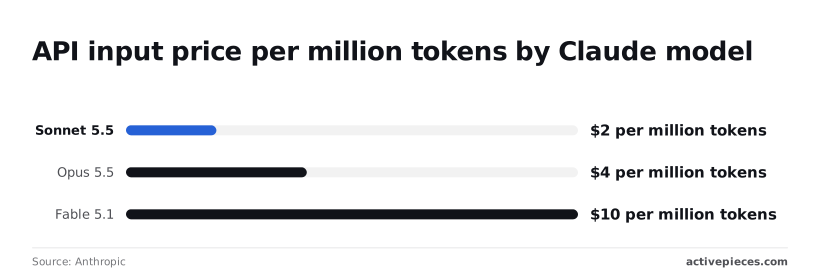
Start with the per-token prices in Anthropic's model overview. Haiku 5.5 costs $0.10 per million input tokens, so the month is $5.28.
At $2, Sonnet 5.5 gives $105.60. Opus 5.5 costs $4, which gives $211.20. Fable 5.1 costs $10, which gives $528.
| Option | Sticker price | Arithmetic | Extra-usage risk | Monthly total |
|---|---|---|---|---|
| Pro | Lowest flat fee | 132 sessions on one fee | High: six heavy sessions a day can exhaust the usage window | Plan fee, plus any extra usage |
| Max 5x | Mid flat fee | Same 132 sessions, five times Pro's allowance | Moderate: a heavy week can still hit the cap | Plan fee, plus any extra usage |
| Max 20x | Highest flat fee | Same 132 sessions, twenty times Pro's allowance | Low: you pay for headroom you may not use | Plan fee |
| API billing | None, per token | 132 × 0.4M = 52.8M tokens × $2 | None from caps, but cost grows with every session | $105.60 plus output |
Step 3: Find the cheapest plan that holds
Start at Pro and move up only when your heaviest week proves it fails. A week of lockouts costs billable hours, so if Pro stalls mid-session, Max 5x is the next test.
Move to Max 20x only if Max 5x still stalls, meaning you should test 5x before upgrading to 20x.
Choose API billing only if your plan fee would exceed $105.60, or if usage is so uneven that a flat fee goes unused, so you avoid overpaying for the wrong billing structure. For normal, steady usage you're better off with the flat-rate plan.
Usage limits and upgrade costs
The moment one of five limits interrupts your work, the flat fee stops being the cheaper option. Each behaves differently, so the useful question is which one your workload reaches first.
- The session window starts when you begin working, and heavy back-to-back prompts exhaust it. At the cap you wait for the window to reset, so the cost is idle time.
- The weekly cap counts total use across days, and a few long agentic runs can consume it. At the cap you wait for the weekly reset or move up a tier, so one bad week can justify the pricier plan.
- Model access depends on your plan, and the heavier models draw down your allowance faster. Once the allowance's gone you fall back to a lighter model or stop, so the cost is slower, weaker output.
- Shared chat limits mean time spent in the Claude chat app draws from the same pool as Claude Code. At the cap both stop together, so a long brainstorming session can cost you a coding session.
- Extra usage lets you keep working past a cap, billed per use on top of the plan fee. It's the only one of the five that charges you automatically, so cap it deliberately.
Costs that sit outside the sticker price
When extra usage kicks in, a cheap plan quietly turns expensive.
Anthropic's cost documentation puts enterprise averages at around $13 per developer per active day, or $150–250 per developer per month, meaning enterprise pricing varies significantly with usage.
Treat that as your yardstick: if your heavy weeks look like that, overage charges will add up to more than the step up to the next tier.
Because each turn carries the accumulated context, long sessions cost more than their length suggests. A sprawling session on a heavy model burns allowance faster than three short ones on a lighter model.

Team seats add a further layer, since each seat is a separate allowance and a separate fee.
Watch for three signs. You hit the weekly cap before the week ends. You keep switching to a lighter model just to keep working. Or you turn on extra usage more than once in a month.
One occurrence is noise, but a repeat means the next tier will cost you less than the overage charges.
Worth checking against a plan that does not meter every step: one credit covers a whole run on Activepieces.
Claude Code vs. competing tools
Judge the alternatives the way you judged the tiers: by which limit each one hits first and what it does when you get there, not by the entry price.
Entry price and paid tiers
In the table below, which shows what I could confirm and what I couldn't, Cursor is the only row with prices, $20 for Pro and $60 for Plus-tier Pro+, and the three-fold gap between them tells you the upgrade is a real budget decision, not a rounding error.
I haven't checked any cell against the vendors' own pages, so "Not checked" means exactly that. Verify before you budget.
| Entry paid price | Tier contents | Cap type | At-cap behaviour | Terminal or editor | |
|---|---|---|---|---|---|
| Claude Code | Not checked | Not checked | Plan usage limits | Not checked | Terminal |
| Cursor | Pro $20; Pro+ $60 | Not checked | Not checked | Not checked | Editor |
| Copilot | Not checked | Not checked | Not checked | Not checked | Editor |
| Codex | Not checked | Not checked | Not checked | Not checked | Terminal |
Read the gaps as the finding.
How each one caps usage
Look at the cap type before the headline price.
A plan that throttles you costs time. A plan that bills overage costs money, and one that stops you costs a deadline.
Here, only one cap is confirmed: Claude Code's plan usage limits, which is why the earlier sections spend so long on which limit you hit first.
For the other three I haven't checked cap details, so I won't guess. Before committing, find out for each whether it counts requests, tokens or a rolling window, and whether hitting it slows you, bills you or locks you out.

Which fits which kind of builder
If you live in the terminal and run long agentic sessions, Claude Code and Codex are the natural comparison, and the cap behaviour should settle it.
If you work inside an editor and want completion and chat alongside your code, Cursor and Copilot fit better.
If you want a clean test, start with Cursor's $20 entry tier, so you can figure out whether it works for you.
If a month at that level covers your heaviest week, you have no reason to pay for a larger Claude Code plan. If it doesn't, the $60 tier needs to beat the Claude Code tier you would otherwise buy.
Claude Code spending control routine
Pick a monthly dollar ceiling, read your usage screen every Monday, and let a trigger you wrote in advance decide when to change plans. That way the worst week from that comparison gets priced before it happens.
It takes a few minutes once it's a habit, and it comes to six steps:
- Set a monthly dollar budget.
- Open the usage screen.
- Note your session use and your weekly use.
- Compare both with last week.
- Apply the upgrade or downgrade trigger.
- Record the decision.
Set the budget and the trigger
Choose the budget as a number before looking at any dashboard, because a ceiling set after the fact will always sit just above whatever you spent.
Write down the plan that fits under it, then write the trigger: "I upgrade if I hit the weekly limit twice in a month. I downgrade if I finish a month well short of the session limit."
Choose the budget as a number before looking at any dashboard, because a ceiling set after the fact will always sit just above whatever you spent.
Two hits means a pattern rather than one bad deadline, and the bill for upgrading is then a decision, not a reaction.
Check usage weekly
Open the usage screen on the same day each week. Note two readings: how close your sessions got to their limit, and how much of the weekly allowance you consumed. The two are different failures.
Running into the session limit mid-task interrupts you but resets quickly, so it costs you time. Running into the weekly limit stops you for longer, so it costs you days.
On its own, a single reading tells you little, and the week-over-week change tells you whether your workload is growing into a bigger plan or shrinking out of the one you have.
Then apply the trigger exactly as written, and record what you did and why in a line or two. When the same question comes up in three months, you'll have your own history to settle it, not a vendor's marketing page.
Automate the weekly spend summary with Activepieces
This step is for people billed through the API, where spend accrues per token and no plan limit stops you. Build a scheduled workflow in Activepieces that pulls your usage once a week and posts a short summary to wherever you already read messages.
A run costs 1 credit however many steps the workflow has, so adding a step to format or route the summary doesn't change the bill.
Think of it as housekeeping, not a replacement for the Monday check: it saves you collecting the numbers, while the decision stays yours.
At one run a week, that's four or five credits a month against the 1,000 included on the free plan, which also allows unlimited flows, so this workflow doesn't need a paid tier.
Frequently asked questions
Not on Anthropic's free chat plan, which as far as the pricing page shows doesn't include Claude Code. You need a paid subscription or API credits, so the cheapest honest budget line is the lowest paid tier, not zero.
Check the current plan comparison before you assume otherwise, because Anthropic changes what each tier includes.
Can I use Claude Code with an API key instead of a subscription?
Yes. Claude Code can authenticate with an API key from Anthropic's developer console, and you're then billed per token instead of drawing on a plan's usage allowance. That trades a ceiling for a meter.
In a light month it costs less than a subscription, and in a heavy agentic month there's no cap to stop it. If your workload is spiky, set a spend limit in the console before you run anything unattended.
Does Claude Code usage count against my Claude chat limit?
On the subscription plans, yes: chat and Claude Code draw on the same usage allowance, so a long coding session can leave you with less room for chat that day. The reverse is also true.
If you hit a limit in one place, expect to feel it in the other. API-key usage is separate, because it's billed on its own meter instead of drawing on the plan.
Can a team share one Claude Code plan?
Not by sharing a login. Individual plans are licensed to one person, and the allowance is per account, so passing credentials around only gets one person's limit consumed faster.
Anthropic's team and enterprise offerings are built for multiple seats under one organization, with admin controls. Read the current seat terms on the pricing page, because per-seat minimums and what each seat includes are where team costs tend to surprise people.
Can I cancel or change plans mid-month?
Generally, yes. You can manage your plan from your account settings. Upgrades normally take effect right away, while cancellations and downgrades usually run to the end of the billing period you already paid for.
Don't count on a prorated refund for unused days unless the billing terms say so.
The practical use is to upgrade for a single heavy week and step back down afterward, as long as you confirm how your own billing handles the switch before relying on it.
Related reading
Running the numbers
See what the same workload costs here.
Free forever plan, and every paid plan self-hosts at no extra cost.
See pricing Talk to sales