
Finance Automation Examples and How Each Works in 2026

Oct 19, 202615 min read
Without someone keying the data in, software rules do the recurring finance tasks. That is finance automation.
The examples below are the five flows teams run most, and each one starts from a trigger you already have, such as an email arriving or a row being added, which a workflow tool like Activepieces can pick up.
Finance automation examples that teams actually run
What finance automation is
A trigger fires, a rule checks the data, and the result lands in the system that needs it. Nobody retypes a number or forwards an attachment.
You probably assume less of this is manual than it is. According to Fiscaltec, About 65 percent of organisations still reconcile by hand, which means if you're doing it manually, you're in abundant company.
So if your bank matching is a person with two spreadsheets, you're in the majority, not behind.
About 80 percent of organisations still handle expenses manually. That range's wide, which means practice varies enormously between teams. Even the low end's one organisation in five, so the work is far from solved.
Where finance automation is most common
Start where your own team loses the most. The chart that follows shows how common manual reconciliation and expense work remain, so read it as a map of where the hours sit. These five flows cover most of what small finance teams automate first:

- Invoice capture, in the accounts payable inbox, where supplier PDFs arrive by email
- Expense approval, in employee spend, where claims wait on a manager's decision
- Payment reminders, in accounts receivable, where overdue invoices need a nudge
- Bank-to-ledger matching, in reconciliation, where statement lines meet ledger entries
- Month-end reporting, in FP&A, where figures are pulled into the same pack every period
You can prove the saving afterward, because each flow is narrow, repeats on a schedule, and takes hours you can count today.
Rule-based versus AI-assisted finance automation
For most of these flows, rules are all you need. If an expense is under a set limit and carries a receipt, approve it. If an invoice is ten days overdue, send the reminder.
A rule either fires or it doesn't, so you can audit it line by line, and that's what a controller wants to see.
Where the input's messy, such as a supplier PDF whose layout changes every month, AI earns a place. Even then, keep it to the extraction step and leave the decision to a rule.
A single flow can chain the two, but the principle holds with any tool: the model reads, the rule decides. The result's a flow you can explain to an auditor, and one you can measure from day one.
Everything below works on Activepieces' free plan. Start without code or a credit card.
Five finance workflows, each with trigger and steps
Pick the flow where your team loses the most hours. Five cover most of what a small finance team repeats by hand: invoice capture, expense approval, payment reminders, bank matching and month-end reporting, each with one trigger and a few steps.
The table shows what starts each flow, what it does and which task it removes.
| Flow | Trigger | Steps | Apps | Manual task replaced |
|---|---|---|---|---|
| Invoice capture | New email with attachment | Extract fields, append row, label email | Gmail, Google Sheets | Retyping invoices into a tracker |
| Expense approval | New row in request sheet | Post to approver, wait for reply, update row | Google Sheets, Slack | Chasing managers by email |
| Payment reminders | Daily schedule | Fetch overdue invoices, send reminder, log it | QuickBooks, Gmail | Scanning the ageing report |
| Bank-to-ledger matching | New bank export row | Look up ledger entry, mark matched, flag the rest | Google Sheets, Xero | Ticking off lines side by side |
| Month-end reporting | Schedule on the last working day | Pull totals, write summary sheet, email it | QuickBooks, Google Sheets, Gmail | Assembling the same report each month |
Before you switch any of these on, plan for the one failure point each flow has.
Because supplier invoices already arrive in a shared inbox, the invoice capture flow reads each attachment and appends a row. Send anything it can't read confidently to a review label, so a misread amount never reaches your tracker unseen.

For expense approval, the request lands in a sheet, the approver gets a message in the team chat tool, Slack in this example, and the answer writes back to the row.
Keep the approval rule to a plain threshold, because an approver who understands the rule will trust the flow.
For overdue invoice reminders, a daily check against your accounting system finds invoices past due and sends a polite note. Log every send, because the first question from a customer is always "when did you write to me?"
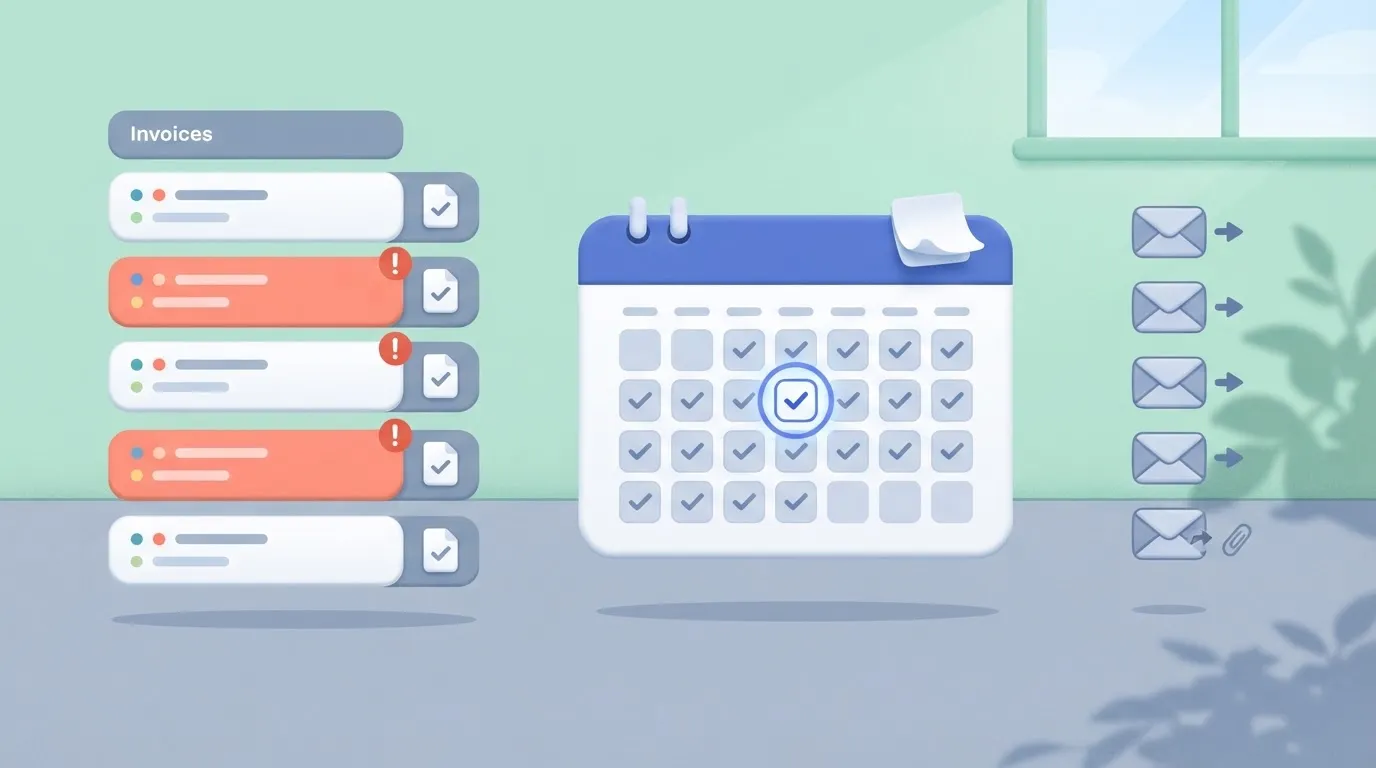
For bank feed reconciliation, match on reference and amount, and only mark exact matches. Everything else goes to a short exceptions list, which is where your bookkeeper's time now belongs.
Every month the report pulls the same totals and emails the same summary. That sameness is the point: variance becomes visible because the layout never changes.
Start with whichever flow has the clearest trigger in your own inbox or bank export, and build only that one.
What finance automation costs and requires
Start with a single narrow flow and it costs a few thousand dollars a year in software at most, plus a few days of someone's time. A full AP platform is priced in tiers that start near two thousand and climb past twenty thousand.
The case for starting small is clearest in the per-invoice numbers.
Software and licence costs
According to APQC 2025 benchmarks via eZintegrations, best-in-class teams pay about $2.78 per invoice, so if you're above this figure, you're not yet operating at best-in-class efficiency. A fully manual process runs as high as $19.83.
viz type=pictogram title="Cost to process one invoice, best teams versus manual" unit="$ per invoice" source="APQC 2025 benchmarks via eZintegrations - https://ezintegrations.ai/accounts-payable-automation-enterprise-guide/" target="6.00" benchmark="APQC median: $6.00"9.83." Best-in-class: 2.78 Manual, high end: 19.83
Chart below shows the gap between the two ends: the spread's roughly seven to one, so the saving comes from removing handling steps, not from shaving a few cents off each one.
If you process 500 invoices a month, the difference between those two ends is about $100,000 a year. You don't need a platform to capture a good part of it, so the constraint is execution, not technology.
Now compare that with one vendor's published pricing. Nexus AP charges $1,908 per year for Starter, $6,948 for Growth and $19,980 for Scale, meaning you'll need to calculate your expected annual invoice count to pick the right tier.
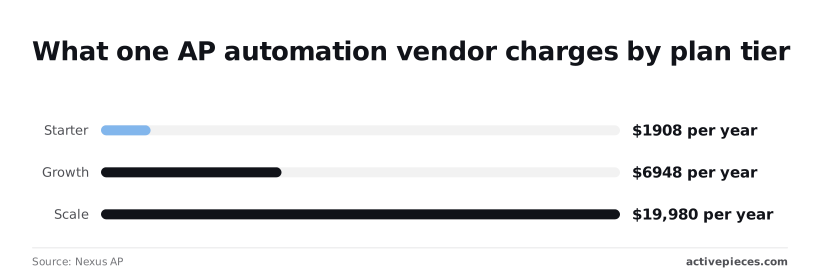
Those are list prices for one vendor, not the market. They show the shape: each tier multiplies the bill by roughly three, so you pay for volume headroom before you've proven the process works.
Built between systems you already own, a flow carries no new licence at the start, and you can price the platform later with your own measured baseline in hand.
The step count is the other cost that creeps in.
The Activepieces pricing page lists 1 credit per flow run, whatever the number of steps, so the four-step invoice flow and a ten-step version with extra checks each draw one credit from the free plan's 1,000 a month.
Zapier's pricing page bills per task and Make's bills per module, which means every added validation step becomes a line on the invoice. MoneyGram, Moneypenny, Alan and FundingSocieties run Activepieces in production.
Before you build, four things must exist, and a missing one will stall you faster than any tool choice:
- Clean reference data: a vendor list without duplicates and consistent account codes. If two records exist for one supplier, the flow will faithfully pay or post to both.
- API or export access to the systems on each side, such as your accounting ledger and the mailbox or bank feed that triggers the flow. Ask for credentials early, because security review is where weeks vanish.
- A named owner who answers when the flow fails at month-end.
- Written approval rules: who signs off above which amount. If these live only in someone's head, the flow can't encode them.
Before you build, four things must exist, and a missing one will stall you faster than any tool choice:
Time to first working workflow
Plan on days for one rule-based flow, not quarters. The first run will expose bad data and missing permissions rather than logic errors, so budget most of the time for those.
Measure cost per invoice before and after on that one flow, and you have a number you can compare against $2.78 and $19.83 instead of a vendor's promise, letting you validate whether the solution's savings match your financial case, which means you decide based on proof, not pitch.
That tells you whether the tool actually pays off in your circumstances.
Easier to see it running than to read about it: set it up free, no card.
Mistakes that break finance automation projects
Plan on your first flow being as likely to fail as to succeed.
EY has put the failure rate of initial RPA projects at 30-50%, and five mistakes account for most failed finance automations, each with a fix you can apply before you build anything, so you have a method to sidestep the obstacles that derail most projects.
Spend your care on the causes below.
- Automating a broken process: fix the process on paper first, then automate it.
- No exception path: route every case the rules can't handle to a named person.
- No audit trail: log each run's input, decision and output somewhere an auditor can read.
- Over-permissioned credentials: give the automation its own account with only the access that one flow needs.
- No baseline: record today's cost and cycle time before you switch anything on.
If approvals bounce between three people because nobody owns the coding rules, a bot will bounce them faster. Walk the flow by hand with the person who does it, and delete every step they call a workaround.
Automate what is left, which is usually shorter and easier to express as rules.
Finance automation without exception paths or audit trails
When an invoice arrives with a missing purchase order, a duplicate number or a mismatched total, a flow with no exception path either drops it or pushes it through, and in finance both are worse than doing nothing.

Send each failure to a queue with a reason attached and an owner who clears it daily.
Write every run to a log that records what came in, which rule fired and what went out. Without that log you can't answer an auditor, and you can't debug the flow when a supplier disputes a payment.
Think about credentials here too. An automation running on a finance director's login can approve and pay, so a bug becomes a loss.
Create a dedicated service account that can read invoices and write to one ledger, and nothing else. When something goes wrong, the damage stays inside that one flow.
Skipping baseline measurement before automating finance
Without a recorded manual cost, you can't say whether the project paid back, and you end up defending it with anecdotes.
Before launch, time twenty real items by hand and write down the cost per item and the error rate. That gives you a before figure to set against the after, which is what decides whether you widen the flow or retire it.
With those five guards in place, a narrow flow can run safely, and the next question is how to choose the first one.
Build an invoice approval flow with Activepieces
Four steps, each in a system you already own: an email trigger, field extraction, a chat approval, and a spreadsheet row written only after someone approves, meaning you don't need to buy new software or forge new vendor relationships.
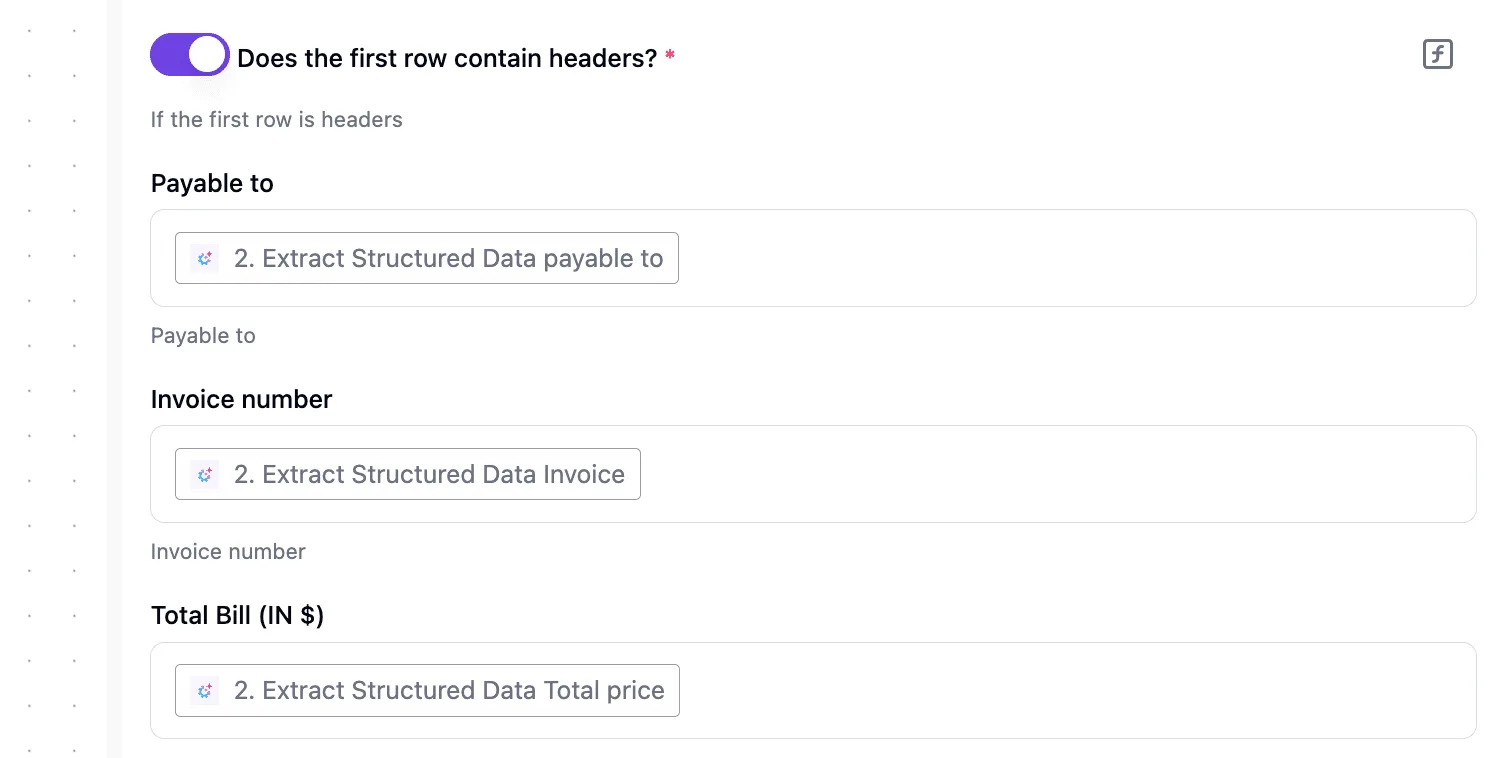
That is the whole invoice approval flow in Activepieces, and nothing here needs a platform purchase, since unlimited flows are included on every plan, the free one too.
Stage 1: trigger on new invoice email
Point the trigger at the shared mailbox where vendors already send invoices, using the Gmail integration (one of 768 in the MIT-licensed Activepieces repository) with its new-email trigger. Filter on a label or a subject pattern so only invoices start a run.

If the mailbox is noisy, a narrow filter now saves you from approving newsletters later. Run the test and confirm a real invoice email arrives with its attachment intact.
Stage 2: extract amount and vendor
Add an AI step that reads the email body or attachment and returns two fields: vendor name and total amount. Ask for exactly those and nothing more. A narrow extraction is easier to check than a clever one.
Add a branch after it: if either field comes back empty, send the email to a person instead of continuing. Invoices vary, and the flow should admit when it hasn't read one properly.
Stage 3: route for approval
Post the vendor, amount and a link to the original email into a Slack channel your approver watches, and have the flow wait for a response before moving on.
The flow can pause a run until someone approves or declines, so no one polls anything. A declined invoice ends the run, or notifies the sender if you prefer.
Keep the approver to one named person or one channel, because shared ownership is how invoices go unanswered.
Stage 4: log the approved row
Only the approved path reaches the final step: a Google Sheets action that inserts one row with date, vendor, amount and approver.
In the screenshot, the builder shows this choice. A test flow is open with an "Every Hour" schedule trigger selected, the integration picker lists spreadsheet options with Insert Row, Update Row and Find Rows, and the sample-data panel shows a successful test.

At each stage, the passing test is your signal: don't switch the flow on until every step has produced real output from a real invoice.
Once the sheet is filling, you have something measurable: rows written per week against invoices received, and how often the empty-field branch fires. Those two counts tell you whether to tighten the extraction or leave the flow alone.
To build it yourself, sign up for the free plan, no card required, and start with the email trigger.
Frequently asked questions
Is finance automation the same as RPA?
No. Robotic process automation (RPA) imitates a person clicking through screens, while the flows this article recommends pass data between systems you own through their APIs, webhooks or email.
That difference matters in production: a screen-driven bot breaks when a vendor moves a button, and a flow connected to an API usually doesn't. Keep RPA for the system that offers no API and no export.
Which finance task should be automated first?
Pick the task with a clear trigger, rules you can write on a page, and a cost you already feel. One example is pulling invoices from a shared inbox and entering them in the ledger.
Narrow beats impressive. A first flow of this size is a matter of days to a few weeks, not a project plan.
You want the person who does the task today to own the flow, because they know the exceptions. IT is needed for access and credentials, not for the building.
For the second flow, choose the neighbor of the first, such as approval routing or payment reminders. You already hold the connections and understand the data.
To measure payback, time the manual task before you touch it and record hours spent, errors caught and days to completion.
After launch, take the same measures and subtract the time you spend maintaining the flow. If you skip the baseline, you'll only have an opinion of the savings.
Can small businesses automate finance without a developer?
Yes, for rule-based flows. Visual builders let a bookkeeper or finance manager connect an inbox, a spreadsheet and an accounting system without writing code.
You'll want a developer, or a patient technical colleague, when a system needs a custom API call or the data needs reshaping that the builder's steps can't do.
Start with flows that stay inside what the tool does out of the box, and call for help only when a real flow demands it.
Is automated finance data safe for audits?
It can be safer than manual work, provided the flow leaves a trail. Auditors look for controls, so keep a log of every run and store the original document next to the entry it created.
Require a named approver where policy demands one, and record who changed the flow and when. Limit each connection to the access its job needs.
Above all, watch for a flow that fails quietly. Set alerts for failed runs and reconcile totals between the source and the destination on a schedule. Show your auditor the design before year-end rather than during it, since their questions will improve it.